
.webp)
Third-Party API Monitoring: Metrics Guide



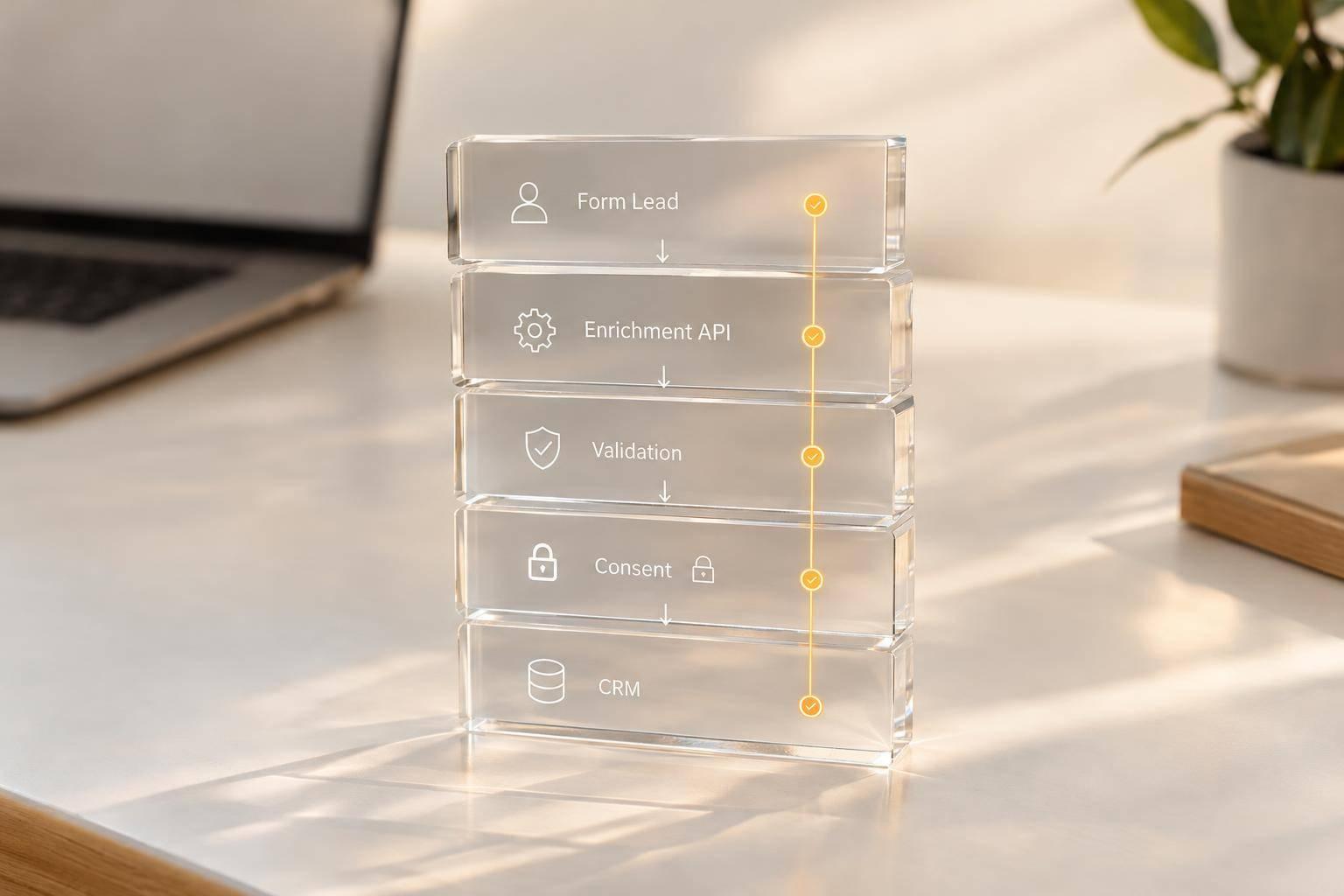
I don’t count a form submission as finished until the lead reaches its destination with the right data. An HTTP 2xx response can still leave you with a missing record.
I start by mapping which API calls block submissions and which run afterward. Then I track:
- API health: uptime, request success, p50/p95/p99 response times, and payload errors.
- Lead completion: confirmed downstream records, required fields, and duplicate checks.
- Webhooks: delivery attempts, retries, queue delays, missing events, and processing completion.
- Vendor signals: outages, API changes, and quota use - with a warning below 20% remaining.
- Response and recovery: alerts tied to lead impact, named owners, safe retries, and tested recovery steps.
My rule: <u>check the result, not just the response</u>. I protect submission data, trace each lead across systems, and compare the 30 days before and after monitoring changes to see whether failures and delays fell - not just whether more alerts fired.
Observability for APIs | Postman Intergalactic
sbb-itb-5f36581
Measure API Uptime, Speed, and Data Quality
Once each endpoint is mapped, score its availability, latency, and lead integrity. Measure uptime, request success, response time, payload quality, and downstream lead completion separately to create high-converting lead forms. Break out metrics by endpoint and peak submission period. Use external probes from multiple regions; results from one region don’t establish availability everywhere. This separation helps distinguish transport failures from downstream lead failures.
| Metric | Calculation | What it reveals | Form impact |
|---|---|---|---|
| Synthetic availability | Successful checks ÷ total checks × 100 | Baseline endpoint reachability and DNS health | Form fails to load or the submission endpoint is unreachable |
| Request success rate | Successful intended operations ÷ total requests × 100 | Whether the integration logic works as intended | User sees a success message, but the lead never reaches the downstream system |
| Response-time percentiles | p50, p95, and p99 of request durations, in milliseconds | Bottlenecks and long-tail delays | Long waits before submission completes |
| Invalid payload rate | Invalid payloads ÷ total evaluated payloads × 100 | Field mismatches, missing fields, or mapping errors | Rejected or incomplete lead data |
| Lead completion rate | Verified downstream records ÷ accepted submissions × 100 | Whether the intended workflow finished | Leads are available in downstream systems |
Track Uptime and Response-Time Percentiles
A successful synthetic check must return the expected status, response schema, and required values - not just reach the endpoint. Record each probe’s location and check frequency. One region’s results can’t establish availability everywhere, and failures between checks may go undetected. For real traffic, report p50, p95, and p99 by endpoint and peak submission period. Record timeouts separately rather than including them in latency percentiles.
Measure Request Success by Error Type
Group failures by form and integration using the categories below. An HTTP 2xx response doesn’t always mean success: the response body may contain an error, or the downstream operation may still be unfinished.
| Error type | Likely cause | Detection method | User impact |
|---|---|---|---|
| Authentication | Expired or invalid credential | Authentication failure response | Integration cannot run |
| Validation | Missing field or wrong type | Field-level errors; schema checks | Lead rejected |
| Rate limit | Quota exceeded | Rate-limit response | Processing delayed |
| Vendor 5xx | Vendor-side failure | Response status | Submission failure or delay |
| Timeout | Request exceeds deadline | Client timeout | Long wait; uncertain outcome |
| DNS or connection | Resolution or network failure | Client network errors | API cannot be reached |
| Partial record write or duplicate lead | Incomplete mapping or repeated processing | Record reconciliation; deduplication checks | Incomplete or repeated lead |
Check Payloads and Confirm Lead Creation
Validate required fields, formats, and response schemas. Check authentication settings without logging credentials to craft killer lead forms that prioritize data integrity. Then confirm downstream record IDs and required field values through read-back or reconciliation. Use a consistent deduplication key so retries don’t create extra leads.
Apply the same endpoint-level view to webhook delivery and processing, where retries and delays introduce different failure modes.
Monitor Webhook Delivery and Processing

Webhook Monitoring: From Event to Confirmed Lead
After the endpoint accepts the call, track delivery, acknowledgment, and processing. Treat webhooks as a separate event pipeline. Follow each stable event ID from creation through delivery attempts, acknowledgment, and processing completion. Successful delivery doesn't always mean the lead was created or updated.
Track event IDs and attempt IDs separately. Store timestamps in UTC, and label local times with the U.S. time zone. Account for clock skew before comparing timestamps across systems. At-least-once delivery can produce duplicates even when the pipeline is healthy.
Measure Webhook Delivery Success and Retries
Count distinct events when measuring delivery success and retries. Count individual attempts when measuring attempt failures. Set a delivery deadline for each workflow, and keep pending events separate from failed events.
| Metric | Calculation | Measurement window | Suggested alert severity |
|---|---|---|---|
| First-attempt success rate | Events acknowledged on the first attempt ÷ events requiring delivery × 100 | 15 minutes and 1 hour | High when a critical workflow drops materially below its baseline |
| Eventual delivery success rate | Events acknowledged before the deadline ÷ total events × 100 | 1 hour and 24 hours | Critical when lead-related events approach the business failure threshold |
| Retry-required rate | Events needing at least one retry ÷ total events × 100 | 15 minutes and 1 hour | Warning for a sustained increase; high when retries delay lead routing |
| Attempt failure rate | Failed delivery attempts ÷ total delivery attempts × 100 | 15 minutes | High when endpoint errors or timeouts spike |
| Delivery queue delay | First attempt time − event creation time | p50, p95, p99 over 15 minutes | High when p95 exceeds the workflow target |
| Processing latency | Completed processing time − acknowledgment time | p50, p95, p99 over 15 minutes | High when downstream systems fall behind |
| Permanent failure rate | Events exhausting retries or missing the deadline ÷ total events × 100 | 1 hour and 24 hours | Critical for events that create or update customer records |
Measure Queue, Acknowledgment, and Processing Delays
Measure four intervals: creation → first attempt, attempt → acknowledgment, acknowledgment → processing completion, and creation → completion. Record acknowledgment latency for each attempt. Report p50, p95, and p99 for every interval, including end-to-end latency with retry wait time.
Watch queue depth and the oldest unprocessed event alongside these percentiles. Latency metrics for completed work alone can hide events that never finish.
A fast acknowledgment confirms acceptance - not CRM lead creation. Acknowledge only after authentication and durable storage. Then follow queued work through to a confirmed downstream record ID. If vendor timestamps aren't available, measure only the stages your monitoring system can see. Mark the other intervals as unavailable rather than relying on inaccurate estimates.
Find Missing, Duplicate, and Out-of-Order Events
Reconcile expected, received, and processed event IDs against source records. Flag events that pass their deadlines, exhaust retries, or remain the oldest unprocessed event. Retain the event ID, destination, final error, retry count, last attempt time, and processing status - not sensitive payloads.
Use sequence numbers or record versions to detect stale updates. Fall back to source timestamps only when needed. Before processing, enforce an atomic claim on the event ID that prevents another worker from claiming the same ID. Check downstream state before retrying writes.
For recovery, replay only selected IDs or a bounded time range. Preserve original IDs, apply the same idempotency checks, rate-limit production replays, and record who initiated the replay. Deduplication doesn't preserve ordering; keep both controls.
Use Vendor Signals to Guide Alerts
Use vendor signals to explain alerts, distinguish platform issues from workflow failures, and get issues to the right owner fast.
Track Vendor Status, Quotas, and API Changes
A green status page does not prove your workflow is healthy. Match status-page incidents and maintenance windows to failures by endpoint, region, account, and API version. Track remaining quota, reset times, 429 responses, deprecation notices, version changes, authentication requirements, and vendor communications.
Tie each signal to blocked submissions, missing leads, or delayed webhooks. Assign planned changes to an owner before the deadline. Vendor notices should explain alerts - not dismiss them.
| Signal source | Strengths | Blind spots | Best alerting use |
|---|---|---|---|
| Synthetic checks | Test a known endpoint and detect broad reachability or authentication failures before real traffic occurs | May not test the customer’s account, payload shape, permissions, region, or complete workflow; consume quota | Alert on repeated failures across locations or on a critical preflight path |
| Real request telemetry | Shows actual success rate, latency, status codes, endpoint behavior, and business impact | Can miss unused paths and produce noisy results at low volume | Alert on workflow-specific SLO breaches and concentrated error spikes |
| Webhook logs | Track delivery attempts, acknowledgments, retries, duplicates, and completion | Cannot explain upstream API failures unless linked to the originating request | Alert on overdue, failed, or repeatedly retried events |
| Vendor status pages | Provide incident, maintenance, and recovery context | May group products together, lag behind actual conditions, or omit account- or region-specific failures | Add context and help route ownership; do not automatically suppress customer telemetry |
| Quota and rate-limit headers | Show remaining capacity, reset time, and throttling risk | May be absent, inconsistent, or different across endpoints | Warn before exhaustion and page on sustained 429 responses |
Warn when remaining quota falls below 20% or projected usage will exhaust it before reset. Page when sustained 429 responses block a critical workflow or the reset time exceeds that workflow’s acceptable delay.
Treat 429s as capacity signals: reduce volume or request more quota. Record the vendor, account, endpoint, response code, quota value, reset timestamp, and correlation ID.
Set alert thresholds around the workflow, not vendor noise.
Set Targets and Alert Windows by Workflow
Set separate objectives for blocked submissions, missing leads, payload validity, and delayed webhook completion. Support them with request-success and p95 latency targets.
Base targets on several weeks of comparable traffic, vendor commitments, business criticality, volume, and acceptable delay. Use short detection windows, sustained evaluation, and minimum sample counts. Compare results against both absolute targets and historical baselines. For low-volume workflows, alert on overdue events rather than unstable percentages.
Page first for blocked submissions, missing leads, or failed consent or audit writes - not isolated field-validation errors or status-only notices. Google SRE recommends alerting on meaningful error-budget consumption rather than every failure.
Assign Incident Owners and Protect Submissions
Follow detect → assess impact → correlate signals → assign owner → mitigate → recover → verify.
Every page should identify the workflow, endpoint, region, account, error class, affected submissions or leads, mitigation, and escalation contact. Send quota issues to the integration owner. Bring in application or security owners for authentication changes.
Group duplicate alerts by vendor, endpoint, status code, and time window. Keep new alerts visible when the region, account, error type, or business impact changes.
During response, protect the submission path first. Defer optional work until recovery, and keep optional enrichment outside the core submission path. Securely store the minimum required submission data, confirm receipt only after local acceptance, and then queue optional work.
Use idempotency keys for retry-safe operations during mitigation. Limit retries with exponential backoff and jitter, and honor Retry-After and vendor guidance.
Before recovery, verify applicable consent and destination authorization, then reconcile source and destination records. Encrypt queued submission data and limit retention. Allowlist telemetry fields, redact sensitive fields, and exclude credentials.
Conclusion: API Monitoring Checklist
Start with integrations that block submissions or move leads into downstream systems. Once those paths are covered, add monitoring for non-blocking enrichment, reporting, and notifications.
For each critical dependency, track uptime, p50/p95/p99 latency, success rate by error type, and payload validity. Check that the record reached its destination - not just that the API returned an HTTP response.
For webhooks, connect delivery attempts to acknowledgment, queue time, and completion. Track retries, missing events, duplicates, and events that arrive out of order.
Keep vendor status, quotas, and API changes alongside each dependency’s owner, workflow-specific lead-impact thresholds, and a tested recovery runbook. Record the date of the last successful recovery test so gaps stay visible.
Once alerts and recovery steps are in place, check whether monitoring improved results. Measure outcomes, not alert volume. Compare the 30 days before and after the change, accounting for traffic volume and vendor incidents. Check whether failed submissions, missing leads, delays, and recovery time decreased.
FAQs
How do I set API targets without historical data?
Start with industry standards and the provider’s documented limits. Aim for a sync success rate above 99% and sync latency between a few seconds and one minute.
Check the API documentation for burst limits and quotas. Target 80% of the provider’s documented limit to leave room for timing fluctuations. Track performance in real time and adjust your targets as traffic patterns emerge.
How can I trace missing leads across multiple integrations?
Use the same submission ID and correlation ID across webhook intake, queue jobs, token requests, and CRM delivery.
Send records that still fail after retries to a dead-letter queue (DLQ). Store the original payload, submission ID, integration target, attempt history, and specific failure reason.
Audit logs regularly and compare CRM records with form submissions to find where leads dropped off. Manually replay failed work.
How often should I test API recovery procedures?
Test your forms monthly. Check error logs and update API keys so expired credentials don’t cause silent failures. Every quarter, audit your setup: rotate credentials, check user permissions, and confirm your recovery path still works.
Before going live, test recovery procedures thoroughly to make sure your setup can handle token failures, outages, and duplicate events.
Related Blog Posts
Get new content delivered straight to your inbox

The Response
Updates on the Reform platform, insights on optimizing conversion rates, and tips to craft forms that convert.



Drive real results with form optimizations
Tested across hundreds of experiments, our strategies deliver a 215% lift in qualified leads for B2B and SaaS companies.
