
.webp)
How Trigger Emails Improve Lead Quality



Trigger emails tend to bring in better leads because they respond to buyer actions at the moment intent is highest. In the research here, triggered emails drive 41% of email revenue from only 5.3% of send volume, convert at 1.49% vs. 0.08% for batch sends, and can help teams get 50% more qualified leads at 33% lower cost.
If I had to boil it down, it works like this:
- Timing beats schedule: trigger emails go out when someone takes an action, not when the calendar says so
- Intent beats broad targeting: pricing-page visits, demo requests, trial starts, and ROI-calculator use say more than list membership
- Behavior beats static data: clicks, repeat visits, and inactivity help score leads more accurately
- Routing matters: responding within 5 minutes after a high-intent action can make a lead 21x more likely to convert
- Clean form data matters too: validated and enriched submissions help scoring, routing, and follow-up stay on track
A simple way to think about it: high-intent action → triggered email → better scoring → faster handoff → better lead quality.
This article shows why that happens, which triggers matter most, and how form data affects the whole process.
Evidence That Trigger Emails Outperform Standard Email Sends
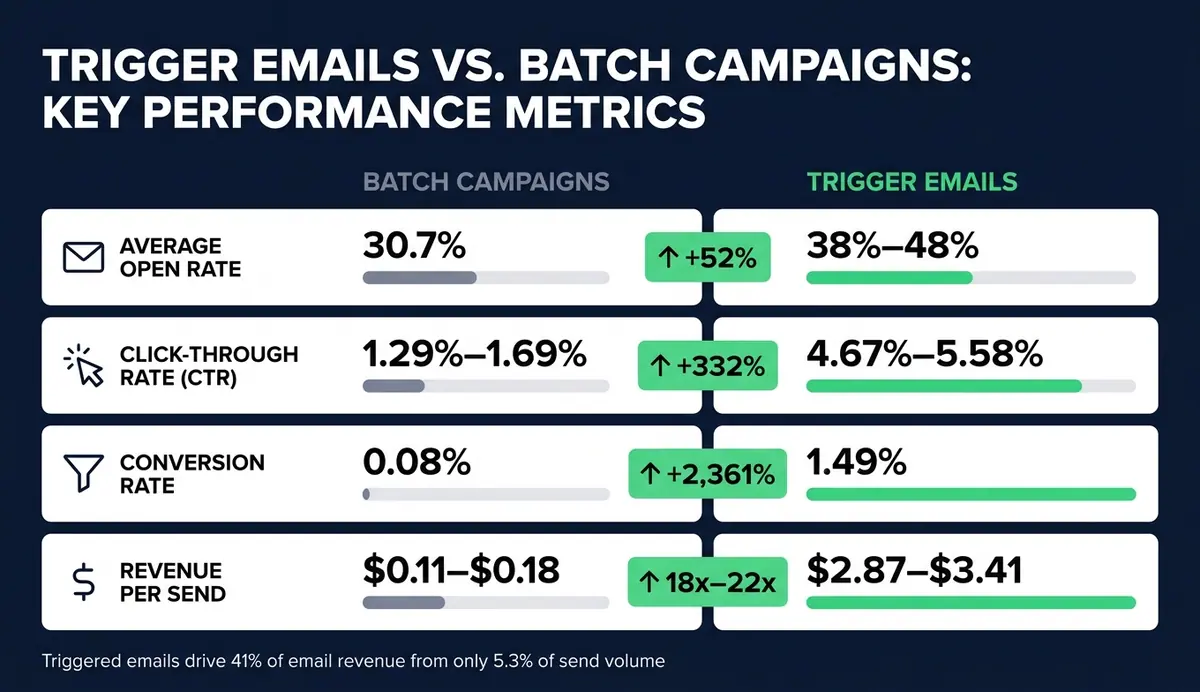
Trigger Emails vs. Batch Campaigns: Key Performance Metrics
The data is pretty clear: triggered emails beat batch sends on engagement, conversions, and revenue. Automated flows drive 41% of all email-driven revenue from just 5.3% of total send volume. That gap comes down to timing and intent.
And that matters for more than email metrics. When someone responds to a trigger-based message, they're often showing stronger buying interest, not just casual engagement.
Open Rates, Click Rates, and Conversions: What the Data Shows
Automated flows average 38% to 48% open rates, versus 30.7% for standard campaigns. Some triggers do far better than that. Welcome emails, for instance, can hit 83.6% to 90% open rates.
Clicks show an even bigger gap. Triggered emails see a 4.67% to 5.58% CTR, while batch sends land at 1.29% to 1.69% - a 332% lift.
Conversions are where the difference gets hard to ignore. Automated flows convert at 1.49%, compared with 0.08% for standard campaigns. That's a 2,361% difference, and it comes from sending the right message when intent is already there.
Revenue per send tells the same story. Triggered emails bring in $2.87 to $3.41 per send, while scheduled campaigns generate only $0.11 to $0.18. That works out to an 18x to 22x revenue lift.
Behavior Signals That Indicate Better Leads
The best results come from actions that show buying intent. Not every signal means the same thing.
Someone opening a newsletter is worth noting. Someone visiting your pricing page three times in a week is much closer to a sales conversation.
Research supports that difference. Pricing page visits indicate 4.7x higher purchase readiness, and users who view a product page three or more times within a week have a 78% higher conversion probability.
Other high-value signals include:
- ROI calculator use
- Technical content downloads, such as case studies and whitepapers
- Trial milestones
- Onboarding milestones
These actions point to a lead that's actively weighing a solution, not just skimming. Triggered workflows do their best work when they react to high-intent behavior instead of passive browsing.
Comparison Table: Trigger Workflows vs. Batch Campaigns
| Metric | Batch Campaigns | Trigger Workflows | Lift |
|---|---|---|---|
| Average Open Rate | 30.7% | 38%–48% | +52% |
| Click-Through Rate | 1.29%–1.69% | 4.67%–5.58% | +332% |
| Conversion Rate | 0.08% | 1.49% | +2,361% |
| Revenue per Send | $0.11–$0.18 | $2.87–$3.41 | 18x–22x |
| Lead Qualification Signal | Static demographics or list membership | Real-time actions: pricing visits, cart adds, feature use | Direct buying intent |
Those same intent signals also feed better lead scoring and routing in the next stage.
sbb-itb-5f36581
How Trigger Workflows Improve Lead Scoring and Qualification
Once you capture intent signals, the next step is simple: use them to change how leads are scored and routed. Trigger-email engagement helps show which leads are ready for sales. Every open and click adds a behavioral layer on top of static firmographic data, which gives your scoring model a much clearer view of where each lead stands.
How Email Behavior Data Improves Lead Scoring
Demographic data tells you who a lead is. Behavioral data tells you what they're doing right now. Trigger workflows bring those two together, and that's what makes lead scoring accurate enough to use in day-to-day decisions.
Repeated opens, pricing-page visits, and other high-intent actions can move a lead past the sales-ready threshold. Companies that use lead scoring report up to a 77% higher lead-generation ROI. AI-driven models also track engagement velocity, meaning they look at whether activity is picking up or fading. If engagement is climbing, qualification gets stronger. If it drops off, that lead should move down the priority list.
Intent-Based Routing Helps Sales Teams Focus
Not every lead needs a sales call. Trigger workflows handle that automatically by routing leads based on the action that fired the trigger, not only the total score.
A demo request, for instance, shouldn't sit in a nurture queue. It should go straight to a sales rep's task list. Prospects are 21x more likely to convert when a team responds within five minutes of a trigger event. That kind of speed only happens when routing is automated and tied straight to the trigger, not held up by manual review. Implementing expert form strategies can further streamline this process, ensuring leads are qualified and routed without delay.
Pricing-page visitors are often the highest-intent segment, but many teams still send them into generic nurture.
Lower-intent actions, like a whitepaper download, don't call for the same urgency. Those leads fit better in an educational nurture track until their behavior shows they're ready for direct outreach. Routing by intent keeps sales focused on actual opportunities and helps leads avoid feeling pushed too early.
Table: Trigger Events and Their Impact on Lead Qualification
The same trigger logic works at the event level:
| Trigger Event | Lead-Quality Implication | Scoring Impact | Resulting Workflow Action |
|---|---|---|---|
| Demo / Trial Request | Immediate high intent; ready for sales | +25 pts / Critical | Route to AE queue immediately; Slack alert |
| Pricing Page Visit | Active evaluation; price sensitivity | +15 pts / High | SDR follow-up within 5–120 minutes |
| ROI Calculator Completed | Deep consideration; building business case | +20 pts / High | Send financial justification/ROI guide |
| Multiple Stakeholders Engage | Account-wide interest; consensus building | Account-level score boost | Executive-level outreach; account-based play |
| Case Study Download | Mid-funnel interest; seeking proof | +12 pts / Medium | Enter consideration nurture track |
| 30-Day Inactivity | Fading interest; lead going cold | −20% behavioral score | Move to re-engagement sequence |
It also helps to subtract disqualifying signals, such as competitor-domain emails or unsubscribes. That keeps MQL counts accurate and protects sales time.
Why Form-Triggered Email Workflows Improve Data Quality
Forms turn intent into structured data. When someone fills out a demo request or starts a pricing inquiry, you’re looking at a high-intent signal. What happens next decides whether that signal turns into lead data your team can use.
Form Submissions and Abandonment as High-Value Triggers
A completed demo or pricing form is the strongest form-based trigger you have. It shows active evaluation.
But abandonment matters too. Between 70% and 75% of B2B demo registrations are never completed. In many cases, that happens because the form is too long or the person simply gets pulled away, not because interest disappeared.
That’s why timing matters. A reminder email sent within 30 to 60 minutes of abandonment can recover up to 30% of those leads. Demo requests should trigger right away. Send one recovery email fast, then send a follow-up the next day if the form is still incomplete.
At that point, abandonment recovery isn’t just a follow-up move. It’s a data-quality problem. If you let those partial submissions sit, you lose useful intent signals that could have turned into clean lead records.
Validated and Enriched Form Data Improves Workflow Accuracy
Speed helps, but it won’t save a messy workflow. If bad data comes through the form, everything downstream starts to wobble.
Validating email addresses at the form layer keeps trigger workflows focused on contacts you can actually reach and helps protect sender deliverability. Enrichment adds more context the moment a submission comes in, including firmographic data like company size, industry, and job role. That makes role-based routing possible: a CFO can get an ROI-focused sequence, while an IT lead gets security specs and integration documentation.
Standardized event names and fields matter just as much. Clear submission and abandonment signals reduce the odds of misconfigured enrollment rules, which can hurt deliverability.
How Reform Supports Trigger Workflows Backed by Research
When form data is clean, the workflow can route and personalize with confidence. Reform supports this by sending validated, enriched form data straight into scoring, routing, and email personalization.
It also supports this setup with:
- Email validation
- Spam prevention
- Conditional routing
- Enrichment
- CRM integrations
When a demo request comes in, the validated and enriched record can go straight to your sales team or trigger a personalized email sequence.
Design Principles and Key Takeaways
Start With High-Intent Triggers and Map Them to Scoring
After you spot the strongest intent signals, the next move is simple: decide which ones should trigger automation first.
Start with actions that show clear buying intent, such as:
- Pricing page visits
- Demo requests
- Trial activations
- Abandoned signups
Then assign each one a score based on how much intent it shows. Put your energy into the highest-intent triggers first.
When a lead passes your sales-qualified threshold, send it to sales right away. For enterprise leads, that handoff should happen within a 5-minute window - prospects are 21x more likely to convert when you respond that fast.
You'll also want exclusion rules. Without them, automation can get messy fast. Leads already in an active sales cycle or dealing with a renewal dispute shouldn't be pulled into automated nurture emails.
Measure Lead Quality Outcomes, Not Just Email Metrics
Once your triggers are running, don't stop at engagement numbers. The bigger question is whether those workflows are producing qualified pipeline.
Open rates aren't a strong signal on their own because Apple Mail Privacy Protection can inflate them. Instead, track Sales Acceptance Rate, Opportunity Rate, lead progression speed, and revenue per workflow entry. Those metrics show whether leads entering the workflow are turning into pipeline or just clicking around.
Click rates and bounce rates still matter, but they work better as support signals. Keep bounces below 3%.
Final Summary of the Research
Taken together, the research points to a clear pattern: intent-driven triggers improve lead quality when scoring and routing match that intent.
The main takeaway is straightforward. Trigger emails work because they respond to what a buyer actually did, not because a calendar says it's time to send. That match between behavior and message helps explain why triggered workflows generate 320% more revenue than non-automated sequences.
Those workflows also create engagement data - clicks, replies, and sequence completion - that feeds back into lead scoring over time. That makes qualification tighter. And when the data going into those workflows is checked and structured well, routing and reporting become more dependable.
high-intent trigger → clean data → better scoring → faster routing → higher-quality leads
FAQs
Which trigger emails work best?
The best trigger emails react to what a person just did and what that action suggests, not to a preset schedule.
In most cases, the top campaigns fall into three buckets: first-party engagement, third-party intent signals, and relational triggers.
The strongest setups mix these signals so teams can send personal content right when a lead is most engaged. Tools like Reform can help capture that data and route it for timely, relevant outreach.
How fast should trigger emails send?
Trigger emails should go out as fast as possible. For high-intent actions like demo requests or pricing page inquiries, the benchmark is within 5 minutes. Top-performing companies send them in under 2 minutes.
Here’s why that speed matters: research shows leads contacted within 5 minutes are 21 times more likely to qualify than leads contacted after 30 minutes.
How does form data affect lead quality?
Form data has a direct effect on lead quality because it shapes both segmentation and qualification. What someone submits - and where they submit it - works like an intent signal. That signal helps trigger-based email workflows send the right message instead of a generic follow-up that misses the mark.
It also affects scoring and routing. When fields are validated and enriched, especially business email data, lead scoring gets more accurate. You also cut down on deliverability problems caused by invalid addresses or low-intent contacts.
Related Blog Posts
Get new content delivered straight to your inbox

The Response
Updates on the Reform platform, insights on optimizing conversion rates, and tips to craft forms that convert.


Drive real results with form optimizations
Tested across hundreds of experiments, our strategies deliver a 215% lift in qualified leads for B2B and SaaS companies.
