
.webp)
Ultimate Guide to Lead Workflow Automation



Lead workflow automation helps businesses respond faster to leads, saving time and increasing sales efficiency. Companies using automation report:
- 42 hours saved on average for lead follow-ups.
- 40% lower customer acquisition costs.
- 25% faster sales cycles.
Automation handles tasks like capturing lead data, scoring, routing, and nurturing, ensuring no leads are missed and sales teams can focus on closing deals. Tools like Reform simplify this process with features like no-code forms, real-time data enrichment, and CRM integration, starting at just $15/month.
Key Benefits:
- Respond to leads within minutes, increasing qualification chances by 7x.
- Automate follow-ups and reduce manual data entry by 90%.
- Track and improve ROI with detailed analytics and reduced lead management inefficiencies.
Businesses of all sizes, especially SaaS companies, can benefit from automation to streamline operations and maximize lead conversion rates.
This is My Ultimate Lead Management Workflow!
This workflow starts with creating high-converting lead forms to ensure you capture the right data from the beginning.
sbb-itb-5f36581
Core Components of an Automated Lead Workflow
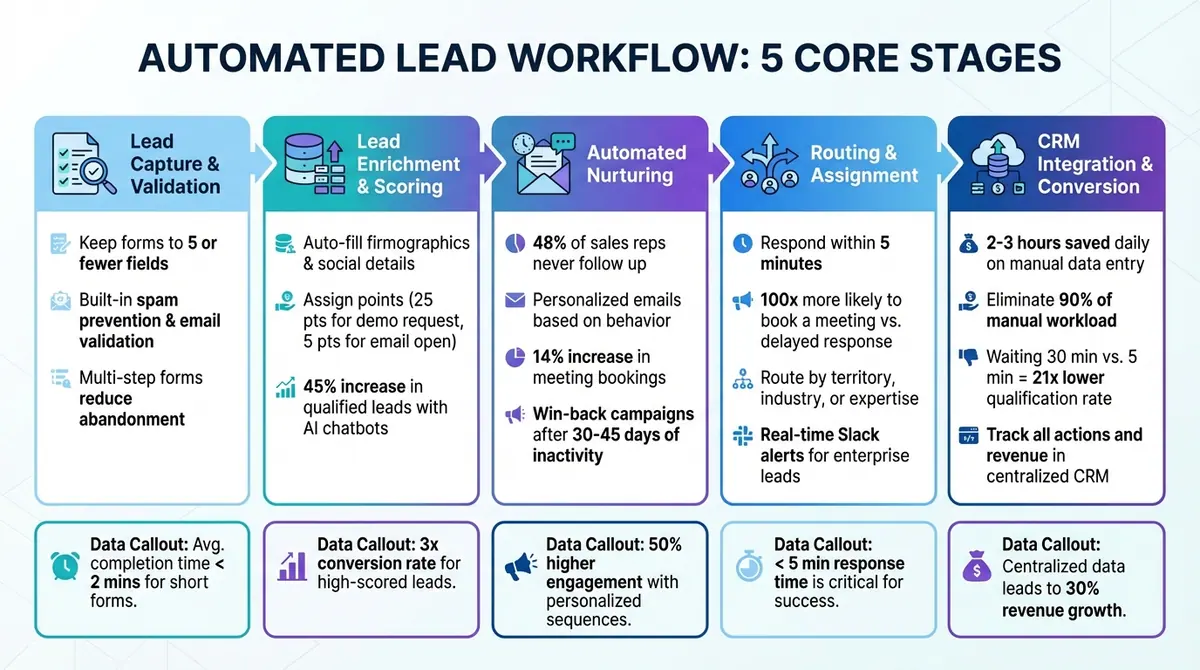
5-Stage Automated Lead Workflow Process from Capture to Conversion
An automated lead workflow simplifies the journey from capturing a lead to converting it into a customer. This process moves through five essential stages: capture and validation, enrichment and scoring, automated nurturing, routing and assignment, and CRM integration. Each stage flows into the next, ensuring a smooth transition from the initial contact to closing a deal. It starts with lead capture, which triggers data enrichment to fill in missing details. With this enriched data, leads are qualified and scored. High-priority leads are then automatically routed to the appropriate team member, who can use integrated tools to schedule meetings instantly. For leads that aren’t ready to convert, nurturing sequences are activated based on their behavior.
Lead Capture and Validation
The first step is all about capturing leads efficiently while maintaining data accuracy. Keeping form fields to five or fewer can significantly improve conversion rates. Instead of asking for every detail upfront, tools like waterfall enrichment can automatically fill in missing information, such as company size or industry, after a lead submits their details.
Platforms like Reform make this process easier with no-code forms that include built-in spam prevention and email validation. These features ensure you’re collecting genuine, high-quality leads - not bots. Additionally, multi-step forms help reduce abandonment by breaking long questionnaires into smaller, more manageable sections. Once a lead submits their information, workflows are activated immediately.
Lead Enrichment and Scoring
Lead enrichment enhances a lead’s profile by adding valuable data, such as firmographics and social details, right after capture. This approach reduces the number of fields needed on your forms while maintaining the quality of your data.
Lead scoring, on the other hand, assigns numerical values to leads based on explicit factors like job title or company size, as well as implicit behaviors like email engagement or website activity. AI-powered scoring tools take this a step further by using machine learning to adjust scores in real time. For instance, companies that use AI chatbots for lead qualification have reported a 45% increase in qualified leads.
To standardize the scoring process, assign clear point values to different actions - like 25 points for requesting a demo or 5 points for opening an email. Leads that meet the sales-ready threshold automatically trigger notifications for the sales team, while others are funneled into nurturing campaigns [5, 13].
Automated Lead Nurturing
Not all leads are ready to make a purchase right away. In fact, 48% of sales representatives never follow up with a lead, which highlights the importance of automated nurture sequences. These sequences deliver personalized emails and multi-channel follow-ups based on user behavior and pre-set rules.
For example, if a lead downloads an eBook, they might receive educational content tailored to their interest, while someone requesting a demo could get product-specific follow-ups. Automating these actions can lead to a 14% increase in meeting bookings. Additionally, leads that become inactive can be shifted into "win-back" campaigns after 30 to 45 days of low engagement, helping to reignite interest.
Routing and Assignment
Speed is everything when it comes to responding to leads. Reaching out within five minutes increases the likelihood of booking a meeting by up to 100 times compared to a delayed response. Automated routing ensures that leads are assigned to the most suitable sales representative based on criteria like territory, industry, or expertise.
For instance, enterprise-level leads might trigger real-time alerts via Slack to senior sales reps, while smaller leads can be directed to automated nurture campaigns. This approach ensures every lead is handled by the right person without requiring manual effort.
Conversion and CRM Integration
Integrating your CRM is crucial for maintaining a centralized source of information. Many businesses waste 2–3 hours daily on manual data entry, but CRM integration can eliminate up to 90% of this workload. Integration also enables near-instant contact with leads, as waiting just 30 minutes instead of 5 can reduce the chances of qualifying a lead by 21 times.
"Manual data entry doesn't just slow you down - it compromises the quality of your most valuable business asset: your customer data." - Orbit Forms
Reform's integrations with tools like HubSpot and Salesforce ensure that every automated action - emails sent, meetings booked - is logged in your CRM. This not only preserves data accuracy but also helps track revenue generated from marketing efforts. To prevent issues, configure duplicate detection (e.g., by email address) and set up notifications for errors via email or Slack.
Mastering these components is key to choosing the right automation tools for your lead management system.
How to Choose Tools for Lead Workflow Automation
Choosing the right automation tool starts with documenting each type of lead and how they should be routed. For instance, if you need to differentiate enterprise leads with urgent timelines from small businesses still in the research phase, the tool must support multi-factor conditional logic. These criteria ensure your chosen tool aligns seamlessly with your overall workflow strategy.
Features to Look For
One of the most essential features is AI-powered lead qualification, which scores and routes leads in real time based on their behavior and responses. This eliminates the need for manual sorting. Another critical feature is native CRM integration, which syncs data with your systems instantly. A no-code interface with drag-and-drop builders allows marketing teams to create and manage workflows without relying on developers, cutting down on long-term maintenance.
Other important features include:
- Conditional logic: Adapts forms dynamically based on user responses, creating a personalized experience.
- Progressive profiling: Recognizes returning visitors and collects new information incrementally, enriching lead profiles over time.
- Security and compliance: For regulated industries, prioritize features like HIPAA compliance, encrypted data handling, and audit trails.
- Automated triggers: Launch multi-step email sequences as soon as a lead is captured, helping you become a lead generation expert.
Reform is an example of a platform that ticks these boxes. It offers a no-code builder, multi-step forms with conditional routing, lead enrichment, email validation, and spam prevention. Its direct integrations with popular CRM tools ensure smooth data syncing, and its transparent pricing starts at $15/month, making it a scalable option for growing businesses.
Tool Comparison
When comparing tools, look beyond the basic features. Evaluate how deeply each tool implements critical capabilities like AI-powered lead qualification, conditional logic, and progressive profiling. Consider the total cost of ownership, including whether pricing scales with your business. Reform stands out for combining effective lead conversion features with straightforward, competitive pricing.
Scalability and Integration
Examine your existing tech stack to identify the key systems - like CRM, email marketing, social media, and analytics platforms - that the automation tool must integrate with. Opt for a platform that supports native integrations rather than relying on third-party connectors like Zapier, which can add costs and introduce potential issues. Reform’s native CRM integrations and API access for custom setups make it easier to streamline data flow and simplify implementation.
Scalability is equally important. The tool should handle growing lead volumes without slowing down or requiring a complete system overhaul. Reform addresses this with unlimited responses on both its Basic and Pro plans, ensuring your workflows remain efficient as your business expands.
"Proving automation ROI requires a shift from traditional ROI models to a more holistic approach... [considering] both tangible and intangible benefits, long-term value, and the challenges of data quality." - Ashmita Shrivastava, Content Marketing Manager, Moveworks
Before deploying any automation tool, establish baseline metrics like lead response time and cost per lead. This will help you measure ROI effectively. Research shows that organizations implementing process automation see an average ROI of 240% within the first year, with 60% achieving positive results in that timeframe. However, only 33% successfully scale their AI initiatives beyond the pilot stage. This underscores the importance of addressing scalability and integration from the start.
Building and Optimizing Your Automated Lead Workflow
Before jumping into form creation, take the time to map out your entire lead journey. Document the different types of leads you anticipate and plan their routes - for example, directing enterprise leads to Slack notifications while sending small and medium-sized business (SMB) leads into nurture sequences. This proactive planning avoids the headache of trying to retrofit forms into a workflow that wasn’t fully thought out in advance. A well-documented process sets the foundation for a structured and efficient workflow.
Workflow Setup Steps
Conditional routing is key to managing leads effectively. By using criteria like company size, budget, or timeline, you can guide leads down the right paths. Tools like Reform's no-code multi-step forms make it easy to set up these logic-driven workflows. Don’t forget to connect your CRM to ensure data syncs in real time - this helps maintain attribution and prevents leads from falling through the cracks.
Set up tiered notifications to prioritize responses. For instance, use Slack or SMS alerts for high-priority leads, while email notifications or nurture sequences can handle lower-priority ones. Test these configurations with a variety of lead personas to make sure your logic works as intended. Start small by focusing on two or three lead segments and clearly define exit conditions to stop nurture sequences when leads take high-intent actions.
"Automation is only as smart as the strategy, data, and orchestration behind it." - Elizabeth Long, Whippy
Optimization Methods
To keep your workflow running smoothly, review and tweak your lead scoring system monthly, especially during the first quarter. A/B testing is another powerful tool - try routing similar leads down different paths to see which performs better. Reform’s real-time analytics can help you identify patterns quickly, such as which form fields are most likely to lead to closed deals. Use this information to refine your scoring logic.
Keep your data clean by regularly deduplicating records and verifying key fields like names and opt-in statuses. Additionally, schedule quarterly audits of all active workflows. This ensures that templates, branching logic, and spam filters remain up-to-date.
"Automation is only as effective as the data driving it." - Matt, Tactics Marketing
Mistakes to Avoid
Automating a flawed process will only amplify its issues. Before introducing automation, make sure your manual workflows are streamlined and functional. Use lead scoring to filter out unnecessary alerts and reduce the risk of alert fatigue. And remember, automation isn’t a “set-it-and-forget-it” solution - regular reviews are essential to keep things running smoothly.
Be mindful of message frequency. Implement caps and suppression logic, like 24-hour pauses, to prevent overwhelming your leads with conflicting communications. With about 70% of buying decisions made before a customer even speaks to a salesperson, it’s crucial to strike a balance. Over-automation can be counterproductive; some situations require a human touch to handle them effectively.
Reform Pricing and Value for Workflow Automation
Reform Pricing Plans
Reform offers pricing options designed to grow with your business. The Free Plan ($0/month) is perfect for testing workflows, though it doesn't include live form publishing. The Basic Plan ($15/month or $150/year) caters to startups and small businesses, providing unlimited responses, custom branding, and integrations with tools like Google Sheets and Zapier. For teams requiring more advanced features, the Pro Plan ($35/month or $350/year) includes conditional logic, partial responses, and team access.
| Plan | Monthly Price | Annual Price | Key Workflow Features |
|---|---|---|---|
| Free | $0 | $0 | Testing only; live forms aren't available |
| Basic | $15 | $150 | Unlimited responses, custom branding, basic integrations |
| Pro | $35 | $350 | Conditional logic, partial responses, team access |
| Done-for-You | $500 (one-time fee) + Pro subscription | N/A | Custom form built by experts in 30 days |
For businesses looking for a hands-off solution, the Done-for-You service is available for a $500 one-time fee (plus an active Pro subscription). This service delivers a custom-built form, designed by FunnelEnvy's conversion experts, within 30 days - offering over $15,000 in value.
These pricing plans are designed to keep costs predictable while setting the stage for strong returns on investment.
Getting ROI With Reform
Reform's pricing isn't just affordable - it’s designed to drive measurable sales improvements. Features like partial responses on the Pro Plan allow you to capture incomplete form data, expanding your potential lead pool. Meanwhile, conditional routing ensures high-value leads are directed to scheduling links, while others are seamlessly added to nurture sequences. This saves your sales team time and boosts efficiency.
Take ExactBuyer, for example. Under CEO Edan Krolewicz, the company used Reform's multi-step forms with dynamic routing and real-time enrichment. In just 23 days, they achieved a 90% demo engagement rate and reduced exit rates by 26.4%. Similarly, heyMarvin's Director of Growth, Tim McMinn, implemented Reform's logic-based routing to automatically send leads to two separate Calendly flows. In just two weeks, this reduced manual handoffs and filtered out unqualified leads.
"Reform is what Typeform should have been: clean, native-feeling forms that are quick and easy to spin up. Reform does the job without a bunch of ceremony."
– Derrick Reimer, Founder, SavvyCal
For B2B and SaaS companies, Reform has been shown to increase qualified leads by 215%. With unlimited responses included in all paid plans and no per-submission fees, businesses can scale their lead volume without worrying about rising costs. Plus, annual billing provides a 16% discount, essentially giving you two months free.
Conclusion
Automating lead workflows is a game-changer for converting prospects when they’re most engaged, instead of losing them to quicker competitors. Research shows that following up with a lead within five minutes is 300% more effective than waiting an hour. On top of that, 80% of marketers using automation report lead increases of up to 451%.
This sense of urgency is tackled by a system that captures leads through optimized forms, validates and enriches their data automatically, assigns them to the right sales representatives, and nurtures them with personalized messages until they’re ready to make a purchase. The benefits? Fewer manual errors, the ability to scale without increasing team size, a 14.5% boost in sales productivity, and a 12.2% cut in marketing costs.
Reform simplifies the automation process with its no-code platform. Features like multi-step form templates, conditional routing, real-time data enrichment, and seamless CRM integration make it easy to create workflows that operate 24/7. As highlighted earlier, businesses have seen noticeable improvements in lead engagement and distribution within just weeks of adopting Reform.
You can get started with Reform’s Basic Plan for just $15 per month, offering unlimited responses and essential integrations. Need more advanced features? The Pro Plan, at $35 per month, includes conditional logic and partial response tracking. If you’re looking for a customized solution, Reform’s Done-For-You service provides tailored forms built specifically for your lead generation needs, with pricing customized to your requirements.
The 5-Minute Rule isn’t just a suggestion - it’s a necessity in today’s fast-paced market. Automation ensures you act quickly and efficiently, keeping valuable leads from slipping through the cracks. Build your automated workflow with Reform and stay ahead of the competition.
FAQs
What should I automate first in my lead workflow?
Start by automating the early steps of your lead workflow to streamline your process and save time. Here’s where to focus:
- Lead capture: Implement forms or software integrations to collect lead information effortlessly.
- Lead qualification: Use automation tools to enrich data, score leads, and route them to the right team members for follow-up.
By automating these steps, you can cut down on repetitive tasks, reduce errors, and set up a reliable system that supports growth without overwhelming your team.
How do I set up lead scoring that sales will trust?
Creating a lead scoring system that your sales team can rely on starts with setting clear, measurable criteria. Look at behaviors, like how often a lead engages with forms or downloads resources, as well as characteristics, such as demographic or firmographic details, that signal genuine buying intent.
Assign point values that accurately reflect the quality of a lead. For instance, actions like requesting a demo might carry more weight than simply opening an email. Transparency is key - make sure your lead management system clearly shows how scores are calculated and what they mean.
Finally, don’t let your model grow stale. Regularly review it using feedback from your sales team and data on actual conversions. Adjust as needed to ensure it aligns with sales expectations and continues to build trust between teams.
How can I prove lead automation ROI in 30–90 days?
To showcase the return on investment (ROI) of lead automation within 30–90 days, start by calculating measurable benefits. These might include higher conversion rates, quicker response times, and better lead quality. Then, compare these benefits to the costs incurred during the same timeframe.
Use this straightforward formula to determine ROI: (Benefits – Costs) / Costs x 100%.
Keep an eye on progress throughout this period. Highlight improvements such as less manual work and increased conversion rates. These tangible results can clearly illustrate the value of automation to stakeholders.
Related Blog Posts
Get new content delivered straight to your inbox

The Response
Updates on the Reform platform, insights on optimizing conversion rates, and tips to craft forms that convert.




Drive real results with form optimizations
Tested across hundreds of experiments, our strategies deliver a 215% lift in qualified leads for B2B and SaaS companies.
