
.webp)
Vendor Risk Checklist for Lead Form Tools


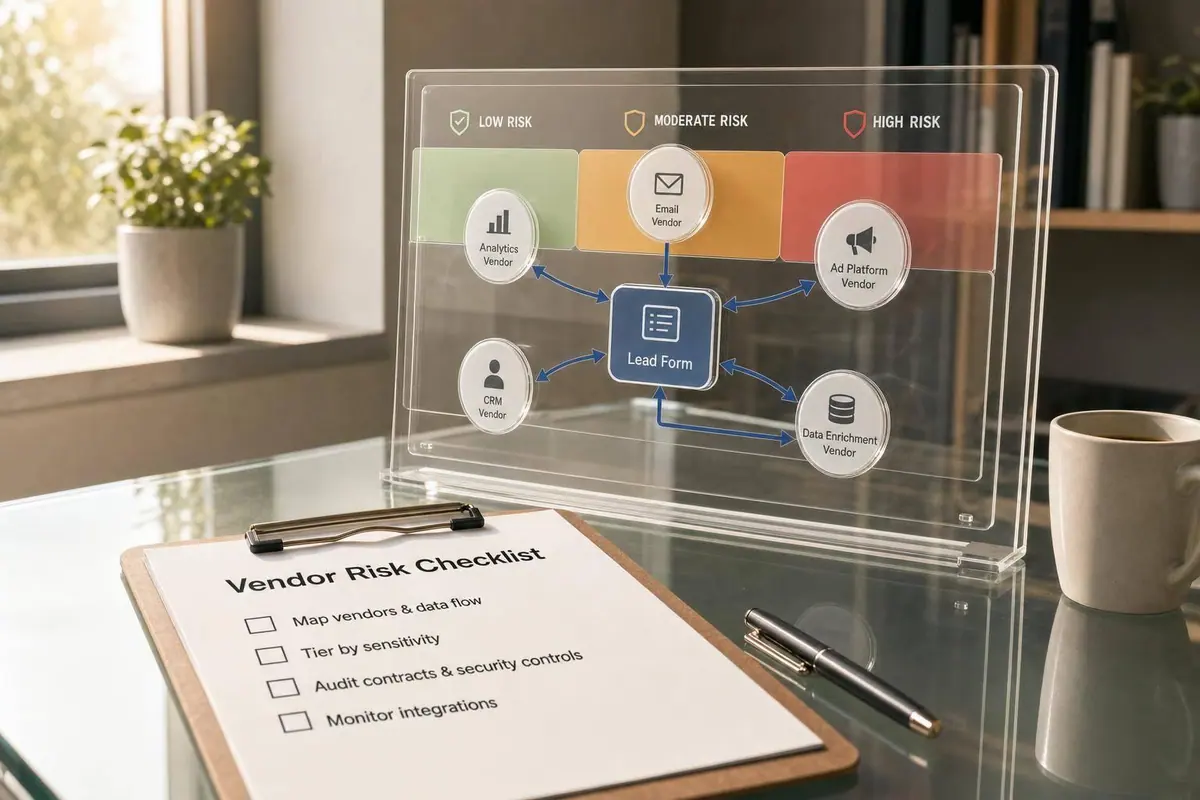
A lead form is only as safe as the tools behind it. If one form sends data through 5 to 8 apps - like spam filters, CRM syncs, enrichment tools, webhooks, and analytics - you need to review every stop, not just the form itself.
I’d boil this article down to four checks:
- Map every tool that receives or passes lead data
- Rank vendor risk by data type, access level, and downstream spread
- Review legal, privacy, and security terms before launch
- Watch setup changes and vendor updates after go-live
The article makes one point clear: even “simple” lead forms can handle PII such as names, emails, phone numbers, IP addresses, and behavior data. And once that data moves into other systems, risk grows with each handoff. That means I’d review consent syncing, deletion rules, SSO/MFA, API key limits, webhook signing, breach notice terms, backup plans, and alerts for sync failures or spam spikes.
A few numbers stand out:
- 72 hours: breach notice target after confirmed impact
- 12 months: audit log retention target
- 95%: alert threshold when webhook success drops below this level
- 10%: alert threshold when retry rate goes above this level
- 1%: alert threshold when permanent failures pass this level
If you want the short version, it’s this: list your vendors, tier them High/Medium/Low, test the full lead path, and review the top-risk tools first. That gives you a simple way to cut legal, security, and routing risk without slowing down form launches.
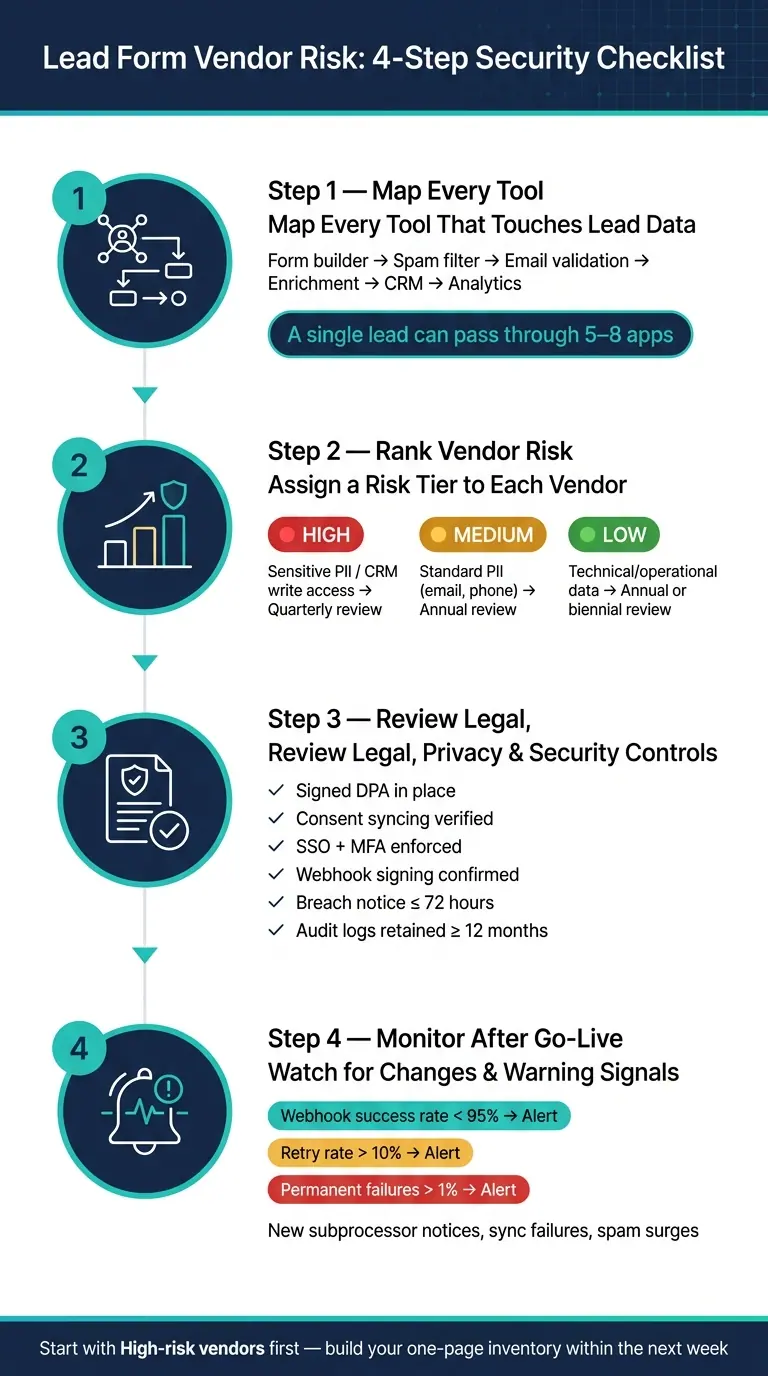
Lead Form Vendor Risk: 4-Step Security Checklist
7 Step Vendor Risk Assessment Checklist
sbb-itb-5f36581
1. Map Data Flows and Assign a Risk Tier
Start by documenting every tool that receives, changes, stores, or passes along a submission. That includes the obvious tools, like your form platform and CRM, but also the easy-to-miss ones: webhooks, queues, backups, and error logs. If lead data touches it, it belongs on the map.
List every tool that touches lead data
A normal lead flow often includes the form builder, spam or bot checks, email validation, enrichment, CRM sync, and analytics.
One detail matters here: if a single platform does several jobs, list each job separately. Why? Because one vendor might validate emails, store submissions, and trigger downstream actions all at once. Treating that as one line item can hide risk.
Once you’ve mapped the full path, classify each field by sensitivity and purpose.
Classify the data fields and retention needs
Group each field into one of these buckets:
- contact data
- business data
- operational data
- sensitive data
For each field, set a retention rule too. Do this by field and vendor, then delete or anonymize inactive records on a set schedule. If a vendor keeps data forever and gives you no auto-delete setting, flag it right away. That’s the kind of thing that turns a small privacy issue into a big mess later.
Use a simple High, Medium, Low risk model
With your inventory and field classes in place, assign each vendor a risk tier based on three things:
- how sensitive the data is
- how many downstream systems receive it
- how much control you have over retention and access
The table below shows how those tiers connect to review needs.
| Data Type | Business Impact | Assessment Depth | Review Frequency |
|---|---|---|---|
| Sensitive PII (financial, health, regulated) | Critical - legal and regulatory risk | Full security audit + DPA review | Quarterly |
| Standard PII (email, phone, company) | High - privacy and workflow risk | Standard questionnaire + contract review | Annually |
| Technical/operational data (IP, UTMs, session IDs) | Low - limited impact | Self-assessment questionnaire | Annually |
| Pseudonymized data (aggregate analytics, hashed IDs) | Minimal | Terms of service review | Every 2 years |
The next table gives a practical view of common vendor checks.
| Category | Checklist Item | Applies To | Risk Tier |
|---|---|---|---|
| Form Builder | Stores raw submissions and PII; confirm encryption at rest and in transit | Form builder platform | Medium–High |
| Spam Detection | Processes IP addresses and behavioral signals; verify subprocessor list and data retention | Spam/bot filter | Low |
| Email Validation | Handles email addresses; confirm whether addresses are logged or shared | Email validation tool | Low–Medium |
| Enrichment API | Appends firmographic data; verify legal basis for processing and data source accuracy | Enrichment service | Medium |
| CRM Sync | Receives the full lead record, including consent data; check API security and field mapping | CRM connector | High |
| Analytics/Event Tracking | Logs conversion events and session behavior; confirm pseudonymization and cookie compliance | Analytics platform | Low–Medium |
Any vendor that enriches data, redistributes it, or tracks it across several systems should get extra attention. Those tools can look harmless on the surface, then turn out to have a much bigger footprint than expected.
Use this tiering model to decide which legal, privacy, and security checks each vendor needs.
2. Review Legal, Privacy, and Data Lifecycle Controls
Use the risk tier to decide how deep the legal review should go. Once you've tiered vendors, make sure their legal and privacy terms line up with how lead data is collected, used, stored, and deleted.
Check contracts, DPA terms, and subprocessor rules
Any vendor that handles lead data should have a signed Data Processing Agreement (DPA) in place. Review the DPA to make sure it covers the processing scope, confidentiality, audit rights, deletion or return of data, and approved subprocessors. If lead data moves across borders, confirm the transfer terms before launch.
Once the contract terms check out, look at what the form actually collects when someone submits it.
Verify consent, notices, and consumer rights support
Make sure the form can support custom notice text and consent fields for the markets you serve. Also confirm that the vendor can handle access, deletion, and portability requests.
Before launch, submit a test lead and check that consent, notice acknowledgment, and UTM fields sync to the right CRM properties. If the sync drops consent data, you lose your proof of compliance.
Then look at what happens after the form submission.
Confirm retention, deletion, and export options
Check that the vendor supports retention rules, clean deletion, and exports for audits, portability requests, and access requests. If a vendor can't produce a clean export on demand, handling a consumer rights request turns into manual work fast.
3. Validate Security Controls for Form Workflows and Integrations
After legal and privacy review, check the controls that protect lead data across forms, APIs, webhooks, and CRMs. Give the closest review to vendors you already tagged as medium or high risk. Then use the workflow map from Section 1 to test each vendor at every handoff.
Access controls, encryption, and audit logs
Badly set access permissions are a common SaaS problem. Require SSO, MFA for admin accounts, and RBAC with least-privilege defaults. Also confirm that role permissions cover who can edit forms, manage keys, view submissions, and export data. Ask for a role matrix, then verify that least privilege is the default setting, not just something you could turn on later.
Audit logs matter too. They should record logins, permission changes, API key creation, webhook edits, and exports. Keep them for at least 12 months, and make sure they can be exported to your SIEM. Ask for a sample export and check that it includes user ID, timestamp, action, and IP address.
Request SOC 2 Type II or ISO/IEC 27001 evidence. Then check that the scope covers submissions, integrations, and analytics.
Once human access is locked down, move to the machine-to-machine paths.
API, webhook, and spam defense safeguards
Check for signed webhooks with timestamp headers, scoped and rotatable API keys, limited OAuth scopes, and rate limiting on both API and form endpoints. Before launch, test rate limiting and invalid webhook signatures. It’s a simple step, but it can save you from ugly surprises later.
Spam defenses like CAPTCHA, honeypot fields, IP reputation scoring, and behavioral filtering add another layer of protection. But there’s a tradeoff: they can also increase what lead data gets shared with third-party services. For Reform, confirm that you can limit enrichment fields, disable features per form, log enrichment calls, and block free-text fields from external scoring services.
Incident response and recovery commitments
Require a documented incident response plan, clear severity levels, a named security contact, and breach notice within 72 hours of confirmed impact.
Also ask for RPO/RTO targets for form capture and CRM sync, plus encrypted, tested backups stored in separate infrastructure zones. If a vendor can’t explain how they recover after a problem, that’s a warning sign.
Use these questions to score each vendor against the lead flow you mapped earlier.
| Control Area | Key Questions | Evidence to Request | Red Flags |
|---|---|---|---|
| Access Management | Does the tool support SSO, MFA, and RBAC? Can you restrict who manages API keys and webhooks? | SOC 2 Type II report; role matrix; IdP integration docs; sample audit log export | Shared admin logins; no MFA; all-or-nothing permissions; no audit logs |
| Data Protection | Is lead data encrypted in transit (TLS 1.2+) and at rest (e.g., AES-256)? Are backups encrypted and tested? | Security whitepaper; DPA; SOC 2 or ISO 27001 scope; encryption architecture overview | HTTP form submissions; no mention of encryption at rest; no retention configurability |
| API Security | Are webhooks signed with timestamp headers? Are API keys scoped and rotatable? Is rate limiting enforced? | API docs showing auth patterns; sample webhook headers; rate-limiting policy | Unsigned webhooks; long-lived full-access API keys; no rate limiting; broad OAuth scopes |
| Incident Response | What is the breach notification timeline? What are the RPO/RTO targets for form capture and CRM sync? | Incident response plan; BC/DR summary; DPA subprocessor terms | No formal IR plan; notification timelines over 72 hours; no documented recovery targets |
4. Apply the Checklist During Onboarding and Ongoing Monitoring
A contract review by itself won't tell you where the risk is. The bigger problems tend to show up during setup and after launch, when small config decisions quietly expand data exposure.
Secure the initial setup and routing logic
Before launch, recheck the full lead path from start to finish. Every handoff is a spot where data can go somewhere it shouldn't.
Conditional routing and multi-step forms need the closest review. Conditional logic can send sensitive answers to places the user never expected. Multi-step forms can also push teams to ask for more information than the workflow actually needs. Review each branch and make sure sensitive responses go only to tools that have a clear business reason to get them.
Hidden fields are another easy miss. They often pass UTM parameters and attribution data into downstream tools. But when a hidden field is set up the wrong way, it can also expose internal IDs or user data. Review every hidden field, confirm why it exists, and verify where it ends up in the CRM.
Notification emails and Slack alerts also deserve a hard look. They can spread lead details much more broadly than intended. Keep notifications limited to the few fields people need, and audit who gets them. Then review CRM mapping line by line, submit a test lead, and check the browser network panel for any third-party calls you didn't expect.
Monitor vendor changes and internal warning signs
Ongoing monitoring works best when you keep it simple: define a short set of signals and assign an owner to each one. Use the risk tier from Section 1 to set the review schedule: monthly for high-risk tools, quarterly for lower-risk tools.
Operational signals often show trouble first. Duplicate CRM records, blank fields, or leads with bad attribution usually point to data being routed the wrong way, not a weak campaign. A sudden jump in junk submissions can mean spam controls have slipped or bot behavior has changed. For webhook reliability, industry best practice suggests setting alerts when success rate falls below 95%, retry rate goes above 10%, or permanent failures rise past 1%.
You also need to watch what changes on the vendor side. New subprocessor notices, updates to data retention terms, and product releases can change your data flows even when no contract amendment is signed. These events should trigger an immediate reassessment instead of waiting for the next review:
- A sync failure that can't be tied to a known outage
- Unusual export volume from the form tool or CRM
- A vendor announcement about new subprocessors or revised data-use terms
- A spam surge that gets past current filters
Apply the checklist to a no-code form platform like Reform
Use the same launch checks for Reform's routing, enrichment, and analytics features. Review Reform as a full workflow, not just a form builder.
This feature-by-feature map lets you review setup and monitoring in one pass.
| Reform Feature | Onboarding Check | Ongoing Monitoring Signal |
|---|---|---|
| Spam prevention | Confirm settings are active for each form; verify that no extra data is shared with outside scoring services | Spike in junk submissions or drop in filter performance |
| Email validation | Check that invalid addresses are blocked before enrichment or CRM sync | Increase in bounced or undeliverable leads in CRM |
| Lead enrichment | Limit enrichment to needed qualification fields; log enrichment calls; turn it off on low-intent forms | New fields showing up in CRM records that were not mapped on purpose |
| CRM integration | Review field mapping line by line; test a sample lead end-to-end before launch | Sync failures, duplicate records, or blank required fields |
| Conditional routing | Audit each branch; confirm sensitive responses go only to intended destinations | Leads showing up in the wrong CRM segments or notification lists |
| Real-time analytics | Confirm that only event-level data is collected | Unexpected third-party endpoints in browser network activity |
| Abandoned submission tracking | Verify what partial data is stored and how long it is kept | Unexpected changes in what partial data is stored or how it is used |
| Custom code / embedding | Treat it as a separate integration; audit scripts for third-party calls | New scripts or tags added through campaign or agency edits |
Conclusion: A Practical Checklist for Safer Lead Form Operations
Lead form vendor risk isn't just a one-time procurement issue. It affects the data flowing into your CRM, the dependability of your revenue operations, and how well your team can handle security reviews.
Once you've mapped, reviewed, and monitored your stack, the next move is pretty simple: start with the highest-risk vendors. Map every tool that touches lead data. Then assign each one a High, Medium, or Low risk tier. Review High-risk vendors first.
High-risk vendors, especially those with full lead profile access and CRM write permissions, need closer review. That means checking contracts and DPAs, confirming baseline security, privacy, and incident-response controls, and setting a recurring review schedule. Lower-risk tools can go through a lighter check, but it still needs to be documented.
For Reform, use that same workflow-level review. Look at it as an end-to-end workflow, not just a form builder.
The next step is practical: within the next week, build a one-page inventory of every tool in your lead form stack, assign a risk tier to each one, and flag your top three High-risk vendors for a focused review. Give Marketing, RevOps, and Security clear ownership so this becomes a shared process, not a compliance job that lands on one person's desk.
FAQs
How do I identify my highest-risk lead form vendors?
Group vendors by the way they handle, store, or share lead data.
The highest-risk group often includes:
- ad networks that do behavioral tracking
- social media pixels used for cross-site profiling
- services tied to cookie synchronization
A risk matrix can help you score each vendor across a few key areas: data sensitivity, profiling, compliance history, and retention policies.
Some warning signs are hard to ignore. If a vendor refuses a security questionnaire or won’t sign a compliant Data Processing Agreement, that’s a red flag. You should also keep a current inventory of every sub-processor that handles personal data.
What evidence should I request from a vendor before launch?
Before launch, ask for and review the main legal and security documents: the privacy policy, DPA, SCCs, the law-enforcement request policy, and the latest transparency report.
Then check the contract itself. It should spell out sub-processor transparency, breach notification, and data retention in plain terms.
If it applies to your setup, make sure a BAA is signed. You should also ask for proof of:
- encryption
- deletion practices
- access logs
- support for customer-managed keys
This step may feel a bit tedious, but it can save you from a mess later.
How often should I review lead form vendors after go-live?
Review lead form vendors on a set schedule, not just once after go-live.
- Weekly: reconcile key CRM objects
- Monthly: audit API usage and field mappings
- Quarterly: audit high-risk areas in-house
- Annually: run a full audit
- Every 1–2 years: get an independent review
- Immediately: review again after any material change, like a new form, tracking tag, or market
Related Blog Posts
Get new content delivered straight to your inbox

The Response
Updates on the Reform platform, insights on optimizing conversion rates, and tips to craft forms that convert.




Drive real results with form optimizations
Tested across hundreds of experiments, our strategies deliver a 215% lift in qualified leads for B2B and SaaS companies.
