
.webp)
How Validation Improves Form Performance


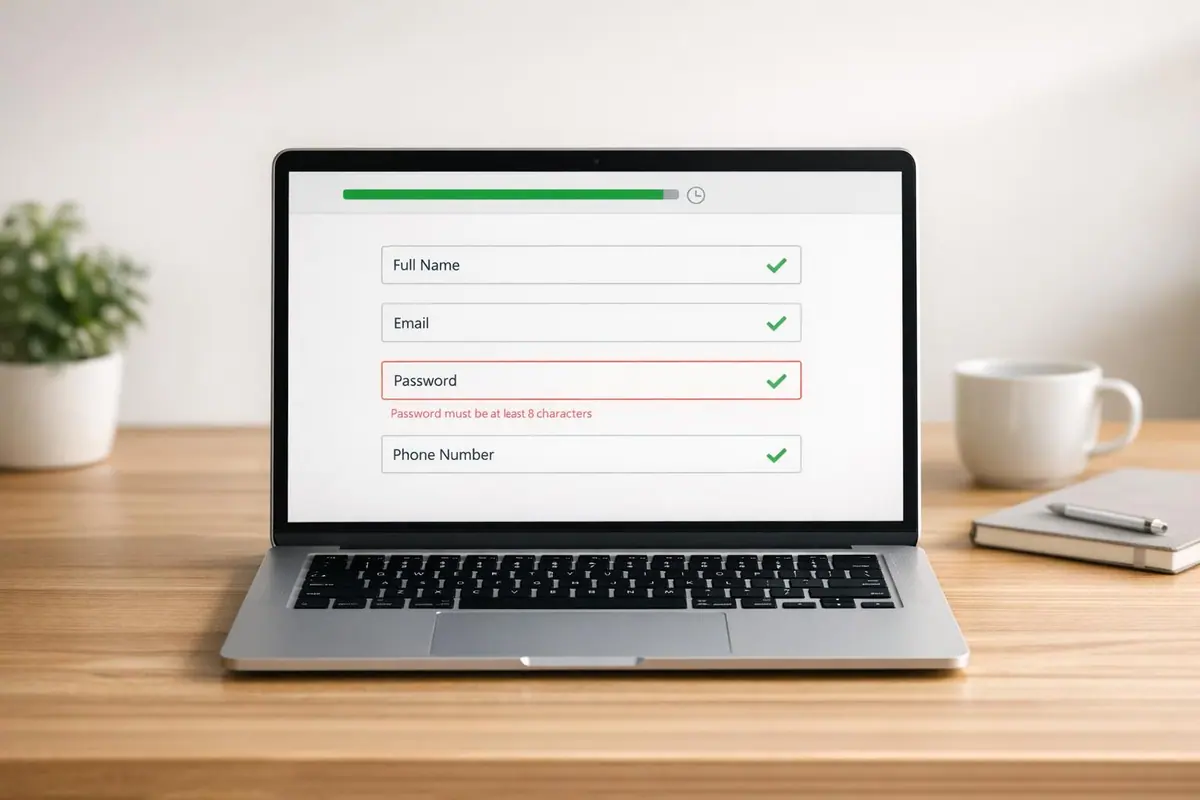
Form validation makes filling out forms easier, faster, and less frustrating. Inline validation, which checks for errors as you type, boosts success rates by 22%, reduces completion time by 42%, and increases user satisfaction by 31%. Yet, 31% of websites still lack this feature, leading to user frustration and higher abandonment rates.
Key takeaways:
- Inline validation: Fixes errors immediately, improving completion rates and user experience.
- Common issues: On-submit-only checks, vague error messages, and color-only indicators create confusion and exclude users.
- Benefits: Proper validation ensures accurate data, reduces user errors by 22%, and improves lead quality.
Effective validation methods, like real-time feedback, email/phone checks, and conditional logic, simplify forms and improve lead quality. Platforms like Reform make implementing these techniques easy, ensuring better outcomes for businesses and users alike.
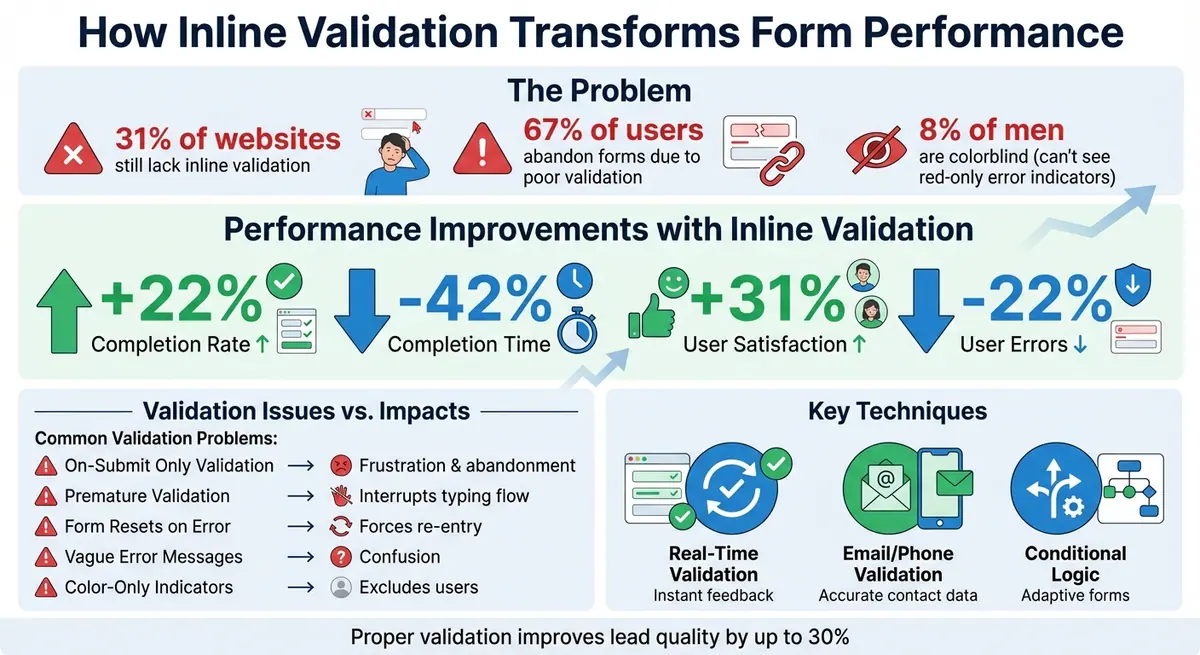
Impact of Inline Form Validation on User Experience and Conversion Rates
Inline Validation design best practices (with examples) - Vitaly Friedman

sbb-itb-5f36581
Problems Caused by Poor Form Validation
When forms lack proper validation, the results can be costly. Up to 67% of users abandon forms, leading to lost opportunities and revenue. Beyond the financial impact, such failures frustrate users and reduce the quality of collected data, ultimately undermining conversions.
High Error Rates Lead to User Frustration
One of the most common issues is showing errors only after a form is submitted. This approach leaves users feeling annoyed and often forces them to re-enter information. Forms that reset after errors only add to the frustration, increasing the mental effort required and pushing users to abandon the process altogether.
On the other hand, overly aggressive validation - flagging errors before users finish typing - can be just as disruptive. It interrupts their flow and creates unnecessary stress. As one usability test participant from the Baymard Institute expressed:
"Why are you telling me my email address is wrong, I haven't had a chance to fill it all out yet!" – Usability Test Participant, Baymard Institute
Accessibility issues further amplify these frustrations. For example, about 8% of men are colorblind, yet many forms rely solely on red borders to indicate errors. This approach excludes these users and often fails to work with screen readers, leaving a significant portion of users unable to navigate forms effectively.
These issues don’t just frustrate users - they also harm the quality of the data collected.
Poor Data Quality Hurts Lead Conversion
When forms don’t provide real-time feedback, users are more likely to submit incomplete or vague responses. This results in lower-quality data. For instance, users might submit invalid email addresses or leave out key details simply to move forward in the process.
For businesses, this creates a ripple effect. Marketing campaigns can’t reach invalid email addresses, incomplete phone numbers hinder follow-ups, and vague responses leave sales teams struggling to connect with prospects. This inefficiency wastes time, lowers conversion rates, and ultimately leads to missed revenue opportunities - all of which could have been avoided with better validation practices. Optimizing these touchpoints is a core pillar of a successful lead conversion playbook.
| Validation Issue | User Impact | Business Impact |
|---|---|---|
| On-Submit Only Validation | Frustration; higher cognitive load | Increased abandonment; slower form completion |
| Premature Validation | Interrupts typing flow; user irritation | Lower user satisfaction; perceived site issues |
| Form Resets on Error | Forces re-entry of data | Loss of momentum; significant drop in completion |
| Vague Error Messages | Confusion; unclear how to fix errors | More support requests; weak lead data |
| Color-Only Indicators | Excludes colorblind/blind users | Potential WCAG violations; lost conversions |
Key Validation Techniques That Improve Form Performance
Modern techniques in form validation are designed to fix errors as users type, making the process faster and more efficient.
Real-Time Validation Provides Instant Feedback
Real-time validation helps users spot and correct errors immediately, while their input is still fresh. This eliminates the frustration of revisiting field requirements or deciphering error messages after submitting a form. Edward Scott, Research Lead at Baymard Institute, highlights this advantage:
"A key benefit of inline validation is that it speeds up the error-recovery process because errors are corrected immediately".
To work effectively, real-time validation should display error messages as soon as a user finishes typing or exits a field. It should also recheck the input continuously, so errors disappear as soon as they’re resolved. For fields like ZIP codes or credit card numbers, which have a fixed length, validation can trigger automatically once the required number of characters is entered.
The next step in improving form accuracy is validating contact information.
Email and Phone Number Validation
Validating contact details ensures the data collected is accurate and actionable. For email addresses, validation should check both the format and the domain. In B2B forms, filtering out personal email domains like Gmail, Yahoo, or Hotmail can help prioritize professional leads. This can be done programmatically using regex patterns like /@([A-Za-z0-9-]+\.[A-Za-z0-9-.]+)/ to verify the domain portion. Clear error messages, such as "Please enter a valid work email", guide users toward the correct input.
Phone number validation is just as critical. It ensures numbers are complete and formatted correctly, reducing the risk of follow-up issues caused by incomplete or invalid entries.
Conditional Logic and Field-Specific Rules
Conditional logic enhances the user experience by adapting the form to the user’s answers in real time. For instance, if a user selects "Business" as their account type, the form can dynamically display fields for details like company name and employee count, while hiding fields meant for personal accounts. Validation is then applied only to the visible fields, streamlining the process and keeping things simple for the user by reducing the cognitive load of long forms.
This targeted approach not only makes forms easier to fill out but also ensures that users aren’t overwhelmed with unnecessary fields.
Benefits of Proper Form Validation
When done right, form validation can transform the user experience, improving completion rates, data accuracy, and overall satisfaction. By addressing errors in real-time, businesses can streamline processes and make forms more intuitive, ultimately boosting key performance indicators.
Higher Completion Rates and Reduced Abandonment
Inline validation has a direct impact on completion rates, increasing them by 22%. Why? Because users can fix mistakes immediately while their focus is still on the task, rather than being interrupted by error messages after hitting submit. This seamless correction process keeps users in "completion mode", reducing frustration.
Additionally, delaying error messages until a user exits a field - and clearing them as soon as corrections are made - helps maintain momentum. This approach minimizes backtracking and keeps users engaged. Forms with effective validation also cut completion times by 42%, making the process quicker and less stressful. Features like automatic cursor placement on the first invalid field after submission further enhance recovery time, ensuring users can fix issues without hassle.
Improved Data Accuracy and Lead Quality
Accurate data is the backbone of effective business operations. With proper form validation, errors in fields like email addresses or phone numbers are caught early, reducing the risk of bad data entering your system. Inline validation decreases user errors by 22%, ensuring higher-quality leads that are ready for follow-up.
Beyond basic validation, tools like conditional logic and lead enrichment can refine the process even further. Conditional logic helps prioritize high-value leads by routing them based on their input, while lead enrichment gathers additional context without overwhelming users with extra fields. This combination not only improves data quality but also ensures sales teams focus their efforts on leads most likely to convert.
Enhanced User Experience and Satisfaction
Users appreciate forms that respect their time and effort. Proper validation techniques can increase user satisfaction by 31%. Real-time feedback tools, such as character counters or green checkmarks, provide reassurance and a sense of progress, reducing anxiety about potential errors.
For accessibility, multi-sensory indicators - like combining icons, text, and color changes - make errors more noticeable and understandable for everyone, including the 8% of men and 0.5% of women who experience color blindness. This thoughtful approach fosters trust and inclusivity, encouraging users to complete the form without hesitation.
| Validation Metric | Impact of Inline Validation |
|---|---|
| Completion Rate | +22% |
| Completion Time | -42% |
| User Satisfaction | +31% |
| User Errors | -22% |
How Reform Handles Validation
Reform is designed to catch errors early, block spam, and make navigating forms easier for users. With its no-code setup, anyone can implement advanced validation rules - like email syntax checks and domain verification - without needing to code. This makes it ideal for marketing teams, sales operations, and small business owners who need reliable forms without technical complexity. Let’s dive into how Reform fine-tunes validation with email checks, conditional logic, and multi-step forms.
Email Validation and Spam Prevention
Reform’s email validation ensures data quality by checking syntax and deliverability while blocking disposable or temporary addresses. By filtering out addresses often used by spammers, the system ensures only genuine leads make it to your CRM. This process can boost lead conversion rates by up to 30%, as shown in form optimization studies. Validation happens as soon as a user exits the email field, providing instant feedback without interrupting their flow.
The platform also combats spam with tools like honeypot fields - invisible traps designed to catch bots. Unlike CAPTCHAs, which can frustrate users, this method works silently in the background, keeping automated submissions out while maintaining a smooth experience for legitimate visitors. The result? Cleaner, more reliable data for your CRM.
Conditional Routing and Real-Time Analytics
Reform uses conditional logic to adapt forms based on user input, making the experience more relevant and less overwhelming. For instance, if a respondent shows interest in enterprise solutions, the form dynamically reveals questions about company size and budget while skipping sections meant for individual plans. This approach can cut form length by up to 50% in multi-step setups, reducing unnecessary questions that might cause users to abandon the form.
Additionally, real-time analytics track user interactions, highlighting where errors occur or where users drop off. This data helps you fine-tune validation rules and improve the overall form experience. Combined with targeted validation, Reform’s dynamic design ensures a smoother journey for users.
Multi-Step Forms Reduce Abandonment
Long forms can feel overwhelming, but Reform’s multi-step forms solve this by breaking them into smaller, manageable sections. Validation occurs at each step, so users catch errors immediately, rather than scrolling back to find and fix mistakes. This structure lowers cognitive load and provides a clear sense of progress, helping users stay engaged.
Accessibility is a priority, too. With ARIA labels, error messages are screen reader-friendly, and multi-sensory indicators - like color, icons, and text - ensure users with color vision deficiencies can easily understand what needs correction. This thoughtful design not only makes error handling intuitive but also helps guide users through the process without frustration.
Using Analytics to Measure Validation Performance
Tracking validation performance metrics is essential to uncover areas for improvement and confirm how validation impacts conversions. Analytics can highlight user pain points, pinpoint fields with high error rates, and reveal how validation methods influence submission speed.
Track Key Performance Metrics
Start by keeping an eye on error rates - the percentage of submissions that trigger validation warnings. Breaking this down by field helps you identify problematic areas. For instance, if one field consistently shows a high error rate, it might indicate unclear formatting instructions.
Another metric to watch is completion time, which measures how long users take to fill out and submit a form. Real-time validation can reduce this time by 42% compared to after-submit validation, making it a key factor in user experience. If short forms are taking users more than 60 seconds to complete, something might be slowing them down; in such cases, multi-step form design can often improve the flow. Also, segment this data by device type - mobile users often need more forgiving validation rules than desktop users.
Abandonment rates are another critical metric, showing where users drop off. Tools like Reform's real-time analytics can pinpoint the exact step or field where users give up. Additionally, track field-specific engagement metrics, such as time spent on each field and the number of edits made. A high number of edits can indicate that users find the validation rules confusing. Monitoring these metrics helps improve both user experience and the quality of leads.
Refine Validation Rules Based on Data
When a specific field shows high abandonment rates, consider A/B testing less restrictive rules, improving error messages, or even removing unnecessary fields altogether. For example, if users struggle with phone number formatting, you could experiment with accepting multiple formats - like numbers with or without dashes, parentheses, or country codes - before enforcing stricter patterns. Starting with flexible rules and tightening them based on data can help reduce friction without sacrificing conversions.
Validation triggers also play a role in user experience. Compare "on-blur" triggers (which validate fields as users leave them) with "on-submit" triggers to see which approach works better for your audience. Reform's analytics can measure how these methods affect completion rates. Regularly review error logs to identify common mistakes - if a particular rule trips up many users, think about rewriting the error message or adjusting the requirement to make it more user-friendly.
Finally, eliminate unnecessary fields if they create friction. For instance, instead of asking users to manually input details like company size, use lead enrichment tools to gather that information automatically. Making these adjustments based on data can enhance form performance and keep users engaged.
Conclusion
Validation can dramatically improve form performance by minimizing user frustration. Inline validation, for instance, has been shown to increase success rates, reduce completion times, and improve overall user satisfaction. These enhancements often lead to higher conversion rates and better-quality leads for your business.
The key to effective validation is making it supportive, not restrictive. Real-time feedback helps users catch mistakes as they happen, while positive cues - like checkmarks - boost confidence. Clear, actionable error messages guide users toward completing forms successfully. When validation is done right, users navigate forms more quickly and with less hassle, leading to a smoother experience overall.
Platforms like Reform take these principles to heart. With features like email validation, spam prevention, conditional routing, and real-time analytics, Reform ensures forms are both user-friendly and efficient. Its multi-step forms and lead enrichment tools further enhance the experience by removing unnecessary fields and streamlining the process, reducing abandonment rates and improving data accuracy.
FAQs
When should validation appear while I’m filling out a form?
When users fill out a form, validation should happen as they go. This approach improves the experience and reduces errors. Inline validation, which gives real-time feedback, works best because it lets users fix mistakes right away. Showing errors either during data entry or right after a field is completed helps avoid frustration and makes the process smoother. The result? Happier users and better-performing forms.
How can I make error messages more accessible than color alone?
To make interfaces more accessible, combine clear, actionable error messages with visual cues like icons. Ensure form fields have proper labels and are linked correctly, allowing users to understand their purpose. Support keyboard navigation by managing focus effectively - for example, automatically setting focus on the first error after a form submission. This method ensures that all users, including those with disabilities, can identify and resolve issues without depending only on color cues.
Which fields should be validated strictly vs. flexibly?
Strict validation plays a key role when dealing with critical fields such as email addresses, phone numbers, and other required inputs. It ensures that the data entered is accurate and secure. Implementing real-time validation, paired with clear and actionable error messages, can significantly enhance the user experience by allowing users to fix mistakes as they go.
On the other hand, flexible validation is better suited for optional or less critical fields. These fields don’t demand immediate checks, giving users the freedom to review and correct their input later if needed. Striking this balance between strict and flexible validation helps maintain both usability and data quality without frustrating the user.
Related Blog Posts
Get new content delivered straight to your inbox

The Response
Updates on the Reform platform, insights on optimizing conversion rates, and tips to craft forms that convert.




Drive real results with form optimizations
Tested across hundreds of experiments, our strategies deliver a 215% lift in qualified leads for B2B and SaaS companies.
