
.webp)
How to Write Data Sharing Disclosures Under CCPA


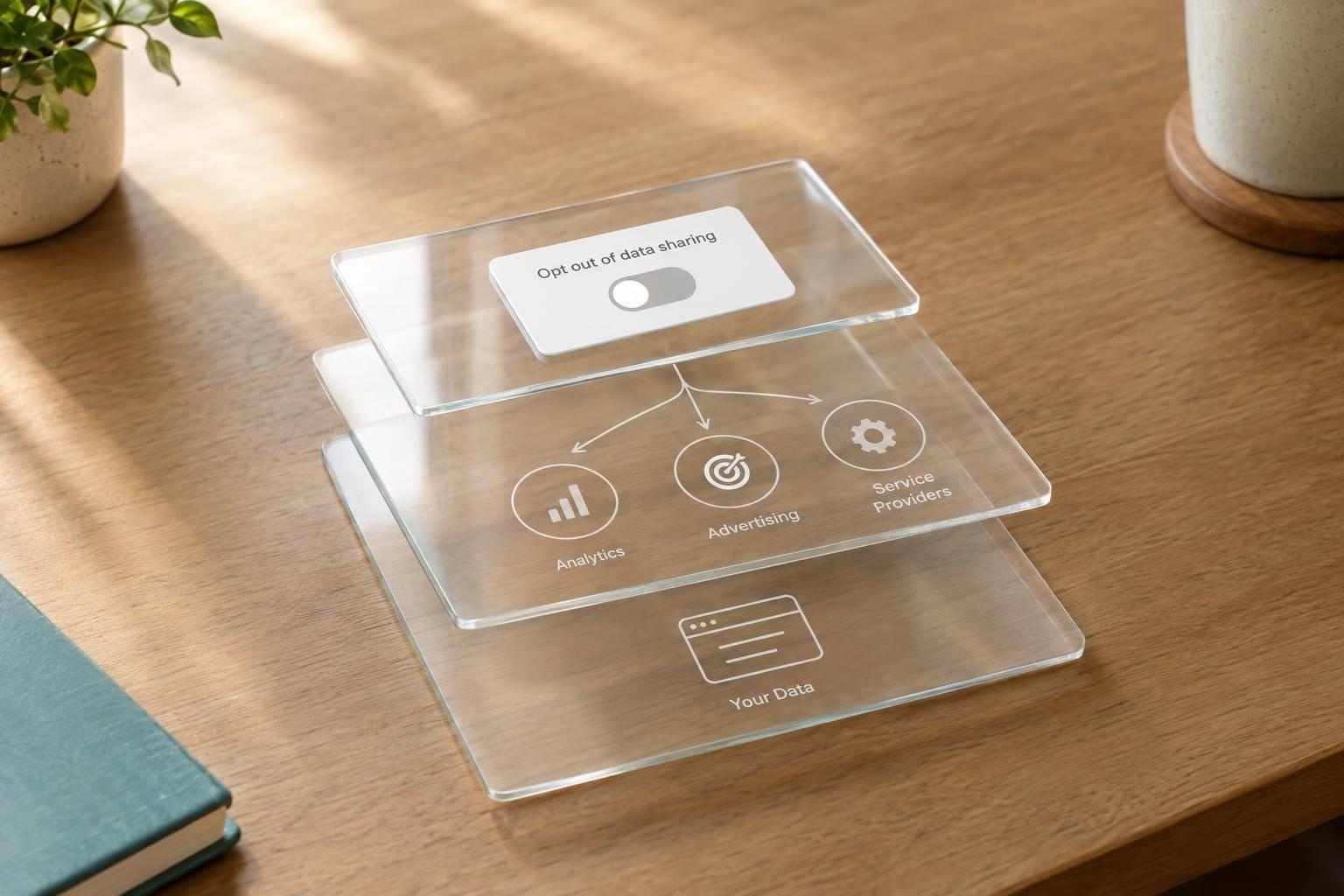
I start with where the data goes - not a disclosure template. Your CCPA Notice at Collection should explain what you collect, why, whether you sell or share it, and how long you keep it, with required links available <u>before collection begins</u>.
I use four steps to turn that into clear disclosure language:
- Map the data flow. Check form fields, page-load tracking, Reform integrations, downstream tools, and retained copies.
- Classify each transfer. Separate restricted vendor processing from sales and sharing for cross-context behavioral advertising. A vendor label alone isn’t enough.
- Write and place the notices. Describe actual data, recipients, and purposes. Keep the collection notice aligned with the privacy policy, which covers the prior 12 months.
- Test and review. Check contracts, retention, deletion, and opt-out controls - including Global Privacy Control - and update disclosures when workflows change.
An unsubscribe link isn’t a CCPA sale/sharing opt-out. I’d have counsel check uncertain classifications before publishing; this guide is general information, not legal advice.
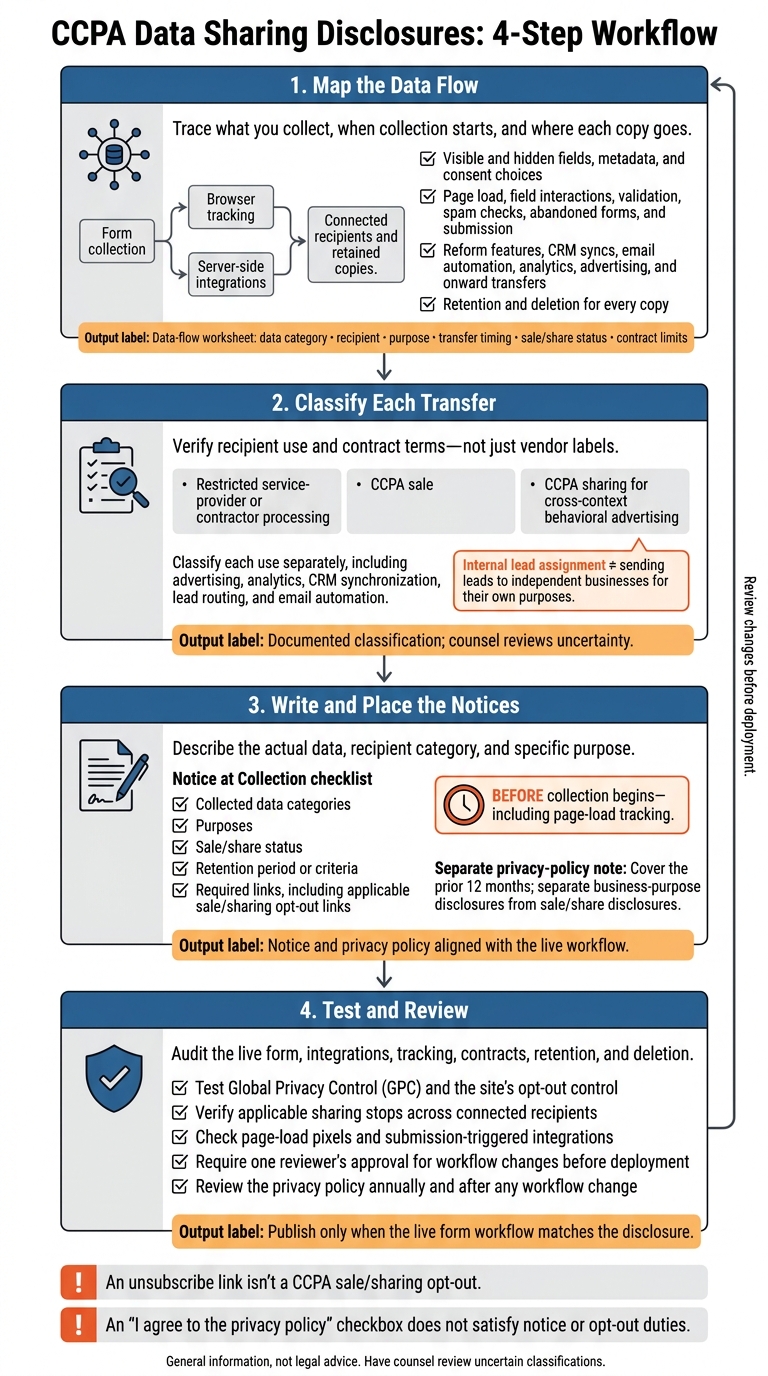
CCPA Data Sharing Disclosures: 4-Step Workflow
What you should know about CCPA and CPRA
sbb-itb-5f36581
Step 1: Map Every Form Data Flow
Before writing disclosures, map what each form collects, when collection starts, and which systems receive the data. Include visible and hidden fields, plus metadata such as campaign parameters, referring URLs, IP addresses, cookies, session IDs, device information, and consent choices.
Don’t stop at completed submissions. Check field interactions, validation requests, spam checks, and abandoned-form tracking. Use the map to turn the system’s actual behavior into disclosure language.
Create a Data-Flow Worksheet
Create one worksheet for each form version, and record its URL, owner, and verification date. Add one row per field, event, or transfer. Include columns for:
- Personal-information category and sensitive-information status
- Recipient and named recipient
- Purpose, transfer method, and timing
- Sale/share status
- Contract limits on use, disclosure, combination, and deletion
This lets you match each disclosure line to a specific recipient and purpose.
Keep submission transfers separate from browser tracking and advertising events. Use browser network tools to inspect requests at page load, during field interactions, when users select consent options, and at submission. Test abandoned forms and rejected submissions, too.
Check server-side integrations separately. Browser inspection alone won’t show downstream CRM syncs or email automation.
Trace Reform and downstream tools
For Reform, check which collection, validation, spam prevention, enrichment, analytics, routing, and notification features are enabled. Follow each enabled path into connected tools, including onward CRM syncs, email sends, sales inbox notifications, and advertising events.
Record whether each recipient gets the full submission, selected fields, or added enrichment data. A feature label does not determine CCPA status. Verify the configuration, the recipient’s use of the data, and the applicable contract.
Track retention for every copy, including the Reform response, CRM records, email systems, analytics and ad platforms, inboxes, exports, backups, webhook logs, and failed queues. Confirm retention periods or criteria against settings, contracts, and vendor documentation. Record how deletion reaches each destination.
Flag unresolved recipients, uses, and retention rules before drafting. In the next step, use the worksheet to draft one disclosure per workflow.
Step 2: Write Disclosures for Each Marketing Workflow
Draft each notice line from your worksheet, one workflow at a time. Use the samples below as templates for your actual workflows. Have counsel classify each recipient before you draft. Recipient categories describe roles, not just labels.
Workflow Information transferred Recipient category Purpose Sample disclosure wording Classification question for counsel Advertising platforms Identifiers, audience-matching data, device information Advertising platforms Cross-context behavioral advertising and measurement We share identifiers and device information with advertising platforms for audience matching, relevant ads, and campaign measurement. Is this use cross-context behavioral advertising? CRM synchronization Contact details, company information, lead status, form history CRM providers CRM and sales follow-up We disclose contact details, company information, lead status, and form history to CRM providers to manage inquiries and sales follow-up. Do contract terms and practices meet service-provider or contractor restrictions? Lead routing tools Qualification responses, location, inquiry details, form history Routing providers or independent businesses Lead assignment and team notification We send form responses to routing providers to assign your inquiry to the right team member. Do independent businesses receive leads for their own purposes? Analytics vendors Device information, form interactions, submission events, clickstream data Analytics providers Measure form performance and improve site usability We disclose device and interaction data to analytics providers to measure form performance and improve site usability. Do data combination, independent use, and de-identification practices meet CCPA requirements? Email or marketing automation tools Contact details, communication preferences Email and marketing automation providers Deliver resources, manage subscriptions, send follow-up, and measure campaigns We send contact details and preferences to email providers to deliver resources, manage subscriptions, send follow-up, and measure campaigns. Do all activities, including tracking, meet service-provider restrictions?
Advertising and Analytics Disclosures
Keep advertising and analytics wording separate - even if the same recipient handles both. Specify audience matching for advertising, and form interactions and submission events for analytics. Classify each use separately before drafting its disclosure.
CRM Sync and Lead Routing Disclosures
Assigning a lead internally is not the same as sending it to an independent organization. Don't describe outside lead sharing as internal routing. If outside businesses receive contact details or qualification responses for their own marketing, state that recipient category and purpose explicitly. Have counsel classify the transfer separately.
Email and Marketing Automation Disclosures
Separate requested-resource delivery from subscriptions and marketing follow-up. Include campaign measurement only when it happens, and explain tracking based on its purpose.
Unsubscribe links do not satisfy CCPA opt-out rights. Where applicable, provide a separate Do Not Sell or Share My Personal Information mechanism.
Place the drafted lines in the notice before collection.
Step 3: Draft and Place Your Notices
Use the mapped workflow to write each notice line in plain language.
State the Data, Recipient, and Purpose
Use the worksheet from Step 2 to describe each actual data flow: the data, recipient category, and specific purpose. Choose direct verbs such as send, store, and route. Name the data rather than using a blanket “personal information” label. Call a recipient a service provider only when verified contracts and processing practices support that status.
A workflow sentence isn't enough. Add the collected data categories, purposes, sale/share status, retention period or criteria, and required links. Make sure the retention wording matches your actual settings. Don't promise a deletion deadline you can't support. Once these required details are in place, replace any vague claims.
Replace Vague or Misleading Claims
Describe recipients by function, such as CRM providers, advertising networks, or email vendors. Don't make blanket no-sharing claims when vendors receive personal information. Separate ordinary disclosure from CCPA-defined sharing for cross-context behavioral advertising. Saying you don't sell data for money doesn't rule out a CCPA sale or sharing.
In the privacy policy, cover the prior 12 months and separate business-purpose disclosures from sale/share disclosures. State clearly if no sale or sharing occurred. Identify the relevant recipient categories and purposes, and describe actual transfers directly. Then place the corrected notice where users can see it before collection starts.
Make Notices Available Before Collection
Place an accessible notice or clearly labeled direct link where users can see it. For multi-step forms, put the notice before the first data collection point - including page-load tracking. Link to the full privacy policy, include required sale-or-sharing opt-out links and controls where applicable, and honor browser- or platform-level opt-out signals.
Keep links mobile-friendly and accessible; an “I agree to the privacy policy” checkbox does not satisfy notice or opt-out duties.
Step 4: Check and Update Your Disclosures
Check Disclosures Before Publication
After drafting the notice, check the live workflow before publishing. Audit the form, integrations, and tracking - not just the notice. Compare your disclosures with form fields, integration settings, webhooks, tracking scripts, and vendor contracts. Make sure the data categories, recipients, purposes, and connected systems match the published notice.
Check that both contracts and actual use support each service-provider classification. Refer uncertain classifications to counsel before publication. Use the same data-flow map as your audit checklist.
Next, test opt-outs across the full workflow to confirm that disclosed sharing stops when required. Enable Global Privacy Control (GPC), load the form, and check that the signal suppresses applicable downstream sharing across connected tools. Repeat the test with the site’s opt-out control. Verify that the restriction reaches connected recipients - not just the on-screen confirmation. Check both page-load pixels and submission-triggered integrations.
Review Data-Flow Changes Before Deployment
Before launch, require one reviewer’s approval for changes so the notice stays aligned with the workflow. Assign one owner to approve changes to fields, enrichment, scripts, routing, and recipients before deployment. Keep the data-flow map, settings review, contracts, and test results together for sign-off.
Review the privacy policy annually and after any workflow change. Update affected disclosures whenever data sharing changes. Before collecting additional data categories or using existing information for new purposes, assess notice requirements and revise the affected disclosures. Have counsel determine whether additional consent is required, including when a change in a recipient’s use introduces sale or sharing.
Conclusion: Keep Disclosures Matched to Data Flows
Write from the data-flow map, not a generic template. Trace every collection and transfer point, classify each recipient, and explain what data goes where and why. Provide the Notice at Collection before collecting data. Include categories, purposes, retention, and required links. The notice is complete only when its wording matches the form workflow.
After launch, keep the disclosure aligned with how the live form works. Support every claim with documented practices, contracts, controls, and review. Marketing can draft the copy; privacy, engineering, and procurement should check the uses, connections, and terms. Publish only when the live form workflow matches the disclosure.
FAQs
Does the CCPA apply to my business?
The CCPA applies to for-profit businesses that collect California residents’ personal information and meet at least one of these thresholds:
- Annual gross revenue over $25 million
- Personal information handled for 100,000 or more California residents or households
- At least 50% of annual revenue from selling or sharing personal information
These businesses must provide clear privacy disclosures at or before collection. They must also give consumers ways to exercise their rights, including opting out of the sale or sharing of their personal information.
Can I use one disclosure for multiple forms?
Yes, but only if the forms collect the same data, use it for the same purposes, and follow the same sharing practices.
CCPA requires a notice at or near the point of collection that explains which categories of personal information you collect and why you use them. Each notice must reflect how data from that form is collected, used, and shared. A form used for ad retargeting needs a different notice than one used only for internal sales follow-up.
What if a vendor cannot honor opt-outs?
If a vendor can’t honor opt-outs, they likely don’t qualify as a CCPA service provider. Check your data processing agreements: they must prohibit selling or sharing personal information and require ways to honor opt-outs.
If the vendor doesn’t meet these requirements, reclassify the transfer as a sale or share and update your disclosures. Consider limiting or stopping the data flow to prevent processing that isn’t permitted.
Related Blog Posts
Get new content delivered straight to your inbox

The Response
Updates on the Reform platform, insights on optimizing conversion rates, and tips to craft forms that convert.


Drive real results with form optimizations
Tested across hundreds of experiments, our strategies deliver a 215% lift in qualified leads for B2B and SaaS companies.
