
.webp)
Historical Data Audit Guide for AI Lead Scoring


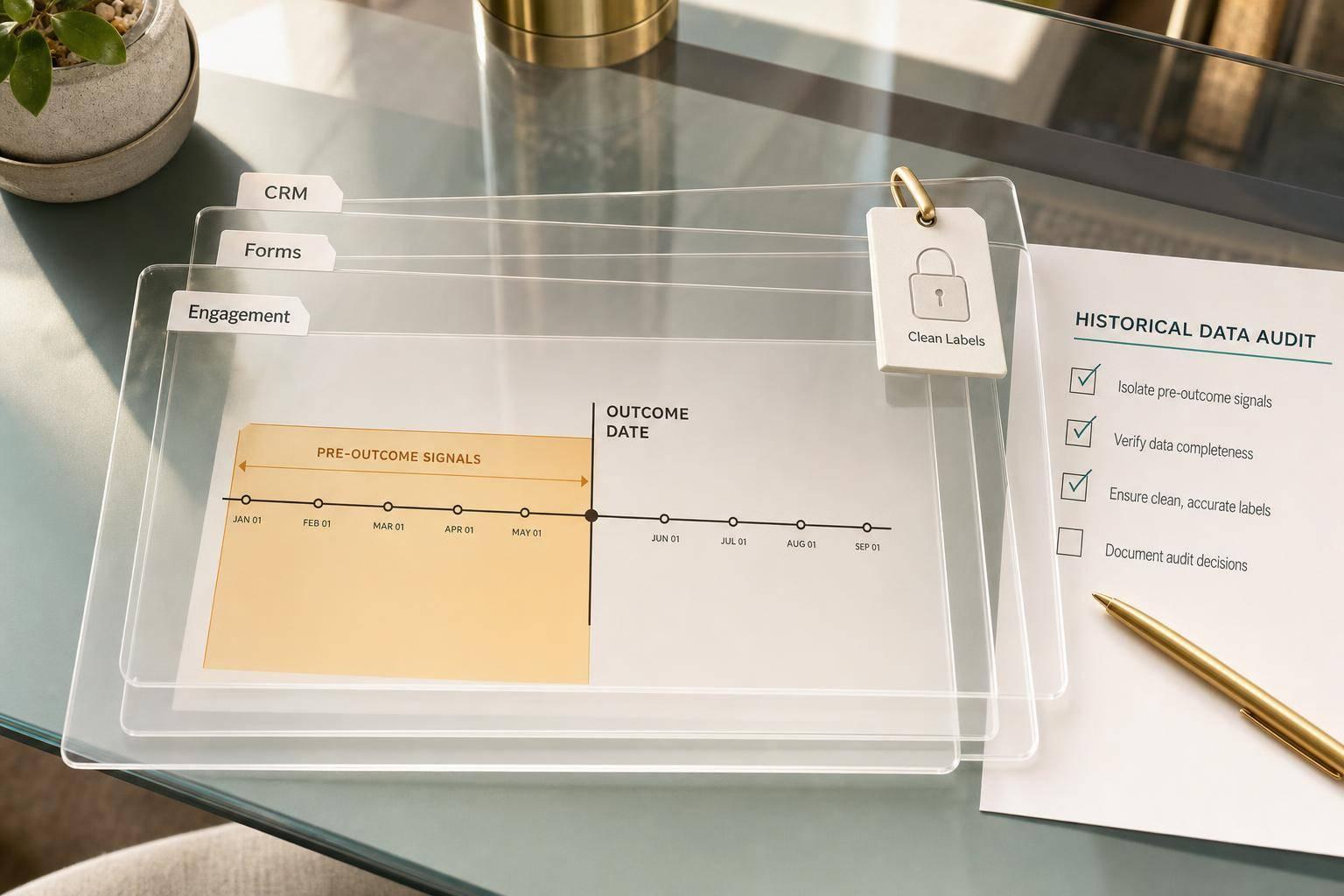
If your past lead data is messy, your AI score will be messy too. Before I train any lead scoring model, I first check four things: the target outcome, source fields, label rules, and time-based data quality.
Here’s the short version:
- I pick one prediction target first, such as SQL, opportunity creation, or Closed Won
- I limit the audit to a clear segment and date range, often the last 12 to 24 months
- I map every field from forms, CRM, ads, and marketing tools into one dataset
- I remove fields that would leak future info, like
closed_won_date - I check for missing values, junk inputs, stale records, broken joins, and spam
- I review stage history, timestamps, owner data, and conversion windows
- I split data by time and keep the most recent 3 to 6 months for backtesting
- I document every rule, filter, and field change so the dataset can be rebuilt later
In plain English: the job is to make sure the model learns from what sales and marketing knew at the time, not from bad labels or future events.
A few numbers matter early:
- Won rates in B2B datasets are often just 1% to 5%
- Email fields should usually stay under 10% missing and 3% invalid
- Phone data can be much weaker, with up to 40% missing
- A stale field often means 12 to 18 months without an update
The main idea: I don’t start with modeling. I start by checking whether the history is clean enough to trust.
This guide walks through that audit from start to finish, without turning it into a data science project before the data is ready.
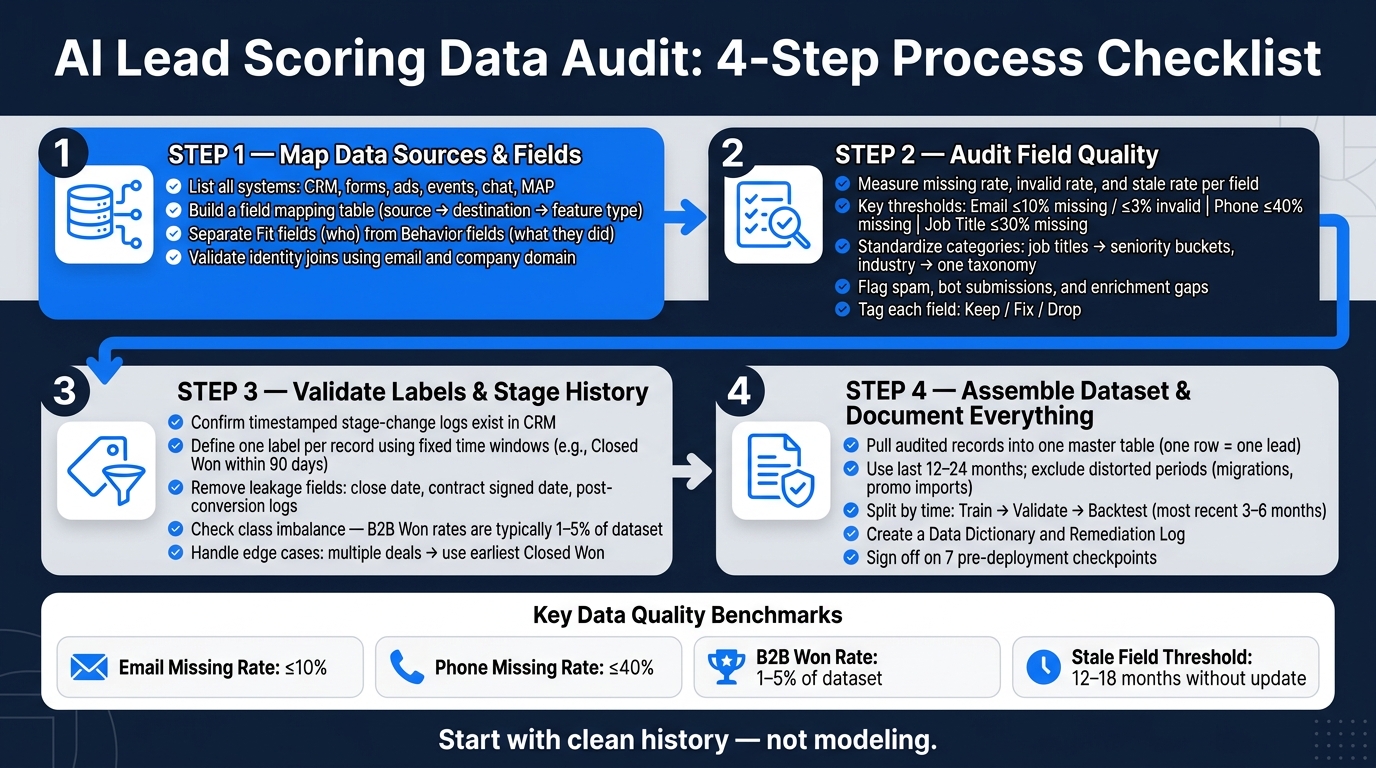
AI Lead Scoring Data Audit: 4-Step Process Checklist
Step 1: List data sources and map every field
Identify form, CRM, and engagement sources
Start by listing every system that touches a lead record. That includes every tool that writes data into it: forms, CRM, marketing automation, ads, events, chat, and product usage.
Your CRM is the hub. It stores lifecycle stages, pipeline history, owner assignments, and the conversion outcomes your model will use as labels. Marketing automation platforms track email engagement and nurture sequences, then write scores or last-touch fields back into the CRM. Ad platforms add campaign, channel, and cost data through UTM parameters. Event tools log attendance and Q&A activity. Chat tools track routing decisions and demo requests.
Forms deserve extra attention because they often create the first record. Use standardized field names, validation, spam filtering, and CRM integrations to cut down cleanup before training. Reform supports this with native integrations and webhooks that send form submissions into CRM and marketing automation with a consistent field schema across campaigns.
Build a field mapping table from source to model
Once your source list is done, build a field mapping table. Do this now so later quality checks point to the right inputs. The goal is simple: trace every field from where it starts to where the model will read it.
Each row should include:
- the source system
- the raw field name
- the destination CRM property
- the feature type
Feature type is the column that matters most. Fit fields describe who the lead is, like job title, company size, industry, and budget range in USD. Behavior fields describe what the lead did, like email opens, webinar attendance, form timeline answers, and ad campaign type.
Keep fit and behavior separate. Behavior fields get stale over time, so mixing them with static traits can muddy the picture. Also, map only fields that were available before the outcome date.
| Source System | Source Field Name | Destination Property | Feature Type |
|---|---|---|---|
| Reform | email |
crm_contact_email |
Identity |
| Reform | company_name |
crm_account_name |
Fit |
| Reform | job_title |
crm_contact_title_normalized |
Fit |
| Reform | annual_budget_usd_range |
lead_budget_range_usd |
Fit |
| Reform | timeline_to_purchase |
lead_intent_timeline_category |
Behavior |
| Marketing automation platform | last_email_open_date |
contact_last_email_open_date |
Behavior |
| CRM | opportunity_stage |
opp_stage_current |
Label |
| Google Ads | campaign_name |
acquisition_campaign_name |
Behavior |
Flag any field that gets filled in after a lead is scored, such as closed_won_date or sales notes, and leave it out of training features. That’s where data leakage creeps in.
Validate identity resolution across systems
A field mapping table is only useful if records join the right way across systems. Use email as the lead-level join key. For account-level joins, use company domain or CRM account ID.
The biggest problems here are duplicates and broken joins. A broken join can create a false training row, which throws off the dataset fast. Before you pull training data, audit merged contacts in the CRM and make sure engagement history from the non-surviving record moved over to the surviving one.
Pick one system, usually the CRM, as the system of record for each field. If the same field appears in both marketing automation and the CRM, use the CRM as the source of truth. Write that rule into your mapping table so the same logic is used when you assemble the training dataset in Step 4.
With sources and joins mapped, the next job is to audit field quality, completeness, and consistency.
sbb-itb-5f36581
Step 2: Check field quality, completeness, and consistency
Once your field mapping table is set, the next step is figuring out which fields are solid enough to use for training. A neat map does not mean the data itself is clean. It just shows you where to inspect.
Measure missing, invalid, and stale values
For each critical field, calculate three metrics: missing rate, invalid rate, and stale rate.
- Missing rate shows how many records have no value at all.
- Invalid rate counts records that fail a rule or format check, like an email address without a domain or a phone number filled with repeated zeros.
- Stale rate marks fields that haven’t been updated in 12–18 months. This matters most for fields that change often, such as role and employee count.
Use the thresholds below to decide what can stay in the model. You can adjust them based on your data volume and what your model needs.
| Field | Common Error Types | Target Thresholds (Missing / Invalid) |
|---|---|---|
| Invalid format, disposable domains, role accounts | ≤10% missing, ≤3% invalid | |
| Phone | Missing country code, obvious fakes, wrong length | ≤40% missing, ≤20% invalid |
| Job title | Generic values ("manager"), invalid values, missing | ≤30% missing, ≤10% junk |
| Company name | Personal names, URLs, "N/A", blank | ≤15% missing, ≤10% invalid |
| Industry | Custom labels, values outside taxonomy, missing | ≤50% missing, ≤10% outside taxonomy |
| Employee count | Text ranges, zero values, stale figures | ≤60% missing, ≤5% outliers |
| Country / State | Free-text variants, invalid abbreviations | ≤15% missing, ≤10% invalid |
After that, tag each field as keep, fix, or drop. Write down why in your audit log. You’ll want that record later when someone asks why a field was used - or left out.
Standardize categories and timestamps
Raw category values almost never stay consistent over time. Job titles are a classic mess: "VP Marketing", "VP of Marketing", and "Vice President, Marketing" may all mean the same thing, but a model won’t treat them that way on its own.
Industry fields can get even messier. "SaaS", "Software", and "Cloud software" may point to the same sector, yet they’ll show up as different labels unless you clean them up.
The fix is to create a canonical mapping table for each categorical field. For job titles, map raw values into seniority buckets such as Individual Contributor, Manager, Director, VP, and C-suite. For industry, choose one taxonomy - like NAICS or a simpler internal list - and map every variation to it. For U.S. states, enforce two-letter USPS codes like CA, NY, and TX, then convert common variants such as "California" or "Calif." to the right code. For lifecycle stages, define one internal sequence and remap any old labels to match it.
Timestamps need the same kind of discipline. Pick one internal timestamp format and use it everywhere: UTC in ISO 8601 format (YYYY-MM-DDTHH:MM:SSZ) for fields like created_at, stage_change_date, and last_updated_at. That helps you avoid quiet errors in duration calculations and windowing logic.
Flag spam, enrichment gaps, and known anomalies
Before you lock in the training set, do one pass just for junk. Look for names with random strings like "asdf" or "qwerty", emails from known disposable domains, phone numbers with repeated digits, and bursts of submissions where the same IP address creates multiple records within seconds. Those are common bot and spam signals.
Assign each lead a junk score based on those checks, then exclude records above your cutoff from training.
Enrichment gaps are a different issue. Measure enrichment coverage for each field by checking what share of leads in your training window has a value for industry, employee count, or HQ country. If coverage drops hard before a certain point in time - for example, "70% of leads from the last 12 months have employee count, but only 35% before 2022" - you’re looking at a shift in the data that can throw the model off.
In that case, you have a few options:
- Enrich older records after the fact
- Treat missing data as an explicit "unknown" category
- Exclude those records from v1 training and bring them back once enrichment is stable
It also helps to tighten form-side validation and enrichment so future records come in cleaner.
Last, flag time periods affected by one-off events, like a purchased list import, a limited-time promotion, or a major pricing change. Add markers such as is_purchased_list or campaign_type = promo, then decide whether those records should be excluded or given less weight. If you leave them mixed in with everything else, they can skew the training set and bend conversion rates for certain segments.
Once field quality is in good shape, audit stage history and conversion labels.
Step 3: Validate stage history, labels, and date windows
Review lifecycle and opportunity stage history
Stage history turns raw CRM activity into labels your model can learn from.
Start by checking that these fields are filled in:
- lead status
- lifecycle stage
- opportunity stage
- created date
- last activity date
- close date
- owner and assignee
That last part matters more than it may seem. SDR-to-AE handoffs often signal a real funnel step, so missing owner data can blur what actually happened.
Next, confirm how stage changes are stored. If your CRM keeps timestamped stage-change events - for example, a move from MQL to SQL on 07/12/2024 - you can rebuild time-based features such as days from first touch to opportunity creation. If the CRM just overwrites the current stage and keeps no event log, that history is gone. And once it's gone, time-based features become shaky at best. You need history logs to rebuild deal movement over time.
Do a fast completeness check too. Look at:
- the share of Closed Won and Closed Lost deals with a valid close date
- the percentage of leads with no lifecycle stage
- any records missing close dates
If a record has no close date, leave it out of label creation.
Then look for logic conflicts. Say a lead is marked Disqualified and later ends up attached to a Closed Won deal. That usually points to messy or missing history, not some pattern you want the model to copy.
Define conversion labels with clear rules
Once stage history looks clean enough, turn CRM outcomes into labels the model can train on.
The goal is simple: create one label per record using the same window rules for the segment you set in the audit scope.
Define labels using CRM outcomes inside a fixed time window, measured from lead creation or the first qualifying event:
| Lifecycle / Deal Stage Pattern | Time Window (days) | Training Label |
|---|---|---|
| Opportunity reaches Closed Won | 90 | Won |
| Opportunity reaches Closed Lost, no Closed Won | 90 | Lost |
| Lead status is Disqualified or Spam, no opportunity | 30 | Disqualified |
| Lead stays in MQL/SQL/Nurturing, no close outcome | 120 | No conversion within window |
Your date window should match your actual sales cycle. For example, if 80% of your SMB deals close within 45 days, a 60-day window will catch most true wins without mixing in deals that are still in progress. Enterprise segments with 120+ day cycles may need a 90- to 180-day window instead.
Edge cases need hard rules. No guesswork.
If a lead has more than one deal, use the earliest Closed Won as the conversion event. Leave renewals and expansions out of the first-pass labels. They should sit in separate models. And if one opportunity has multiple contacts, decide whether the label goes to every primary contact or only the designated owner. Either path can work. What matters is sticking with ONE rule every time.
Write all of these decisions in your label definition document so anyone can reproduce the logic later.
Check for leakage, imbalance, and sample size problems
Label leakage happens when your features or labels include facts that would not have existed at the time the model was supposed to score the lead. That can quietly wreck the whole setup.
Fields like close date, Closed Won/Lost stage flags, contract signed date, or post-conversion activity logs must stay out of training features. They belong only in labels.
Set a clear prediction timestamp for each record. That is the exact moment the model would have scored the lead in production. Then verify that every feature reflects only what was known up to that point. If the model’s top features include direct outcome fields, or your validation scores look suspiciously high, leakage is probably the reason.
Class imbalance is the other big issue. In B2B funnels, only a small share of leads turn into Closed Won. In many cases, Won records make up less than 1–5% of the dataset. Check the label mix before training. If the positive class is too small for a stable split, expand the date range or widen the conversion definition to include key product-qualified events.
Also inspect your Disqualified and No Conversion groups for junk imports. Large batches of leads created on the same date, with no activity and filler data like test@test.com or company name N/A, can swell those classes without reflecting actual go-to-market behavior. Pull those records out, or move them into a separate category.
Once these label checks are done, you’re ready to build the master training set in Step 4.
Step 4: Assemble the training dataset and document audit decisions
Build a clean master dataset and holdout period
Once the labels clear audit, pull the audited records into one master table. Each row should map to one lead. The columns should include identity fields, firmographic attributes, behavioral signals, lifecycle stage timestamps, and the final conversion label.
Use a historical window where your sales motion and definitions stayed consistent. In many cases, that means the last 12–24 months. If your team went through a major pricing change, a CRM migration, or a go-to-market restructure during that span, leave those periods out or break them into a separate segment. You also need enough positive examples to make the train and validation splits hold up. If positives are thin, extend the date range or shift the target to an earlier funnel event, such as opportunity creation.
Split the data by time, not at random:
- Train on older records
- Validate on a middle period
- Reserve the most recent 3–6 months for backtesting
For Reform forms, standardized field names and form IDs make CRM joins much easier.
After the dataset is assembled, document every transformation and every exclusion. If you changed it, filtered it, or mapped it, write it down.
Create a data dictionary and remediation log
Two documents make this dataset usable after the first model run: a data dictionary and a remediation log.
The data dictionary works as a field-by-field reference. For each feature in the dataset, include the field name, a plain-English definition, data type, source system, field owner, allowed values or category lists, and any known limits. That could be a note like "only available after 06/01/2024" or "depends on enrichment quality." For labels, record the exact conversion rule and the time window.
The remediation log tracks each cleanup call made during the audit. Every entry should include the date, the affected fields or records, the issue, the action taken, the scope of impact, and who approved it. That gives you a plain record of what changed and why.
| Document | What to Include |
|---|---|
| Data Dictionary | Field name, definition, data type, source system, owner, allowed values, known limitations |
| Remediation Log | Date, affected fields/records, issue description, action taken, scope of impact, approver |
| Label Rules | Conversion definition, time window, edge cases, exclusions |
Conclusion: Key audit checkpoints before deployment
Before the model goes live, make sure each checkpoint is documented and signed off:
- Clear prediction target - written label definition with a fixed time window
- Complete source inventory - all contributing systems listed and confirmed
- Accurate field mapping - raw inputs mapped to standardized model features with documented transformations
- Usable stage history - consistent, timestamped lifecycle and opportunity stages
- Defensible conversion labels - validated through sampling and stakeholder review
- Representative date range - covers current sales motion, excludes distorted periods
- Aligned data capture - forms, CRM workflows, and integrations follow the same validation and mapping rules used in the audit
Keep new form, CRM, and integration data in line with the audited schema so production scoring matches the training data.
Each checkpoint should point back to a specific artifact: the master dataset, the data dictionary, the remediation log, or the label rules document. When those artifacts are complete, the dataset is ready for model training.
FAQs
How much historical data do I need?
For an effective AI lead scoring model, you’ll usually want 12–24 months of consistently tagged CRM history.
A good target is at least 1,000 lead records, with 200 closed-won and 200 closed-lost deals in the mix. That gives the model enough signal to spot conversion patterns that matter instead of guessing from thin data.
There’s no hard floor for tuning. But here’s the truth: data quality matters more than raw volume.
Focus on:
- clean, complete records
- backfilled missing fields when you can
- a dataset that includes different time periods and a mix of outcomes
If your CRM data is messy, even a large dataset can lead you in the wrong direction. On the flip side, a smaller but well-tagged dataset can give you a much better starting point.
What counts as data leakage in lead scoring?
Data leakage happens when a lead scoring model uses information it wouldn’t actually have at the moment of scoring. That makes the model look better than it is, because it seems to predict conversions with more accuracy than it can in practice.
This usually comes from a few common problems:
- Inconsistent stage dates or timestamps
- Using CRM outcome fields like won/lost as inputs instead of labels
- Bad history, including duplicate, missing, or invalid records that skew conversion labels
It’s a bit like grading a test with the answer key sitting face-up on the desk. The score looks great. The result in the field usually doesn’t.
How do I handle messy CRM stage history?
First, standardize stage definitions so MQL, SAL, SQL, and Opportunity mean the same thing across teams. Also clean up inconsistent picklist values and map them into uniform entries, so the model doesn’t read them as different inputs.
Then remove duplicates, flag or drop records that have been inactive for 12+ months, preserve key timestamps, and keep stage definitions stable over time even if your team changed them later. Also make sure both won and lost opportunities are labeled.
Related Blog Posts
Get new content delivered straight to your inbox

The Response
Updates on the Reform platform, insights on optimizing conversion rates, and tips to craft forms that convert.




Drive real results with form optimizations
Tested across hundreds of experiments, our strategies deliver a 215% lift in qualified leads for B2B and SaaS companies.
