
.webp)
Multi-Step Form API Validation Guide



Most form problems happen after basic field checks pass. If I want better data without hurting completion rates, I need to validate in layers: browser checks first, API checks second, and fallback rules for outages.
Here’s the short version:
- I use client-side checks for required fields, format, and length.
- I run API validation only after local checks pass.
- I trigger checks at the lowest-friction moment: change, blur, step exit, or submit.
- I map errors back to the right place: field, step, or global.
- I add debouncing, retry limits, and
429backoff to control API usage. - I decide in advance when to fail-open, fail-closed, or flag for review.
- I track both API health and form results, like p95 latency, error rate above 10% for 5 minutes, and step completion drops of 20% vs. a 7-day baseline.
A good setup is simple: check syntax early, call APIs later, and never block users without a clear reason. That means fewer wasted requests, cleaner error messages, and better control when email, phone, eligibility, duplicate, spam, or enrichment checks fail.
If I’m building a multi-step form, this is the model I’d follow to keep data quality high and user friction low.
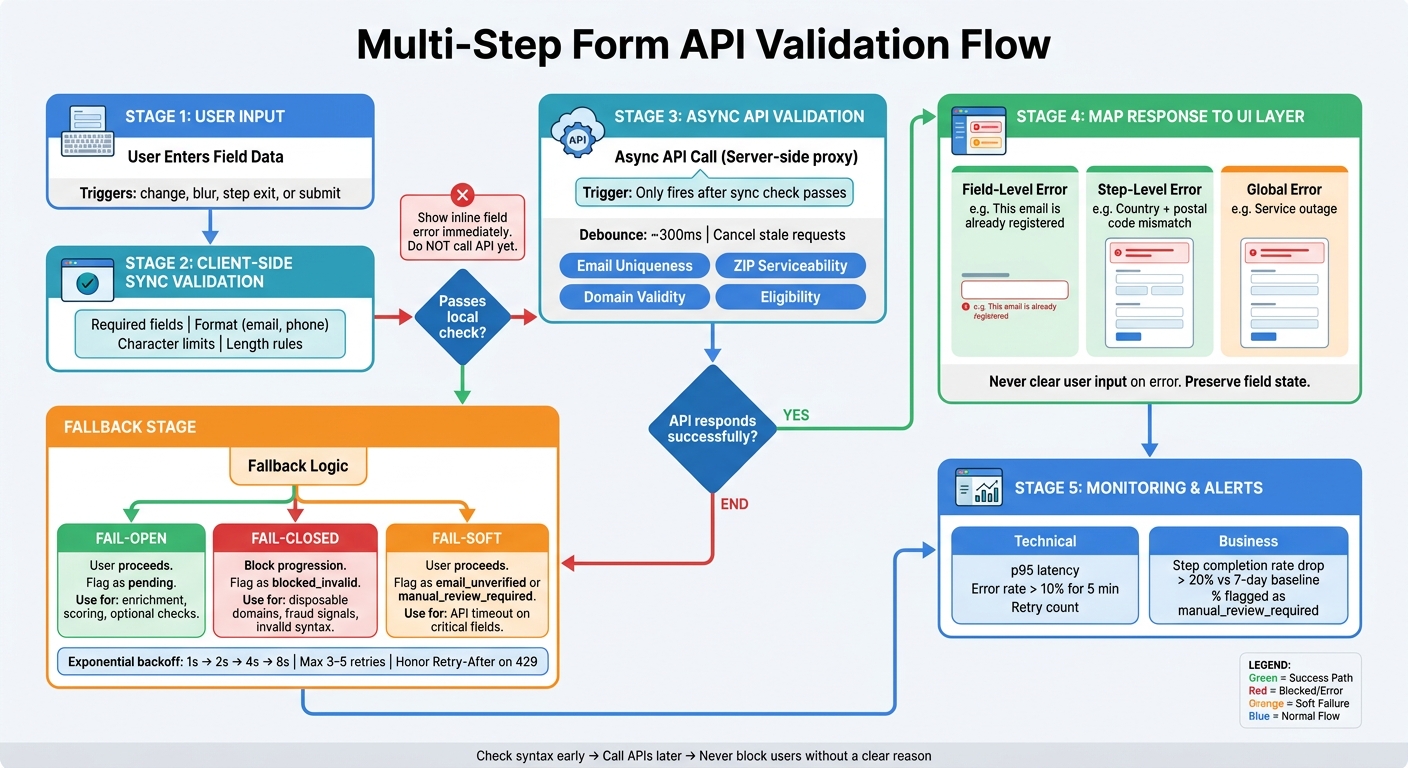
Multi-Step Form API Validation Flow: Sync, Async & Fallback Logic
Design the Validation Flow for Each Step
Use the validation layer to decide when a check should run, then send the result back to the correct step. In a multi-step form, timing shapes both conversion and data quality. The goal is simple: run each check at the first point where it helps instead of getting in the user’s way.
Sync vs. Async Checks: When to Use Each
Synchronous validation happens right away in the browser. It doesn’t need a network request. Use it for things like required fields, character limits, and format checks such as email syntax or phone number patterns.
Asynchronous validation needs an API response, so it takes longer. Use it for email uniqueness, ZIP code serviceability, domain validity, or account eligibility.
Start with the sync check. If a field fails a format check, don’t call the API yet. There’s no point. The user still has to fix the input first. Trigger the async request only after the field passes local validation.
That one move does two things:
- It cuts wasted requests
- It keeps error messages clean and specific
So instead of mixing messages together, users see the format problem first and only see a business-rule rejection after the input is valid.
Pick the Right Trigger: Change, Blur, Step Exit, or Submit
After you know the check type, pick the event that adds the least friction.
| Trigger | Best For | Why |
|---|---|---|
| On change | Required fields, format, length | Instant feedback; no API cost |
| On blur | Email, phone, business email domain checks | Typing pause; fewer API calls |
| On step exit | Uniqueness, eligibility, multi-field rules | Blocks progress only when needed |
| On submit | Cross-field rules, fraud checks, final integrity | Full context available |
For fields like work email or phone number, on blur usually works best. It gives people room to finish typing before the form reacts. For slower eligibility checks, like product qualification, wait until the user clicks "Next." That avoids expensive API calls while someone is still working through the step.
During async checks, always show a loading state. Even a small "Checking…" label near the field or button can make the form feel clear instead of stuck. If a request times out and the check isn’t blocking, let the user move on and deal with it later.
Map API Responses Back to Form State
Send every response to the right UI layer: field-level errors, step-level errors, or global submission errors.
A message like "This email is already registered" should sit right under the email field. Something like "This country and postal code combination isn't supported" touches more than one input, so it belongs at the top of the step. A temporary service outage should show up as a global message.
When validation fails, keep people oriented. Leave their input exactly as it is. Don’t wipe fields. Clearing entered values after an error is one of the fastest ways to lose someone in a multi-step flow.
The same rule applies when users go back to an earlier step. Fields that already passed validation should reload from stored state, so no one has to type the same information again.
sbb-itb-5f36581
Handle Errors, Accessibility, and Rate Limits
Show Field Errors and Step Summaries Clearly
When an API check fails, show the error where the user can fix it fastest. In practice, that means using two layers:
- Inline errors right under the field
- A step-level summary at the top of the current step when the user tries to continue
Inline errors are best for single-field problems. A message like Enter a valid business email address right below the input is hard to miss.
The summary helps when several fields fail at once. It gives users one clear snapshot of everything that needs attention. List each invalid field with a clear label and, if possible, add anchor links so people can jump straight to the problem.
After a failed step attempt, move keyboard focus to the summary first. Then shift it programmatically to the first invalid field. That helps keyboard and screen reader users stay oriented instead of hunting through the form.
| Pattern | Best For | Watch Out For |
|---|---|---|
| Inline errors | Single-field issues, format checks, real-time feedback | Can be missed when many fields fail at once |
| Step-level summary | Multiple errors, API failures, submit-time checks | Needs focus management and field anchor links |
Make these same errors readable for screen readers by using the right ARIA attributes.
Write Accessible Validation Messages
Use aria-invalid, aria-describedby, and a live region or role="alert" to expose validation failures.
Add aria-invalid="true" to any field that fails. Then connect that field to its error message with aria-describedby, pointing to the ID of the error element. That link matters. Without it, a screen reader user may hear that a field is invalid but not know why.
For async results that appear after the user has already moved on, wrap the error in role="alert". That way the message is announced when the check returns, without needing to force focus to move again.
The wording matters just as much as the markup. Be specific:
Enter a valid US ZIP code (5 digits)
Your password must be at least 12 characters and include a number
If the API fails for reasons outside the user's control, skip the technical jargon. Say what happened in plain English:
We couldn't verify your information right now. You can try again or continue and we'll check it later.
Once the messages are clear, the next job is cutting down how often you hit the API.
Control API Volume With Debouncing and Backoff
Debounce validation requests by a few hundred milliseconds, and cancel stale requests when the input changes. Otherwise, one fast typist can trigger a pile of checks that no longer matter.
For APIs with quotas or paid usage, send requests through a server-side proxy instead of calling them straight from the browser. This keeps credentials out of client-side code and gives you one place to handle caching, logging, and retry logic. Set a short proxy timeout, and treat timeouts as non-blocking warnings instead of hard stops.
When retries are needed, use exponential backoff. Start at 1 second, then double each time: 2 seconds, 4 seconds, 8 seconds. Cap retries at 3–5 attempts.
If the API returns 429 Too Many Requests with a Retry-After header, follow that value exactly. Retrying right away usually makes the block last longer.
| Strategy | Operational Tradeoff | Best Fit |
|---|---|---|
| Immediate retry | Simple, but risks overwhelming a struggling service | Very brief network flickers, non-rate-limited endpoints |
| Exponential backoff | Slower recovery, but much safer for shared infrastructure | 429 responses, webhook delivery, paid third-party APIs |
Add Fallback Logic and Debug API Failures
If validation still fails after retries, don't decide one case at a time. Use a preset rule.
Fail-Open vs. Fail-Closed: Choosing the Right Rule
When a validation API fails, you need to decide whether the form should keep going or stop the step.
Fail-open means the user can move forward even if the check doesn't finish. This works well for non-critical enrichment. In low-risk, high-value flows like demo requests or contact-us forms, it's often better to capture the lead and enrich leads while keeping prospects engaged or manual review than to block the flow because an enrichment service timed out.
Fail-closed makes sense when validation is deterministic and bad data creates clear risk. A syntactically invalid email address, a known disposable domain like mailinator.com, or a confirmed spam trap should stop progression. If you let those through, you pollute your CRM and hurt email deliverability.
Use fail-soft when the user can continue, but the submission still needs an internal tag for review.
| Behavior | When to Use | Internal Flag |
|---|---|---|
| Fail-open | Enrichment, scoring, optional data quality checks | pending |
| Fail-closed | Email syntax, disposable domains, fraud signals | blocked_invalid |
| Fail-soft | API timeout on critical fields like email or phone | email_unverified, manual_review_required |
If you're failing open, tell the user what happened. A short, plain message works best.
We couldn't verify your company details right now, but your request has been submitted. We'll verify this information before confirming your demo time.
Debug Webhook and API Issues Step by Step
If the fallback path fires too often, trace the request before you change form logic. The goal is simple: figure out whether you should unblock the user, tag the record, or fix the integration.
Start with endpoint reachability. Use curl or browser DevTools to confirm that DNS resolves and the TLS handshake succeeds. A lot of failures begin right there - DNS, TLS, firewall, or load balancer problems.
Then check the HTTP status, read the response body, verify auth headers, and trace the request with a correlation ID. Add an X-Request-ID or X-Correlation-Id header to every outbound call. Log it with submission_id, step_id, attempt_count, utc_timestamp, response_status_code, response_duration_ms, and validation_result.
That logging setup gives you a clean trail. You can follow one user's validation path across browser logs, backend workers, queues, and third-party provider dashboards, then spot exactly where the failure happened.
Use the failure pattern to decide retry limits and alert thresholds.
Set Up Retries and Monitoring
Retries help with short outages and brief provider hiccups. But the retry policy matters just as much as the retry itself.
Cap total retry attempts at 3–5 and set an overall deadline so the form doesn't hang forever. For synchronous, user-facing checks, keep the full retry window under a few seconds. For asynchronous background validation, like post-submit enrichment, longer windows are fine because the user has already moved on.
When retries run out, send the record to a dead-letter queue. Each entry should include submission_id, last_error_type, and last_response_status_code. That gives your team what they need to inspect the issue and reprocess failures without losing the lead.
For monitoring, look at technical and business metrics together. Validation error rate, p95 response latency, and retry counts show API health. Step completion rate and the share of submissions flagged as manual_review_required show whether your fallback logic is protecting conversion or quietly hurting it.
Set alert thresholds such as:
- Validation error rate above 10% for 5 minutes
- Step completion rate dropping more than 20% below the 7-day baseline
Implement Multi-Step API Validation in Reform
Once your validation plan is in place, the next step is to turn those rules into actual step logic inside Reform.
Configure Step Logic, Routing, and Validation Points
Reform's multi-step form builder lets you attach validation rules to each step. So you can validate contact details in Step 1, run enrichment after Step 2 is submitted, and check qualification fields in Step 3.
You can store enrichment data - like company size or industry - in hidden fields and use it for conditional routing. For example, a lead with 100+ employees and a budget above $500/month can be sent to a calendar booking step. Smaller accounts can go down a simpler path instead. You set up that routing directly in the form editor.
If you're building a custom UI, Reform also works in headless mode. Your front end handles the display, while Reform takes care of submission, routing, and integrations.
That setup makes email checks, spam filtering, and enrichment the first three layers most teams combine.
Use Email Validation, Spam Prevention, and Lead Enrichment Together
Reform checks email syntax first, then sends the address to an external verification webhook. From there, you can map the result to a hidden field such as email_status. Deliverable leads move forward, risky leads can be sent to review, and undeliverable ones can trigger a correction prompt.
Reform's spam prevention adds bot detection and rate limiting. That means leads that make it into your CRM have already passed format checks, external verification, and spam filtering - without forcing legitimate users through a captcha.
Conclusion: Balance Data Quality and Conversion in Your Validation Setup
Good multi-step API validation comes down to using the right check at the right time. Keep local validation fast and synchronous for format issues and required fields. Save remote API calls for fields that need outside verification, like email deliverability or lead enrichment, and run those checks on blur or when the user leaves a step. That tradeoff shapes both the user experience and conversion.
Inline validation and optimized templates can help more people finish the form. But even a little delay from a slow API can drag conversion down. Debounce requests, cache results, and space out retries so checks stay fast.
When the timing is in place, the next piece is clear, accessible error handling. Field-level errors should tell people exactly what went wrong and what to do next. Step-level summaries should give a quick snapshot without dumping too much on the screen. Every message also needs to work with screen readers, so use aria-invalid, aria-describedby, and keyboard-safe focus management.
Then there’s outage behavior. This part matters more than teams think. Set fallback rules in advance and be explicit about them. Decide whether each API check should fail-open or fail-closed, and log why. For enrichment and scoring, fail-open often makes sense. For fraud or compliance checks, fail-closed is usually the safer choice. If you don’t make that call early, outage behavior tends to get messy fast.
The best setup is one you can measure and tune without a lot of drama. Track per-step completion rates, error frequency by field, and abandonment patterns after launch. That data shows whether a check is improving lead quality or simply adding friction - and gives you proof for what to adjust next.
FAQs
Which validation checks should block the next step?
Reserve blocking checks for moments when the user can’t sensibly move forward.
Use them for synchronous validation such as:
- duplicate email lookups
- critical pre-save checks
If one of those checks fails, the user should have to fix the issue before moving on.
The next step should also stay blocked when an async validation or enrichment request is still running or has failed. In plain terms: disable navigation until the request finishes.
And on top of that, always enforce server-side validation on every step.
When should I run API validation in a multi-step form?
Run validation in two places: when a user clicks Next or Continue, and again at final submission.
Per-step validation checks the fields the user can see right then, so errors show up early instead of piling up at the end. Final server-side validation handles cross-step rules, business logic dependencies, and deduplication, while still keeping the user’s progress intact.
What should happen if the validation API is down?
If the validation API goes down, the first job is simple: don’t let the user lose their work. Keep the form data on the client in places like sessionStorage or IndexedDB, so if there’s a connection problem, users can pick up where they left off instead of starting over.
For short-term problems like 5xx errors or timeouts, retry the request with exponential backoff and jitter. That gives the service a little breathing room and helps avoid hammering it while it’s already struggling.
If the API still can’t be reached after several attempts, stop retrying. At that point, move the payload to durable storage or a dead-letter queue so it can be checked manually. That way, the data doesn’t vanish into thin air, and the issue can still be dealt with later.
Related Blog Posts
Get new content delivered straight to your inbox

The Response
Updates on the Reform platform, insights on optimizing conversion rates, and tips to craft forms that convert.




Drive real results with form optimizations
Tested across hundreds of experiments, our strategies deliver a 215% lift in qualified leads for B2B and SaaS companies.
