
.webp)
JavaScript Error Diagnosis For Multi-Step Forms



If a multi-step form stops converting, I first check state, validation, routing, async requests, and submit flow - in that order. With 67%–68% of users leaving forms before finishing, even one quiet JavaScript bug can mean fewer demo requests, missing CRM data, or a submit button that appears dead.
Here’s the short version of what I’d do:
- Map the form as state, not just screens:
currentStep, saved answers, touched fields, errors, and submit status - Test NEXT, BACK, and SUBMIT to see where values disappear, steps repeat, or buttons stop working
- Check validation on the active step and at final submit
- Look for hidden required fields and stale errors tied to fields users can’t see
- Trace conditional routing when users change answers and move back through the flow
- Control async checks like email lookup, spam checks, and CRM calls to stop spinner stalls and double submits
- Use Console and Network logs to match each click to a state change, validation result, and request
- Run a test matrix for backtracking, mobile, autofill, slow connections, duplicate clicks, and partial submissions
A few patterns show up again and again:
- If BACK clears answers, values may only save on step advance
- If a completed step appears again, the branch rule may re-run with old data
- If Submit does nothing, UI state and validation state may not match
- If users get stuck with no error message, a hidden field may still be marked required
I’d treat the form like a step-by-step system: reproduce the bug, log each transition, compare visible fields to stored state, then check requests right before submit. That approach cuts guesswork and helps me find whether the problem is in the front end, the routing logic, or the backend handoff.
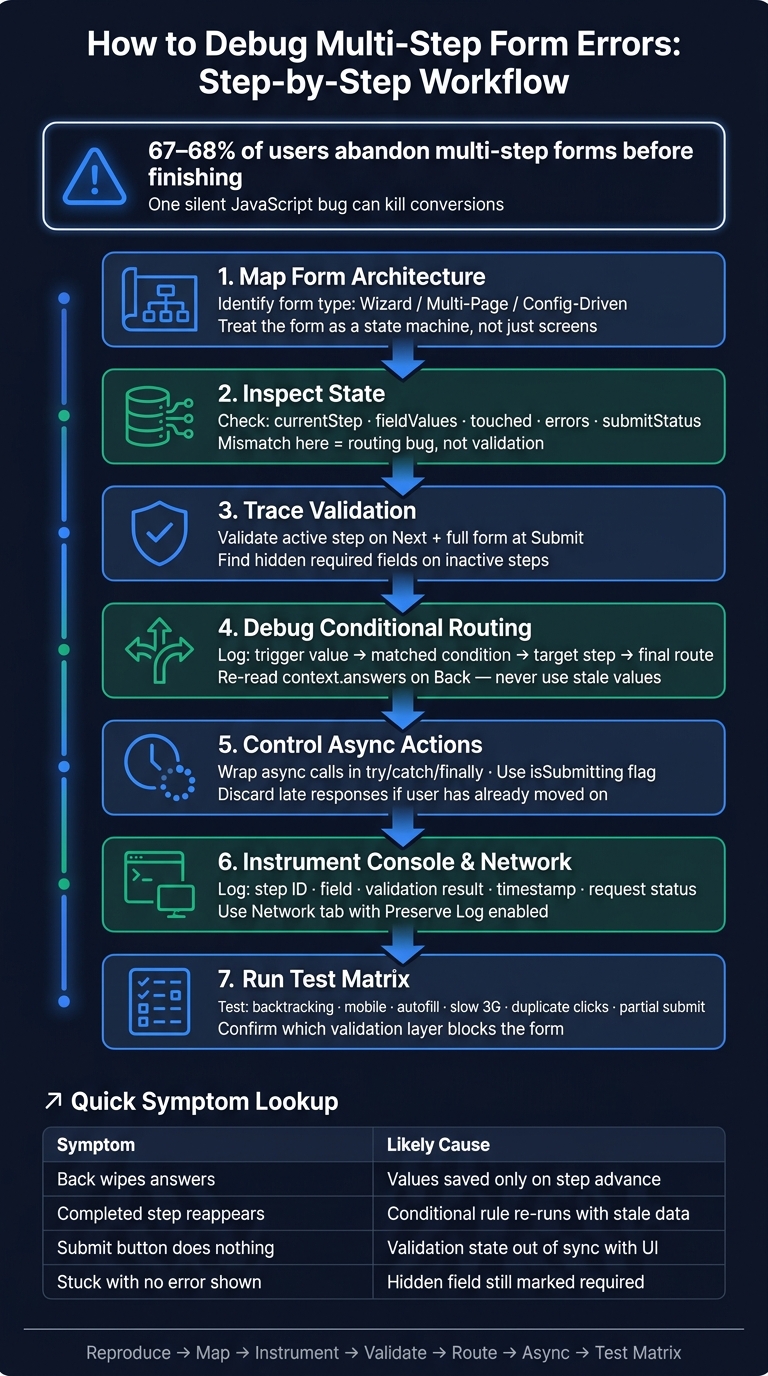
JavaScript Multi-Step Form Debugging Workflow
Understand Form Architecture Before You Start Debugging
Most multi-step forms fall into one of three setups: a single-form wizard, a multi-page flow, or a config-driven flow. Each one tends to break in its own way.
A wizard usually breaks in the UI state. A multi-page flow often breaks in routing or saved data. A config-driven flow tends to break when rules fire in the wrong order or conditional logic clashes.
A good way to look at the whole thing is to treat the form as a state machine, not just a set of screens. That shift matters. Instead of asking, “What page am I on?” ask, “What state is the form in right now?”
Start by checking currentStep, fieldValues, touched, errors, and submitStatus. Those five pieces usually tell the story. If currentStep = 3 but the UI still shows step 2 fields, you’re not dealing with a validation bug. You’re dealing with routing. That kind of state map gives you a solid starting point for tracking validation, routing, and persistence issues.
Inspect Step State, Navigation Events, and Stored Answers
Check NEXT, BACK, and SUBMIT first. These actions are where multi-step forms often go off the rails.
Make sure NEXT moves to the next step as expected. Make sure BACK returns to the prior step without clearing saved values. And make sure SUBMIT fires only when all requirements pass. If navigation logic is split across several components instead of one transition function, mismatches happen all the time.
Also, save answers on input, change, or blur - not only on Next. That detail trips up a lot of forms. If values are saved only when the user advances a step, going Back can wipe out later entries.
Match Common Symptoms to Their Architectural Causes
Some bugs point to certain causes almost immediately. Before you even open DevTools, make a simple step map. Write down each step, its visible fields, required fields, validation trigger, and transition rule.
For a high-converting lead form, that could look like this:
Step 1 contact info → Step 2 company details → Step 3 qualification questions → Step 4 review and submit
If the flow skips Step 3 or shows Step 2 again, the problem usually sits in routing or conditional dependencies, not in the input component.
| Symptom | Likely Cause |
|---|---|
| Back navigation wipes answers | Values saved only on step advance, not on input/blur |
| Completed step reappears | Conditional rule re-evaluates without a stable guard |
| Progress bar out of sync | Step index updated independently from rendered step |
| Submit button does nothing | Validation state is out of sync with UI state |
Once the step map is in place, trace validation and saved answers through each transition.
sbb-itb-5f36581
Trace Validation Flow Across Steps and Hidden Fields
A healthy multi-step form checks validation in two places: on the active step when someone clicks Next or Continue, and again on the full form at final submit. Use blur to show field errors, and use input or change to keep state and formatting lined up. Call event.preventDefault() only when the current step is invalid or an async check is still in flight.
Dates, times, and currency should be checked on the step where they appear. After that, convert them into a normalized numeric value before running cross-step rules.
HTML5 attributes like required, type="email", pattern, min, and max are a solid first check. The Constraint Validation API also gives you clear states like valueMissing, typeMismatch, and patternMismatch, which map cleanly to field-level messages. One common gotcha: on browser submit, the first invalid field can pull focus back to an earlier step if validation isn't scoped to the active step.
If validation passes but people still get stuck, the next place to look is usually conditional routing or async checks.
Find Hidden Required Fields and Invisible Error States
When a form blocks and there's no visible reason, start with hidden required fields. This happens when a field gets hidden by conditional logic, but its required attribute or schema rule stays in place. The result? The form refuses to move on, and the user has no clue why.
To track it down, inspect the current step in DevTools and look for hidden inputs that still have required, aria-required="true", or other constraint attributes. Then review the validation schema and make sure the rule turns on and off with the same condition used by the UI. Last, log the step's error object. If a hidden field still shows up in errors, the validation layer still treats it as required.
The fix is simple in principle: update both the DOM state and the schema rule when visibility changes, and clear any stale error at the same time. That stops stale errors from hanging around as messages tied to fields the user can't see or edit.
Separate Step-Level Checks from Cross-Step Rules
Rules based on answers from earlier steps should live in shared validation logic, not inside single step components. That shared layer should be able to read the full context.answers object so it can evaluate dependencies across the whole form.
Here's where things often break: an earlier answer changes what a later step needs, but the schema or error state never refreshes. Say a later step asks for budget only when a prior answer points to a larger company size. If that earlier answer changes, the form can get stuck with old required states or errors that no longer fit the user's path. Put cross-step rules in one central place, then map final errors back to the right step and field.
If your form has a step-submit hook, return field-keyed errors before sending data. If those rules check out, the next move is to trace conditional branches and async validation.
Debug Conditional Steps, Async Actions, and Submission Races
Conditional routing, async validation, and submission requests often fail without much noise. The form just sits there, loops a step, or sends people down the wrong path. If you've already ruled out validation errors and hidden-field problems, the next move is to trace the code that decides two things: where the user goes next and what has to finish before submission.
Log Conditional Routing Decisions at Each Step
Every routing decision should leave a clear trail. At each transition, log these four values:
- trigger field value
- matched condition
- target step ID
- final route
That makes debugging much less of a guessing game. Say an enterprise lead should jump to qualification, while a smaller account should skip ahead to booking. If the router reads an old answer after the user clicks Back, the wrong branch can fire.
When someone goes back and changes an answer, the routing logic must re-read the current context.answers - not the value from the first pass. If it doesn't, you'll run into repeated questions, skipped required branches, or steps showing up even though the answer that triggered them has already changed.
If the route checks out, move to the next weak spot: async checks that delay or block step changes.
Control Async Validation and Block Double Submissions
Async checks like email validation, enrichment, and CRM lookups introduce timing problems. Gate step changes inside the async handler, and only advance after the check succeeds.
Wrap every async call in try/catch/finally. If a check fails, show the error on the current step and stop there. Disable Next or Submit on the first click with an isSubmitting flag, and ignore extra clicks until the request finishes. Reset that flag only after the request succeeds or fails.
Each async request also needs enough context to prove it's still current when the response comes back. That can be a step ID, the active field value, or a request token. If the user has already changed the answer or moved to another step, discard the response. A late invalid-email result shouldn't overwrite the UI state for a step the user already left.
If the code looks fine, the next place to check is the form platform itself. Sometimes the problem isn't in your JavaScript at all.
Check Integration and Platform-Level Behavior
Some issues that look like JavaScript bugs are actually integration-state problems: a mapping error, a rejected payload, or a slow enrichment response can freeze the form after Submit.
If your form runs on Reform, use its platform hooks to narrow down where the break happens. Reform's onPageSubmitted event fires after the user clicks Next but before the request reaches the backend. Return errors keyed by field ID using the { type: 'error', errors: { [fieldId]: 'message' } } format. That keeps the form on the current step and shows the message on the correct field. If the backend rejects the request, onValidationFailed is the place to inspect that failure.
For conditional routing, if a branch misfires, check whether the field ID in the routing rule matches the actual field ID in the builder. That mismatch is silent and common. Reform's onPageChanged event lets you log state after a transition finishes, so you can compare what context.answers looked like at onPageSubmitted with where the user actually landed. In practice, that side-by-side check usually shows where the routing logic went off track.
Use Console Tracing and Test Cases to Find the Root Cause
Once state, validation, and submission look right, the next job is to isolate the last point of failure.
Start in the Console tab. Use console.log() to inspect state values, console.error() for failures, console.warn() for edge cases, console.trace() to see which function triggered the call, and console.table() when you want a clean view of step-by-step logs. If the issue happens at the event level, Chrome DevTools Event Listener Breakpoints can pause execution the moment a click fires on your Next or Submit button, without editing source code. You can also run getEventListeners(element) in the console to inspect the handlers attached to a button.
In Network, filter to Fetch/XHR and turn on Preserve log so requests stay visible after the page changes. Then check the URL, method, payload, status code, and timing for each submit attempt. If the desktop request looks fine but the bug still shows up, move to mobile and reproduce it there.
Keep logging consistent so the failure is easy to repeat. Track step ID, field name, validation result, timestamp, request status, and branch/route decision. For example: Step 2 | email | invalid format | 10:42:13 AM | no request sent | next-step blocked.
On mobile, watch for three common failure classes:
- autofill
- touch timing
- viewport changes
These tie back to the same validation and routing flow. In other words, mobile bugs usually show up in the same state transitions, not in some separate debugging track.
Build a Test Matrix for Lead Capture Forms
Use your logs to map the exact paths that belong in the test matrix. Focus on the paths that break during backtracking, slow network conditions, and device differences, or use expert form strategies to optimize these flows.
For a B2B demo request form, test at minimum:
- A prospect who selects a company-size option and gets routed to a qualification branch
- A user who goes back from Step 3 to Step 1 and changes their company size
- A pricing inquiry where a conditional budget field appears only after a specific answer
You should also cover invalid email handling, duplicate clicks on Submit, slow 3G-style network conditions, restored drafts after a tab refresh, partial submissions, and autofill behavior on email and company name fields. A confirmation without a delivered payload is a partial success, so log that handoff from start to finish.
If you use Reform, log context.answers after each transition and again right before submit. When those values don't match, that's often the reason a CRM payload ends up incomplete.
Compare Validation Paths
The matrix helps you see whether the failure comes from step validation, final submission, or both. Use that comparison to confirm which validation layer is blocking the form.
| Pattern | Error Visibility | User Friction | Debugging Difficulty | Best Use Case |
|---|---|---|---|---|
Per-step validation (onPageSubmitted) |
High - errors surface before the user moves on | Low - fixes happen in small batches | Low - scope stays limited to the current step | Critical qualifying fields: email, budget, company size |
Full-form validation (onFormCompleted) |
Low - errors appear only at final submit | High - the user may need to go back across multiple steps | High - requires tracing state across the full session | Final data integrity checks and CRM handoffs |
| Synchronous submission | Immediate feedback | Minimal | Easy to trace in the console | Simple forms with no async dependencies |
| Asynchronous submission | Delayed - risk of double-click submissions | Moderate - needs a loading indicator | Hard - requires watching the Network tab and async timing | Email validation, enrichment, CRM lookups |
During debugging, document which fields are validated at each stage and whether the final submit repeats those checks.
Conclusion: A Step-by-Step Workflow for Fixing Multi-Step Form Errors
Multi-step form bugs usually don't show up in an obvious way. They tend to hide in state, routing, or async timing. The cleanest path is to start with the form's setup, then follow validation, and only then check submission.
Before you touch validation, make sure the current step, stored answers, and error state still line up with the step the user can actually see. This matters more than it seems. Hidden required inputs on inactive steps can still block submission and move focus to a field the user can't even see. Once state is in sync, trace validation only for the active step.
For each user action, map what should happen next: the state change, the validation result, and the network request. Any mismatch points you to the bug. A steady logging pattern helps a lot here, such as console.debug('[FORM_STATE]', { step, values, errors }). It makes the failure easier to reproduce and much easier to scan. Pair that with the Network tab so you can check that the payload matches the state object at the exact moment the form submits. If state and validation both look right, move to conditional routing and async timing.
Show every blocking error inline. Also log the step, field, rule, and timestamp so you can see where the flow breaks.
In Reform, log context.answers after each transition and again before onFormCompleted. If those snapshots don't match, you've narrowed the issue to the step logic or the completion handler. Use those snapshots to see which layer breaks before moving on to the test matrix.
Reproduce → map architecture → instrument → trace validation → inspect routing → control async → run the test matrix. That sequence shrinks the search space one layer at a time. By the time you get to the test matrix, you should already have a strong sense of what's failing. The matrix then confirms it and helps stop the same bug from showing up again.
FAQs
What should I debug first in a multi-step form?
Start with the earliest failure point: validation and input rules. Check for required-field mismatches, format problems, and hidden or conditional fields that may be blank or invalid.
If validation passes but submission still fails, look for JavaScript errors and make sure the request is actually sent. Then review any 4xx or 5xx responses, isolate the step that breaks, and verify the request, headers, and auth.
Why does my form get stuck with no visible error?
A form that looks stuck, even when no error shows on the page, is often running into a silent failure in the browser or in the integration layer. A good first step is to open Chrome DevTools and check the Console and Network tabs for 4xx or 5xx status codes.
If you're using embedded forms, make sure iframe sandbox restrictions or Content Security Policy violations aren't blocking the submission. It's also worth checking that your CRM field mappings and custom validation rules line up with the expected data formats and permission settings.
How do I stop async checks from causing double submits?
Handle async validation in the onPageSubmitted event. It runs after a user submits a page, but before the request goes to the backend. That gives you a chance to intercept the submission and stop it if validation fails.
Also, keep the handler fast. Since it runs asynchronously, shorter execution helps users avoid feeling stuck and cuts down on repeat clicks or submission errors tied to delay.
Related Blog Posts
Get new content delivered straight to your inbox

The Response
Updates on the Reform platform, insights on optimizing conversion rates, and tips to craft forms that convert.




Drive real results with form optimizations
Tested across hundreds of experiments, our strategies deliver a 215% lift in qualified leads for B2B and SaaS companies.
