
.webp)
Progress Bar Not Updating in Multi-Step Forms



If your form moves to the next step but the progress bar stays put, the problem is usually in one of 3 places: event wiring, step-state math, or CSS.
I’d check it in this order:
- Does the step value change? Log
page.pageNumber. - Does the update event fire on every move? Use
onPageChanged, not just button clicks. - Does the bar UI read from that same step value? Use one shared source for width, labels, and counters.
- Is CSS hiding the update? Check
display,width,overflow, and active classes. - Does it fail only on jumps, Back, embeds, or saved sessions? Test each path.
A lot of stuck bars are state-sync bugs, not form-navigation bugs. In plain terms: the form is on Step 3, but the bar still thinks it’s on Step 1. I’d verify the fix by testing Next, Back, validation errors, conditional jumps, embed behavior, and resume flow so the bar stays matched to the form in every case.
Short version: track the current step from the form itself, update the bar on load and on every page change, and make sure CSS isn’t hiding the result.
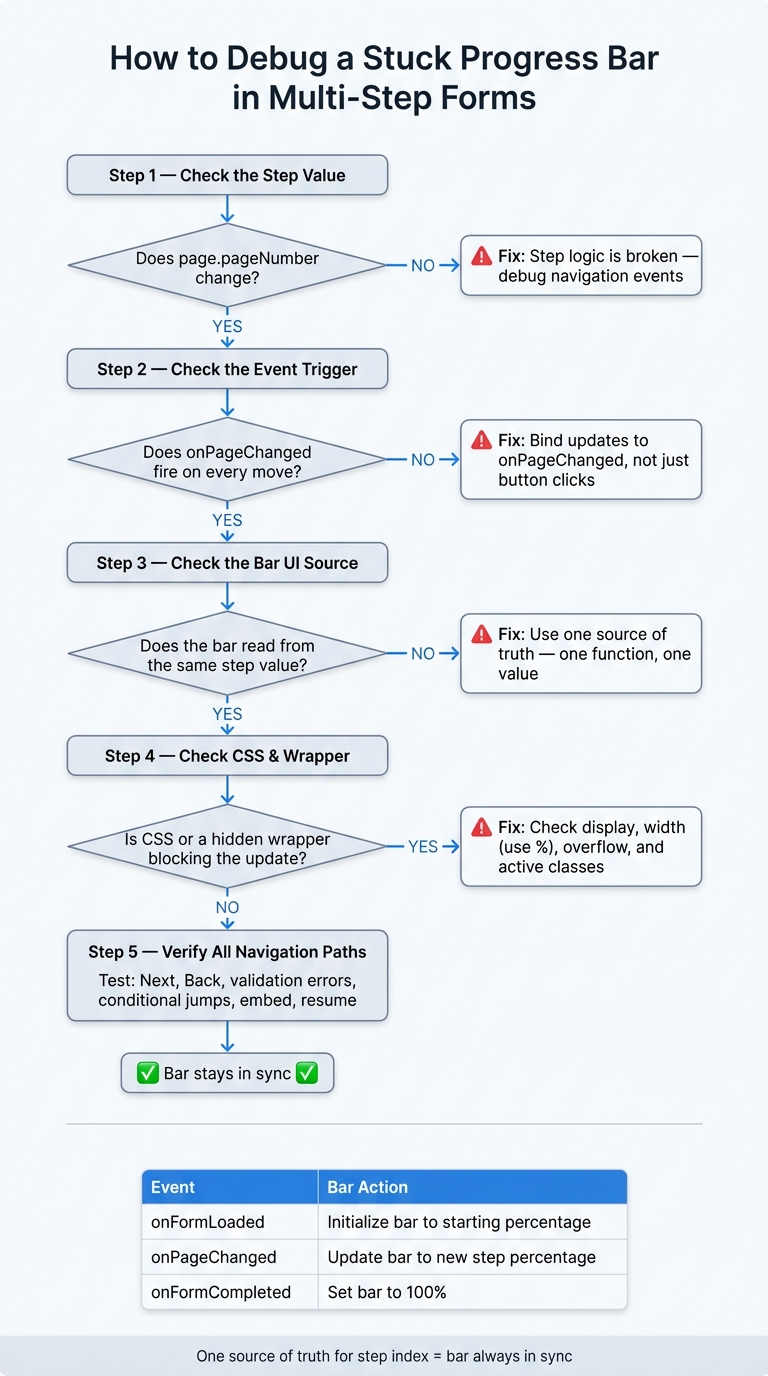
How to Debug a Stuck Progress Bar in Multi-Step Forms
Find the Root Cause Before Changing Code
Before you touch the code, make sure you know what's actually failing. There are two separate things to check:
- whether the step index changes
- whether the progress bar reflects that change
If you skip this part, it's easy to fix the wrong layer.
Check whether the current step value is actually changing
Add console.log(context.page.pageNumber) to your onPageChanged handler, then click through the form and watch the browser console.
If the step number goes up and down on each Next and Back click, your step state is changing as expected. If it stays stuck or returns undefined, the step logic is where the problem starts.
Conditional jumps can make this easier to spot, especially when navigation happens outside the Next button.
If the step number changes but the bar doesn't move, you're not dealing with a navigation problem. You're dealing with a display sync problem.
Compare visual state vs. data state
Once the step number is changing, open DevTools and inspect the progress bar.
A changing page.pageNumber paired with a fixed width or an .active class that doesn't move is a clear sign that the UI isn't staying in sync.
Use the table below to find the first point where things go off track.
Check these states in order
| Layer | Working State | Broken State |
|---|---|---|
| JS Event | onPageChanged fires on every navigation |
Event fails to fire or only fires on load |
| Step Number | page.pageNumber increments/decrements correctly |
pageNumber stays fixed or shows undefined |
| CSS Classes | .active class moves to the current step indicator |
.active stays on Step 1 or disappears entirely |
| Bar Width | Inline width updates dynamically, for example 33% to 66% |
width stays at a fixed value like 0% or the initial value |
| Logic Jumps | Jump to triggers a proper page change event |
Visible step changes, but stored step number does not |
Go through the table from top to bottom. The first row where the working state and broken state split apart tells you which layer needs attention.
If the step number changes but the bar still freezes, the next place to look is missing update triggers or broken sync logic.
sbb-itb-5f36581
Fix Missing Triggers and Progress Sync Logic
If the step number changes but the bar stays frozen, fix the event wiring first.
Bind updates to step-change events, not just button clicks
Hook progress updates to onPageChanged, not just the Next button. People can move through a form in other ways too. They might go Back, press Enter, or hit a conditional jump. Those paths won't touch a click handler. Because onPageChanged fires only after the move actually works, the bar stays in sync even when validation stops the user from moving forward.
Update progress on initialization, Next, Back, and conditional jumps
Initialize the bar in onFormLoaded, then update it in onPageChanged. On first load, the form hasn't moved yet, so the bar needs a starting value before the first onPageChanged event runs.
Conditional routing makes this a little trickier. "Jump to" rules and similar logic can skip steps, so simple step + 1 math falls apart fast. The bar should reflect the form's current state, not a manual counter that tries to guess where the user is.
Once the trigger is set up the right way, tie every update back to that same step value.
Use one source of truth for step index and percentage
Read the current page number once, then calculate the percentage from that value. Don't keep a second counter in local state.
Use one function that takes the current page number and total pages, calculates the percentage, and updates the bar. Then call that same function from both onFormLoaded and onPageChanged.
Two mistakes show up all the time:
- Off-by-one errors can make the bar look one step ahead of the form or one step behind it.
- In AJAX-based forms, updating on the click event can move the bar before the page content changes, which leaves you with stale state.
Reading from the form's context object helps avoid that timing issue.
| Event | When It Fires | What to Do with the Progress Bar |
|---|---|---|
onFormLoaded |
After the first page loads | Initialize the bar to the starting percentage |
onPageChanged |
After any successful navigation | Update the bar to the new step percentage |
onFormCompleted |
After the final submission is saved | Set the bar to 100% |
If the event flow looks right but the bar still won't move, inspect the wrapper state next.
Fix Hidden Wrapper and CSS State Problems
If the step value changes but the bar still doesn't move, the next place to look is the wrapper and your CSS. Sometimes the event logic is fine, but the bar still looks stuck because the DOM structure or style rules are masking the update.
In AJAX-based multi-step forms, all form blocks are often rendered at the same time, while visibility is controlled by wrappers that aren't shown yet or by display: none on each container. That means the data can update, but the bar still won't appear if it's sitting inside a hidden wrapper for the current step. For embedded forms, also check onPageResized. If the iframe height hasn't updated, it can clip the progress bar.
Once you've ruled out visibility, move to the layout rules that control the fill itself. The form may be working just fine - the wrapper is just getting in the way. Use percentage-based width, not pixel values. A fixed width can stop the fill from growing the way you expect. It's also worth checking parent containers such as .form-container for overflow: hidden, which can clip a fill that is updating properly but never becomes visible on screen. And yes, a slow or blocked transition can make the bar look frozen too.
After that, make sure the visible fill lines up with the accessible state. If the fill width changes but the ARIA state or step labels don't, screen readers and other assistive tools can end up out of sync with what people see on screen. In forms that use custom CSS or JavaScript, higher-specificity rules can also override the active class styles. Open the browser inspector and confirm that the right classes are being applied - and that another rule isn't beating them. If the labels are hidden, inspect the fill width directly.
| CSS Property | What Goes Wrong | How to Check |
|---|---|---|
display / visibility |
Wrapper hides the bar even when logic updates | Look for unrendered wrappers or display: none on parent elements |
width |
Fixed pixel value prevents the fill from growing | Confirm the fill uses a dynamic percentage, not px |
overflow |
Container clips the fill before it's visible | Inspect .form-container for overflow: hidden |
transition / transform |
Animation fails to trigger or looks stalled | Verify timing and transform rules on the fill element |
| Active classes | State classes are not toggling between steps | Use DevTools to watch class changes in real time |
Verify the Fix and Prevent It From Returning
Once the bar updates in code, check it across every navigation path and embed setup.
Run a step-by-step verification sequence
After the fix, do a full state check, not just a fast click-through. You want to make sure the step state and the bar state stay in sync on every move.
Load the form and confirm the bar starts in the right place. Move to the next step and confirm the bar advances. Go back and confirm it moves back too. Some scripts listen only for Next clicks and miss backward navigation. Submit invalid data and make sure the bar does not move when validation fails. Test each conditional branch and confirm the bar lands on the actual destination step, not just the next numeric step.
| Trigger | Expected Bar Behavior |
|---|---|
| Form loads | Starts at Step 1 or the first custom label |
| Successful "Next" | Moves to the next sequential or conditional step |
| "Back" navigation | Moves back to the previous step |
| Conditional jump | Skips to the destination step, not just +1 |
| Validation failure | Stays on the current step |
Retest embedded and customized forms
Then test the form where people will use it.
If the form is embedded on a host page, retest it there, not only in the form builder preview. The fix is not done until the bar works in the live page setup. Check that the page resize event fires so the bar stays visible as the container height changes. Use the browser console to watch navigation changes in the parent context and confirm the wrapper is not blocking script execution.
In Reform, retest after any conditional routing, custom code, or style changes. If you're using Custom Labels, make sure every page has a label assigned in settings. Missing labels can leave the bar showing empty or fallback states. If Save Progress is on, resume from the emailed link and confirm the bar restores the correct step.
Conclusion: Fix the shared step state, and the bar updates
A stuck progress bar usually comes from one of three issues: a missing event trigger, a CSS or wrapper problem that hides the update, or JavaScript that changes the step index without updating the bar. In each case, the same idea applies: use one source of truth for the current step and make sure the visual bar and step labels read from that same value. When the event logic, DOM structure, and styles all point to the same step value, the bar stays in sync.
FAQs
Why does my progress bar update on Next but not on Back?
Usually, the Back button doesn’t fire the same step-change update as Next.
First, make sure the progress bar is turned on in Form Settings. If your form uses conditional logic, check that it updates the form path correctly so the bar matches the user’s actual route when they go back. It’s also worth checking whether any custom JS or CSS is stopping the form from re-rendering the current step state.
How do conditional jumps affect progress bar logic?
Conditional jumps let your form change direction based on what someone selects. If a user gives a certain answer, you can send them to a specific page instead of forcing them through the same fixed path as everyone else.
The progress bar changes along with that path. So instead of showing a static percentage, it reflects the steps that person will actually go through.
That matters more than it may seem. If the form sequence changes but the progress bar doesn't, the experience can feel off. A user may think, "Wait, why did I jump ahead?" or "Why is this stuck?" Updating the bar to match the path helps keep the flow clear and natural.
You can test the full experience in preview mode to make sure the page transitions look smooth and the progress bar tracks each jump the way you expect.
Why is my progress bar stuck after the step number changes?
Your Reform progress bar can get stuck when it stops syncing with the form’s actual page flow.
This usually happens when conditional logic changes the step order but the progress bar doesn’t reflect that change. It can also happen when custom behavior or redirects slow down the page-change event.
It’s also worth checking the basics:
- Make sure the progress bar is turned on in Form Settings
- Check that your navigation sends people to the right page
- Review your logic to confirm it leads to the correct next step
If any of those pieces are off, the progress bar may stay fixed instead of moving with the form.
Related Blog Posts
Get new content delivered straight to your inbox

The Response
Updates on the Reform platform, insights on optimizing conversion rates, and tips to craft forms that convert.




Drive real results with form optimizations
Tested across hundreds of experiments, our strategies deliver a 215% lift in qualified leads for B2B and SaaS companies.
