
.webp)
B2B Follow-Up Email Examples by Lead Intent


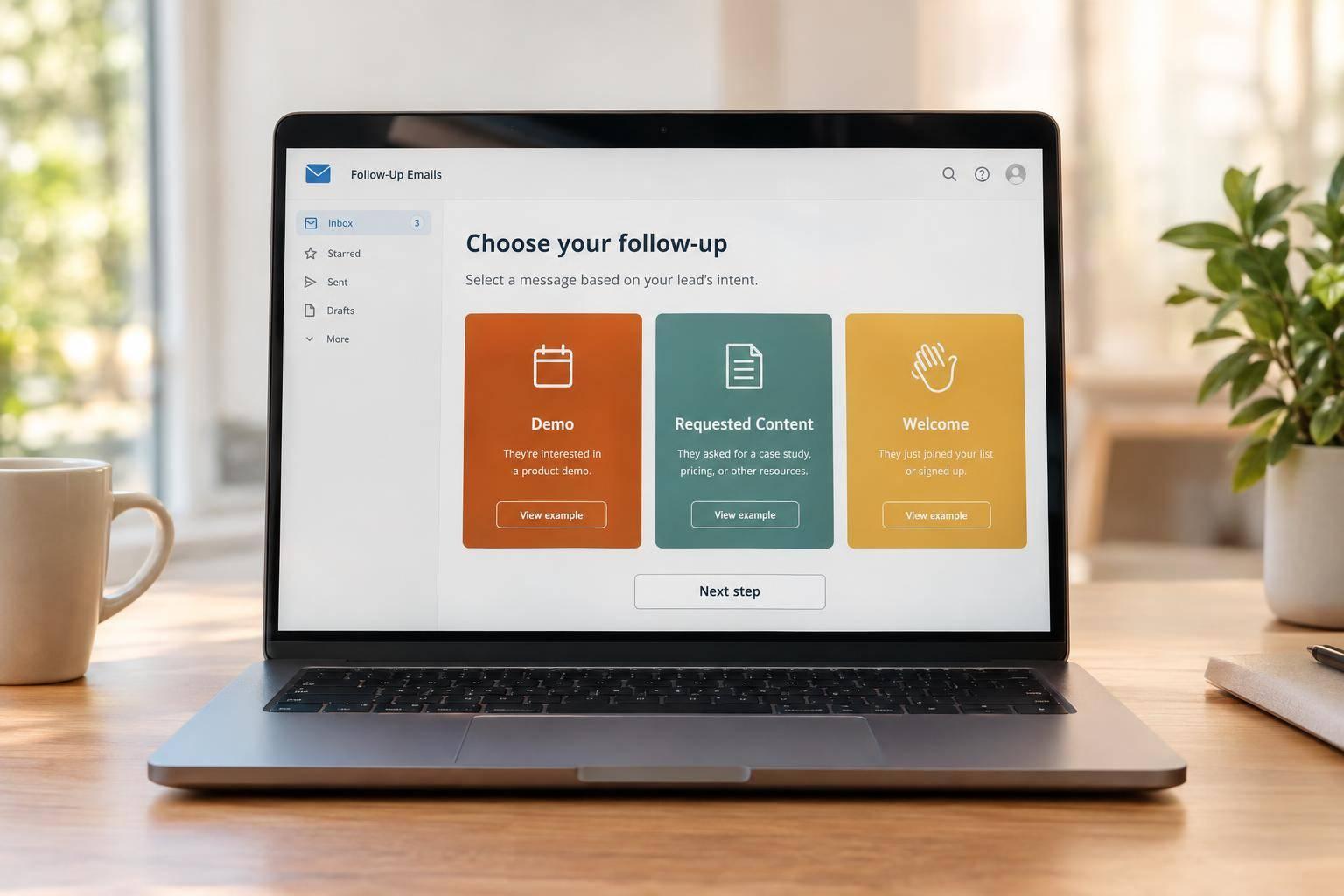
I match each B2B follow-up email to what the lead requested - not a fixed sales sequence. Confirm demo requests right away, send downloaded resources within minutes, and welcome newsletter subscribers without a sales pitch.
These 15 examples cover three intent levels, with a trigger, message angle, timing, and next step for each:
- Demo requests: Confirm the request, ask pre-demo questions, offer to reschedule, recap the meeting, and address an objection.
- Content downloads: Deliver the resource, share one takeaway, show a related scenario, offer a short assessment, and invite a demo when the lead shows product interest.
- Newsletter signups: Welcome the subscriber, cover their selected topic, share a practical tip, invite preference updates, and check in after inactivity.
My rule: <u>one primary next step per email</u>. A demo request signals interest - not confirmed budget or buying authority. I use form answers and later replies to choose the next message, then pause or stop follow-up when someone replies, books, or opts out.
These are conditional paths, not 15 emails to send everyone. Before sending, check consent, routing, ownership, and exit rules. Then measure replies, bookings, and confirmed engagement - not opens alone.
The BEST Follow Up Emails To Convert Leads to Clients
sbb-itb-5f36581
Use Form Submissions to Guide Follow-Up
Route each lead based on the form they submitted and any need or timeline they shared. Demo, pricing, and contact-sales requests show high intent. Guides, checklists, and webinars signal mid intent, while newsletter signups indicate low intent.
Then review the submitted details. Intent isn’t the same as purchase readiness. A demo request doesn’t confirm budget or decision-making authority. Ask only for information that changes your response, such as the main challenge, desired outcome, or timeframe. Use those answers to shape an email that supports a buying decision, helps solve a problem, or provides education.
Update your assessment as engagement changes. Replies, webinar questions, and repeated pricing-page visits may warrant more direct help. A single email open should not trigger sales outreach. A demo lead whose project is several months away may be better served by low-pressure educational emails. Review older signals, too: past activity doesn’t mean intent stays the same.
Each email should acknowledge the request, provide useful help, and offer one clear next step. For high-intent leads, make scheduling easier or answer the immediate question. For content leads, send the requested material before asking for anything else. For newsletter subscribers, focus on useful information and topic preferences - not an early demo pitch.
Use an example only when its trigger applies. Send a rescheduling email after a missed meeting, or an objection follow-up after someone shares a concern. These are conditional paths, not a fixed sequence. Stop or change the path when the recipient replies, books a meeting, changes preferences, or opts out.
Start with the first scenario that matches the submission, then use the email examples below. High-intent demo leads come first because they need the fastest response.
1. High-Intent Demo Lead: Confirm the Request
Trigger
Send this email as soon as a demo-request form arrives with a valid email address and all required fields. Use the submitted details to personalize the message, and route the lead to the right rep or territory right away.
Angle
Confirm the request - not a booked meeting.
Subject: We received your demo request
Hi Maya,
Thanks for requesting a demo of Acme’s workflow platform. We received your request and noted that you’re evaluating solutions for a 25-person operations team.
A solutions specialist will review your details and email you within one business day to coordinate a time and tailor the conversation to your goals. In the meantime, you can reply with any questions or share the tools you currently use.
Best,
The Acme team
Timing
Send within seconds and route the lead to sales immediately. Promise a response window your team can meet. Include business hours and the time zone when weekend or holiday coverage affects the wait.
Next step
Invite the prospect to reply with questions or details about their current tools. If they can schedule immediately, replace that invitation with a “Choose a demo time” link. If they’ve already booked, show the confirmed date, time, and time zone.
2. High-Intent Demo Lead: Ask Pre-Demo Questions
Trigger
Send a short prep email after the demo is booked and before the meeting. If the booking form already asks about the prospect’s challenge, ask what outcome they want. If it collects only contact details, ask about their main goal for the meeting.
Angle
Use the booking details to ask for one missing piece of context. Ask one question - two at most - that will change what you show in the demo. Keep the reply optional and easy to answer in one line.
Subject: Help us tailor your demo
Hi [First Name],
Thanks for requesting a demo of [Product]. To make our time useful, what workflow or challenge would you most like us to focus on?
Best,
[Rep Name]
Timing
Send the email the same business day the meeting is booked. If the demo is scheduled further out, send it one business day before the meeting. Give the host time to review the reply.
Next step
Make a reply the only CTA. Leave out extra forms and resource links. Send the reply to the meeting host so they can adjust the agenda and examples around the prospect’s priorities.
3. High-Intent Demo Lead: Offer to Reschedule
A missed demo still signals interest. Focus on rebooking while the meeting is still recent.
Trigger
Send this after a prospect misses a booked demo. Switch from confirming the meeting to helping them choose another time.
Angle
Keep the tone warm and guilt-free, and make rebooking easy.
Subject: No worries about today - want to rebook?
Hi [First Name],
Sorry we didn’t connect today. No worries at all.
If you’d still like a demo, you can choose a new time here: [Rescheduling link].
Best,
[Rep Name]
Timing
Send it 15–60 minutes after the missed meeting, while it’s still recent.
Next step
Make the rescheduling link the only CTA.
4. High-Intent Demo Lead: Recap the Meeting
Once the demo is complete, move from scheduling details to a recap and next steps.
Trigger
Send this when your CRM or booking tool marks the demo as completed. Pull the buyer’s priorities and questions from your meeting notes.
Angle
Interest is already established. Confirm what mattered most to the buyer, tie it to the capability you discussed, and make sure everyone agrees on what happens next. Keep the recap warm, specific, and focused on one next step.
Subject: Demo recap: [Buyer’s main priority]
Hi [First Name],
Thanks for today’s conversation. Your priority is [buyer’s stated goal], with [specific blocker] standing in the way. We discussed how [relevant capability] could help by [connection to that goal].
As agreed, [owner] will [next action] by [date]. Can you confirm that timing still works?
Best,
[Rep Name]
Timing
Send it the same day, within 2 hours.
Next step
Ask only for confirmation of the action, owner, and deadline. Don’t add a second request for another demo, a trial, or extra documents.
If the prospect responds with a concern rather than confirming the plan, switch to an objection follow-up.
5. High-Intent Demo Lead: Address an Objection
Trigger
Send this when a prospect replies to the recap email with a blocker. Use their exact objection from the notes, CRM, or transcript. Don’t guess what’s behind it.
Angle
Acknowledge the blocker, answer it directly, and share one relevant resource. For implementation concerns, send a rollout guide or checklist.
Subject: The rollout plan we discussed
You mentioned concern about getting the team live before the next planning cycle. Most teams use the phased rollout described in this implementation guide. Would a 15-minute review with our implementation lead help confirm whether that timeline fits?
Timing
Send within 24–48 hours, while the evaluation is active.
Next step
Make the 15-minute implementation review your only request. Use the meeting to confirm setup steps, responsibilities, and timing.
6. Mid-Intent Content Lead: Send the Resource
Mid-intent leads need the resource they requested - not a sales handoff.
Trigger
Send this email after someone submits a form for an e-book, checklist, report, webinar recording, or template. Check the form data to confirm the resource and email permission. If the asset is gated in Reform, pass its name and key form fields into your automation so the email matches the request.
Angle
Deliver the resource, not a meeting pitch. Include the submitted asset name in the subject and body, one prominent access link, and one sentence explaining what the resource covers.
Use this direct delivery format:
Subject: Your B2B Lead Routing Playbook
Hi Jordan, thanks for requesting the B2B Lead Routing Playbook. Download it here: [Get the playbook]. It covers routing rules for assigning leads by region, company size, and buying signal. If you have questions while reviewing it, reply to this email. Best, Maya
Timing
Send within a few minutes of a successful submission.
Next step
Link Get the playbook directly to the file or an ungated landing page. Use just that one resource link - no demo pitch.
7. Mid-Intent Content Lead: Share One Takeaway
Trigger
Send this follow-up after the delivery email to mid-intent leads who downloaded a gated resource. Exclude demo requests, pricing inquiries, and newsletter-only signups.
Angle
Help the lead put the resource to use before inviting them to a meeting. For a form-conversion checklist, use this sample email:
Subject: One quick fix from the form conversion checklist
Hi [First Name],
You requested our Form Conversion Checklist a couple of days ago. Start with the first screen of your form: remove any field your team does not use for qualification, routing, or follow-up.
Sort each field into “required for action” or “nice to know,” then test a version with only the first group. The goal is to make one change now, not rework the whole form.
Reply with your form type - demo, contact, or quote request - and we’ll point you to the next step.
Best,
[Sender]
Timing
Send 1–2 business days after resource delivery. Don’t assume the lead has read the resource. The email should help even if they’ve only scanned it.
Next step
Make testing the shorter form the primary action. Leave out the demo link.
8. Mid-Intent Content Lead: Share a Related Scenario
Trigger
Use this after a mid-intent download when the form response points to a privacy or compliance concern. Match the scenario to the concern, not the job title.
Angle
If a takeaway feels too generic, use a scenario that reflects the lead’s stated concern. Show how the resource applies without claiming results. Keep it to one context sentence, one scenario, and one CTA. Use a verified scenario only when you have support for it. Otherwise, make clear that it’s illustrative.
Subject: Applying the checklist to your privacy review
Hi [First Name],
Your checklist request mentioned a privacy concern. Here’s an illustrative scenario: a team reviewing its form workflow checks which submitted details reach outside services, then uses the compliance checklist to guide its privacy review.
Would a one-page review checklist help with that conversation?
Best,
[Sender]
Timing
Send 3–5 business days after the download. Give the lead time to read the material and think about how it applies before offering another angle.
Next step
Make the one-page review checklist the only CTA.
9. Mid-Intent Content Lead: Offer a Short Assessment
Trigger
Send this when a lead downloads a guide, checklist, or benchmark report and names a specific challenge, such as improving lead quality, reducing manual qualification, or increasing form conversion - but hasn’t requested a demo. Choose the diagnostic based on the problem they shared in the form or a follow-up interaction, not the download alone.
Angle
After the delivery and takeaway emails, offer a short diagnostic that addresses the lead’s stated problem. Make it a check, not a sales pitch.
Keep it to 4–7 questions about qualification fields, lead segments, routing, and response time. Connect answers to practical recommendations, such as adding routing logic or shortening follow-up time. Promise five minutes only if someone can realistically finish it that fast.
Subject: A 5-minute lead-quality check
Hi [First Name],
You downloaded our guide on improving B2B lead quality last week. If improving lead quality is still on your list, we created a short diagnostic that checks four areas: form questions, qualification signals, routing, and follow-up timing.
Take the lead-quality diagnostic
Best,
[Sender Name]
Timing
Send 5–7 business days after resource delivery or the most recent engagement, during the recipient’s local business hours. Suppress the email if the lead has booked a meeting, completed the diagnostic, unsubscribed, or bounced.
Next step
Make the diagnostic the only primary CTA, and show recommendations when it’s complete. Offer a demo only when the results point to a clear need and a near-term timeline.
10. Mid-Intent Content Lead: Invite a Demo
Trigger
Invite a demo when someone who submits a content form shows product intent beyond a download or click. They might ask about a use case, describe a workflow problem, request implementation details, or submit a product-help form. A single content download or isolated email click should usually stay in nurture.
Angle
When a content lead shifts from learning to evaluating your product, move from sharing resources to offering a short walkthrough. Answer their question first. If they ask about manual routing, focus the invite on how submissions would move through their workflow.
Subject: A quick look at automating inbound routing
Hi [First Name],
Thanks for explaining how your team routes inbound requests manually. Reform supports conditional routing, so a short walkthrough could show how submissions would move through your workflow and whether that setup fits your process.
Would a 20-minute session help you assess whether it fits your process?
Book a focused walkthrough: [Scheduling Link]
If a meeting feels premature, I can answer your routing questions by email instead.
Best,
[Sender Name]
Timing
Send within one business day, preferably the same day. For a product-help form, acknowledge the submission immediately, then send a personalized reply during the recipient’s local business hours.
Next step
Use one primary CTA: book the focused walkthrough. Display the time zone on the scheduling page, and share the form submitter’s original question with the host. Keep replying by email as the backup CTA.
11. Low-Intent Newsletter Lead: Welcome the Subscriber
Trigger
Send the welcome email when someone submits a newsletter signup form.
Copy Angle
Welcome the reader, tell them how often you’ll email, and name the topics you’ll cover. Skip the sales pitch. This first email sets expectations before you send topic-specific content later.
Timing
Send immediately after signup. If you use double opt-in, send the confirmation request right away, then send the welcome once the subscriber confirms - not while confirmation is pending.
Use the template below, replacing the placeholders with the topics promised on your signup form. Adjust the frequency to match your actual schedule.
Subject: Welcome - here’s what to expect
Thanks for subscribing to our [Signup Topic] newsletter!
You’ll hear from us about twice a month.
We’ll cover [Specific Themes Promised on the Signup Form].
Featured read: [Guide Link].
Primary Next Step
Offer one useful read, not a meeting. Link to a guide or past issue that delivers what the signup form promised. Save preference updates and other requests for later.
12. Low-Intent Newsletter Lead: Cover the Selected Topic
After the welcome email, send one follow-up focused on the subscriber’s chosen topic.
Trigger
Store the topic selected at signup in a segmentation field. Use it to route the subscriber into the matching email sequence.
Copy Angle
Start with one practical tip about their chosen topic. Keep it educational, and leave out the demo pitch.
Subject: A simple way to improve B2B lead quality
Hi [First name],
You selected B2B lead generation when you signed up. One simple improvement is to ask for the prospect’s desired outcome before asking for extensive qualifying details.
For example, replace a generic field such as ‘Tell us about your company’ with: ‘What would you like to improve in the next 90 days?’ The answer gives your team useful context while making the form feel more relevant to the buyer.
See more lead-generation ideas →
Best,
[Sender name]
Timing
Send 1–3 days after the welcome email. Test that timing against a 2–7-day window.
Primary Next Step
Include one CTA that links to an educational resource about the selected topic.
13. Low-Intent Newsletter Lead: Share a Practical Tip
After the topic-specific email, keep the sequence useful with one small tip readers can apply right away.
Trigger
Include this in the next issue for active subscribers in the segment.
Copy Angle
Give readers one concrete task tied to their topic segment. For example, ask them to write a subject line under 30 characters and replace vague hype with a specific number.
Subject: One subject line to test
Hi [First name],
For your next newsletter, write one subject line variant under 30 characters.
Best,
[Sender name]
Timing
Send it in the next scheduled issue.
Primary Next Step
Keep the action to one subject line draft.
14. Low-Intent Newsletter Lead: Invite Preference Updates
Trigger
Send this after the welcome series, while the subscriber is still active.
Copy Angle
Let subscribers choose what lands in their inbox - and how often. Use one clear CTA that opens a short form with topic and frequency choices. Keep the unsubscribe link separate.
Subject: Update your preferences
You’ve been getting our newsletter for a few months. Update your topics or frequency anytime. Choose the topics you want and switch between every new post and a monthly digest.
[Update preferences]
Prefer to stop receiving emails? [Unsubscribe]
Timing
For a twice-monthly newsletter, start with 6–10 issues, or about 3–5 months, as your baseline.
Primary Next Step
Ask subscribers to update their topic and frequency preferences only so the newsletter stays aligned with their signup interests. Leave sales qualification fields out of the form.
15. Low-Intent Newsletter Lead: Check In After Inactivity
Trigger
Use this final check-in when a subscriber remains inactive despite regular sends and preference updates. For weekly or biweekly newsletters, trigger it after 60–90 days without clicks, replies, downloads, or preference updates. For monthly newsletters, wait 180 days or longer.
Copy Angle
Ask whether the subscriber still wants your newsletter. Make staying subscribed the main choice, with clear options to change preferences or leave. Keep the message low-pressure and focused on the newsletter.
Subject: Would you like to stay on the list?
We send practical B2B marketing tips. Would you like to keep receiving them?
[Keep me subscribed]
Want different topics or fewer emails? [Update my preferences]
Ready to leave? [Unsubscribe]
Timing
Send the check-in once the subscriber reaches your inactivity threshold, within the newsletter’s usual sending window. Wait 14 days, then suppress nonresponders from regular sends.
Primary Next Step
Link Keep me subscribed to a confirmation page. Record the response or suppression status in the contact record so you don’t accidentally email suppressed contacts again. Process preference changes and unsubscribes promptly. Measure success by confirmed reactivation, not opens.
Route Each Form Submission to the Right Follow-Up
B2B Lead Routing and Follow-Up Workflow
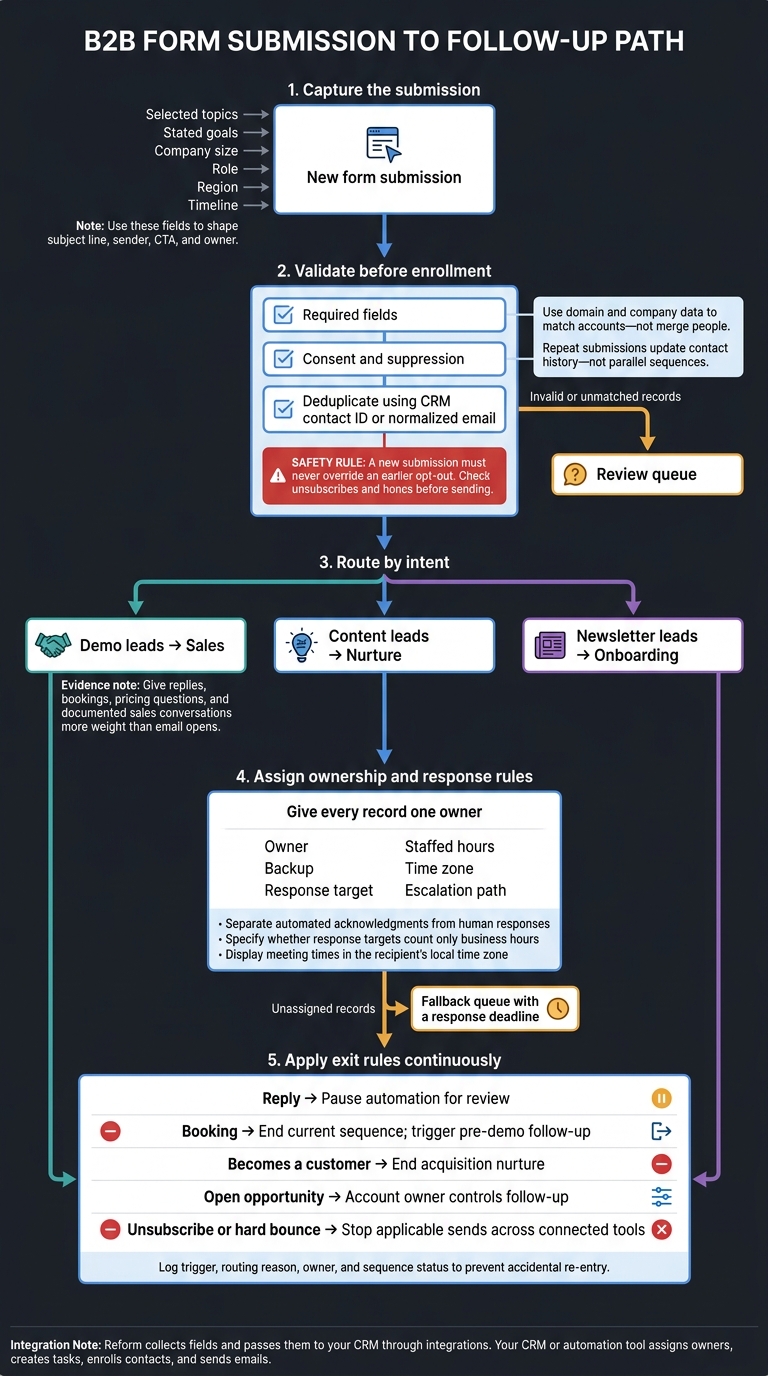
These examples work only if form data sends each lead down the right follow-up path. Let the submission guide what happens next. Use selected topics, stated goals, company size, role, region, and timeline to route demo leads to sales, content leads to nurture, and newsletter leads to onboarding. Those fields should also shape the subject line, sender, CTA, and owner. Give replies, bookings, pricing questions, and documented sales conversations more weight than email opens.
Reform can collect these fields and pass them to your CRM through integrations. From there, let your CRM or automation tool assign owners, create tasks, enroll contacts, and send emails.
Before enrollment, validate required fields, check consent and suppression, and deduplicate records using a CRM contact ID or normalized email. Use domain and company data to match accounts - not merge people. Repeat submissions should update contact history rather than start parallel sequences. Send invalid or unmatched records to a review queue, and check unsubscribes and hard bounces before sending. A new submission must never override an earlier opt-out.
Give every record one owner. Record the owner, backup, response target, staffed hours, time zone, and escalation path. Separate automated acknowledgments from human responses, and specify whether response targets count only business hours. Display meeting times in the recipient’s local time zone. Send unassigned records to a fallback queue with a response deadline.
Set exit rules before launch. Replies should pause automation for review; bookings should end the current sequence and trigger pre-demo follow-up. When a lead becomes a customer, end acquisition nurture. Put open opportunities under the account owner’s control. Unsubscribes and hard bounces should stop applicable sends across connected tools. Log the trigger, routing reason, owner, and sequence status to prevent accidental re-entry.
With routing in place, compare how timing, copy, and CTA change across intent levels.
Compare Follow-Up Plans Across Intent Levels
| Lead intent | Form trigger | Copy angle | Suggested timing | Primary objective | Handoff condition |
|---|---|---|---|---|---|
| High-intent demo lead | Demo, consultation, pricing, or sales-contact request | Confirm the request, speak to the stated need, and offer scheduling options. | Send an automated confirmation immediately. Aim for a human reply within 5 minutes during staffed hours. After hours, set expectations for the next business day. | Secure a qualified sales conversation. | Assign a sales owner when a valid request comes in. |
| Mid-intent content lead | Guide, report, webinar, or checklist request | Deliver the resource, then share useful takeaways without pushing for a meeting. | Deliver immediately, share one takeaway after 2–3 business days, and send related guidance 5–7 days later. | Educate the lead and identify a relevant business need. | Hand off after a sales request or clear signs of fit, such as replies or product questions. |
| Low-intent newsletter lead | Subscription without a sales request | Set expectations, cover selected topics, and share practical tips. | Send a welcome immediately, then follow the promised weekly or monthly cadence. | Build steady, permission-based engagement. | Hand off only after clear buying intent, such as a direct product question or demo request. |
For content leads, let topic relevance and engagement with follow-up messages guide when you send a demo invitation.
Measure response time to the first human sales reply, not the automated confirmation email.
Document the handoff rule. For example, require sales acknowledgment within 4 business hours and a recorded disposition within 2 business days.
Before sending, check subject lines, timing, and ownership against the comparison.
Check Your Emails Before Sending
Before sending the sequence, check the trigger, lead intent, and automation path one last time.
Match each email to the form submission and intent level: high-intent demo, mid-intent content, or low-intent newsletter.
Stick to one primary CTA and a mobile-friendly layout. Use short paragraphs and make the CTA easy to spot.
Check CAN-SPAM requirements. Confirm accurate sender details, an honest subject line, a valid physical postal address, and a working opt-out mechanism. CAN-SPAM applies to B2B email, too. Honor opt-outs within 10 business days, and don’t use a misleading “Re:” subject line.
Test the workflow - not just the copy. Submit test forms at each intent level to check timing, routing, and fallback handling. Make sure replies, bookings, and unsubscribes stop the correct sequence. Use one suppression list across all tools and mailboxes, and monitor reply-to inboxes.
Verify delivery details. Check SPF, DKIM, and DMARC authentication. Then preview both HTML and plain-text versions in major inboxes.
Conclusion: Match the Next Step to Lead Intent
Across all 15 examples, the next step should follow the lead’s signal - not a fixed sequence for everyone. Give each form submission a fitting follow-up path. Demo leads need confirmation, prep, rescheduling, and a recap. Content leads need the resource first, followed by one takeaway or assessment. Newsletter subscribers need useful, topic-based content - not a sales pitch.
Refine each path based on behavior. For demo leads, track replies, bookings, and attendance. For content leads, watch resource engagement and return visits. For newsletter subscribers, monitor sustained clicks, preference updates, and unsubscribe trends.
Change one variable at a time, such as the send delay or call to action. If bookings continue but qualified meetings decline, improve your pre-demo questions. If unsubscribes climb, check whether your frequency or topics match subscribers’ interests. Let those signals guide the next step: teach, invite, or pause.
FAQs
How should I handle conflicting lead intent signals?
Give recent behavior more weight than static information or older activity. Use lead scoring to assign values to actions, such as pricing page visits and content downloads, so you can better gauge a lead’s current intent.
Use Reform’s conditional logic to route leads based on their form responses, and map form data to CRM properties. Higher-intent signals should trigger immediate sales outreach. Keep lower-intent leads in educational nurture sequences until their behavior shows a stronger intent to buy.
How many unanswered follow-ups are too many?
There’s no universal limit, but decision-stage nurture sequences typically include three to five emails over one to two weeks. Set frequency caps and suppression rules so prospects don’t receive too many messages.
If a lead stays inactive for 30 to 45 days, move them to a win-back campaign instead of continuing standard follow-ups.
How can I personalize emails with limited form data?
Use lead enrichment to automatically add a contact’s job title, company name, or industry from their email address. Then use Liquid templates in your email platform to add form responses to subject lines and email messages.
Always set fallback values, such as “there” when a name is missing. Conditional content blocks let you show or hide email sections based on known responses, so messages stay relevant without asking for more input.
Related Blog Posts
Get new content delivered straight to your inbox

The Response
Updates on the Reform platform, insights on optimizing conversion rates, and tips to craft forms that convert.


Drive real results with form optimizations
Tested across hundreds of experiments, our strategies deliver a 215% lift in qualified leads for B2B and SaaS companies.
