
.webp)
Behavioral Triggers for Personalized Email Follow-Ups


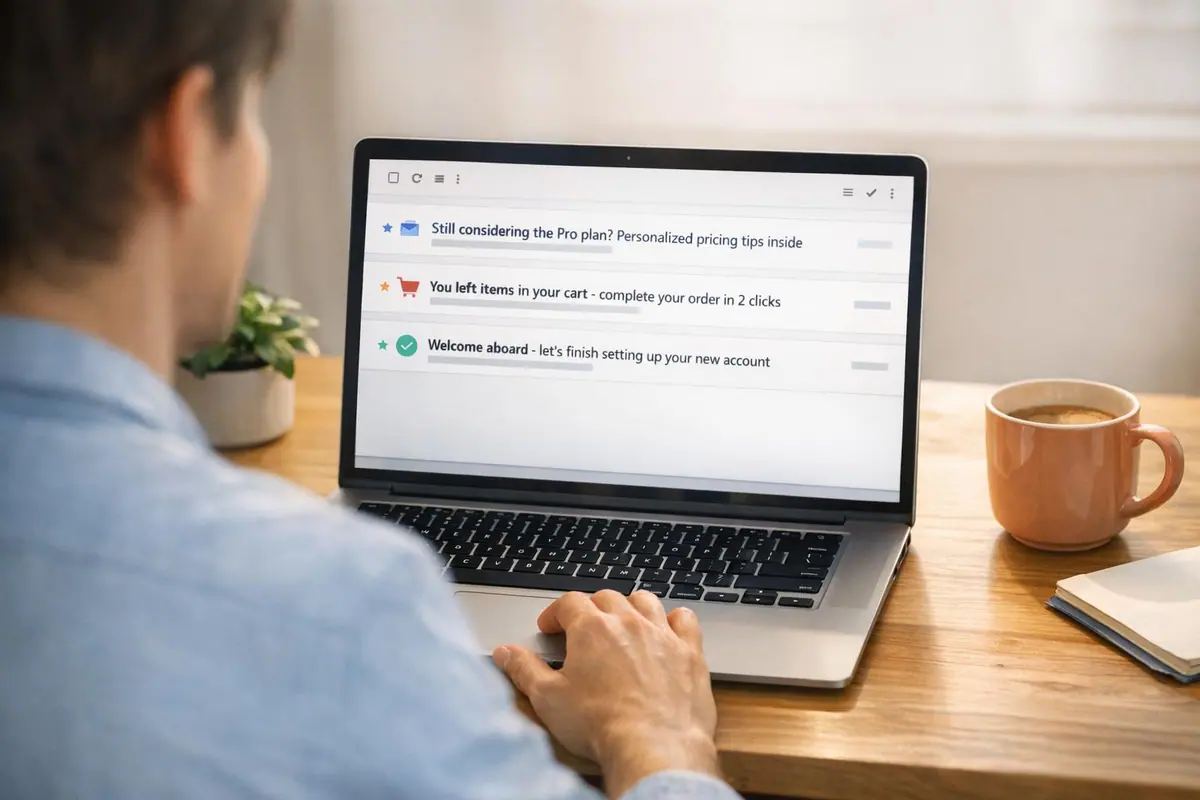
Behavioral triggers are a game-changer for email marketing. Instead of sending emails on a rigid schedule, they respond directly to user actions - like visiting a pricing page or abandoning a cart. This approach makes emails more relevant, timely, and effective.
Here’s why they work:
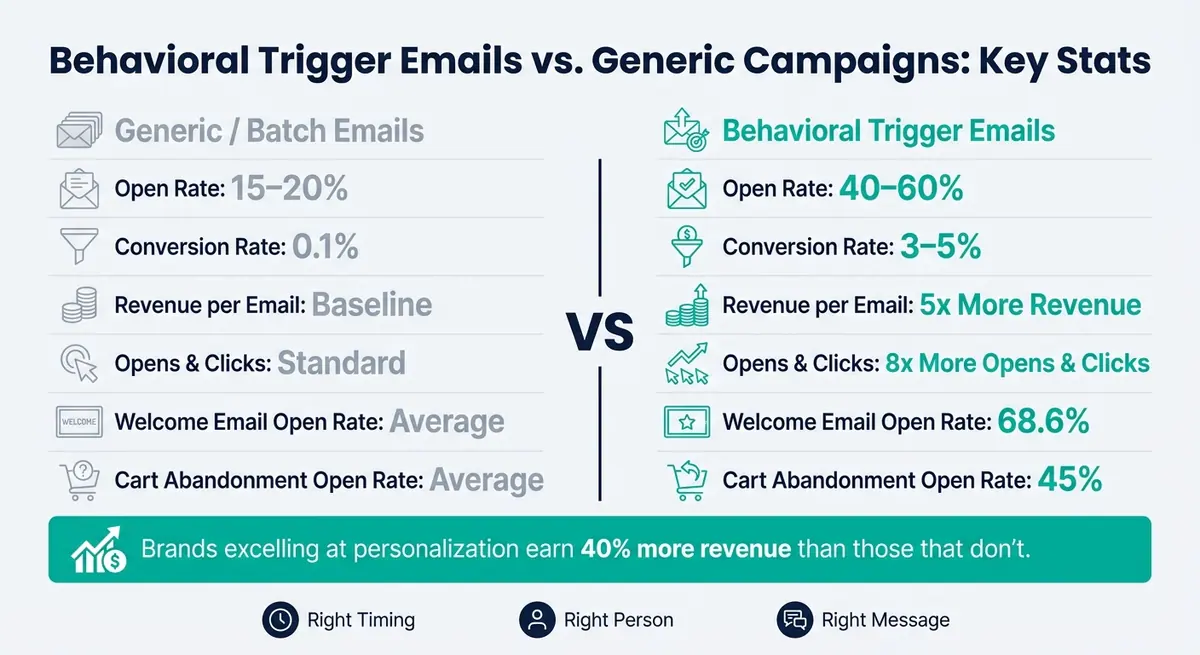
- Higher Engagement: Triggered emails generate 8x more opens and clicks than standard campaigns.
- Better Conversions: Conversion rates jump to 3–5%, compared to 0.1% for generic emails.
- Personalized Timing: Emails are sent based on user behavior, not arbitrary schedules.
Key Triggers to Start With:
- Welcome Emails: Engage users right after sign-up.
- Cart Abandonment: Recover lost sales with reminders.
- Re-engagement: Win back inactive users.
Tracking user actions (like form completions or pricing page visits) and combining them with enriched data (e.g., job title or company size) ensures your emails feel personal. The result? Higher engagement, more conversions, and better ROI. Start simple, measure results, and refine over time.
Behavioral Trigger Emails vs. Generic Campaigns: Key Stats
Stop Sending Emails Manually, Do This Instead
sbb-itb-5f36581
What Are Behavioral Triggers and Why Should You Use Them?
Behavioral triggers take email relevance to a whole new level by focusing on user actions rather than sticking to a rigid marketing schedule. These triggers send automated emails based on what someone actually does, making your communication far more timely and effective. The difference? The user's behavior sets the timing - not your calendar.
Think about a typical email campaign, like a newsletter sent every Tuesday at 9 AM. It goes out to everyone, regardless of their recent activity. Sure, it’s consistent, but it often misses the mark for many recipients. Behavioral triggers, on the other hand, respond to what someone needs right now.
"Batch sends ignore context. They ignore timing. They ignore the actual behavior that tells you what someone needs right now." - Ronald Davenport, Lifecycle Architect
This approach isn’t just smarter - it’s more effective. Triggered emails see open rates of 40–60%, compared to only 15–20% for standard campaigns. Even better, they generate 5x the revenue per email compared to generic broadcasts.
Common Behavioral Triggers with Examples
Behavioral triggers tend to work best when aligned with where a user is in their journey. Here’s a breakdown:
| Trigger Category | Example Action | Why It Matters |
|---|---|---|
| High Intent | Pricing page visit, form submission, quote request | The user is in decision-making mode - timing is crucial. |
| Engagement | Email link click, video view, resource download | The user is exploring - great chance to provide more value. |
| Lifecycle/Retention | No login for 30 days, purchase anniversary, milestone | The user may need re-engagement or recognition. |
Some specific examples stand out. Welcome email triggers, for instance, generate 320% more revenue per email than standard promotional messages, with open rates averaging an impressive 68.6%. Meanwhile, cart abandonment triggers boast open rates of 45% and can recover up to 29% of lost sales. These automations are among the most effective tools for increasing ROI.
If you’re just getting started, focus on the "Core Three" triggers:
- A welcome flow tied to signups
- A cart or form abandonment sequence
- A re-engagement trigger for inactive users
These three types of triggers address the most common points where users drop off and can deliver impactful results - without requiring a complicated setup.
Up next, we’ll dive into how to track user behavior to fine-tune your email personalization even further.
Tracking the Right User Signals for Personalization
When it comes to personalizing your user interactions, it's all about tracking behaviors that accurately predict what users will do next. This ensures your responses are timely and relevant, laying the groundwork for smarter trigger logic in your workflows.
"Your email platform knows when to send. Your analytics platform knows why. The magic happens when you connect them." - KISSmetrics Editorial
By linking your email and analytics platforms, you can unlock the true potential of these triggers and create a more seamless experience.
Key Behavioral Data Points to Track
Effective trigger-based emails rely on two main types of data: Properties and Events.
- Properties capture a user’s current state, like their billing status (
billing_state = trialing) or the number of projects they’ve created. These are often more reliable for setting triggers since they reflect the present moment. - Events are timestamped actions, such as
project_createdorguide_downloaded. While useful, events can sometimes get lost during migrations or data cleanups, making properties a safer bet for consistency.
Some important metrics to monitor include:
- Form completions
- Partial submissions (a strong signal of abandonment)
- Field-level intent - tracking which fields were completed before a user dropped off
- Lead source
- Pricing page visits
- Inactivity patterns
It’s just as important to track what users don’t do as it is to track their actions. For example, if most buyers complete their purchase within 30 minutes of adding items to their cart, you might set an abandonment trigger to activate after 60 minutes.
Using Enrichment Data to Improve Trigger Accuracy
Behavioral data shows you what someone did, but enrichment data reveals who they are. In B2B scenarios, where decisions often involve multiple stakeholders, this distinction is crucial. For instance, a CFO using your ROI calculator will need a very different follow-up compared to an IT director reviewing security documents.
Integrating CRM data - like company size, role, or industry - into your email content can make your messages far more relevant. Tools like Reform simplify this process by pulling details such as job title, company, and intent signals directly from form submissions into your trigger logic. This allows for hyper-personalized messaging, such as referencing, "Your dashboard is 80% set up", rather than sending a generic reminder.
Trigger Types and Use Cases: A Comparison
Acting on high-intent signals quickly is key - prospects are 21 times more likely to convert if you follow up within five minutes. But not all triggers demand the same level of urgency. Here's a breakdown of different triggers, their intent levels, and how they can be used effectively:
| Trigger Type | Intent Level | Ease of Setup | Response Time | Use Case Example |
|---|---|---|---|---|
| Form Submission / Quote Request | Very High | Easy | Immediate (0–5 min) | New lead submits a contact form |
| Pricing Page Visit | High | Medium | High (1–2 hours) | User browses pricing but doesn’t convert |
| Cart / Form Abandonment | High | Medium | High (30–60 min) | User starts a form but exits before submitting |
| Stage Progression | High | Hard | High | Lead moves from "Initial Interest" to "Active Evaluation" in CRM |
| Guide / Resource Download | Medium | Easy | Medium (24 hours) | User downloads a whitepaper or checklist |
| Inactivity (30+ days) | Low / At-risk | Medium | Re-engagement (Weekly) | No login or email engagement in over a month |
| Milestone Reached | High | Medium | Medium | User completes their 20th project or hits a usage limit |
How to Build Trigger-Based Email Follow-Up Workflows
Once you’ve identified the signals to track, the next step is turning those signals into automated workflows. A trigger-based workflow follows a simple formula: when a user does X, send email Y. The tricky part? Crafting rules that are precise and feel personal rather than robotic.
Mapping User Actions to Workflow Logic
At the heart of every effective workflow is if/then logic. For instance, if a user clicks a link in your email, you can move them into a high-intent path with a direct call-to-action. On the flip side, if they don’t open the email, you might follow up with a revised subject line and include some compelling social proof. This branching strategy ensures your messages stay relevant at every stage.
When building workflows, two things matter most: timing and exit conditions. Timing should be guided by your funnel data - sending emails too early or too late can hurt engagement. Exit conditions, on the other hand, ensure that users don’t get unnecessary follow-ups once they’ve completed the desired action.
Pay attention to your logic operators as well. Use AND logic for targeting high-intent users (e.g., visited the pricing page and clicked the contact link). For re-engagement workflows, OR logic works better (e.g., hasn’t logged in for 30 days or hasn’t opened an email in 45 days).
Once your workflow logic is in place, the next step is connecting the right tools to automate the process.
Connecting Your Tools for Automated Follow-Ups
For a workflow to work smoothly, your tools need to communicate in real time. This means syncing data between your form builder, analytics platform, and email or CRM tool. Here are three common ways to make this happen:
- Property syncing: Push user attributes, like
activation_status, directly to your email platform. - Event tracking APIs: Send custom events from your analytics tool to your email service provider.
- Webhooks: Trigger a data payload to your email service provider as soon as a user completes an action.
A tool like Reform can be a game-changer in this setup. Its conditional routing logic allows you to customize form experiences based on user responses, while its incomplete submission tracking helps capture leads when someone drops off mid-form. These incomplete submissions often signal high intent - perfect for personalized follow-ups. By integrating Reform with your email platform, you can dynamically tailor content using form data like job title, company, and intent signals, instead of relying on generic templates.
If you’re new to trigger-based workflows, start simple. Focus on three essential workflows: a welcome sequence segmented by signup source, a follow-up for incomplete form submissions, and a re-engagement sequence for inactive users. These workflows cover critical moments in most funnels and provide a solid foundation to expand upon.
How to Personalize Follow-Up Email Content
Once your workflow and tool integrations are set, the next step is crafting emails that feel genuinely personal. The key is aligning your message with the recipient's recent actions. A follow-up email that resonates with someone's behavior can make all the difference between being opened or ignored. Let’s dive into how to weave behavioral insights into every email element.
Tailoring Content Based on Behavior and Intent
The most impactful follow-up emails reference specific actions rather than vague activities. For example, instead of saying, "We noticed you visited our site", try, "We saw you checked out our enterprise pricing - here’s what you need to know." This level of specificity shows the recipient the email is tailored just for them.
Subject lines are your first opportunity to reflect user behavior. Use dynamic data points to personalize them - like referencing a feature they interacted with, a page they browsed, or their progress in onboarding. For instance, a subject line like "Your dashboard is 80% set up - finish it now" creates an urge to act. Personalized subject lines can boost unique open rates by 26% compared to generic ones. Once the email is opened, ensure the body mirrors this personalization. Dynamic content blocks can automatically pull in details like the product category they explored or a feature they haven’t tried yet.
When customizing your content, focus on the what - their actions, interests, or needs - and frame your message around how you can help. Avoid being overly specific about when they were active, such as mentioning exact times, as this can feel invasive. Striking the right tone based on their intent is equally important. Below are some guidelines for aligning your message depth with user behavior.
Matching Message Depth to User Intent Level
Every user interaction signals a different level of intent, and your email should reflect that. For example, someone requesting a quote has a much higher intent than someone casually reading your blog. Sending a pushy email to a low-intent user could turn them off, while a soft approach for a high-intent user might waste an opportunity.
Here’s how to adjust your content strategy based on intent:
| Intent Level | Example Trigger | Content Approach | Timing |
|---|---|---|---|
| High | Form submission, quote request | Direct CTA, personal contact info, urgent tone | 30–60 minutes |
| Medium | Pricing page visit, guide download | Educational content, case studies, "how-to" resources | 24 hours |
| Low | General browsing, blog reading | Brand storytelling, weekly tips, light nurturing | Weekly/bi-weekly |
For high-intent users, offer a clear next step, like a booking link, a phone number, or a time-sensitive promotion. Medium-intent users respond best to value-driven content, such as a relevant case study or a comparison guide. Low-intent users, on the other hand, need nurturing - think along the lines of helpful tips or industry trends to build trust over time.
Emails triggered by specific behaviors and tailored to the right depth consistently outperform generic campaigns. The difference lies in relevance: delivering the right message, at the right time, with just the right level of detail.
Testing and Improving Behavioral Trigger Performance
Key Metrics to Track for Trigger-Based Emails
Setting up behavioral triggers is just the starting point - what really matters is how well they perform. To measure their success, focus on metrics like open rates, click-through rates (CTR), and unsubscribe rates to assess engagement. But the most critical metric? Your behavioral conversion rate. This shows whether the recipient actually completed the action the email was designed to prompt. A click may indicate interest, but a conversion confirms the email hit the mark.
Another important metric is revenue per trigger, which reveals how much value each automated sequence generates. For example, cart abandonment emails often recover around 10% of lost revenue, with average open rates of 39%. By identifying which workflows drive the most value, you can focus your efforts on optimizing those that matter most.
| Metric Category | What to Measure | Why It Matters |
|---|---|---|
| Engagement | Open Rate / CTR | Indicates if your subject lines and content are resonating |
| Conversion | Behavioral Conversion Rate | Validates whether the email drove the desired action |
| Financial | Revenue per Trigger | Highlights your most profitable workflows |
| List Health | Unsubscribe / Complaint Rate | Flags over-emailing or targeting issues |
Keep an eye on bounce and complaint rates, too. High numbers in these areas could mean your triggers are firing too often or targeting the wrong people, which can hurt your sender reputation. With these metrics in hand, you’ll have the foundation needed to refine your strategy through testing.
A/B Testing and Refining Your Workflow Logic
Once you’ve tracked key metrics, the next step is to improve your workflows with structured A/B testing. Start with the basics: test subject lines first, then move on to preview text, the email’s layout, and finally, your calls-to-action (CTAs). Subject lines are a great starting point because they’re often the biggest factor in whether an email gets opened.
Timing is everything. Experiment with different delays - like sending a follow-up an hour later versus three hours later - to discover what works best for your audience.
"Behavioral triggers aren't complicated. They're just smarter timing." - Ronald Davenport, Lifecycle Architect
To avoid overwhelming your audience, set frequency caps to limit how many automated emails a user can receive within a specific timeframe. A good rule of thumb is a 24–48 hour gap between promotional emails. Additionally, use suppression rules to exclude users who’ve already converted or who have active support tickets. For instance, sending a sales email to someone who’s dealing with a service issue can erode trust quickly.
Another way to fine-tune your triggers is through holdout testing. Randomly exclude 10–20% of eligible users from receiving a specific trigger, then compare their behavior to those who did receive it. This helps you determine whether the trigger is actually driving conversions or if users would have taken the action on their own.
Finally, don’t set your workflows on autopilot indefinitely. Schedule a quarterly review of all active triggers. Audience behavior evolves, and workflows that were effective six months ago might not resonate anymore. Regular reviews help you catch and correct outdated logic, ensuring your triggers remain relevant and effective.
Conclusion: Getting Results with Behavioral Triggers
Behavioral triggers take the guesswork out of email marketing by responding directly to what users do - or don’t do - in real time. Instead of sticking to a rigid schedule, you’re tailoring your outreach based on actual behavior. That’s a big reason why triggered emails generate 8x more opens and clicks compared to generic, time-based campaigns. Even better, conversion rates leap from a modest 0.1% with batch emails to 3–5% when behavioral triggers are in play.
Key signals like visits to pricing pages or high-converting forms are goldmines for creating timely and relevant workflows. Combine these signals with enriched data and clear exit conditions to ensure every email hits the mark. With proper tracking, your follow-ups become more than just emails - they’re personalized touchpoints that resonate with your audience.
This approach highlights an important truth: timing emails based on real user behavior is far more effective than even the most cleverly written subject line. Personalization becomes the driving force, aligning content with what users actually want. By referencing specific actions, tailoring the depth of your message to match intent, and sending emails when urgency is highest, you’ll see engagement soar. In fact, brands that excel at personalization earn 40% more revenue than those that don’t, and behavioral triggers are one of the simplest ways to tap into that potential.
To keep your triggers performing at their peak, track behavioral conversion rates, run holdout tests, and review your workflows every quarter. While today’s triggers need regular tweaking, consistent measurement ensures they remain sharp and continue delivering the right message to the right user at the perfect time.
FAQs
Which behavioral triggers should I set up first?
Start by identifying triggers connected to actions that reflect strong user intent or engagement. These could include visits to critical pages like pricing or service pages, actions such as abandoning a form or shopping cart, or meaningful interactions like downloading resources or browsing multiple pages. Zeroing in on these behaviors allows you to act swiftly on potential leads, increasing both engagement and conversion opportunities.
How do I choose the right timing for each trigger email?
Timing is everything when it comes to email engagement. Align your emails with specific user actions to make the most impact. For instance, if someone abandons their cart, sending an email right away can help reignite their interest. However, not all triggers are the same.
Keep an eye on metrics like open rates and conversion rates to fine-tune your approach. Some emails might perform better with a slight delay, while others work best when delivered instantly. Use performance data to adjust your strategy, ensuring your emails stay relevant and effective.
What data should I use to personalize triggered follow-ups without being intrusive?
To make follow-ups feel personal but not pushy, concentrate on behavioral data such as website activity (like visiting important pages or abandoning a cart), email engagement (such as opens and clicks), and product interactions (like completing forms or downloading resources). Steer clear of gathering overly sensitive or detailed information. Instead, focus on meaningful actions that show genuine interest, like checking out pricing pages. This approach keeps your follow-ups relevant, respectful, and helps establish trust with your audience.
Related Blog Posts
Get new content delivered straight to your inbox

The Response
Updates on the Reform platform, insights on optimizing conversion rates, and tips to craft forms that convert.



Drive real results with form optimizations
Tested across hundreds of experiments, our strategies deliver a 215% lift in qualified leads for B2B and SaaS companies.
