
.webp)
CLOUD Act And Lead Data: Q&A For SaaS Teams



If a U.S.-linked SaaS vendor can access your lead data, it may have to turn that data over to U.S. law enforcement - even when the data is stored outside the U.S.
Here’s the short version: I’d treat vendor access as the main risk, not server location. In a lead stack, that can mean form entries, IP addresses, timestamps, enrichment fields, CRM records, and logs. And because more than 50% of criminal investigations involve cross-border electronic evidence requests, each extra vendor in your workflow can add one more place where disclosure can happen.
Before I get into the details, these are the points I’d focus on first:
- Foreign hosting does not block U.S. access requests if the provider is under U.S. jurisdiction.
- Both content and metadata matter. Form answers and uploaded files are one part of the picture; logs and routing data matter too.
- Each retained copy adds risk. Forms, CRMs, enrichment tools, backups, and analytics platforms can all hold the same lead in different forms.
- Encryption key control matters. If the vendor holds the keys, it may be able to hand over readable data.
- Shorter retention cuts exposure. Less stored data usually means less data available to disclose.
- Your vendor review should be direct. Ask about notice, request handling, legal challenges, deletion, subprocessors, and key control.
- Your internal plan should be simple. Assign legal, security, and ops roles before any request arrives.
I’d sum up the article like this: data residency helps with local compliance goals, but it does not remove CLOUD Act exposure on its own. What matters most is who controls the data, who can access it, how long it is kept, and whether your team knows what to do if a vendor gets a request.
That’s the lens I’d use for the rest of this guide.
The CLOUD Act Problem: US Government Access to Foreign Servers
sbb-itb-5f36581
What counts as provider-held lead data
Provider-held data is any lead data a vendor stores or can pull from its own systems. It’s not limited to what shows up in your dashboard.
In a lead workflow, that can include form answers, uploaded files, account records, IP addresses, timestamps, referrer URLs, enrichment outputs, and usage logs. The main split here is content versus metadata.
Content data vs. metadata in lead workflows
The key legal split is content versus metadata.
Content is the substance of a lead submission. That means the actual form answers or files someone sends. Metadata is the technical record around that submission, like an IP address, timestamp, or account ID.
Both can be disclosed. But the legal bar often isn’t the same.
That distinction shapes the disclosure risk below.
| Data Type | Common SaaS Use | Provider Can Access? | Common Access Standard |
|---|---|---|---|
| Form answers | Lead capture, qualification | Yes | Search warrant (probable cause) |
| Uploaded files | Intake forms, applications | Yes | Search warrant (probable cause) |
| IP addresses | Fraud detection, attribution | Yes (system logs) | Subpoena or court order |
| Submission timestamps | Lead scoring, audit trails | Yes (system logs) | Subpoena or court order |
| Referrer URLs | Attribution, campaign tracking | Yes (system logs) | Subpoena or court order |
| Account records | CRM records, verification | Yes (database) | Subpoena or court order |
| Enrichment outputs | Appended firmographics, social URLs | Yes (API/database) | Subpoena or court order |
| Usage logs | Engagement tracking | Yes (system logs) | Subpoena or court order |
How provider control applies across the SaaS stack
In practice, every retained copy matters.
The CLOUD Act turns on what a provider can access in its underlying systems, not just what your team can see in the UI. That’s the part many teams miss. A form builder may keep both the submission itself and the technical records around it. Then the lead moves into a CRM or an enrichment tool, and now you have more copies sitting in more places.
Each retained copy can become another exposure point.
The next risk question is where those providers and sub-processors are located.
How data location and vendor jurisdiction change risk
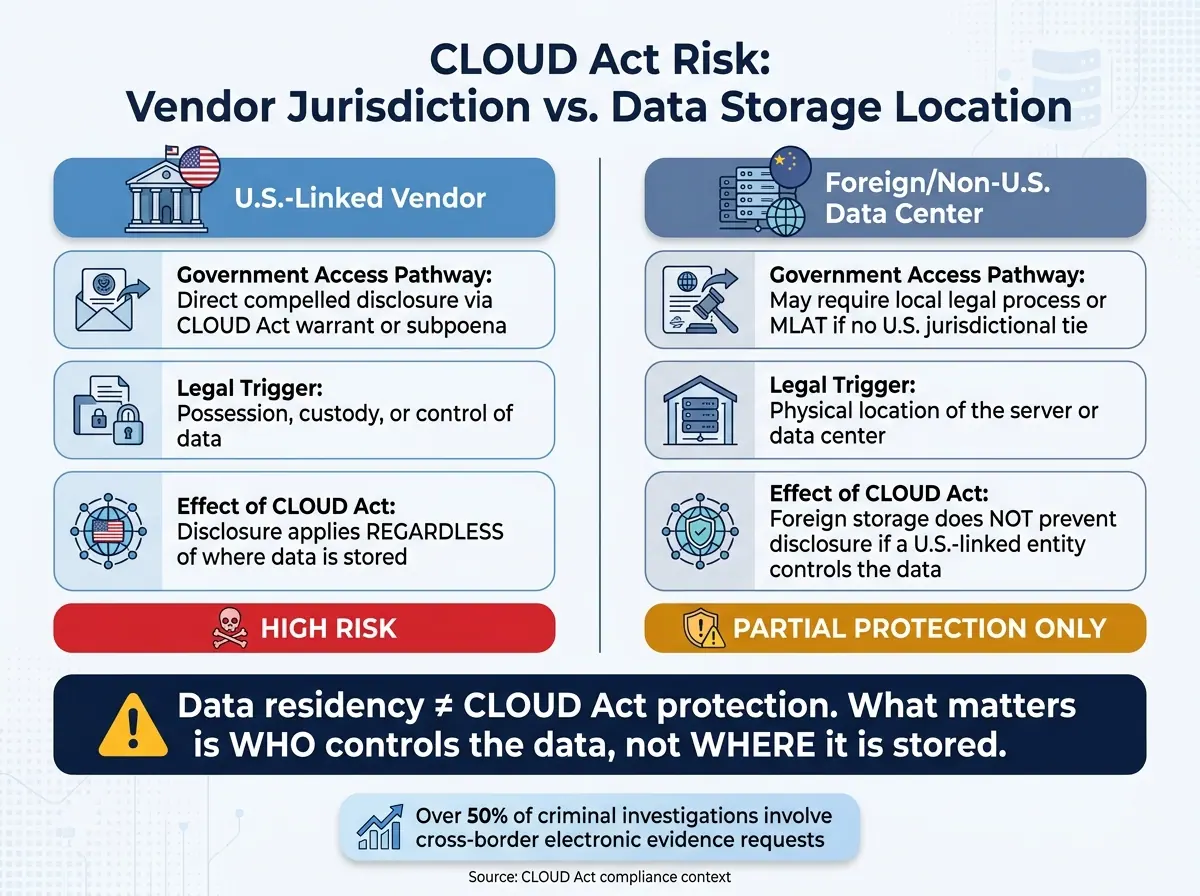
CLOUD Act Risk: Vendor Jurisdiction vs. Data Storage Location
Hosting data outside the U.S. does not remove CLOUD Act risk from lead data in SaaS tools. If a provider with U.S. ties controls that data, the storage location by itself won’t keep it out of scope.
Why foreign storage does not block disclosure
The CLOUD Act is based on possession, custody, or control - not where the server happens to be. So if a U.S.-linked provider has possession, custody, or control of your lead data, that provider can be forced to hand it over no matter where the data is stored.
Data residency still matters. It can help meet local data localization rules and support a GDPR compliance posture. But it does not block valid U.S. legal process aimed at a U.S.-linked provider. That’s why Transfer Impact Assessments (TIAs) for GDPR compliance need to look past a cloud console’s region selector. If your vendor is a U.S. company running a foreign data center, the TIA should directly address U.S. government-access exposure instead of assuming offshore hosting fixes the issue.
So the next question for SaaS teams isn’t just about storage region. It’s about vendor jurisdiction.
How sub-processors multiply exposure
Lead data almost never stays in one system. A form submission might pass into a CRM like Close, an email sequencer, a backup system, or a support tool. Every extra system creates another provider-held copy and another place where access can happen.
For each vendor in your lead workflow, the useful question is not only, “Where is this data stored?” It’s also: Which legal entity controls the data environment, and is that entity subject to U.S. compelled disclosure orders?
| Risk Dimension | Provider Jurisdiction (U.S. Linked) | Storage Location (Foreign/Non-U.S.) |
|---|---|---|
| Government Access Pathway | Direct compelled disclosure via CLOUD Act warrant or subpoena | May require local process or an MLAT if the provider has no U.S. jurisdictional tie |
| Legal Trigger | Possession, custody, or control | Physical location of the server or data center |
| Effect of CLOUD Act | Compelled disclosure applies regardless of storage location | Storage abroad does not prevent disclosure if a U.S.-linked entity controls the data |
There’s another layer here: encryption key control. If the provider holds the keys, it can be forced to decrypt the data. If the customer holds the keys, the scope of disclosure is more limited.
The next move is pretty simple: ask each vendor who controls the data environment and who can be compelled to produce the data.
What to ask vendors about government access requests
Turn that risk map into a vendor checklist.
The minimum questions every SaaS team should ask
Start with the basics: review the privacy policy, DPA, SCCs, law-enforcement request policy, and the latest transparency report. Those documents can tell you a lot. They show how a vendor handles notice, challenge, retention, and subprocessors.
Use them to pressure-test the vendor, not just skim for fine print.
The table below links each core question to why it matters for lead data and what a strong answer should sound like.
| Vendor Question | Why It Matters for Lead Data | What a Strong Answer Looks Like |
|---|---|---|
| Will you notify us of government requests? | Lets your legal team intervene or seek a stay before lead data is handed over. | "Yes, unless a gag order prohibits it." |
| Do you send requests to the customer first? | Ensures the government seeks data from the data owner, not the intermediary. | "We redirect law enforcement to the customer whenever possible." |
| Do you challenge overbroad requests? | Prevents fishing expeditions into your entire lead database. | "We review every request and challenge any that are overbroad or lack a valid warrant." |
| What is your default retention for lead content and logs? | Shorter retention directly shrinks the window of data available for disclosure. | "Logs purged after 30 days; content deleted on customer request." |
| Are all sub-processors listed, and what jurisdictions do they operate in? | Each sub-processor is another entity that can be compelled to produce data. | "Full sub-processor list with jurisdictions is in our DPA; all are bound by the same privacy standards." |
Also ask whether the vendor shortens retention for older lead records and deletes data on request. That one detail can change the size of your exposure quite a bit.
Technical controls that affect disclosure scope
Contract language matters. But the technical setup tells you what the provider can hand over in practice.
Ask, point-blank, whether the vendor supports Bring Your Own Key (BYOK) or customer-managed keys through a Hardware Security Module (HSM). If the vendor holds the keys, it may be able to produce readable lead content under a valid legal order. That’s the key issue.
Then look at access logging and role-based permissions. Access logs show who touched lead records and when. Role-based permissions narrow which vendor employees can reach those records at all. Fewer people with access usually means less room for trouble.
Ask how long those logs are kept and whether you can export them on your own. If you can’t get the logs when you need them, they don’t help much.
Last, ask about deletion practices. A vendor that can show documented deletion of lead data after a campaign ends is a lower-risk choice than one with indefinite retention defaults. That’s not just nice policy language. It limits what the vendor can disclose.
These answers should feed your internal response plan.
Practical safeguards and a simple internal playbook
How to reduce exposure in form-based lead collection
Start with minimization inside your workflow. Use the data map from your vendor review to trim what you collect at the source.
Collect only the data needed for the immediate workflow. In plain terms, audit every field on your lead capture forms. If a field doesn't serve the task in front of you, cut it. A form that asks only for an email address creates a much smaller exposure surface than one that also pulls location data, behavioral signals, and other extra details.
Good form design helps on two fronts: it lowers exposure and removes friction. Reform, for example, lets you build multi-step forms with conditional routing. So instead of showing every field to every person, you ask for more only when the workflow actually calls for it. That kind of setup keeps unneeded personal data out of your CRM and out of downstream integrations too.
Beyond minimization, separate high-risk data from routine lead data. Information tied to trade secrets, strategic plans, privileged communications, or sensitive personal data should sit in a separate environment, not next to day-to-day lead records. Document which systems hold each data category and which team owns each flow.
| Safeguard Type | How It Applies to Form-Based Lead Gen | Primary Benefit |
|---|---|---|
| Data minimization | Collect only essential fields; remove identifiers not needed for the workflow | Reduces data volume and exposure |
| Data segregation | Store high-risk information in separate silos from routine lead data | Improves visibility and legal protection |
| Encryption (BYOK) | Use customer-managed keys so plaintext access is limited | Prevents plaintext access if compelled |
| Access control | Limit which integrations and team members can view lead metadata | Reduces downstream exposure and linking risk |
| Data mapping | Document every sub-processor and storage region in the lead workflow | Improves visibility into legal exposure |
Of course, controls on paper don't do much if the team freezes when a request comes in.
What an internal response playbook should contain
When a vendor receives a request, speed and role clarity matter more than last-minute debate. Most SaaS teams don't have a plan for that moment. The good news: fixing that gap doesn't require a full legal department.
The playbook should exist to control what providers can disclose, not just to tidy up internal process. Keep it tight and centered on three actions:
- Assign ownership: Legal reviews validity and challenges. Security works with the vendor. Marketing ops maintains the data map.
- Define how your team handles notice: Set the process for when a vendor notifies you - and when it can't. Spell out the legal grounds your team would use to challenge an overbroad request, and store those grounds with your DPAs and vendor contracts.
- Log every decision: Track which requests came in, how they were checked, what objections were raised, and what was disclosed. That record matters for accountability and for later legal defense.
Internal governance documents - privacy notices, DPAs, and data maps - need to reflect jurisdictional reality, not just where the data is stored.
Related Blog Posts
Get new content delivered straight to your inbox

The Response
Updates on the Reform platform, insights on optimizing conversion rates, and tips to craft forms that convert.




Drive real results with form optimizations
Tested across hundreds of experiments, our strategies deliver a 215% lift in qualified leads for B2B and SaaS companies.
