
.webp)
Privacy and Compliance in Lead Forms



A lead form can create legal risk the moment someone types in their email. If I want lead forms that convert and stay within GDPR and CCPA/CPRA rules, I need to do five things from the start: give clear notice, track consent proof, ask for less data, set deletion rules, and watch every system the data flows into.
Here’s the short version:
- Every field needs a job: if I can’t explain why I ask for it, I should remove it. Using a lead gen multi-step template can help structure these fields logically while maintaining compliance.
- Consent needs proof: a simple yes/no flag is not enough for an audit.
- Privacy links and notices need checks: one broken link or old policy version can create risk.
- Lead data should not sit forever: many stale leads should be deleted or anonymized in 30 to 90 days.
- Integrations need controls: CRM, ad tools, enrichment tools, and analytics can all create risk if data moves without the right checks.
A few facts stand out:
- Under GDPR, pre-checked marketing boxes do not count as valid consent.
- Under CCPA/CPRA, sending lead data to ad or enrichment tools can trigger sale/share disclosure and opt-out duties.
- Open-text fields often cause the most avoidable problems because people may submit more personal data than I asked for.
If I had to boil the whole article down to one point, it would be this: a compliant lead form is not just a form page - it’s a system of notice, consent records, retention rules, and transfer logs.
That’s the frame for everything that follows.
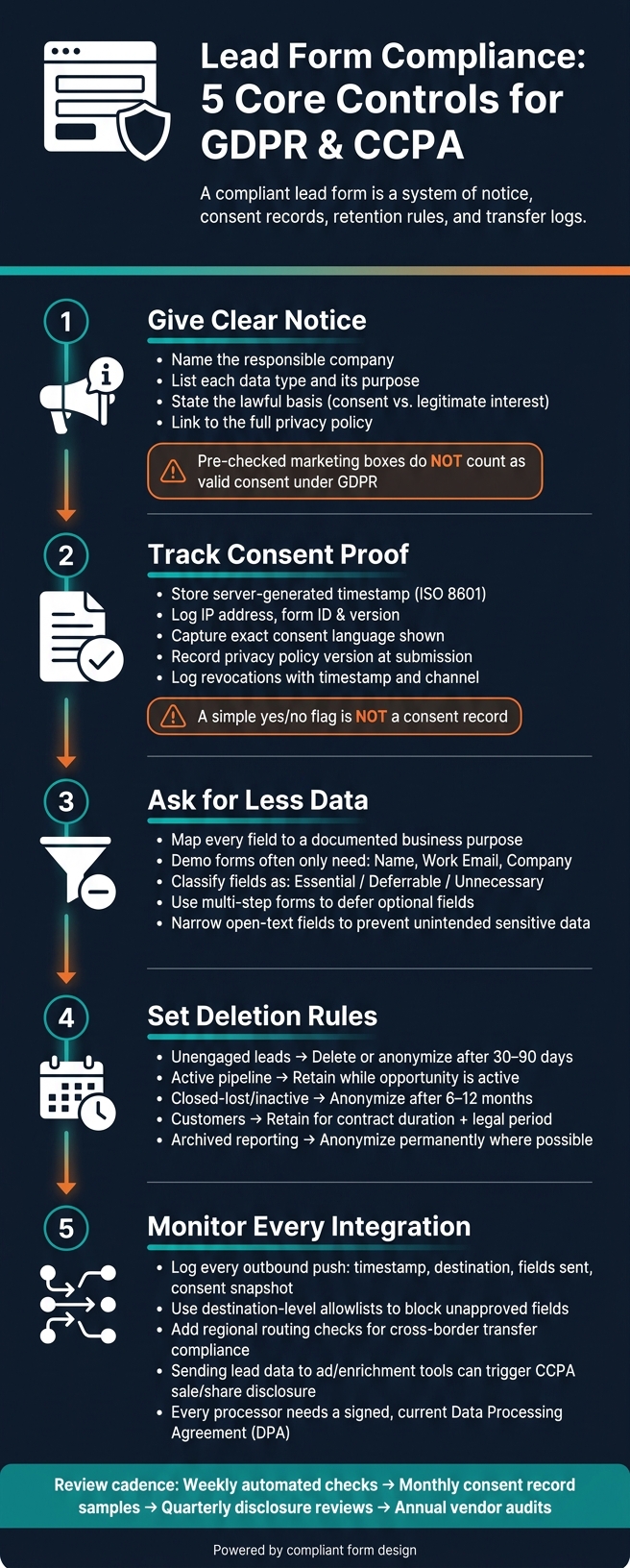
Lead Form Compliance: 5 Core Controls for GDPR & CCPA
Privacy rules that apply to lead forms
Before a lead form goes live, map every field to a legal basis, a clear purpose, and the tools that will receive that data. On paper, that sounds simple. In practice, it only works if the form enforces those rules at the moment someone submits it.
How GDPR and CCPA/CPRA shape lead form design
Under GDPR and CCPA/CPRA, names, work emails, phone numbers, job titles, IP addresses, company details, and profile data are regulated when they identify a person or can be tied back to one.
GDPR requires a documented lawful basis for each processing activity. For optional marketing, newsletters, and behavioral tracking, use consent. That consent must come from an active opt-in. A pre-ticked checkbox does not count.
For expected B2B follow-up, legitimate interest may apply when the form shows clear buying intent. But you still need to document the purpose and complete a balancing test.
If lead data is sent to ad platforms or enrichment tools, that can count as sale or sharing under CCPA/CPRA. That triggers disclosure, opt-out rights, and vendor controls that should appear in the notice at collection.
Form-level requirements to verify before launch
Start with the basics: use HTTPS, encrypt data in transit and at rest, and limit submission access by role.
The notice at collection needs to be specific, not vague filler text. It should name the responsible company, list each data type and why it is being collected, state the lawful basis, and link to the full privacy policy.
For marketing consent, keep the checkbox text plain, leave it unticked by default, and separate it from required fields. Bundling consent with terms of service acceptance is not valid under GDPR.
Every field should have a documented purpose before launch. If a field has no clear job or no known destination, cut it. That record of what each field collects, which tools receive it, and why they receive it is what makes the form auditable later. In short, each choice should leave an audit trail.
Use the checklist below to confirm the form is ready.
| Compliance Concept | What It Requires on a Lead Form |
|---|---|
| Personal information | Treat all personally identifiable fields as regulated data |
| Lawful basis | Document whether each processing activity relies on consent or legitimate interest |
| Notice at collection | Name the responsible company, state each data type and its purpose, and link to the privacy policy |
| Data minimization | Only collect fields with a documented, necessary purpose |
| Purpose limitation | Restrict downstream uses; review before adding new tools or ad platforms |
| Storage limitation | Set retention schedules tied to lead lifecycle stages; delete or anonymize stale records |
| Sale/sharing disclosure | Disclose if lead data flows to ad networks or enrichment tools; provide opt-out options |
Once those legal rules are in place, the next step is tracking consent and spotting form changes as they happen.
sbb-itb-5f36581
Build consent tracking and real-time monitoring into every form
Consent records that hold up in an audit
A checkbox flag is not a consent record. Regulators and auditors want proof of the notice, the time, and the choices shown when someone submitted the form. A simple yes/no flag can't show any of that.
Each submission should create a structured consent object that stores the full context of that moment. At a minimum, include:
- A server-generated timestamp in ISO 8601 format
- The IP address from the HTTP request
- The form ID and version
- A reference to the exact consent language shown
- The state of each checkbox or preference toggle
- The privacy policy version linked at submission
- The source URL
- Source and campaign metadata
Also log revocations - unsubscribe, preference-center withdrawal, or support request - in the same record, along with the timestamp and channel.
Use the table below to line up your evidence depth with your risk level.
| Approach | Data Captured | Audit Strength | Best Fit |
|---|---|---|---|
| Basic consent logs | Timestamp, email, yes/no flag | Low - hard to prove what the user saw | Legacy systems, non-regulated use cases |
| Structured consent JSON | Timestamp, IP, form ID/version, checkbox states, policy version, source URL | Medium - provides technical context for each submission | Growth-stage SaaS handling EU or California traffic |
| Audit-evidence approach | All structured fields plus legal basis per purpose, data categories, retention rules, revocation history, workflow approval IDs | High - defensible in regulatory reviews and DPIAs | Mature SaaS, enterprise B2B vendors, organizations under active regulatory scrutiny |
For EU or California traffic, structured consent JSON should be the baseline. That record then becomes the control point for blocking bad syncs and flagging form drift.
Live alerts for missing consent, broken notices, and risky form changes
Once you capture consent, the next step is simple: stop bad submissions before they spread into the rest of your stack.
Four alert patterns cover most of the risk. Flag any submission that is missing a required consent value before the record syncs downstream. That lead should never reach your email platform. Check each publish event against your legal content registry too. If a republished form still points to an old privacy policy version, alert legal or marketing ops before traffic hits the page.
You should also watch schema diffs between form versions. If a new field collects personal data but has no linked processing purpose or retention rule, it should trigger a review request. And integration syncs need a gate. If someone tries to push lead data to an enrichment API or ad platform without a checked consent status, block it and log it.
Use threshold alerts for hard rules and anomaly alerts for drift. Think of it this way: threshold rules catch the obvious stuff, while anomaly alerts catch the weird stuff that slips through.
| Alert Type | How It Triggers | Best For | Limitation |
|---|---|---|---|
| Threshold-based | Fires when a fixed rule is breached (e.g., submissions that breach a jurisdiction-specific notice or opt-out rule) | Known regulatory conditions and hard compliance rules | Needs manual tuning per jurisdiction; misses subtle or novel issues |
| Anomaly-based | Fires when patterns deviate from historical baselines (e.g., consent rate drops sharply from its baseline on a pricing-page form) | Catching configuration drift, silent failures after a copy change, or unexpected routing behavior | Requires baseline data; can generate false positives without a clear triage process |
Start with threshold rules for the non-negotiables. Then layer in anomaly detection to catch the problems that fixed rules won't spot on their own.
Use Reform to support privacy-safe lead capture
Reform helps with data minimization through multi-step forms and conditional routing. With a multi-step layout, you can ask for only the core contact details first. Then, later in the flow, you can ask for optional marketing preferences or profiling details after the user has more context and can make a clearer choice.
Conditional routing gives you jurisdiction-level control. If a respondent picks a region or plan type that triggers added disclosure requirements, Reform can send them to a step with jurisdiction-specific consent language and the right checkboxes. Spam prevention and email validation also help keep consent records cleaner. And when a form connects to downstream tools, Reform passes consent fields and metadata so those systems can enforce consent status.
Review fields, retention rules, and downstream integrations
After consent is in place, the next step is simple: collect less, keep it for less time, and watch where it goes.
Field-by-field review to cut unnecessary personal data
Start with every live form. For each one, note the owner, the destination system, and which fields are required versus optional. Then review each field one by one and ask:
Does this field directly support a defined business outcome right now?
If the answer is no, cut it or move it later in the flow.
GDPR and CPRA both say data collection should stay limited to what is needed for the stated purpose. In many cases, a demo form only needs name, work email, and company.
A simple way to sort fields is into three buckets:
- Essential
- Deferrable
- Unnecessary or risky
Fields in the third bucket should go. Fields in the second bucket should come later through progressive profiling. And pay close attention to open-text fields. They can invite people to share sensitive details they never meant to send.
| Audit Action | What to Do | Privacy Benefit |
|---|---|---|
| Field inventory | Map every field to a specific business purpose | Supports GDPR purpose limitation |
| Staged capture | Move deferrable questions to later qualification steps | Reduces personal data collected at first touch |
| Open-text review | Narrow prompts or replace with structured options | Helps prevent unintended sensitive data collection |
| Abandonment check | Remove fields with high drop-off and no clear purpose | Cuts unnecessary data and improves conversion |
Once the form is trimmed, set retention rules for what stays.
Retention checks tied to lead lifecycle stages
Retention should follow the lead lifecycle, not one blanket timer for everything.
Unengaged leads usually have the weakest case for long-term storage. If there is no follow-up activity, the reason for keeping that data fades fast. Active pipeline records can stay while sales activity continues, but the fields on those records should still be reviewed from time to time to make sure they are still needed. Customer records often need a longer retention period for billing, contracts, and support, but those rules should sit apart from marketing data. Archived reporting data should be anonymized where possible, since anonymized data falls outside GDPR's personal-data scope when the anonymization is truly irreversible.
| Data Category | Suggested Retention Action | Notes |
|---|---|---|
| Unengaged leads | Delete or anonymize after 30–90 days of inactivity | Weak justification for retention without engagement |
| Active pipeline leads | Retain while opportunity is active; review fields periodically | Re-check purpose if the deal stalls |
| Closed-lost or inactive | Anonymize after 6–12 months | Preserves reporting value without keeping personal data |
| Customers | Retain for contract duration plus applicable legal period | Separate rules for billing, support, and contract data |
| Archived reporting data | Anonymize permanently where possible | Anonymized records fall outside GDPR personal-data scope |
This only works if it runs on its own. Scheduled deletion jobs, anonymization jobs, legal-hold exceptions, and logs that show what was deleted, when, and under which rule turn policy into day-to-day practice. It also helps to set alerts for records that sit past their allowed window. Then run periodic checks across your form platform, CRM, marketing system, warehouse, and backups to make sure deleted records are not still hanging around in a backup copy.
After retention is set, the next job is tracing where each remaining field goes.
Integration monitoring across CRM, marketing automation, analytics, and enrichment tools
Every system that touches lead data after form submission is a compliance point.
Build a data flow map that shows each destination, the fields sent there, the processing purpose, the storage region, and the owner of that integration. Add the consent status or other legal basis for each transfer. GDPR transfer rules apply not just to cloud exports, but also to remote access. A support team viewing EEA records from outside the region can itself count as a cross-border transfer. That alone makes integration monitoring a must-have.
Each outbound push should be logged with:
- timestamp
- source form
- destination system
- record identifier
- fields transmitted
- consent snapshot
- approved purpose
- the user or automation that triggered the transfer
That log shows who got the record, why they got it, and whether the transfer matched the consent in place at submission. NIST Privacy Framework guidance specifically calls for sending approved purpose along with data elements and reviewing audit logs under a minimization principle.
In practice, silent over-sharing is often the bigger problem than a broken sync. A team updates a form, adds a field, and suddenly that field starts flowing into a system that was never cleared to receive it. No alert, no warning, no obvious error. That’s how scope creep sneaks in.
To stop that, set destination-level allowlists so unapproved fields are blocked or stripped before the payload is sent. Add regional routing checks too, so data does not land in an unapproved geography.
| Integration Control | What to Verify | Why It Matters |
|---|---|---|
| Logging | Every push has a timestamp, destination, approved purpose, and consent snapshot | Creates audit evidence and supports investigations |
| Reconciliation | Source and destination record counts match expected syncs | Detects failed or partial transfers and drift over time |
| DPA coverage | Each processor has a signed, current Data Processing Agreement | Confirms data-use limits and deletion obligations |
| Transfer checks | Data is not routed to an unapproved region or access point | Reduces unlawful cross-border transfers |
| Destination enforcement | Unapproved fields are blocked or stripped per system | Prevents over-sharing and scope creep |
Governance, audits, and conclusion
Roles, review cadence, and evidence SaaS teams should keep
Once alerts, retention checks, and integration monitoring are set up, governance is what keeps everything current. Controls don't hold up on their own. Someone has to own them.
A practical setup gives clear responsibility to marketing, RevOps, product, security, and legal. Use a RACI matrix, and have RevOps or a privacy lead own the review calendar.
Set a steady review rhythm:
- Run weekly automated checks for missing consent, broken links, and failed integrations.
- Review sample consent records monthly.
- Review disclosures, minimization, and rights-request processes quarterly.
- Audit retention, vendors, and the risk register annually.
That output becomes the audit file below.
The ICO recommends keeping consent records for as long as processing continues on the basis of that consent, so deleting evidence too early creates its own risk. Keep one audit file that answers four questions: what the user saw, what they accepted, when and how they accepted it, and where the data went.
In practice, that means keeping versioned form copy, timestamped consent records, integration logs, and deletion logs in one place, not scattered across different tools.
| Evidence Type | What to Keep | Why It Matters |
|---|---|---|
| Consent records | Timestamp, source, version of notice shown, preference values | Proves informed, specific consent and preference capture |
| Form version history | Copy, field list, and notice text for each published version | Reconstructs what a lead saw on the collection date |
| Integration and transfer logs | Destination, fields sent, approved purpose, consent snapshot | Shows where lead data went and how consent or opt-out flags propagated |
| Retention and disposal logs | What was deleted, when, and under which rule | Shows schedules are enforced, not just documented |
| Rights-request records | Intake date, systems checked, completion date | Confirms SLAs are met and all connected systems are covered |
If an incident happens, log it right away with the discovery time, affected systems, scope, and remediation steps. Then run root-cause analysis and turn the fix into a control change.
Conclusion: the core controls every lead form program needs
These controls only work if the review loop stays on schedule. A compliant lead form program depends on clear ownership, a fixed review cadence, and an audit file that shows consent, minimization, retention, and integration decisions were both made and enforced, not just written down.
FAQs
What counts as valid consent?
Valid consent must be freely given, specific, informed, and unambiguous. That means the person needs to take a clear action to say “yes.” Think checking an empty box or clicking a button. Just browsing a site doesn’t count. Pre-checked boxes don’t count either.
A solid consent record should show:
- who gave consent
- when they gave it
- how they gave it
- what privacy notice or disclosure text they saw at the time
That paper trail matters. If consent is ever challenged, you need more than “the user agreed.” You need a record that shows exactly what happened.
How long should lead data be kept?
Keep lead data only for as long as you need it. The less you store, the lower your risk. It also makes audits a lot easier.
Set a formal retention schedule based on legal or contract requirements. Keep consent records for at least five years after the last contact. Marketing data is often kept until consent is withdrawn or the lead goes inactive, usually 12 to 24 months. Once records pass their retention window, purge them.
Which integrations pose the most risk?
The biggest risk usually comes from integrations that have full lead profile access and CRM write permissions. Those tools can touch sensitive data across your entire marketing stack, which means a small issue can spread fast.
Give extra scrutiny to vendors that enrich or redistribute data, track users across multiple systems, use ad networks with behavioral tracking, depend on social media pixels for cross-site profiling, or tie into cookie synchronization.
Related Blog Posts
Get new content delivered straight to your inbox

The Response
Updates on the Reform platform, insights on optimizing conversion rates, and tips to craft forms that convert.




Drive real results with form optimizations
Tested across hundreds of experiments, our strategies deliver a 215% lift in qualified leads for B2B and SaaS companies.
