
.webp)
10 Constant Contact Auth Errors and Fixes


I start fixing Constant Contact OAuth errors by finding the step that failed - not by replacing credentials. Check the authorization request, callback, token exchange, token renewal, or API call. Authorization codes expire after 5 minutes, so exchange each code once and without delay.
Here’s my checklist for the 10 errors covered in this guide:
- Invalid grant: Get a new code or use the latest stored refresh token.
- Invalid redirect URI: Match the registered callback URL exactly.
- Missing client ID: Send the app’s API key where your flow requires it.
- Invalid client secret: Check the server-side secret and client login method.
- Unsupported grant type: Use the exact supported
grant_typevalue. - Missing or incorrect scope: Request the endpoint’s required permissions and reauthorize.
- Expired access token: Renew access, save both returned tokens, and retry once.
- Revoked or invalid token: Stop reusing it; renew access or reconnect the account.
- Malformed token POST request: Send form-encoded data, not JSON.
- Invalid or duplicate parameters: Remove repeated, empty, or unsupported fields.
For API calls, I treat 401 as a token check and 403 as a permission check. I keep secrets and token handling on the backend, redact logs, and verify the returned state. Then I test one low-risk API call - because browser approval alone doesn’t prove access. This is especially true when creating high-converting lead forms that rely on seamless third-party integrations.
<u>Change one thing at a time, then retest the failed step.</u>
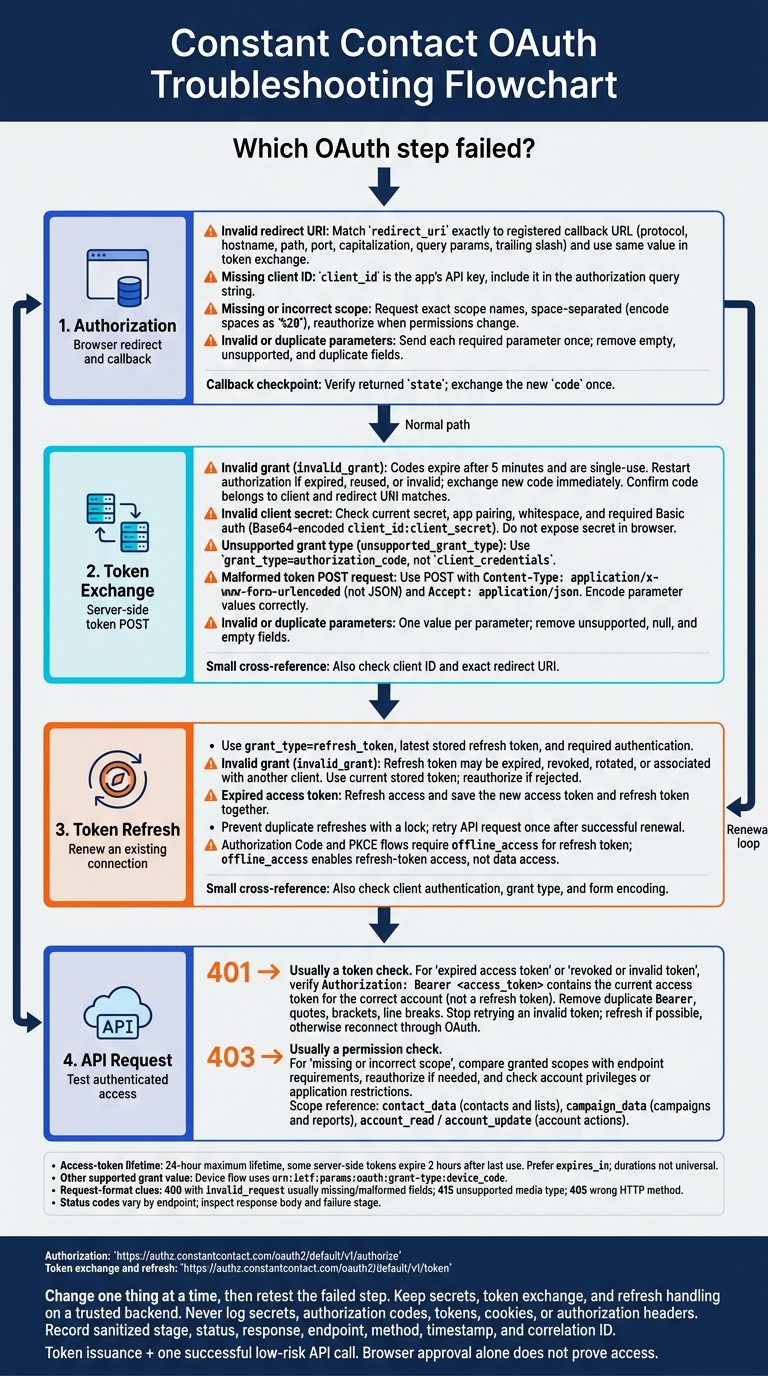
Constant Contact OAuth Errors: Find the Stage, Fix the Cause
How to GET CONSTANT CONTACT API KEY (Step by Step)
sbb-itb-5f36581
Find the OAuth Failure Stage
Authorization: Check the browser redirect separately from server-side requests. Verify the client_id, exact registered redirect_uri, response type, and requested scopes. For server-side flows, also check the client_secret.
Token exchange: If the callback returns a code, check the server-side token request next. Verify client authentication, grant_type, the matching redirect URI, and request encoding. Exchange the code immediately. For Authorization Code Flow, Constant Contact uses Basic authentication with a Base64-encoded client_id:client_secret value.
Token refresh: If an existing connection fails when renewing access, check grant_type=refresh_token, the stored refresh token, and the required client authentication. Authorization Code and PKCE flows require offline_access to receive a refresh token. Store the new refresh token, and refresh only when the access token is near expiry.
API request: Make sure the access token is sent in the Authorization: Bearer <access-token> header. A 401 usually points to an expired, revoked, or invalid token. A 403 usually means a missing scope. Compare the token’s granted scopes with the endpoint’s requirements before changing client credentials.
Use the current Constant Contact docs to check your flow, scopes, and endpoint rules. The current OAuth documentation lists https://authz.constantcontact.com/oauth2/default/v1/authorize as the authorization endpoint and https://authz.constantcontact.com/oauth2/default/v1/token as the token endpoint.
Error messages vary by endpoint and integration. Record the stage, HTTP status, response body, and sanitized request metadata. Never log secrets, codes, tokens, or authorization headers.
Once you’ve identified the stage, match it to the error below.
1. Invalid Grant
OAuth Stage and Error Signal
Constant Contact returns invalid_grant when it rejects the grant during an authorization code exchange or token refresh. The problem is with the authorization code or refresh token.
Likely Cause
Authorization codes expire quickly and work only once. Waiting too long or exchanging the same code again can cause this error. For token refreshes, the refresh token may have expired, been revoked, been replaced through rotation, or been issued to a different client.
Request and Credential Checks
Check the code’s age and whether it has already been exchanged. For the initial token exchange, set grant_type=authorization_code and confirm that redirect_uri exactly matches both the authorization request and the app registration. The code must also belong to the same client application requesting the exchange.
Fix
Restart the OAuth flow if the code has expired, was already used, or is invalid. Exchange the new code once in the server-side callback. Save the tokens, then redirect the user to a regular app page. This prevents a callback page reload from triggering another exchange.
If a token refresh fails, retry with the current refresh token. If Constant Contact rejects that token, reauthorize the connection.
2. Invalid Redirect URI
If the code is valid but the callback still fails, check the redirect URI next. A callback mismatch isn't a token problem.
OAuth Stage and Error Signal
Constant Contact returns a 400 error when the redirect_uri in the authorization request or token exchange doesn't exactly match the registered absolute redirect URI.
Likely Cause
The app is sending a callback address that differs from the one saved in My Applications. This can happen when staging and production settings get mixed up, or when a reverse proxy generates http even though the public address uses https.
Request and Credential Checks
Compare the registered URI with the redirect_uri in both requests. Check the protocol, hostname, path, port, capitalization, query parameters, and trailing slash. Also confirm that the client_id belongs to the app that owns the redirect URI.
URL-encode the redirect_uri in the authorization URL, then check that its decoded value matches the registered URI. Constant Contact requires an absolute URI, not a relative path.
Fix
Use an explicitly registered URI for each development, staging, or production callback - don't rely on wildcards. Store it in an environment-specific setting, such as CONSTANT_CONTACT_REDIRECT_URI, and use that setting for both requests.
Regenerate the authorization URL, restart the flow, and confirm that the callback returns code and state. If the URI matches but the error persists, check the next OAuth parameter.
3. Missing Client ID
If the redirect URI is correct, check the client ID next.
OAuth Stage and Error Signal
A missing or incorrect client_id makes the authorization or token request fail. At the token endpoint, invalid_client usually means the app’s credentials were rejected.
Likely Cause
The problem may be an empty environment variable, a camelCase parameter name, or an API key from the wrong app. Constant Contact’s client ID is the app’s API key.
Request and Credential Checks
Open My Applications in the Constant Contact Developer Portal and find the active app. Copy its exact API key and compare it with your configured client_id. Check for extra whitespace or accidental quotation marks.
Where you send client_id depends on the request and OAuth flow:
- Authorization requests: Send it in the query string.
- Token requests: Send it in the Basic auth header for the authorization-code flow, or in the form body for PKCE and device flows.
Fix
Store the correct API key in your server-side configuration, then send it where your OAuth flow requires it. Restart the app and start the OAuth flow again with a new code. If the ID is correct, check the client secret next.
4. Invalid Client Secret
If the client ID is correct, check the client secret next.
OAuth Stage and Error Signal
An invalid client secret usually returns invalid_client or a 401 during token exchange or refresh.
Likely Cause
The stored secret may be outdated, include extra spaces or line breaks, or belong to another app. Constant Contact shows a generated secret only once. Generating a new one invalidates the previous secret.
Request and Credential Checks
Check the server-side secret’s length and surrounding whitespace without printing its value. Remove accidental whitespace, but keep internal characters unchanged.
For the server-side token exchange, send the exact client_id:client_secret pair only in the server-side Basic auth header. Send token data as application/x-www-form-urlencoded, not JSON. Keep the secret out of the request body.
Fix
Update the server-side secret to the current value. Rotate it only if it’s lost, exposed, or confirmed invalid. After rotation, update every server, worker, and job that refreshes tokens. Restart any processes that cache configuration.
Keep the secret out of browser JavaScript and public form code. Retry the OAuth flow and confirm that tokens are issued. If the secret is valid but the exchange still fails, check the grant type next.
5. Unsupported Grant Type
OAuth Stage and Error Signal
If the client ID and secret are correct, check grant_type next. The unsupported_grant_type error occurs at the token request stage. It means Constant Contact received a grant_type value that isn’t supported for that flow - not that the code or token is wrong.
Likely Cause
A mismatch in the parameter name or value can trigger this error. Check both exactly.
Common mistakes include
grantType,authorization-code,refresh-token, or uppercase variants such asAuthorization_Code.
Use the exact lowercase values Constant Contact documents for the operation. Do not use client_credentials.
Request and Credential Checks
Inspect the outgoing POST body with secrets redacted. Match grant_type to the operation: authorization_code for an authorization code exchange, refresh_token to refresh access, or urn:ietf:params:oauth:grant-type:device_code for device flow.
Fix
Set grant_type to the exact supported value, then retry with a new authorization code or a valid refresh token. If the response changes to invalid_grant, the grant type is correct. Troubleshoot the code or token next: that error now points to the credential, not the flow type.
6. Missing or Incorrect Scope
OAuth Stage and Error Signal
If the redirect and token exchange work, check scopes next. A scope error means the token or request lacks the permissions an endpoint needs. It may occur during authorization if Constant Contact rejects an unsupported or misspelled scope, or during an API call as 403 Forbidden. A 403 may also mean the account lacks the required privileges.
Likely Cause
The requested scope doesn’t match the endpoint. Use contact_data for contacts and lists, campaign_data for campaigns and reports, and account_read or account_update for account actions. offline_access enables refresh-token access only - it doesn’t grant access to data.
Request and Credential Checks
Make sure the authorization URL uses exact scope names separated by spaces, not commas. Encode spaces as %20. Check the granted scopes in JWT claims or /token_info, but never log the token.
Fix
Reauthorize with the missing scope, store the new tokens, and retry the API call. If the scope is already present but access still fails, check account privileges and endpoint restrictions. If reauthorization doesn’t fix the error, check whether the access token has expired.
7. Expired Access Token
OAuth Stage and Error Signal
If an API call returns 401 Unauthorized after scope checks pass, the access token has expired or is no longer valid. Check its age and expiration time before retrying the call.
Likely Cause
Constant Contact documents a 24-hour maximum lifetime, but some server-side tokens expire 2 hours after last use. When available, use the token response’s expires_in value instead of assuming every token lasts a full day. Also check that the request sends the current access token - not an old refresh token.
Request and Credential Checks
Make sure Authorization: Bearer <access_token> contains the current access token, not a refresh token. Before refreshing it, verify that you’re using the latest refresh token, the correct OAuth client, the HTTPS token endpoint, and an application/x-www-form-urlencoded body.
Fix
Send a POST request to https://authz.constantcontact.com/oauth2/default/v1/token with grant_type=refresh_token and the stored refresh_token. For the server-side authorization code flow, use Basic authentication with the Base64-encoded client_id:client_secret.
Use a lock or single-flight guard to prevent duplicate refresh attempts. Save the new access token and refresh token together, then retry the API request once.
8. Revoked or Invalid Token
OAuth Stage and Error Signal
A 401 on an API request usually means the access token is revoked, invalid, or malformed. A 403 Forbidden points to missing scopes, insufficient user privileges, or a deactivated application. If the header is correct but the request still fails, check the next section for malformed token POST bodies.
Likely Cause
If the token hasn’t expired, it may have been revoked, cut short, or loaded from the wrong account or environment.
Request and Credential Checks
Check that Authorization: Bearer <access_token> contains the current token for that account. Remove any duplicate Bearer prefix, quotes, brackets, or line breaks. Log only a record ID - never the token.
Fix
Stop retrying the same token. Use a valid refresh token to get a new access token. If refreshing fails or the refresh token is invalid, restart OAuth authorization. Save the new credentials securely to the correct account, then retest the same endpoint.
9. Malformed Token POST Request
OAuth Stage and Error Signal
If the token value is correct but the POST fails, check the request body and headers. The issue is token request formatting. An HTTP 400 with invalid_request usually means fields are missing or formatted incorrectly. A 415 suggests an unsupported media type, while a 405 suggests the wrong HTTP method.
Likely Cause
The app may be sending JSON instead of form data, calling the wrong endpoint, or skipping URL encoding for parameter values.
Request and Credential Checks
Inspect the raw request body. Send a POST to https://authz.constantcontact.com/oauth2/default/v1/token with Content-Type: application/x-www-form-urlencoded and Accept: application/json.
Check the actual request, not just the code variables, for required fields and form encoding. URL-encode reserved characters such as +, &, and = in parameter values.
Fix
Replace JSON serialization with form encoding. In server-side JavaScript, use URLSearchParams instead of JSON.stringify. Retest with a new authorization code or a valid refresh token. If a minimal request works, compare its encoding with your app’s request. Keep secrets out of request logs and browser-side code.
10. Invalid or Duplicate Request Parameters
OAuth Stage and Error Signal
If the POST body is correctly encoded but Constant Contact still returns invalid_request, check for duplicate, empty, or unsupported parameters.
Likely Cause
Query-string assembly or form serialization can add the same parameter twice or send empty fields. One request, one value per parameter, no extras.
Request and Credential Checks
In the authorization request, make sure client_id, redirect_uri, and response_type each appear once. In the token exchange, check that code, grant_type=authorization_code, and the exact original redirect_uri each appear once.
If every required field is present once, remove extra parameters and retry with a minimal request.
Fix
Build parameters in one place. Remove duplicate, unsupported, null, or empty parameters, then review the final redacted query string and body for fields repeated across both. Before review, mask credentials, codes, tokens, and the Authorization header.
Retry with a minimal request and a new authorization code - codes expire after 5 minutes. If that request works, add optional parameters back one at a time.
Error and Fix Quick Reference
Match the failure stage - authorization request, token exchange, or API call - to the fastest fix.
| Error | Likely cause | Failure stage | HTTP response | Fix |
|---|---|---|---|---|
| Invalid grant | Expired, reused, or invalid code; redirect URI mismatch | Token exchange | Usually 400 |
Restart authorization. Exchange a new code using the same redirect URI. |
| Invalid redirect URI | redirect_uri does not exactly match a registered absolute URI |
Authorization | 400 |
Register the exact URI and send the identical encoded value. |
| Missing client ID | Omitted client_id |
Authorization or token exchange | Usually 400; response body varies |
Add the registered client_id where required. |
| Invalid client secret | Wrong, missing, or mismatched secret; wrong authentication method | Token exchange | 401 or a client-authentication error |
Check the secret and use the required authentication method. |
| Unsupported grant type | grant_type does not match the OAuth flow |
Token exchange | Typically 400 |
Send the grant type required by the flow. |
| Missing or incorrect scope | Scope missing, unsupported, or too narrow for the endpoint | Authorization or API call | Authorization: 400; API: 403 |
Request the required space-delimited scopes and reauthorize. |
| Expired access token | Token past its lifetime | API call | 401 Unauthorized |
Refresh or reauthenticate, then retry once. |
| Revoked or invalid token | Revoked, corrupted, or invalid bearer token | API call | 401 Unauthorized |
Discard the token and complete OAuth again. |
| Malformed token POST request | Missing fields, bad encoding, or wrong content type | Token exchange | Usually 400 |
Send a form-encoded POST with all required fields. |
| Invalid or duplicate request parameters | Duplicate, unsupported, or invalid parameters | Authorization or token exchange | Usually 400 with invalid_request |
Remove duplicates and correct parameter names and values. |
Status codes vary by endpoint. Treat this table as a guide, not a universal map.
For API calls, 401 means the token is invalid or expired; 403 means permission is missing.
Apply the fix and retest once. If the error persists, move on.
Diagnose and Retest OAuth Safely
Once you’ve narrowed down the failure stage, record the HTTP status, redacted response body, endpoint, method, timestamp, and failure stage before changing anything. Keep authorization, code exchange, refresh, and API-request failures separate. A failed token exchange needs different handling than a failed V3 API request. Add a correlation ID to link the browser callback to the server-side exchange. This is especially critical when managing marketing and sales tech stack integrations that rely on stable OAuth handshakes.
Check configuration in this order: redirect URI → client ID and secret → grant type → scopes → token status → form encoding. The redirect URI must match exactly in Constant Contact’s app settings and your runtime configuration. Retrieve credentials from your secret store without printing them, and confirm they belong to the same app. Change one item at a time, then retest.
Redact secrets before saving logs. Remove client secrets, codes, tokens, cookies, and Authorization headers - including any in callback query strings or response bodies. Keep error labels, scope names, parameter names, and correlation IDs. Mask personal data and restrict log access.
After applying the fix, use a test account and a new authorization session to retest the OAuth path that failed. Clear the failed state, send a new authorization request, verify the returned state, and exchange the new code only once. Make one low-risk API request, then test refresh separately. Save the new token set securely, and replace the previous refresh token if it rotates.
Confirm that both token issuance and the authenticated API request succeed. Browser approval alone isn’t proof. If the new flow still fails, send the app owner or Constant Contact support the sanitized response, timestamps, endpoint, failure stage, and reproduction steps - never the credentials.
Keep OAuth Credentials Out of Form Code
Some auth failures stem from where credentials live - not from incorrect parameter values. Keep the client secret, refresh token, token exchange, and refresh handling on a server or in a trusted backend integration. Never put them in embedded forms or browser-visible JavaScript, which can expose credentials, codes, and tokens. Use Authorization Code Flow on the server; use PKCE only when a client cannot store a secret.
Keep the callback and token exchange on the backend, too. Send form data to a backend or supported connector, validate state, exchange the code server-side, and store tokens securely. Use the access token only for backend API calls. Register the redirect URI as an absolute URI in Constant Contact. Moving the flow to the backend doesn’t replace checks for invalid grants, redirect mismatches, or malformed token requests.
If you use Reform, confirm that its connector supports Constant Contact OAuth on a trusted backend. If it doesn’t, use a custom server endpoint. Once the credentials are isolated, retest the OAuth flow with a clean backend request.
Conclusion: Check Parameters, Permissions, and Tokens
Before closing the issue, identify the failing stage. Check the exact redirect URI, client credentials, scope, and form-encoded token request. Exchange a new code for a token, then retest the failing step once.
If the API still fails, check the status code. 401 usually points to an expired or invalid token; 403 usually means a missing scope or permission. Refresh the token or reauthorize the connection as needed.
Send a low-risk API request and confirm that the response and account match what you expect. Getting a token doesn’t prove API access. Once the request succeeds, the integration is ready. Keep credentials redacted from test logs and out of browser-visible code.
FAQs
How can I prevent simultaneous token refreshes?
Only one worker should refresh a connection at a time. In a relational database, acquire a row lock with SELECT FOR UPDATE before refreshing. In a distributed system, use a short-lived lock in Redis or a similar store. Key the lock to the user and provider, and set its TTL to about 30 seconds.
If a worker can’t acquire the lock, it should wait briefly, then re-read the token record to reuse the refreshed token.
How should I handle a failed token save?
Treat a failed token save as an auth problem. Record the HTTP status, sanitized response body, error_key/error message, and request/correlation ID. Never log access or refresh tokens.
For permanent errors (invalid_grant, invalid_refresh_token, or invalid_client), turn off retries, pause dependent jobs, set the status to AUTH_REQUIRED/DISCONNECTED, and ask the account owner to rerun OAuth.
For an expired access token - often indicated by HTTP 401 - refresh once through OAuth, update the stored tokens together, and retry once.
When should I ask users to reconnect Constant Contact?
Ask users to reconnect when their integration shows Disconnected or Token Expired. Do the same after permanent authentication errors such as invalid_grant, invalid_refresh_token, or invalid_client, which typically return HTTP 400 or 401.
Prompt users to reauthorize if they withdraw consent, change their password, or their account lacks the required roles or scopes. Recommend reauthentication every quarter to help prevent silent disconnects.
Related Blog Posts
Get new content delivered straight to your inbox

The Response
Updates on the Reform platform, insights on optimizing conversion rates, and tips to craft forms that convert.



Drive real results with form optimizations
Tested across hundreds of experiments, our strategies deliver a 215% lift in qualified leads for B2B and SaaS companies.
