
.webp)
Fixing OAuth 2.0 Redirect URI Mismatches



OAuth 2.0 redirect URI mismatches are a common issue that can disrupt your app's authentication flow. These mismatches happen when the URI your app sends doesn't match the one registered with your OAuth provider. Even tiny differences - like http instead of https, a missing trailing slash, or an incorrect port - can cause errors.
Key Takeaways:
- OAuth providers require exact matches for redirect URIs, including protocol, domain, path, and port.
- Common mismatches include:
- HTTP vs. HTTPS: Always use
httpsin production. - Domain/Subdomain Issues: Ensure
www.example.commatchesexample.com. - Trailing Slashes:
/callbackand/callback/are treated differently. - Case Sensitivity:
/Auth/Callback≠/auth/callback. - Query Parameters: Some providers disallow or require exact matches.
- HTTP vs. HTTPS: Always use
How to Fix It:
- Inspect the Redirect URI: Use browser developer tools or debug logs to verify the URI sent by your app.
- Register All Variations: Add separate URIs for development (
http://localhost:3000), staging, and production in your OAuth provider's console. - Use Environment Variables: Store URIs in environment variables to avoid hardcoding and ensure consistency.
- Test Thoroughly: Validate the authentication flow in all environments, including localhost and production.
Pro Tip: Changes in your OAuth provider's console may take a few minutes to apply. Be patient and retest after updating.
Fixing redirect URI mismatches ensures a smoother authentication process and protects sensitive data like authorization codes.
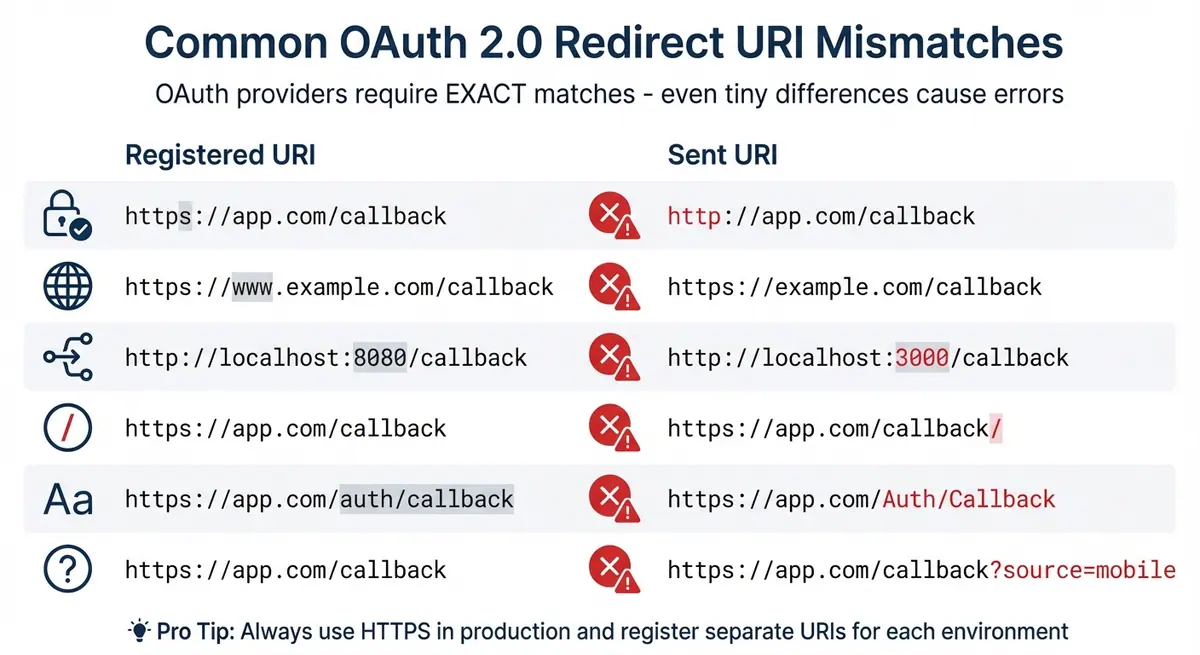
Common OAuth 2.0 Redirect URI Mismatch Types and Examples
How the fix redirect_uri_mismatch error. #googledevelopers #googleoauth
sbb-itb-5f36581
Why Redirect URI Mismatches Happen
OAuth providers are strict when it comes to matching the registered redirect URI. Even the smallest deviation - like a missing character - can result in an error. Let’s break down the most common reasons behind these mismatches.
HTTP vs. HTTPS Protocol Differences
The protocol in your URI matters. For example, if you register "https://app.com/callback" but your app sends "http://app.com/callback", the request will fail. This is especially important in production, where HTTPS is essential for securely transmitting authorization codes. These protocol mismatches are a frequent source of errors.
Domain, Subdomain, and Port Number Differences
OAuth providers treat every variation of an address as unique. For instance, "localhost" and "127.0.0.1" are not interchangeable, and "www.example.com" is distinct from "example.com." Similarly, subdomains like "dev.example.com" and "prod.example.com" must be registered separately. Port numbers also play a role - if your app runs on port 3000 but the registered URI specifies port 8080, the mismatch will cause an error. Most providers don’t allow wildcards (like "*.example.com"), so you’ll need to register each specific variation.
Trailing Slashes and Path Inconsistencies
A trailing slash can make or break your redirect URI. For example, "/callback" and "/callback/" are treated as completely different endpoints.
Query Parameter Matching Requirements
Some providers, such as Google, don’t allow query parameters in registered redirect URIs. Trying to register something like "https://app.com/callback?source=mobile" will result in an error. Instead, use OAuth 2.0’s state parameter to pass dynamic data safely. If your provider does allow query parameters, they must match exactly in both format and encoding.
Case Sensitivity and Environment Configuration Errors
URI paths are case-sensitive, so "/Auth/Callback" and "/auth/callback" are seen as different. Configuration mistakes - like using development URIs in production or forgetting to update the provider’s whitelist when transitioning from staging to live - are also common culprits. Additionally, reverse proxies, load balancers, or CDNs might alter the public-facing URI or protocol, leading to mismatches between what’s sent and what’s registered.
Understanding these potential pitfalls will help you troubleshoot redirect URI issues effectively.
How to Diagnose Redirect URI Problems
To identify and resolve redirect URI issues, you need to compare the registered redirect URI with the one your application sends. Here’s how you can troubleshoot and fix mismatches:
Use Developer Tools (F12) to inspect the authorization request. Open the Network tab and locate the OAuth provider request (e.g., accounts.google.com or facebook.com/dialog/oauth). Check the redirect_uri parameter in the URL. If the URI is URL-encoded (e.g., %3A%2F%2F), decode it to confirm the exact value being sent.
Check the 400 error page for details. Many providers include an "error details" link on 400 error pages. This link often shows both the requested and registered URIs, making it easier to spot subtle mismatches like http versus https or trailing slashes.
Enable debug logging in your OAuth library. Libraries like OmniAuth (for Ruby) can provide detailed logs of OAuth request URLs and validation errors. Look for messages such as "Invalid redirect_uri provided" or Azure AD's AADSTS50011 error to pinpoint the issue.
Finally, make sure you’re editing the correct client credentials in your provider’s console. If you’re working in a multi-environment setup, double-check that you’re updating the right project or "Web Client" entry. Keep in mind that changes may take 5–10 minutes to take effect.
How to Configure Redirect URIs Correctly
If you've pinpointed the cause of a mismatch, the next step is to properly configure your redirect URIs across all environments. Keep in mind that OAuth 2.0 providers rely on exact string matching, so every single character matters.
Register Multiple Redirect URIs for Different Environments
Many OAuth providers allow you to register multiple redirect URIs under a single Client ID. This flexibility lets you add URIs for development, staging, and production without needing separate applications. For local development, a common URI is http://localhost:3000/auth/callback - just make sure the port matches your setup. For staging, you might use something like https://staging.example.com/auth/callback, and for production, always enforce HTTPS with a URI like https://example.com/auth/callback.
It's important to note that Google supports multiple URIs per Client ID, but GitHub's OAuth Apps only allow one callback URL. For GitHub, you'll need to create separate OAuth App registrations for each environment. Also, avoid using wildcards like https://*.example.com - not only do major providers like Google disallow them, but they also introduce security vulnerabilities. Registering precise URIs helps prevent the mismatches mentioned earlier.
Use Environment Variables for Different Deployments
Hardcoding redirect URIs is a bad practice. Instead, store them in environment variables such as OAUTH_REDIRECT_URI and use conditional logic to select the appropriate one based on your environment (e.g., NODE_ENV in JavaScript or Rails.env in Ruby). For local development, save the localhost URI in a .env file and add it to .gitignore to keep it out of version control. For staging and production, leverage your CI/CD pipeline secrets or tools like AWS Secrets Manager or GCP Secret Manager to manage these values securely.
"Always use a configuration management tool or environment variables to manage callback URLs." - MojoAuth
Make sure every URI stored in your environment variables is explicitly registered in your OAuth provider's console. Even a small mismatch between what's in your .env file and what's registered will trigger a 400 error. After setting things up, thoroughly test and validate your configuration.
Follow Consistency Best Practices
Be consistent with your URI formatting, especially when it comes to trailing slashes and case sensitivity. For example, https://example.com/callback and https://example.com/callback/ are treated as entirely different URIs. Similarly, /callback and /Callback will not match on most platforms. Decide on a standard format and stick to it. Regularly reviewing and auditing your registered URIs can also help avoid unnecessary errors down the line.
Testing and Validating Your Configuration
Once you've set up your OAuth configuration, rigorous testing is essential to ensure it works seamlessly across all environments. After configuring your redirect URIs, it's crucial to test them thoroughly to catch potential issues early. As Markaicode highlights, applying systematic debugging techniques can cut OAuth troubleshooting time dramatically - from hours to mere minutes.
Begin by testing the entire authorization flow in your development, staging, and production environments. This involves initiating an OAuth request, completing the authorization process, and confirming that the callback successfully redirects back to your application. Test under various conditions, including localhost, IP addresses, and with or without "www." To avoid caching issues, use incognito or private browsing modes during these tests.
Your browser's developer tools can be a lifesaver during this process. Use them to monitor the initial OAuth request and ensure the redirect_uri matches the registered value exactly. This simple step can catch about 60% of OAuth-related bugs before they escalate to production.
If you encounter persistent mismatches, remember that changes may take 5–15 minutes to propagate. Be patient and retest after this window. Also, scrutinize your infrastructure - components like proxy servers, load balancers, or tools such as Nginx can sometimes modify URLs or switch protocols (e.g., from HTTPS to HTTP) without you realizing it. For example, in January 2026, a team discovered their production load balancer was adding a trailing slash to redirect URIs, causing failures. A single tweak to their Nginx configuration resolved the issue entirely.
"The fastest way to debug OAuth is to intentionally break it first." - Markaicode
Enable detailed logging for your OAuth provider (e.g., OmniAuth if you’re using Ruby on Rails) to capture the full request URL and verify the redirect_uri. If your provider requires HTTPS, even for local development, tools like ngrok can help by creating a secure tunnel to your local server. This approach ensures your testing environment closely mimics production, helping you refine your setup and maintain a secure, reliable OAuth flow.
Conclusion
Redirect URI mismatches are a common pitfall in OAuth 2.0, but they are entirely avoidable with the right approach. Beyond being a technical parameter, the redirect URI plays a critical role in security, ensuring that sensitive authorization codes and access tokens are sent to the right destination. As FFatih, a security engineer, puts it:
"The
redirect_uriparameter is not a convenience feature. It is a critical security control that decides where highly sensitive artifacts - authorization codes or access tokens - are delivered."
The solution lies in consistent, exact matching. Even the smallest discrepancy - like a missing trailing slash, an HTTP/HTTPS mismatch, or a port number difference - can derail your authentication flow. To maintain order and security, register separate redirect URIs for each environment (development, staging, production) and manage them with environment variables. Only register exact URIs to minimize vulnerabilities.
Testing and regular audits are equally important. Verify your setup with the testing best practices discussed earlier, and routinely review your OAuth provider's console to remove outdated or unused URIs. This proactive approach ensures a secure and seamless OAuth implementation across all environments.
FAQs
Why does my OAuth provider reject my redirect URI even if it looks correct?
When configuring OAuth, your provider might reject the redirect URI if it doesn't perfectly align with the one registered in their console. Even small discrepancies - like a missing trailing slash, mismatched capitalization, incorrect port numbers, or variations between environments - can cause issues. Carefully review your setup to confirm the redirect URI matches the registered one exactly.
How can I safely manage redirect URIs for localhost, staging, and production?
To handle redirect URIs securely, make sure to register each environment's URI - such as http://localhost:3000, https://staging.example.com, and https://www.example.com - in your OAuth provider's settings. It's crucial that these URIs match precisely, including the protocol, port, and any trailing slashes. Leverage environment-specific configurations to streamline the process of switching between URIs. Finally, test each configuration thoroughly to ensure the OAuth flow functions smoothly and without any issues.
What should I check if a proxy or load balancer changes my redirect URI?
If a proxy or load balancer alters your redirect URI, it’s crucial to ensure the Host header is forwarded accurately. The external URL must match the registered redirect URIs exactly - this includes the scheme, hostname, port, and path. To address this, configure your proxy to retain the original URL and headers. Additionally, double-check that the redirect URI registered with your OAuth provider aligns perfectly with the one used after routing through the proxy.
Related Blog Posts
Get new content delivered straight to your inbox

The Response
Updates on the Reform platform, insights on optimizing conversion rates, and tips to craft forms that convert.




Drive real results with form optimizations
Tested across hundreds of experiments, our strategies deliver a 215% lift in qualified leads for B2B and SaaS companies.
