
.webp)
Checklist: CRM Setup For Email Deliverability


If your emails aren’t landing in inboxes, your CRM isn’t doing its job. Poor email deliverability can cost you time, money, and customers. For example, a company in early 2026 lost $52,500 due to emails ending up in spam folders. To avoid this, your CRM setup must prioritize deliverability. Here’s how:
- Authenticate Your Domain: Set up SPF, DKIM, and DMARC to prove your emails are legitimate. These protocols are now required by major providers like Google and Yahoo for bulk email senders.
- Clean Your Contact List: Remove invalid, bounced, or outdated emails. High bounce rates hurt your sender reputation.
- Segment Your Audience: Group contacts by engagement levels to send relevant, targeted emails.
- Monitor Key Metrics: Keep bounce rates under 2% and spam complaints below 0.1%. Tools like Google Postmaster can help.
- Personalize Your Emails: Use CRM data to craft messages that resonate with recipients.
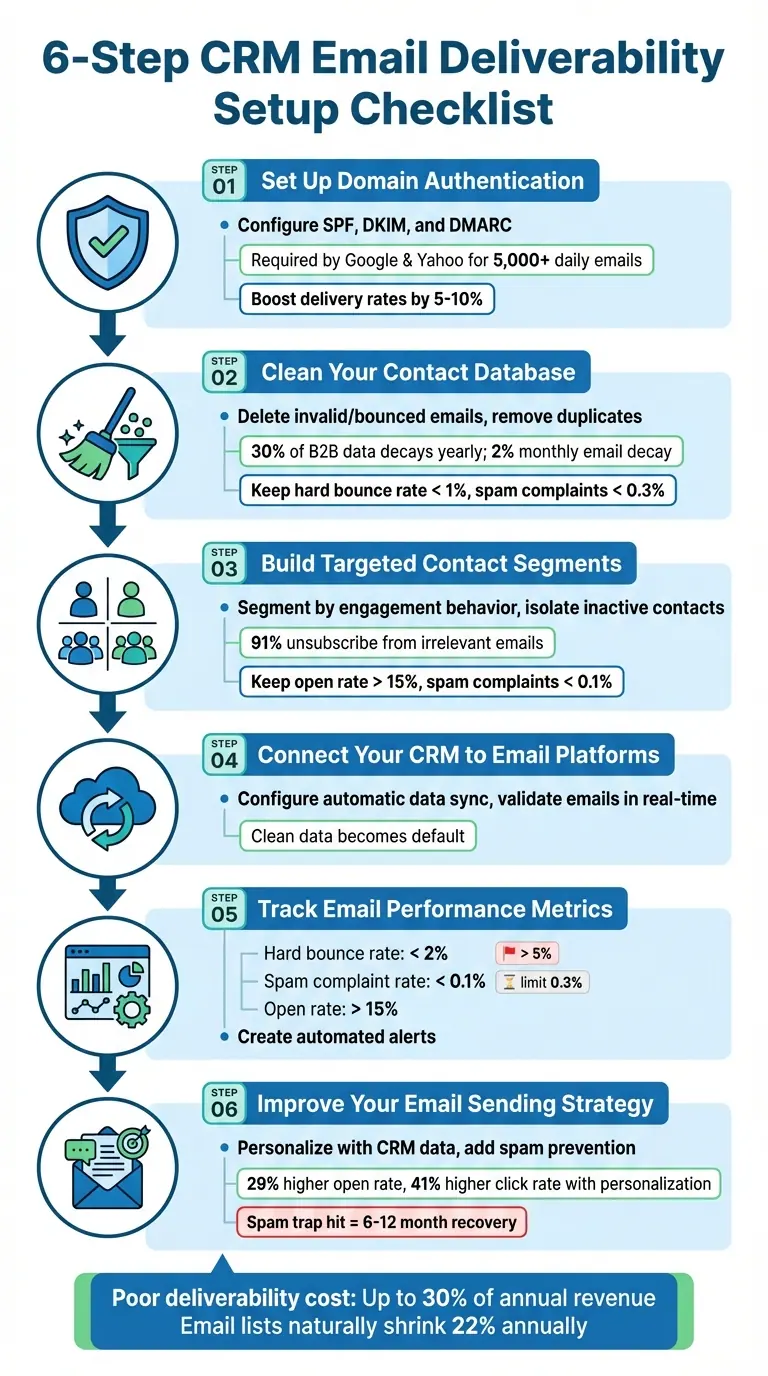
6-Step CRM Email Deliverability Setup Checklist
Improve Email Deliverability: SPF and DKIM Setup in Salesforce | Step-by-Step Guide
Step 1: Set Up Domain Authentication
Domain authentication proves that you have the authority to send emails on behalf of your domain. Without it, your emails are more likely to be blocked or flagged as spam, and they become vulnerable to spoofing and phishing attempts. Business Email Compromise alone has resulted in over $2.77 billion in reported losses.
Starting February 1, 2024, Google and Yahoo require bulk email senders - those sending more than 5,000 emails daily - to implement SPF, DKIM, and DMARC protocols. Without these in place, your emails may never make it to major inboxes. Setting up these protocols is critical to protecting your email reputation.
Configure SPF, DKIM, and DMARC Records
These protocols work together to ensure email authentication:
- SPF (Sender Policy Framework): A DNS TXT record that lists the servers authorized to send emails for your domain.
- DKIM (DomainKeys Identified Mail): Adds a cryptographic signature to email headers, verifying that the message hasn’t been altered during delivery.
- DMARC (Domain-based Message Authentication, Reporting, and Conformance): Aligns SPF and DKIM and tells receiving servers how to handle emails that fail authentication.
Your CRM will typically provide the DKIM keys and SPF "include" statements needed for your domain's DNS settings. If you’re using multiple services (like a CRM, Google Workspace, and a support platform), combine them into a single SPF record. For example:
v=spf1 include:_spf.google.com include:_spf.yourservice.com ~all.
Keep in mind, a domain can only have one SPF record. Also, exceeding the 10 DNS lookup limit will cause SPF authentication to fail.
When setting up DMARC, start with a monitoring policy (p=none) to gather data. Once authentication is stable, move to stricter policies like p=quarantine and eventually p=reject. A DMARC enforcement policy can boost your email delivery rates by 5% to 10%.
Verify Your Authentication Settings
Most CRMs include dashboards that display the status of your DNS records, often showing a label like "Authenticated" when everything is set up correctly. DNS record changes typically verify in 10–70 minutes, but full propagation can take up to 48 hours.
To confirm everything is working, use tools like MXToolbox or check test emails (e.g., Gmail’s "Show original" feature) to ensure SPF, DKIM, and DMARC all pass. Additionally, enable DMARC aggregate reporting using the rua tag to receive daily summaries of email activity. Proper authentication not only protects your domain but also sets the stage for maintaining a cleaner and more effective contact database.
Step 2: Clean Your Contact Database
Did you know that B2B contact information can degrade by 30% each year? And email data? That declines by about 2% every month. In just 12 months, as much as a third of your CRM database could become outdated, which can seriously affect your ability to connect with your audience and maintain good inbox placement.
But the impact doesn’t stop there. According to Salesforce, 90% of contact records are incomplete, and 20% are completely unusable. High bounce rates don’t just mean missed opportunities - they send red flags to email providers like Gmail and Outlook, labeling you as an unreliable sender. This can reduce your inbox placement by 15% to 30%. On top of that, poor CRM data can cut into revenue by up to 25% across various industries.
Delete Invalid and Bounced Email Addresses
If you want to protect your sender reputation, keeping your database clean is non-negotiable. Start by backing up your CRM data. Then, remove any records tied to hard bounces, opt-outs, or those that have been inactive for over two years. Use deduplication tools to clean up duplicates, whether they're exact matches or slight variations (e.g., "Bob Smith" vs. "Robert Smith"). To stay in good standing, aim to keep your hard bounce rates below 1% and spam complaints under 0.3%.
Also, take the time to standardize your data formats and weed out role-based emails (like info@ or sales@). These types of addresses often lead to low engagement and can clutter your database unnecessarily.
Set Up Automatic Email Validation
Once you've cleared out outdated contacts, automation is your best friend for keeping things accurate. Configure your CRM to automatically validate new email addresses entered through web forms, manual inputs, or integrations. Modern tools can check DNS records and SMTP server responses to confirm if an email address is valid and not a spam trap.
To combat natural data decay, schedule workflows to re-validate existing contacts every three to six months. Double opt-ins are another great way to ensure new subscribers are providing valid, active email addresses - just have them confirm their email by clicking a verification link. Businesses that use automated validation report spending 41% less time on manual data cleanup. Plus, sales teams with verified CRM data close deals 23% faster, thanks to fewer wasted efforts chasing incorrect information.
Step 3: Build Targeted Contact Segments
Sending generic emails to your entire list can hurt your sender reputation. Email platforms like Gmail and Outlook monitor recipient interactions - things like opens, clicks, and replies - to determine if you're a trustworthy sender. Here's the reality: 91% of users will unsubscribe or report emails as spam if the content feels irrelevant. Even a low spam complaint rate of 0.1% (1 in 1,000 emails) can trigger warnings from mailbox providers. Plus, an open rate below 15% can signal to these platforms that your emails might be spam. Targeted segmentation is key to ensuring your emails reach the right audience and maintain strong engagement.
Segment Contacts by Engagement Behavior
Relying on open rates alone isn't enough - tracking pixels can skew those numbers. Instead, focus on metrics like clicks, replies, website visits, and purchase history, which are far more accurate indicators of interest.
Use your CRM data to create engagement tiers based on key actions. Look at metrics such as "Last activity date", "Recent conversion date", "Last form submission", and "Last marketing email click date". Then, group your contacts into categories like:
- Active Champions: These are your most loyal contacts who regularly open and click your emails.
- Regular Engagers: Contacts who interact with your content at least once a month.
- Recovery Candidates: Previously active contacts who have been unresponsive for 3–6 months.
You can also segment based on how contacts joined your list. For instance, someone who signed up through a webinar may have different interests than someone who downloaded a white paper. Tailor your messaging to match their preferences. With clean, verified data and proper list hygiene, segmentation not only improves engagement but also boosts ROI by ensuring your emails land in the inbox.
Move Inactive Contacts to a Separate List
After segmenting by engagement, it's important to isolate inactive contacts to protect your deliverability. Contacts inactive for 6+ months should be excluded from your campaigns. Email lists naturally lose about 22% of contacts annually due to factors like job changes, closed accounts, or shifting interests. Continuing to email inactive contacts can signal to providers that you're sending unwanted messages.
Identify contacts who haven't engaged - no clicks, no opens - despite multiple email attempts. Move these to a "Critical Risk" or "Do Not Send" list. Before completely removing them, consider running a final re-engagement campaign. If they still don't respond, suppress or delete them from your list.
Automating this process through your CRM can make it seamless. Set up workflows based on "Sends since last engagement" to automatically exclude inactive contacts. Using features like graymail suppression ensures you're only emailing people who genuinely want to hear from you, which can significantly improve your deliverability.
| Segment Category | Criteria/Behavior | Recommended Action |
|---|---|---|
| Active Champions | Consistent opens, clicks, and conversions | Treat as VIPs; send frequent updates |
| Regular Engagers | Engage at least once per month | Maintain a consistent sending schedule |
| Recovery Candidates | Quiet for 3–6 months; previously engaged | Launch a "We Miss You" re-engagement campaign |
| Critical Risk | No engagement in 6+ months | Move to inactive list or remove from database |
| Never Engaged | No activity within 90 days of signup | Consider immediate suppression |
sbb-itb-5f36581
Step 4: Connect Your CRM to Email Platforms
After organizing your CRM and fine-tuning segmentation, the next step is to ensure a seamless connection between your CRM and email platform. This integration keeps your contact data up to date, ensuring strong email deliverability by avoiding outdated or incorrect addresses.
Configure Automatic Data Synchronization
Choose the integration method that works best for your setup - whether it’s native integration, an API, or a tool like Zapier. Map essential fields such as Email, Company, Role, Owner, and enable bi-directional syncing. This ensures that any email activity, like opens, clicks, bounces, or unsubscribes, is instantly reflected in your CRM. To maintain clean lists, set the system to automatically remove undeliverable addresses and schedule re-verification of your data every 3–6 months.
Once your data is successfully synced, take an extra step to verify its accuracy immediately.
Use Reform to Improve Contact Data Quality

Integrating a tool like Reform can help validate email addresses as they’re captured. It performs real-time checks to catch common errors, such as mistyping ".con" instead of ".com", and blocks spam bot submissions. This means only accurate, verified leads make it into your CRM. As Antonio Gabrić explains:
"When verification lives inside your CRM, clean data becomes the default - and outreach becomes faster, cheaper, and more reliable".
Step 5: Track Email Performance Metrics
Now that your CRM and email platforms are working together and your data is clean, it's time to keep an eye on the numbers. Monitoring key performance metrics is essential for spotting potential deliverability problems early. By staying on top of these metrics, you can safeguard your sender reputation.
Monitor Bounce Rates and Spam Complaints
Pay close attention to your hard bounce rate and spam complaint rate using your CRM dashboard. A hard bounce happens when an email can't be delivered due to an invalid address. To maintain a solid reputation, this rate should stay below 2%. On the other hand, a spam complaint rate of 0.1% or higher is a warning sign, and bulk senders should aim to keep it under 0.3% to meet email provider requirements.
Don’t forget to track your open rates and click rates as well. If your marketing emails have an open rate below 15%, it could signal low engagement, which might hurt your deliverability. Keep in mind, email lists naturally shrink by about 22% each year - people change jobs, close accounts, or simply stop using old addresses.
| Metric | Healthy Target | Red Flag Level |
|---|---|---|
| Hard Bounce Rate | < 2% | > 5% (risk of suspension) |
| Spam Complaint Rate | < 0.1% | 0.3% (Gmail/Yahoo limit) |
| Open Rate | > 15% | < 15% (potential spam signal) |
These metrics are the foundation for setting up automated alerts, so you can act quickly if deliverability issues arise.
Create Alerts for Metric Changes
Set your CRM to alert you whenever critical metrics hit concerning levels. For example, create alerts for bounce rates exceeding 2% or spam complaints reaching 0.1%. This way, you can respond to problems before they escalate. Some CRMs, like HubSpot, even offer tools like the Email Health tab, which provides a score (from 1 to 10) that reflects your sending reputation over the past 30 days.
If you're sending emails to Gmail users, Google Postmaster Tools can be a game-changer. Since Gmail doesn’t share spam complaint data directly, connecting your domain to this tool gives you deeper insights into how Gmail recipients perceive your emails.
Step 6: Improve Your Email Sending Strategy
Even with the best technical setup, poorly timed or generic emails can still end up in spam folders. Your CRM holds the key to crafting targeted and timely messages that resonate with your audience.
Personalize Email Content with CRM Data
Building on segmentation techniques, personalization takes your email campaigns to the next level by tailoring messages to each recipient's behavior and preferences. Emails personalized with CRM data - like demographics, purchase history, and user behavior - see a 29% higher open rate and a 41% increase in clicks.
Take advantage of CRM triggers for campaigns such as welcome sequences, abandoned cart reminders, and post-purchase follow-ups. Dynamic content blocks allow messaging to adapt automatically, which can boost conversion rates by up to 202%. For example, welcome sequences triggered by new signups outperform standalone welcome emails by 320%. Triggered emails in general achieve a 152% higher open rate compared to untargeted mass emails.
Instead of sending emails to your entire list at once, use your CRM's send time optimization to deliver messages when recipients are most likely to engage. You can also configure your CRM to tag subscribers automatically based on their engagement levels (e.g., "High Value", "Inactive", or "Frequent Browser"). This allows you to trigger highly targeted campaigns without manual effort. To ensure professionalism, always include a fallback version of personalized content - such as showcasing bestsellers when specific recommendations aren't available.
| Segmentation Type | CRM Data Used | Example Campaign |
|---|---|---|
| Demographic | Location, Job Title, Age | Invitations to local events or industry-specific updates |
| Behavioral | Purchase History, Clicks | "Restock" reminders or personalized product suggestions |
| Lifecycle | Sign-up Date, Last Purchase | Anniversary discounts and loyalty rewards |
As you refine your personalization strategy, don’t overlook the importance of protecting your sender reputation through spam prevention.
Add Reform's Spam Prevention to Your Workflow
As highlighted in Step 4, maintaining clean data is essential. Reform's advanced spam prevention tools now bring that same rigor to your email campaigns. Fake signups and disposable email addresses can sabotage even the most well-planned strategies. Reform filters out low-quality leads in real time, protecting your sender reputation.
Spam traps are a serious risk - just one hit can take 6–12 months to recover from. Reform’s proactive filtering prevents these hits, helping you maintain a bounce rate below 2% and spam complaints under 0.1%, which signals to mailbox providers that you’re a trusted sender. Plus, you save money by avoiding costs associated with invalid contacts.
With Reform's email validation and lead enrichment features integrated into your CRM, only high-quality contacts make it into your campaigns. Real-time analytics from Reform also let you track which sources deliver the best leads, enabling you to adjust your strategy for better results. This combination of clean data and well-crafted content ensures your emails land in inboxes and drive engagement.
Conclusion
Email deliverability requires constant attention and upkeep to ensure your messages land in inboxes where they belong. With nearly 30% of B2B contact data naturally decaying each year, even a clean email list today can harm your sender reputation in just a few months. This decline in data quality isn’t just a technical issue - it can impact your bottom line, potentially costing up to 30% of annual revenue.
The stakes are high. A single spam trap hit could take 6 to 12 months to recover from. And with mailbox providers increasingly relying on AI to assess sender reputation and user engagement patterns, even minor missteps in data hygiene or authentication can lead to your campaigns being blocked by filters.
The foundation of deliverability optimization is simple: emails must be delivered to be opened, opened to be clicked, and clicked to drive conversions. By focusing on delivery, you maximize your chances of achieving a strong ROI.
To stay ahead, implement these key practices:
- Schedule quarterly DNS audits to confirm your SPF, DKIM, and DMARC records are set up correctly.
- Use tools like Google Postmaster Tools to monitor your domain reputation on a weekly basis.
- Set up automated workflows to suppress contacts who haven’t engaged in 3 to 6 months and maintain a consistent sending schedule to prevent sudden volume spikes that could trigger spam filters.
FAQs
What are SPF, DKIM, and DMARC, and how do they help with email deliverability?
SPF, DKIM, and DMARC are essential tools for email authentication. They work together to verify the sender's identity and protect against spoofing, helping ensure your emails land in the recipient's inbox instead of being flagged as suspicious.
- SPF (Sender Policy Framework) checks if the email is sent from a server that’s authorized to send on behalf of your domain. Think of it as a "permission list" for your email servers.
- DKIM (DomainKeys Identified Mail) adds a digital signature to your emails, confirming they haven’t been altered during transit. It’s like a tamper-proof seal for your messages.
- DMARC (Domain-based Message Authentication, Reporting, and Conformance) ties SPF and DKIM together. It tells email providers what to do if an email fails authentication - whether to reject it, quarantine it, or just monitor it.
Using these protocols not only improves your email deliverability but also helps protect your domain’s reputation by preventing unauthorized use of your domain by spammers. Major providers like Gmail and Yahoo are more likely to trust your emails when these measures are in place.
How can I keep my CRM contact list clean and up-to-date?
Maintaining a clean and accurate CRM contact list is crucial for better email deliverability and stronger engagement. Here’s how you can keep your database in top shape:
- Validate email addresses: Double-check that email addresses are correct to minimize bounce rates and maintain a professional image.
- Eliminate duplicates: Clear out repeated entries to avoid confusion and ensure your data remains accurate.
- Standardize data formats: Use consistent formats for names, addresses, and phone numbers to keep your database organized and easy to manage.
- Update outdated information: Regularly refresh incorrect or old details to improve personalization and ensure your messages resonate.
- Segment your audience: Group contacts by behavior or demographics for campaigns that feel tailored and relevant.
- Remove inactive or invalid contacts: Regularly weed out unengaged or invalid entries to boost engagement rates and avoid deliverability problems.
These steps will help you keep your CRM data clean, organized, and ready to power effective email campaigns.
Why is audience segmentation important for email engagement and deliverability?
Audience segmentation is a powerful way to boost email engagement and deliverability. By dividing your audience into specific groups based on their interests, behaviors, or demographics, you can send emails that feel more relevant and personalized to each recipient.
When your emails match what someone cares about, they're more likely to open, read, and interact with your content. This increased engagement - like higher open rates and more clicks - doesn't just benefit your campaign; it also strengthens your sender reputation. A strong reputation means your emails are less likely to end up in the spam folder, improving their chances of landing in the inbox.
On the flip side, sending irrelevant emails can backfire. It might lead to unsubscribes or even spam complaints, both of which can hurt your sender reputation. By focusing on segmentation, you not only create a better experience for your audience but also follow email best practices that keep your campaigns on track.
Related Blog Posts
Get new content delivered straight to your inbox

The Response
Updates on the Reform platform, insights on optimizing conversion rates, and tips to craft forms that convert.



Drive real results with form optimizations
Tested across hundreds of experiments, our strategies deliver a 215% lift in qualified leads for B2B and SaaS companies.
