
.webp)
Cross-Border PII Transfers: Compliance Checklist



If personal data from your forms can be viewed, stored, backed up, or processed in another country, you need more than a DPA. Under EU and UK GDPR, mistakes in international transfers can lead to fines of up to 4% of global annual turnover.
I’d reduce this topic to four jobs:
- Map every data path from form to system, backup, support tool, and subprocessor
- Match each route to the right transfer method such as adequacy, DPF, SCCs, UK IDTA/Addendum, BCRs, or a narrow derogation
- Check transfer risk before launch with a TIA, vendor review, and added security controls where needed
- Keep records so legal, security, and compliance teams can show what was approved, why, and when it must be reviewed again
A cross-border transfer is not just “sending a file overseas.” It can also mean:
- remote access from another country
- cloud replication or backups in another region
- analytics or support tools processing data abroad
- a vendor’s own subprocessors getting access elsewhere
My quick takeaway: if you collect form data, I’d treat access, storage, backups, and onward sharing as part of the same transfer review.
| What I’d check first | Why it matters |
|---|---|
| Form fields and purpose | To cut data you do not need |
| Countries touched by the stack | To spot transfer rules early |
| Vendors and subprocessors | To find hidden onward transfers |
| Transfer method | To confirm the legal path |
| TIA and safeguards | To test whether the method works in practice |
| Logs and review triggers | To support audits and later changes |
So the core message is simple: know where the data goes, know why it can go there, and keep proof on file.
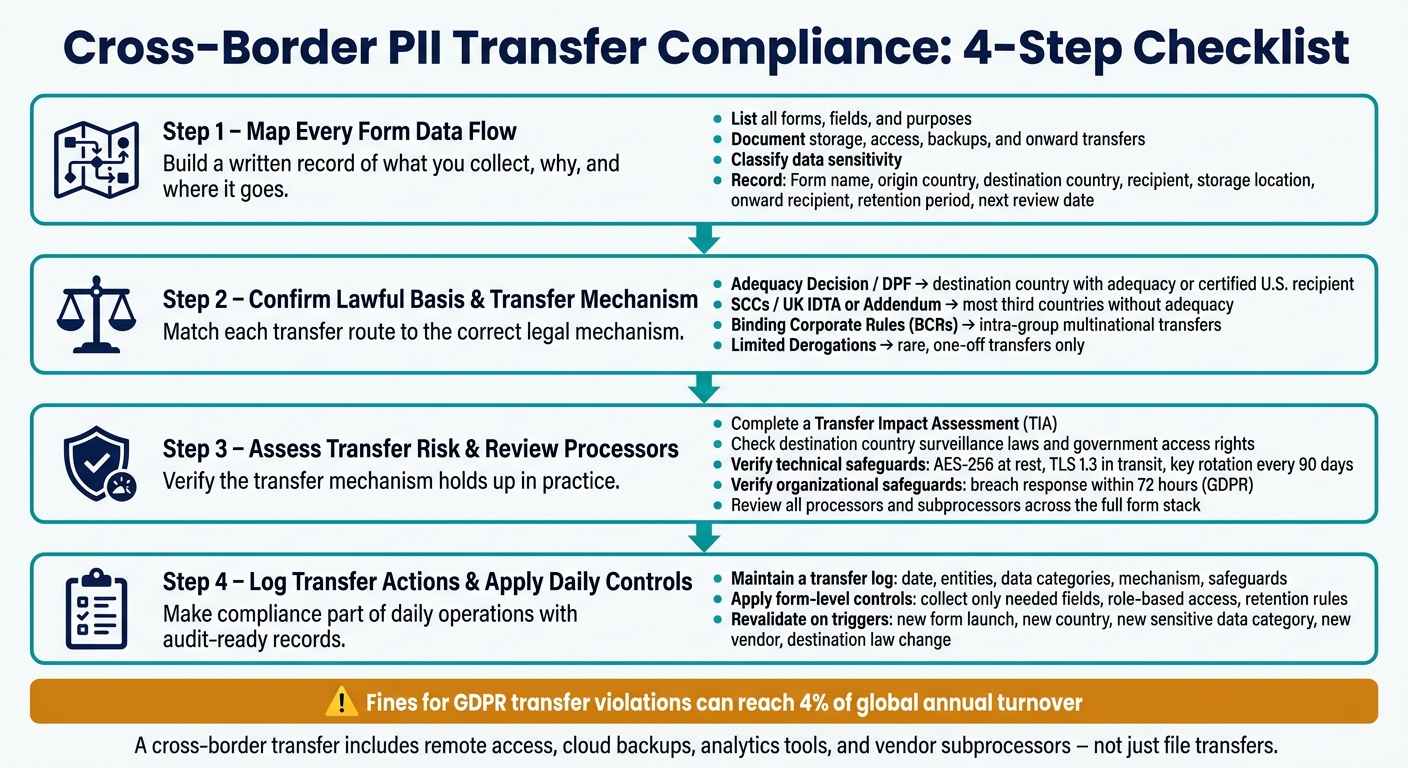
Cross-Border PII Transfer Compliance: 4-Step Checklist
Cross-Border Data Transfers in 2025: Regulatory Changes, AI Risks, and Operationalization
sbb-itb-5f36581
1. Map every form data flow before data leaves its origin
Create a data flow map for each form submission path. This turns guesswork about your form stack into a written record of what you collect, why you collect it, and where it goes.
List forms, fields, purposes, and recipients
Start with every collection point, not just your main form. That means web forms, apps, support channels, and third-party integrations.
For each one, record the data categories collected and the legal or business purpose behind every field. If you can't explain why a field is there, remove it.
Then note who or what gets the submission. That includes your CRM, your email platform, any vendor or third-party processor, and any internal team that can access the data.
Document storage, access, backups, and onward transfers
Data doesn't always stay where it first lands. Analytics tools, customer support platforms, and error-logging services can send data to servers in other countries. Cloud backups can also copy data across regions.
For every form in your inventory, document the full chain: where each submission enters, where it is stored, and which countries receive it. Also record server locations, who can access the data, whether the main recipient shares it with any subprocessors, and whether remote access from outside the origin country is possible.
A simple worksheet works well here. Include columns for:
- Form name
- Origin country
- Destination country
- Recipient
- Storage location
- Onward recipient
- Retention period
- Next review date
Classify data sensitivity and keep the record current
Not all form data carries the same level of risk. Flag special categories of personal data, along with any data that could create a higher risk for the individual. Those fields need extra scrutiny during transfer review.
Keep the inventory up to date whenever a form changes, a vendor is added, or a purpose changes. In the next step, use this record to pick the right transfer mechanism.
2. Confirm lawful collection and choose the right transfer mechanism
Use the inventory from Section 1 to check that each transfer has a lawful basis and a valid transfer mechanism.
Check legal basis, notice, and consent records
For every form in your inventory, make sure you have a documented legal basis for each data category. Your privacy notice should spell out the purpose, recipients, countries, and transfer mechanism. If consent covers a different purpose, keep those consent records separate.
Next, map each transfer route to the right mechanism in the table below.
Select adequacy decisions, contractual safeguards, BCRs, or a limited derogation
Use adequacy or DPF when it fits. If it doesn’t, use SCCs/IDTA, BCRs, or a limited derogation for rare transfers.
Transfer mechanism decision table
| Mechanism | When It Applies | Documentation Required | Review Frequency |
|---|---|---|---|
| Adequacy Decision / DPF | Destination country with an adequacy decision or certified U.S. recipient under DPF | Proof of recipient certification or country status | Check adequacy status from time to time. |
| SCCs / UK IDTA or Addendum | Most third countries without adequacy | Signed clauses + a Transfer Impact Assessment (TIA) for each transfer route | Annual or when law or practice changes |
| Binding Corporate Rules (BCRs) | Intra-group transfers within a multinational | Regulatory approval documents + internal policies | Audit on a set schedule |
| Limited Derogations | Rare, one-off transfers only | Documentation of necessity and specific purpose | Per-transfer basis |
3. Assess transfer risk and review processors before activation
After you pick a transfer mechanism, the next job is to make sure it holds up in practice, not just in a contract.
Complete a transfer impact assessment
Use the inventory from Section 1 and the mechanism from Section 2 to finish the assessment. A Transfer Impact Assessment (TIA) comes down to one question: can the data importer protect the data you send under the laws of its country?
For each transfer route, record the data categories involved, the reason for the transfer, the recipient, and the countries involved. Also note any legal or practical limits in the recipient country, especially government access rights and whether data subjects have any path to redress. Then document the residual risk, who signed off on the transfer, and what would trigger a new review.
| TIA Component | Focus Area | Key Risk to Evaluate |
|---|---|---|
| Data Sensitivity | PII categories | Presence of health, biometric, or children's data |
| Destination Risk | Local legislation | Government access and surveillance laws |
| Technical Controls | Security measures | Encryption in transit and at rest |
| Onward Transfers | Sub-processors | Location and compliance of the full service stack |
Verify supplementary safeguards and security controls
If your TIA shows gaps, add supplementary safeguards before anything goes live.
- Technical safeguards: Check end-to-end encryption, pseudonymization where feasible, role-based access controls, key management practices, data minimization at the collection point, defined retention limits, and logging of access and exports. Also confirm where encryption keys are stored. If the keys sit in a jurisdiction with broad surveillance powers, that can undercut the TIA.
- Organizational safeguards: Check that breach response procedures can meet strict notice deadlines - 72 hours under GDPR - and that staff with access to transferred data have finished the right training.
Write down the exact safeguard package you plan to use before any transfer begins.
Review processors and subprocessors across the full form stack
A transfer mechanism can look fine on paper and still fall apart if one vendor in the chain can't support it. That's why you need to review every vendor that may receive, store, or access submission data before activation.
Go through the full stack: your form platform, hosting environment, CRM, marketing automation tools, email delivery provider, analytics tools, support systems, backups, and any live integrations. For each vendor, confirm:
- their processing role
- legal entity and jurisdiction
- where data is stored and processed
- where support teams can access the data
- whether a current Data Processing Agreement is in place
- how they handle sub-processor change notices
If you're using Reform, include it in your processor inventory and check how your setup routes or exposes data.
For U.S.-based vendors, review the official Data Privacy Framework list at dataprivacyframework.gov before relying on DPF. If a certified vendor uses non-certified sub-processors, you still need a separate TIA for those onward transfers. Use the 2021 EU SCC modules: Module 2 for controller-to-processor transfers, and Module 3 for processor-to-processor transfers.
4. Log transfer actions and apply the checklist to day-to-day form work
Once a transfer route clears risk review, the next step is simple: make those controls part of daily work. Approval on paper isn’t enough. Teams need logging, records, and form rules they can follow every day.
Create a transfer log that supports audits and investigations
When your transfer mechanisms and safeguards are set, use a transfer log to show that each transfer route is approved, documented, and watched over time.
Record, at minimum:
- Date
- Exporting and importing entities
- Source form
- Data categories involved
- Purpose
- Destination country
- Transfer mechanism used
- Applied safeguards
- Processor and any subprocessors
- Consent evidence where required
- Legal authorization for the transfer
Keep all supporting documents in one transfer file linked to each log entry. That includes executed Standard Contractual Clauses, Binding Corporate Rules, Transfer Impact Assessments, records of supplementary measures, and any incident records. Put these records in one place so your team can respond faster when regulators ask questions.
Apply controls at the form level
After the transfer route is documented, apply those same controls inside the form itself.
Before any cross-border form goes live, collect only the fields you need, separate optional fields, send submissions only to approved recipients, and limit access by role. Apply retention and deletion rules to submissions and backups. Use strong encryption both in transit and at rest, with scheduled key rotation.
For Reform forms, line up routing, integrations, and field structure with the approved processor list and destination countries.
Use AES-256 for data at rest and TLS 1.3 for data in transit, and rotate encryption keys at least every 90 days.
Conclusion: Minimum records and reviews every team should maintain
At minimum, every team handling cross-border form data should maintain:
- A current data flow map for each form
- Documented legal basis and transfer mechanism for each route
- Completed TIAs for all non-adequate destinations
- Signed DPAs with all processors and subprocessors
- A transfer log with supporting documents for each route
- A record of each revalidation and its trigger
Revalidate this checklist before launching a new form, adding a new country, collecting a new category of sensitive data, or changing an integration or vendor. This review doesn’t have to take long. But it does have to happen, and it has to be recorded.
Use these triggers to decide when the checklist needs a fresh review.
| Trigger for Review | What to Revalidate |
|---|---|
| New form launch | Data map, legal basis, transfer mechanism, processor list |
| New destination country | TIA, adequacy or SCC status, supplementary safeguards |
| New sensitive data category | Legal basis, consent records, security controls |
| New integration or vendor | DPA status, subprocessor locations |
| Destination law change or SCC update | TIA, transfer mechanism, supplementary measures |
FAQs
What counts as a cross-border data transfer?
A cross-border data transfer happens when personal data is sent to, accessed from, or processed in a country outside the jurisdiction where it started.
That can include data stored on servers in another country, remote access by staff in a different region, automated processing that moves data across borders, and even temporary routing through foreign servers while the data is in transit.
When do I need a Transfer Impact Assessment?
You need a Transfer Impact Assessment (TIA) when you send personal data to a country that does not have a European Commission adequacy decision.
If you rely on Standard Contractual Clauses (SCCs), a TIA is also required. The point is simple: you need to check whether the destination country’s laws cut into the protections those clauses are supposed to provide.
It also makes sense to complete a TIA for higher-risk data flows. And it shouldn’t be a one-and-done exercise. Review it at least once a year, or sooner if there’s a material change in local laws or in your vendor’s data practices.
How often should I review my transfer records?
Review transfer records at least quarterly so your compliance program stays current. Focus on three things: data flows, vendor performance, and technical controls.
Then do a deeper review once a year. And if there’s a material change, don’t wait for the next cycle. Review right away.
That includes cases like:
- New vendors
- New market entries
- Changes in the legal or security environment of a destination country
Related Blog Posts
Get new content delivered straight to your inbox

The Response
Updates on the Reform platform, insights on optimizing conversion rates, and tips to craft forms that convert.


Drive real results with form optimizations
Tested across hundreds of experiments, our strategies deliver a 215% lift in qualified leads for B2B and SaaS companies.
