
.webp)
Dark Patterns in Forms: Examples and Fixes


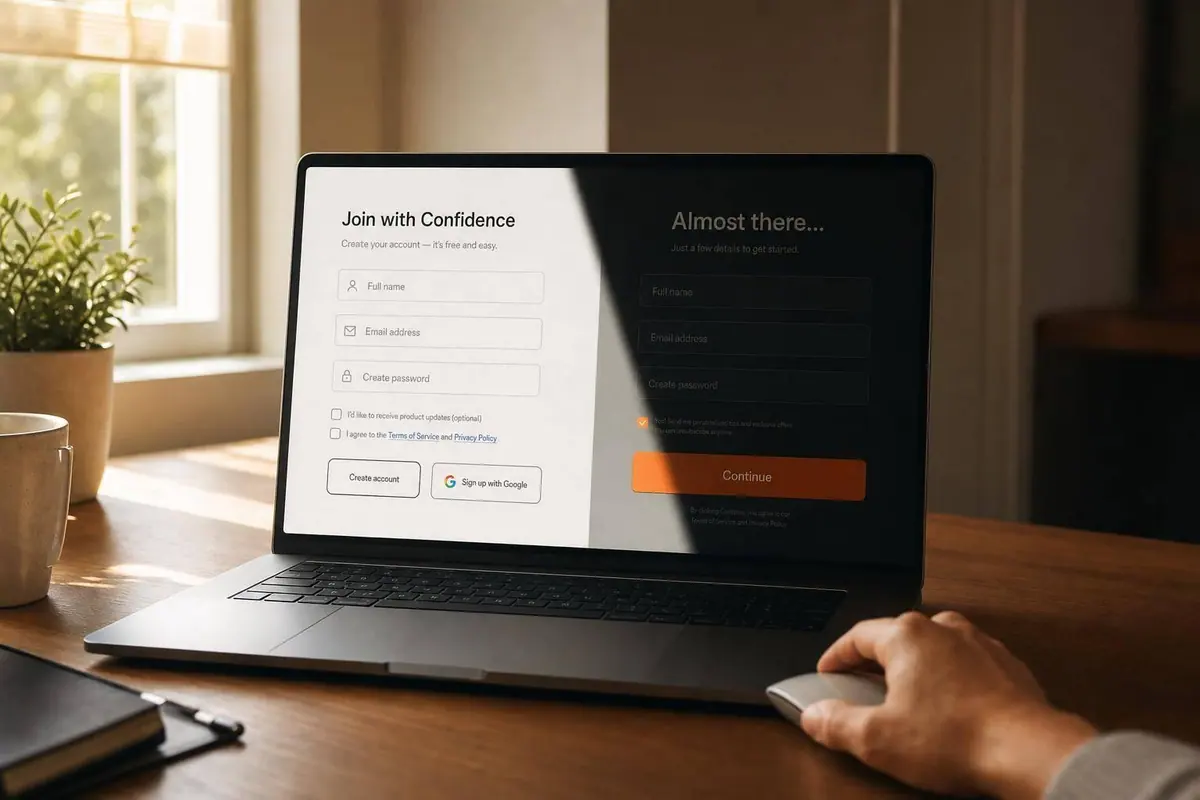
Dark patterns can lift form completions in the short term, but they often hurt trust, lead quality, and legal standing. I’d sum it up like this: if a form uses pressure, hidden choices, or extra friction to steer people, the fix is to make every option clear, equal, and easy to act on.
Here’s the short version:
- Pre-checked boxes can push opt-ins up by 27.24%, but those sign-ups often have weak intent.
- In one 2024 review of 642 subscription sites, 76% used at least one dark pattern and 67% used more than one.
- 56% of consumers say they lose trust after seeing manipulative design.
- Legal risk is not small: the FTC can seek up to $53,088 per violation, and under the CPRA, consent gained through dark patterns can be void.
- The main fixes are simple: unchecked consent boxes, matched button weight, plain wording, full price shown before submit, and cancel flows that are no harder than sign-up.
What I’d watch for most:
- consent boxes that are checked by default
- “Accept” buttons that stand out while “Decline” is hidden
- guilt-heavy copy like “No thanks, I don’t care about saving money”
- forms that ask for more data than they need
- add-ons or fees shown too late
- subscriptions that are easy to start and hard to stop
Bottom line: if I want to craft killer lead forms to boost quality instead of more low-intent form fills, I’d remove pressure, cut extra fields, respect “no,” and measure post-signup results like churn, opens, refunds, and chargebacks - not just completion rate.
Dark Patterns Explained with Real Examples
sbb-itb-5f36581
Common dark patterns found in forms
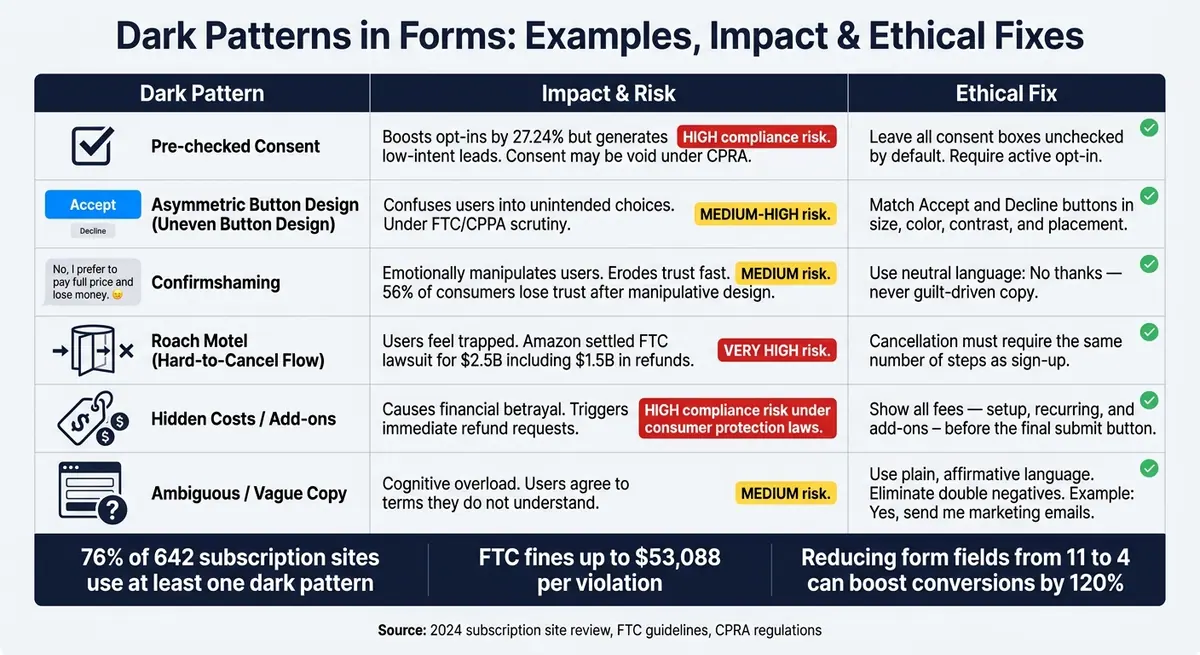
Dark Patterns in Forms: Examples, Impact & Ethical Fixes
Dark patterns usually show up in defaults, button styling, and the words around a choice. You’ll see them most often in consent, pricing, and cancellation flows.
| Dark Pattern | Impact on User Trust | Compliance Risk | Lead Quality |
|---|---|---|---|
| Pre-checked Consent | High - users feel tricked | High - consent may be invalid under CPRA | Low - accidental sign-ups, low-intent leads |
| Uneven Button Design | Medium - frustrating UX | High - FTC/CPPA scrutiny | Medium - inflated opt-ins from confused users |
| Confirmshaming | High - emotional manipulation | Low/Medium - deceptive design | Low - resentful, guilt-driven leads |
| Hard-to-Exit Flows (Roach Motel) | Very High - users feel trapped | Very High - FTC "Click-to-Cancel" rule | Very Low - high churn and chargebacks |
| Hidden Costs/Add-ons | Very High - financial betrayal | High - consumer protection laws | Low - immediate refund requests |
| Ambiguous Questions | High - cognitive overload | Medium - deceptive acts | Poor - users agree to terms they don't understand |
Prechecked consent, buried opt-outs, and misleading button design
One of the most common dark patterns is the pre-checked consent box. Picture a SaaS trial form with a checkbox already selected under the password field: "Yes, I'd like to receive product updates and promotional emails." A lot of people won’t spot it. Others will see it and leave it alone because the default takes less effort. That matters. Pre-selecting an option increases the odds that users choose it by an average of 27.24%. It can lift opt-ins, but the tradeoff is weak intent and lower trust.
Cookie banners use the same playbook, just with visual pressure instead of a checked box. A bright Accept All button sits in plain view, while Reject appears as a small gray link off to the side, or doesn’t show up on the first screen at all. In September 2025, Google was fined €325 million by France's CNIL because its Gmail cookie consent flow made rejecting cookies much harder than accepting them.
Confirmshaming pushes in a softer, but still manipulative, way. Instead of a plain “No thanks,” users see lines like "No thanks, I prefer to pay full price" on a discount popup, or "I don't care about my team's productivity" on a demo request form. The message is simple: saying no should feel bad. That kind of guilt wears down trust fast.
Forced data collection, vague copy, and repeated consent prompts
Some forms ask for far more information than they need. A whitepaper download that demands a full name, job title, company size, phone number, and work email before showing the file is a common case. It adds friction to a gated download form, and it often screens in weaker leads instead of better ones.
The wording can make things worse. A line like "We may share your information with trusted partners" sounds polished, but it tells users almost nothing. Who are those partners? What data is shared? For what purpose? If people can’t answer basic questions about what they agreed to, they usually do one of two things: leave the form or submit it without understanding. Neither helps lead quality.
And when a user says no, then gets asked again and again, the form sends a blunt message: your choice doesn’t count. That chips away at trust even more.
Hidden paid add-ons and sign-up flows that are harder to exit than to enter
Checkout forms are where hidden charges hit hardest. A user moves through a multi-step SaaS trial, enters card details, and then sees a service fee, tax, or add-on only on the final confirmation screen. That’s a disclosure problem, plain and simple.
The Roach Motel pattern goes a step further. Getting in is easy. Getting out is a slog. Amazon's Prime cancellation flow once took seven steps, while subscribing took only one. In September 2025, Amazon settled an FTC lawsuit over this flow for $2.5 billion, including $1.5 billion in consumer refunds. That kind of setup doesn’t just upset users. It also drives churn, refunds, and complaints.
Next, the fixes show how to make these flows clear without hurting conversion.
How to fix each dark pattern
The fix is simple: give users a real choice and make each option just as easy as the other.
Use the patterns above as a redesign checklist.
| Pattern | Ethical Fix | UX Principle |
|---|---|---|
| Pre-checked Boxes | Unchecked by default; requires active opt-in | Active Consent |
| Confirmshaming | Neutral language, like "No thanks" | Respectful Engagement |
| Asymmetric Buttons | Similar size, color, contrast, and placement for all choices | Symmetrical Choice |
| Hard-to-cancel flow | Cancellation steps must match sign-up steps | Easy exit |
| Confusing questions | Plain, affirmative language; no double negatives | Clarity |
| Hidden Costs | Show all fees before the final CTA | Transparent Disclosure |
Replace default consent and biased choice design with clear, balanced options
The easiest fix for a pre-checked consent box is to leave it unchecked. If a user ticks the box themselves, that choice is deliberate.
And it doesn't stop with the checkbox. Visual balance matters too. If your Accept button is big, bold, and blue, your Decline option should carry the same weight. That means similar size, color, contrast, and placement, not a tiny link tucked below the fold. The same rule applies to cookie banners and email opt-ins.
Collect less data, write clearer copy, and respect user decisions
Every extra field gives people one more reason to leave. Ask only for the information you need right now. Mark optional fields clearly so people can tell what's required and what's not. A multi-step layout can help here because it shows one question at a time, which cuts form fatigue without leaning on manipulation.
Fuzzy consent copy causes trouble too. Rewrite double negatives and soft, hedged labels into direct language like "Yes, send me marketing emails" or "No, thanks". And when someone says no, respect that choice. Don't ask again for at least 30–60 days unless the situation has changed in a major way.
Make pricing, subscriptions, and cancellations as clear as sign-up
Hidden costs aren't just a design issue. They're a trust issue. Show the full price before the final submit button. If there's a $49.00 setup fee and a $99.00/month recurring charge, both should appear next to the main CTA, not on a later confirmation screen.
The same goes for cancellation. Signing up should not be easier than getting out. If enrollment takes a few clicks, cancellation should too. For optional add-ons, use explicit opt-in. People should tick the checkbox themselves, not hunt for one they need to untick. That keeps consent clear and cuts post-purchase confusion.
"Tricking consumers into signing up for subscription programs or trapping them when they try to cancel is against the law. Firms that deploy dark patterns and other dirty tricks should take notice." - Samuel Levine, Director of the FTC's Bureau of Consumer Protection
Once the main flows are fair, apply that same bar to the rest of the form experience.
How to build privacy-first forms that still convert
After you fix dark patterns, the next move is building forms that stay honest without tanking conversions.
Start with data minimization, accessibility, and clear field design
Cut any field that doesn't directly help the conversion. One study found that reducing a form from 11 fields to 4 increased conversions by 120%. That's not a tiny lift. It's a sign that extra questions often get in the way.
If a field is optional, say so in plain text. And for every field you keep, make the purpose obvious. A good rule here is simple: ask only for what you need. If people can't tell why you're asking, the field probably shouldn't be there.
Top-aligned labels and single-column layouts also help people move through forms with less friction and less delay. These aren't cosmetic choices. They shape whether someone finishes the form or gives up halfway through.
Accessibility matters here too. It lowers friction and helps more people use your form without guesswork. High color contrast, clear labels, and full keyboard and screen-reader support all make a direct difference. Under WCAG 2.2, every path through the form, including the opt-out path, should be equally reachable and easy to read.
Measure success with lead quality, not just form completions
Completion rate on its own is a weak metric. If a form looks easy to complete only because the honest exit path was hidden, then you're not measuring trust. You're just measuring volume.
A better way to judge performance is to track what happens after the form fill. Focus on metrics tied to downstream health, such as:
- qualified lead rate
- email open rates from new signups
- chargeback volume
- abandonment points inside the form
If lots of people drop off at one field, that's often a clue. The question may feel invasive, confusing, or unnecessary. In that case, the fix isn't to push harder. It's to remove the field or rethink it.
Use analytics to judge lead quality, not just completion rate. Reform can help with analytics, spam prevention, and lead validation.
The table below shows how surface-level wins can mask weak lead quality.
| Visible Metric | Hidden Reality |
|---|---|
| High completion rate | Low-engagement leads who never open or act on follow-up emails |
| Growing subscriber count | A list that may hurt deliverability because many contacts are disengaged |
| Low churn rate | Users who stayed subscribed but still created refund or chargeback risk |
The goal is fewer low-intent submissions and more qualified leads. That's the kind of list that performs.
Governance and conclusion: keeping dark patterns out of future forms
Once a form is fixed, governance helps keep it that way. Dark patterns in forms create business and legal risk, not just a UX problem. They touch marketing, product, engineering, and legal. That’s why a pre-launch review matters.
A pre-launch review checklist for forms
Before any high-impact form goes live, run a quick cross-functional check. Marketing, product, legal, and engineering each spot different issues. And something that looks fine in a design file can still hide a compliance problem in production.
| Check | What to Verify | Owner |
|---|---|---|
| Consent defaults | All marketing, add-on, and data-sharing checkboxes are unchecked by default | Marketing / Design |
| Choice symmetry | "Decline" is as visually prominent as "Accept" in size, color, and contrast | Design / Engineering |
| Pricing transparency | Show all recurring charges before payment | Product / Legal |
| Plain copy | No double negatives or confirm-shaming; labels are specific and affirmative | Marketing / Legal |
| Cancellation parity | Unsubscribing or canceling requires the same number of steps as signing up | Product / Engineering |
| Accessibility | A screen reader user can complete both paths without help | Engineering |
After launch, review cancellation and opt-out flows weekly to catch drift. Store versioned form snapshots and consent timestamps so you can show exactly what users saw when they agreed.
Honest, high-converting lead forms help protect trust, improve lead quality, and lower compliance risk. The best ones are clear, easy to use, and able to hold up under scrutiny.
FAQs
How can I spot a dark pattern in a form?
Look for signs that the design is trying to steer you away from what you want, like:
- Pre-selected checkboxes for services you didn’t ask for
- Confirmshaming or tricky wording, including double negatives
- Visual interference, such as a big, bright “Accept” button and a tucked-away “Reject” option
If signing up takes a click or two but canceling turns into a maze, you’ve probably run into a roach motel.
Are dark patterns in forms illegal in the U.S.?
Not by default. In the U.S., there isn’t one federal law that bans all dark patterns. But some tactics can still be illegal under consumer protection laws.
The FTC can take action against deceptive or unfair design choices. And laws like the CPRA also ban dark patterns used to get user consent. If a form is likely to mislead a reasonable consumer, it can create legal risk.
How do I improve conversions without using dark patterns?
Focus on transparency and low-friction design, not behavior tricks. Make choices clear enough that people would still pick them without a nudge. That means removing pre-checked boxes, using neutral button copy, and making cancellation just as easy as sign-up.
Forms should feel light, simple, and easy to scan. Ask only for the information you need, stick to a single-column layout, and use positive inline validation so people know they're on the right track. Clear design builds trust, loyalty, and better leads.
Related Blog Posts
Get new content delivered straight to your inbox

The Response
Updates on the Reform platform, insights on optimizing conversion rates, and tips to craft forms that convert.




Drive real results with form optimizations
Tested across hundreds of experiments, our strategies deliver a 215% lift in qualified leads for B2B and SaaS companies.
