
.webp)
GLBA Safeguards Rule: SaaS Form Setup Guide


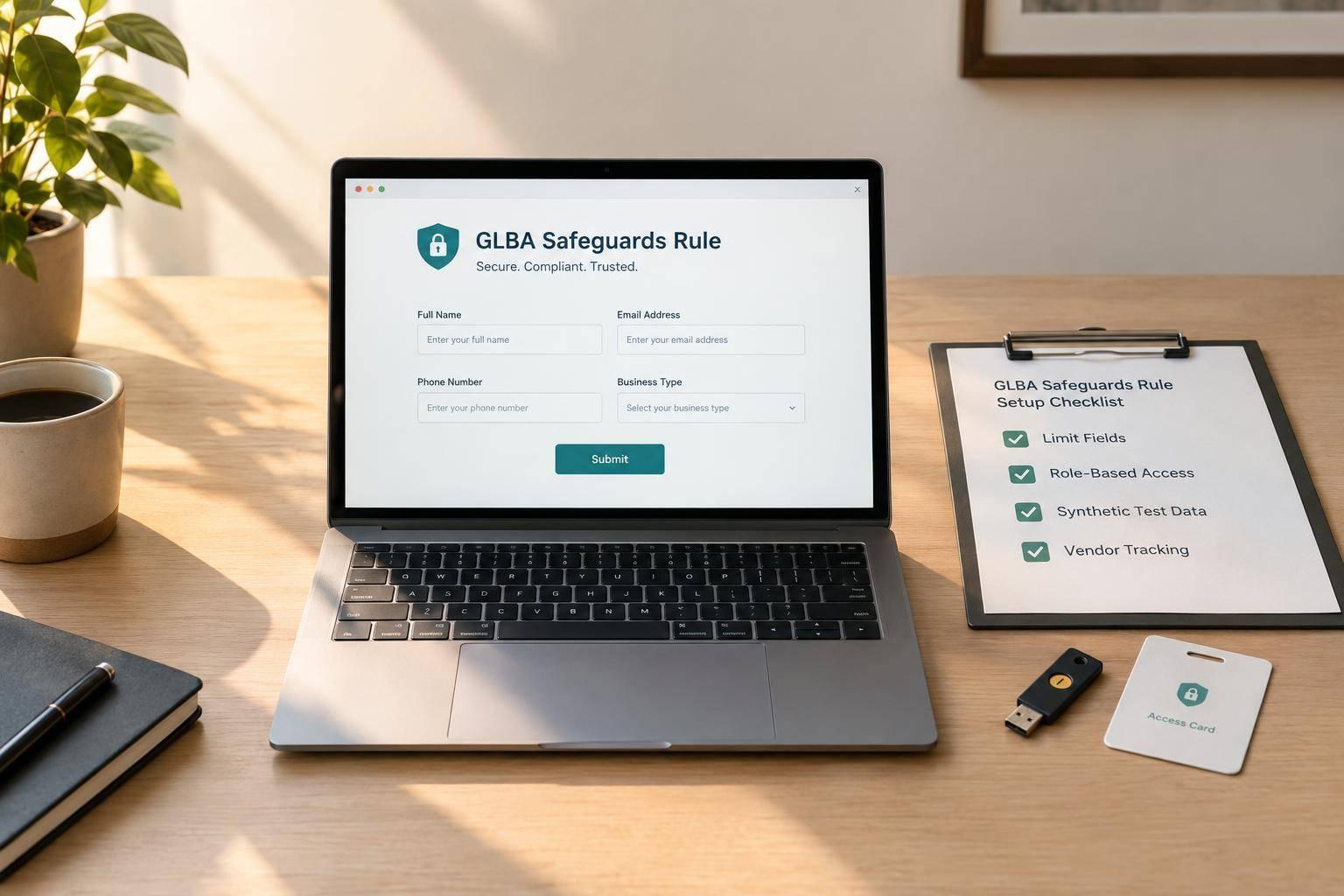
A SaaS form builder does not make your business GLBA compliant. I’d start by confirming coverage with counsel, assigning a security owner, and mapping where every field goes - before collecting customer information.
Here’s the setup checklist I’d use:
- Limit intake: Collect only what you need, protect sensitive records, verify encryption, and set deletion rules.
- Control access: Review vendors, require MFA, and send only approved fields to sales and connected tools.
- Check before launch: Use synthetic data to test permissions, routing, integrations, and analytics without exposing customer answers.
- Keep records current: Document approval, schedule reviews, and prepare incident escalation steps.
One threshold to know: certain breaches affecting 500 or more consumers require FTC notice within 30 days of discovery, or sooner.
My rule of thumb: <u>approve the whole data path - not just the form</u>. Keep its settings, vendors, access rules, and review dates in one approved package.
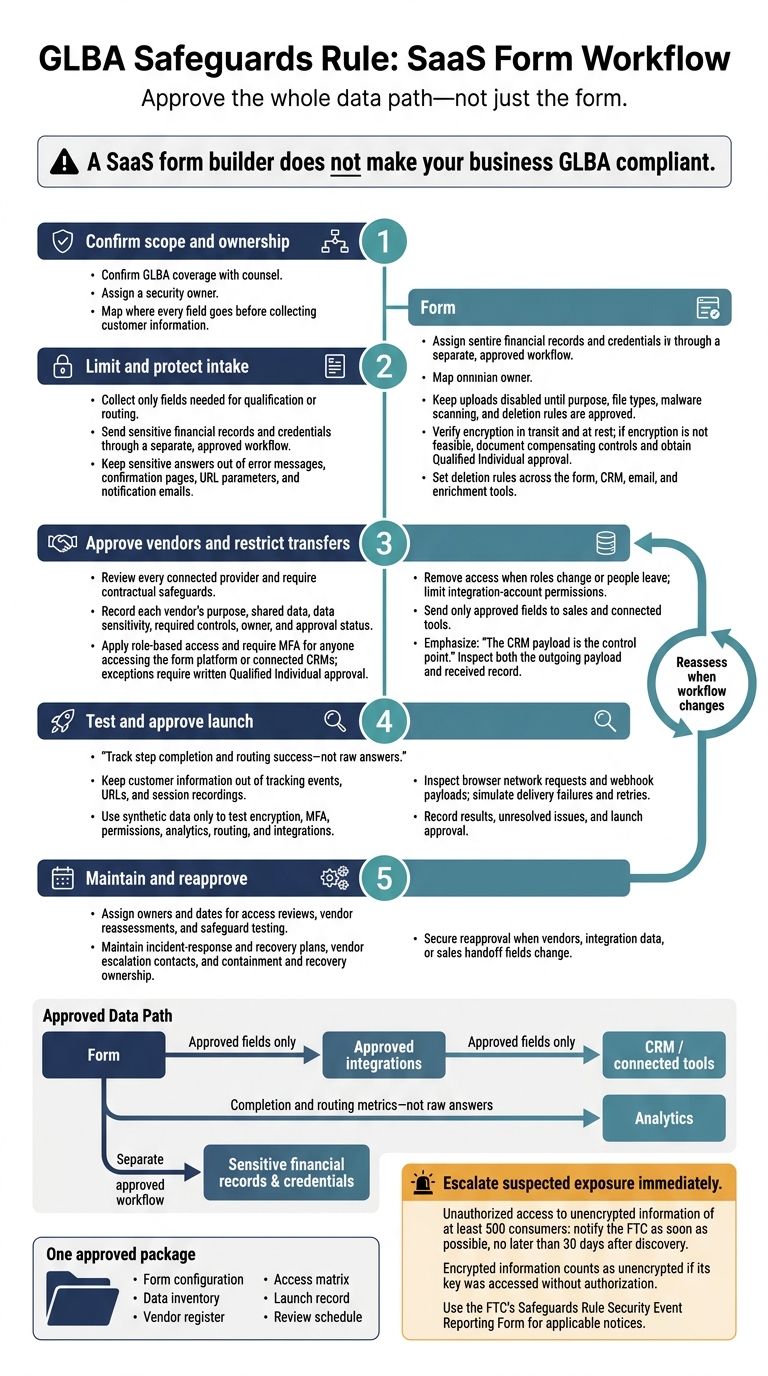
GLBA Safeguards Rule: SaaS Form Workflow
Step 1: Limit and Protect Form Intake
Keep Sensitive Data Out of Lead Forms
Use your field inventory to keep only fields that affect qualification or routing. Use Reform’s multi-step forms and conditional routing to hide the rest. Send sensitive financial records and credentials through a separate, approved workflow. Your organization remains responsible for how the form is configured and used.
Make sure the purpose statement and privacy notice match the data you actually share. Once you’ve limited intake, check validation, uploads, and confirmations for exposed data.
Protect Validation, Uploads, and Confirmations
Give validation and spam filters only the data they need. Leave uploads disabled until you’ve approved their purpose, allowed file types, malware scanning, and deletion rules.
Keep sensitive answers out of error messages, confirmation pages, URL parameters, and notification emails. Use a neutral confirmation:
Your submission was received
Test invalid entries and successful submissions with synthetic data. Then check redirects, emails, and logs for exposed values. If authorized staff need access to a submission, link to the protected record instead of emailing its contents.
Verify Encryption and Set Retention
Verify encryption in transit and at rest. If encryption isn’t feasible, document compensating controls and get Qualified Individual approval.
Before collecting customer data or storing partial submissions, confirm the tool’s current behavior and contract terms. Set deletion rules for the form, CRM, email, and enrichment tools so records are removed when they’re no longer needed.
Next, lock down vendor access, permissions, and sales handoffs.
sbb-itb-5f36581
Step 2: Approve Vendors and Control Access
Review Vendors and Integration Data
List the form platform and every connected provider: hosting, CRM, email, enrichment, analytics, automation, and storage. Before connecting a provider, check its security, subprocessors, location, incident terms, and retention rules. Require contractual safeguards, and set a review schedule based on each vendor’s risk.
Keep a vendor register that records each provider’s purpose, data shared, data sensitivity, required controls, owner, and approval status. Use the field inventory from Step 1 to define what each vendor may receive.
Set Role-Based Access and MFA
Separate access by role - marketing, sales, compliance, and admins - and give each role only the records needed for its work. Marketing should see completion metrics, not customer records. Sales should see only assigned qualification data. Require MFA for anyone accessing the form platform or connected CRMs. Any MFA exception needs written approval from the Qualified Individual.
Remove access when someone leaves or changes roles. Limit integration accounts to the permissions needed for their transfers. Log access, changes, exports, and transfers, and restrict who can access those logs. Match this access model to the data map before any sales handoff.
Limit Sales Handoffs to Approved Fields
Map each outgoing field to a CRM field in the receiving record already approved for transfer. Then test territory and product routes with synthetic submissions.
The CRM payload is the control point. Routing alone doesn’t prove that filtering works. Inspect both the payload and the received record to confirm that only approved fields reach sales. Keep sensitive values out of email and chat alerts.
Use the approved field map to limit analytics and verify the launch in Step 3.
The New GLBA Safeguards Rule – What Financial Institutions Need to Know
Step 3: Limit Analytics and Test Before Launch
Once intake, access, and vendor controls are in place, check that analytics and launch testing don’t expose customer data.
Track Completion Without Recording Answers
Track step completion and routing success - not raw answers. Keep customer information out of tracking events, URLs, and session recordings. Disable session recordings that could record sensitive inputs.
Before turning on analytics, check what it stores, displays, and sends. Inspect browser network requests during a synthetic submission. Reject any setup that sends field values or sensitive URL parameters to unapproved destinations.
Once those tracking limits are in place, test the full workflow before launch.
Test Controls and Record Launch Approval
Use synthetic data only to test encryption, MFA, role permissions, analytics, routing, and integrations before launch. Inspect webhook payloads, then simulate delivery failures and retries to check delivery and field mapping.
Record the results and any unresolved issues. The Safeguards Rule requires regular testing and monitoring to check whether administrative, technical, and physical safeguards work as intended.
Schedule Reviews and Plan Incident Escalation
After launch approval, begin scheduled reviews and incident-response work.
Assign owners and dates for access reviews, vendor reassessments, and safeguard testing. Check that access, vendor, and analytics limits still match the approved workflow. Keep the incident-response and recovery plan current, record vendor escalation contacts, and assign owners for containment and recovery.
Escalate suspected exposure immediately. Breaches involving unauthorized access to unencrypted information of at least 500 consumers require FTC notice as soon as possible - and no later than 30 days after discovery. Encrypted information counts as unencrypted if its key was accessed without authorization. Use the FTC’s Safeguards Rule Security Event Reporting Form for applicable notices.
Conclusion: Maintain the Approved Form Workflow
Once the form is live, maintenance matters as much as setup. Keep GLBA scope up to date and controls tied to one approved workflow.
Reform can help with implementation through conditional routing and CRM integrations. But compliance depends on your security program, vendor terms, and regular oversight - not the form builder alone.
Keep one approved package containing the form configuration, data inventory, vendor register, access matrix, launch record, and review schedule. Assign owners to update the package and secure reapproval whenever vendors, integration data, or sales handoff fields change.
FAQs
How do I know if GLBA applies to my business?
GLBA applies if your business qualifies as a financial institution and handles nonpublic personal information (NPI). This includes businesses heavily involved in lending, investing, transferring money, or providing financial advice.
Collecting NPI through forms - such as Social Security numbers, account balances, or credit details - triggers the rule. If you store NPI and general leads in the same system, the entire system must comply with the Safeguards Rule.
How often should I review my form’s safeguards?
Review safeguards regularly. Run a full security review immediately after material changes, such as new fields, integrations, tracking tags, or reviewer roles.
Use this schedule for routine checks:
- Weekly: Reconcile key CRM objects.
- Monthly: Audit API usage, webhook alerts, and field mappings.
- Quarterly: Conduct an internal audit of access controls, tokens, retention rules, and high-risk areas.
- Annually: Audit the entire system and review policies.
- Every 1–2 years: Obtain an independent external review.
What should I do if a vendor cannot verify its security controls?
Treat this as a serious red flag. Escalate it immediately through your formal procurement or legal process. Document the compliance gaps and the steps needed to address them.
If a vendor refuses to provide required security documentation, such as audit reports or a signed Data Processing Agreement, avoiding that vendor is the safest way to limit liability. Track each vendor’s status in a vendor risk register, and keep sensitive data out of unverified systems.
Related Blog Posts
Get new content delivered straight to your inbox

The Response
Updates on the Reform platform, insights on optimizing conversion rates, and tips to craft forms that convert.



Drive real results with form optimizations
Tested across hundreds of experiments, our strategies deliver a 215% lift in qualified leads for B2B and SaaS companies.
