

HIPAA Data Backup Rules for SaaS Teams



HIPAA backup readiness means being able to restore ePHI securely - not just saving copies. I start with three checks: set risk-based retention, confirm a signed business associate agreement (BAA), and test recovery with access controls and encryption intact.
HIPAA sets no universal backup schedule, retention period, or recovery deadline. Its six-year retention rule covers required compliance documentation, not every backup.
Here’s what I check across the backup lifecycle:
- Retention and deletion: How long copies remain, when they expire, and whether legal holds prevent deletion.
- Logs and encryption: Who accesses or restores data, how copies are protected, and who controls the keys.
- Recovery and ransomware: Whether clean, isolated copies restore usable data - and whether identity systems, keys, and integrations work.
- Vendor duties: What the BAA covers, which tasks belong to your team, and what restore tests confirm.
My bottom line: <u>a successful backup job is not proof of a successful recovery</u>. Match policies, settings, vendor duties, and test results to your documented risks.
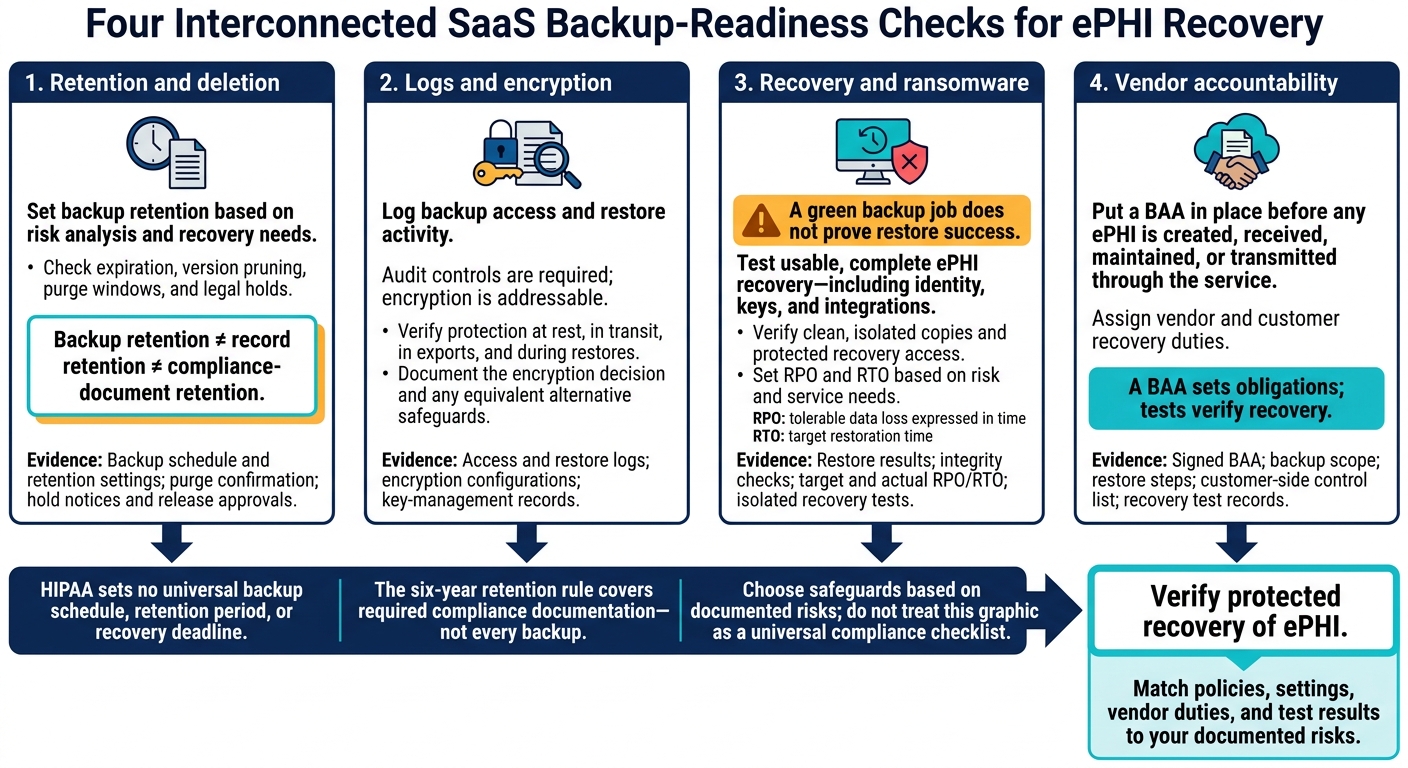
HIPAA SaaS Backup Readiness: 4 Essential Checks
Top 5 HIPAA Compliant Cloud Backup Services
sbb-itb-5f36581
1. HIPAA Backup Rules and Risk-Based Safeguards
Required specifications are mandatory. Addressable specifications call for a documented decision and, if not implemented, an equivalent alternative backed by risk analysis. SaaS teams turn these requirements into backup scope, retention rules, logging, encryption, and restore workflows.
Retention and deletion
Base backup retention and deletion policies on your risk analysis, and document what you back up and how long you keep it. HIPAA does not set a specific retention period for backup data, but it requires restorable copies of ePHI. Your retention policy also needs logs of access and recovery activity.
Auditability and encryption
Audit controls are required; encryption is addressable. Log backup access and restore activity. Use a documented risk assessment to set log retention - HIPAA does not impose a universal six-year retention period on these logs.
Verify encryption at rest and in transit. Document the methods you use, your encryption assessment, and any alternative safeguards. These controls must remain in place during a restore.
Recovery and resilience
HIPAA requires documented backup, disaster recovery, and emergency mode plans. Set snapshot frequency based on risk. Testing and revision are addressable; document both and show how access controls remain active during emergency operations. Backup schedules, restore tests, and emergency access must match the system’s risk profile.
Vendor accountability
For SaaS, responsibility is split between the provider’s infrastructure and your team’s configuration, access controls, and restore testing. Cloud providers that store ePHI are business associates, even if they lack decryption keys. Put a BAA in place before any ePHI is created, received, maintained, or transmitted through the service.[6]
Use the BAA and vendor documents to assign duties. Keep evidence of the controls your team owns - HIPAA compliance depends as much on vendor documentation as on internal backup settings.
2. Everyday SaaS Backup Practices
Day-to-day backup work comes down to four checks: retention, logs, recovery, and vendor ownership.
Retention and deletion
A default backup schedule is not a retention policy. Check when older copies expire and how deletion affects your ability to recover data. Keep backup schedules separate from record-retention rules and HIPAA compliance-document retention - typically six years. Log access and restore activity to support those retention practices.
Auditability and encryption
A success message doesn't tell you who accessed or restored ePHI. Review access and restore-test records, encryption configurations, and key-management records together. Check exports and restore targets, too - not just source storage. Encryption settings alone don't prove the entire workflow is protected. You also need evidence that the data restores cleanly.
Recovery and resilience
A green backup job does not prove restore success. Test whether backup copies produce usable, complete ePHI. Keep test results and any updates to the contingency plan. Verify that an isolated copy remains reachable during an outage or compromise.
Vendor accountability
Ask the vendor for its backup scope, restore steps, and customer-side control list. Match those documents to the BAA, and assign an owner to every customer-side task needed for secure, usable recovery. Verify coverage for application data, access settings, and restore workflows. Don't assume infrastructure protection covers them.
The next section breaks these checks into retention, deletion, logs, encryption, and isolated recovery dependencies.
Backup Retention, Deletion, Logs, and Encryption
HIPAA’s backup expectations translate into settings SaaS teams manage: how long copies stay, how deletion works, what logs record, and how encryption protects data.
Backup Retention vs. Record Retention
Backup retention and record retention serve different purposes. Set backup retention based on recovery needs and risk analysis. Medical-record retention usually follows state law, board requirements, or contracts. Security Rule documentation must remain available for six years.
| Category | Retention basis | SaaS practice to check | Evidence |
|---|---|---|---|
| Backups | Risk analysis, recovery needs, contracts | Schedule, oldest recoverable copy, expiration timeline | Backup schedule and retention settings |
| Security Rule documentation | Six-year retention period | Policies and required records remain accessible | Dated policies and revision history |
| Litigation holds | Applicable preservation duties | Holds prevent scheduled destruction of covered data | Hold notices and release approvals |
Deletion procedures must match these retention rules.
Snapshots, Backup Versions, and Deletion
HIPAA requires retrievable, exact copies of ePHI - not a specific backup method. Deleting production data can leave recoverable copies behind. Check customer settings, version pruning, purge windows, and legal holds separately. A “deleted” status does not prove that data has been purged.
| Method | Recovery value | Exposure risk | Deletion complexity | Auditability |
|---|---|---|---|---|
| Snapshots | Point-in-time recovery | May share storage or platform access | Account for expiration and holds | Snapshot lifecycle logs |
| Incremental backups | Recovery from saved changes | Access to chain components | Preserve needed dependencies | Job and chain records |
| Full backups | Complete saved dataset | Concentrated ePHI | Track each retained copy | Creation and purge records |
| Versioning | Earlier files or objects | Older ePHI remains accessible | Prune versions, not just current data | Version activity logs |
| Soft deletion | Temporary undo | Data remains recoverable | Verify the final purge window | Delete and purge records |
When copies persist after deletion, logs must show where they remain and when they expire.
Audit Trails for Backups and Restores
Under § 164.312(b), audit controls must record and examine activity in systems containing or using ePHI. To help verify recovery, backup records should show creation, deletion, restore outcomes, access changes, key activity, and retention changes.
Keep policy and review records for six years. Set system log retention based on risk and business needs.
| Activity | Routine SaaS evidence | Oversight gap | Verification evidence |
|---|---|---|---|
| Backup creation | Automated success alerts | Missed failures or silent drops | Daily success logs and failure alerts |
| Data deletion | System deleted status | Residual data in snapshots | Purge confirmation and retention logs |
| Restore access | Admin login logs | Missing restore justification or outcome | Restore request tickets, approvals, and test results |
| Key rotation | Provider default settings | Unverified rotation or access | Key management service logs |
| Retention changes | Configuration settings | Policy changes made without permission | Audit trail of setting modifications |
Logs are only part of the picture. The backup process also needs encryption and key control.
Encryption Coverage and Key Management
Encryption under the Security Rule is an addressable specification. SaaS teams should assess whether encryption is reasonable and appropriate, document that decision, and use an equivalent alternative if they do not implement it.
| Scope | Transit protection | At-rest protection | Access ownership | Typical gaps | Evidence |
|---|---|---|---|---|---|
| Production data | TLS 1.2+ | AES-256 | SaaS provider/customer | Weak cipher suites | Configuration screenshots |
| Replicas | Encrypted tunnel | AES-256 | SaaS provider | Unencrypted replication | CSP SOC 2 reports; replication settings |
| Backups | TLS 1.2+ | AES-256 | SaaS team | Backups stored in unencrypted volumes | Backup job logs; encryption status reports |
| Exported backups | Secure transfer | AES-256 | SaaS team | Local downloads without disk encryption | Asset inventory; encryption policy docs |
| Key management | Secure KMS/HSM access | HSM / KMS | SaaS team (BYOK) | Lack of rotation | Key rotation logs; IAM access reviews |
Keep retention settings, deletion procedures, access reviews, log exports, and documented encryption decisions together so teams can check how safeguards work across the backup lifecycle.
The next section compares these controls with disaster recovery, ransomware isolation, and vendor duties.
Disaster Recovery, Ransomware, and Vendor Duties
Contingency Plans vs. Automated Backups
Retention, logs, and encryption are in place. Next, check whether recovery will work during an outage or attack. 45 C.F.R. § 164.308(a)(7) requires backup and disaster recovery planning. SaaS teams set RPO (tolerable data loss expressed in time) and RTO (target restoration time) based on risk and service needs. HIPAA does not set universal targets.
Testing, revision, and criticality analysis are addressable requirements. Implement them when reasonable and appropriate. Otherwise, document why not and adopt equivalent alternatives where reasonable and appropriate.
Restore Tests and Recovery Dependencies
Test the entire recovery process in dependency order, including identity, keys, and integrations. Record the recovery point, target and actual RPO/RTO, integrity checks, and results. Replication alone is not an independent backup if it copies corrupted or encrypted data.
| Scenario | HIPAA expectation | Routine SaaS practice | Gap | Test evidence | Corrective action |
|---|---|---|---|---|---|
| Backup verification | Maintain retrievable copies | Check job status | Unreadable copies escape detection | Copy opened; integrity checks passed | Repair failed jobs and retest |
| Single-record restoration | Support integrity and availability | Submit support ticket | Delay or incomplete record relationships | Timed restore; fields and relationships checked | Fix permissions or restore procedure |
| Full-environment restoration | Support disaster recovery | Restore database only | Identity, keys, or integrations unavailable | End-to-end workflow results; actual RPO/RTO | Update dependency order and runbook |
| Regional recovery | Address relevant outage risks | Rely on vendor resilience | Regional dependencies remain unavailable | Failover timing and dependency checks | Remove identified regional dependencies |
| Ransomware recovery | Address malicious destruction | Restore latest snapshot | Copy compromised or accessible to attacker | Clean recovery point; isolated restore results | Protect copies and recovery access |
Ransomware Defenses and Isolated Backups
Ransomware changes the goal: copies must be clean and isolated, not just available. HHS ransomware guidance recommends frequent backups, periodic restore tests, and offline or network-isolated copies.
Use risk analysis to choose isolation, immutability, separate administration, and protected recovery credentials. These are not a universal HIPAA checklist. Attackers target backups, too. A clean copy helps only if recovery can proceed without compromised production systems.
| Control | Remaining risk | Verification evidence |
|---|---|---|
| Backup frequency | Latest clean copy predates the approved RPO | Clean recovery point compared with RPO |
| Clean-recovery testing | Backups retain malware or attacker persistence | Isolated restore results and integrity checks |
| Offline or isolated copies | Compromised production credentials reach backups | Access review and production-access separation test |
| Immutability | Administrators can delete retained versions | Locked-retention settings and deletion-control checks |
| Separate recovery access | Production compromise blocks recovery | Permission review and logged emergency access tests |
BAAs and Shared Backup Responsibilities
Vendors and customers share backup recovery duties, but a vendor’s legal obligation does not prove that a restore will work. A BAA sets obligations; tests verify recovery. The customer still needs to validate the result.
Business associates must notify covered entities of breaches of unsecured PHI without unreasonable delay and no later than 60 calendar days after discovery. Contracts can require faster notice. Data location is a risk and contract issue - not a blanket requirement to host data only in the United States.
| Function | Vendor ownership | Customer ownership | Contractual commitment | Verification evidence |
|---|---|---|---|---|
| Breach notification | Notify the covered entity | Handle downstream reporting duties | BAA; 60-day maximum, with faster notice if agreed | Incident log and notification records |
| Subcontractors | Bind applicable subcontractors | Conduct due diligence on the primary vendor | BAA | Subcontractor list and flow-down obligations |
| Data location | Secure the hosting environment | Assess regional risks and requirements | BAA / service agreement | Region settings report |
| Data return or destruction | Return or destroy where feasible | Validate receipt and disposition | Termination clause | Export validation; disposition record |
Vendor Documents and Recovery Test Records
Review the BAA, restore test reports, notification procedures, audit logs, and evidence of emergency access procedures together. Check scope exclusions, customer configuration duties, subcontractor flow-downs, termination steps, and whether ePHI can be returned or destroyed.
Review independent assurance reports for their scope and open findings. Do not treat those reports as proof that backup recovery works.
Conclusion: Verify Protected Recovery
With retention, logging, encryption, and recovery controls in place, one question remains: Can you restore protected ePHI? Scope, settings, contracts, and test results must align with documented risks. HIPAA’s six-year rule applies to policies and compliance records - not backup data.
Use this scorecard to spot the weakest control, not to declare the system compliant. Score each area from 0–2: 0 for absent, 1 for incomplete, and 2 for current.
| Dimension | Score | Required evidence | Next action |
|---|---|---|---|
| Retention | 0–2 | Risk-based retention policy | Align settings with documented risk |
| Recoverability | 0–2 | Recent restore logs | Test immediately if logs are more than 1 year old |
| Integrity | 0–2 | Integrity verification logs | Automate integrity checks |
| Confidentiality | 0–2 | Encryption configuration and key policy | Review backup admin key access |
| Accountability | 0–2 | Backup and restore access logs | Log all backup modifications |
| Resilience | 0–2 | Evidence of an isolated or offsite copy | Keep one copy isolated |
| Shared responsibility | 0–2 | Signed BAA and defined recovery duties | Document recovery duties in the BAA |
| Testing | 0–2 | Recent contingency test reports | Run a recovery drill |
Policy alone doesn’t prove HIPAA backup readiness; you need evidence of protected recovery. Address unrecoverable backups, failed restores, exposed admin access, and unclear ownership first. Assign an owner to each gap, and close it only when evidence confirms the fix.
FAQs
How do I choose a backup retention period?
Balance your business recovery goals with legal and regulatory duties. Define your Recovery Point Objective (RPO) - how much data loss you can tolerate - and Recovery Time Objective (RTO) - how soon systems must be restored. Set retention periods by data type, following the longest applicable legal or state requirement.
Record these decisions in your disaster recovery plan. Use automated lifecycle rules to enforce retention periods, and apply legal holds to pause deletion during investigations or litigation.
How can I test restores without exposing ePHI?
Run restore drills in a secure, isolated sandbox. Never copy electronic protected health information (ePHI) from production into test or development environments unless those environments maintain the same security controls, including access controls, encryption, and auditing.
Document restore tests and retain logs of successful recoveries to show that backup data can be retrieved and remains intact.
What if my vendor’s recovery targets don’t meet mine?
Set your Recovery Point Objective (RPO) and Recovery Time Objective (RTO) based on how sensitive your data is. Under 2026 standards, critical systems are expected to be restored within 72 hours.
If testing shows your vendor takes longer to recover than your RTO allows, address that compliance risk before a disaster strikes. Consider cross-platform backups to keep data independent of your vendor and give you more control over meeting your recovery targets.
Related Blog Posts
Get new content delivered straight to your inbox

The Response
Updates on the Reform platform, insights on optimizing conversion rates, and tips to craft forms that convert.



Drive real results with form optimizations
Tested across hundreds of experiments, our strategies deliver a 215% lift in qualified leads for B2B and SaaS companies.
