
.webp)
How Lead Forms Handle Latin America Consent Rules


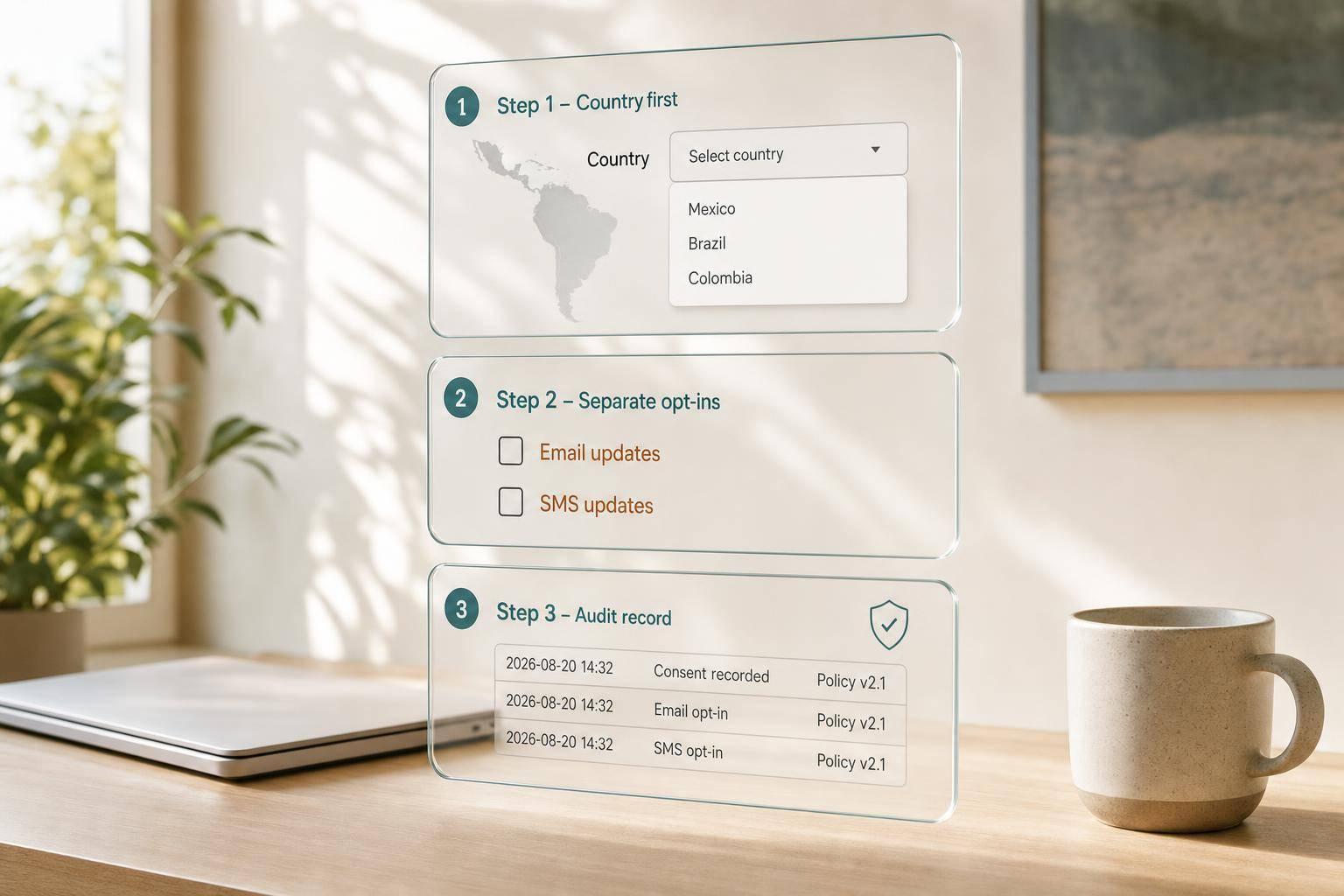
If I run one lead form across Latin America, I should not use one consent flow for every country. Some markets need an unchecked opt-in for each purpose. Others allow a notice-first setup. That changes the form path, the copy, and the records I send to the CRM.
Here’s the short version:
- Brazil, Argentina, Uruguay, Peru, Costa Rica, El Salvador, and Colombia are safer with express opt-in
- Mexico, Chile, and in some cases Colombia-style notice flows need clear notice at minimum, but Mexico is still the main notice-first market in this piece
- Marketing consent must be separate from a demo request or content download
- No pre-checked boxes
- Each purpose needs its own field: email, SMS, WhatsApp, profiling, lead scoring, and similar uses
- I should log what the user saw, including:
- country
- language
- timestamp
- checkbox choices
- consent text version
- form or session ID
- If country detection fails or changes mid-session, I should default to the strictest path
In plain terms: ask for country first, show the right consent copy, keep marketing optional, and store a full consent record.
A few facts from the article stand out:
- The guide splits markets into notice-based and explicit opt-in groups
- It calls for one checkbox per purpose, not bundled consent
- It gives a sample audit timestamp like 08/20/2026 2:15 PM UTC-3
- It recommends an immutable log with field-level records such as
consent_email_marketing: trueandconsent_sms: false
| Area | What I should do |
|---|---|
| Country routing | Ask country early and branch the form |
| Consent fields | Use separate, unchecked boxes |
| Language | Keep English, Spanish, and Brazilian Portuguese aligned |
| Audit trail | Save timestamp, country, language, version IDs, and user action |
| CRM sync | Map each consent type to its own field |
So if I want a short rule to follow, it’s this: build for the strictest market first, then relax only where local rules allow it. Using a multi-step lead gen template makes it easier to manage these conditional paths.
Map country consent rules before you design the form
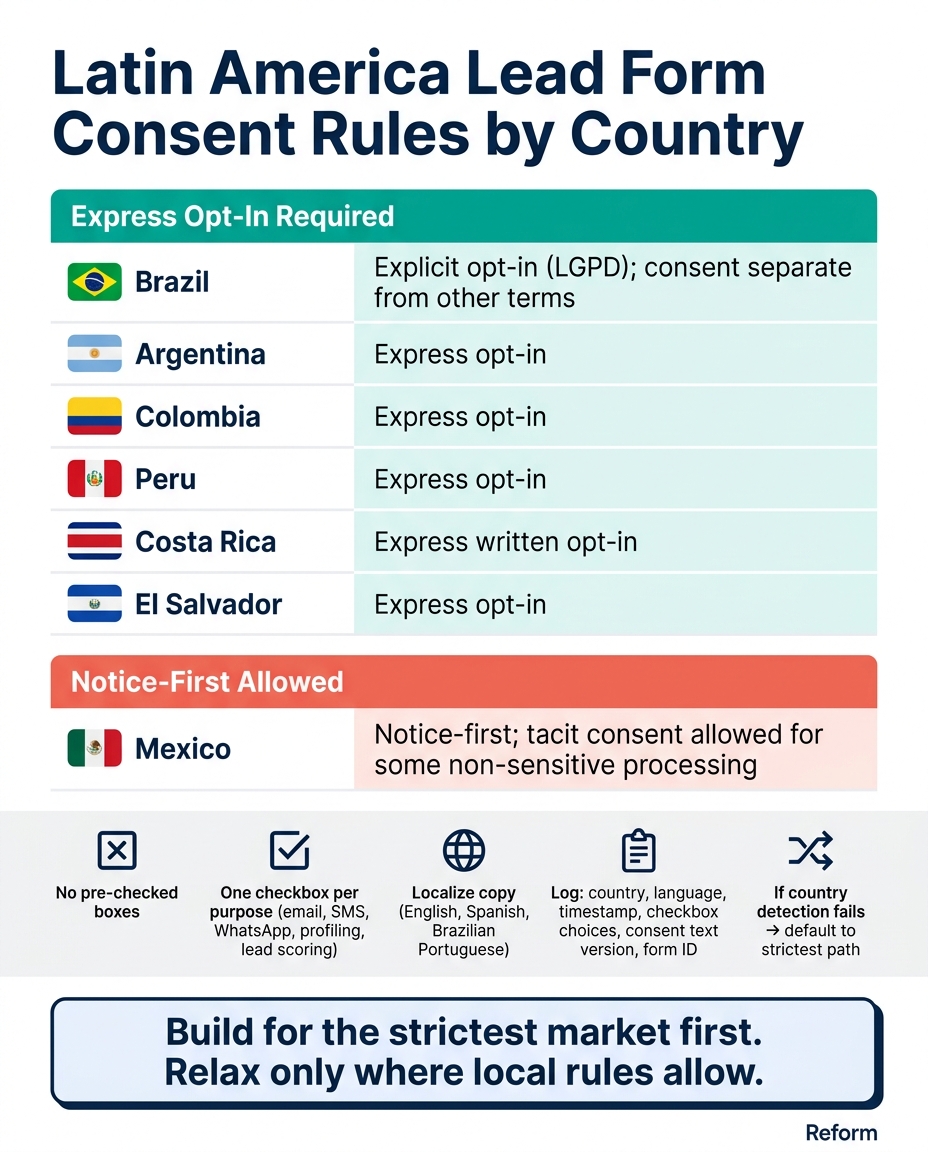
Latin America Lead Form Consent Rules by Country
Before you write a single field label, design for the strictest consent market you serve. Then ease up only where local rules let you. In practice, that means starting with explicit, recorded opt-in and separate consent for each purpose. Use that standard to shape the form flow for each country.
Build a country-by-country consent matrix
A consent matrix takes legal differences and turns them into something your form team can use day to day. The table below covers the seven countries and points to the consent standard that affects form design.
| Country | Consent Standard |
|---|---|
| Brazil | Explicit opt-in (LGPD); consent separate from other terms |
| Mexico | Notice-first; tacit consent allowed for some non-sensitive processing |
| Argentina | Express opt-in |
| Colombia | Express opt-in |
| Peru | Express opt-in |
| Costa Rica | Express written opt-in |
| El Salvador | Express opt-in |
Mexico follows notice-first rules and may allow tacit consent for some non-sensitive processing. In the other countries, unchecked opt-in checkboxes with clear purpose language are the safer starting point. Build your form architecture around that from the beginning.
Once you’ve mapped the country rules, break out each purpose into its own field.
Separate contact-request processing from marketing consent
Use the contact details needed to fulfill demo requests or content downloads. Then ask for separate opt-ins for email, SMS, WhatsApp, profiling, and lead scoring, including any CRM or ad stack use tied to audience building or retargeting.
Here’s the rule that matters most: access to gated content should never depend on optional marketing consent. If someone has to tick a marketing box just to get the asset they asked for, that can weaken the case that consent was freely given.
Map each purpose before you build anything. That way, your field structure matches the data flows happening downstream. Those purpose splits should decide which consent fields show up in each country-specific path. They also set up the conditional fields covered in the next section.
sbb-itb-5f36581
Design consent fields and language variants for each country
Use separate unchecked opt-in fields for each purpose
Turn the matrix into actual form fields: one unchecked checkbox for each purpose. Don’t bundle multiple purposes into one checkbox. Each consent statement should appear right next to the checkbox, or directly under it, so people can see what they’re agreeing to without hunting through a linked terms document.
For sensitive data, keep the disclosure tighter and ask only for what’s needed. Less noise, less confusion.
Localize consent copy for English, Spanish, and Brazilian Portuguese
A consent statement should mean the same thing in every language. Store the English, Spanish, and Brazilian Portuguese versions as reusable locale blocks inside one form. That way, you’re not rewriting the same consent in different places and hoping it still lines up.
When someone submits the form, log a fixed timestamp format, such as 08/20/2026 2:15 PM UTC-3, along with the exact language shown to the user. That record becomes part of the audit trail used in the next step.
Use multi-step and conditional form sections to keep consent clear
Keep consent easy to spot by giving it its own step after the contact fields. If contact details and all consent options appear on the same screen, the page gets crowded fast, and opt-ins are easier to miss.
A cleaner setup looks like this:
- First, collect contact details
- Next, show the consent step
- Then, display the right country and language path based on the user’s selection
Reform supports multi-step forms and conditional routing, so you can ask for country first and send users into the right consent path. Reusable locale blocks help keep all three language versions organized inside the same form structure. The result is one form that branches by country while still keeping a clear consent trail.
Set up country-aware form logic and consent records ready for audit
Capture country first and route users to the right consent path
After you define the consent fields, route users by country and capture the final country choice using multi-step form logic. Put a required country field at or near the start of the form. Every consent decision that follows depends on that field.
You can use IP-based geo-detection to prefill the country, but users should always be able to change it by hand. Then log both values:
- the detected country
- the user-confirmed country
That way, your audit trail shows two things: users had a chance to correct the country, and consent was tied to the confirmed value.
Once the country is set, use it to send users down the right consent path based on the country matrix you built earlier. Brazil should trigger standalone opt-ins for each purpose. Other markets should display the local notice and consent wording.
If someone changes their country partway through the form, use the strictest country's rules for that session. Route the session to the strictest consent path that applies, and record the final country choice.
Once the routing is in place, log the exact consent event tied to each submission.
Log the exact consent event, text version, and user action
A consent log only helps if it lets you rebuild what happened at the moment the form was submitted. Under Brazil's LGPD, the controller must be able to show how and when consent was obtained, including the consent text and UI used. Each consent event should store the fields that match the exact purposes the user saw and selected.
| Category | What to Record |
|---|---|
| Temporal | Timestamp in ISO 8601 format with time zone (e.g., 2026-08-20T14:37:12-05:00) |
| Contextual | User-confirmed country, language shown (e.g., pt-BR, es-MX) |
| Legal | Privacy notice version ID, version ID for each consent field |
| Granular | Each channel choice recorded on its own (e.g., consent_email_marketing: true, consent_sms: false) |
| User action | Checkbox state, submit button event, form/session ID |
Store these logs in an immutable log, so each consent change creates a new record instead of replacing the old one. That gives you a full history of opt-ins, opt-outs, and later updates.
Use that same record structure when you send consent data to the CRM.
Sync consent fields to the CRM and keep a full history
This final step completes the workflow: form choice → audit record → CRM storage. Create dedicated fields for each channel and purpose. For example:
Email_Marketing_ConsentSMS_ConsentWhatsApp_ConsentProfiling_ConsentConsent_CountryConsent_TimestampConsent_VersionWithdrawal_Status
This setup lets you honor an SMS withdrawal without touching email consent. It also makes it much easier to answer a regulator's question about one channel without digging through messy notes.
Use Reform's integrations or webhooks to send a structured consent payload at the moment of form submission straight to your CRM and marketing automation system. Log withdrawals using the same fields as the original grant, and build segments from those fields, not from a single opt-in flag.
Conclusion: A practical setup for compliant lead capture across Latin America
A compliant Latin America lead form works best when every part fits together: country rules, conditional routing, local language, granular opt-ins, and CRM-linked logs. In that setup, country detection is the first call in the flow.
Start there, then send users to the strictest consent path that applies to them. Brazil and Argentina need unchecked opt-ins. Mexico and Chile can use notice-first flows. If geolocation doesn’t return a valid result, default to the strictest path automatically.
Once the routing changes by country, the wording needs to stay just as consistent. The consent scope should match across English, Spanish, and Brazilian Portuguese. Translation can’t change that scope. And that only works if the consent record matches exactly what the user saw at the time of submission.
Send purpose-specific fields, version IDs, language, timestamp, and the exact consent text to the CRM so the record is ready for review. Field-level consent data matters here, not a generic note in the contact record. Reform's form templates and CRM integrations can pass that payload at submission time.
Clear language and honest choices can help protect compliance without hurting conversion. For teams needing a custom setup, expert form strategies can help bridge the gap between compliance and performance.
FAQs
Which countries need explicit opt-in?
Users in the European Union need explicit opt-in under GDPR before any non-essential tracking starts.
More broadly, you need clear, informed, and unambiguous opt-in any time data collection for marketing, profiling, analytics, or advertising goes beyond what’s strictly needed for a form to work or remain secure.
A simple way to handle this: use geo-targeted conditional routing so those fields appear only where they’re required.
What should I log for consent audits?
For consent audits, your logs need to be secure, encrypted, and tamper-evident. If an auditor asks what happened, you should be able to show a clear record without gaps or guesswork.
At a minimum, log:
- The exact timestamp
- A pseudonymized user identifier
- The action taken
- The policy version
- The banner configuration shown
You should also log any consent withdrawals. For those records, include the date, the method used, the user’s location, and the collection method.
As for retention, keep these records for at least 12 to 24 months.
How should I handle users who change countries mid-form?
If a user changes countries in the middle of a form, don’t keep the old consent setup in place. Tie your routing rules to the country step so the form shows the right consent fields for that location and skips anything that no longer applies.
Consent checkboxes should stay unchecked by default. If the jurisdiction changes, ask for a new active opt-in. Then log each update in your CRM with the timestamp, consent choices, policy version, and country for audit tracking.
Related Blog Posts
Get new content delivered straight to your inbox

The Response
Updates on the Reform platform, insights on optimizing conversion rates, and tips to craft forms that convert.


Drive real results with form optimizations
Tested across hundreds of experiments, our strategies deliver a 215% lift in qualified leads for B2B and SaaS companies.
