
.webp)
7 HubSpot Lifecycle Stage Workflow Examples



If your lifecycle stage rules are off, your routing, nurture emails, and funnel reports can go off with them. I’d keep the setup simple: move contacts forward only, use form intent and behavior to decide stage changes, and use deal events to move people into Opportunity and Customer.
Here’s the full article in one view:
- Subscriber → Lead on a first high-intent form like demo, pricing, or contact sales
- Lead → MQL when score or behavior hits a set threshold
- MQL/Lead → SQL on a demo request, after a fit check
- SQL → Opportunity when a deal is created
- Opportunity → Customer when a deal is marked Closed Won
- Recycled MQLs/SQLs should stay at their current lifecycle stage and use Lead Status instead
- External forms should only move early-stage contacts forward after a stage check
A few rules drive all 7 examples:
- Do not move contacts backward. HubSpot stores stage-entry dates, and resets can skew funnel reporting.
- Use high-intent actions for stage changes. A newsletter signup is not the same as a demo request.
- Set associations first. Contacts, companies, deals, and tickets need to be linked before workflows run.
- Protect source data. Keep original attribution in place and use later source fields for re-engagement.
- Check external form mapping before sync. That helps prevent bad stage updates and duplicate records.
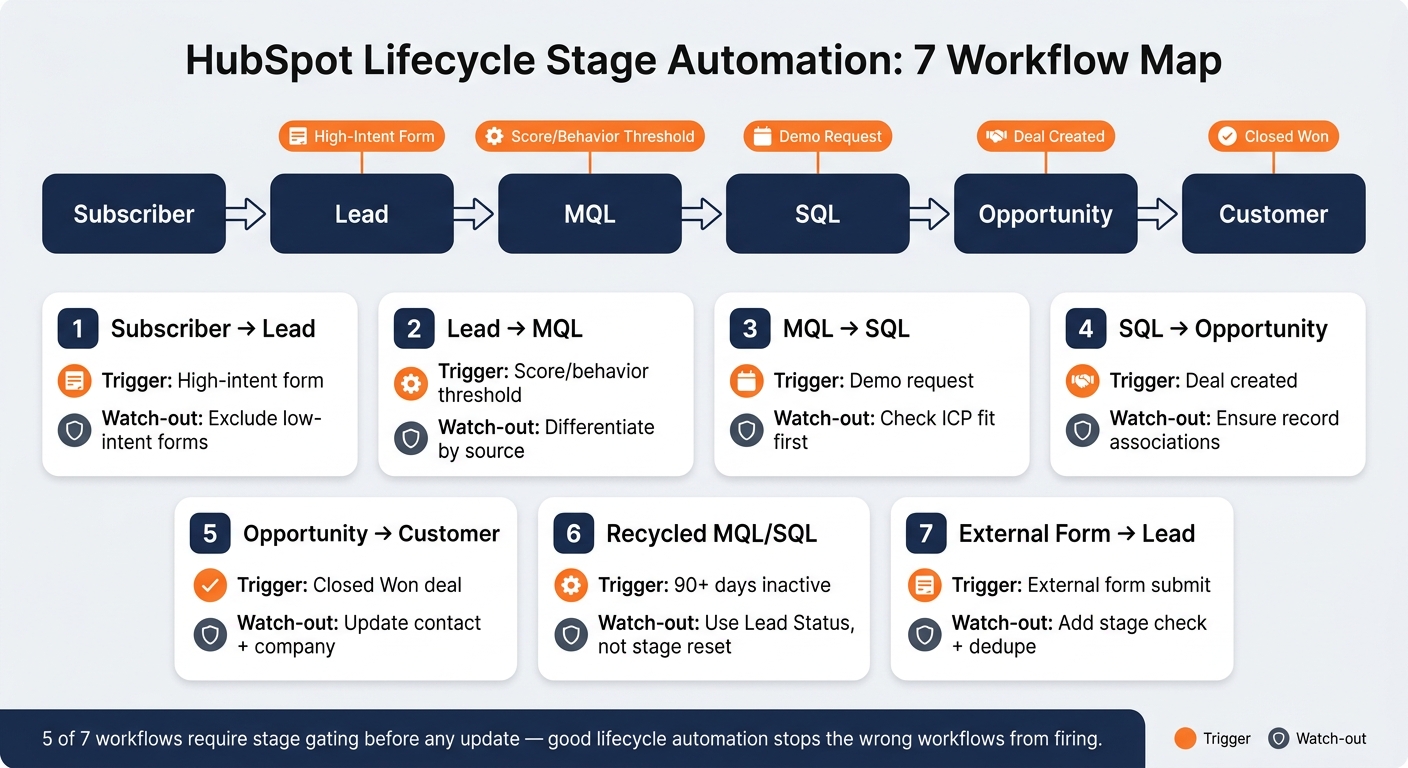
HubSpot Lifecycle Stage Workflow: 7-Step Automation Map
Quick Comparison
| Workflow | Main Trigger | Stage Change | Main Watch-Out |
|---|---|---|---|
| 1 | High-intent form submission | Subscriber/Unknown → Lead | Don’t include low-intent forms |
| 2 | Score or behavior threshold | Lead → MQL | Keep threshold rules clear by source |
| 3 | Demo request | MQL/Lead → SQL | Check ICP fit before update |
| 4 | Deal created | SQL → Opportunity | Make sure records are associated |
| 5 | Closed Won deal | Opportunity → Customer | Update linked contact and company |
| 6 | Recycled + 90+ days inactive | No lifecycle change | Use Lead Status, not stage reset |
| 7 | External form submission | Subscriber/blank → Lead | Add stage check and dedupe rules |
One stat-like point stands out: 5 of the 7 workflows rely on stage gating before any update happens. That tells me the article’s main message is simple: good lifecycle automation is less about adding more workflows and more about stopping the wrong ones from firing.
sbb-itb-5f36581
Before You Build: Ground Rules for Lifecycle Stage Automation
Before you build the seven workflows below, lock in three rules tied to forms, behavior thresholds, and deal-based stage changes. These guardrails help keep everything lined up with HubSpot reporting and workflow logic.
Rule 1: Lifecycle stages move forward, not backward. HubSpot records a timestamp each time a contact enters a new stage. If you downgrade a contact, you can overwrite those native dates and skew funnel velocity reporting. The safest move is to treat lifecycle stages as a one-way path.
Rule 2: Recycle cold MQLs and SQLs without changing lifecycle stage. Instead of moving them backward, send them into a separate nurture path. That way, your reporting stays clean and the original timestamps remain in place.
Rule 3: Map forms to the lowest valid stage and let behavior-based workflows promote contacts. This matters even more for external forms. Apply the same rule before sync so bad data doesn't kick off bad automation. Reform can handle conditional routing, email validation, and spam prevention before data reaches HubSpot.
There’s one more thing worth setting up early. HubSpot uses the hubspotutk cookie to deduplicate native form submissions and update existing records. You should also set object associations first. Contacts, Companies, Deals, and Tickets shape how data moves through HubSpot and which triggers fire. Get that part wrong, and the workflows can behave in odd ways.
With those rules in place, the first workflow can move a subscriber into a lead after a high-intent submission.
| HubSpot Object | Role in Lifecycle Automation |
|---|---|
| Contact | Represents the individual lead or client and holds the lifecycle stage property |
| Company | Represents the business entity associated with the contact |
| Deal | Tracks the commercial relationship and closed-won status |
| Ticket | Often used to track the onboarding project or specific post-sale milestones |
1. Subscriber to Lead on First High-Intent Form Submission
When a Subscriber sends a high-intent form, move that contact to Lead automatically. Leave contacts in later lifecycle stages as they are. Once that handoff is clean, the next workflow can move qualified leads forward based on behavior.
Trigger Logic
Set the enrollment trigger to "Contact submitted [specific high-intent form] on any page," then add a second filter: Lifecycle Stage is Subscriber or Unknown. This keeps the workflow focused on early-stage contacts.
Turn off re-enrollment so the workflow doesn’t run again if the same person submits the form later. For ABM teams, connect the contact to the correct company object at this step.
Form Submission Rules
Not every form should move someone to Lead. Newsletter signups and blog subscriptions should stay at the Subscriber stage because they show interest, not buying intent.
The forms that should trigger this workflow are the ones tied to direct product interest, such as:
- Demo requests
- "Contact Sales" forms
- Pricing inquiries
For external forms, validate email addresses, block spam, and route submissions before they sync to HubSpot.
Lead Source Path
When the workflow runs, use a "Set property value" action to change the Lifecycle Stage to Lead. Save UTM and source data in HubSpot before the stage update so attribution stays in place. For ABM, this is also the point where you should connect the contact to the right company.
Use the table below to keep form intent and lifecycle stage lined up.
| Form Type | Intent Level | Lifecycle Stage |
|---|---|---|
| Newsletter Signup | Low | Subscriber |
| Blog Subscription | Low | Subscriber |
| Resource Download | Medium | Lead |
| Pricing Inquiry | High | Lead |
| Contact Sales | High | Lead |
| Demo Request | High | Lead |
2. Lead to MQL Based on Behavioral Thresholds
After a form turns a contact into a Lead, the next step is to watch what they do. Their behavior tells you when they’re ready to become an MQL. Once those actions show clear intent, the handoff moves to the MQL stage.
Trigger Logic
Use HubSpot’s predictive or manual lead scoring to track intent-based actions. Enroll contacts when Lifecycle Stage = Lead and HubSpot Score hits your MQL threshold, such as 50. Leave out contacts who are already in SQL or Opportunity.
Good scoring signals include pricing page visits, email clicks, and case study downloads. Those actions usually mean the person isn’t just browsing anymore.
Form Submission Rules
Repeat high-intent form submissions can also push a Lead into MQL. Forms like Contact Sales or Request Quote are strong signals, especially when someone submits them more than once.
Lead Source Path
Original source should shape how fast a Lead reaches MQL. Not every source deserves the same bar, and that’s the whole point.
| Lead Source | Recommended Threshold Logic | Key Behavioral Triggers |
|---|---|---|
| Inbound | Moderate threshold; focus on content consumption and education | Multiple blog views, whitepaper downloads, newsletter signups |
| Paid | High threshold; require specific hand-raiser actions | Direct demo requests, pricing page visits, Contact Sales submissions |
| Partner | Variable threshold; often relies on fit data from the partner | Referral form submission, co-branded webinar attendance |
| Product-Led | Usage-based threshold; focus on Aha! moments within the app | Reaching a specific usage limit, inviting team members, activating key features |
Best-Fit Funnel Stage
This workflow fits MOFU, where behavior moves a Lead into MQL. From there, a demo request can move the contact to SQL.
3. MQL to SQL on Demo Request
Once scoring moves a contact to MQL, a demo request is usually the clearest handoff point for sales. Behavior has already shown interest. The demo request adds intent and marks the contact as sales-ready, which is when they should move to SQL.
Trigger Logic
Set the enrollment trigger to Form submission is any of [Demo Request Form]. Focus this workflow on contacts in MQL or Lead. After enrollment, update the lifecycle stage to SQL, route the contact to the right sales rep, send an internal Slack or email alert, and assign a follow-up task to the lead owner.
That said, don't move every form fill straight to SQL without a quick check. Use form templates to confirm fit before the stage changes.
Form Submission Rules
The form should collect the fields that help you check ICP fit. In most cases, the most useful ones are job title/role, company size/revenue, and primary pain point. You should also screen out personal email addresses and companies in non-target industries or segments before moving the contact to SQL.
| Qualification Category | Required Fields | Action |
|---|---|---|
| Contact Fit | Job Title, Work Email | Validate ICP fit |
| Company Fit | Company Size, Industry | Filter non-target segments |
| Intent Signal | Demo Request Form Submission | Move to SQL |
| Routing Data | Lead Source, Region | Route to the right AE |
Lead Source Path
Lead source should shape follow-up priority. A demo request from paid search often needs faster routing than one from organic search. If someone is coming in through a high-intent paid campaign, speed matters.
Best-Fit B2B/SaaS Funnel Stage
Use this workflow for bottom-of-funnel B2B and SaaS handoffs.
4. SQL to Opportunity When a Deal Is Created
Once a demo request has been marked as SQL, deal creation is usually the cleanest point to move that contact to Opportunity. The idea is simple: a rep opens a deal from a qualified demo request, and that action pushes the contact into the next lifecycle stage.
Trigger Logic
Use a deal-based workflow triggered by "Deal is created," then update Lifecycle Stage on associated contacts to Opportunity.
When you apply the lifecycle stage change to Associated Contacts, every linked contact moves to Opportunity at the same time. If that’s too broad, use HubSpot Association Labels to control which associated contacts the action should touch.
Association Path
Make sure the Contact, Company, and Deal records are linked before the workflow runs. That connection is what tells HubSpot which contacts should be updated.
Best-Fit B2B/SaaS Funnel Stage
This workflow works best for teams that treat deal creation as the standard Opportunity trigger. After that, closed-won automation can move the record to Customer.
5. Opportunity to Customer on Closed-Won Deal
Use a deal-based workflow that fires when a deal is marked Closed Won. From there, update the linked contact to Customer and update the linked company as well.
Trigger Logic
Set the trigger to Deal property "Deal stage" is any of Closed Won, then change the contact lifecycle stage to Customer.
This only works the way you expect if each deal is linked to at least one contact and one company before enrollment. If those associations are missing, the update can break or hit the wrong record.
It also helps to create a separate onboarding ticket pipeline after the deal closes. That keeps post-sale work out of the sales pipeline. The handoff should happen before any onboarding tasks start.
Form Submission Rules
Use onboarding forms to kick off post-sale tasks, not to change lifecycle stages. For example, a welcome form or a technical requirements form can trigger the next onboarding step.
That means forms should push the work forward, not reset lifecycle history.
Best-Fit B2B/SaaS Funnel Stage
This workflow marks the handoff from sales to customer onboarding.
6. Recycling Unresponsive MQLs or SQLs Without Losing Lifecycle Data
When an MQL or SQL goes quiet, use Lead Status as the working field and leave Lifecycle Stage alone. That gives you a clean way to restart nurture without wiping out the contact’s history.
Trigger Logic
Set the workflow trigger to Lead Status = "Recycled" AND more than 90 days since last activity. This flags stale contacts for follow-up without changing Lifecycle Stage.
If that same contact later submits a high-intent form, like a demo or pricing request, that new action can move the Lifecycle Stage to SQL or MQL based on your rules. The key idea is simple: let the new signal drive the stage change, not the recycle action itself.
Form Submission Rules
Any high-intent form submission should check stage eligibility again. If a recycled MQL or SQL submits a demo or pricing form, move Lifecycle Stage forward based on that new intent.
Don’t reset the record just because the lead had stalled before. Keep the earlier stage history in place.
Lead Source Path
Leave Original Source unchanged so acquisition reporting stays accurate. For re-engagement, use Latest Source instead.
That way, you can still answer two different questions:
- Where did this lead first come from?
- What brought them back into the funnel?
Best-Fit B2B/SaaS Funnel Stage
This workflow fits B2B and SaaS funnels with stalled MQLs or SQLs, especially when the sales cycle stretches out over weeks or months. A ticket pipeline can help you track re-engagement on its own, separate from the main sales process.
| Workflow Component | Logic/Rule | Purpose |
|---|---|---|
| Trigger | Lead Status = "Recycled" AND more than 90 days since last activity |
Identifies stale leads for automated nurturing |
| Form Submission | High-intent form submission, such as demo or pricing | Advances Lifecycle Stage based on new intent |
| Lead Source Path | Preserve Original Source; track Latest Source | Keeps acquisition reporting accurate |
This same stage discipline matters even more when the lead comes from an external form, where mapping needs to be right before sync.
7. External Form Submission to Lead With Correct HubSpot Lifecycle Mapping
External forms should follow the same rule as recycled leads: map first, then promote only early-stage contacts. If someone submits an external form - whether it’s embedded on your site or built in Reform - use a stage-check workflow before you update lifecycle stage.
If you skip that check, the form can overwrite a contact’s current stage. And that’s where things get messy fast.
Trigger Logic
Set the workflow to trigger from the exact external form submission event, whether that form reaches HubSpot through an API or a native integration. As soon as the contact enrolls, add an if/then branch that checks the current Lifecycle Stage before anything else happens.
Only move Subscriber or blank records to Lead. If the contact is already MQL, SQL, Opportunity, or Customer, the workflow should exit with no change.
That way, a new top-of-funnel form submission doesn’t push a higher-intent contact backward. Once that logic is in place, field mapping becomes the next big thing.
Data Mapping Rules
Map external submissions to the right Contact, Company, Deal, and Ticket records before the sync runs. Pass hubspotutk through the submission to help dedupe records.
Lead Source Path
Map the submission to Original Source or to a custom Lead Source field so attribution stays intact.
Best-Fit B2B/SaaS Funnel Stage
This setup works well for B2B and SaaS teams that depend on external or embedded forms to capture leads, especially when those forms use multi-step flows or conditional routing.
| Workflow Component | Configuration Logic |
|---|---|
| Enrollment Trigger | Contact has submitted [External Form Name] |
| If/Then Branch | Subscriber or blank → Lead; MQL, SQL, Opportunity, Customer → exit |
| Deduplication | Pass hubspotutk through the submission |
| Source Attribution | Map to Original Source or custom Lead Source |
Quick Reference Tables for Stage Logic
Use these two tables as a final QA pass for the workflow logic above, with extra attention on Examples 2, 3, and 6. They turn the rules into a simple build-time checklist.
MQL vs. SQL Criteria in a Sample SaaS Funnel
Use this table as a field checklist for the MQL-to-SQL handoff.
| Stage | Typical Handoff Signal | Required Fields | Owner |
|---|---|---|---|
| MQL | Marketing-qualified by score or repeated intent | Email, Job Title, Company Name, Industry | Marketing / Growth Team |
| SQL | Sales-ready handoff form | Phone, ACV, Est. Close Date | Sales / SDR Team |
Keep the qualification fields lined up with sales routing and close-date standards. In plain English: use the same fields your SDRs already rely on during handoff, so nothing gets lost between teams.
Safe vs. Risky Recycling Patterns
The first table covers handoff criteria. This second one shows which recycling actions help protect reporting.
Recycle stalled contacts without changing lifecycle history.
| Approach | Lifecycle Impact | Reporting Risk |
|---|---|---|
| Automated Nurture Loop | Moves contact back to Lead or Subscriber with a custom "Recycle Reason" property logged | Low - Preserves original conversion dates; Time in Stage reporting stays intact |
| Status-Only Recycling | Keeps Lifecycle Stage at SQL; updates "Lead Status" to "Recycled" | Medium - Preserves history; use strict filters in views. |
| Manual Stage Reset | Manually clears the Lifecycle Stage property to push a contact backward | High - Can wipe historical stage timestamps and break attribution models |
The safest default is Status-Only Recycling. Leave Lifecycle Stage at the highest point the contact already reached, and use a custom Lead Status field to mark that person as recycled.
Use this as a quick pre-launch check so the workflows above stay in sync in HubSpot.
Conclusion
These seven workflows make one point clear: stage changes should follow intent, not just form activity. For that to work, your setup has to line up across the board. Qualification rules, trigger logic, form submission rules, and lead source mapping all belong to the same system. If one piece is off, lifecycle reporting can drift fast.
The main rule is simple: object associations must be in place before automation runs. Make sure Contacts, Companies, Deals, and Tickets are linked before launch. Set custom properties at the same time. If you don’t, you can end up with broken automations and messy data. And if you add fields or stages halfway through, active automations can fail and reporting gaps can show up.
From subscriber capture to the closed-won handoff, the logic doesn’t change: match the trigger to the right stage. So the practical move is pretty straightforward. Audit each form strategy against its trigger, stage rule, and source mapping. That’s how HubSpot lifecycle stages stay tied to actual buying intent across the funnel.
For U.S. B2B and SaaS teams, that kind of audit is often the line between clean funnel reporting and avoidable CRM friction. When stage logic, form rules, and source mapping reflect buyer intent, HubSpot reporting stays reliable.
FAQs
How do I choose the right MQL threshold?
Start with a baseline of 60 to 80 points. Most U.S. B2B teams begin around 65, while enterprise-focused organizations often use 75 to 100.
Treat lead score as a dynamic metric, not a fixed rule. Each quarter, review your last 50 to 100 MQLs and look at which score ranges turned into SQLs and closed deals. Then adjust your threshold and HubSpot routing rules as needed.
And one more thing: always follow up right away on high-intent actions like demo requests.
What happens if contacts move backward in HubSpot?
HubSpot lets you update lifecycle stages either by hand or through workflows. That means it won’t automatically prevent a contact from moving backward.
So if a workflow changes lifecycle stages based on set triggers, a contact can end up in an earlier stage when those conditions are met. To keep your data clean, make sure your automation rules match the customer journey you want to track.
How should I handle duplicate or external form submissions?
Build duplicate prevention into your routing rules and workflow triggers. In HubSpot, you can use filters based on submission date or prior submission history to cut down on duplicate enrollments.
If you want to allow re-enrollment for repeat submissions, add a not currently enrolled filter so people don’t get the same message twice. Also, avoid using both a form follow-up email and a workflow email for the same submission.
Related Blog Posts
Get new content delivered straight to your inbox

The Response
Updates on the Reform platform, insights on optimizing conversion rates, and tips to craft forms that convert.




Drive real results with form optimizations
Tested across hundreds of experiments, our strategies deliver a 215% lift in qualified leads for B2B and SaaS companies.
