
.webp)
ISO 27001 Access Control for Forms



ISO 27001 access control is all about ensuring that only the right people can access sensitive data in forms, based on their roles and business needs. This protects confidential information, prevents data breaches, and ensures compliance with regulations like GDPR and HIPAA. Key principles include:
- Need-to-Know: Access is limited to those who require specific data for their job.
- Least Privilege: Users only get the minimum permissions necessary to perform their tasks.
- Role-Based Access Control (RBAC): Permissions are assigned based on predefined roles, not individuals.
ISO 27001 outlines clear controls for managing access, such as identity management, authentication, and regular audits. Tools like Reform can simplify compliance by automating access management, enforcing multi-factor authentication (MFA), and maintaining audit trails. Proper implementation reduces risks, aligns with regulations, and builds a secure data environment.
ISO 27001:2022 A.5.15 – Access Control | Complete Overview
sbb-itb-5f36581
Core Principles of ISO 27001 Access Control
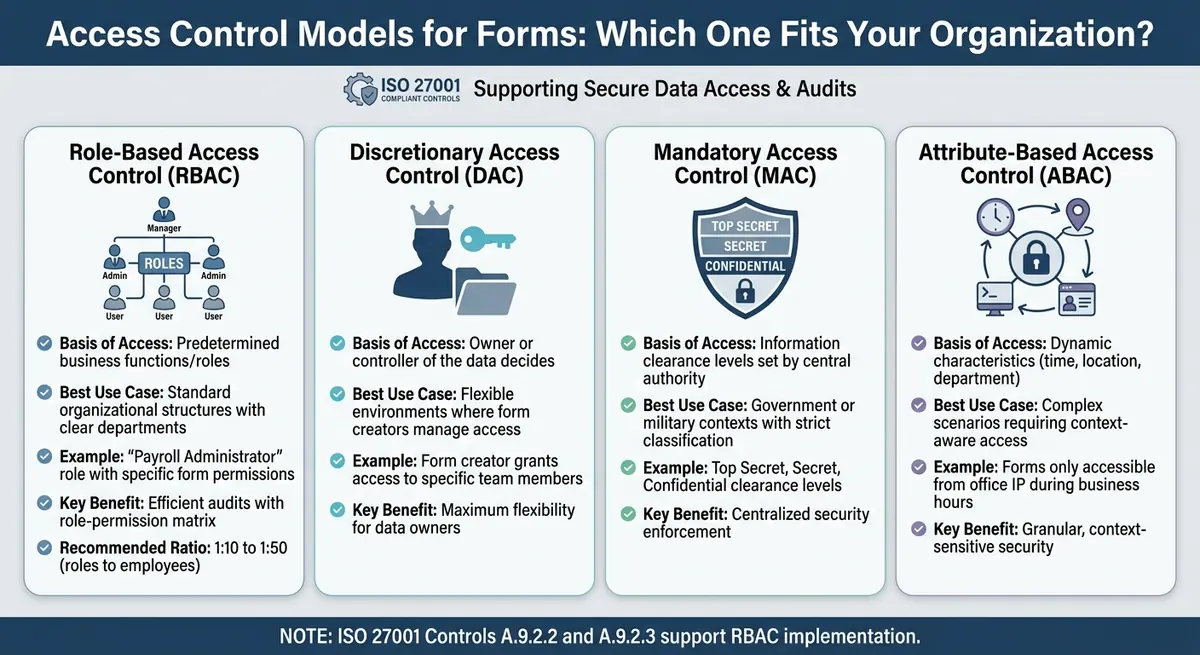
ISO 27001 Access Control Models Comparison for Digital Forms
When it comes to managing sensitive data in digital forms, ISO 27001 access control is built on three core principles. These principles establish clear boundaries for who can access form data and under what conditions.
The 2022 update to ISO 27001 introduced streamlined controls, including new measures for cloud services and data masking - both of which are particularly relevant for handling digital forms.
"Access control is a fundamental aspect of information security, ensuring that only authorised individuals can access information and associated assets." – ISMS.online
To implement effective access control, four key components come into play: Authentication (confirming identity), Authorization (assigning rights), Accounting (monitoring resource usage), and Auditing (reviewing actions). These components work together to safeguard sensitive data, such as employee records or customer information, by preventing unauthorized access or data manipulation. They also ensure compliance with relevant regulations.
Need-to-Know Principle for Forms
The need-to-know principle limits access to form data based on whether someone requires the information to perform their job. For example, an HR manager might need access to salary details in employee forms, while a department supervisor might only need to see attendance records.
This principle helps protect confidentiality by ensuring that sensitive fields - like Social Security numbers, medical details, or financial information - are only visible to those who genuinely need them.
Start by reviewing your forms to identify fields containing sensitive data and document who needs access to that information. For instance, a customer feedback form might include contact details that are relevant to the sales team but not the product development team. The goal is to share information only with those whose roles specifically require it.
"Without proper access restrictions, sensitive information may be exposed to unauthorized users, leading to data breaches, policy violations, or non-compliance with legal and regulatory requirements." – ISO 27001 PRO LLC
Least Privilege for Form Data Access
The least privilege principle ensures that users are granted only the permissions necessary to complete their tasks. For forms, this might mean granting view-only access to certain users while restricting their ability to edit or delete submissions.
This approach minimizes the risk of accidental data manipulation or unauthorized exposure. For example, a customer service representative might need access to specific submissions but should not have the ability to export the entire database.
To implement this, categorize the information collected by your forms into sensitivity levels - such as public, internal, confidential, or restricted - and assign access rights accordingly. Regular audits can help identify and correct "permission drift", which can occur when employees change roles but retain outdated access rights. Additionally, monitoring user activity can reveal potential violations.
Role-Based Access Control (RBAC) for Forms
Building on the need-to-know and least privilege principles, Role-Based Access Control (RBAC) organizes permissions by predefined roles. Instead of assigning access directly to individuals, you create roles - like "Payroll Administrator" or "Form Reviewer" - with specific permissions. Users then inherit these permissions when assigned to a role.
RBAC relies on four elements: Users (those requesting access), Roles (job functions like HR Manager), Permissions (actions like reading or deleting a form), and Sessions (temporary activation of roles for specific tasks). This model aligns with ISO 27001 controls, including A.9.2.2 (User Access Provisioning) and A.9.2.3 (Management of Privileged Access Rights).
One of the benefits of RBAC is its efficiency. For example, instead of reviewing individual user accounts during an audit, you can produce a role-permission matrix, cutting preparation time significantly. To avoid role proliferation, aim for a role-to-employee ratio of 1:10 to 1:50.
| Access Control Model | Basis of Access | Best Use Case for Forms |
|---|---|---|
| Role-Based (RBAC) | Predetermined business functions/roles | Standard organizational structures with clear departments |
| Discretionary (DAC) | Owner or controller of the data decides | Flexible environments where form creators manage access |
| Mandatory (MAC) | Information clearance levels set by a central authority | Government or military contexts with strict classification |
| Attribute-Based (ABAC) | Dynamic characteristics (time, location, department) | Complex scenarios requiring context-aware access (e.g., forms only accessible from an office IP) |
To make RBAC work effectively, analyze how employees actually interact with form data rather than relying solely on job titles. Define roles based on function - like "Submission Manager" or "Form Auditor" - to ensure the system scales smoothly as your organization grows.
Key ISO 27001 Controls for Forms
ISO 27001 lays out specific controls to manage access to forms and their data systematically. Controls A.5.15–A.5.18 focus on policies, identity management, authentication, and access rights, ensuring secure and well-defined access processes.
A.5.15: Access Control Policy
This control requires organizations to define and document clear rules for accessing form submissions and templates. Access should be granted based on business needs, with roles like Viewer, Editor, and Admin clearly outlined.
"Access control is usually perceived as a technical activity... but access control doesn't begin as a technical thing. It begins as a business decision." – Dejan Kosutic, CEO & Lead Expert, Advisera
A.5.16: Identity Management
Every user accessing form data must have a unique identifier throughout their employment. Shared accounts (like admin@company.com) are a compliance risk because they lack accountability. Unique logins ensure a clear audit trail, showing exactly who accessed or modified sensitive information.
A.5.17: Authentication Information
This control covers managing credentials such as passwords, tokens, and other methods of authentication. Multi-factor authentication (MFA) is mandatory for production systems and administrative access, especially when handling sensitive data like PII or financial information.
"MFA is the number one item auditors check. If it's not enforced on production systems and admin accounts, expect a finding." – Hazel Castro, ISO 27001 Internal Auditor, Internal ISO Audit
A.5.18: Access Rights
Access rights must be managed throughout their lifecycle. This includes provisioning access, conducting regular reviews, and revoking permissions promptly - ideally within 48 hours - when employees change roles or leave the organization. Regular reviews ensure permissions remain appropriate for current roles.
Overview of Controls in Form Scenarios
| ISO 27001 Control | Focus Area | Application to Form Scenarios |
|---|---|---|
| A.5.15 | Access Control Policy | Defining access for departments like HR or Finance to specific form types. |
| A.5.16 | Identity Management | Requiring unique logins for the form builder platform. |
| A.5.17 | Authentication Info | Enforcing MFA and strong passwords for sensitive form data. |
| A.5.18 | Access Rights | Promptly revoking access after role changes or termination. |
Additional Technical Measures
Beyond organizational controls, ISO 27001 includes technical measures to secure access further:
- A.8.2 (Privileged Access Rights): Limits "Superuser" or "Owner" roles, requiring enhanced monitoring for accounts with elevated permissions, such as those that can bulk-export data or delete entire form databases.
- A.8.3 (Information Access Restriction): Ensures access restrictions are enforced, such as preventing developers from accessing production form databases without proper authorization.
To streamline access management, consider creating standardized user profiles like "HR Recruiter" or "Marketing Analyst", each with predefined permissions for specific form categories. Automate access removal processes by integrating your HR system with IT tools, ensuring access is revoked within 48 hours. Lastly, configure session timeouts of 15 to 30 minutes on form management dashboards to reduce the risk of unauthorized access.
How to Implement ISO 27001 Access Control in Forms
To effectively apply ISO 27001 access control principles, you’ll need a mix of policy-driven strategies, technology solutions, and regular checks. Let’s break it down step by step.
User Authentication and Multi-Factor Authentication (MFA)
Start by eliminating shared accounts. Each user should have their own login credentials to ensure accountability and create clear audit trails.
Multi-factor authentication (MFA) is non-negotiable for securing production systems and administrative access. Why? Because MFA can block over 99.9% of account compromise attempts. For users handling sensitive data, make sure MFA is in place. Other key steps include:
- Enforcing session timeouts (15–30 minutes).
- Locking accounts after 3–5 failed login attempts.
- Requiring passwords with at least 12 characters and rotating them every 90 days.
Make sure your Identity Provider (IdP) aligns with the requirements in your Access Control Policy. Auditors will check this alignment, so it’s essential to get it right. Once users are authenticated, define their access rights clearly.
Authorization and Privileged Access Management
Authorization determines what a user can do after their identity is verified. Using Role-Based Access Control (RBAC), you can map specific permissions to job functions. Collaborate with department heads to define role-specific access needs. For example, HR recruiters might need access to job application forms but shouldn’t see financial submission data.
Privileged accounts (like admin, root, or superuser) require special attention. Here’s how to manage them:
- Document privileged accounts separately.
- Use enhanced security measures, like hardware security keys for MFA.
- Ensure administrators have separate credentials for daily tasks and privileged actions.
Automating access provisioning can save time and reduce errors. For instance, in 2024, a community hospital with 200 staff automated access management for nursing roles. Access rights were updated automatically when nurses switched wards, cutting their ISO 27001 certification timeline by two weeks.
Strong authorization practices set the stage for ongoing monitoring and periodic reviews.
Regular Reviews and Audits of Form Access Rights
Access control issues are the most common nonconformity in ISO 27001 audits. To stay compliant, conduct access reviews at least every quarter. Each review should:
- Document the reviewer’s name, date, and decisions for each user.
- Avoid relying solely on screenshots of user lists.
When employees leave, revoke their access within 48 hours. Auditors will cross-check HR termination dates with system activity logs to ensure compliance. During audits, expect a sample review of 3 to 5 new hires and 3 to 5 terminations to confirm proper access provisioning and revocation.
Be proactive about privilege creep - when users accumulate unnecessary permissions over time. Trigger access audits whenever roles change. Also, enable audit logging to monitor access to sensitive form data, especially for industries governed by regulations like HIPAA or PCI DSS. Automated security tools can make a huge difference here, with organizations reporting savings of around $1.7 million per incident compared to manual processes.
Best Practices for Form Access Control
Creating an Access Control Policy for Forms
An access control policy outlines who can access your forms and what actions they can take. According to ISO 27001 (Control A.9.1.1), organizations must maintain a documented policy for access control.
Start by cataloging all your forms and their associated data storage systems. Then, group users by roles instead of assigning permissions individually. For instance, HR recruiters might need access to job application forms but should not view financial data. This approach, called Role-Based Access Control (RBAC), simplifies permission management and makes periodic reviews more manageable.
Adopt the principle of least privilege, ensuring users only access the data necessary for their roles. To further enhance security, implement segregation of duties. For example, the person designing a form shouldn't be the sole individual responsible for auditing its access logs. This separation reduces the risk of unauthorized changes and aligns with ISO 27001's requirements for segregation of duties (Control 6.1.2).
Access control should cover the entire user lifecycle, from onboarding to offboarding. Ensure access is revoked immediately when an employee leaves the organization to prevent unauthorized data exposure. For sensitive data, consider using just-in-time access. This method grants temporary permissions, which automatically expire, reducing potential vulnerabilities. It also aligns with the Zero Trust model, where every access request is continuously verified. Make it a point to review and update your access control policy annually or whenever significant IT infrastructure changes occur.
While having a strong policy is crucial, using specialized tools can help enforce these controls more effectively.
Using Reform for ISO 27001-Compliant Forms
Reform offers features that align seamlessly with ISO 27001 access control requirements, helping you implement compliance measures with ease. For instance, its conditional routing feature ensures segregation of duties by automatically directing form submissions to the appropriate team members based on predefined criteria. This allows financial forms to go directly to the finance team, while HR forms are handled separately, supporting the least privilege principle without requiring manual oversight.
Reform also prioritizes security with enhanced email validation, ensuring that only verified users can submit forms. Combined with its spam prevention tools, this helps reduce unauthorized access attempts while maintaining clear audit trails. Real-time analytics provide insight into who is interacting with your forms and when, a vital feature for conducting regular access reviews.
The platform integrates seamlessly with CRM and marketing automation tools, centralizing authentication and authorization rules. This simplifies permission management across systems, which is a key element of ISO 27001 compliance. Additionally, Reform's abandoned submission tracking feature can help identify potential security concerns by monitoring incomplete form interactions.
For organizations needing more advanced options, Reform's Pro Plan ($35/month or $350/year) includes custom CSS and JavaScript support. This allows for tailored security measures to meet specific compliance needs. The headless forms capability further enables integration into your existing security infrastructure, giving you complete control over user experience and access management while maintaining strong compliance practices.
Common Challenges and Solutions in Form Access Control
Implementing ISO 27001-compliant access control for forms comes with its fair share of challenges, particularly when it comes to maintaining strong security practices. In fact, access control is the most frequently cited area of nonconformity in ISO 27001 audits. This makes it essential to address these issues effectively right from the start. Let’s explore some of the common hurdles and practical ways to overcome them.
One major obstacle is cultural resistance. Employees often view multi-factor authentication (MFA) as a hassle that slows down their workflow. The key to overcoming this resistance lies in shifting the conversation from technical compliance to business value. Michelle Drolet, CEO of Towerwall, explains:
"Certification helps to identify security gaps and vulnerabilities, protect data, avoid costly security breaches and improve cyber resilience (…) and serves as a seal of approval (or proof) that an independent third-party certified body is routinely assessing the security posture of the business and finds it to be effective".
When employees understand how security measures like MFA protect the organization (and their own work), they're more likely to adopt them. This alignment of security with business goals helps build buy-in across teams.
Another issue is documentation overload. ISO 27001 demands detailed records of access rights, policies, and procedures, which can quickly become overwhelming when handled manually. Hazel Castro, ISO 27001 Internal Auditor at Internal ISO Audit, emphasizes:
"A documented process must be actively followed to satisfy auditors".
To address this, automate evidence collection using system-generated logs and centralized repositories. This not only reduces human error but also ensures you have time-stamped, verifiable records ready for audits. Automating these processes streamlines compliance tasks while maintaining accuracy.
Orphaned accounts are another significant risk - these occur when former employees retain access to forms after leaving the organization. To mitigate this, ensure that HR offboarding processes immediately trigger IT deprovisioning. Use automated checklists to ensure all steps are completed, and conduct quarterly reviews by sampling recent departures. Verify that access has been revoked per policy, and document the findings instead of relying solely on screenshots.
Finally, legacy systems can present technical hurdles. Older form-building tools may lack support for modern security features like MFA or automated identity management. If upgrading these systems isn’t an immediate option, consider implementing compensating controls - additional security measures that mitigate risks in alternative ways. Start by securing forms that handle the most sensitive data and gradually extend these controls as resources become available.
Each of these solutions not only addresses specific challenges but also supports broader efforts to maintain effective and secure access control systems. By tackling these issues head-on, organizations can better align with ISO 27001 requirements and strengthen their overall security posture.
Conclusion
Setting up ISO 27001-compliant access control for forms lays a strong defense against potential threats. As Securends points out, "Ask any auditor what they look for first, and they'll say the same thing - access control". High-profile breaches, like those involving Anthem Inc. and Target Corporation, highlight the consequences of weak access measures. These cases stress the importance of implementing clear and effective control systems.
The foundation of strong access control lies in the principle of least privilege. Always grant the minimum access necessary, use Role-Based Access Control (RBAC) to simplify permissions, and automate regular reviews to avoid privilege creep. It's critical to document every review - because if it's not documented, it might as well not have happened. Keep detailed, timestamped logs of all access-related activities, including requests, approvals, and revocations.
Specialized tools can make compliance more manageable. For example, platforms like Reform incorporate automation for role-based access, inline validation, and real-time analytics. Reform’s AI capabilities even enhance lead profiles from basic submissions, helping you stay aligned with ISO 27001 standards while improving form performance - balancing security with better user engagement.
Strong access control does more than reduce the risk of breaches; it also builds trust and improves operational efficiency by cutting down on manual tasks. As SecureSlate explains, "Access policies are all about protecting your organization. However, a foundational, practical approach is key to implementing them correctly". Start by securing your most sensitive forms, use compensating controls where necessary, and gradually expand these protections to cover your entire form infrastructure.
FAQs
What counts as “sensitive data” in forms under ISO 27001?
Under ISO 27001, "sensitive data" refers to information that needs to be protected because of its confidential nature. This often includes personal details, financial records, or health-related information. To maintain compliance and ensure security, this type of data requires strict access controls and robust protection measures.
How can I define roles and permissions for form access without creating too many roles?
To keep things manageable and secure, adopt a role-based access control strategy built around the principle of least privilege. This means grouping users with similar responsibilities into well-defined roles and assigning permissions accordingly. By clearly outlining each role's access rights, you streamline administration without compromising security. Plus, this method aligns with ISO 27001 standards for strong access control practices.
What evidence do auditors expect for form access reviews and offboarding?
Auditors usually look for specific evidence to verify compliance with ISO 27001 standards for access control. This includes documented access control policies, records of quarterly access reviews (complete with reviewer names and their decisions), IAM policy exports from cloud platforms, and user lists showing role assignments from the identity provider. These materials serve as proof that proper access control measures are in place.
Related Blog Posts
Get new content delivered straight to your inbox

The Response
Updates on the Reform platform, insights on optimizing conversion rates, and tips to craft forms that convert.


Drive real results with form optimizations
Tested across hundreds of experiments, our strategies deliver a 215% lift in qualified leads for B2B and SaaS companies.
