
.webp)
Manage Access and Refresh Tokens



If token handling fails, your integration breaks. In most setups, access tokens expire every 15 to 60 minutes, and if your app mishandles refresh tokens, users end up with failed syncs, stale data, and reconnect prompts.
Here’s the short version:
- I store access tokens and refresh tokens in one backend record
- I convert
expires_ininto a fixed UTC timestamp right away - I keep refresh tokens off the browser and only on the server
- I refresh tokens a few minutes before expiry or retry after a
401 - I save new token values in one atomic write
- I stop duplicate refresh attempts with a per-connection lock
- I treat
invalid_grantand similar errors as final, not retryable - I revoke and delete tokens on disconnect
- I track refresh success, failure, and reconnect state with structured events
Bottom line: if I want integrations to keep running, I need a clean token flow from issue -> storage -> use -> refresh -> revoke.
A quick comparison of the three refresh patterns:
| Method | What it does | Main downside | Best fit |
|---|---|---|---|
| Refresh before expiry | Renews token before it runs out | Depends on accurate expiry time | High-volume syncs |
Refresh on 401 |
Renews only after a failed call | First request fails | Low-volume usage |
| Scheduled refresh | Renews on a timer | Can bunch requests together | Background jobs |
This article boils token handling down to the parts that keep SaaS integrations working without extra support pain.
OAuth2 & OpenID Tokens Explained | Access, ID, Refresh & Opaque Tokens
sbb-itb-5f36581
Map the token flow from issuance to expiration
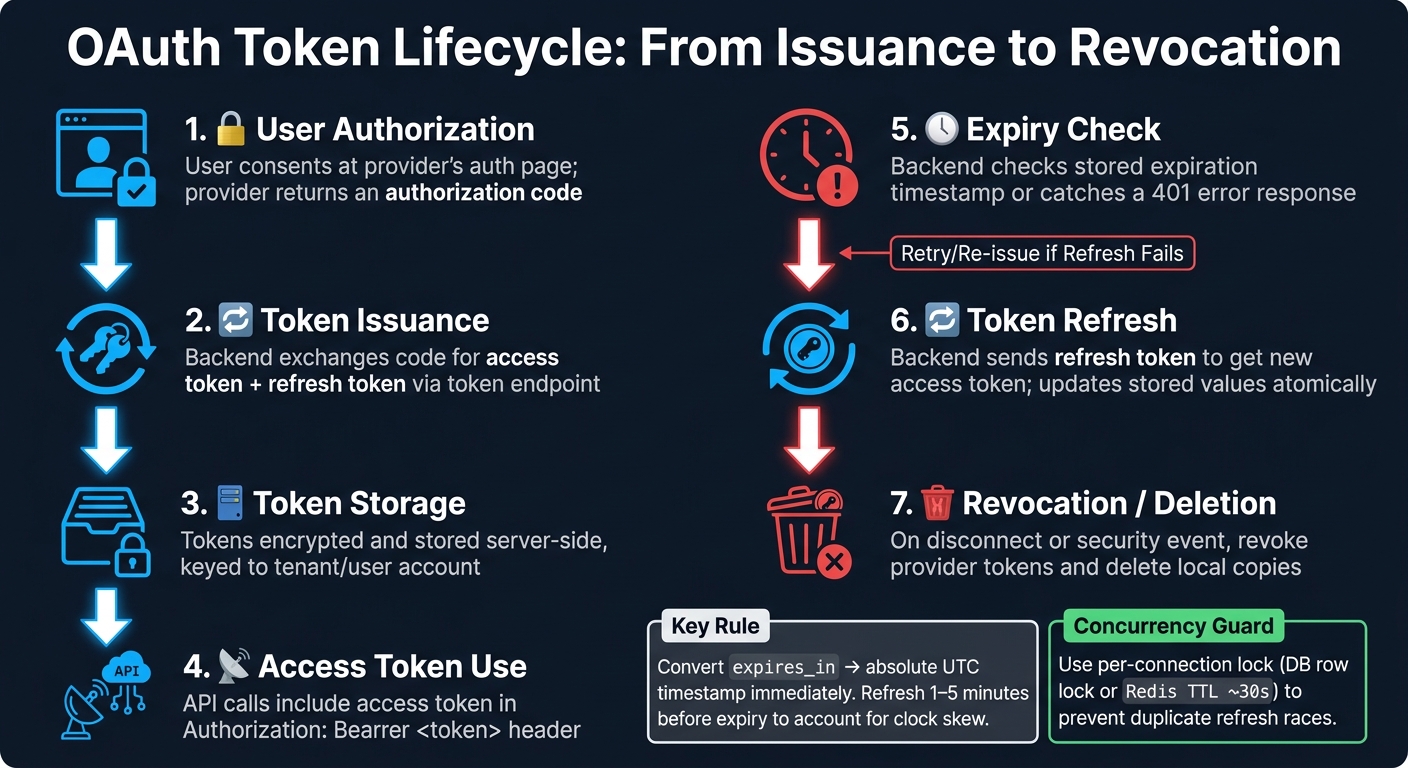
OAuth Token Lifecycle: From Issuance to Revocation
Third-party integrations usually follow the same backend token path. The smart move is to track that full lifecycle in one normalized backend record.
| Stage | What happens |
|---|---|
| User authorization | User consents at the provider's auth page; provider returns an authorization code |
| Token issuance | Backend exchanges the code for an access token and refresh token via the token endpoint |
| Token storage | Tokens and metadata are stored securely on the backend, keyed to the tenant or user account |
| Access token use | API calls include the access token in the Authorization: Bearer <token> header |
| Expiry check | Backend checks the stored expiration timestamp or catches a 401 error response |
| Refresh | Backend sends the refresh token to get a new access token, then updates stored values |
| Revocation or deletion | On disconnect or a security event, revoke provider tokens and delete local copies |
Capture the initial token response correctly
When the token endpoint responds, your system needs to save more than just the token strings.
A standard OAuth 2.0 response often includes:
access_tokenrefresh_tokentoken_type(usually"Bearer")expires_in(seconds until the access token expires)scope
Some providers also send extra fields, such as tenant metadata or API base URLs.
Here’s where things get messy: each provider tends to shape these fields a little differently. If you handle each one in its own special way, the code gets cluttered fast. A better approach is to normalize every token response right away into one internal model.
A clean internal record looks something like this:
{
  "provider": "salesforce",
  "tenantId": "acct_123",
  "accessToken": "…",
  "refreshToken": "…",
  "tokenType": "Bearer",
  "scopes": ["contacts.read", "leads.write"],
  "accessTokenExpiresAt": "2026-08-27T15:30:00Z",
  "refreshTokenExpiresAt": null,
  "issuedAt": "2026-08-27T14:30:00Z"
}
With one shared format, your refresh logic, monitoring, and error handling can work the same way no matter which provider issued the tokens.
Store expiration data in a usable format
Convert expires_in into an absolute UTC timestamp as soon as the token arrives:
accessTokenExpiresAt = issuedAt + expires_in
Store that value in UTC using ISO 8601. For example, if a token arrives at 2026-08-27T14:30:00Z with expires_in: 3600, the absolute expiration time is 2026-08-27T15:30:00Z.
It also helps to add a small safety buffer when deciding when to refresh. Refresh the token 1 to 5 minutes early to account for clock skew and network delay.
Store tokens securely on the backend
Once you’ve stored expiry data, the next step is simple: keep token access locked down.
Store tokens in the backend in encrypted form, and let only the API worker read them. Raw-token access should be limited to the smallest possible service account. At the same time, your setup still needs to let refresh jobs read tokens while blocking everyone else.
Keep refresh tokens out of browsers and client apps
Server-side storage only works if the browser never gets the long-lived credential in the first place.
If you store a refresh token in browser storage or device storage, an attacker can keep using a user’s third-party account after an XSS attack or a stolen device. That’s the danger: not just one bad request, but lasting access.
Use the Backend-for-Frontend (BFF) pattern. The browser should hold only a short-lived session cookie with HttpOnly, Secure, and SameSite set. The backend then maps that session to the stored tokens. Token refresh happens on the server, so the client never sees the refresh token.
Use encrypted storage and minimal retention
Once token storage is server-side, lock down the data and the logs too.
Store tokens in an encrypted database column or a secrets vault, and manage keys through KMS. Keep key access tight. DBAs, analysts, and developers who don’t need token access should not be able to use those keys.
Logs need the same level of care. Redact access tokens, refresh tokens, and Authorization headers from all logs. If a token shows up in an exception report, treat it as exposed.
When a user disconnects an account or closes it, delete the tokens. That cleanup should also reach queued refresh jobs and sync tasks, so dead credentials don’t keep circulating through your job system.
Handle token expiry and renewal safely
Once your tokens live safely on the backend, the next step is keeping each integration working as tokens expire. The right refresh approach depends on request volume, provider limits, and how costly a failed request would be. Use the stored expires_at value to decide when to act.
| Strategy | Pros | Risks | Best use case |
|---|---|---|---|
| Refresh-before-expiry | Prevents failed requests and usually gives the lowest user-facing latency | Requires accurate expires_at tracking |
Best for high-volume or mission-critical integrations. |
| Refresh-on-401 | Refreshes after expiry or revocation. | The first request after expiry fails and must be retried | Low-volume or non-critical integrations where occasional retries are acceptable |
| Scheduled renewal | Refreshes on a schedule, away from request traffic. | Needs reliable job orchestration and can create thundering-herd bursts if many tokens refresh at once | Background sync services with predictable usage patterns |
A lot of teams mix scheduled renewal with refresh-on-401 as a fallback. That gives you a steady renewal path, plus a safety net when something slips through. It also helps to add random jitter so tenant refreshes don't all hit the token endpoint at the same moment.
Send the refresh request and update tokens atomically
When the trigger fires, refresh the token and save the new values together.
Send a POST request to the token endpoint with grant_type=refresh_token, the current refresh token, and client authentication when the provider requires it. In many cases, the provider returns a new access_token, an expires_in value, and, if token rotation is in play, a new refresh_token.
Save the new access_token, refresh_token, and expires_at in one atomic transaction. Don't write one field and leave the others for later. That's where things go sideways. A partial write can leave the record in a bad state and break the next refresh cycle.
If the provider rotates refresh tokens, treat the returned refresh token as the new source of truth right away and discard the old one. If you fail to store it at once, the next refresh may fail and force the user to re-authenticate.
Prevent duplicate refreshes across workers
You also need to protect the refresh path from concurrent workers.
If two workers refresh the same connection at the same time, they can overwrite good credentials and break token rotation. With providers that rotate refresh tokens, that race can invalidate the token family and lock the user out.
The fix is pretty simple: only one worker should refresh a given connection at a time.
In a relational database, a SELECT ... FOR UPDATE row lock before the refresh call is often enough. In distributed setups with multiple servers, use a short-lived lock in Redis or a similar store, keyed with something like lock:refresh:user:123:provider:x, with a TTL of about 30 seconds.
If a worker can't get the lock, it should wait briefly and then re-read the token record instead of trying its own refresh. This single-flight pattern refreshes once and lets waiting workers reuse the new token.
Revoke, recover, and monitor token health
Even if your refresh flow is solid, tokens still get revoked. Users disconnect apps. Providers expire refresh tokens after long periods of inactivity. Some OAuth setups rotate old tokens out on their own. When a refresh fails for good, you're no longer dealing with a temporary hiccup. You're dealing with revocation or a full reauthorization path. That response matters just as much as the refresh logic itself.
Handle revoked or expired refresh tokens
A permanent failure usually appears as a provider error like invalid_grant, invalid_refresh_token, or invalid_client, often with an HTTP 400 or 401 response. Treat those as final failures, not temporary ones.
By contrast, network timeouts, 5xx responses, and 429 rate-limit errors can be retried with backoff and a strict cap. A dead refresh token won't come back to life just because you try again.
When you hit a permanent failure:
- Mark the connection non-retryable. This keeps background workers from picking it up again.
- Quarantine briefly, then delete the tokens.
- Set the connection status to
AUTH_REQUIREDorDISCONNECTED. Store the failure reason too, such asrefresh_token_invalid, along with a timestamp. - Pause dependent jobs.
- Notify the account owner. Send an email and/or in-app alert that says which integration failed, when it happened, and what it affects. Then give them a direct reconnect link. If the same connection keeps failing, group those into one notification per connection per 24 hours, while still logging each event internally.
Send users back through the original OAuth flow, with the workspace or environment context prefilled when possible. After that, confirm the reconnect worked and show the next sync time.
If a user disconnects an integration on purpose, call the provider's revocation endpoint as defined in RFC 7009 to invalidate the grant on the provider side. That clears the provider's records and cuts risk if your database is ever exposed. Log a USER_DISCONNECT event with the user ID, timestamp, and provider for audit purposes.
With rotating refresh tokens, replaying an invalidated token can revoke the entire token family. That usually points to either a concurrency bug or a compromise.
For monitoring, keep a structured integration_auth_events table or event stream with fields such as integration_id, provider, event_type (for example, ACCESS_TOKEN_REFRESHED, REFRESH_FAILED_PERMANENT, REVOKED_BY_USER), http_status, error_code, and a timestamp. Never log raw tokens. Log token IDs or hashes instead.
Watch permanent refresh-failure rates by provider, and track how many connections are sitting in AUTH_REQUIRED. That's how you catch broken integrations before they start disrupting syncs or lead capture. A sudden spike in invalid_grant errors from one provider is often the first clue that a policy change or mass revocation event is happening.
Conclusion: Token management checklist
Use this checklist to audit issuance, storage, refresh, revocation, and monitoring before launch.
| Area | What to verify |
|---|---|
| Issuance and capture | All token response fields stored (access token, refresh token, scopes, expiry, token type) with accurate expires_at calculation |
| Secure storage | Tokens encrypted at rest, backend-only, never exposed to browsers or client apps |
| Expiration and refresh | Proactive refresh before expiry using stored timestamps; atomic writes for all token fields |
| Concurrency control | Per-connection lock (database row lock or distributed lock) prevents duplicate refreshes |
| Rotation support | New refresh token stored atomically on every rotation; old token discarded immediately |
| Revocation and recovery | invalid_grant classified as permanent; retries stopped; credentials quarantined; connection marked AUTH_REQUIRED |
| User reauthorization | Clear in-app status, email notification, and a direct reconnect flow for affected accounts |
| Monitoring and observability | Structured auth event log, metrics on refresh success/failure rates, alerts on failure spikes |
Review this checklist with engineering, security, and support together. Token failures rarely stay inside one team's lane. They can hit lead flow, attribution, customer trust, and uptime at the same time.
FAQs
How do I choose the best token refresh strategy?
Choose a setup that balances security with steady access. For most integrations, rotating refresh tokens are the best fit: issue a new refresh token each time one is exchanged, invalidate the old token right away, and revoke access if an old token shows up again.
In production, keep tokens on the backend only. Manage refresh logic in one place, prevent multiple servers from trying to refresh at the same time, and keep access tokens short-lived - usually 15 to 60 minutes.
What should I do if a refresh token stops working?
A refresh token usually stops working for a few common reasons: it was revoked, it expired, or the server invalidated it for security reasons.
Start by checking your logs. You want to confirm this isn't just a short-lived network problem before you treat it like a token failure.
If the token was reused after rotation, the authorization server may have invalidated the entire token family. When that happens, don't keep retrying old tokens. Stop using them and ask the user to reauthorize the application so you can get a new set of credentials.
How can I avoid token refresh race conditions?
Use centralized token management and jittered refresh timing so multiple processes don’t all try to refresh the same token at once. That cuts down on refresh storms and weird race conditions.
Make token updates atomic. If a crash happens during rotation, you don’t want to end up with an invalidated token and no replacement waiting in the wings.
If the provider supports a short overlap window, use it to handle retries or near-simultaneous requests. Also track token acquisition success rates and errors so you can spot refresh problems in production before they turn into outages.
Related Blog Posts
Get new content delivered straight to your inbox

The Response
Updates on the Reform platform, insights on optimizing conversion rates, and tips to craft forms that convert.




Drive real results with form optimizations
Tested across hundreds of experiments, our strategies deliver a 215% lift in qualified leads for B2B and SaaS companies.
