
.webp)
How to Review Third-Party Risk in PCI Payment Forms



Your payment processor is only part of the risk. If your checkout page loads outside scripts, tags, pixels, or hosted payment elements, you need to review the whole page - not just the company that handles the card.
Here’s the short version:
- I start with a full list of every script, vendor, and access path on the payment page
- I check each item against PCI DSS 4.0 rules 6.4.3, 11.6.1, and 12.8
- I remove anything that does not belong on checkout
- I lock down what stays with CSP, SRI, change control, and page/header checks
- I keep audit proof in one place: inventory, approvals, logs, vendor docs, and access records
That matters because web-skimming attacks target the browser before card data is sent. Even a non-payment script on checkout can change the page or read form activity.
A few facts stand out:
- PCI DSS 4.0 became mandatory on March 31, 2025
- Requirement 11.6.1 calls for payment-page change detection at least every 7 days
- Redirects, iframes, and hosted fields can lower exposure, but they do not remove parent-page risk
Bottom line: if a third party can load on the payment page or change it, I treat it as part of the review.
This article walks through a simple process: inventory the page, test each dependency against PCI rules, review vendors, and keep proof ready for assessment.
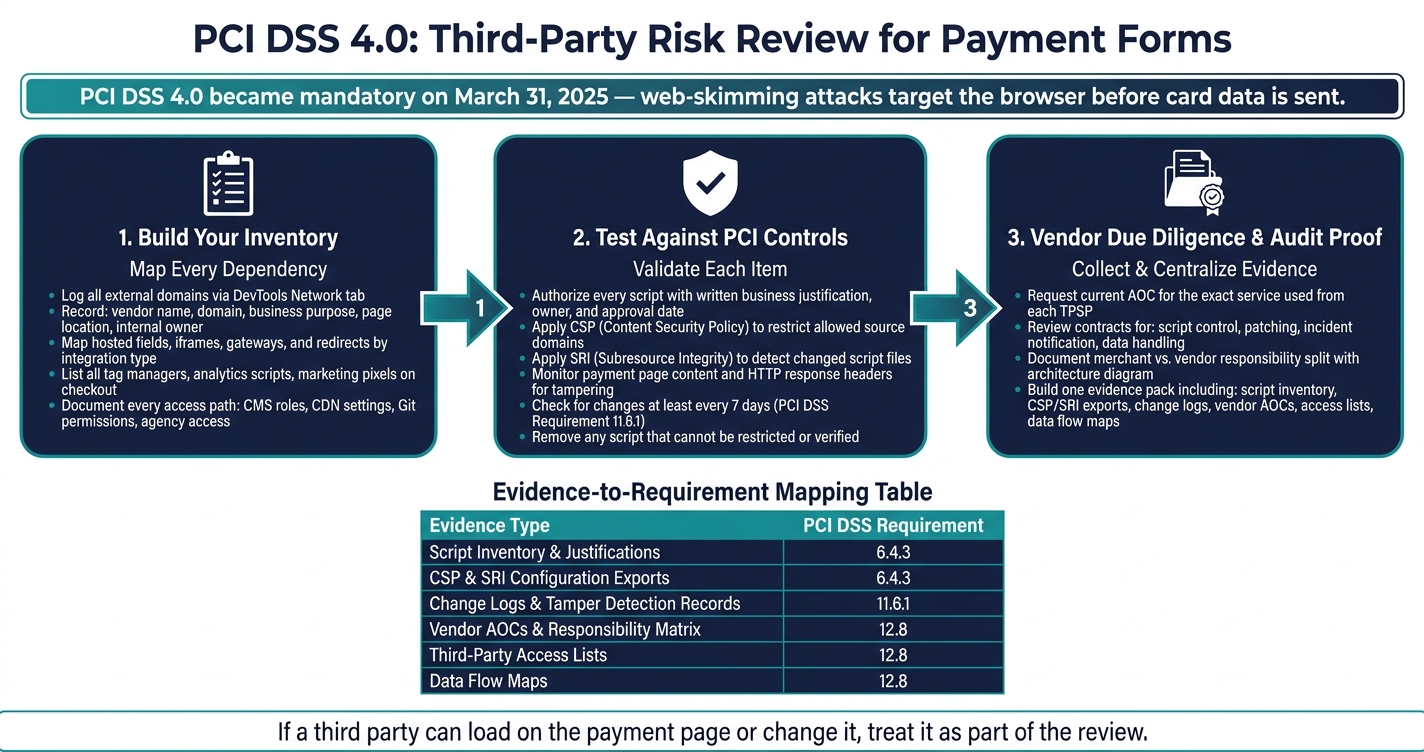
PCI DSS 4.0 Third-Party Risk Review Process for Payment Pages
Who Owns Payment Risk in 2026? PCI Council & Industry CISOs Debate 3rd-Party Exposure Gaps
sbb-itb-5f36581
Step 1: Build an inventory of every third party on the payment form
Start by turning the risk talk into a plain, working inventory. Open DevTools on the checkout page, head to the Network tab, and reload the page. Then log every external domain that appears.
For each one, note:
- vendor name
- domain
- business purpose
- where it shows up on the page
- internal owner
- whether it can access or affect the payment page
Begin with what loads on the page. After that, split payment-related items by integration type. That matters more than it may seem at first glance.
Map hosted fields, gateways, and embedded payment components
Integration type shapes responsibility. It also shapes the proof you need to keep on hand.
Hosted fields, iframes, and redirects do not work the same way. Each one shifts control in a different direction. So for every payment component, record the integration type, the domain that loads it, and the proof required for that setup.
That way, you're not just saying, “We use a payment vendor.” You’re showing how that vendor appears on the page and what that means for control of card-entry elements.
List tag managers, analytics scripts, and marketing pixels on checkout pages
This is where teams often miss things.
Tag managers, analytics tools, A/B testing code, ad pixels, and chat widgets are common examples of non-payment scripts that still show up on checkout pages. They may not process card data directly, but they can still affect the page. And if a script can change the payment page or touch the card-entry flow, it belongs in scope.
Audit every tag that fires on checkout URLs. Write down why each script runs there. If something does not need to fire on checkout, remove it.
Put simply: presence alone is not the issue. The issue is whether the script can alter the page or capture data.
Record vendor and internal access to payment-page changes
The inventory is not only about what loads. It is also about who can change it.
Map every change path across the payment page, including tag manager admins, CMS roles, CDN settings, Git permissions, and any agency or contractor with deployment access. Record who approves changes, how often changes happen, and whether review is required before release.
Access is part of the risk surface. If someone can change the checkout page, that path needs to be documented just like any script or embedded component.
Once the inventory is done, you can test each dependency against PCI controls.
Step 2: Review each dependency against PCI controls
Now that you have your inventory, go item by item and check whether it should be on the page, whether it’s locked down at the technical level, and whether someone is watching for changes.
Authorize every script and document a business need
Review each item in your inventory against three checks: approval, technical restriction, and monitoring.
Every script on a payment page needs a written reason for being there. Assign each one a clear business function, an owner, and an approval date.
A simple review table makes this easier for security, engineering, and marketing teams to manage together:
| Script / Component | Owner | Business Need | Approval Date | Last Review Date |
|---|---|---|---|---|
| Google Analytics | Marketing | Track conversion rates and donor behavior | Jan 2026 | July 2026 |
| Payment Gateway Script | Engineering | Essential for processing transactions | Dec 2025 | June 2026 |
| Tag Manager | Marketing | Deployment of approved marketing pixels | Feb 2026 | Aug 2026 |
This kind of table does two jobs at once. It shows why a script is on the page, and it gives you a paper trail when someone asks who approved it and when.
Check integrity and allowed source domains with CSP and SRI
Use CSP to limit which domains can serve scripts. Use SRI to catch script files that have changed. If you can’t restrict a script or verify it, take it off the payment page.
That’s the simple rule here: if you can’t control it, it shouldn’t sit next to cardholder data.
Page and header monitoring for tampering
This means checking both page content and the related HTTP response headers for unauthorized changes. You’ll also want to keep reports, alerts, and remediation records so you can show what was checked and how issues were handled.
Save those records for vendor review and audit evidence. If an assessor asks what changed, when it changed, and what your team did about it, you should be able to point to the logs without scrambling.
Step 3: Run vendor due diligence and collect audit-ready proof
With your controls in place, it’s time to gather vendor proof and put it into a format you can hand over during an audit. This step covers vendor review and evidence collection.
Review vendor security documents, contracts, and responsibility split
Review any vendor that can load, change, or process payment-page content, including payment gateways, hosted-field providers, tag managers, analytics scripts, and chat widgets loaded at checkout.
For each TPSP, ask for the current AOC for the exact service you use. That detail matters. A vendor can have a strong attestation at the company level, but if the hosted-field module or analytics script you rely on sits outside the assessed scope, that gap still belongs to you.
Ask for their security controls, incident-response contact, and subprocessor list. Then review the master service agreement, data processing terms, and any security addenda. The contract needs to spell out who owns script control, patching, incident notification, logging, change management, data handling, and page integrity. If anything is missing or unclear, document it as risk.
Next, write down the merchant/vendor split. With hosted fields, the vendor secures the input field, while the merchant secures the parent page and every other script. Keep that boundary on record with an architecture diagram, a list of payment-page components, and screenshots or exports of the checkout flow.
Build an evidence pack for scripts, access, and monitoring
Once vendor review is done, pull the records into one evidence set. Keep a single evidence pack for the assessment. It should include your script inventory, written business justifications, change approvals, CSP and SRI configuration records, tamper-detection logs, vendor access lists, and checkout-page exports. Make sure each item is dated and assigned to an owner.
Use this table to map each evidence type to 6.4.3, 11.6.1, or 12.8:
| Evidence Type | PCI DSS Requirement | Owner | Review Frequency |
|---|---|---|---|
| Script Inventory & Written Justifications | 6.4.3 | Security/DevOps | Monthly |
| CSP & SRI Configuration Exports | 6.4.3 | Web Development | Per Change |
| Change Logs & Tamper Detection Records | 11.6.1 | Security Operations | Real-time / Weekly |
| Vendor AOCs & Responsibility Matrix | 12.8 | Compliance/Legal | Annually |
| Third-Party Access Lists & Permissions | 12.8 | IT Administration | Quarterly |
| Data Flow Maps & Transfer Path Records | 12.8 | Data Architect | Bi-annually |
Your script inventory and approvals support 6.4.3. Your monitoring records support 11.6.1. Your vendor contracts and responsibility matrices support 12.8. Put simply, the point is to line up proof across technical controls, monitoring, and governance so you’re not scrambling when an assessor asks to see it.
Conclusion: A repeatable review process for PCI payment form security
Third-party risk on payment forms is manageable if you use the same review process every time. Identify every external dependency, remove anything that doesn’t need to be there, lock down what remains with script controls and tamper detection, confirm where vendor responsibility ends and yours begins, and keep your proof in one centralized evidence pack. Then run that same sequence on every change so your evidence stays current.
Keep lead-enrichment and marketing steps off PCI-scoped pages. Send users to the payment page ONLY for card entry. Once the page is trimmed down, protect that state through change control.
Build this review into change management for every checkout update. A structured review helps keep checkout UX and PCI compliance aligned. Make PCI payment-form review part of every release.
FAQs
Do hosted fields remove PCI payment-page risk?
Yes - hosted fields cut down one of the biggest PCI risks because card data is entered inside the payment processor’s secure iFrame and usually never passes through your servers. In most setups, your system gets only a token. That shrinks your PCI scope.
That said, hosted fields don’t remove all third-party risk. You still need to review vendor access and scripts, and make sure your site isn’t loading scripts that interact with the payment page.
Which third-party scripts belong on checkout pages?
Include all scripts loaded on the checkout page in your third-party risk review. That means analytics tools, tag managers, embedded JavaScript, and any custom code or embeds that make third-party calls.
Keep an up-to-date inventory of everything running on payment pages. Also take a close look at page elements that come from your own site. Scripts injected into the customer’s browser are a key risk area.
What evidence should I keep for a PCI review?
Keep records that prove your controls are in place and up to date. If something isn’t written down, an auditor may act like it isn’t there.
Hold on to:
- Your network diagram
- An up-to-date inventory of scripts on payment pages
- Third-party processors’ AOCs
- Completed SAQs
- Remediation plans for any unmet requirements
- Reports from quarterly external vulnerability scans
- Reports from annual penetration tests
This paperwork gives you a clear trail that your controls are real, current, and being checked on a regular basis.
Related Blog Posts
Get new content delivered straight to your inbox

The Response
Updates on the Reform platform, insights on optimizing conversion rates, and tips to craft forms that convert.




Drive real results with form optimizations
Tested across hundreds of experiments, our strategies deliver a 215% lift in qualified leads for B2B and SaaS companies.
