
.webp)
How PCI DSS 4.0 Affects SAQ A for Payment Forms


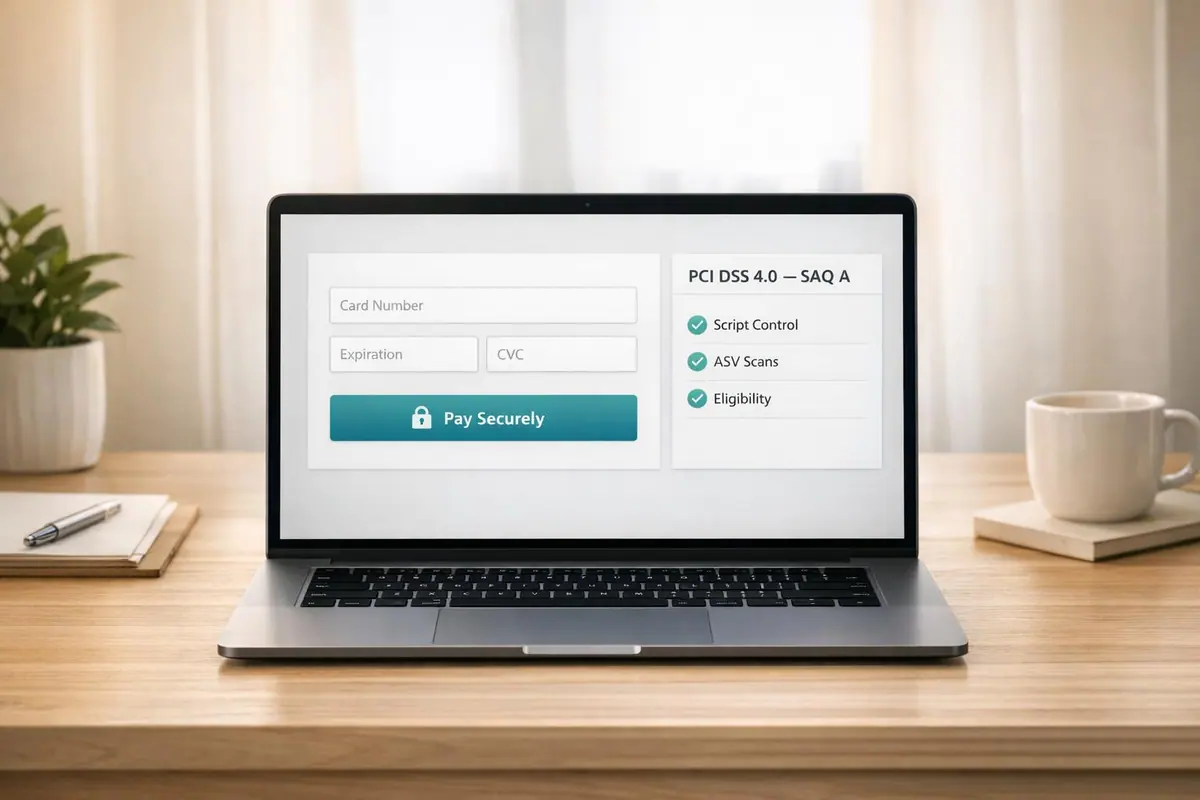
PCI DSS 4.0 has introduced stricter rules for merchants using SAQ A to maintain compliance. If you rely on SAQ A for your payment forms, here’s what you need to know:
- As of April 1, 2025, SAQ A eligibility requires stronger website security to protect against script-based attacks (e.g., Magecart).
- External vulnerability scans by a PCI Approved Scanning Vendor (ASV) are now mandatory for SAQ A merchants.
- New criteria demand all scripts on payment pages come from compliant third-party providers.
- Integration methods like full redirects have fewer requirements, while iframes need stricter script management.
Failing to meet these updates could push merchants into more demanding compliance questionnaires like SAQ A-EP (191+ requirements) or SAQ D (300+ requirements).
Key takeaway: To stay within SAQ A scope, ensure your payment forms avoid non-compliant scripts, monitor third-party providers, and implement tools like Subresource Integrity (SRI) and Content Security Policy (CSP).
What is New for the PCI DSS v4.0 SAQs
sbb-itb-5f36581
What Changed in SAQ A Under PCI DSS 4.0
PCI DSS 4.0 SAQ Types Compared: Requirements, Scope & Compliance Cost
PCI DSS 4.0 didn’t do away with SAQ A, but it did make qualifying for it more stringent. Starting April 1, 2025, merchants must meet tougher rules for building payment pages and take on clearer responsibilities - even when outsourcing all card data handling. Below, we’ll break down these updated controls and what non-compliance could mean for your business.
Stricter Rules for Outsourcing and Scope
One major update is a new requirement: every element on the payment page must come from a PCI DSS-compliant Third-Party Service Provider (TPSP). Even if you’re using an iframe, your setup won’t qualify for SAQ A if the parent page loads non-compliant scripts, such as those from internal sources.
Why Payment Page Scripts Face More Scrutiny
The updated rules focus heavily on scripts, thanks to the growing threat of Magecart-style attacks. These attacks use malicious JavaScript to skim payment data from customers' browsers before it reaches the payment processor. SecurityMetrics highlighted that Requirement 11.6.1 was introduced to combat such attacks, noting it stems from the rise in skimming incidents on e-commerce payment pages.
Although Requirements 6.4.3 and 11.6.1 were removed from the SAQ A checklist, they’ve been folded into the eligibility criteria. Practically, merchants still need to comply with these controls:
- Requirement 11.6.1: Weekly tamper-detection checks for HTTP headers and payment page content.
- Requirement 6.4.3: Authorization, integrity verification, and inventorying of all browser-loaded scripts.
Gareth Bowker from Jscrambler explained:
"Whatever it was that merchants were doing to meet requirements 6.4.3 and 11.6.1 before these requirements were removed from SAQ A should still see them well in the future to meet the new 'Eligibility Criteria'."
One audit revealed a merchant thought their checkout page had 17 scripts, but a deeper review found 41 - many added without proper oversight. Ignoring these controls doesn’t just weaken security; it also pushes you out of SAQ A eligibility.
The Consequences of Falling Out of SAQ A Scope
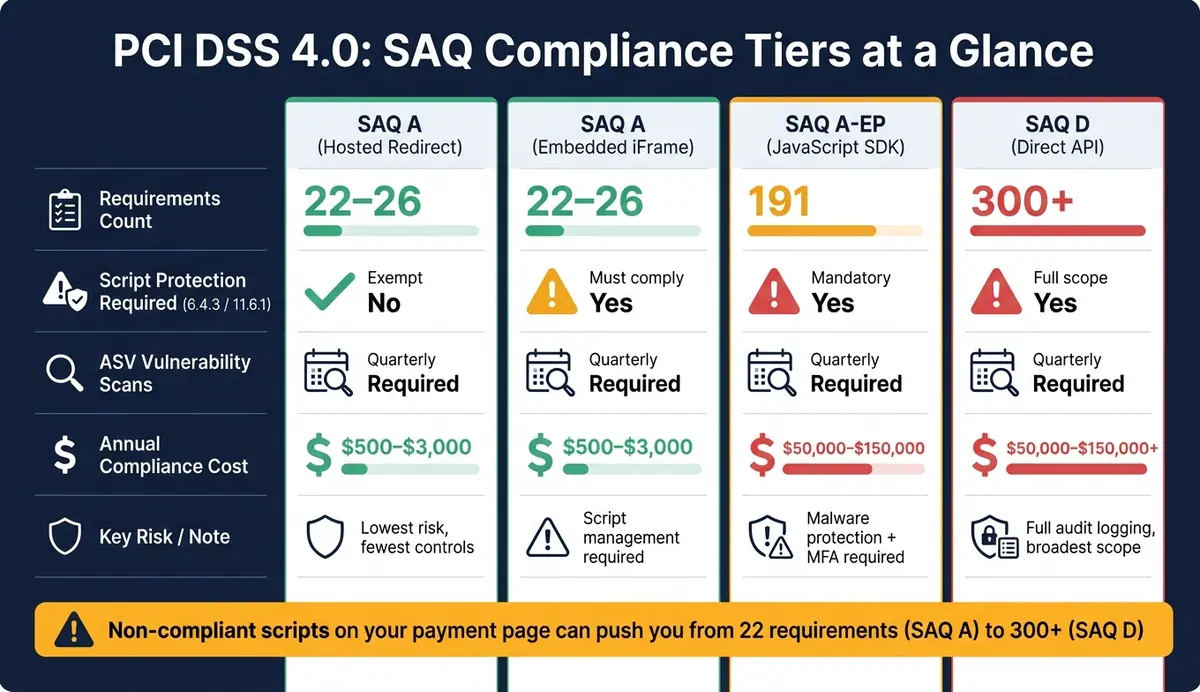
If your payment setup no longer qualifies for SAQ A, you’ll need to switch to a more demanding questionnaire. That could mean adopting SAQ A-EP (around 191 requirements) or SAQ D (300+ requirements). These come with additional mandates, like malware protection, multi-factor authentication, and detailed audit logging. The table below breaks down how integration methods affect compliance:
| Integration Model | SAQ Type | Requirements (~) | Script Protection Required |
|---|---|---|---|
| Hosted redirect | SAQ A | 22–26 | Exempt from 6.4.3/11.6.1 |
| Embedded iframe | SAQ A | 22–26 | Must meet 6.4.3/11.6.1 criteria |
| JavaScript SDK | SAQ A-EP | ~191 | Mandatory 6.4.3/11.6.1 |
| Direct API | SAQ D | 300+ | Full PCI DSS scope |
Daniella Mitchell from The BrightByte summed it up well: "The new controls are not technically hard. They are organisationally hard." The real danger isn’t a technical failure - it’s someone, like a marketing team member, adding a third-party widget to your checkout page without proper security checks.
How to Keep Your Payment Forms Within SAQ A Scope
How to Design SAQ A-Compliant Payment Forms
Choosing the right integration model is essential to stay within SAQ A scope. The full redirect method - where customers are redirected to a hosted payment page - has the lowest compliance requirements and avoids the need for script-protection measures. Alternatively, embedded iframes (also known as hosted payment fields) also qualify for SAQ A but come with stricter conditions related to script management.
The critical requirement here is that every element loaded in the customer’s browser during the payment process must come directly from a PCI DSS-compliant Third-Party Service Provider (TPSP). Even if the payment field is fully outsourced, loading scripts from non-compliant sources on the parent page can disqualify you from SAQ A eligibility.
For Single Page Applications (SPAs), the situation is even more complex. Scripts from other parts of the site can persist during the checkout process, which broadens the security scope beyond just the payment page.
"A common misconception is that using an iframe or redirect is enough. It's not. The key requirement is that the merchant must not load scripts that interact with the payment page." - Simon Wijckmans, CEO, cside
Once your payment form framework is set, the next step is managing third-party scripts to ensure your payment page remains secure.
Controlling Scripts and Third-Party Content on Payment Pages
After designing your payment form, managing scripts becomes a top priority. This starts with a detailed browser-level audit. Many merchants discover that tag managers and third-party loaders silently add scripts, often without being noticed by the engineering team.
Once you’ve identified all active scripts, begin by removing unnecessary ones, such as chat widgets, A/B testing tools, and marketing pixels. Every script you eliminate reduces your exposure to potential attacks and makes compliance with Requirement 6.4.3 easier.
For the scripts you must keep, implement two key security measures:
- Subresource Integrity (SRI): This adds cryptographic hashes to
<script>tags, allowing browsers to verify that scripts haven’t been altered. Despite its importance, SRI is currently underused, with only 3% to 15% of web scripts utilizing it. - Content Security Policy (CSP): This restricts allowed script domains using
script-srcdirectives and sets up areport-urito track and report policy violations.
Additionally, set up a tamper-detection system to monitor HTTP headers and payment page content at least once every seven days, as required by Requirement 11.6.1. SaaS-based synthetic monitoring tools can automate this process by comparing the live payment page to a trusted baseline.
How to Oversee Your Third-Party Service Providers
Proper oversight of your TPSP is crucial for maintaining SAQ A compliance. While your TPSP is responsible for securing the iframe, you are accountable for every other script on the page. As Ivan Tsarynny, CEO of Feroot Security, explains:
"The TPSP owns scripts inside the iframe. You own every script on the page that embeds it."
To ensure compliance, start by requesting written confirmation from your payment provider that their solution meets Requirements 6.4.3 and 11.6.1. This documentation is one of the two ways SAQ A merchants can meet the script-protection eligibility criteria.
Beyond the initial confirmation, review your TPSP's Attestation of Compliance (AOC) annually to confirm their services remain aligned with the latest PCI DSS requirements. Your contracts should clearly define security responsibilities, especially regarding parent-page script management. As Alicia Malone, Director of Communications at PCI SSC, emphasizes:
"Merchants should work closely with their TPSPs to obtain guidance about how to implement the TPSP's solution securely."
Finally, follow your TPSP’s implementation instructions precisely. Even the most secure solution can fail if it’s not embedded correctly.
Building SAQ A Compliance Into Day-to-Day Operations
Mapping Your Payment Flows to SAQ A Requirements
To maintain SAQ A compliance, it's essential to regularly monitor and document how payment data flows through your system in relation to SAQ A controls. Start by determining your payment integration type. A URL redirect (via HTTP 30x, meta redirect, or JavaScript redirect) differs significantly from an embedded iframe in terms of compliance requirements. Alicia Malone, Director of Communications at PCI SSC, explains:
"SAQ A eligibility criteria only applies to e-commerce merchants with a webpage that includes a TPSP's/payment processor's embedded payment form."
Once you've identified your integration type, trace every step of your payment data flow and align it with the relevant SAQ A controls. Here's a quick reference guide:
| Requirement Area | Redirects | Iframes | Key Action |
|---|---|---|---|
| Script Protection (6.4.3/11.6.1) | No | Yes | Inventory and authorize all scripts on the page |
| ASV Scans (11.3.2) | Yes | Yes | Schedule quarterly scans with a PCI Approved Scanning Vendor |
| Password Security (Req. 8) | Yes | Yes | Ensure all administrative accounts use passwords with a minimum length of 12 characters |
| Paper Records (Req. 3/9) | Yes | Yes | Document retention and destruction policies for paper receipts |
For iframe-based setups, make sure your script inventory is consistent with both your payment flow mapping and ongoing audits. This mapping process forms the backbone of a compliance checklist you’ll rely on for continuous monitoring.
A Practical Checklist for Ongoing SAQ A Compliance
PCI DSS 4.0 emphasizes that compliance is not just an annual task but an ongoing responsibility.
"The standard now emphasizes that compliance is an ongoing process, not an annual event." - Petronella Technology Group
To stay compliant, adopt these recurring tasks:
| Task | Frequency | Requirement |
|---|---|---|
| Script inventory review and justification | Ongoing / Annual | 6.4.3 |
| Script integrity monitoring (CSP/SRI) | Continuous | 11.6.1 |
| External vulnerability scans (ASV) | Quarterly | Req. 11 |
| TPSP Attestation of Compliance (AOC) collection | Annually | 12.8.x |
| Security awareness training | At hire & Annually | Req. 12 |
| Incident response plan testing | Annually | Req. 12 |
Beyond these tasks, maintaining clean and secure logging practices is critical. Debug logs or support tools that inadvertently capture card data can expand your compliance scope from SAQ A to SAQ D, which involves over 300 controls compared to SAQ A's 22–26. Regularly audit your logging configurations to avoid this costly scenario.
Using Reform to Support SAQ A-Friendly Payment Journeys
To simplify compliance and reduce risk, separate non-payment data collection from payment processing. For example, use a tool like Reform to handle lead capture - such as collecting names and email addresses - before redirecting users to a PSP-hosted payment page. This approach keeps your SAQ A scope intact.
Reform's pre-payment forms allow you to collect non-sensitive information in a branded, multi-step process, followed by a full redirect to the payment processor's page. This method avoids the need to comply with PCI DSS 4.0's script-protection requirements (6.4.3 and 11.6.1), which can be technically demanding.
As Sully Perella, Senior Manager at Schellman, notes:
"If any element of a payment page originates from the merchant's website, the implementation is not eligible for SAQ A."
Since Reform doesn’t handle card data, it stays entirely outside your cardholder data environment. This separation aligns perfectly with SAQ A's strict eligibility rules, helping you maintain a secure and streamlined payment process. Plus, this approach keeps compliance costs low - typically between $500 and $3,000 annually for SAQ A, compared to $50,000 to $150,000 for SAQ A-EP, which applies when merchants have more control over their payment pages.
Conclusion: Keeping Payment Forms Compliant Under PCI DSS 4.0
With PCI DSS 4.0, the eligibility criteria for SAQ A have become stricter. Merchants who fully outsource payment processing to a compliant third-party service provider (TPSP) and ensure their pages are free of unauthorized scripts now face a much lighter compliance load - just 22–26 requirements. Compare that to the 191 requirements for SAQ A-EP or over 300 for SAQ D.
However, staying within SAQ A scope isn’t passive anymore. As Chris St Amand of Chronarpay explains:
"The method you use to capture and tokenize card data can mean the difference between a lean compliance footprint and a full-blown security audit."
This means merchants must take an active role in maintaining compliance. Regularly verify your TPSP’s script protections, keep a documented list of approved scripts, and monitor your payment pages for any unauthorized changes. It’s about staying proactive.
Even the design of your payment forms matters. Separating non-payment data collection from the payment process itself can simplify compliance. For instance, you might use tools like Reform for gathering pre-payment information, then redirect users to your TPSP for the actual payment. This approach keeps sensitive data outside your environment, helping you stay within SAQ A’s boundaries.
FAQs
Do I still qualify for SAQ A after April 1, 2025?
Yes, qualifying for SAQ A after April 1, 2025, is possible, provided you meet the updated eligibility requirements. E-commerce merchants using embedded payment forms like iframes need to ensure their webpages are secure against script-based attacks. You can address this by either implementing the necessary protections yourself or confirming that your PCI-compliant payment processor has these safeguards in place. Always double-check with your acquirer or payment brand to confirm that SAQ A is suitable for your specific setup.
What scripts can my checkout page load and still stay in SAQ A?
To meet the requirements for SAQ A when using an embedded payment form (like an iframe), all elements of the payment page must be provided by a third-party vendor that complies with PCI DSS standards. To protect your site from malicious scripts, you should:
- Restrict the use of unauthorized scripts.
- Implement tamper-detection tools.
- Verify with your payment provider that their solution includes protections against script-based attacks, provided it’s implemented correctly.
These steps ensure an added layer of security for your payment process.
How do I set up ASV scans and tamper checks for SAQ A?
If you're an e-commerce merchant redirecting customers to third-party payment pages, external vulnerability scans are a must. These scans need to be conducted using a PCI Approved Scanning Vendor (ASV) to ensure your systems are secure.
For merchants using embedded payment forms, like iframes, it's crucial to guard against unauthorized scripts. This can be done by leveraging the built-in security features offered by your payment provider or by implementing additional security measures on your end.
Lastly, always double-check your compliance requirements with your acquiring bank to avoid any surprises.
Related Blog Posts
Get new content delivered straight to your inbox

The Response
Updates on the Reform platform, insights on optimizing conversion rates, and tips to craft forms that convert.




Drive real results with form optimizations
Tested across hundreds of experiments, our strategies deliver a 215% lift in qualified leads for B2B and SaaS companies.
