
.webp)
Script Blocking for ePrivacy Compliance



Script blocking ensures no tracking scripts run until users give consent. This method is vital for meeting ePrivacy Directive and GDPR requirements, which mandate explicit user consent before non-essential scripts (like analytics or advertising) can collect data. Without proper blocking, even a consent banner won't protect you from legal penalties.
Key Takeaways:
- What is script blocking? A technique to stop tracking scripts (e.g., Google Analytics) from loading until users consent.
- Why does it matter? Consent must be obtained before data collection begins. Violations can lead to hefty fines, like SHEIN's €150M penalty in 2025.
- How to implement it?
- Manual Tagging: Modify scripts to delay execution until consent is granted.
- Automatic Blocking: Use a Consent Management Platform (CMP) to detect and block scripts dynamically.
- Hybrid Approach: Combine manual and automatic methods for complete coverage.
Action Steps:
- Place your CMP script as the first element in your
<head>tag. - Update script tags to use
type="text/plain"anddata-srcattributes. - Test compliance using browser DevTools to ensure no tracking scripts execute before consent.
Regulators focus on what happens behind the scenes, not just what users see. Proper script blocking isn't optional - it's the backbone of ePrivacy compliance.
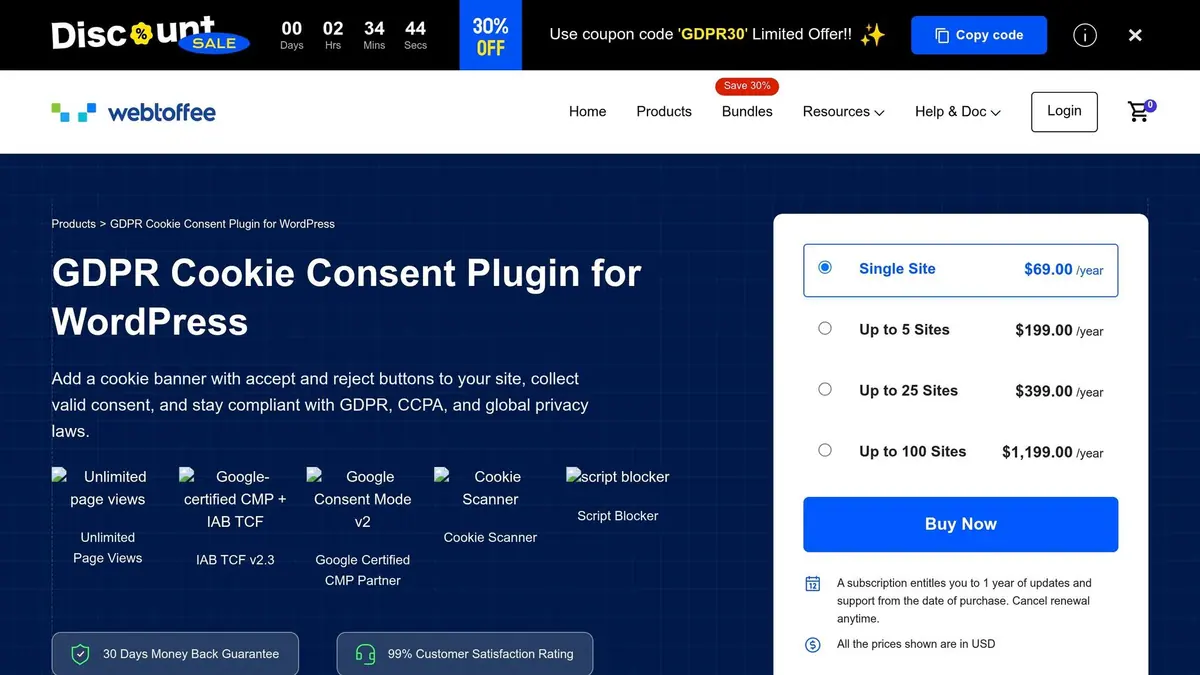
How to use the Script Blocker feature in the GDPR Cookie Consent Plugin
sbb-itb-5f36581
Key Script Blocking Techniques
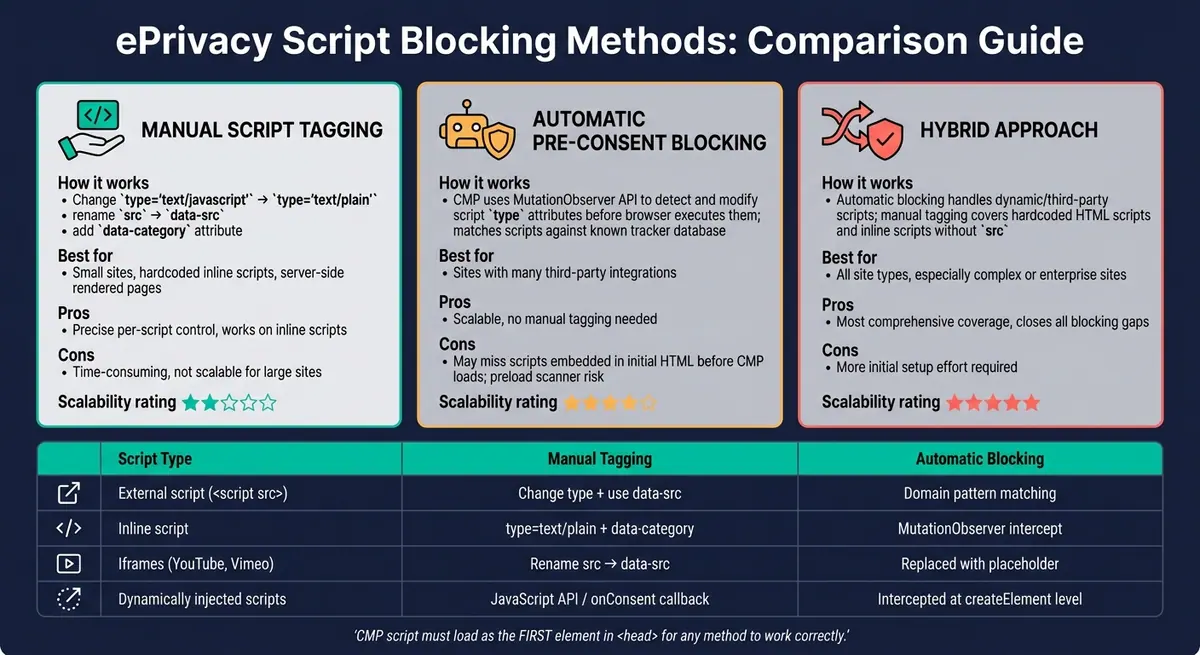
Script Blocking Methods for ePrivacy Compliance: Manual vs. Automatic vs. Hybrid
Manual Script Tagging
Manual script tagging is a straightforward way to stop tracking scripts from running until users give their consent. This involves changing the script's HTML tag type from text/javascript to text/plain and renaming the src attribute to something like data-src or data-consent-src. This prevents the browser from fetching the script. You can also use a data-category attribute, such as data-category="analytics", to link the script to a specific consent category in your Consent Management Platform (CMP). Once the user selects "Accept", the CMP updates the type and src attributes to their original values and re-injects the script into the DOM.
The same process applies to iframes: moving the src attribute to data-src ensures that embedded content is blocked until consent is granted. This method provides precise control over individual scripts, making it easier to stay compliant by ensuring nothing runs without user approval. However, because it requires manual updates, it can be time-consuming and less scalable for larger sites.
Automatic Pre-Consent Blocking
Automatic blocking shifts the responsibility to the CMP, eliminating the need to manually tag each script. Modern CMPs use extensive databases to detect tracking scripts. When a script matches a known pattern, the CMP uses the MutationObserver API to monitor DOM changes and modifies the script's type attribute to text/plain before the browser can execute it.
This method is ideal for sites with numerous third-party integrations, as it scales efficiently and ensures compliance by blocking scripts until consent is given. However, there's a catch: if a script is embedded directly in the initial HTML, the browser's preload scanner might fetch it before the CMP has a chance to block it.
"By the time the CMP arrives [in post-load blocking], cookies are in the browser and data has been sent to remote servers. Removing a script element from the DOM cannot un-send a network request." - ConsentStack
To avoid this, the CMP's script should be loaded synchronously as the first element in the <head> section. Because of these limitations, relying solely on automatic blocking might not be enough in some cases.
Hybrid Approaches
A hybrid method combines manual tagging and automatic blocking to address the limitations of each. Automatic blocking can handle most dynamic and third-party scripts, while manual tagging ensures that scripts hardcoded in the HTML are properly managed. This is especially important for server-side rendered pages, where the preload scanner might bypass automatic blocking.
For inline scripts without a src attribute, manual tagging with data-category is crucial to classify them correctly.
Here’s a quick overview of how these methods apply to different types of scripts:
| Script Type | Manual Tagging Method | Automatic Blocking Method |
|---|---|---|
External script (<script src="...">) |
Change type to text/plain, use data-src |
Intercepted via domain pattern matching |
| Inline script | Add type="text/plain" and data-category |
Intercepted via MutationObserver |
| Iframes (YouTube, Vimeo) | Rename src to data-src |
Replaced with about:blank or a placeholder |
| Dynamically injected scripts | Use JavaScript API (e.g., an onConsent callback) |
Intercepted at the document.createElement level |
The hybrid approach is the most comprehensive option for ensuring compliance. While it requires more initial effort to set up, it effectively handles both hardcoded and dynamically added scripts, closing any potential gaps in blocking mechanisms.
How to Implement Script Blocking for ePrivacy Compliance
Setting Up Your CMP Correctly
To ensure compliance, place your CMP (Consent Management Platform) script as the very first element in the <head> section of your website. This prevents scripts from running before the user's consent preferences are established.
"The biggest compliance gap isn't a missing banner. It's a banner that appears while scripts run underneath it." - Consentify
Once the CMP is correctly positioned, categorize your scripts into these groups: Strictly Necessary, Functional, Analytics, and Marketing. Scripts classified as Strictly Necessary (e.g., session authentication or CSRF tokens) do not require user consent. However, all other categories must wait for user approval. By classifying scripts, you enable your CMP to determine which ones to block or allow based on the user's choices.
If you decide to activate "Enforce Mode" (which blocks any uncategorized third-party scripts by default), it's crucial to conduct a thorough audit of your site first. This step ensures that essential services like Google reCAPTCHA or Stripe aren't mistakenly blocked.
Once your CMP is in place and all scripts are properly categorized, the next step is to adjust script tags to delay execution until consent is granted.
Blocking Common Third-Party Scripts
For widely used scripts like Google Analytics and Meta Pixel, you'll need to manually update the script tags to delay their execution until the user provides consent.
For Google Analytics, modify the standard script tag:
<script async src="https://www.googletagmanager.com/gtag/js?id=G-XXXXXXXX"></script>
Change it to:
<script type="text/plain" data-src="https://www.googletagmanager.com/gtag/js?id=G-XXXXXXXX" data-category="analytics"></script>
For the Meta Pixel, follow a similar approach. Replace src with data-src, set the type attribute to "text/plain", and assign the appropriate data-category value (e.g., "marketing"). For embedded content like YouTube iframes, replace src with data-src to stop the embed from loading automatically. Don't assume that using youtube-nocookie.com bypasses tracking - it still uses HTML localStorage for tracking, which requires prior consent under the ePrivacy Directive.
For Google services, consider setting up Google Consent Mode v2 alongside your manual script tagging. This allows Google tags to adapt dynamically to the user's consent preferences, rather than being entirely blocked. Starting March 2024, this has become mandatory for EEA traffic.
Using Consent Events and Callbacks
After modifying your script tags, it's essential to listen for consent events to ensure scripts only run after the user has made their choice. Most CMPs fire a custom event on the window object once the user provides or denies consent. This lets you programmatically inject scripts at the appropriate time, without requiring a page reload.
Instead of simply changing the type attribute back to text/javascript - which browsers ignore - you should clone the script element and re-inject it into the page.
If multiple scripts depend on one another, use onload callbacks to release them in sequence. This avoids browser performance issues like freezing. However, if a user revokes consent, the only reliable solution is to reload the page. Once a script has executed, it can't be removed from the browser's memory, so a fresh page load is necessary to reapply blocking rules.
Script Blocking for Lead Generation Compliance
Lead generation form pages come with a tricky compliance issue: tracking scripts (like Meta Pixel or LinkedIn Insight Tag) often run as soon as the page loads - before users even interact with a consent banner. While earlier script-blocking techniques are helpful, form workflows need specific adjustments to address the unique challenges they bring.
Managing Tracking in Form Workflows
Scripts that handle personal data must stay inactive until the user gives explicit consent. This includes tools like conversion tracking snippets, session recording services (e.g., Hotjar or FullStory), and CRM tracking pixels embedded near your forms.
For inline tracking scripts (such as HubSpot or Google Ads conversion tags), you can add type="text/plain" and set an appropriate data-category. This ensures the script remains dormant until your CMP (Consent Management Platform) updates it to text/javascript after receiving consent. For callback-based workflows, use the CMP's consent event (e.g., CookieConsentGranted) to activate the tracking scripts only after consent is confirmed. To avoid duplicate script execution, set window._trackerLoaded = true.
"Every third-party JavaScript tag you load on your website is code you didn't write, executing in your visitors' browsers, with access to everything on your page - including form inputs, page content, and user behavior." - Thomas Kramer, GDPRScoreCheck
This level of control ensures your tracking aligns with consent-gated workflows, which is critical for compliance.
Using Reform for Consent-Compliant Forms
Reform simplifies managing consent-gated workflows by offering built-in tracking solutions that respect user consent. On its Pro plan, Reform allows you to integrate custom JavaScript, enabling you to use CMP callback APIs. This means you can listen for consent events before loading analytics or conversion tracking scripts tied to form interactions.
This is particularly helpful for multi-step forms where a conversion event - like form completion - triggers a tracking pixel. With Reform's custom JavaScript capabilities, you control exactly when that pixel activates, ensuring it fires only after the user consents to marketing cookies. Tools like HubSpot benefit significantly from this approach, as non-essential scripts are properly gated under the ePrivacy Directive.
Logging Consent with Lead Data
It's not enough to collect consent - you need to document it. Regulators require a clear audit trail for every lead, including a timestamp, the version of your privacy policy in effect, and the specific consent categories the user agreed to or declined.
A practical solution is to attach consent metadata to the form submission data. When a user submits a lead form, your CMP should already have stored their consent record. This record - complete with the timestamp and policy version - should be logged alongside the lead entry in your CRM or database. This creates a clear connection between the lead and their consent decision, providing the proof you need in case of an audit.
Testing and Maintaining Script Blocking Compliance
Once you've implemented script blocking, the next step is to ensure it works as intended and continues to meet ePrivacy standards. This requires thorough testing and regular audits to identify and address any compliance gaps.
How to Test Script Blocking
Start by opening an incognito browser window, launching DevTools (press F12), and navigating to your website without interacting with the consent banner. Use the Network tab (filtered by "JS") and the Application tab (specifically the Cookies section) to confirm that no tracker domains or non-essential cookies - like _ga or _fbp - are active before consent is granted. Common trackers to check for include domains like google-analytics.com, facebook.net, doubleclick.net, and hotjar.com.
Testing should also include consent revocation. Verify that when consent is withdrawn, the page reloads and all non-essential scripts are disabled. Additionally, clear your CDN cache and any caching plugins, such as WP Rocket, before each test to avoid cached scripts bypassing your blocking logic.
"Script blocking is the difference between consent theater and consent enforcement." - ConsentStack
Once you're confident in your testing, incorporate regular audits to ensure continued compliance.
Running Regular Privacy Audits
Privacy audits are a must, especially as new marketing tags, third-party updates, or template changes can introduce vulnerabilities. As SecureSpells explains:
"Privacy compliance is not a static state; new marketing tags or third-party updates can re-introduce vulnerabilities at any time."
Perform manual audits at least every quarter, and always run an additional check after deploying changes to scripts, templates, or third-party integrations. Each audit should examine three key scenarios:
- No user interaction: Only strictly necessary cookies should be present.
- Full rejection: No non-essential requests should run.
- Selective consent: Only the categories explicitly accepted by the user should load.
Don't overlook inline scripts, third-party iframes (e.g., YouTube, Google Maps), or scripts hardcoded into theme files. These can bypass your tag manager and remain undetected. A stark reminder of the consequences came in September 2025, when the CNIL fined SHEIN €150 million for a broken "Reject all" button that allowed advertising cookies to load despite user preferences.
Automated tools like Puppeteer or Playwright can be invaluable here. They can simulate a "Reject" click in a CI/CD pipeline, flagging any builds where non-essential cookies are detected before they reach production.
While audits keep you compliant, performance optimization ensures your site remains user-friendly.
Balancing Performance and User Experience
For script blocking to be effective, your consent management platform (CMP) must load before any trackers. A slow CMP SDK can allow trackers to fire prematurely. Ideally, CMP scripts should be lightweight - around 5 KB - but some enterprise solutions can bloat to over 200 KB. Keeping your SDK lean is critical for both compliance and site performance.
When enabling scripts after consent, avoid releasing them all at once. A simultaneous release can overwhelm the browser, causing delays. Instead, use onload chains to release scripts sequentially, ensuring proper execution order and maintaining page responsiveness.
For third-party iframes, such as YouTube or Google Maps, hard blocking can result in empty containers that confuse users. A better approach is to display a placeholder explaining what content is blocked, with an option to load it after consent. This keeps users informed without breaching compliance. Similarly, your consent banner design should treat "Accept" and "Decline" options equally. Hiding the rejection option in small text is considered a dark pattern and could lead to compliance issues.
Conclusion and Next Steps
Final Thoughts
Script blocking is what transforms a banner from being just visually compliant to actually meeting technical compliance standards. Recent enforcement actions, like those against SHEIN and Google, highlight how regulators focus on what happens behind the scenes - network traffic - not just what users see on the screen.
"A banner that displays but does not technically prevent scripts from firing is cosmetic, not compliant. Regulators inspect network traffic, not just visual design." - Kukie.io
When done right, script blocking doesn't just help you meet legal requirements - it also strengthens user trust by ensuring that "Reject All" truly means no unwanted tracking.
Action Steps for Businesses
Compliance doesn't have to break the bank. Here's how you can take practical steps to ensure your business meets standards:
- Load your CMP first: Make sure your consent management platform (CMP) script is the first thing in your HTML
<head>. This ensures it loads before any tag manager or third-party code. - Use DevTools in incognito mode: Filter for tracker domains like
google-analytics.comorfacebook.net. No tracking requests should fire before the user gives consent. - Ensure button equality: The "Reject All" button should be just as noticeable and easy to click as the "Accept All" button.
- Automate regular scans: Run cookie scans at least every quarter - or after any major updates - to catch new scripts that might sneak in without proper categorization.
- Keep detailed audit logs: Record hashed identifiers and timestamps for each consent event. This creates a verifiable trail in case regulators come knocking.
In 2025 alone, the CNIL fined 21 organizations for cookie-related violations, with penalties totaling nearly €487 million. A well-maintained and regularly tested script-blocking system is no longer optional - it's essential.
FAQs
How can I tell if any trackers fire before consent?
To find out if trackers are firing before consent is given, open your website in a browser and head to the Network tab in DevTools. Load the page without clicking on or interacting with the cookie banner. Look for any requests to known trackers, such as google-analytics.com or facebook.net. If you spot these requests, it means the scripts are running too early. Proper script blocking should ensure these requests are held off until the user explicitly provides consent.
Do I need manual tagging if my CMP blocks scripts automatically?
If your CMP automatically blocks scripts, you typically don’t need to worry about manual tagging. The CMP takes care of identifying and categorizing scripts, ensuring they’re blocked as needed without extra effort on your part.
What should I do when a user revokes consent?
When a user withdraws consent, make sure all tracking scripts and cookies are immediately blocked or deactivated. Implement script-blocking methods to ensure no scripts continue running after consent is revoked. Adjust your system to either automatically or manually halt script loading until the user explicitly provides approval again. This approach helps maintain compliance with ePrivacy regulations.
Related Blog Posts
Get new content delivered straight to your inbox

The Response
Updates on the Reform platform, insights on optimizing conversion rates, and tips to craft forms that convert.




Drive real results with form optimizations
Tested across hundreds of experiments, our strategies deliver a 215% lift in qualified leads for B2B and SaaS companies.
