
.webp)
Testing Marketing Tool Integrations: Best Practices



Testing marketing tool integrations is critical to ensuring smooth operations, accurate data flow, and preventing costly errors. Poorly tested integrations can lead to data loss, duplicate records, and misattributed leads, costing businesses millions annually. Here’s how to avoid these pitfalls:
- Start with a plan: Define integration goals, set measurable benchmarks (e.g., <3% duplicate rate), and identify which system acts as the "source of truth."
- Map data flows: Document field mappings, sync directions, and responsible teams to prevent conflicts.
- Create test data: Use sandbox environments or test segments with valid and edge-case records to identify potential issues.
- Test step by step: Validate core functions like form submissions, lifecycle stage updates and lead qualification, and bidirectional syncs. Look for errors like API failures or silent data mismatches.
- Monitor and maintain: Schedule regular audits, track real-time metrics (e.g., sync volume), and ensure APIs and credentials stay updated.
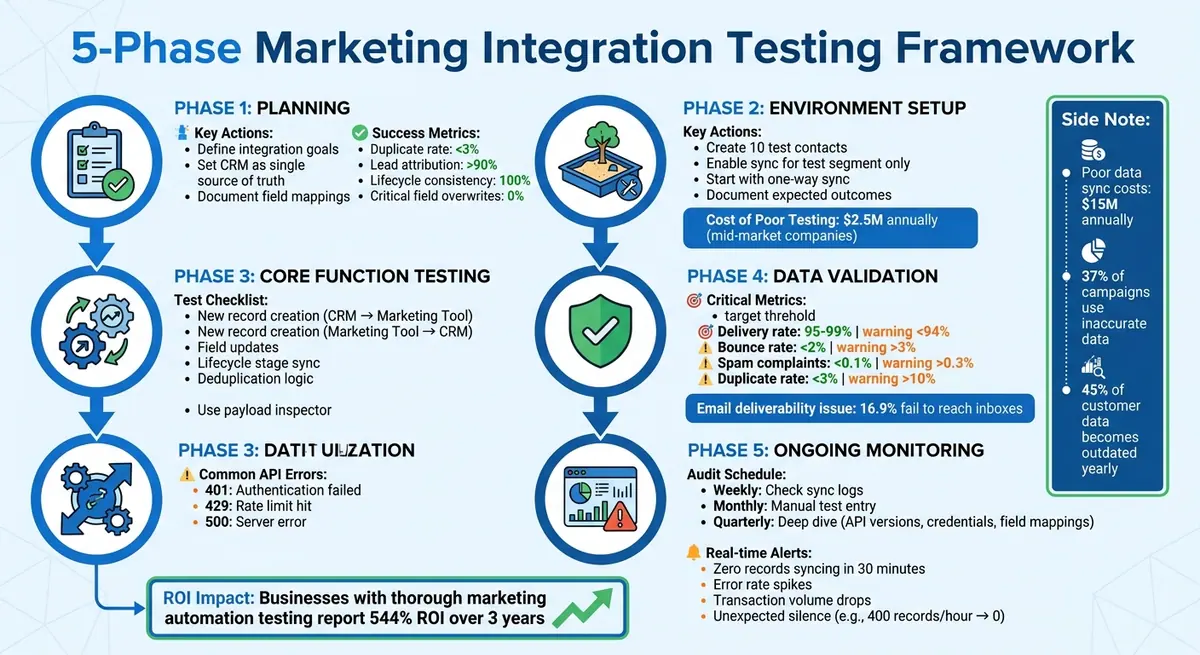
5-Phase Marketing Integration Testing Framework with Key Metrics
Preparing for Integration Testing
Before connecting any tools, you need a solid plan. Most integration issues don’t stem from technical glitches but from skipping the planning phase. Diving into data synchronization without clear guidelines often results in duplicate records, overwritten fields, and disrupted workflows. These mistakes can derail your campaigns. Start with a clear strategy, then outline measurable goals and success criteria.
Set Integration Goals and Success Metrics
Begin by defining what success looks like for your integration. A crucial first step is deciding on your CRM as the single source of truth for contact data. Without this, you risk sync loops, where systems endlessly overwrite each other's data.
"The root cause in almost every case: the integration was built without a clear decision about which system is the system of record." – Calvin D., Head of Enterprise Solutions
Set measurable benchmarks before testing. For instance, aim for a duplicate contact rate below 3%, lead attribution accuracy above 90%, and 100% consistency in lifecycle stages across systems. For critical fields managed by your sales team, aim for zero overwrite incidents. These benchmarks help ensure smooth integration and avoid expensive data errors.
Clearly define pass/fail criteria for each test case. For example, if a form submission is supposed to create a new lead in your CRM with a specific lifecycle stage, document exactly what should happen. Similarly, if an email update in your marketing platform needs to sync seamlessly to your CRM, spell out the expected outcome. This approach keeps testing objective and focused.
Map Data Flows and Identify Stakeholders
Mapping data flows is essential to avoid sync conflicts. Document every field that will sync between systems. Create a data dictionary that includes field names, data types, picklist values, required fields, and the team responsible for each one. This practice helps prevent issues, such as marketing automation overwriting deal stages managed by sales or sales updates erasing lead scores calculated by marketing.
Decide the sync direction for each field. Most fields should sync in one direction - either from the CRM to the marketing platform or vice versa. Reserve bidirectional sync for fields that truly need updates from both systems, like contact lifecycle stages.
Identify and involve key stakeholders across departments. Revenue Ops and GTM teams often manage integration maintenance and data governance. Sales and SDR teams, as the primary CRM users, are directly affected by sync issues. Marketing teams handle lead generation, scoring, and engagement data, while engineering supports custom API integrations and debugging. Collaboration is critical, especially given that only 8% of B2B professionals rate their CRM data quality as "excellent".
Create Test Data and Backup Systems
A reliable testing environment is your last line of defense before full deployment. Always test in a sandbox or dedicated test setup to avoid risking real customer data. If a sandbox isn’t available, create a clearly labeled test segment within your production environment.
Develop a test dataset with both valid and invalid records. Start with 10 test contacts using unique emails (e.g., test1@yourcompany.com, test2@yourcompany.com). Add matching records in your connected tool with slight variations to ensure your sync logic handles data normalization correctly.
Don’t forget edge cases. Include records with missing required fields, duplicate emails, special characters in names, and unsubscribe flags. Testing these scenarios can reveal potential issues before they impact live data. Once initial tests pass, run a pilot sync using 500 real contacts from one source before scaling to the entire database.
Set overwrite rules before testing. Ensure that incoming data only fills empty fields and never overwrites existing, manually verified information from sales teams. This prevents a common frustration where automated syncs erase valuable, manually collected data.
sbb-itb-5f36581
How to Test Marketing Tool Integrations
Testing your marketing tool integrations step by step ensures you catch issues early and avoid data mishaps. Businesses that prioritize thorough marketing automation testing report an average ROI of 544% over three years. By following a structured approach, you can confirm your integrations are reliable and ready for action.
Phase 1: Set Up Your Test Environment
Start by creating a dedicated test environment to keep test data separate from your live systems. This prevents accidental emails or data syncs affecting real customers. Set up 10 test CRM contacts using unique test emails (e.g., test1@yourcompany.com through test10@yourcompany.com). Then, create matching records in your marketing automation platform, but tweak the field values slightly. For instance, if the CRM record lists "John", you could use "Jonathan" in the marketing platform. This helps you test sync logic and deduplication.
Enable the integration sync only for your test segment - never for your entire database. This isolation minimizes risks if something goes wrong. Start with a one-way sync from your marketing tool to your CRM. This lets you confirm field mappings and filters before moving to a two-way sync. Be sure to document your expected outcomes for each test scenario so you can objectively validate the results.
"The most dangerous failures are the ones that look like everything is fine. Alert on silence, not just errors." – House of MarTech
Begin testing with your small, controlled sample and expand gradually. Poor data governance between CRMs and marketing automation platforms costs mid-market companies an average of $2.5 million annually due to wasted spending and misattributed pipeline.
Phase 2: Test Core Functions
Once your test environment is ready, simulate user actions that should trigger your integration. For example, submit a test form and verify that the lead's lifecycle stage updates correctly in the CRM. Check that the record syncs to the destination system with all fields mapped accurately.
Review API error logs for common issues. A 401 error means authentication failed, so you may need to refresh API keys or OAuth tokens. A 429 error indicates you've hit rate limits, requiring throttling adjustments. A 500 error points to a server issue on the receiving platform. To avoid "authentication decay", set calendar reminders to audit credentials quarterly.
Bidirectional sync testing is critical. For example, if you update a lifecycle stage to "SQL" in your CRM, ensure the marketing tool reflects this change without reverting it back to "MQL". The CRM should always act as the primary source of truth, with marketing tools writing to it but not overwriting it.
Here’s a quick checklist for core sync tests:
| Test Step | Action | Expected Outcome |
|---|---|---|
| New Record (CRM) | Create contact in CRM | Record appears in Marketing Tool |
| New Record (MAP) | Create contact in Marketing Tool | Record appears in CRM |
| Field Update | Change a field in System A | System B updates the matching field (if mapped) |
| Lifecycle Sync | Update stage to "SQL" in CRM | Marketing Tool reflects "SQL" status |
| Deduplication | Submit form with existing email | Existing record updates; no duplicate created |
Don’t skip testing edge cases, such as missing data, invalid inputs, or duplicate contacts. These scenarios help you identify how well your integration handles errors.
Phase 3: Validate Data and Handle Errors
After testing core functions, validate your data and address any errors. Use a payload inspector to confirm that the data sent matches what’s received. This step can uncover hidden schema mismatches that might otherwise go unnoticed. Be on the lookout for "silent failures" where a 200 OK status might mask issues like discarded data due to schema mismatches or version deprecations.
"A working API connection does not guarantee accurate data transfer. Validate the payload, not just the connection." – House of MarTech
Set up alerts for unexpected silence. For example, if a high-volume sync that normally processes 400 records per hour suddenly stops, trigger an alert - even if no error code appears. These silent failures can go undetected for weeks and cause significant problems.
Run a pilot campaign using 5% to 10% of your audience for 60 to 90 days before rolling out the integration fully. This timeframe allows you to gather enough data to catch edge-case errors.
Monitor key metrics during this phase:
- Delivery rate: Aim for 95% to 99% (warning below 94%)
- Bounce rate: Keep it under 2% (warning above 3%)
- Spam complaints: Stay below 0.1% (warning above 0.3%)
- Duplicate rate: Target below 3% (warning above 10%)
Nearly 16.9% of marketing emails fail to reach inboxes, making deliverability testing a crucial part of validating your integration setup.
Common Integration Problems and Solutions
Integrating systems effectively can be tricky, and the stakes are high. Poor data synchronization alone costs businesses around $15 million annually, with 37% of marketing campaigns relying on inaccurate data due to syncing issues. Fortunately, most integration problems follow predictable patterns, and practical solutions exist for each.
Let’s dive into some common data sync issues and how to tackle them.
Data Mismatches and Sync Errors
One of the most frequent culprits of integration headaches is mismatched data formats. For instance, a text field in a form builder might fail to sync with a dropdown menu in a CRM, causing data to bounce back or disappear. Even something as seemingly simple as date formats can create chaos - one system might expect MM/DD/YYYY, while another requires YYYY-MM-DD.
Then there’s the issue of "silent failures." These occur when systems return a 200 OK status, masking the fact that data has been discarded due to schema mismatches or outdated versions.
"Your CRM is only as powerful as the data inside it." – Ashish Shetty, B2B Growth Strategist, DigitalScouts
To avoid these problems, establish a source of truth for each data type. For example, let your CRM own opportunity data while your marketing platform manages engagement metrics. Automate workflows to standardize formats - like converting "United States" to "US" or ensuring consistent phone number and date formats - before syncing. Field-level validation is another must-have; it blocks invalid emails or incomplete data at the entry point, preventing errors from spreading throughout your system.
And don’t forget about data cleanup. With 45% of customer data becoming outdated each year, regular maintenance is essential. Set up alerts to flag unusual patterns, such as no records syncing for 30 minutes. This "silence monitoring" can catch broken connections even when no error codes are present.
API Connection Failures
APIs are the backbone of system integrations, but they’re not foolproof. Expired tokens, rotated API keys, or deactivated user accounts are common reasons for sudden connection failures. A 401 error indicates failed credentials, while a 429 error means you’ve hit rate limits during high-volume activities like importing large datasets.
"MarTech API failures rarely announce themselves - they bleed data silently for days or weeks while your dashboards show green." – House of MarTech
To troubleshoot, start with the basics: check API logs for status codes, verify authentication, and confirm rate limits. Most of these issues can be resolved in under 20 minutes. Use a payload inspector to compare the data sent with what’s received, and schedule quarterly audits of your credentials to prevent authentication problems.
Here’s a quick reference for common HTTP status codes and their fixes:
| HTTP Status Code | Meaning | Common Fix |
|---|---|---|
| 401 | Unauthorized | Refresh tokens, rotate API keys, or re-authorize OAuth |
| 403 | Forbidden | Update permission scopes in the developer account |
| 429 | Too Many Requests | Implement request throttling or use webhooks |
| 500 | Internal Server Error | Check the third-party service status page and retry later |
| 504 / Timeout | Gateway Timeout | Verify firewall rules, SSL certificates, or IP whitelisting |
Once the connection is restored, shift your focus to ensuring automation triggers are functioning correctly.
Automation Triggers Not Working
When automation triggers fail, the ripple effects can be significant. Often, these failures happen when data sources are empty (e.g., an Airtable view with no records) or when app connections expire after a year.
"Measure twice, cut once... if you check your work and what you've created, you can avoid errors that would cause issues in the future." – Andy Wingrave, Chief Automator, Saastronomical
Start by applying the same three-step troubleshooting process used for API issues. Compare incoming and outgoing data payloads to identify discrepancies. Many platforms require unique IDs for dropdown fields rather than plain text, and mismapping these fields is a common cause of trigger failures.
To prevent future problems, assign unique IDs to triggers and lock integrations to a specific API version. After fixing a trigger failure, document the issue, how it was detected, and what could have prevented it. This builds a knowledge base that helps your team avoid repeating mistakes.
Finally, conduct regular audits of field mappings. Even well-mapped systems can develop misalignments over time - typically within 12 to 18 months - as fields and requirements evolve.
Monitoring and Maintaining Integrations
Fixing an integration once isn’t the end of the story. Without proper upkeep, even well-configured systems can start to falter. Poor data management can waste millions in marketing budgets and lead to misattributed pipelines. Fortunately, many integration issues can be avoided with a solid monitoring strategy.
Schedule Regular Integration Audits
Start by keeping an updated inventory of all connected apps. Include details like how data flows (one-way or two-way), how often updates occur, and the purpose of each connection. Even the best-configured systems can drift over time - field mappings may become misaligned as platforms update field names or change data types, often within 12 to 18 months.
A tiered auditing schedule can help you stay on top of things:
- Weekly: Check sync logs for failed records or API errors before they snowball into bigger problems.
- Monthly: Perform a manual test entry, like submitting a test form fill, to ensure data flows smoothly through the pipeline to your CRM.
- Quarterly: Do a deep dive to review API version deprecations, credential health, and field mappings.
"A well-built CRM-to-MAP integration is invisible. Leads flow in correctly attributed, records stay clean, and lifecycle stages sync without conflict." – Calvin D., Head of Enterprise Solutions
Pay close attention to authentication. Many OAuth-based integrations expire every 60 to 90 days for security reasons. Regularly refresh credentials, and assign someone to monitor critical integrations, respond to alerts, and track vendor API updates. Also, conduct regular deduplication audits to keep your data clean.
These periodic reviews set the stage for real-time monitoring, which can help catch issues as they happen.
Use Real-Time Analytics for Monitoring
Scheduled audits are essential, but real-time analytics can catch sudden problems like unexpected data silences. The most dangerous failures are often the quiet ones - your dashboards might look fine while data silently disappears in the background.
"The specific metric to obsess over is unexpected silence. If your CRM normally receives 400 records an hour from your MAP and suddenly receives zero, that silence is as loud as an error code." – House of MarTech
Focus your monitoring on three main metrics: error rates (to flag threshold breaches), transaction volume (to spot unexpected drops), and latency (to track response time spikes). Set up alerts for scenarios like zero records syncing within 30 minutes - this can quickly highlight broken connections. Use tools like Slack, SMS, or email for notifications when error rates spike or API rate limits are nearly maxed out. Platforms like HubSpot’s API Usage or Zapier’s Monitoring page can also provide valuable insights into call volumes and recurring endpoint failures. A simple three-step troubleshooting process - checking logs, verifying credentials, and reviewing rate limits - can resolve most API issues in under 20 minutes.
Keep Software and APIs Updated
Keeping software and APIs up to date is critical for maintaining healthy integrations. Outdated APIs can lead to "silent failures", where a deprecated endpoint might return a "200 OK" status but still discard data. This can result in weeks of lost leads or inaccurate reporting if teams rely solely on status codes without verifying actual data delivery.
"API version updates are a vendor decision, not your decision. Stay ahead of them or get blindsided." – House of MarTech
To avoid surprises, lock integrations to a specific API version rather than defaulting to the "latest" version. Check platform changelogs and developer documentation quarterly to stay informed about deprecations or schema changes. After any update - whether it’s a platform change or a new form - review field mappings to ensure data types still align (e.g., date formats like YYYY-MM-DD vs. MM/DD/YYYY).
When testing updates, start with simple, clean data to pinpoint connection issues before introducing more complex inputs. Set up alerts for zero transaction volume, and document any failures to improve future troubleshooting efforts.
Testing Integrations with Reform
Reform takes the hassle out of integration testing with its no-code approach. Instead of relying on developers to write custom code or configure data flows, marketing teams can independently create, test, and deploy forms that seamlessly connect to their CRM and marketing automation tools. This simplified process cuts down on technical overhead and speeds up testing cycles, aligning perfectly with best practices for efficiency. By removing the need for code-based adjustments, Reform makes integration testing more accessible for non-technical teams.
Simplifying Form Testing with Reform
With Reform's visual builder, you can design multi-step forms and set up conditional routing - all without writing a single line of code. This feature makes it easy to create test forms, submit entries, and verify that data flows correctly into connected systems like HubSpot or Google Sheets.
The platform also allows you to test how incremental data capture impacts automation workflows. For example, if high-value leads are routed to sales while mid-tier leads enter nurturing campaigns, you can submit test entries with different variables (like company size or industry) to ensure your conditional logic triggers the right workflows in tools like Zapier or your CRM.
Real-Time Data Validation and Error Prevention
Reform takes data accuracy seriously. Its lead enrichment feature, powered by ExactBuyer, automatically fills form fields with precise company and contact information, minimizing manual entry errors before the data even reaches your CRM. If the enrichment process fails, a fallback mechanism ensures fields remain open for manual input, avoiding data gaps in your integrations.
Additionally, Reform's built-in spam prevention and email validation tools ensure that only legitimate leads are passed into your marketing systems. This not only reduces noise in your CRM but also improves the overall quality of your data.
Before launching any new integration, it's a good idea to submit test entries for both known and unknown leads to confirm that the fallback logic operates as expected.
Connecting Reform to Marketing and CRM Tools
Reform integrates directly with platforms like HubSpot, Google Sheets, and Zapier, often eliminating the need for middleware. The platform’s interface makes field mapping straightforward, letting you connect enrichment data - such as company size or industry - directly to specific form fields. This simplifies the testing process while maintaining thoroughness.
Hidden fields add another layer of functionality, enabling you to collect backend data for routing or lead scoring without affecting the user experience. For instance, you can use enriched company data to automatically assign leads to the right sales rep or nurture track. These workflows can then be tested using a variety of company profiles to ensure accuracy.
For those on the Pro Plan, Reform unlocks advanced integrations and enrichment features, making it easier to build and test complex marketing workflows - all without the need for custom development.
Conclusion
Regularly testing your marketing tool integrations is crucial to protecting your sales pipeline and avoiding unseen failures. As OrbitForms aptly put it, "Every lost submission represents a potential customer who took the time to engage with your brand, only to disappear into a technical black hole". Without consistent monitoring and audits, problems can slip under the radar, leading to data silos that interrupt your lead flow. Tools like automated alerts, weekly health checks, and quarterly re-authentication can help you identify and fix issues before they impact your operations.
FAQs
What should be the source of truth for my integration?
A centralized and reliable system, such as your CRM or API, should serve as the backbone for your integration. This system acts as the single source of truth, ensuring that data remains accurate and consistent. To maintain this reliability, it's crucial to regularly validate, monitor, and update the system, keeping all connected tools aligned and functioning seamlessly.
How can I catch silent sync failures fast?
To stay ahead of silent sync failures, establish a monitoring system that keeps an eye on potential issues such as authentication expiration, rate limit violations, schema mismatches, and outdated versions. Conduct regular audits of your integrations to catch errors early. Keep track of key metrics like data accuracy and response times to ensure everything runs smoothly. Set up alerts for unusual activity or anomalies so you can quickly detect and resolve problems, reducing the chance of data-related headaches.
What metrics should I monitor after launch?
After rolling out your marketing tool integration, it's crucial to keep an eye on key metrics to confirm everything is running as it should and delivering the desired outcomes. Pay close attention to response time, data accuracy, and system performance to ensure operations are efficient and data flows seamlessly.
It’s also important to monitor metrics like lead conversion rates, the length of your sales cycle, and system reliability. Regularly reviewing these factors can help you catch potential issues early, fine-tune performance, and make sure your integration is driving effective lead management, improved customer engagement, and a solid return on investment.
Related Blog Posts
Get new content delivered straight to your inbox

The Response
Updates on the Reform platform, insights on optimizing conversion rates, and tips to craft forms that convert.




Drive real results with form optimizations
Tested across hundreds of experiments, our strategies deliver a 215% lift in qualified leads for B2B and SaaS companies.
