
.webp)
Token Rotation and Revocation Guide


One missed token update can stop lead delivery in minutes. I’d treat every token change the same way: map every place the credential lives, switch with an overlap window, test end to end, watch 401/403 errors for the next 30–60 minutes, and revoke the old credential only after logs show 0 usage.
Here’s the short version:
- I rotate refresh tokens and client secrets every 90–180 days
- I rotate static API keys at least every quarter
- I use short-lived access tokens, often 5–60 minutes
- I test in staging first, then send a live test lead in production
- I queue failed leads and retry over 24–48 hours if a token change blocks delivery
- I roll back only if the old credential was not part of a breach
- I log the full change with a timestamp like 08/21/2026 2:00 PM
What matters most is simple: forms may still submit even when the CRM handoff is broken. That’s why I’d watch delivery rate, queue backlog, retries, and error spikes right after cutover, not just whether the form loads.
A few failure points matter in nearly every lead flow:
- Access tokens for API calls
- Refresh tokens for new access tokens
- API keys for SaaS tools and data providers
- Signing keys for JWTs and webhooks
If I were doing this today, I’d keep the process tight: update staging, verify token issuance and delivery, deploy production changes to every system on the checklist, confirm test leads arrive, then disable the old credential only after usage drops to zero.
This guide boils the process down to the steps that keep leads moving while you rotate or revoke tokens.
OAuth 2.0 Token Revocation
sbb-itb-5f36581
Plan a Safe Rotation Schedule
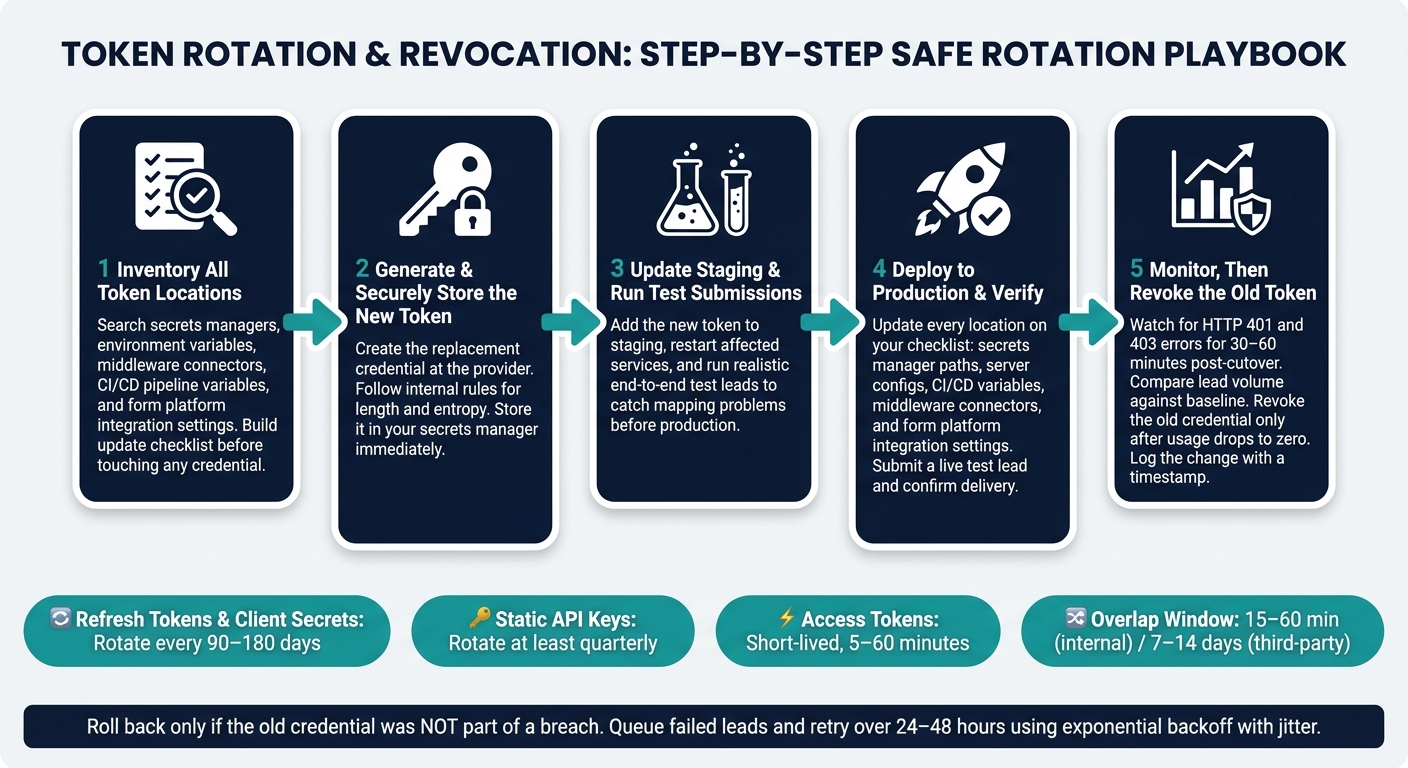
Token Rotation & Revocation: Step-by-Step Safe Rotation Playbook
Use your token inventory to decide the rotation order, who owns each step, and where rollback happens. Build the checklist from that inventory before you touch any credential.
Choose Rotation Timing and a Transition Window
Not all tokens should be handled the same way. Short-lived OAuth access tokens, which often last 5–60 minutes, are usually rotated on their own through refresh tokens. Those usually don't need a manual schedule.
The credentials that need planning are the long-lived ones.
For most CRM and marketing integrations, a good starting point is to rotate refresh tokens and client secrets every 90–180 days, and static API keys at least quarterly. Rotate right away after a suspected compromise, a team member leaves, or a platform change. High-privilege tokens, like ones with admin scopes or data export access, should be rotated on the shorter end of that range.
Schedule the work during your lowest lead-volume maintenance window. If the vendor allows it, use a credential overlap window so both the old and new credentials stay active while you move systems over one at a time. For fast internal services, 15–60 minutes of overlap may be enough. For third-party integrations, plan for 7–14 days. If the vendor allows only one active credential at a time, line up every config change ahead of time and make the switch in a tight window.
Use a Step-by-Step Rotation Playbook
Once the window is set, follow the same sequence every time.
- Inventory all token locations Confirm every place the current token lives: secrets managers, environment variables, middleware connectors, CI/CD pipeline variables, and form platform integration settings. Search code repositories for token names and environment variable keys so hidden copies don't slip through. This becomes your update checklist.
- Generate the new token and store it securely Create the replacement credential at the provider and follow your internal rules for length and entropy. Put it in your secrets manager right away.
- Update staging first and run test submissions Add the new token to staging, restart or redeploy affected services, and run realistic end-to-end test leads. This is where you catch mapping problems before they hit production.
- Deploy to production and verify Update every location on your checklist: secrets manager paths, server configs, CI/CD variables, middleware connectors, and form platform integration settings. Then submit a live test lead and confirm it shows up in the destination system and that the API call succeeds.
-
Monitor, then revoke the old token
Watch for HTTP
401and403responses, and compare lead volume against your baseline. After delivery and error rates stay steady, revoke the old credential and log the change. If delivery drops or errors spike, stop before revocation and roll back the new token.
Map Every Place the Token Lives
Search repositories, middleware, and form settings for hidden copies.
| Storage Location | What to Check |
|---|---|
| Secrets manager / vault | Secret paths, versions, and access policies |
| Application servers | Environment variables and server configs |
| CI/CD pipelines | Repository secrets, build-time variable injections |
| Integration middleware | Connector credentials, API key fields in iPaaS tools |
| Form platform settings | Outbound integration configs, such as Reform's integration settings for CRM and email tool connections |
When you use Reform to send leads into a CRM or email platform, the API key or OAuth credential sits inside Reform's integration settings, not just in your server setup. That means it has to be updated during every rotation that affects those downstream connections. Miss that one spot, and lead delivery can fail as soon as the old credential is revoked.
Apply Refresh Token Rules and Key Rollover Correctly
Set Refresh Token Rotation and Reuse Rules
Use single-use refresh tokens. Each time a token is exchanged, issue a new refresh token and invalidate the old one right away. That helps keep lead delivery running without stale credentials getting in the way. In practice, you should store only the newest refresh token and never send an older one again.
Some providers allow a short overlap window. In that case, the token that was just replaced may still work for a brief moment to absorb network retries or near-simultaneous requests. Keep that grace period tight. It should apply only to the immediately previous token. If anything older shows up, treat it as a security event.
If you detect reuse of a token that was already rotated out, assume compromise until proven otherwise. Revoke the entire token family, force reauthentication, and log what happened. If reuse attempts keep happening, alert on them so your team can dig in instead of quietly accepting stale credentials.
Never store refresh tokens in browser storage, logs, or error traces. Keep them on the backend in encrypted secret stores or vaults with strict access controls. Also, update them atomically, so a crash in the middle of rotation doesn't leave you stuck with an invalidated token and no replacement. Pair rotation with an absolute expiration and an inactivity timeout, so a stolen token can't be used forever.
Roll Signing Keys and Client Secrets in Parallel
Roll signing keys in publish → overlap → retire order. First, publish the new public key in JWKS. Then start signing new JWTs with the new private key while keeping the old key published so existing tokens can still be verified. Retire the old key only after downstream caches have refreshed and all old tokens have expired.
That overlap window needs to cover two things: the slowest verifier cache and the longest-lived token still out there. Cut it too short, and you'll see 401 spikes during rollover. For live lead syncs, that can cause direct interruptions. If you're using key IDs (kid), give the new key a new kid so validators can pick the right public key without guesswork.
Use that same overlap pattern for client secrets. Client secret rotation follows the same basic flow, but the secret is used to authenticate your app to the authorization server, not the token itself. Create the new secret, update every client to use it, keep the old secret active during the switch, and then disable and delete it after every client has moved over. In staging, test token issuance, validation, and secret retrieval as separate steps before the production cutover. This work should sit in the same change window as refresh-token rotation.
Once the new secret is live and verified, move to controlled revocation and failure handling.
Revoke Tokens and Handle Failures Without Dropping Leads
Pick the Right Revocation Method
Once the new credential is live and verified, you need a clean way to shut off the old one. The right move depends on how fast that shutdown needs to happen.
A simple starting point is to use short-lived access tokens, usually 5 to 15 minutes. In many cases, that means revocation happens on its own when the token expires. Short lifetimes also cut down the need to keep extra revocation state around.
If you're dealing with theft or offboarding, use the provider's revocation endpoint. One thing to watch: an HTTP 200 only means the provider accepted the request. It does not confirm that the token was active at the time.
| Method | Speed | State required | Provider Support | Lead-flow impact |
|---|---|---|---|---|
| Short-lived tokens | Automatic when the token expires | Low - mainly token lifetime and refresh logic | Broad support in OAuth 2.0 and OpenID Connect | Minimal; requires solid refresh logic |
| Server-side revocation lists | Immediate, subject to propagation | High - requires state tracking and validation checks | Varies by provider | Can break active flows without queueing and retries |
| Refresh token invalidation | Immediate on next use | Medium | Broad support in OAuth 2.0 flows | Stops future access without ending the current access token |
For security incidents, revoke the refresh token first and let the access token run out on its own.
If revocation cuts into delivery, don't let the lead vanish. Queue failed leads before you replay them.
Queue, Retry, and Roll Back When Needed
If revocation breaks delivery, protect the lead first. Fix delivery second.
When a revoked credential starts returning 401 or 403 errors, pause live delivery and write the lead to durable storage. Store the payload, destination, status code, error, and UTC failed_at. Then mark the record as pending, failed, or delivered.
Retries should start only after the credentials are fixed. Use exponential backoff with jitter across 24–48 hours, attach an idempotency key, and send exhausted leads to a DLQ.
Rollback is only safe when the old credential was not compromised. That makes it a fit for config mistakes, not breaches. If the issue is a breach, issue a new token and replay the backlog instead. Log each rollback with a timestamp and approver.
Monitor Results and Close the Rotation
Watch 401s, 403s, and Lead Delivery Rates
After cutover and revocation, pay closest attention to the first 30 to 60 minutes. That’s the highest-risk window. Log timestamps in U.S. format, like 08/21/2026 2:32 PM, so responders can line up spikes with the cutover window fast.
Focus on two error codes:
- 401 errors usually mean the token is missing, expired, revoked, or invalid.
- 403 errors usually mean the token is valid but under-scoped.
Those codes look similar at a glance, but they point to different fixes.
Also compare delivery rate, retries, queue backlog, and p95 time-to-delivery against your baseline. If you see a sustained drop or spike, treat it as an incident. These checks happen right after the new token goes live and before the old one is retired.
Audit the Change and Remove the Old Credential
Before disabling the old credential, confirm in logs that it has zero remaining usage. GitHub Enterprise Server, for example, lets you search audit logs with a token’s SHA-256 hash to verify whether a specific access token was still used after the rotation window closed. The same idea applies no matter what platform you use.
Once usage is at zero, document the full change. Your audit record needs five things: who performed the rotation, the exact timestamp such as 08/21/2026 2:00 PM, every system where the token was updated, when the old credential was disabled, and the reason for the change.
This matters to security, engineering, and marketing ops for a simple reason: token changes can directly affect lead delivery to CRMs and marketing platforms. After usage is confirmed at zero, move to final validation.
Conclusion: The Minimum Safe Process for Token Changes
Every safe token change follows the same path: know exactly where the token lives before you touch it, rotate with an overlap window so nothing breaks mid-flight, monitor until lead flow is stable again, and revoke the old credential only after logs show zero remaining usage.
If you use Reform, review integration logs and submit a few test leads to confirm every destination received them after rotation. Close the rotation only after 401/403 rates return to baseline, delivery matches historical norms, and the old credential is confirmed retired.
FAQs
How do I know every token location was updated?
Create a complete audit trail for the entire rotation process, both before and after the change. Record all OAuth updates, config edits, credential rotations, revocations, and scope changes. Each log entry should include the timestamp, the acting user or service, before-and-after snapshots, and the correlation ID tied to that event.
Then review integration logs for every create, update, and export action. Confirm the final write result, capture any error codes returned, and trace failed calls back to the exact correlation ID and the token or config version used at the time.
What should I do if lead delivery fails after revocation?
If lead delivery fails right after revocation, first check that the revocation reached every system that uses the token. Clear local caches, then make a test API call with the revoked token and confirm the request is denied.
Next, disable only the affected flow or integration instead of shutting down more than you need to. Watch for spikes in 401/403 responses, and review audit logs and API logs from the incident window to see which lead records were hit.
Before digging deeper, export authentication logs, integration run logs, and API logs to immutable storage.
When is rollback safe after a token change?
Rollback is safe only after the new token or key is fully rolled out, traffic looks normal, error rates stay steady, and the old token or key has stopped receiving requests.
For token families, reusing a rotated refresh token is a sign of compromise. If that happens, invalidate the entire family right away.
For key rotation, keep a short overlap window during the handoff. Once everything has moved over without issues, deactivate the old key.
Related Blog Posts
Get new content delivered straight to your inbox

The Response
Updates on the Reform platform, insights on optimizing conversion rates, and tips to craft forms that convert.




Drive real results with form optimizations
Tested across hundreds of experiments, our strategies deliver a 215% lift in qualified leads for B2B and SaaS companies.
