
.webp)
Top Marketing Automation Use Cases for Forms



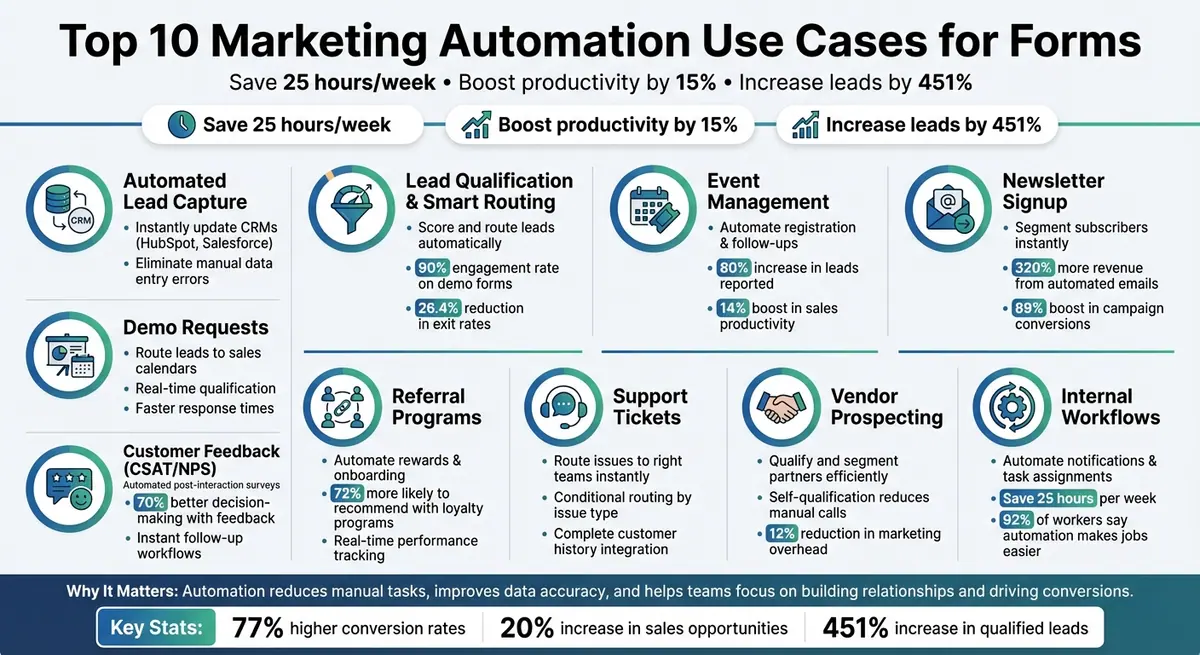
Forms are essential tools in marketing, but their true power is unlocked through automation. Here's what happens when forms meet automation:
- Automated Lead Capture: Instantly update CRMs like HubSpot or Salesforce when a form is submitted, saving time and reducing errors.
- Lead Qualification: Score and route leads based on form responses, ensuring sales teams focus on high-priority prospects.
- Event Management: Automate registration, follow-ups, and post-event surveys to streamline attendee engagement.
- Newsletter Signup: Segment subscribers immediately and trigger personalized email sequences.
- Demo Requests: Qualify and route leads directly to sales calendars, improving response times.
- Customer Feedback: Use automated surveys to collect and act on satisfaction data.
- Referral Programs: Manage rewards and onboarding without manual effort.
- Support Tickets: Route issues to the right teams instantly.
- Vendor Prospecting: Qualify and segment potential partners efficiently.
- Internal Workflows: Automate notifications and task assignments to save time.
Why it matters: Automation reduces manual tasks, improves data accuracy, and helps teams focus on what truly matters - building relationships and driving conversions. Implementing these workflows can save up to 25 hours per week and boost productivity by 15%.
10 Marketing Automation Use Cases for Forms with Key Benefits
How to Make Jotform Your Marketing Automation Tool
1. Automated Lead Capture and CRM Integration
When someone hits "submit", automation takes over. Instead of manually entering data, systems like HubSpot, Salesforce, or Pipedrive instantly update contact records. This process saves time, eliminates repetitive tasks, and minimizes errors - like mislabeling prospects or inputting information incorrectly. It’s a streamlined way to kick off powerful workflows.
Automation Capabilities
Submitting a form can trigger a series of automated actions: updating your CRM, tagging leads, notifying sales teams, and even moving prospects through deal stages. These workflows are based on predefined criteria, such as deal size or geographic location, ensuring your team stays organized and efficient.
Integration with CRM/Marketing Platforms
Automation doesn’t stop at data capture - it ensures smooth integration across your systems. Platforms can connect forms to thousands of applications, ensuring a seamless flow of information. Once a form is submitted, lead data syncs across your tools, from CRMs to email marketing software. For platforms without direct integrations, webhooks can send JSON-formatted data to external systems. You can even set up notifications to alert your sales team when high-value leads submit their details, helping them follow up quickly.
Data Enrichment and Segmentation Potential
Automation doesn’t just collect data - it transforms it into actionable insights.
"Forms are the digital equivalent of the prospect interview. With cleverly designed forms you can help your prospects self-qualify in a way that provides your marketing department with a great amount of actionable detail." - Marcelo Beilin, Digital Marketing Consultant
Smart forms act like a virtual interview, allowing prospects to share details such as property type, budget, or decision-making authority. This information automatically tags them into specific segments in your CRM. Systems can also assign lead scores based on these inputs, helping sales teams focus on the most engaged prospects. Additionally, automated nurture sequences can launch based on form interactions. For example, someone downloading a pricing guide might enter a sales-focused email series, while a webinar attendee receives educational follow-ups.
2. Lead Qualification and Smart Routing
Smart routing uses form data to pinpoint high-value prospects and guide them through automated workflows. This process ensures your sales team focuses their efforts on leads that matter most by scoring, tagging, and routing them in real time.
Automation Capabilities
Lead scoring assigns numerical values to prospects based on their demographics and behaviors captured through form responses. For example, a senior decision-maker might receive a higher score than someone in a less influential role. Actions like visiting a pricing page or downloading a whitepaper can further increase a lead's score. Once a lead reaches a certain score threshold, they are tagged as Marketing Qualified and trigger immediate sales notifications.
Conditional logic takes this a step further by tailoring forms to the prospect's responses. For instance, if someone indicates a larger budget, they might be routed directly to an Account Executive's Calendly link for a meeting. On the other hand, those with smaller budgets could be added to a nurture sequence. This self-qualification happens instantly, eliminating the need for manual sorting. A great example of this in action is ExactBuyer, which achieved a 90% engagement rate on demo forms and reduced exit rates by 26.4%. These automated processes integrate seamlessly with CRM systems, ensuring smooth transitions.
Integration with CRM/Marketing Platforms
Smart routing works best when your tools communicate effectively. By integrating forms with CRMs like Salesforce or HubSpot, leads can be automatically assigned based on factors like territory, industry, or deal size. For instance, tools like Reform simplify this process by offering direct integrations with popular CRMs, allowing you to implement smart routing effortlessly. Together, these strategies improve lead quality and conversion rates while enhancing the automation benefits discussed earlier. Beyond routing, enriched lead data takes things even further.
Data Enrichment and Segmentation Potential
Forms don’t just collect data - they also enhance it. Real-time enrichment tools can automatically fill in missing details, such as company size or annual revenue, reducing friction for prospects while improving lead quality. Once a form is submitted, leads are tagged based on their responses. For example, you could differentiate between homeowners and renters or segment enterprise leads from SMBs. This segmentation then triggers personalized email sequences designed to address the unique needs of each group.
"The misalignment between marketing-qualified leads (MQLs) and sales-qualified leads (SQLs) is probably costing your business big... Lead scoring is key. It ensures your sales team focuses on qualified leads." - Bani Kaur, Typeform
3. Event Registration and Post-Event Follow-up
Event registration forms are more than just a way to collect attendee details - they’re a vital tool for engaging your audience before, during, and after an event. When these forms are integrated with your marketing tools, attendee data seamlessly flows into your CRM and email platforms, automatically assigning registrants to the right nurture workflows. This streamlined process ensures timely, personalized communication at every stage.
Automation Capabilities
Once someone fills out a registration form, automation kicks in to handle the follow-ups. A confirmation email is sent immediately, followed by countdown reminders as the event nears. After the event, attendees might receive satisfaction surveys or NPS forms while their feedback is still fresh. Automation can even stagger follow-ups for better timing. For high-priority leads flagged through conditional logic, tasks or tickets can be automatically created in your CRM, prompting sales reps to act quickly. These automated steps make post-event engagement smoother and more effective.
Integration with CRM/Marketing Platforms
When someone submits a registration form built with tools like Reform, their data is instantly synced with platforms such as HubSpot or Salesforce. This integration allows for behavior-based nurturing. For instance, if an attendee clicks a specific link during your webinar or visits a follow-up page, automation can trigger content tailored to their interests. HubSpot users, for example, have reported an 80% increase in leads and a 14% boost in sales productivity through strategies like these.
Data Enrichment and Segmentation Potential
Registration forms gather "zero-party data", which is the information attendees willingly share about their preferences and challenges. This data can trigger workflows that deliver highly targeted content, such as session slides, whitepapers, or case studies. It’s especially relevant in B2B marketing, where 97% of buyers prefer content that directly addresses their needs. For example, a homeowner and a renter attending the same real estate webinar could be automatically placed into completely different email sequences based on their registration responses.
"Forms are the digital equivalent of the prospect interview. With cleverly designed forms you can help your prospects self-qualify in a way that provides your marketing department with a great amount of actionable detail."
– Marcelo Beilin, Digital Marketing Consultant
4. Newsletter Signup and List Segmentation
Newsletter signup forms are more than just a way to collect email addresses - they’re your first chance to understand what your subscribers care about most. When paired with marketing automation, these forms evolve into tools for precise audience segmentation, delivering tailored content from the very start. Automation helps group subscribers based on their interests, challenges, or roles, setting the foundation for targeted communication throughout their journey with your brand.
Automation Capabilities
Once segmentation is in place, automation gets to work immediately. For example, the moment someone signs up, a welcome sequence can be triggered, introducing them to your most relevant content right away. Automation also adapts to subscriber behavior. Actions like clicking on specific links or visiting certain pages can prompt updates to their segments, ensuring they receive content that matches their evolving interests. Re-engagement workflows can also be set up for subscribers who’ve gone quiet, kicking in after three to six months of inactivity to either reignite their interest or clean your list. It’s worth noting that automated emails generate 320% more revenue than non-automated ones, making this a must-have for boosting your newsletter’s performance.
Integration with CRM/Marketing Platforms
Syncing your signup forms with platforms like HubSpot, Drip, or Mailchimp takes things to the next level. These integrations allow for automatic tagging based on form responses and enable lead scoring. By assigning points based on a subscriber’s profile and engagement, you can quickly identify which leads are ready for sales outreach. And the benefits are clear: lead segmentation can boost campaign conversions by up to 89%. High-performing marketing teams are also 1.5 times more likely to use these tools compared to their less successful counterparts.
Data Enrichment and Segmentation Potential
The secret to effective segmentation lies in asking the right questions upfront. Forms that gather zero-party data - information that subscribers willingly share about their needs - can trigger highly specific nurturing paths. This is especially important since 72% of consumers only engage with marketing that aligns with their interests. To encourage signups, start with the email address (this step alone can increase completion rates by 9%) and keep forms short - ideally under six questions that take less than a minute to complete.
Customization and Branding Options
The design of your signup form can have a big impact on conversions. Tools like Reform let you create branded forms with conditional logic, showing only the fields that are relevant based on earlier responses. This keeps the experience smooth and focused. Multi-step forms with progress indicators can reduce overwhelm and abandonment, while self-qualification options ensure subscribers immediately receive content aligned with their interests. To keep bots at bay without annoying users, honeypot fields are a smart alternative to CAPTCHAs. And for forms that need to gather more detailed data, consider using interactive lead magnets like quizzes or calculators - they have an 11% higher completion rate compared to static forms.
5. Demo and Consultation Request Management
Demo and consultation request forms play a key role in capturing high-intent leads at a crucial stage of the sales funnel. By automating these forms, you can qualify leads, route them efficiently, and enrich their data before your team steps in to follow up.
Automation Capabilities
Automation ensures that demo requests are instantly qualified and routed based on specific criteria like company size or industry. For example, dynamic routing can send qualified leads directly to an Account Executive's calendar, cutting out unnecessary steps. ExactBuyer implemented a system like this, using real-time data enrichment to qualify leads and saw impressive results: a 90% engagement rate for demo requests and a 26.4% drop in exit rates - all achieved within just 23 days. Similarly, heyMarvin used multi-step forms with built-in logic to seamlessly route prospects to Account Executives, eliminating the need for manual handoffs.
For high-value demo requests, notifications can be sent directly to Slack, while automated confirmation emails can include meeting agendas to set clear expectations. Additionally, nurture sequences can be triggered to send case studies or product videos while prospects await their consultation. Since marketing automation has been shown to boost sales productivity by about 15%, these workflows free your team to focus on closing deals rather than administrative tasks.
All these automated workflows integrate seamlessly into your CRM strategy, ensuring every qualified lead is handled quickly and efficiently.
Integration with CRM/Marketing Platforms
Integrating demo forms with your CRM takes automated qualification to the next level. Tools like HubSpot, Salesforce, and Pipedrive enable instant data synchronization, eliminating manual entry and reducing errors. This integration also allows for automated lead scoring, ranking prospects based on how closely they align with your Ideal Customer Profile.
Veo, a sports camera company, used Zapier to connect social ad leads with ActiveCampaign and Pipedrive, streamlining their sales process. Lars Christensen, Social Ads Specialist at Veo, shared:
"It's helped us accelerate our sales cycle… and saved us thousands of hours, and costs, because we didn't have to hire a developer to make multiple systems talk to each other."
Platforms like Reform also simplify the process, offering direct integrations with scheduling tools like Calendly. This allows qualified leads to book a meeting immediately after completing the form, creating a seamless experience.
Data Enrichment and Segmentation Potential
Real-time data enrichment enhances segmentation and leads to more personalized follow-ups. For instance, enterprise-level leads can be routed to senior Account Executives, while smaller prospects might enter automated nurture tracks. GrowthMatch used interactive forms to qualify leads before booking consultations, ensuring CRM-ready submissions without the need for custom development.
"Real-time enrichment -> Improved experience"
– Edan Krolewicz, Founder and CEO, ExactBuyer
If a prospect highlights a specific challenge - like concerns about lead quality - you can trigger tailored behavior flows to address their needs. Considering that 97% of B2B buyers prefer content that directly aligns with their challenges, this level of personalization can significantly boost conversion rates.
Customization and Branding Options
Demo request forms benefit from thoughtful design and branding, which can improve conversions. Breaking forms into multi-step processes helps reduce abandonment rates by making the intake process feel more manageable. Starting the form with an email field is particularly effective, as it can boost completion rates by 9%.
Reform’s conditional logic features keep forms relevant by dynamically showing or hiding fields based on user responses. For example, if a prospect indicates they represent an enterprise, you can immediately ask about implementation timelines while skipping questions on pricing tiers.
Spam prevention is another critical aspect. Instead of relying on CAPTCHAs, which can frustrate users, invisible honeypot fields block bots without adding friction. Adding interactive elements like budget calculators or ROI estimators can also encourage engagement, with lead magnet forms achieving an 11% higher completion rate compared to standard forms.
6. Customer Satisfaction and NPS Surveys
Automated CSAT (Customer Satisfaction) and NPS (Net Promoter Score) surveys provide instant feedback and enable timely follow-ups, creating a direct link between customer experiences and your engagement strategies.
Automation Capabilities
Marketing automation platforms can send CSAT or NPS surveys after specific actions, like completing a purchase, resolving a support ticket, or reaching a milestone in the customer journey. These workflows ensure immediate follow-ups: a low NPS score, for example, might assign a task to a customer success manager, while promoters are seamlessly added to referral programs or invited to share testimonials.
Companies like InVintory use automated surveys to gather feedback that drives product updates. Calm takes a similar approach, sending surveys to their most engaged users to brainstorm new app features, ensuring engineering resources go toward impactful updates.
AI-powered sentiment analysis takes this further by categorizing open-ended feedback and identifying pain points. Automation not only simplifies this process but also saves time - marketing automation has been shown to increase sales productivity by 14%. This frees your team to focus on building relationships rather than processing data. Insights from surveys also help refine marketing and support strategies, ensuring customer feedback directly shapes engagement efforts.
Integration with CRM/Marketing Platforms
Integrating survey responses with CRM systems like HubSpot or Salesforce ensures feedback is actionable. Responses automatically update customer profiles, and real-time alerts notify account managers when detractors submit low scores. Customers can also be tagged as "Promoters", "Neutral", or "Needs Attention", enabling highly targeted follow-up campaigns. According to Harvard Business Review, 70% of companies that effectively use customer feedback make better decisions to improve their services.
For SaaS products, in-app prompts can ask users to rate features right after use, often leading to better engagement than email-only surveys. This integration ensures feedback is not only collected but also actively used to shape customer strategies.
Data Enrichment and Segmentation Potential
Survey feedback adds depth to customer profiles, going beyond basic lead data. By segmenting customers based on their health scores, you can tailor your outreach: promoters might be invited to join beta programs or share case studies, while passives can enter nurture campaigns that address their specific challenges. This personalized approach matters - 80% of customers are more likely to buy from brands offering customized and relevant experiences.
Automated churn surveys sent when customers leave can also uncover competitor strengths and unresolved issues, providing valuable insights for future improvements.
"The best people to educate you on customer awareness - and where your marketing budget should be spent - are your customers." – Typeform
Customization and Branding Options
To keep surveys engaging and aligned with your brand, start with simple formats like a 1–5 scale or a single NPS question to minimize drop-offs. Personalize the experience by using the customer’s name and referencing specific interactions, such as a product they purchased or a support ticket they resolved. Conditional logic can further refine the process, asking for follow-up feedback only from dissatisfied respondents.
Timing is key - sending surveys right after a purchase confirmation or a resolved issue ensures feedback is fresh and relevant. Offering small incentives, like discount codes for detailed responses, can also improve participation rates while maintaining data quality. Finally, incorporating visual elements like your brand’s colors, logo, and style ensures the survey feels like a natural part of the customer experience.
sbb-itb-5f36581
7. Referral Program Management
Referral programs are a powerful way to generate quality leads through trusted recommendations. However, managing these programs manually can quickly become overwhelming, creating delays and inefficiencies. Automation steps in to simplify the process, transforming referral forms into a self-operating system that handles everything - from onboarding to payouts - with minimal effort.
Automation Capabilities
Automation takes the headache out of managing affiliates and referrers. The moment someone submits a registration form, they’re automatically added to your CRM, email lists, and tracking platforms. This seamless integration ensures that onboarding happens instantly, without manual follow-ups.
Real-time notifications keep the program running smoothly. For instance, when a referral link generates clicks or sales, automated alerts via Slack or email notify your team right away. This quick communication helps maintain momentum. And here’s a fun fact: automated emails generate 320% more revenue compared to non-automated ones. Clearly, timing and automation are game-changers for referral success.
Automation also enables behavior-based rewards. For example, when a partner hits their third successful referral, the system can automatically send a thank-you message or distribute a reward - no manual tracking needed. Plus, with 72% of customers more likely to recommend brands with strong loyalty programs, these rewards can strengthen relationships and encourage more referrals.
"Zapier eliminates manual partner onboarding, tracking, and payout tasks, giving you real-time insight into performance." – Zapier
Integration with CRM and Marketing Platforms
Connecting referral forms to your CRM provides a single, unified view of partner activity. When a referral converts into a sale, the data is automatically synced to accounting and payment systems, ensuring commissions are calculated and sent without errors. This streamlined process not only saves time but also builds trust by ensuring partners are paid accurately and on time.
Another perk of integration is automatic segmentation. High-performing referrers can be moved into premium support tiers or offered higher rewards, while newer partners can be placed in nurturing campaigns to help them grow. Segmentation is a big deal - campaigns with segmented leads see conversion rates increase by up to 89%. By categorizing partners effectively, you can maximize the return on your referral program.
Data Enrichment and Segmentation Potential
Referral forms are more than just sign-up tools - they’re treasure troves of data. Beyond basic contact details, these forms can capture insights into a partner’s motivations, audience type, and potential performance. Using conditional logic, forms can adapt their questions based on who’s signing up - be it an influencer, a business partner, or a casual customer. This self-qualification allows for instant segmentation and personalized communication.
AI-powered tools can take it a step further by analyzing initial responses and early activity to predict which partners are likely to deliver the most value. With these insights, you can focus your resources on building relationships with the partners who show the greatest promise.
Customization and Branding Options
A well-designed referral form should be simple yet reflective of your brand. Breaking the sign-up process into smaller, manageable steps can prevent users from feeling overwhelmed, reducing the chances of abandonment. Conditional routing makes the experience even smoother by showing relevant fields based on previous answers - for instance, business partners might see commission options, while individual referrers are presented with reward tiers.
Consistency in branding is key to building trust. By incorporating your company’s colors, logos, and overall style, the referral process feels like a natural extension of your product. Tools like Reform’s no-code form builder make it easy to create branded, conversion-friendly forms. Features like conditional logic and real-time analytics ensure a seamless onboarding experience that encourages partners to stay engaged for the long haul.
8. Support Inquiry Routing and Ticket Management
Support forms are often the first stop for customers seeking help, and automation ensures their concerns are addressed swiftly. When a customer submits a request, the system can instantly create a ticket, notify the right team members, and route the issue to the specialist most suited to handle it. This streamlined process cuts out the tedious back-and-forth that slows response times and leaves customers frustrated.
Automation Capabilities
As soon as a form is submitted, automation kicks in to create a support ticket and send notifications, ensuring every inquiry is tracked from the start. Conditional routing takes this a step further by directing issues based on the customer's input - for example, technical problems might go to engineering, billing questions to finance, and general inquiries to frontline support. Ticket statuses can also update automatically as communications progress, minimizing administrative tasks and keeping everyone in the loop. In 2025, heyMarvin introduced multi-step forms with logic-based routing that automatically directed leads to specific Account Executive Calendly flows, cutting down on unqualified inquiries and calendar clutter. These automated workflows lay the groundwork for deeper integrations that further refine support processes.
Integration with CRM and Marketing Platforms
Taking automation to the next level, integrating support forms with CRM systems provides a complete picture of each customer’s history. This includes details like past purchases, earlier support tickets, and marketing interactions, all of which help agents resolve issues more effectively. Tools like Slack can deliver real-time alerts for high-priority tickets, while cloud-based phone systems can display form response data during live calls. By combining dynamic routing with real-time data enrichment, teams can handle inquiries more efficiently while boosting customer satisfaction.
Data Enrichment and Segmentation Potential
Support forms can gather "zero-party data" - information customers willingly share about their needs. This data provides valuable context, helping teams assess urgency and prioritize inquiries without guesswork. Automation can score and segment tickets based on factors like customer value or issue urgency, ensuring that critical matters get immediate attention. Real-time enrichment tools can also add useful context, such as company size, industry, or technical setup, giving agents a head start before they even begin working on the ticket.
Customization and Branding Options
Multi-step forms simplify complex questions by breaking them into manageable steps, reducing the chance of overwhelming users. Conversational design elements can make the experience feel more engaging rather than like a formal interrogation. For returning customers, hidden fields can pre-fill forms with known data, saving time and effort. Reform’s no-code form builder makes it easy to design branded support forms with conditional logic that adapts to user responses. Features like real-time analytics and spam prevention ensure your team focuses on genuine inquiries while maintaining a seamless and professional brand experience throughout the support process.
9. Partner and Vendor Prospecting
Building a strong network of partners and vendors is essential for growth, but traditional manual prospecting can drain valuable resources. Automated forms offer a smarter way to identify and qualify strategic partners by acting like digital interviews. These forms allow potential partners to self-qualify while capturing important data for your decision-making process. Instead of spending time on initial calls with every prospect, automated forms can pinpoint high-value opportunities and send them directly to the right team members.
Automation Capabilities
When a prospect submits a form, automation takes over. A CRM record is created, the prospect is tagged as either a "Vendor" or "Strategic Partner", and tailored onboarding processes are triggered. Logic-based routing ensures that high-value inquiries go straight to the appropriate account executives, cutting down on manual sorting. These systems also track behavioral signals after the form is submitted, such as which resources or pages the prospect visits. This data helps refine outreach strategies and ensures timely follow-ups. By seamlessly integrating with your CRM, these insights become actionable immediately, improving engagement and reducing manual handoffs.
Integration with CRM and Marketing Platforms
Connecting prospecting forms to platforms like HubSpot, Salesforce, or Pipedrive eliminates the hassle of manual data transfers. Contact records are created or updated in real time, enabling your team to assign tasks, launch onboarding sequences, or send high-priority alerts through collaboration tools. For example, ExactBuyer used real-time data enrichment and dynamic routing in their forms, resulting in a 90% demo engagement rate and a 26.4% drop in exit rates - all in just 23 days from start to finish.
"Forms are the digital equivalent of the prospect interview. With cleverly designed forms you can help your prospects self-qualify in a way that provides your marketing department with a great amount of actionable detail." – Marcelo Beilin, Digital Marketing Consultant
Data Enrichment and Segmentation Potential
Real-time enrichment tools can automatically fill out vendor profiles with details like company size, industry, or technical capabilities, reducing the need for lengthy forms. This minimizes friction for prospects while giving your team the context needed to prioritize outreach. Automated lead scoring can assign values to specific responses, flagging high-fit vendors for immediate attention. As third-party tracking becomes less reliable, forms now serve as a dependable source of "zero-party data" - information that prospects willingly provide. Studies show that marketing automation can increase qualified leads by 451% and cut marketing overhead costs by about 12%.
Customization and Branding Options
Multi-step forms keep prospects engaged by breaking down complex intake processes into smaller, manageable steps. This approach prevents overwhelm and improves completion rates. Tools like Reform’s no-code platform make it easy to design branded forms that use conditional logic to adapt based on responses. Features such as automated meeting scheduling allow qualified partners to book discovery calls right after submitting their forms. Additionally, hidden fields can capture tracking data to personalize the experience without asking repetitive questions.
10. Internal Team Workflows and Process Automation
Forms aren't just for gathering information from customers - they can be a game-changer for your internal operations too. Whether employees need to request resources, share project updates, or report an issue, automated forms can cut down on delays and make sure everyone stays aligned. In fact, marketing teams save an average of 25 hours per week by using automation. That’s over three full workdays freed up for more strategic work.
Automation Capabilities
When someone submits an internal form, automation kicks in right away. Notifications can be sent instantly through tools like email, Slack, or Microsoft Teams to ensure the right people are alerted. Tasks can also be automatically created in your CRM or project management software, so nothing gets overlooked.
AI-powered routing takes this a step further by analyzing the form content and sorting submissions into categories like sales leads, support tickets, or partnership requests. These are then sent to the correct team without manual intervention. To reduce notification overload, automated digests can summarize form activity and send updates daily or weekly - keeping stakeholders informed without overwhelming their inboxes. It’s no surprise that high-performing marketing teams are 1.5x more likely to rely on automation tools compared to those that struggle, and 92% of knowledge workers say automation has made their jobs easier. This level of automation ensures your tools work together seamlessly across your tech stack.
Integration with CRM and Marketing Platforms
By connecting forms to platforms like HubSpot, Salesforce, or Pipedrive, you can ensure that data moves effortlessly across your systems. For example, a form submission might trigger a pipeline stage update in your CRM, change a ticket’s status, or sync data in real time to a shared Google Sheet. For more specific workflows, webhooks can send JSON-formatted data to external apps or custom internal systems.
"Zapier has been instrumental in making sure the team has the right data and insights, so we can all work together to support our prospects and customers." – Matt Grebo, Sr. Manager of Demand Generation at ServiceTitan
Customization and Branding Options
Multi-step forms can simplify complex processes, breaking them into smaller, more manageable chunks so employees don’t feel overwhelmed. Conditional logic makes forms smarter by showing only the fields relevant to each user’s input. Using a no-code platform like Reform, you can design branded forms with features like file uploads, save-as-draft options, and custom CSS for complete control over the look and feel. Validation rules help ensure that the data collected adheres to your internal standards, while hidden fields can capture extra details - like department codes or project IDs - without requiring manual input. These customization options make forms not just functional, but also tailored to your team’s needs.
Key Integration Considerations
Integrating forms with your marketing automation tools requires features like native CRM connections, real-time webhooks, and instant data syncing. A reliable form builder should seamlessly connect with platforms such as HubSpot, Salesforce, Close, Marketo, and ConvertKit. This ensures leads are automatically synced, eliminating the need for manual data entry. Real-time webhooks add another layer of efficiency, enabling instant Slack notifications or sending JSON-formatted data to any endpoint as soon as a form is submitted.
Beyond basic lead capture, advanced integration options can significantly improve performance. For instance, data enrichment enhances both conversion rates and lead quality. Forms that auto-fill details like company size, industry, or job title based on an email address can reduce the number of visible fields, streamlining the user experience. Features like dynamic routing and real-time enrichment can increase demo engagement while reducing form abandonment rates.
"Multi-step form → Higher engagement. Dynamic routing → Better qualified leads. Real-time enrichment → Improved experience." – Edan Krolewicz, Founder and CEO, ExactBuyer
Hidden fields also play a crucial role in capturing structured data, such as lead scores, UTM parameters, and source codes. Combined with conditional routing, these fields enable you to automatically direct high-priority leads to sales teams while nurturing mid-level prospects. For example, heyMarvin used Reform's routing logic to send leads to specific Account Executive Calendly flows, filtering out unqualified prospects and removing the need for manual sorting.
Before launching any form, it’s critical to test your webhooks to confirm proper data flow. Additionally, mapping enriched data fields early helps maintain data consistency across your CRM. Reform offers these advanced features through its Pro plan, priced at $35/month or $350/year, with a 14-day free trial. These tools ensure smooth integration, improving both lead quality and conversion rates while reinforcing the importance of automation within your marketing stack.
"Reform is what Typeform should have been: clean, native-feeling forms that are quick and easy to spin up. Reform does the job without a bunch of ceremony." – Derrick Reimer, Founder, SavvyCal
Conclusion
Integrating forms with marketing automation isn't just a technical upgrade - it’s a game-changer for lead management. With 77% of users reporting higher conversion rates and a 20% increase in sales opportunities, it’s clear this approach delivers real results. Plus, marketing teams can reclaim up to 25 hours per week by cutting out manual tasks, freeing up time for more strategic efforts.
By combining smart form design with automated workflows - like multi-step forms, conditional routing, and behavioral triggers - you can elevate lead quality while scaling your processes seamlessly.
"Marketing automation is not just about automating repetitive tasks; it is also about optimization and improving relationships." – Rebecca Carter, Digital Marketing Specialist
Take the next step by connecting your forms to your CRM, setting up automated welcome sequences, and focusing on high-value leads. Tools like Reform’s no-code, conversion-focused form builder make it easy to turn form submissions into a powerful growth engine. These strategies are key to driving your business forward.
FAQs
How can marketing automation enhance lead qualification with forms?
Marketing automation takes lead qualification to the next level by leveraging smart forms. These forms ask targeted, interactive questions designed to gauge a lead's potential value. The best part? They can automatically score, segment, and route leads based on their answers, ensuring your team spends time on the most promising prospects.
On top of that, automation makes real-time, personalized follow-ups a breeze. Whether it’s sending tailored emails or offering specific content recommendations, these tools help nurture leads more effectively. This streamlined approach not only saves time but also boosts the overall quality of your leads.
What are the advantages of connecting forms to a CRM system?
Integrating forms with your CRM simplifies managing customer data by automatically syncing submissions into a single, organized system. This not only cuts down on manual data entry but also minimizes errors, saving both time and effort.
It also improves your lead management process by allowing for quicker follow-ups and more tailored responses. With all customer details easily accessible in one place, your team can operate more efficiently and focus on nurturing stronger connections with potential clients.
How can automated forms simplify event management and follow-ups?
Automated forms make event management smoother by capturing attendee details and seamlessly syncing them with your marketing tools. When someone registers, these forms can trigger actions like sending confirmation emails, calendar invites, or personalized reminders - cutting out the need for manual data entry and ensuring timely communication.
They also support advanced workflows, like segmenting attendees based on preferences or ticket types to send customized messages. For example, you can automatically send pre-event surveys to speakers or share helpful tips with first-time attendees. Post-event, the same data can be used to send follow-up surveys, share event recordings, or promote upcoming opportunities - all while tracking engagement to refine future events.
By integrating forms with CRM and email platforms, teams save time, boost response rates, and gain deeper insights into attendee behavior. This means you can focus on creating memorable events without getting bogged down by tedious manual tasks.
Related Blog Posts
Get new content delivered straight to your inbox

The Response
Updates on the Reform platform, insights on optimizing conversion rates, and tips to craft forms that convert.




Drive real results with form optimizations
Tested across hundreds of experiments, our strategies deliver a 215% lift in qualified leads for B2B and SaaS companies.
