
.webp)
Top Tools for Progressive Profiling in 2025



Progressive profiling lets you collect customer data gradually, improving lead quality without overwhelming users with long forms. In 2025, with privacy regulations tightening and third-party cookies disappearing, this approach is key for building first-party data strategies. Tools like Reform, HubSpot, Marketo, Eloqua, and Formulayt simplify this process, offering features like dynamic forms, conditional logic, and CRM integrations.
Key Takeaways:
- Reform: No-code, multi-step forms with conditional routing and abandoned submission capture. Starts at $15/month.
- HubSpot: Smart forms adapt based on prior submissions. Free tier available; advanced features start at $20/month.
- Marketo: Advanced profiling for B2B with dynamic forms and behavioral tracking. Pricing starts at $1,000/month.
- Eloqua: Enterprise-level profiling with staged data collection and CRM sync. Starts at $4,000/month.
- Formulayt: Flexible, integration-friendly forms with dynamic field queuing. Custom pricing.
Quick Comparison:
| Tool | Key Features | Starting Price | Ideal For |
|---|---|---|---|
| Reform | Multi-step forms, real-time validation | $15/month | SMBs, quick setup |
| HubSpot | Smart forms, CRM integration | Free/$20/month | Mid-size businesses |
| Marketo | Behavioral tracking, lead scoring | $1,000/month | B2B enterprises |
| Eloqua | Staged data collection, API access | $4,000/month | Large enterprises |
| Formulayt | Dynamic field queuing, integrations | Custom pricing | Flexible use cases |
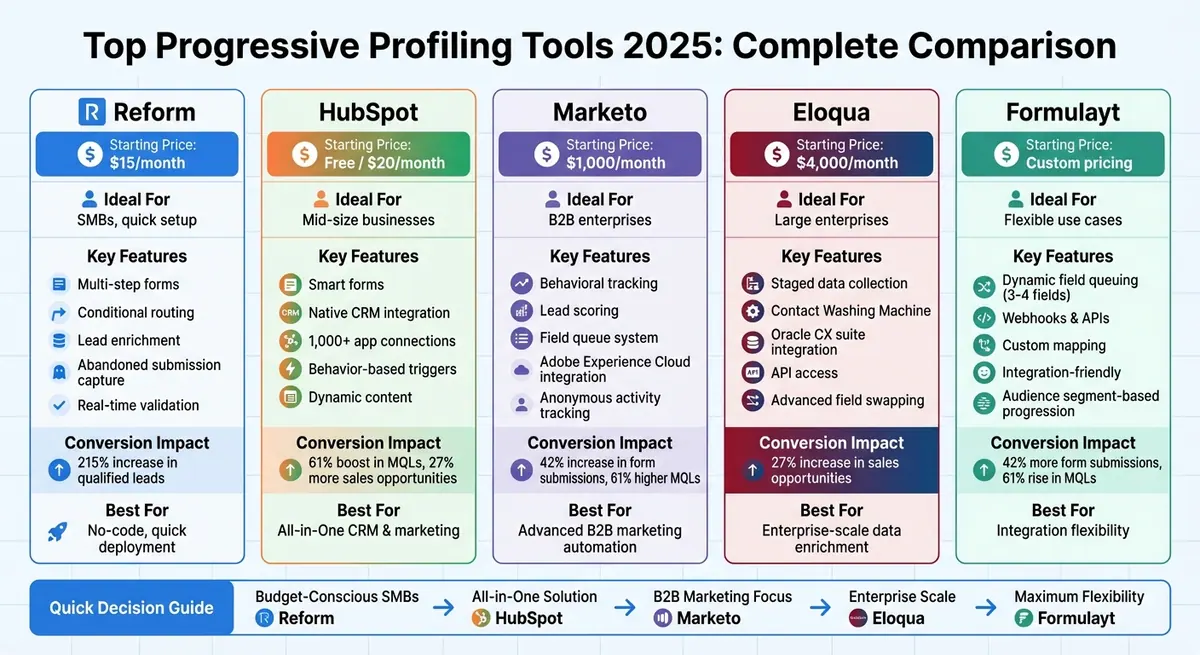
Progressive Profiling Tools Comparison: Features, Pricing & Performance
Smarter Forms in HubSpot with Progressive Profiling
1. Reform

Reform is a no-code form builder designed to improve conversion rates and gather prospect data through progressive profiling. It combines lead enrichment with multi-step forms, allowing you to collect information gradually. When a returning lead interacts with a form, Reform automatically adjusts its questions based on what’s already known about them. This dynamic approach sets the stage for its advanced features.
Progressive Profiling Features
Reform’s standout feature is its use of conditional routing and qualification logic. This means you can create rules that guide leads down different paths depending on their answers. For example, high-value prospects can be directed to a VIP scheduling link, while others might receive a prerecorded demo. The platform supports both single-question-per-page and multi-page formats, striking a balance between thorough data collection and user experience. Additionally, its abandoned submission capture feature saves partial data from users who leave mid-form, so you don’t lose valuable insights.
Integration with Marketing/CRM Tools
Reform integrates seamlessly with platforms like HubSpot and Salesforce, offering custom field mapping and duplicate management. Progressive profile data syncs in real time, ensuring your lead nurturing and segmentation workflows stay efficient. If you’re working with tools that don’t have native integrations, Reform also supports webhooks and APIs for added flexibility.
Customization Options
Branding your forms is straightforward with Reform. You can customize colors, logos, and layouts without needing any coding skills. For teams that require more advanced control, Reform provides options for custom CSS and headless forms, giving developers the freedom to tailor the design and functionality to their exact needs.
"Reform is what Typeform should have been: clean, native-feeling forms that are quick and easy to spin up. Reform does the job without a bunch of ceremony" - Derrick Reimer, founder of SavvyCal.
Impact on Conversion Rates
Reform’s multi-step forms and conditional logic have proven to deliver impressive results, including a 215% increase in qualified leads for B2B and SaaS companies. This aligns with industry data showing a 42% boost in form submissions. With features like spam prevention, email validation, and real-time analytics, Reform ensures you’re collecting accurate and actionable data. These tools also help you refine your forms by identifying where users tend to drop off, so you can continuously improve your lead capture process.
2. HubSpot
HubSpot's Marketing Hub includes native progressive profiling that automatically identifies returning visitors and adjusts form fields based on their previous interactions. For instance, the first form might only ask for basic details like name and email. On subsequent visits, the forms dynamically introduce new fields, such as job title or company size. This automatic rotation of fields, powered by the platform's contact properties and smart lists, eliminates repetitive questions and ensures a smooth experience for users. Similar to Reform, HubSpot uses this approach to build richer lead profiles effortlessly.
Progressive Profiling Features
HubSpot’s smart forms and dynamic content rely on conditional logic to display new fields tailored to each user's prior submissions and behavior. This setup is perfect for collecting detailed lead information over time without overwhelming prospects with lengthy forms at the start. You can prioritize fields based on your business rules, making it easy to gate premium content with more in-depth questions while keeping initial forms simple and approachable.
Integration with Marketing/CRM Tools
HubSpot goes beyond just profiling with its built-in CRM, ensuring seamless data flow across your marketing and sales tools. As an all-in-one CRM and marketing automation platform, it syncs progressive profiling data in real time with email workflows, sales pipelines, and contact records. It also integrates with external tools like Salesforce and Google Analytics via APIs and native apps. This means all enriched data from your forms is automatically updated across your entire tech stack. Features like custom field mapping and duplicate record handling ensure that new data enhances existing profiles without creating messy duplicates.
Customization Options
With HubSpot’s drag-and-drop form builder, you can create multi-step forms, add conditional fields, and even apply custom CSS for personalized designs. Built-in A/B testing and behavior-based triggers make it easier to refine and optimize your forms. Advanced features unlock at just $20/month with the Starter plan, while the free tier supports up to 1,000 contacts.
Impact on Conversion Rates
HubSpot’s progressive profiling has been shown to boost form submissions by up to 42%, increase qualified leads by 61%, and generate 27% more sales opportunities. The platform’s real-time analytics help pinpoint where users drop off, allowing you to optimize field sequences effectively. As profiles become more complete through multiple interactions, businesses typically see a 20–30% improvement in lead quality scores.
3. Marketo

Marketo, like Reform and HubSpot, uses progressive profiling to enhance lead data collection without overwhelming users. Adobe Marketo Engage offers a dynamic form system tailored for B2B marketing teams, making it easier to gather detailed information over time. By using cookies, Marketo identifies returning visitors and adjusts the form fields based on what’s already been collected. For example, a first-time visitor might only be asked for their name and email, while future visits prompt for details like company name, role, or contact preferences. This step-by-step method not only reduces friction but also highlights Marketo's advanced customization and integration capabilities.
Progressive Profiling Features
Marketo’s smart forms are designed to show only a few new questions per visit, thanks to its field queue system. You can control how many blank fields appear - typically two or three - keeping forms short and approachable. Over time, these forms build a rich database of demographic, firmographic, and behavioral data. The platform also tracks user engagement and web activity automatically, saving marketers from manual data entry. A standout feature is its ability to capture anonymous web activity and link it to a lead’s profile once they submit a form, instantly enriching their data with historical insights.
In addition to its form capabilities, Marketo ensures seamless integration with CRM tools for real-time data updates.
Integration with Marketing/CRM Tools
Marketo works effortlessly with platforms like Salesforce and Microsoft Dynamics 365, syncing progressive profile data directly to Lead, Contact, and Account records. It also integrates with tools like ZoomInfo, Clearbit, and 6sense, enabling marketers to keep forms short while building robust profiles behind the scenes. The platform’s behavioral tracking feature further enhances this process by associating anonymous activity with known leads after form submission, providing a comprehensive view of lead behavior.
Customization Options
Marketo offers extensive customization options, including custom fields, objects, and dynamic content, to create highly personalized nurture campaigns. Its smart campaigns can automatically adjust lead scoring, routing, and offers as profiles become more detailed. For advanced users, custom activities allow for tracking specialized data, such as feature usage or event attendance, making it easier to tailor marketing strategies.
Impact on Conversion Rates
Marketo’s progressive profiling approach delivers impressive results: a 42% increase in form submissions, a 61% boost in Marketing Qualified Leads (MQLs), and 27% more sales opportunities. Considering that over 90% of users abandon lengthy forms, Marketo’s method of collecting data in smaller increments significantly improves both conversion rates and lead quality. Its multi-touch attribution and revenue modeling tools also help marketers measure how these campaigns drive pipeline growth and revenue. Many customers report double-digit improvements in MQL-to-opportunity conversion rates, showcasing the effectiveness of this approach.
sbb-itb-5f36581
4. Eloqua
Oracle Eloqua is a platform tailored for enterprise B2B teams that need advanced tools for managing leads and nurturing customer relationships. It’s especially effective for progressive profiling, thanks to its form design editor. Marketers can configure field groups to control which questions appear and in what order. For instance, when a returning visitor accesses an Eloqua form, the system identifies them and only shows fields they haven’t completed yet. So, if someone downloads a second whitepaper, the form might ask for their role and company size instead of repeating questions like name and email. This smart recognition makes data collection smoother and more efficient.
Progressive Profiling Features
Eloqua’s progressive profiling revolves around staged data collection. Marketers can define tiers of questions, starting with basic contact details and gradually moving to more specific information like firmographics or qualifying details. Typically, forms are kept short, showing just three to five fields at a time. The platform also includes a Contact Washing Machine feature, which standardizes data like job titles and state names. This ensures that profiles stay organized and easy to segment, making follow-ups more accurate and effective.
Integration with Marketing/CRM Tools
Eloqua integrates seamlessly with major CRM systems like Oracle Fusion Sales, Salesforce, and Microsoft Dynamics, syncing data in real time. For example, when a contact updates their decision timeline or product interest, the CRM automatically reflects these changes. Beyond CRMs, Eloqua connects with tools like web analytics platforms, advertising systems, and customer data platforms (CDPs) through APIs and Oracle Integration Cloud. These integrations enhance audience segmentation and power targeted remarketing campaigns by combining detailed data collection with actionable insights.
Customization Options
Eloqua offers two form editors to suit different needs. The drag-and-drop Design Editor is perfect for marketers who want an easy-to-use interface, while the Source Editor gives developers full control over HTML and CSS. Conditional logic is another standout feature - marketers can set up follow-up questions based on previous answers. For example, if someone selects "within 6 months" as their timeline, the form might ask for their ideal implementation date. This flexibility ensures that profiling feels tailored and engaging for users.
Impact on Conversion Rates
When done right, progressive profiling can lead to impressive results. It’s been shown to boost form submissions by 42%, generate 61% more marketing-qualified leads (MQLs), and create 27% more sales opportunities. Eloqua’s step-by-step approach aligns with these industry trends, and users often see significant improvements in MQL-to-opportunity conversion rates when combining progressive profiling with adaptive lead scoring. Teams typically measure these results by A/B testing progressive and traditional forms over a four- to six-week period, tracking metrics like form completion rates, MQL volume, and pipeline growth.
5. Formulayt
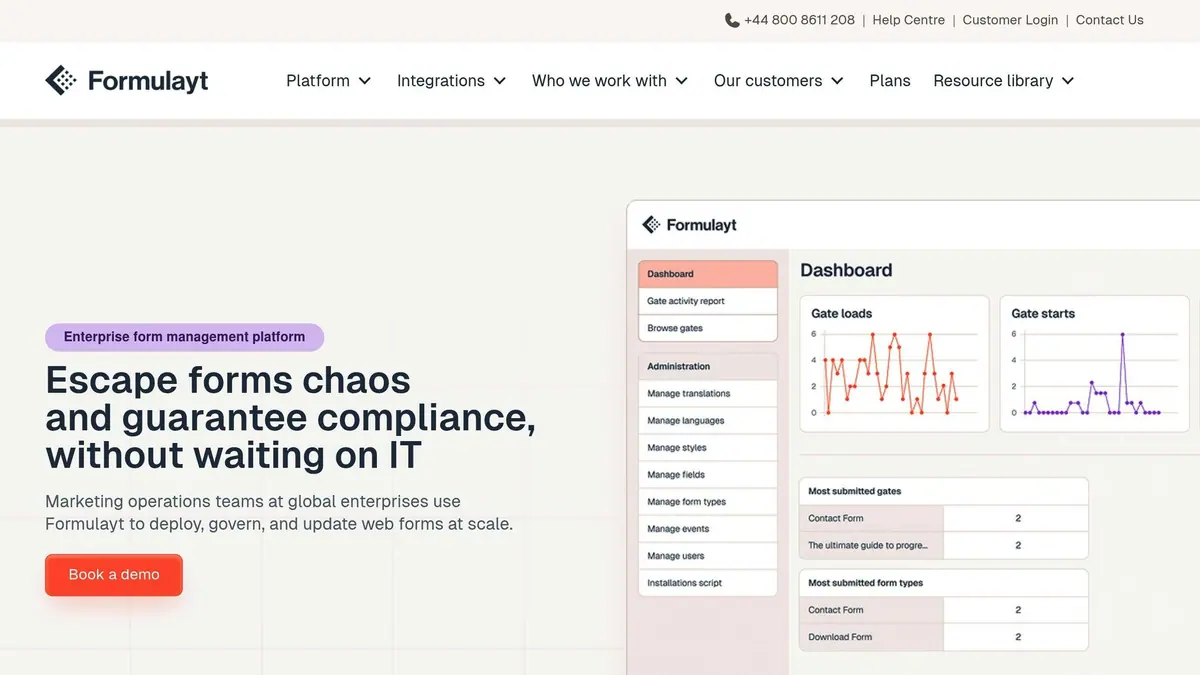
Formulayt takes progressive profiling to the next level by offering flexible form customization, making it easier for marketers to gather data across multiple sessions without disrupting the user experience. Designed to work seamlessly with platforms like Marketo, HubSpot, and Eloqua, Formulayt provides a fresh approach to progressive profiling that prioritizes both user convenience and data quality.
Progressive Profiling Features
One standout feature of Formulayt is its dynamic field queuing system. This allows marketers to control which questions are shown to returning visitors by setting up a prioritized list of fields. The goal? Keep forms short - usually just three to four fields - while gradually building a more detailed lead profile over time. For instance, a first interaction might only ask for an email and name to download a guide. On subsequent visits, the form might request additional details like company, phone number, industry, or job title. This approach minimizes form fatigue while ensuring marketing and sales teams get the data they need, one step at a time.
Integration with Marketing/CRM Tools
Formulayt integrates directly with popular marketing automation tools and CRMs, offering features like custom mapping and duplicate handling. It also supports webhooks, APIs, iframes, and web components, making it easy to connect with internal systems or platforms that don’t have built-in integrations. This gives technical teams the flexibility to deploy forms across a variety of digital channels without being tied to rigid systems.
Customization Options
Whether you prefer ready-made templates or fully customized solutions, Formulayt has you covered. Marketers can design form progression based on factors like audience segments, content value, or specific data points such as company size or pain points. This flexibility ensures that the data collection process aligns closely with sales and marketing strategies, enabling more precise and meaningful data capture.
Impact on Conversion Rates
By reducing form complexity, Formulayt directly addresses a major user pain point - long forms, which over 90% of consumers tend to avoid. Its user-friendly, progressive profiling approach can lead to impressive results, including up to a 42% increase in form submissions, a 61% boost in marketing-qualified leads, and a 27% growth in sales opportunities. This makes it a powerful tool for marketers looking to improve lead generation and overall conversion rates.
Tool Comparison Table
Here's a quick look at five progressive profiling tools, comparing their features, integrations, customization options, and how they impact conversions. Use the table below to see how they stack up side by side.
| Tool | Progressive Profiling Features | Integration Capabilities | Customization Options | Conversion Impact |
|---|---|---|---|---|
| Reform | Multi-step forms, conditional routing, lead enrichment (auto-fills data via web crawling), abandoned submission capture, "Finish Later" option, and real-time email validation | Deep CRM/marketing automation integrations with custom field mapping, webhooks, APIs, headless forms, and iFrame embedding | No-code branding, custom CSS & JavaScript, conversion-optimized templates, and three levels of customization | 215% increase in qualified leads for B2B and SaaS companies |
| HubSpot | Smart forms that adapt fields based on prior submissions and existing contact data | Native CRM integration plus 1,000+ app connections via its marketplace | CSS styling, behavior-based triggers, and queued field configuration without coding | 61% boost in MQLs, with 27% more sales opportunities |
| Marketo | Sequential data gathering through marketing automation and form field progression tied to lead scoring and behavioral triggers | Adobe Experience Cloud integrations and robust APIs for complex B2B pipelines | Configurable progressive forms using business rule engines for dynamic question sequencing | 61% higher MQLs and reduced form abandonment |
| Eloqua | Advanced field swapping, enterprise-scale data enrichment, and frictionless profiling across multiple touchpoints | Deep Oracle CX suite integration with robust API access for large-scale CRM data syncing | Tokens, dynamic content, and segmentation rules for personalized field progression | Streamlined lead nurturing with a 27% increase in sales opportunities |
| Formulayt | Dynamic field queuing limits interactions to typically 3–4 fields for gradual profile building | Direct integration with HubSpot, Marketo, and Eloqua, plus webhooks and APIs for custom connections | Audience segment-based progression, content value alignment, and custom mapping for specific data points | 42% more form submissions, 61% rise in MQLs, and 27% growth in sales opportunities |
Pricing Breakdown
- Reform: Starts at $15/month with unlimited responses.
- HubSpot: Offers a free tier, with advanced forms starting at $20/month and enterprise plans up to $3,600/month.
- Marketo: Pricing begins at $1,000/month.
- Eloqua: Starts at $4,000/month.
- Formulayt: Offers flexible, integration-focused plans.
Key Takeaways
If you're looking for quick deployment without technical hurdles, Reform and Formulayt stand out as no-code solutions. On the other hand, HubSpot, Marketo, and Eloqua cater to more complex workflows, offering advanced reporting, lead scoring, and full-funnel analytics. Ultimately, your choice depends on whether you prioritize ease of use or need robust tools for multi-touch campaigns.
Conclusion
Progressive profiling tools solve a major challenge for marketers: gathering detailed customer information without overwhelming potential leads with lengthy forms. By collecting data gradually, these tools allow businesses to build comprehensive customer profiles while keeping the user experience smooth and enjoyable.
When choosing a platform, consider factors like budget, technical requirements, and existing infrastructure. For small-to-medium businesses, no-code platforms like Reform offer quick setup and user-friendly interfaces. Larger enterprises with established marketing automation systems might prefer platforms like HubSpot, Marketo, or Eloqua, which include progressive profiling features that integrate seamlessly with analytics and lead scoring tools. Picking the right platform lays the foundation for a step-by-step data collection strategy.
Start with basic fields, such as an email address, and expand gradually as prospects engage further. Add firmographic details - like job title, company size, or industry - at appropriate stages of the buyer's journey. Each piece of information should have a clear role in helping you refine segmentation or create more personalized experiences.
To make the most of progressive profiling, regular optimization is key. Keep an eye on form completion rates, identify fields that lead to drop-offs, and ensure you're actively using the data you collect. The goal is to create meaningful connections with prospects, not to overwhelm them by gathering unnecessary details.
With third-party cookies being phased out, progressive profiling becomes even more critical for building reliable first-party data. This data fuels personalized campaigns across channels. Start with a platform that meets your needs today, roll out a phased data collection plan, and use performance insights to fine-tune your approach. This way, you can consistently generate better-quality leads while strengthening customer relationships.
FAQs
How does progressive profiling support data privacy and compliance?
Progressive profiling takes a thoughtful approach to data privacy and regulatory compliance by gathering small bits of information over time rather than asking for extensive details all at once. This method minimizes the risk of exposing unnecessary data and aligns with privacy regulations such as GDPR and CCPA.
By giving users control over when and what they share, progressive profiling builds trust and creates a more open and transparent experience. It also helps businesses collect only the essential data they need, making compliance simpler while prioritizing user privacy.
How do multi-step forms enhance lead generation?
Breaking up long forms into multi-step forms can significantly improve lead generation. Why? Because smaller, bite-sized steps feel more approachable and less intimidating for users, making them more likely to stick around and complete the process. This simple shift can reduce form abandonment and keep users engaged.
But that's not all. Multi-step forms also allow you to ask targeted questions at each stage, helping you gather more relevant information. This means better-qualified leads and, ultimately, higher conversion rates. It's a win-win for businesses looking to streamline their marketing efforts while improving lead quality.
What's the best way to connect progressive profiling tools with my CRM?
With Reform, integrating your CRM is a breeze thanks to its built-in API and webhook features. These tools allow for seamless data transfer and let you map custom fields effortlessly. The best part? You don’t need to be a tech expert to ensure your leads' details are automatically updated in your CRM.
Reform also helps simplify your processes by syncing enriched lead data in real time. This means your team can spend less time on manual updates and more time crafting tailored marketing and sales strategies - all while keeping your data accurate and up-to-date.
Related Blog Posts
Get new content delivered straight to your inbox

The Response
Updates on the Reform platform, insights on optimizing conversion rates, and tips to craft forms that convert.




Drive real results with form optimizations
Tested across hundreds of experiments, our strategies deliver a 215% lift in qualified leads for B2B and SaaS companies.
