
.webp)
Ultimate Guide to Lead Nurture Content Formats



Most leads don’t turn into pipeline because the follow-up is off, not because the top of funnel is weak. If I want nurture content to work, I need to match each format to buyer intent, trigger it from behavior, and hand high-intent leads to sales fast.
Here’s the short version:
- Lead generation forms get the contact. Lead nurturing moves the deal.
- The best formats change by stage:
- Awareness: guides, short emails, reports
- Consideration: playbooks, templates, case studies
- Validation: ROI tools, product tours, webinars
- Decision: demos, trials, pricing and approval content
- Behavior should drive timing. A pricing-page visit, trial signup, repeat feature-page visits, or 30–60 days of inactivity should each trigger a different path.
- Forms should do more than gate content. I can use multi-step forms to collect role, company size, timeline, and use case, then send each lead into the right track.
- Measurement should focus on stage movement, not vanity metrics like opens. Watch:
- Visitor-to-lead
- Lead-to-MQL
- MQL-to-SQL
- SQL-to-opportunity
- Opportunity-to-close
- The article’s main stats are hard to ignore: teams with nurture programs see 50% more sales-ready leads at 33% lower cost, and nurtured leads can move through the sales cycle about 23% faster.
A simple rule runs through the whole piece: send the next best format for the next buyer question. That’s what turns content into pipeline instead of just activity.
How Lead Nurturing Works (Automate!)
sbb-itb-5f36581
Map Content Formats to Funnel Stages and Buyer Questions
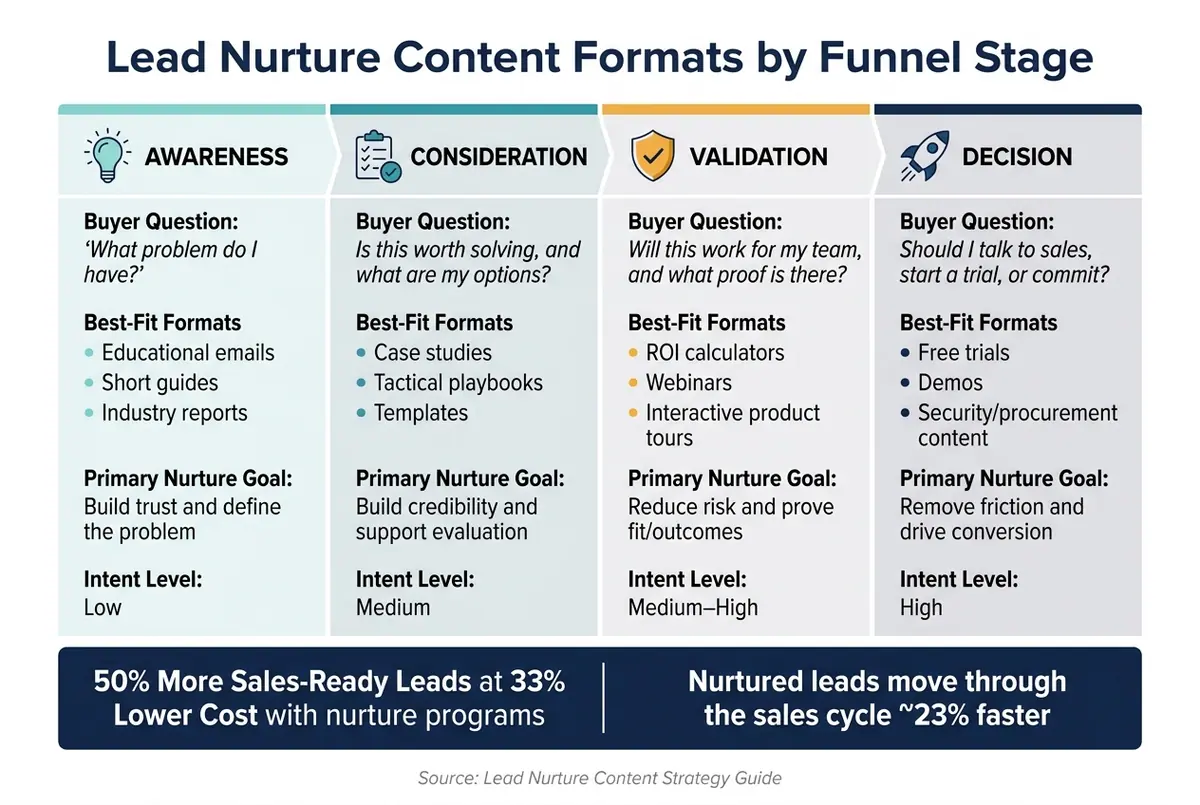
Lead Nurture Content Formats by Funnel Stage
Producing content without a funnel map makes nurture too generic. Someone who just found your product doesn't need a pricing comparison. And a buyer who has visited your pricing page more than once doesn't need yet another intro blog post.
The fix is simple: match the format to the buyer's stage, not to the next step you want them to take.
A funnel map shows the workflow what to send, when to send it, and what should happen next. It also sets the path each lead moves into after that.
The table below maps each funnel stage to the question a prospect is actually asking, the formats that answer it best, and the main nurture goal.
| Funnel Stage | Buyer Question | Best-Fit Formats | Primary Nurture Goal |
|---|---|---|---|
| Awareness | "What problem do I have?" | Educational emails, short guides, industry reports | Build trust and define the problem |
| Consideration | "Is this worth solving, and what are my options?" | Case studies, tactical playbooks, templates | Build credibility and support evaluation |
| Validation | "Will this work for my team, and what proof is there?" | ROI calculators, webinars, interactive product tours | Reduce risk and prove fit/outcomes |
| Decision | "Should I talk to sales, start a trial, or commit?" | Free trials, demos, security/procurement content | Remove friction and drive conversion |
Awareness and consideration formats
Early-stage leads are trying to understand the problem, not judge your product. That means the format should help them name the issue, see why it matters, and stay engaged long enough to learn more.
This is where stage-specific CTAs matter. "Download the guide" fits awareness. "See it in action" fits consideration. Small shift, big difference.
Consideration content moves the conversation from what's going wrong to which approach makes sense. Case studies, customer success stories, and tactical playbooks help buyers figure out whether the problem is worth solving and what solving it could look like. Social proof works best when it matches the buyer's company size and industry. A startup wants to see a startup story. An enterprise team wants proof from a company that looks like them.
Validation and decision formats
By the validation stage, buyers want proof. Not broad claims. Not top-level education. They want to know if the solution will work for their team.
The best content here answers that with concrete evidence: real results, workflow walk-throughs, and plain explanations of how setup or rollout works. In other words, this is where you make the fit feel less like a guess.
Decision-stage content has one job: make the next step easy. At this point, the CTA should be direct, like "Book a pipeline review" or "Start your free trial." It should not send people back to another educational asset.
This is also where content gaps tend to show up. Auditing your asset library at the decision stage is often the highest-leverage move, because even strong nurture programs can fall apart right before handoff. By this point, the content should make the sales handoff feel obvious.
Next, narrow these options into the format mix that fits each nurture track.
How to Choose the Right Lead Nurture Content Formats
Pick content formats based on buyer stage and intent, not on what's easiest to make. That's the difference between content that fills a calendar and content that moves someone forward. The matrix below turns that idea into choices you can plug into your workflow.
| Format | Funnel Stage | Primary Job | Intent Level | Common Trigger |
|---|---|---|---|---|
| Welcome email | Awareness | Set expectations, guide first step | Low | Form submission (Day 0) |
| Educational sequence | Consideration | Build knowledge, show quick wins | Medium | 2–4 days after signup |
| Templates / playbooks | Consideration | Show how the solution fits their workflow | Medium | Resource download |
| Case studies / benchmarks | Validation | Prove ROI, reduce risk | Medium–High | High engagement, pricing page visit |
| Objection-handling email | Decision | Remove blockers, support internal approval | High | Pricing page visit, trial stall |
| Webinar / demo | Decision | Deep product walkthrough | High | Repeat feature-page visits, demo request |
| Free trial / onboarding email | Activation | Drive first-value moment | High | Trial signup |
| In-app prompt / upgrade nudge | Activation | Push toward key action or paid plan | High | Usage threshold, trial day 5–7 |
| Dormant-lead campaign | Re-engagement | Re-engage or move out of the track | Low–Variable | 30–60 days of inactivity |
| Multi-step form / diagnostic | All stages | Capture context for segmentation | Variable | Gated content, trial signup |
Email, educational, and proof content
The welcome email is your first touch after conversion. Send it on Day 0, right after the form submission, when interest is still high. Keep it short and clean: confirm the action, explain what happens next, and give the lead 1–2 clear next steps, like watching a two-minute overview or finishing their profile.
Days 2 through 4 should focus on education. Two or three short emails with quick wins, how-to tips, short videos, or a mini-guide help leads get early value without dumping too much on them at once.
Proof content should follow clear engagement signals. That includes pricing page visits, repeated opens, or in-app activity. This is when case studies, benchmark reports, and objection-handling emails start to land. At that point, the buyer isn't just trying to figure out what the product is. They're trying to decide whether it will work for a company like theirs. Triggering proof content after high engagement makes the message feel timely instead of generic.
After format selection comes automation timing.
Activation, conversion, and re-engagement content
Activation content has one job: get the lead to their first meaningful moment inside the product. In a 14-day trial, that usually starts with a Day 0–1 onboarding email that includes a simple setup checklist. Then on Day 2–3, an in-app prompt can push a key action, like connecting an integration or inviting a teammate. By Day 5–7, if the lead has already completed at least one core action, a live group demo or consultative webinar invite fits well.
Conversion content should kick in when behavior says the lead is serious. Multiple logins, heavy feature usage, or a pricing page visit are strong signs. That's when a personalized demo or consultation offer tends to work best, because it's tied to the lead's actual usage data and use case. Upgrade nudges also tend to work well 3–5 days before trial expiry. Pair in-app messaging with email so the lead can see exactly what they get by moving to a paid plan.
Re-engagement campaigns are for leads who've gone quiet, usually after 30 or 60 days with no logins or email opens. Start with value, not pressure. Share new features shipped, a new playbook, or a short new-features video. Then add a low-friction CTA, like a 15-minute audit offer, along with a one-click status update so leads can opt out if they're no longer interested.
These formats work best when they're triggered by clear behavioral signals.
Form-based formats that improve segmentation and routing
Forms often get treated like a gate before content delivery. That's too narrow. They should be treated as segmentation infrastructure. The fields you ask for should shape the nurture track, the content a lead sees, and how sales routing works.
A good multi-step form spreads questions across a few steps so you reduce friction while still collecting useful context. Step 1 captures contact info. Step 2 asks about company context. Step 3 brings out goals or timeline. If a lead says their timeline is within 3 months and they identify as a revenue or operations leader, they can go straight into a high-intent track with case studies and demo invites. Everyone else can move into a lighter educational sequence.
Use multi-step forms, conditional routing, real-time lead enrichment, and validation to collect better routing data. A tool like Reform supports this without requiring engineering involvement, which means marketers can update form logic and segmentation questions as the ICP changes. Those signals then feed the routing rules covered next.
Once formats are selected, the next step is wiring them to triggers and CRM handoff rules.
Build Automated Workflows, Triggers, and CRM Handoff Rules
Content formats only do their job when each trigger sends leads down the right path. The fix is simple: map every common trigger to one content path.
Entry Triggers and Automation
Form completions should route leads based on role, company size, use case, and timeline.
Other high-value triggers include pricing page visits - especially two or more within 7 days - trial activations, webinar registrations, and meeting booked. Each one signals a different level of intent, so each one should send the lead into a different flow. For example, if a known lead visits the pricing page and already has a score above your MQL threshold, that lead should get decision-stage content and an SDR alert, not another educational email. A webinar no-show needs a replay link and a short summary, not the same follow-up you’d send to someone who showed up live.
A 30-day inactivity trigger should move leads into a re-engagement flow and pause the main sequence until they engage again.
Here’s how the most common workflow types map to triggers, content formats, and handoff rules:
| Workflow Type | Entry Trigger | Core Formats | Handoff Condition | Result |
|---|---|---|---|---|
| New lead nurture | Form submission, content download | Welcome email, educational sequence | Score crosses MQL threshold | New lead → MQL |
| Trial activation | Trial signup, stalled onboarding | Setup checklist, product tips, activation email | Core feature used or rep follow-up needed | Improved adoption, trial conversion |
| Consideration nurture | Case study download, repeat solution-page visits | Comparison guide, case study, webinar replay | Pricing page visit, high engagement score | Sales-ready interest |
| Decision / high-intent | Demo request, pricing page visit (2+), meeting booked | Proof content, ROI calculator, objection-handling email | Meeting booked or SQL acceptance | Opportunity created |
| Re-engagement | 30–60 days of inactivity | Win-back email, new feature update, alternative offer | Re-engagement click or new activity | Restore active nurture or re-score |
| MQL handoff | MQL threshold crossed, high-intent action | Internal alert, CRM task, handoff summary | Rep acceptance within SLA | Timely follow-up, reduced lead decay |
Build suppression rules at the same time. Contacts already tied to an active deal, already in a later-stage track, marked as customers, or unsubscribed should stay out of early-stage nurture. That stops mixed messages and keeps the experience clear.
CRM Handoff from MQL to SQL
Trigger logic means very little if it doesn’t move the right lead to sales at the right time.
Once routing is in place, lock down the marketing-to-sales handoff.
Speed is the part most teams underrate. Research shows leads contacted within 5 minutes are 21x more likely to qualify than those contacted after 30 minutes. At the same time, the average business takes 47 hours to respond. That’s where deals start slipping away.
A clean handoff starts with plain agreement on what MQL and SQL mean. MQL criteria should blend fit - like role and company size - with engagement, such as a lead score threshold or a pricing page visit. SQL criteria should be tighter. They should require at least one of these signals: an explicit meeting request, repeated high-intent behavior, or qualifying form answers like a confirmed budget, a timeline within 90 days, or decision-making authority.
When a lead crosses the MQL threshold, automation should immediately update the lifecycle stage in the CRM, notify the assigned rep, create a task with a response deadline, and remove that lead from earlier-stage nurture. Sales reps shouldn’t have to dig around for context.
Pass sales the lead’s source, product interest, company size, timeline, and last 5–10 actions. That context should shape both response speed and rejection feedback.
Set a response SLA for high-intent leads and enforce it. If the assigned rep doesn’t accept within the set window, the lead should be reassigned or escalated on its own. Also build a rejection feedback loop so sales can flag low-quality MQLs. That input helps tighten scoring and routing over time.
Test, Measure, and Improve Your Nurture System
Metrics that show content impact across the funnel
Once your workflow is live, the next step is simple: check whether each content format moves leads to the next stage.
A lot of SaaS teams watch opens and downloads. The problem? Those numbers don’t tell you if content is helping turn interest into revenue. What matters more is stage-to-stage movement.
| Funnel Stage | Key Metrics | Signal | Formats to test |
|---|---|---|---|
| Awareness | Visitor-to-lead rate, content downloads | Initial interest and problem recognition | Whitepapers, educational blog posts, checklists |
| Consideration | Lead-to-MQL rate, webinar attendance | Solution fit and active research | Webinars, comparison guides, expert templates |
| Validation | MQL-to-SQL rate, reply rate, content completion | High intent and readiness for sales | Case studies, ROI calculators, plain-text outreach |
| Decision | SQL-to-opportunity rate, trial activation | Evaluation of specific product value | Product demos, free trials, pricing sheets |
| Closed-Won | Opportunity-to-close rate, feature adoption | Final conversion and long-term retention | Onboarding sequences, implementation guides |
Use these stage metrics to decide which triggers and formats stay in the workflow.
Apple Mail Privacy Protection can inflate open rates, so don’t lean on opens as a main trigger. Put more weight on actions like clicks, form fills, page visits, and downloads. Also track MQL-to-SQL speed and rep acceptance rate to make sure your handoff rules are doing their job.
Testing paths and optimization priorities
Once you can see movement by stage, start testing the parts that shape it most: the entry offer, the form path, and the email format.
This is where many teams miss the mark. If your first offer pulls in the wrong audience, no amount of downstream tuning will clean that up. The entry offer sets the tone for lead quality across the whole nurture track.
After that, test form length, field order, and routing rules against two things: completion rate and MQL quality.
For email sequences, plain-text emails are worth testing in the middle of the funnel. They often get more replies during consideration and validation because they feel more personal. Soft CTAs can help too. For example, "just reply and let me know" can start more conversations than a hard "book a demo" button when a lead isn’t ready for sales yet.
Use the same tracking setup across all nurture assets so you can see which formats add to pipeline, not just traffic. In practice, that means reviewing conversion by stage instead of staring at one-off engagement numbers.
You’ll also want a sunset policy. Leads that haven’t engaged for 90 to 120 days should be removed from active nurture to protect deliverability. Before you suppress them, send them to a preference center. That gives interested contacts one last chance to stay in. Everyone else should be suppressed so your metrics reflect active demand, not just a big list.
Conclusion: How to Choose and Run Lead Nurture Content
Every choice in a nurture system comes back to one thing: does this content move the right lead closer to a buying decision?
That applies to format selection, trigger logic, CRM handoff, and measurement.
Pick formats based on funnel stage and the exact question the buyer is trying to answer at that point. Tie each format to a clear behavioral trigger, like a click, form fill, or pricing page visit, instead of relying on a fixed delay. Gather better qualification data early through smart form design so leads land in the right workflow from the start. Then hand leads to sales with full context: source, intent signals, product interest, and recent activity.
And when you measure results, focus on pipeline movement:
- Visitor-to-lead
- Lead-to-MQL
- MQL-to-SQL
- SQL-to-opportunity
- Opportunity-to-close
The teams that do this well don’t win because they publish more content. They win because their content shows up at the right moment, connects to the right trigger, and gets judged by the right outcome.
FAQs
How do I map content to each funnel stage?
Match your content to what each target persona needs, thinks, and asks at each point in the journey. In the awareness stage, help buyers name the problem or need they’re dealing with. Don’t jump straight into your product.
As people get closer to buying, each piece of content should do one clear job - educate, engage, or persuade - and point to one next step. Then use trigger-based campaigns to send that content when a person’s behavior shows they’ve moved to a new stage.
Which behavior triggers should start a nurture sequence?
Start a nurture sequence based on specific behavioral signals, not random timing. Good triggers include:
- form fills
- content downloads
- pricing page visits
- email link clicks
These actions help keep the sequence tied to what the lead cares about right now. That matters. A person who visits your pricing page is in a very different place from someone who just downloaded a top-of-funnel guide.
When you use behavior as the trigger, the next step feels more natural. You can move leads into a sales-ready track when they show buying intent, or shift them into a re-engagement track when interest starts to fade.
What metrics best show whether nurture content is working?
Focus on conversion rates first. Look at sales, but don’t stop there. Track other actions that matter too, like page views, content downloads, and form submissions that push prospects through the funnel.
You should also measure impact on conversion and velocity. That helps you see if nurturing is turning into pipeline and revenue, not just activity on a dashboard.
Click-through rates still have a place, but mostly as diagnostic signals. They can hint at interest or friction. The metrics that matter more are outcome-based ones, like reply rates, meeting rates, and SQL conversion, rather than email opens.
Related Blog Posts
Get new content delivered straight to your inbox

The Response
Updates on the Reform platform, insights on optimizing conversion rates, and tips to craft forms that convert.




Drive real results with form optimizations
Tested across hundreds of experiments, our strategies deliver a 215% lift in qualified leads for B2B and SaaS companies.
