
.webp)
Zoho CRM vs Competitors: Integration Features Compared



Looking for a CRM that fits your business needs? Here's a quick breakdown: Zoho CRM stands out for its affordable pricing and built-in integrations, Salesforce offers unmatched customization for complex setups, and HubSpot CRM combines simplicity with advanced marketing tools - though it can get expensive as your needs grow.
Key Takeaways:
- Zoho CRM: Best for small to midsize businesses (SMBs) with tight budgets. Offers native integrations with tools like Zoho Forms, Google Workspace, and Zoho Marketing Automation. Includes no-code automation via Zoho Flow.
- Salesforce: Ideal for enterprises needing advanced customization. Comes with a vast AppExchange marketplace but requires more technical expertise and higher costs.
- HubSpot CRM: Great for marketing-driven teams. Provides built-in tools for forms, email, and ads but costs rise significantly for advanced features.
Quick Comparison:
| Feature | Zoho CRM | Salesforce | HubSpot CRM |
|---|---|---|---|
| Lead Capture | Web forms, Zoho Forms, APIs | Web-to-Lead, AppExchange apps | Built-in forms, pop-ups, landing pages |
| Automation | Visual workflows, Zoho Flow | Advanced with Marketing Cloud | Visual workflows, behavior triggers |
| Integration | 40+ Zoho apps, Google Workspace | Extensive AppExchange | All-in-one Hub ecosystem |
| Price (USD/user/month) | $14–$23 (lower cost) | $75–$150+ (higher cost) | Free CRM; advanced features $45–$800+ |
Bottom Line: Zoho CRM offers a cost-effective solution for growing SMBs. Salesforce is best for large enterprises needing tailored solutions. HubSpot works well for marketing-heavy operations but can strain budgets for advanced tools. Choose based on your integration needs, budget, and team size.
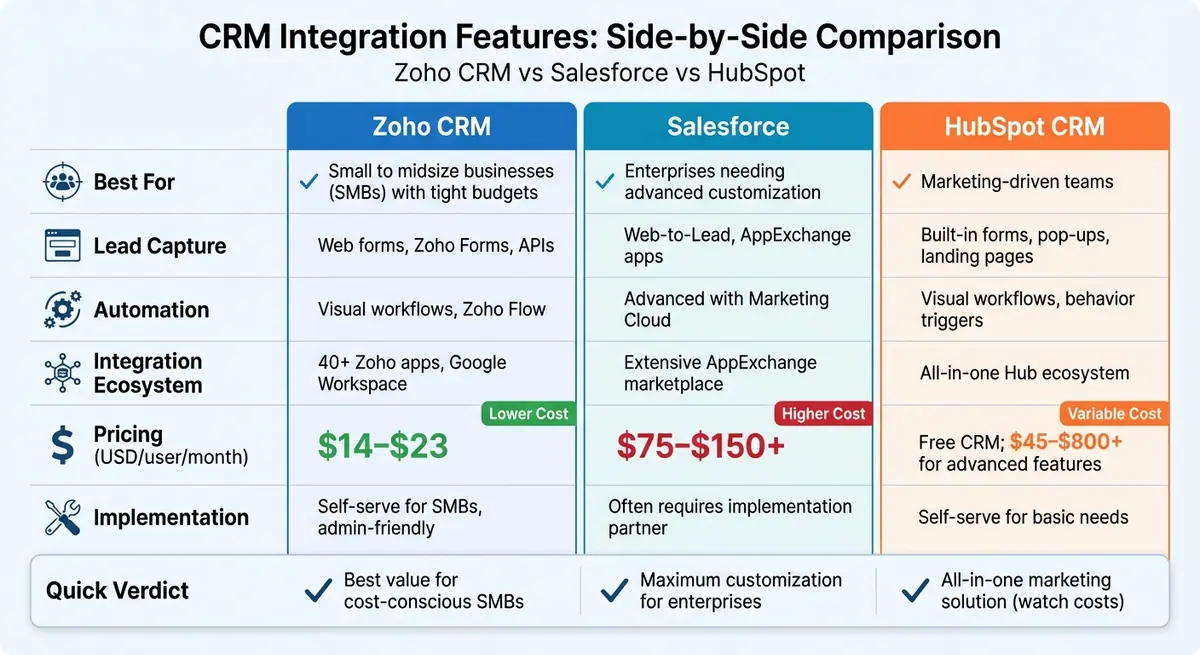
Zoho CRM vs Salesforce vs HubSpot: Integration Features and Pricing Comparison
Zoho CRM Integration Features: What's Included
Native Connections and App Ecosystem
Zoho CRM serves as the hub for a network of over 40 interconnected apps, all designed to work seamlessly without relying on third-party connectors. This means you get deep, built-in integrations with tools like Zoho Campaigns, Zoho Marketing Automation, Zoho Forms, Zoho Desk, Zoho Analytics, and Zoho Books. These connections go beyond simple contact syncing - they enable features like campaign membership tracking, behavioral analytics, advanced segmentation, and maintaining a full history of support tickets. Instead of juggling CSV exports or one-way syncs, teams can manage campaigns, customer journeys, dashboards, and support tickets directly within the CRM, creating a unified view of every customer.
In addition to its native apps, Zoho CRM integrates effortlessly with popular productivity tools. For example, it connects with Google Workspace (Gmail, Calendar, Drive) and Microsoft 365 (Outlook, Calendar, OneDrive, SharePoint). These integrations let sales teams log emails, schedule meetings that sync across both platforms, and attach files to deals - all without duplicating data entry. There's also a Slack integration that streamlines team collaboration by delivering real-time notifications - such as new leads, deal updates, or stage changes - directly to Slack channels where teams are already working.
APIs, Webhooks, and Workflow Automation
Zoho CRM offers a powerful REST API, giving developers the tools to programmatically manage CRM records. This flexibility supports a range of use cases, like syncing data with billing systems, e-commerce platforms, or custom-built tools. On top of that, webhooks enable the CRM to send real-time HTTP callbacks to external systems whenever key events occur - whether it's a new lead, a deal status update, or a closed sale. This ensures that all your systems stay updated in real time.
For those who prefer a no-code approach, Zoho Flow is a game-changer. This automation tool allows businesses to create workflows triggered by CRM events, such as adding a new lead or moving a deal to the next stage. It also integrates with external apps, automating tasks like generating invoices, posting updates in Slack, updating project boards, or registering webinar attendees. With Zoho Flow, operations and revenue teams can design automated, cross-platform workflows without needing advanced coding skills or costly middleware solutions.
Lead Management and Form Integrations
Zoho CRM makes lead management simple with its built-in web-to-lead forms and Zoho Forms, which help businesses capture, assign, and qualify leads efficiently. For those needing more advanced functionality, third-party tools like Reform add features like multi-step flows and conditional routing. These forms are directly mapped to lead fields, so every submission automatically creates or updates a lead record. Leads are then assigned, scored, and set up for follow-up tasks like emails or action items.
Third-party form builders, such as Reform, can also integrate through APIs or Zoho Flow to enhance the lead capture process. Features like real-time email validation and advanced spam prevention ensure higher-quality data. Teams in the U.S. can use multi-step flows and conditional routing to collect detailed qualification data, directing high-priority leads to sales while nurturing lower-priority submissions through targeted campaigns. This setup not only streamlines lead management but also improves response times and ensures cleaner, more actionable data.
Next, we’ll explore how these integration features compare to Salesforce.
Zoho CRM vs Salesforce: Integration Capabilities
Lead Capture and Form Integration
When it comes to handling form capture, Zoho CRM and Salesforce take noticeably different routes - something U.S. businesses dealing with a high volume of leads should carefully evaluate. Zoho CRM offers native forms equipped with a drag-and-drop interface for field mapping and pre-submission validation. This approach minimizes syncing issues and simplifies setup, making it a good option for teams with limited administrative resources. On the other hand, Salesforce's Web-to-Lead feature generates HTML forms and automates lead creation but often requires additional configuration through admin tools or coding with Apex/Flow.
For external form builders, Zoho CRM supports real-time syncing using REST APIs or Zoho Flow. Salesforce provides similar integration options through REST or Bulk APIs but often relies on third-party middleware like Zapier or Make. However, these workflows can be constrained by Salesforce's API limits. U.S. businesses managing high-traffic forms may find Salesforce's API limits and associated costs steering them toward dedicated platforms or solutions like Marketing Cloud or Pardot. In contrast, Zoho CRM users can often handle integrations within Zoho Flow while staying within Zoho's API quotas. These differences in form integration set the stage for broader discussions about marketing and attribution capabilities.
Marketing Campaign and Attribution Integration
Zoho CRM simplifies marketing campaign tracking by offering native integration with Google Ads. This feature pulls campaign and keyword data into the CRM, links it to leads and deals, and calculates ROI - all without requiring extra marketing tools. For small and medium-sized businesses (SMBs) in the U.S., this setup provides straightforward click-to-revenue insights without the need for additional software. Salesforce, by comparison, requires extra products like Pardot or Marketing Cloud to deliver similar campaign tracking, multi-touch attribution, and Google Ads integrations. These add-ons increase licensing and implementation costs for businesses seeking comparable functionality.
Zoho CRM also integrates seamlessly with Zoho Campaigns and Zoho Marketing Automation, allowing users to sync lists, track campaign statuses, and access basic engagement metrics directly within CRM records. This streamlined setup is ideal for smaller teams managing email campaigns and basic automation. In contrast, Salesforce's channel integrations often involve third-party apps from the AppExchange or tools like Marketing Cloud, which come with more complex data synchronization requirements and steeper learning curves. These distinctions highlight the varying levels of complexity and cost between the two platforms.
Integration Ecosystem and Costs
Zoho CRM provides a well-rounded in-house ecosystem that includes tools like Zoho Books, Zoho Desk, Zoho Campaigns, and Zoho Flow. These pre-integrated apps address core business needs, reducing both implementation time and the risk of data fragmentation. Salesforce, on the other hand, boasts a larger AppExchange marketplace with enterprise-grade integrations for CPQ, billing, analytics, and industry-specific solutions, supported by an extensive partner network.
Both platforms offer REST APIs, but Salesforce's stricter API call limits - often tied to the edition and user count - can pose challenges for businesses relying on multiple external tools. Zoho CRM's API quotas, designed for SMBs, are generally sufficient for moderate to heavy integrations. According to Zoho's total cost of ownership (TCO) comparison, Salesforce's licensing and add-ons can cost three to four times more over a five-year period for similar usage across sales, marketing, support, and analytics.
For U.S. SMBs that need integration-heavy solutions but have limited resources, Zoho CRM's simpler tools - such as Blueprints and Zoho Flow - are easier to manage without extensive technical expertise. Meanwhile, Salesforce is better suited for organizations that require governance, scalability, and advanced engineering-driven solutions.
Zoho CRM vs HubSpot CRM: Marketing Automation and Lead Management
Form Integration and Lead Capture
When it comes to form integration, Zoho CRM and HubSpot CRM take distinct paths, each catering to different business needs for managing high-volume lead capture. Zoho Forms allows submissions to flow directly into Zoho CRM, with options for customizable field mapping and validation. This setup is ideal for businesses that need branded, multi-step forms with features like advanced lead enrichment and spam prevention. On the other hand, HubSpot offers built-in form tools that work seamlessly across its free and paid Marketing Hub tiers. These forms automatically create or update contact records and can trigger workflows without requiring additional middleware.
Both platforms include custom field mapping for capturing essential lead data. Zoho lets users map form data to leads, contacts, or custom modules, enabling workflow automation for lead assignment and follow-ups. HubSpot, in comparison, maps directly to standard and custom properties, with automatic enrichment available at higher subscription tiers. HubSpot’s native forms are a good fit for teams seeking quick implementation with minimal setup, while Zoho appeals to businesses that need more flexible form-building options or are already invested in Zoho’s broader app ecosystem. Plus, Zoho typically offers lower subscription costs, which can be a deciding factor for budget-conscious teams.
Next, let’s explore how these platforms handle broader marketing automation and channel integration.
Marketing Automation and Channel Integrations
Zoho CRM integrates with tools like Zoho Campaigns and Zoho Marketing Automation to manage email campaigns, list segmentation, and journey automation. These integrations tie directly to CRM records, allowing triggers based on lead status, deal stages, or engagement metrics. This setup is well-suited for small to midsize U.S. businesses focused on email nurturing or basic drip sequences. For broader marketing needs, Zoho also connects with Zoho Social for social media management and integrates with Google Ads, enabling businesses to sync leads and track ad performance directly within the CRM.
HubSpot’s Marketing Hub, however, delivers a more advanced suite of automation tools. It includes visual workflows, behavior-based triggers across email, web, and ads, advanced lead scoring, content creation tools, and robust attribution reporting - all accessible from the same interface as the CRM. HubSpot also provides built-in integrations for email campaigns, ad management (Google Ads, Facebook, LinkedIn), live chat, and social publishing. This creates a centralized view of each contact’s interactions across channels, backed by strong analytics. For businesses running complex, multi-step nurture campaigns, HubSpot’s automation capabilities are more comprehensive, though they come at a higher cost.
These differences highlight how each platform fits into multi-tool marketing stacks.
Fit for Multi-Tool Stacks
Zoho and HubSpot take different approaches to integrating with external tools, which can influence how well they align with your overall tech stack. Zoho Flow, a no-code integration platform, connects Zoho CRM with hundreds of third-party apps, including external form builders, analytics tools, and specialized ad platforms. This flexibility allows businesses to build customized stacks - such as using Reform for forms or a dedicated SMS provider - while keeping customer data centralized in Zoho CRM. Zoho’s modular structure often results in lower costs per user, making it a strong choice for SMBs looking to balance functionality and affordability.
HubSpot, by contrast, leans into an all-in-one model, encouraging businesses to rely on its native Hubs (Marketing, Sales, Service, Operations) for most needs. While this simplifies vendor management and reduces the learning curve for users, it may be less flexible for teams that prefer specialized tools or want to avoid higher-tier subscriptions for specific features. While HubSpot CRM is free at its core, most advanced marketing automation and reporting features are locked behind paid Marketing Hub tiers, which can cost hundreds or even thousands of dollars per month as your contact list and feature requirements grow. For businesses that prioritize cost control and flexibility, Zoho’s suite - combined with Flow automation - often provides comparable functionality at a lower total cost.
Ultimately, these integration strategies play a key role in determining which CRM aligns best with your lead management and marketing goals.
sbb-itb-5f36581
How to Choose the Right CRM for Integration Needs
Key Integration Features Compared
When comparing Zoho CRM, Salesforce, and HubSpot CRM, several critical features stand out. Here's a breakdown of how these platforms handle lead capture, automation, integration capabilities, and costs for U.S.-based businesses managing multi-tool marketing stacks:
| Feature | Zoho CRM | Salesforce | HubSpot CRM |
|---|---|---|---|
| Native Lead Capture | Web forms, Zoho Forms integration, chat | Requires AppExchange apps or Marketing Cloud/Pardot | Built-in forms, pop-ups, landing pages, chat |
| Form Builder Compatibility | Works well with Zoho Marketplace, Zapier, and no-code tools like Reform | Typically relies on AppExchange or custom APIs; setup can be more complex | Native forms with easy compatibility for external builders |
| Automation Level (Mid-Tier) | Visual workflows, lead scoring, routing via Zoho Flow and Marketing Automation | Advanced workflows and triggers, often requiring Marketing Cloud for full functionality | Visual workflows, behavior-based triggers, and multi-channel automation |
| App Marketplace Size | Large Zoho ecosystem and third-party apps | Extensive AppExchange with thousands of apps | Large marketplace offering plug-and-play integrations |
| API & Webhook Access | Available on lower tiers, developer-friendly | Powerful APIs, but often requires technical expertise | Strong API support, accessible on most tiers |
| Indicative Pricing (USD/user/month) | Lower cost; free tier available, paid plans start around $14–$23 | Higher cost; enterprise plans range from $75–$150+, plus Marketing Cloud fees | Free CRM; advanced features range from $45–$800+ depending on contacts and tools |
| Implementation Complexity | Self-serve for SMBs; admin-friendly | Often requires an implementation partner for complex setups | Self-serve for basic needs; advanced setups may need external support |
From this comparison, Zoho CRM stands out for its broad integration capabilities at a lower cost, Salesforce excels in enterprise-level customization but comes with added complexity and expense, and HubSpot offers an all-in-one solution with costs that increase as your needs grow. Each platform has its strengths, making the choice dependent on your specific integration and budget requirements.
What to Consider When Choosing a CRM
Beyond features, selecting the right CRM requires a closer look at your business's unique needs. Start by mapping out all the tools interacting with your leads or customers - ad networks, form builders, email platforms, webinar tools, and billing systems. Pay attention to how leads flow from capture to CRM, including field mapping, deduplication, enrichment, and routing. For high-volume U.S. campaigns, this process helps identify whether a CRM can handle automation on its own or relies on middleware.
Think about your team's technical expertise and the level of automation you need. For simpler setups, prioritize CRMs with easy, plug-and-play connectors that sync with your existing tools. Zoho CRM and HubSpot are often better suited for small to mid-sized businesses, thanks to their straightforward integration processes. On the other hand, Salesforce is ideal for businesses that require advanced customization but have the resources to manage its complexity.
Cost is another crucial factor. Look beyond just license fees - factor in add-ons like marketing automation, advanced integrations, implementation services, and ongoing administrative support. Zoho CRM tends to offer the best value for its range of features, HubSpot's free tier is appealing but costs can rise significantly with advanced needs, and Salesforce justifies its higher price tag with unmatched flexibility for complex systems.
By evaluating these aspects, you can align your CRM choice with your operational and financial goals.
Which CRM Fits Your Business Scenario
Small teams and startups in the U.S. should focus on affordability, ease of use, and compatibility with essential tools like email, ads, calendars, and no-code form builders like Reform. Zoho CRM and HubSpot's free or entry-level plans are excellent options here. The decision often depends on whether you prefer Zoho's wide app ecosystem or HubSpot's unified marketing platform.
Growing mid-market companies require more robust workflows, better reporting, and tools that integrate seamlessly with ads, events, billing, and support systems. Zoho CRM often provides the best balance of cost and features for these needs, while HubSpot works well for marketing-driven organizations that can manage its pricing at higher contact volumes.
For large enterprises with complex needs, Salesforce is the go-to choice. Its extensive customization options and advanced analytics make it ideal for businesses managing intricate, multi-system architectures - though this comes with higher integration and administrative costs.
No matter the scenario, ensure your CRM integrates smoothly with no-code lead tools. Platforms like Reform allow marketing teams to create high-converting forms with features like lead enrichment, email validation, and spam prevention. This ensures efficient lead generation while maintaining data quality and minimizing operational headaches.
Salesforce vs Zoho CRM: Which CRM Wins in 2025? | Full Review
Conclusion
When it comes to selecting the right CRM for your U.S. business, the decision often hinges on integration capabilities, automation features, and total cost of ownership. Zoho CRM is a standout option, offering extensive native integrations and workflow automation at costs that are 50–70% lower than many enterprise-level alternatives over the long term. For small to mid-sized businesses with tighter budgets, Zoho provides reliable integration across email, calendars, telephony, accounting, and marketing tools - all without the need for costly consultants or large administrative teams.
On the other hand, Salesforce excels with its unmatched flexibility and a vast AppExchange ecosystem, making it ideal for businesses requiring complex, customized integrations. Meanwhile, HubSpot offers an all-in-one platform with seamless attribution and channel integrations, though its pricing can rise significantly as your contact database grows.
For U.S.-based teams, the choice largely depends on your budget, technical expertise, and the range of tools you need to integrate. Zoho’s visual workflow builder, native integrations, and straightforward API access make it a great fit for lean teams aiming to automate processes like lead routing and follow-ups while keeping costs manageable. This aligns with the integration benefits discussed earlier.
Pairing your CRM with tools like Reform can further enhance your results. Reform’s conversion-focused form tools, which include deep CRM integrations, custom mapping, and real-time analytics, help capture high-quality leads. By feeding clean and enriched data directly into your CRM workflows, Reform ensures that only qualified leads make their way into your system, boosting efficiency and driving better outcomes.
Ultimately, the right CRM for your business will depend on your specific integration needs, budget limitations, and growth objectives. By identifying your essential tools, assessing internal resources, and calculating total ownership costs in USD, you can confidently choose a CRM that fits your needs - whether that’s Zoho for its affordability and native integrations, Salesforce for its enterprise-level customization, or HubSpot for its unified marketing capabilities. Pairing your CRM with tools like Reform will further optimize your lead generation efforts and help turn those leads into real revenue.
FAQs
What integration features does Zoho CRM offer?
Zoho CRM offers a variety of built-in integration tools to simplify workflows and boost efficiency. These include effortless connections with marketing automation platforms, custom lead mapping options, and tools for managing duplicates effectively. It also supports webhooks, APIs, and embedding capabilities, allowing direct integration with your website or applications.
With these features, Zoho CRM ensures seamless connectivity with your existing tools, promoting smooth data sharing and streamlined collaboration across different platforms.
How do Zoho CRM's integration costs compare to Salesforce?
When it comes to integration costs, Zoho CRM tends to be easier on the wallet compared to Salesforce. Salesforce often comes with higher setup and licensing fees, especially for advanced integrations. On the other hand, Zoho CRM delivers a more budget-friendly option for businesses wanting to simplify their workflows without breaking the bank.
Both platforms offer extensive integration capabilities. However, Zoho CRM’s pricing makes it especially appealing to small and mid-sized businesses looking to enhance their marketing and CRM efforts while keeping expenses in check.
Why would a small business prefer Zoho CRM over HubSpot for managing leads?
Small businesses might lean toward Zoho CRM for handling leads due to its strong built-in integrations. These integrations allow easy connections with other tools, cutting down on the need for extra third-party apps and streamlining day-to-day operations.
Another plus? Zoho CRM offers plenty of room for customization. This lets small businesses adapt the platform to fit their unique requirements without making things overly complicated.
Related Blog Posts
Get new content delivered straight to your inbox

The Response
Updates on the Reform platform, insights on optimizing conversion rates, and tips to craft forms that convert.




Drive real results with form optimizations
Tested across hundreds of experiments, our strategies deliver a 215% lift in qualified leads for B2B and SaaS companies.
