
.webp)
5 Stages of Automated Lead Nurturing


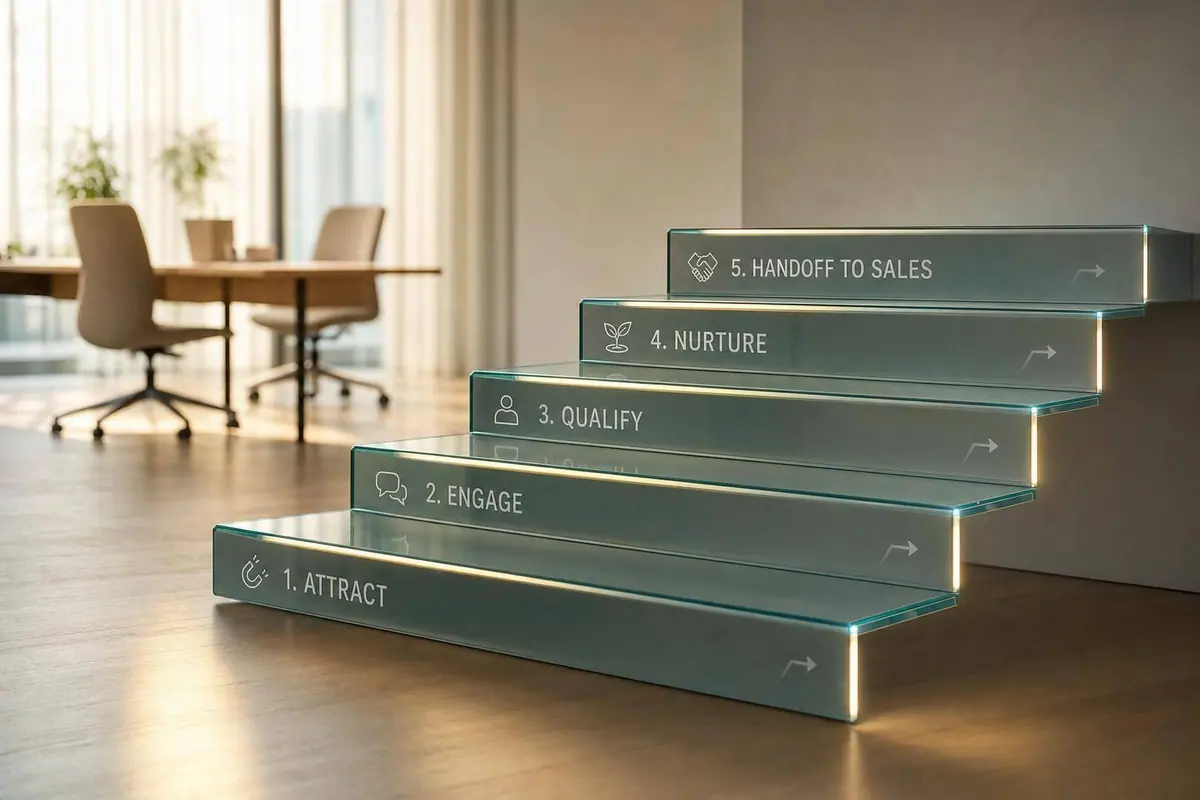
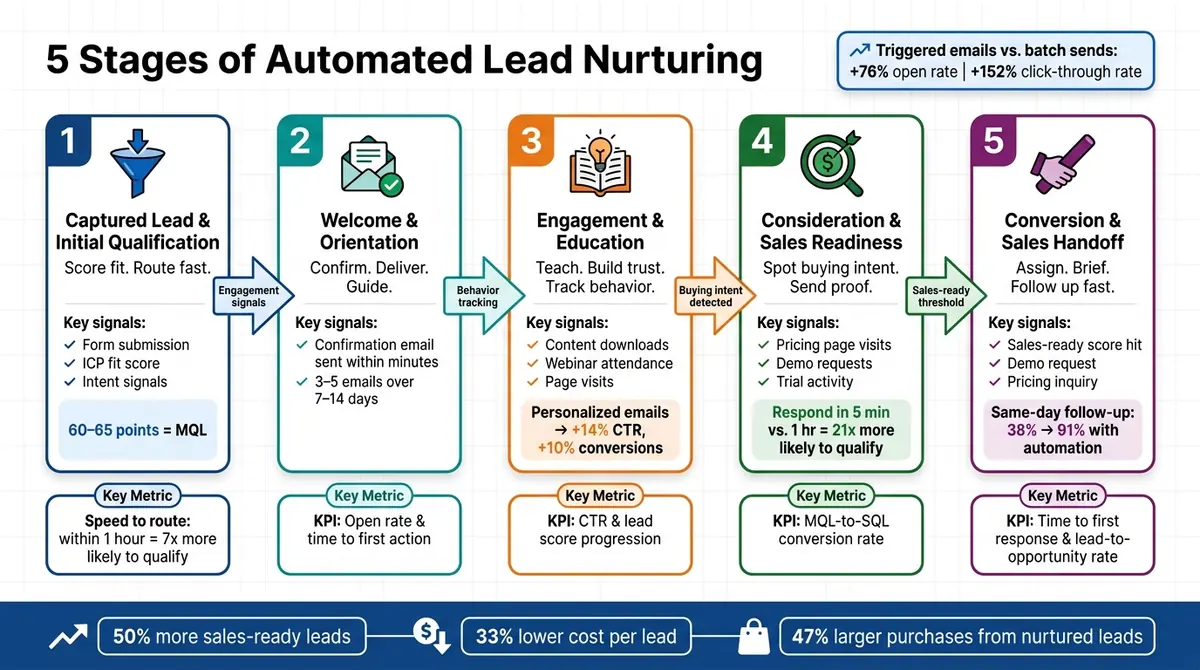
Automated lead nurturing works best when each lead gets the next message based on what they did, not on a fixed email calendar. In this article, I break the process into five stages: qualification, welcome, education, sales-readiness, and handoff. The big idea is simple: when timing, message, and follow-up match intent, teams can get 50% more sales-ready leads at 33% lower cost per lead, and nurtured leads can make 47% larger purchases.
Here’s the full flow in plain English:
- Stage 1: I qualify the lead fast, score fit and intent, and route them into the right path.
- Stage 2: I send a short welcome sequence that confirms the signup and points to one next step.
- Stage 3: I teach, build trust, and track engagement with content tied to the lead’s behavior.
- Stage 4: I watch for buying signals like pricing-page visits, demo requests, and trial activity.
- Stage 5: I pass sales-ready leads to a rep with context, ownership, and response-time rules.
A few numbers stand out. Triggered emails can get 76% higher open rates and 152% higher click-through rates than broad sends. And when teams reply within 1 hour, they are nearly 7x more likely to qualify a lead. For hot inbound leads, follow-up within 5 minutes can make an even bigger difference.
The article also makes one point clear: multi-step forms shape lead quality from the start. Better routing, lighter form friction, and cleaner data help each stage work the way it should.
| Stage | Main job | What I watch |
|---|---|---|
| 1. Qualification | Score fit and route fast | Form conversion, data quality, early engagement |
| 2. Welcome | Confirm signup and guide next step | Click-through rate, first action, unsubscribes |
| 3. Education | Build trust with useful content | CTR, content use, lead score movement |
| 4. Sales-readiness | Spot buying intent | MQL-to-SQL rate, demo requests, pricing visits |
| 5. Handoff | Get sales involved fast | Time to first response, meeting rate, lead-to-opportunity rate |
If I had to reduce the article to one takeaway, it would be this: good lead nurturing is not about sending more emails. It’s about sending the right follow-up at the right point, then moving sales-ready leads to a rep without delay.
5 Stages of Automated Lead Nurturing: From Capture to Handoff
How to do Lead Nurturing with Marketing Automation on HubSpot
sbb-itb-5f36581
Why Stage-Based Lead Nurturing Works
Stage-based nurturing lines up the message, timing, and CTA with a lead’s current intent instead of treating every lead like they’re ready to buy right now. Someone who just found your product needs a different next step than someone who has already checked your pricing page or asked for a demo. When automation follows stage, each sequence feels more on point and helps move leads ahead at a pace that makes sense. That’s why stage-based automation beats fixed schedules.
Behavior-driven automation responds to actions like form fills, optimized lead forms, content downloads, pricing-page visits, and webinar attendance. Triggered sequences can deliver 76% higher open rates and 152% higher click-through rates than one-size-fits-all email.
Each stage should have four parts: a goal, a trigger, a message type, and metrics.
| Stage Component | What It Does |
|---|---|
| Clear Goal | Defines what success looks like at that stage, such as confirming interest or booking a demo |
| Automation Trigger | Starts the sequence based on lead behavior, not a calendar |
| Message Type | Matches content - educational, proof-based, or direct offer - to lead readiness |
| Metrics | Measures stage performance with open rate, CTR, demo-booking rate, or MQL-to-SQL conversion |
Track each stage in 7-day, 14-day, and 30-day views to measure engagement, stage movement, and pipeline impact.
When MQL and SQL criteria are explicit, sales gets leads only when intent is high. That structure begins with the first stage: captured lead and initial lead qualification.
1. Captured Lead and Initial Qualification
This stage turns a form submission into a routed lead. Someone fills out a form, starts a free trial, signs up for a webinar, or asks for a demo, and automation sends that lead where it needs to go right away. At this point, speed and clean data matter most.
The job here is simple: validate the lead, score ICP fit, and route it to the right path. Fit comes from firmographic details like company size, industry, and job title. Intent comes from the offer, the page source, and when the person converted. That early read decides whether the lead goes into a fast-track flow or a standard nurture sequence.
Lead scoring is what makes that work in practice. You can add points for signals like a director-level title, a company with 50+ employees, or a high-intent form choice. You can also subtract points for things like a consumer email domain on a B2B offer. When a lead crosses a threshold of about 60 to 65 points, it can be marked as an MQL and moved into a fast-track path. Everyone else can go into standard nurture.
And yes, speed has a direct effect here. Research cited by Harvard Business Review found that companies that contacted leads within 1 hour were nearly 7x more likely to qualify them than companies that waited longer. That's a huge gap. If your routing is slow, even a good lead can cool off fast.
Clean forms help make scoring more dependable. One lead conversion case study found that moving from a single-page 9-field form to a 5-step progressive form increased conversion rate from 2.8% to 5.1% - an 82% increase. It also increased the share of SQLs by 19% and cut cost per lead by 28%. Reform supports this stage with multi-step forms, conditional routing, email validation, spam prevention, and lead enrichment.
Once the lead is routed, the first message should confirm what happens next. That first touch can be a confirmation email, a thank-you page, or a short follow-up. It should confirm the request, deliver the promised asset, set expectations, and ask one qualifying question. Keep it clear, brief, and reassuring.
| Metric | What It Tells You |
|---|---|
| Form view-to-submission rate | Whether your capture form is turning visitors into submissions |
| Drop-off rate by field or step | Where people leave the form |
| % of submissions flagged as spam or invalid | How clean your incoming lead data is |
| Completeness of critical fields | Whether you're collecting role, company size, and other key qualification details |
| % of new leads meeting minimum fit criteria | Whether your audience matches the ICP |
| Open rate and click-through rate on the first email | Early engagement with the confirmation or welcome message |
| % progressing to Stage 3 or 4 within 30 days | Whether initial qualification is sending leads into the right nurture path |
2. Welcome and Orientation
After routing and qualification, the welcome stage confirms the signup and sets expectations. It also removes friction. The goal is simple: help leads understand what happens next, deliver what you promised, and guide them to one clear next step.
Send the first welcome email within minutes. Use it to confirm the signup, thank the lead, and deliver the promised asset, whether that's a guide, a trial access link, or a webinar confirmation.
Then follow with 3–5 emails over 7–14 days. A short brand intro works well on days 2–3. Explain who you help, what problem you solve, and what result the lead can expect. Days 5–7 are a good time for a getting-started nudge, like a checklist, a short video, or a link to your help center. Keep each email centered on a single action. If every message asks the reader to do five things, odds are they do none of them.
Personalization here doesn't need to get fancy. If you collected role, industry, or use case at signup, use that data to tailor examples and next steps. Even simple dynamic content, like swapping in a case study or suggesting a first step based on job title, can improve click-through rates.
| Metric | What It Tells You |
|---|---|
| Welcome sequence engagement | Whether your subject lines, sender name, and CTAs are earning attention across the series |
| Click-through rate on welcome sequence | Whether your CTAs and value proposition are landing |
| Time to first action | How quickly leads complete a key step after the welcome series |
| Unsubscribe and spam complaint rates | Whether messaging aligns with what leads expected when they signed up |
| Profile completion rate | Whether leads are providing more data after the initial welcome |
Once leads are oriented, move them into education that builds trust and intent.
3. Engagement and Education
Stage 3 is where nurturing moves from orientation to education. The aim is simple: help leads understand the problem, show them a possible fix, and build trust before any sales push. One way to do this is to remove friction with interactive flows that encourage action.
Leads usually enter this stage after they finish the welcome sequence, download a resource, attend a webinar, visit several product or solution pages, or keep interacting with educational content. Those signals tell you they're ready for more focused material. At that point, the conversation shifts from basic intro content to active education.
The content that tends to work best here is practical and problem-focused: how-to guides, short explainer emails, webinars, case studies, blog picks, and comparison pieces. The key is to tie each message to the lead's last meaningful action. If a marketing manager downloaded a lead generation guide, send content about improving conversion rates or campaign ROI. If the lead is a sales leader, content on pipeline quality or qualification criteria will likely land better. Personalized emails can improve click-through rates by 14% and conversion rates by 10%. Reframing your offers and sending relevant emails beat broad sends.
| Metric | What It Tells You |
|---|---|
| Email click-through rate (CTR) | Whether your educational content feels relevant and gets people to act |
| Content engagement (time on page, video completion) | Whether leads are actually using the material, not just opening emails |
| Resource downloads and webinar attendance | Whether leads are moving deeper into your content library |
| Lead score progression | Whether engagement is turning into stronger purchase intent |
| Progression to pricing or demo pages | Whether a lead is moving from education into active consideration |
Keep leads in this stage while they're still working through educational content. Once they start visiting pricing pages, requesting demos, or comparing vendors, move them into consideration and sales readiness.
4. Consideration and Sales Readiness
When engagement starts to look like buying intent, move the lead into this stage. This is where you separate people who are actively shopping from people who are still just looking around. About 50% of leads are qualified but not ready to buy, so this step helps you filter leads before handing them to sales.
A lead should enter this stage after signals like repeated pricing page visits, comparison guide downloads, demo requests, or key actions inside a trial.
At this point, don't send more education-heavy content. Send proof. That means relevant case studies, ROI calculators, comparison checklists, implementation timelines, and objection FAQs. For lower-intent researchers, keep the tone helpful and low pressure. For high-intent leads, be more direct and action-focused, with a clear demo or talk-to-sales CTA.
Speed matters a lot here. Responding to a high-intent lead within 5 minutes instead of 1 hour increases the likelihood of qualification by 21x. And once you see that stat, it's hard to ignore. A HubSpot case study found that automating the sales handoff - triggering rep notification, task creation, and a rep-sent intro email when a contact reached MQL score - increased same-day sales follow-up from 38% to 91%.
| Metric | What It Tells You |
|---|---|
| MQL-to-SQL conversion rate | Whether your qualification criteria are accurate and well-calibrated |
| Demo request rate | Whether consideration-stage content is moving leads toward sales contact |
| Pricing-page visit frequency and recency | Whether a lead is showing repeated buying intent |
| Trial usage depth | Whether free-trial users are engaging enough to warrant sales outreach |
| Sales handoff rejection rate | Whether leads passed to sales actually meet the readiness bar |
If leads stall at this stage - engaged, but not converting - don't let them sit there forever. That's usually a sign that something upstream needs work. In many cases, lead quality here comes down to the form fields and routing rules feeding this stage.
5. Conversion and Sales Handoff
Once a lead hits the sales-readiness threshold, the job changes. You’re no longer just nurturing interest. You’re turning that lead into an assigned opportunity with a clear owner and a defined SLA. At this point, automation should help the next sales conversation happen with full context, not guesswork.
When a lead gets here through a high-intent action like a demo request, pricing question, or product evaluation, create or update the CRM record right away. Then assign the owner based on territory, company size, product line, or vertical. The internal alert should give the rep the full picture: lead source, pages visited, content downloaded, form responses, and recent engagement.
That rep brief should make the first outreach fast and relevant. Use the same language the lead used. Mention their role and company context. Tie examples to their industry or use case. After the handoff, shift to support content that backs up the rep’s conversation instead of restarting the nurture track.
Speed matters most here. For high-intent inbound leads, respond within 5 minutes and keep follow-up capped at 1 hour during U.S. business hours. SLA dashboards and escalation paths help make sure missed follow-ups get reassigned or flagged to a manager.
| Metric | What It Tells You |
|---|---|
| Lead-to-opportunity conversion rate | Whether your sales-ready criteria are accurate |
| Time to first response | Whether routing and SLA enforcement are working |
| Scheduled meeting rate and show rate | Whether confirmation and reminder flows are reducing no-shows |
| Opportunity win rate from sales-ready leads | Whether lead quality and sales readiness are aligned |
| SLA compliance rate | Whether reps are following up within defined windows |
If sales rejects a lead or lets it stall, send that disposition and rejection reason back into your scoring, routing, and recycle flows. That feedback loop helps you tune future nurture logic based on actual sales outcomes.
How Forms Support Lead Quality at Every Stage
Every stage rises or falls on the data your forms bring in. Forms decide who gets into the funnel, where each lead goes next, and what follow-up they get. If the form is weak, you can end up with a pipeline full of poor-fit leads. Just as bad, a sales-ready prospect might bail before hitting submit.
At the capture stage, the form acts as your first quality check. A smart move here is progressive profiling. Instead of asking for every detail right away, you collect more data over time. That keeps the first step lighter while still giving your team what it needs later.
As leads move deeper into the funnel and take higher-intent actions like demo requests or pricing inquiries, longer forms start to make more sense. But length still matters. Multi-step forms help by breaking a longer submission into smaller parts, which lowers the sense of effort and can help more people finish. On top of that, conditional routing makes sure each submission lands in the right sequence instead of getting dumped into a one-size-fits-all path.
Reform supports stage-aware forms with multi-step forms, conditional routing, lead enrichment, spam prevention, email validation, CRM integrations, and analytics.
| Reform Feature | Where It Helps in the Nurture Journey |
|---|---|
| Multi-step forms | Reduces friction at capture; improves completion for mid-funnel offers |
| Conditional routing | Segments leads by intent and sends them into the right sequence |
| Lead enrichment | Fills in firmographic gaps without adding more fields |
| Email validation + spam prevention | Keeps the database clean from the first submission |
| CRM integrations | Automates handoff and speeds up sales response time |
| Real-time analytics | Identifies which form designs produce the highest-quality leads |
Use these form signals to build the stage-by-stage reference tables below.
Stage-by-Stage Reference Tables
These tables give you a quick way to see what happens at each stage: what starts it, what to send, what action to ask for, and what metric to watch.
Put simply, the tables below condense each stage into four parts: trigger, message, CTA, and KPI.
| Stage | Goal | Trigger | Message Type | CTA | KPI |
|---|---|---|---|---|---|
| 1. Captured Lead and Initial Qualification | Capture info and deliver value | Form submission (lead magnet or waitlist) | Delivery email | Download or access the resource | Form conversion rate |
| 2. Welcome | Build trust and authority | Form submission | Welcome sequence | Join the community or follow on social media | Open rate |
| 3. Engagement | Educate and solve problems | Email clicks or content views | Value-first content and case studies | Read a blog post or watch a video | Click-through rate (CTR) |
| 4. Consideration | Identify sales readiness | Pricing page visit or high lead score | Sales-focused content and social proof | Book a demo or view pricing | SQL conversion rate |
| 5. Conversion and Sales Handoff | Close the sale and hand off | Sales-ready score, demo request, or qualified intent signal | Direct offer or personal outreach | Book a demo or speak with sales | Lead-to-opportunity conversion rate |
Stage 1 - Capture
This stage is about getting the lead in the door without making the process feel like a chore. Sometimes creating high-converting lead forms with just a few fields does the job. Other times, you need a bit more detail before routing the lead.
| Feature | Single-Step Form | Multi-Step Form |
|---|---|---|
| Best for | Lead magnets and waitlists | Lead magnets that need more context |
| Focus | Fast, low-friction capture | Collecting more context before routing |
| Notes | Simple entry point | Supports structured qualification and conditional routing |
Stage 4 - Consideration and Sales Readiness
At this point, behavior matters more than surface-level interest. A warm lead is still learning. A hot lead is much closer to making a choice.
| Signal Type | Engaged (Warm) Lead | Sales-Ready (Hot) Lead |
|---|---|---|
| Behavior | Opens multiple emails; attends free webinars | Visits pricing page; abandons checkout |
| Content | Consumes educational blog posts | Finishes a free course or joins a waitlist |
| Intent | Still understanding the offer | Close to a final decision |
| Recommended action | Continue educational nurturing; increase content frequency | Trigger Stage 5 handoff immediately |
Stage 5 - Conversion and Sales Handoff
After handoff, pause nurture and route the lead to a rep.
Once a lead hits the handoff threshold, move from nurture to rep-owned follow-up. That shift should be clean and well-documented so nothing slips through the cracks.
| Handoff Component | What to Document |
|---|---|
| Routing rules | CRM property mapping; tag-based automation triggers; duplicate prevention logic |
| SLA timing | Real-time sync validation; target response window for hot leads |
| Post-handoff tracking | UTM and click ID capture; first-touch CRM locking; email-to-revenue attribution |
Use suppression logic to move purchasers out of active sales sequences as soon as they convert. That keeps new customers from getting upgrade emails right after they buy.
Common Lead Nurturing Mistakes to Avoid
The five stages only work if the system avoids a few common breakdowns. In most cases, nurture workflows get knocked off track by the same five issues: weak forms, generic messaging, poor cadence, shaky KPIs, and fuzzy handoff rules.
Too many fields at signup can hurt Stage 1 lead quality before nurturing even starts. If the form feels like homework, people bail. Use multi-step form design to keep forms short while qualifying the lead, then fill in the rest later with enrichment.
Using one message for all leads causes Stage 2 and Stage 3 segmentation to fall apart. And the numbers back that up: segmented campaigns produced 100.95% more clicks and 9.37% fewer unsubscribes than generic blasts. If you don't segment by intent and funnel stage, engagement usually drops while unsubscribes climb.
Teams also send too often. That's where fatigue sets in fast. Keep complaint rates below 0.1% and set cadence based on engagement, not the calendar.
Using open rates to judge readiness can distort Stage 3 and Stage 4 intent signals. Open rates alone are not a safe way to judge readiness, especially now that inbox privacy features make them less dependable. Treat opens as a secondary signal, not the main readiness metric.
Skip suppression, and converted leads keep getting promotional email. Leave MQL-to-SQL undefined, and leads stall or reach sales too early. Suppress customers right after conversion. Define MQL and SQL criteria clearly, or leads will leak between marketing and sales.
| Mistake | Why It Hurts | Fix |
|---|---|---|
| Too many form fields at signup | Reduces top-of-funnel conversion | Use the shortest form that qualifies the lead |
| No suppression for converted leads | Annoys customers; wastes send volume | Suppress immediately after conversion |
| Same message for every segment | Lower engagement and higher unsubscribes | Segment by intent and funnel stage |
| Fixed send cadence regardless of engagement | Email fatigue; rising complaint rates | Set cadence by engagement |
| Open rate as primary KPI | Misidentifies sales-ready leads | Track clicks, page visits, and demo requests |
| Undefined MQL-to-SQL criteria | Pipeline leakage and slow follow-up | Document shared definitions and SLA timing |
Before the next campaign goes live, tighten up form capture, segmentation, cadence, and handoff rules. Small fixes here can prevent a lot of wasted sends and missed revenue later.
Conclusion
Automated lead nurturing works best when it runs as one connected flow, from signup to handoff. Each stage should lead cleanly into the next. When triggers, messages, and metrics line up, leads keep moving instead of getting stuck.
That’s why the handoff stage matters so much. It’s the point where all the earlier work either turns into revenue or slows down. Marketing and sales need to agree on what “sales-ready” means, and automation should send qualified leads over right away with the full context attached.
Three levers tend to improve nurturing results: cleaner form templates, sharper segmentation, and stronger automation. Testing forms, segments, and workflows over time can improve both lead quality and lead volume without adding more manual follow-up.
FAQs
How do I know when a lead should move to the next stage?
Move a lead to the next stage when they hit clear trigger points, not when someone makes a gut call. Watch for actions like form submissions, content downloads, and other signs that they’re moving through the funnel.
Using Reform to collect detailed lead data makes it easier to connect those actions to stage changes. It also helps to review your lead scoring rules on a regular basis so those triggers keep working the way they should.
What data should I collect on the first form?
Collect only the first-party data you need for lead capture, and focus on fields that map straight into your CRM so records stay clean.
Keep the form short to protect conversion rates. Then review field performance on a regular basis to spot friction points. Reform’s multi-step forms and email validation can help you collect the information you need without hurting user experience or data quality.
When should sales take over from automation?
Sales should step in when a prospect reaches the decision stage and is ready to buy. That’s usually the right moment for your team to work sales-qualified leads.
To get the handoff right, track your MQL-to-SQL conversion rate and revisit lead scoring on a regular basis. That helps make sure sales only gets prospects who are ready for that next step.
Related Blog Posts
Get new content delivered straight to your inbox

The Response
Updates on the Reform platform, insights on optimizing conversion rates, and tips to craft forms that convert.




Drive real results with form optimizations
Tested across hundreds of experiments, our strategies deliver a 215% lift in qualified leads for B2B and SaaS companies.
