
.webp)
Common Issues When Adding Payments to Forms



Adding payments to multi-step forms can be tricky. The process involves technical challenges, security compliance, and user experience issues that can impact conversion rates. Here’s what you need to know:
- Security Risks: Handling sensitive financial data requires strict PCI DSS compliance, encryption, and secure payment methods like tokenization or 3D Secure.
- Technical Problems: Issues like session data loss, webhook failures, or duplicate charges can disrupt transactions and frustrate users.
- User Experience: Confusing payment steps, poor mobile optimization, and limited payment options lead to abandoned checkouts - 70% of carts are left behind, and even a 100ms delay can reduce conversions by 1%.
- Integration Challenges: Choosing between hosted payment pages, embedded iFrames, or direct API integration depends on your technical capabilities and need for control.
The solution? Use secure, PCI-compliant tools like Stripe or PayPal, optimize user flows with progress indicators and real-time validation, and offer diverse payment options like digital wallets. Tools like Reform simplify integration by providing pre-built connectors and analytics to track user behavior.
Google Forms Payment Integration 2024 (Step by step)
While Google Forms is a common starting point, you can also explore optimized conversion paths to further improve your payment success rates.
sbb-itb-5f36581
Common Problems with Payment Gateway Integration
integrating payment processing into a multi-step form isn’t as simple as it sounds. It introduces a host of technical, security, and user experience challenges that can impact conversion rates. Let’s dive into the most common issues.
PCI DSS Compliance and Security Problems
Protecting cardholder data is non-negotiable. The Payment Card Industry Data Security Standards (PCI DSS) mandate strict protocols to guard against breaches and cyberattacks. And the stakes are steep - data breaches in 2024 cost an average of $4.45 million, while global payment fraud could surpass $40 billion by 2027.
One major misstep is handling raw card data on your own servers. This puts you in the highest tier of PCI compliance, which is complex and costly. Instead, tools like Stripe Elements allow sensitive data to bypass your infrastructure entirely, sending it directly to the processor. Beyond that, SSL encryption is a must for any page handling payment information, and tokenization ensures intercepted data is useless to attackers.
3D Secure (3DS) authentication adds another layer of security but also complexity. Forms should mask the CVV and all but the last four digits of the card number to prevent prying eyes. And while client-side validation helps with usability, only server-side validation can truly safeguard transactions against tampering.
Session Data Loss and Transaction Failures
Losing session data is a headache for both users and developers. When this happens, users may have to start over, leading to abandoned transactions. Worse, if a payment is restarted without server-side verification, it can result in duplicate charges.
A particularly tricky situation arises when a payment gateway processes a charge, but a local database update fails due to a session timeout or network hiccup. This leaves orders in an "incomplete" state, creating confusion for both businesses and customers. As Hasan Sidawi, a Software Engineer, explains:
Never trust client-side payment confirmation alone. Webhooks are the source of truth.
To avoid these issues, use idempotency keys. They ensure that even if a request is sent multiple times (due to a double-click or server retry), the customer is only charged once. For multi-step forms, tools like sessionStorage, React Context, or Zustand can help manage state across steps and prevent data loss during page refreshes.
User Experience Problems and Form Abandonment
Even if your technical setup is flawless, poor user experience can derail the payment process. Studies show that 39–48% of users abandon checkout due to unexpected costs revealed at the last step, while 19% quit because they don’t trust the site’s security. Even minor annoyances - like mixing up the order of card input fields (number, expiry, CVV) - can lead to user errors and frustration.
Mobile design missteps are another culprit. For example, failing to enable numeric keypads or auto-format card numbers can make entering payment details tedious. Shockingly, 51% of sites don’t auto-format card numbers, and 15% actively block spaces in those fields. Additionally, 31% of websites lack inline validation, so users only discover errors after submitting the form.
Limiting payment options can also hurt conversions. Relying solely on credit cards without offering digital wallets like Apple Pay or Google Pay can cause an 11% drop in completion rates. Considering digital wallets now account for over 49% of global e-commerce transactions, they’re no longer optional - they’re essential.
Technical Challenges with Form Builder Integration
Integrating payment gateway APIs with form builders brings its own set of hurdles. Issues like network timeouts, webhook delivery failures, and partial transaction updates can disrupt the process.
No-code tools simplify some aspects but still require careful setup. For example, you’ll need to configure webhook endpoints, verify signatures to prevent replay attacks, and handle failed payment retries. Creating a "Pending" transaction record in your database before calling the payment gateway API is critical to maintaining data integrity.
The 3D Secure (3DS2) challenge adds yet another layer of complexity. Multi-step forms must handle the temporary redirect or iframe popup required for 3DS authentication without breaking the flow. This often requires custom JavaScript to manage the authentication window and preserve form state.
Currency and Regional Formatting Problems
Incorrect currency formatting or failure to meet regional requirements can cause payment rejections or even trigger fraud alerts. For U.S.-based businesses, this means displaying amounts in USD with a dollar sign ($) and formatting expiry dates as MM/DD/YYYY. Card numbers should be spaced every four digits, and ZIP codes must follow the standard five-digit format.
Regional differences in 3D Secure (3DS2) requirements can also complicate transactions. For instance, European regulations often mandate Strong Customer Authentication, while U.S. rules are generally less strict. If your form doesn’t account for these variations, legitimate transactions might be declined. Proper formatting and compliance with regional standards are crucial for a smooth payment experience.
How to Fix Payment Integration Problems in Multi-Step Forms
Dealing with payment integration challenges can be frustrating, but the good news is that there are practical solutions. By picking the right tools and applying proven strategies, you can address issues like session data loss, security vulnerabilities, and user friction. Here’s how to tackle the technical, security, and user experience aspects of payment integration.
Use No-Code Platforms with Payment Gateway Support
No-code platforms take the complexity out of payment integrations. Instead of wrestling with lengthy API documentation or custom coding, these platforms offer pre-built connectors for major payment gateways such as Stripe, PayPal, and Square. This approach not only speeds up setup but also reduces the chances of errors during integration.
For example, Reform simplifies this process by providing native connections to payment gateways. It even includes conditional routing, which allows you to direct users to specific payment tiers based on their input. For instance, enterprise clients can be routed to a custom pricing page, while smaller businesses are sent to a standard checkout. Additionally, built-in tokenization ensures that sensitive card data never touches your servers, easing your PCI compliance obligations.
Retailers using no-code orchestration platforms can go live in as little as two days while supporting multiple payment methods - credit cards, digital wallets, and buy-now-pay-later options - all through a single API. Real-world results include a finance team cutting reconciliation time by 50% and another business recovering 18% of failed orders during peak sales with smart routing.
While simplifying integration is crucial, securing the payment process is equally important.
Set Up Secure Payment Processing
Using embedded iFrames or SDKs is one of the safest ways to handle payment data. These tools allow you to embed secure payment fields directly into your form. The SDK encrypts card details before they leave the user’s browser, sending the information directly to the payment processor and bypassing your servers entirely. This setup ensures that even if your servers are compromised, attackers won’t gain access to raw card data.
Another key step is aligning currency settings across all systems. Mismatched currency configurations can lead to reconciliation errors in about 8% of transactions. To avoid this, test multi-currency setups in sandbox mode to ensure proper formatting and display. Additionally, set up webhook handlers to process asynchronous payment notifications and keep your systems in sync.
Once the technical and security aspects are in place, focus on improving the user experience.
Improve User Experience on Payment Steps
A smooth user experience is critical for reducing abandonment rates in multi-step payment forms. Progress indicators are a must - they show users where they are in the process and how many steps remain. For example, Reform’s progress bars use clear labels like "Contact Info", "Details", and "Secure Payment", which help users feel more in control.
Mobile optimization is another priority. Ensure that input fields are large enough for touch interaction, enable numeric keypads for card number entry, and auto-format card details as users type. Poorly optimized mobile flows can increase abandonment by up to 25%, so testing your form on various screen sizes is essential.
Finally, implement real-time validation to catch errors as users fill out the form. Combine this with retry logic that automatically reattempts failed transactions using exponential backoff. These features provide instant feedback, helping users fix mistakes on the spot while improving approval rates and reducing frustration.
Payment Integration Methods Compared
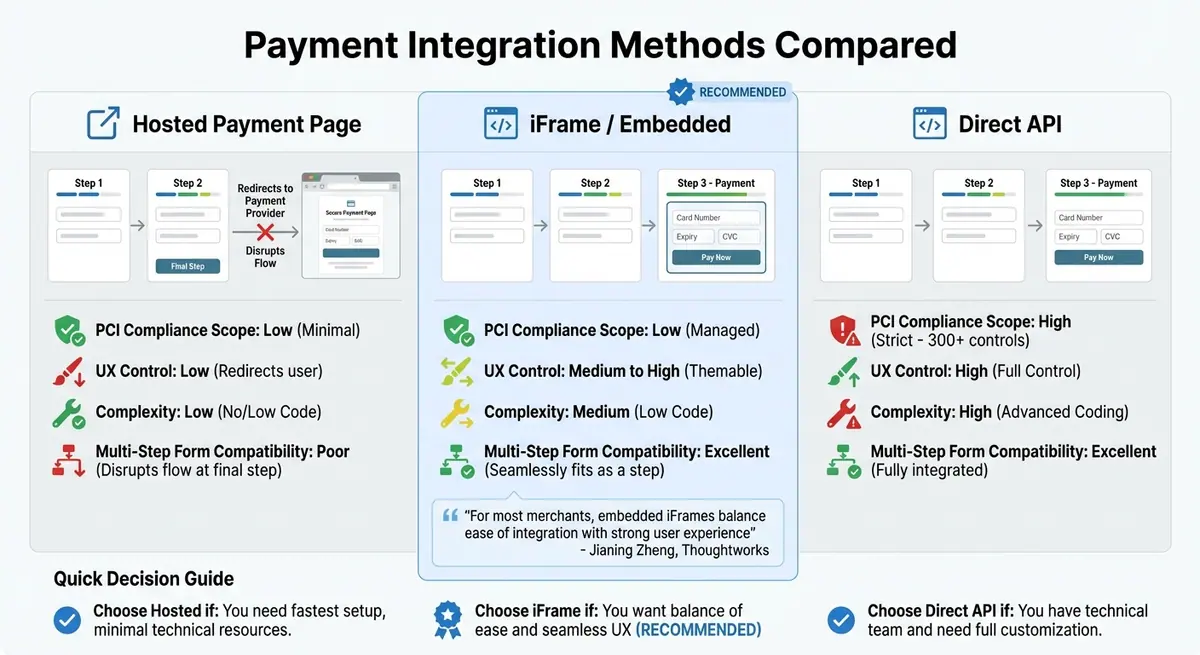
Payment Integration Methods Comparison: Hosted Pages vs iFrames vs Direct API
When integrating payments into multi-step forms, you have three main options: hosted payment pages, embedded iFrames, and direct API integration. Each offers distinct trade-offs in terms of security, user experience, and technical demands. The best choice depends on your resources and how much control you need over the payment process.
Hosted payment pages redirect users to a third-party platform like PayPal or Stripe Checkout to complete their transactions. This method is simple to implement but can disrupt the user journey. Imagine filling out several steps in a form, only to be redirected to a completely different site - this sudden shift often leads to confusion or abandonment, exacerbating the challenges of keeping users engaged.
Embedded iFrames provide a middle ground between ease of use and a smooth user experience. Payment fields appear directly on your page within a secure frame managed by the payment provider. Jianing Zheng from Thoughtworks highlights this approach:
For most merchants, embedded iFrames balance ease of integration with strong user experience.
A great example is Syntho, an electronic music platform that transitioned to Stripe's embedded Payment Element in early 2024. Previously, their legacy system passed card data through their servers, requiring extensive PCI DSS compliance. By switching to the embedded approach, Syntho offloaded compliance responsibilities to Stripe while implementing features like a 12-hour retry window for failed payments and webhooks to handle unstable connections. This change not only reduced customer churn but also maintained a seamless multi-step form flow without disruptive redirects.
Direct API integration offers the most control over the user interface but comes with significant security requirements. Businesses using this method must comply with over 300 PCI DSS controls, including regular audits and scans. This approach is best suited for companies with robust technical teams and a need for complete customization.
Comparison Table: Payment Integration Methods
| Integration Method | PCI Compliance Scope | UX Control | Complexity | Multi-Step Form Compatibility |
|---|---|---|---|---|
| Hosted Payment Page | Low (Minimal) | Low (Redirects user) | Low (No/Low Code) | Poor (Disrupts flow at final step) |
| iFrame / Embedded | Low (Managed) | Medium to High (Themable) | Medium (Low Code) | Excellent (Seamlessly fits as a step) |
| Direct API | High (Strict) | High (Full Control) | High (Advanced Coding) | Excellent (Fully integrated) |
For businesses creating multi-step forms, embedded iFrames often hit the sweet spot. They provide a polished user experience while keeping security requirements manageable. Reform, for instance, uses this method in its native payment gateway integrations, ensuring that sensitive card data stays off your servers while maintaining the flow and branding of your forms. Understanding these integration methods is key to tackling broader challenges in payment systems, which will be explored further in upcoming sections.
How to Fix Persistent Payment Integration Problems
Persistent payment integration issues can be frustrating, but they can be addressed with targeted debugging, detailed tracking, and well-planned backup strategies. Errors like webhook delays, API timeouts, and abandoned payment steps often require a closer look and specific fixes.
How to Debug Webhooks and API Problems
Webhook issues often arise from simple mistakes like URL typos, middleware interference, or incorrect environment settings. For example, in Express apps, using express.json() instead of express.raw() can cause problems with HMAC signature verification for webhooks. Switching to express.raw() for webhook routes can solve this issue.
Leonardo, a software engineer who has dealt with Stripe webhook challenges, puts it this way:
Webhook verification doesn't fail silently because it's hard. It fails silently because the tooling is opaque.
To troubleshoot webhook problems, route webhook URLs to tools like WebhookDebugger or Requex.me. These tools help you inspect raw payloads and headers before they hit your server. For testing locally, the Stripe CLI (stripe listen --forward-to) or a tunneling tool like ngrok can forward events to your development environment for real-time debugging.
When verifying webhook signatures, use the whsec_ signing secret along with the raw request body. Make sure to perform a constant-time comparison to avoid timing attacks. Stripe enforces a 5-minute window for timestamp verification by default.
To ensure smooth webhook processing:
- Respond with a 2xx status code immediately to avoid unnecessary retries.
- Handle heavy tasks (like database updates or sending emails) in background processes.
- Track unique event IDs to prevent duplicate processing.
- Log details like delivery ID, event type, and timestamp for future audits.
Here’s a quick guide to common error codes and their fixes:
| Error Code | Meaning | Common Cause | Recommended Fix |
|---|---|---|---|
| 400 | Bad Request | Malformed JSON or Content-Type mismatch | Inspect raw payload; update parser to match provider format. |
| 401/403 | Unauthorized | Invalid signature or wrong secret | Verify signing secret; check if middleware modified the body. |
| 404 | Not Found | Incorrect URL or route not deployed | Verify URL in provider dashboard; check for trailing slashes. |
| 504 | Gateway Timeout | Slow processing or database queries | Move processing to background jobs; return 200 OK immediately. |
Once webhooks and APIs are running smoothly, focus on tracking user behavior to address payment abandonment.
How to Track and Reduce Payment Step Abandonment
If users are abandoning payments, real-time tracking can help identify the problem. Multi-step forms often reduce drop-offs by breaking the process into smaller parts. However, if users leave during the payment step, tools like Reform’s real-time analytics can reveal where they’re getting stuck.
To improve user experience:
- Enable a progress bar in your form settings to show users how far along they are. Label the payment step clearly, such as "Secure Payment", to set expectations and reduce anxiety.
- Use conditional logic and redirects to tailor the process. For example, high-value leads can be directed to a scheduling link, while others might receive self-service options.
- Rearrange form fields using drag-and-drop features. If analytics show high drop-off rates before the payment step, move less important fields to a post-payment page.
If abandonment persists, recovery strategies can help salvage transactions.
Backup Options for Failed Transactions
When transactions fail, automated recovery workflows can help recover lost sales. Integrations with tools like Zapier and HubSpot allow you to trigger follow-up actions, such as adding users to a "failed payment" email sequence with a direct link to update their payment information.
Offering alternative payment methods can also improve recovery rates. For example:
- If a credit card is declined, provide specific error messages like "Your card has expired" or "Please try another payment method".
- For card failures, display a modal with manual bank transfer instructions, including account details and a unique reference.
For transient errors like network timeouts, implement retry logic with a delay (e.g., 1,000ms). However, avoid retrying for hard declines like "insufficient funds".
Webhooks can act as your safety net. If client-side confirmation fails, webhooks can asynchronously update the transaction status and trigger recovery workflows. Additionally, configure webhooks to notify customers via email when a payment fails, including a direct link to resolve the issue.
Here’s a summary of common failure types and their backup actions:
| Error Type | Possible Reason | Recommended Backup Action |
|---|---|---|
| 402 Transaction Error | Declined card, insufficient funds, or gateway downtime | Suggest changing payment method or trying again later. |
| Transient API Error | Network communication failure or temporary gateway outage | Implement automated retry logic with a delay (e.g., 1,000ms). |
| 3D Secure Required | Card requires additional authentication | Trigger a redirect or modal for 3D Secure authentication. |
| Webhook Failure | Listener downtime or invalid signature | Replay events from the timeframe of the outage and check SSL certificates. |
Conclusion
Adding payments to multi-step forms comes with its own set of technical, compliance, and user experience hurdles. But the good news? These challenges are manageable with the right strategies. Start by using PCI-compliant payment processors to handle sensitive data securely and ensure your forms are protected with HTTPS. This combination shields your business and customers from potential breaches and fraud while enabling a smoother payment process.
A seamless user experience is key to boosting conversions. Features like progress bars and conditional logic keep users engaged, while real-time validation helps catch errors before submission. Offering multiple payment options, including digital wallets, ensures you meet the preferences of a diverse customer base. When payment flows are designed with the user in mind, conversion rates are less likely to take a hit.
By blending strong security measures with an intuitive user experience, you can create a payment form that not only works but thrives. If you're looking for an effortless way to achieve this, Reform provides a no-code platform that simplifies the process. It takes care of the technical heavy lifting while giving you tools to customize branding, set up conditional routing, and access real-time analytics. With Reform, you can quickly build multi-step payment forms complete with progress indicators, redirect high-value leads to scheduling links, and pinpoint where users drop off - all without needing any coding skills.
To succeed, start with the basics: choose a trustworthy payment processor, make security a top priority, and use analytics to identify and address any friction points. Tackling these challenges head-on with proven solutions is essential for keeping your conversion rates on track.
FAQs
How do I avoid storing card data on my servers?
To keep card data off your servers, consider using hosted payment solutions. These services ensure sensitive information never touches your infrastructure. Two popular options are:
- Hosted Fields: These are secure iFrames provided by your payment processor. They allow customers to enter card details directly into fields managed by the provider, sending the data straight to them.
- Hosted Payment Pages: With this approach, users are redirected to the payment provider's website to complete their transaction.
Both solutions help you reduce PCI compliance requirements and lower security risks by ensuring card data stays out of your systems.
What causes duplicate charges in multi-step forms?
Duplicate charges in multi-step forms happen when users accidentally submit the form more than once. This often stems from delays in processing, lack of proper validation, or not disabling the submit button after the initial click. To avoid this, ensure the submit button is immediately disabled upon submission and incorporate effective validation measures.
Which payment integration method fits my form best?
When choosing a payment integration, it all comes down to your specific needs and the type of experience you want to offer users. If you’re looking to support multiple payment methods - like credit cards and digital wallets - Stripe's Elements is a great option. It provides a flexible UI component that creates a smooth and unified checkout flow.
Need conditional logic? You can add routing logic to your form builder so the payment form adjusts dynamically based on user inputs. And if coding isn’t your thing, no-code platforms like Reform make it easy to set up payment forms that support multiple methods - no technical skills required.
Related Blog Posts
Get new content delivered straight to your inbox

The Response
Updates on the Reform platform, insights on optimizing conversion rates, and tips to craft forms that convert.




Drive real results with form optimizations
Tested across hundreds of experiments, our strategies deliver a 215% lift in qualified leads for B2B and SaaS companies.
