

CRM Sync Tool Comparison for Lead Forms


An HTTP 200 OK response doesn’t prove your lead was saved correctly. I check two things: whether the submission reached the CRM and whether the saved fields match what was sent.
My picks depend on where the problem starts: Webhook.site for payload checks, Hookdeck for delivery and retries, Zapier for multi-app workflows, LeadsBridge for ad leads, and Keploy for custom-code tests. With Reform at the form layer, I also test validation and routing before checking the CRM record.
Quick Comparison
| Tool | Best fit | Field checks | Replay or testing | Setup and cost |
|---|---|---|---|---|
| Webhook.site | Inspecting raw requests | Payload names, types, and values | Reruns actions on saved requests | Simple inspection; free URLs hold 50 requests for 7 days |
| Hookdeck | Routing and delivery recovery | Filters and transformations | Automatic retries and bulk replay | Requires delivery rules; event-based billing |
| Zapier | Workflows across apps | Visual mapping and step data | Step retries and workflow replay | Account connections and mapping; task-based billing |
| LeadsBridge | Ad-form-to-CRM sync | Source-to-CRM mapping | Failed-lead retries and re-sync | Connector setup; lead-volume tiers |
| Keploy | Custom lead-handler code | Coded assertions | Recorded tests with mocked dependencies | Engineering setup; test-run limits |
I compare setup, price, app support, field checks, replay, and error logs - not just whether a tool can send data. For example, 10 leads a day with three billable Zapier actions each means about 900 tasks a month. I’d confirm current plans and connector limits before buying.
My final check stays the same: <u>inspect the saved CRM record</u>. I use synthetic leads to test consent, missing fields, duplicates, and failed deliveries, then replay in a sandbox to confirm that one submission produces one correct record. If you need help setting this up, consider expert form strategies to optimize your conversion and routing.
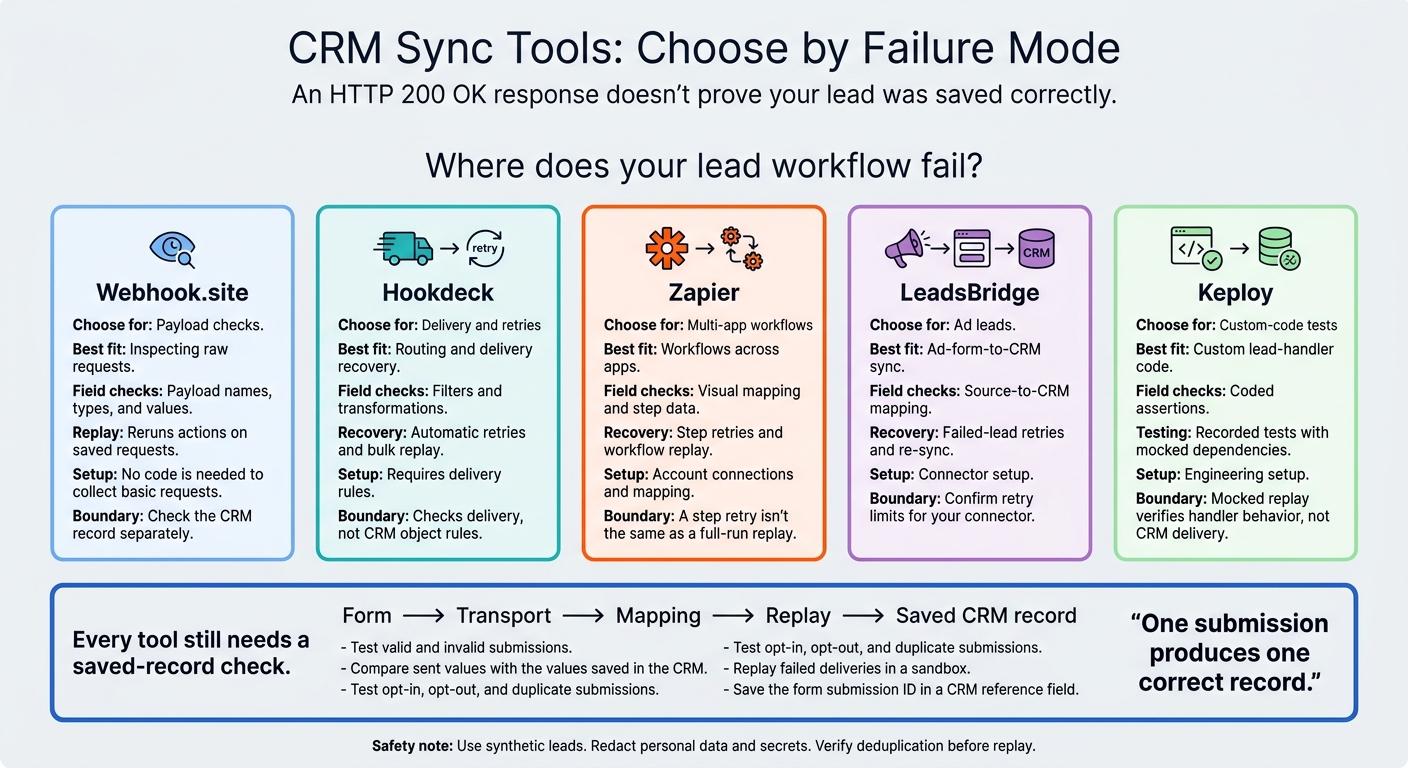
CRM Sync Tools: Choose by Failure Mode
1. Webhook.site
Setup and Price
Open Webhook.site, copy its assigned URL into your form’s test webhook URL, and submit a lead. If you haven't built your form yet, consider using multi-step form design to improve completion rates. No code is needed to collect basic requests.
Free URLs expire after 7 days and hold up to 50 requests. Official plans list Basic at $9/month for 1,000 requests per URL, Pro at $19/month for 10,000, and Enterprise at $69/month for 100,000. Paid plans include permanent URLs and 365-day data storage, though history limits still apply.
Use it for a quick check that your form’s payload reaches the endpoint.
App Support and Mapping
Webhook.site lets you check that the raw lead payload arrives intact before routing it to your CRM. It accepts HTTP requests and supports automation and transformations through Custom Actions, WebhookScript, and JavaScript.
Inspect raw JSON, form data, headers, and query parameters. Then check that field names, structure, and data types match your CRM schema.
Replay and Regression Tests
Replay reruns Custom Actions for all or selected historical requests, letting you retest fixes to forwarding or transformation logic. Save evidence before replaying: requests may run out of order, and replays can overwrite earlier action output.
Error Detail
Recorded requests help you spot missing values and incorrect content types. Forwarding output can also show the destination URL, HTTP status, processing time, and response details.
Keep the timestamp, lead ID, and response details together so you can trace failures. Then check the CRM record separately. Don’t send real lead data to public URLs - anyone with the link can view the recorded requests.
For routing or downstream app handling, use a tool built for delivery workflows.
sbb-itb-5f36581
How to Test LinkedIn Lead Gen Forms (Verify leads sync to your CRM)
2. Hookdeck
Hookdeck sits between your form and CRM to route, filter, retry, and replay leads. It lets you test whether submissions can be delivered reliably - and whether you can track and audit each attempt - before they reach the CRM.
Setup and Price
Setup takes longer than a direct webhook test for multi-step forms because you need to configure destinations, filters, and delivery rules. Pricing depends on submission volume and replay retention. That extra control serves teams that need filtering, retries, and an audit trail, rather than request capture alone.
App Support and Mapping
Use Transformations to validate and normalize fields before delivery. Filters can stop invalid submissions from using CRM API requests.
Hookdeck checks delivery, not CRM object rules. You still need to test required fields and authentication so the payload arrives ready to map to the CRM.
Once field handling works, test replay to check delivery reliability.
Replay and Regression Tests
Hookdeck supports automatic retries with exponential backoff and manual bulk replay. Check retry limits, replay controls, and retention before relying on it for recovery.
Make CRM writes idempotent before replaying: delivering the same submission again shouldn't create another lead. Throttle replays to stay within the CRM’s API limits and avoid 429 errors.
Error Detail
Delivery logs show the request, routing and transformation steps, plus the CRM response status, headers, and body. Timestamps for each attempt, latency metrics, and exact CRM errors help separate payload failures from rate limiting.
Use the logs to isolate transport failures, then check the saved CRM record separately.
3. Zapier
Use Zapier when lead sync involves several apps, not just one CRM endpoint. It works well for workflows that connect CRM, email, spreadsheet, and notification steps.
Setup and Price
A basic multi-step lead form to CRM Zap usually takes minutes to set up. Pick a trigger, connect the source, choose a CRM action, map the fields, and test. Custom fields, permissions, authentication, and approvals can add time. Check premium app access and step limits before you start.
Pricing depends on tasks, not submissions:
At 10 leads a day with three billable actions each, usage is about 900 tasks a month.
App Support and Mapping
Check Zapier’s app directory for every trigger and action your workflow needs. Test blank fields, consent values, dropdowns, duplicate emails, long text, and special characters across steps. Then compare Zapier’s output with the saved CRM record.
Once the workflow passes those checks, test replay behavior and billing.
Replay and Regression Tests
A step retry isn't the same as a full-run replay. Successful actions can consume tasks again. Use a stable submission ID to check for duplicates. If your plan reaches its task limit, Zapier can hold runs and replay them later.
Use the run history to pinpoint failures before checking the CRM record.
Error Detail
Zap History’s Data In and Data Out help you find where lead sync fails: trigger data, mapping, validation, authentication, or the CRM write. Use those details to fix the failing step.
Limit access when sharing lead diagnostics, and review task usage per run to spot costly workflows.
4. LeadsBridge
LeadsBridge suits teams that send ad leads to a CRM and want field mapping, retries, and failure logs in one bridge.
Setup and Price
To get started, select an ad-platform source and publish a bridge. The Free plan includes 50 leads per month and one active bridge. Starter includes 2,000 leads per month and up to six bridges. Check the current pricing page before buying.
Once you’ve checked pricing and limits, review field mapping.
App Support and Mapping
LeadsBridge lists more than 380 integrations for ad-form-to-CRM workflows, including Meta Lead Ads, Google Ads lead form extensions, LinkedIn Lead Gen Forms, and TikTok Lead Generation.
Before connecting, confirm the exact source, destination, and supported fields. The unmapped-fields view helps catch omissions. Mapping tools can also reformat dates, text, and phone numbers. Check that consent and attribution fields fit within any mapping limits.
With mapping checked, test what happens when a lead fails to sync.
Replay and Regression Tests
Official docs confirm automatic retries and manual re-sync for failed leads. Pro adds auto-resync and alerts, but the docs don’t specify retry timing or maximum attempts.
Confirm those limits for your connector, then test recovery with a controlled destination failure. Test replay against a deduplicated CRM record to verify idempotency - that replaying the lead doesn’t create a duplicate.
Error Detail
Bridge failures appear in the Error Table. Check the rejected field, authentication status, and destination response to find where the handoff failed. Then inspect the CRM record to verify that the lead arrived and the correct fields were saved.
The docs don’t confirm full request/response traces or log retention. Before sending personal data, confirm retention periods, deletion options, and access controls.
If you need request-level capture and code-side diagnostics, use a tool built for raw test traffic.
5. Keploy
Routing tools check delivery. Keploy tests the code that builds and sends the lead payload. It’s for engineering teams testing custom lead handlers, not native form-to-CRM connections. Keploy records lead-submission requests and dependency calls, then replays them to catch code regressions.
Setup and Price
Keploy supports local development, CI pipelines, and Kubernetes-based environments. Use Linux or Docker to replay more types of traffic; native macOS and Windows support fewer replay targets.
The Free plan includes 100 monthly test runs. Pro includes 400 and lists at $19 per user per month, plus additional usage.
App Support and Field Checks
Keploy tests custom lead-handler requests and dependency calls rather than offering a catalog of CRM connectors. Native macOS and Windows support lists Go, Node.js, Python, and Java, but PostgreSQL, Redis, Kafka, and gRPC traffic may not replay reliably on those systems.
Add explicit assertions for outbound CRM field names, types, consent values, and routing. A matching response doesn’t prove that CRM fields map correctly. Once the handler and field assertions pass, use replay to catch code regressions.
Replay and Regression Tests
Use Keploy to test for handler, schema, or CRM-client regressions. It replays recorded dependency responses without calling live services.
Mocked replay verifies handler behavior, not CRM delivery. Run a sandbox smoke test to check authentication and record creation, then inspect the destination record’s fields.
Error Detail
Keep correlation IDs so you can trace requests through logs. Mask personal data and secrets before storing or uploading recordings.
Setup, Pricing, and Field Mapping
Setup Effort and Cost
Measure setup in two stages: the first captured request and a verified CRM record. Getting to the second stage means setting up authentication, permissions, and field mapping, then checking the saved data. Count hosting, secret rotation, and connector maintenance too - not just the initial configuration.
Use the table to find a tool that fits your stack. Then check the CRM record before relying on the result.
| Tool | Setup effort | Billing basis | Supported destinations | Mapping visibility | Still verify |
|---|---|---|---|---|---|
| Webhook.site | Capture requests without signing up; CRM delivery needs more configuration. | Monthly or annual subscription; retained history varies by plan. | Raw endpoint testing | Headers, query parameters, and request body | CRM authentication, stored fields, and business rules |
| Hookdeck | Start with inspection; routing requires authentication and transformation work. | Subscription with included events and metered delivered events. | Routing and retries | Event payloads and JavaScript transformations | Destination acceptance and stored CRM values |
| Zapier | Connect accounts, map fields, and activate the workflow | Task-based; successful actions consume tasks. | Multi-app workflows | Visual field mapping, filters, and formatting | Custom-field availability, record creation, and duplicate behavior |
| LeadsBridge | Authorize the lead source and CRM, then set up mapping | Subscription or lead-volume tiers; check current limits | Ad-to-CRM sync | Visual source-to-destination mapping | Required fields, duplicate rules, and stored values |
| Keploy | Set up the application and test environment | Not established in the supplied material | Custom handler tests | Test cases, mocks, and replay coverage | Separate live-destination verification and CRM record checks |
The supplied material does not confirm current official rates. It lists Webhook.site Basic at $9/month or $90/year, Pro at $19/month or $190/year, and Enterprise at $69/month or $699/year. Use these as reference figures until confirmed - not as verified current quotes. Webhook.site also documents unlimited incoming requests, while retained history depends on the plan.
App Support and Field Validation
HTTP transport is not CRM support. Before choosing a tool, check the exact connector, action, custom object, and authentication requirements. Raw inspection shows what arrived. Mapping shows what you intended to send. Only the saved CRM record proves what was stored.
To get a verified CRM record, check standard and custom fields using their internal property names. Validate allowed dropdown values, date/time formats, omitted fields, empty strings, nulls, required properties, record ownership, and consent metadata.
Then retrieve the CRM record and compare the stored values with what you sent. Submit the same email or external ID twice to see whether the system updates, rejects, merges, or duplicates the record.
Once mapping passes, check whether the tool can replay failures safely.
Replay, Regression Testing, and Error Diagnosis
Replay and Retry Options
Once field mapping works, test each tool’s retry, replay, and rollback behavior. Replay resends a request or reruns a step. Regression testing checks whether the result still matches expectations. For captured leads, check the saved CRM state after recovery and confirm you can route replay traffic to a sandbox rather than production.
| Tool | Replay mechanism | Built-in regression support | Failure visibility | Still verify |
|---|---|---|---|---|
| Webhook.site | Manual resend of captured HTTP requests | No regression assertions | Raw payload and headers | CRM records |
| Hookdeck | Automated delivery retries and bulk event replay | No CRM regression tests | Request/response logs and status codes | Stored fields |
| Zapier | Failed-task replay through Zap History; Autoreplay on paid plans | None; reruns production logic | Step-level inputs, outputs, and errors | Downstream effects |
| LeadsBridge | Sync logs and manual “Sync Now” options | No regression suite | Sync status and error logs | Record matching |
| Keploy | Recorded traffic replayed as application test cases, not native CRM sync | Built-in response comparisons | Expected-versus-actual response differences | Persisted state |
Check each vendor’s docs for retry limits, retention, and test-destination support. Replay shows whether recovery worked; logs help explain why the lead failed.
Error Details and CRM Record Checks
Follow one submission from capture through retry or replay to the final record. Check timestamps, status codes, error bodies, and retry count. Match delivery logs to the final CRM record to make them useful.
For CRM-specific checks, use connector logs alongside the destination API docs: Salesforce REST API documentation and HubSpot API documentation. Check record matching and type conversion through manual review or coded assertions. Replay alone doesn’t prove that the correct contact or company was updated.
Safe Replay and Lead Data Protection
Replay into a sandbox CRM using synthetic leads, not a live sales queue. Redact personal data and secrets. Before batch replay, use a consistent submission key to check deduplication and idempotency.
Pros, Cons, and Tool Choices by Stack
Choose by stack and failure mode, not feature count. Weigh setup time, app support, replay, field checks, error details, and price. The goal is to pick the simplest tool that covers your main failure mode. Prices below are plan examples, not total running costs.
| Tool | Advantages | Limitations | Best-fit stack | Price fit |
|---|---|---|---|---|
| Webhook.site | Fast raw-payload inspection | Does not verify CRM write success | One form, one webhook | Free inspection; Basic $9/month. |
| Hookdeck | Routing, retries, and replay | Requires destination and retry configuration | Multiple destinations or unreliable endpoints | Developer $0/month; Team from $39/month, event-based. |
| Zapier | App workflows and step-level diagnostics | Task limits and app-specific behavior | Standard SaaS workflows | Best for low-to-moderate volume and fast setup. |
| LeadsBridge | Lead connectors and source-to-CRM mapping | Connector-specific field limits | Ad forms to CRM | Best for teams that need prebuilt lead connectors. |
| Keploy | Custom-code regression detection | Not a production delivery tool | Custom APIs and transformation code | Best for engineering-owned code regression tests. |
Start simple. Add more tooling only when delivery gets more complex.
Single Forms and Simple Webhooks
Use Webhook.site to check whether a form sends the expected field names and data types. Its free endpoint requires no account, but keeps only 50 requests and expires after one week. That works for a short debugging session, not long-term monitoring. Once the payload checks pass, verify CRM acceptance separately.
If your risks extend beyond a single endpoint, choose a tool that fits your routing needs.
Multiple Destinations and App Workflows
Choose Hookdeck when delivery across destinations is the main risk, Zapier to trace app-workflow steps, and LeadsBridge when advertising sources and CRM field schemas set the requirements. Before paying, check the exact source, destination, permissions, and fields your workflow needs. Support for many apps doesn't mean support for every action or custom field.
Inspect a development submission separately, then use the production connector’s history to diagnose its workflow. Add delivery layers only when the endpoint and authentication model require them. Each layer adds setup and maintenance work; you don't need extra infrastructure just to inspect one payload.
When your own code can cause failures, test at the handler level.
Custom Handlers and Code Tests
Choose Keploy for engineering-owned parsing, validation, or transformation tests, and keep staging CRM checks to confirm destination acceptance. This separates code regressions from CRM-side changes: recorded tests check handler behavior, while destination checks verify delivery and stored fields.
Conclusion: Choose by Risk and Test the Full Lead Path
Choose the tool that addresses your main risk: payload errors, delivery failures, field-mapping mistakes, or code regressions. Match it to the failure mode and testing depth you need. Weigh setup time, app support, replay, mapping, error details, and price.
A successful delivery status doesn’t prove the CRM record is correct. Before launch - and after changes to fields, routing, or integration code - run these baseline checks across the full path: form, transport, mapping, replay, and saved CRM record.
- Test valid and invalid submissions.
- Compare sent values with the values saved in the CRM.
- Test opt-in, opt-out, and duplicate submissions.
- Replay failed deliveries in a sandbox and confirm that you get one clean CRM record.
- Save the form submission ID in a CRM reference field to speed up troubleshooting and support audit trails.
FAQs
When should I add a dedicated CRM sync tool?
Start with native integrations for straightforward lead mapping and common B2B workflows. They offer faster setup, with maintenance handled by the vendor.
Add a dedicated CRM sync tool or custom API integration when native connectors can’t support real-time enrichment, complex lead scoring, custom routing, custom CRM objects, processing across multiple systems, or jobs exceeding 10,000 records. Use these options when you also need more control over retries, deduplication, and error handling.
How can I estimate my total lead sync costs?
Start by deciding whether you need a native integration or a custom API build. Native integrations usually come with predictable subscription costs. Custom builds often cost $1,500 to $30,000+ upfront, plus recurring developer, maintenance, and monitoring expenses.
For subscription platforms, compare your expected monthly lead volume with the available pricing tiers. Set aside funds for technical support, long-term upkeep, and potential integration failures, too.
How often should I retest my CRM integration?
Keep checks on a regular schedule:
- Daily: Check sync latency and failure rates.
- Weekly: Review error queues, reconcile key CRM objects, and check failed transfers.
- Monthly: Audit field mappings, API usage, and data consistency.
- Quarterly: Review CRM field usage and mapping efficiency.
Retest whenever you modify CRM fields, update workflows, or change your form structure. This helps keep mappings accurate and data clean.
Related Blog Posts
Get new content delivered straight to your inbox

The Response
Updates on the Reform platform, insights on optimizing conversion rates, and tips to craft forms that convert.



Drive real results with form optimizations
Tested across hundreds of experiments, our strategies deliver a 215% lift in qualified leads for B2B and SaaS companies.
