

Lead Nurturing Workflows: Automation + Personal Touch



I automate routine follow-up and bring in a person when a lead asks for help or shows buying intent. For demo and pricing requests, I set a 5-minute response target during staffed business hours - not another drip email.
My workflow connects four parts:
- Clean data: Collect only what affects follow-up, validate and enrich leads, and sync records without losing consent or source details.
- Clear ownership: Group leads by fit and intent, assign an owner, and give sales the context to respond.
- Relevant follow-up: Send useful emails to eligible leads. <u>Pause nurture when a conversation starts</u>, and honor opt-outs across sending tools.
- Testing and measurement: Check every path, including failures, then track response times, meetings, and sales conversions.
I start with one complete lead path and expand only after it produces reliable handoffs. The goal isn’t more emails. It’s more qualified conversations.
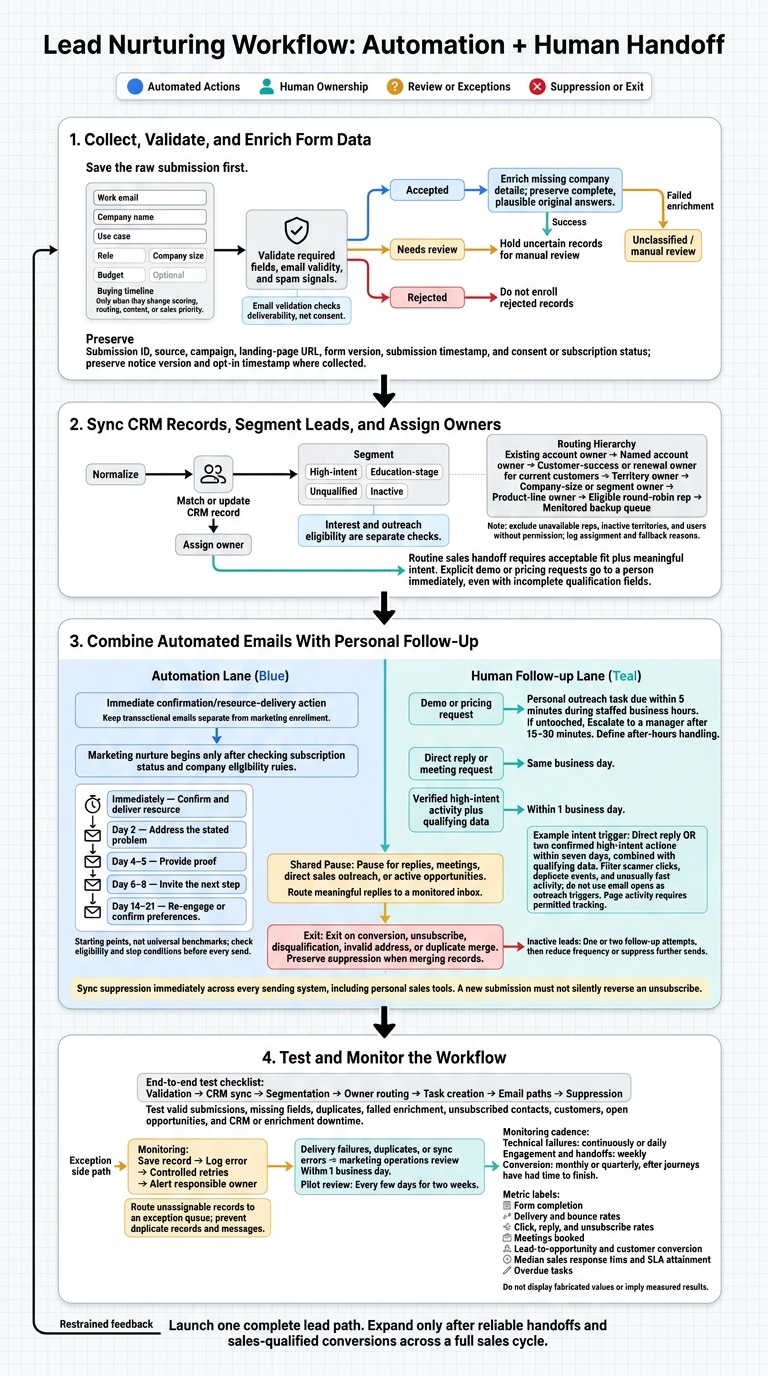
Lead Nurturing Workflow: Automation + Human Handoff
Step 1: Collect, Validate, and Enrich Form Data
Once you’ve defined lead stages and handoff rules, build a form that collects only the data needed for routing and follow-up.
Choose Fields for Lead Qualification
Start with work email, company name, and use case. Add role, company size, budget, or buying timeline only if the answer changes scoring, routing, content, or sales priority.
| Field | Purpose | Branch activated | Downstream use |
|---|---|---|---|
| Work email | Contact the lead | Invalid or personal email review | Confirmation, deduplication, email performance |
| Company name | Match an account | Missing-company enrichment | Account matching, owner assignment |
| Use case | Identify intent | Product, industry, or problem-specific path | Content, conversion reporting |
| Role | Assess influence | Executive, practitioner, or partner path | Messaging, sales context |
| Company size | Segment account potential | SMB, mid-market, or enterprise path | Scoring, routing, pipeline reporting |
| Buying timeline | Assess urgency | Immediate, later, or educational path | Follow-up priority, nurture timing |
Use conditional questions for fields that apply only to some respondents. For longer qualification flows, group questions into clear steps and make the first step easy to complete. Mark required fields clearly and test the form on mobile. Keep phone number and budget optional unless follow-up requires them.
Validate each submission before it enters CRM sync or nurture.
Check Data and Save Submission Details
Save the raw submission first. Then check required fields, email validity, and spam signals before enrollment. Label each submission as accepted, needs review, or rejected, and hold uncertain records for manual review.
Enrich missing company details, but keep complete, plausible original answers as the authoritative record. Save the enrichment source, date, confidence, and status. If enrichment fails, place the lead in an Unclassified segment for manual review.
Build a CRM-ready payload with the submission ID, source, campaign, landing-page URL, form version, submission timestamp, and consent or subscription status. These details support segmentation and handoff. Also preserve the notice version and opt-in timestamp where collected. Email validation checks deliverability, not consent.
Before launch, verify that your chosen CRM connector is available. Don’t assume every connection is native. Check authentication, destination object type, required fields, allowed dropdown values, duplicate handling, consent-field mappings, error responses, and retry behavior. Confirm that rejected records trigger a logged error, that submissions remain saved for retry, and that the operations owner receives an alert rather than the lead being silently lost.
sbb-itb-5f36581
Step 2: Sync CRM Records, Segment Leads, and Assign Owners
After validation, sync each lead to the CRM, then route it based on fit, intent, and ownership.
Update Records and Segment Leads
Normalize records before creating or routing them. Match contacts using a stable CRM contact ID when available, then a normalized email address. Match companies by account ID or normalized company domain - not a generic email-provider domain. Require at least two matching signals before automatically flagging a possible duplicate. Send unclear matches for review rather than merging them automatically. Keep generic inboxes separate, maintain domain aliases, and preserve history, attribution, consent, subscriptions, relationships, and owners when updating a match.
Set clear rules for which system controls each field. The CRM controls account ID, lifecycle stage, opportunity stage, account ownership, and sales status. Marketing automation controls campaign membership, email engagement, subscription status, and nurture enrollment. High-converting lead forms supply submission answers, source URL, UTM values, timestamp, consent language, and form version.
Append new activity and attribution data. Update qualification fields that can change only when the new value is more reliable, and never overwrite the original source or first-touch date. Create opportunities only after qualification and sales acceptance - not after every form submission.
Segment leads by persona, company fit, product interest, behavioral intent, lifecycle stage, and geography or territory. Interest and outreach eligibility are separate checks. Accept incomplete submissions only when usable contact details, the appropriate notice, and eligibility are established. Otherwise, retain the record only for internal processing and mark missing qualification data as unknown. Use these segments to decide which leads stay in nurture and which need human follow-up.
| Segment | Trigger | Owner | Next step |
|---|---|---|---|
| High-intent | Demo or pricing request; repeated product-page visits from an ICP-fit account | Existing account owner; otherwise territory or product-line owner | Create a CRM task for personal outreach and send a brief confirmation |
| Education-stage | Guide download, webinar registration, or comparison content without a direct buying request | Marketing automation owner | Enroll in relevant educational content, track engagement, and alert sales as fit and intent increase |
| Unqualified | Missing required qualification data, poor ICP fit, disposable or invalid contact details, or no outreach eligibility | Marketing operations or review queue | Request missing information when appropriate, suppress noncompliant outreach, or place the record in a low-touch path |
| Inactive | No meaningful email, form, or sales engagement after the agreed inactivity window | Marketing owner, with sales visibility if previously qualified | Pause nurture; run a short re-engagement path only if eligible, then suppress or archive according to the retention policy |
Set Owner Routing and Sales Handoff Triggers
Apply one routing hierarchy: existing account owner → named account owner → customer-success or renewal owner for current customers → territory owner → company-size or segment owner → product-line owner → eligible round-robin rep → monitored backup queue. Exclude unavailable reps, inactive territories, and users without permission. Log the rule used, assignment time, and fallback reason so every inquiry has an accountable owner.
Require both acceptable fit and meaningful intent for routine sales handoffs. Send explicit demo and pricing requests to a person immediately, even if qualification fields are still incomplete. Include form answers, attribution, engagement, and the next action in the CRM task.
For high-intent follow-up during business hours, set owner tasks due within 5 minutes. Escalate to a manager after 15–30 minutes if the record remains untouched. Define after-hours handling based on the prospect’s time zone. Pause generic nurture while sales follow-up is active, and suppress promotional communication when subscription status or consent does not permit outreach.
Step 3: Combine Automated Emails With Personal Follow-Up
Send Confirmations and Relevant Emails
Once the CRM assigns a segment and owner, send each lead into the matching email path. Keep transactional emails separate from marketing enrollment. Deliver the resource right away, explain what happens next, and leave promotions out of the confirmation.
Before starting the sequence below, check subscription status and company eligibility rules. Give each email one primary call to action. Use a shorter path for leads with near-term needs. For researchers and leads who haven’t engaged, space out the emails and focus on education.
| Timing | Purpose | Entry condition | Call to action | Exit or branch condition |
|---|---|---|---|---|
| Immediately | Confirm and deliver resource | Valid submission | Open resource or review next steps | Delivery failure, duplicate, or invalid address |
| Day 2 | Address the stated problem | Eligible for nurture; no reply or meeting | Read a focused guide | Reply, unsubscribe, conversion, or disqualification |
| Day 4–5 | Provide proof | No high-intent signal or active opportunity | View an example or answer a qualifying question | Meaningful click, reply, or owner handoff |
| Day 6–8 | Invite the next step | Meets qualification rules | Book a meeting or request an evaluation | Meeting booked, opportunity created, or opt-out |
| Day 14–21 | Re-engage or confirm preferences | Inactive and still eligible | Choose a communication preference | Preference change, unsubscribe, suppression, or re-entry eligibility |
These delays are starting points, not universal benchmarks. Test them against audience behavior, sales capacity, and the lead’s stated urgency. Use a clear sender name, accurate sender details, truthful headers, a valid postal address, and a clear unsubscribe link.
Use Intent Signals to Trigger Personal Outreach
Trigger personal outreach with verified actions - not email opens. Filter out scanner clicks, duplicate events, and unusually fast activity before counting engagement. One workable trigger is a direct reply or two confirmed high-intent actions within seven days, combined with qualifying data. Using interactive multi-step forms can help gather this data while keeping prospects engaged.
Use page activity only when tracking is permitted. Owners should refer to recorded answers and stated timelines - not budgets the lead never shared, hidden assumptions, or sensitive details.
Treat engagement as a signal to hand off the lead. Pause automated nurture when a person needs to respond.
| Task and owner | Trigger | Response window | Why involve a person? |
|---|---|---|---|
| Confirmation - automation | Form submission | Immediate | The action is standardized and expected |
| Education - automation | Eligible lead enters nurture | Scheduled | Content can be delivered consistently |
| Reply handling - sales owner | Direct reply or meeting request | Same business day | Read the message and respond personally |
| Intent review - sales owner | Verified high-intent activity plus qualifying data | Within 1 business day | Review form conversion and qualification data to decide whether outreach would help |
| Delivery review - marketing operations | Delivery failure, duplicate, or sync error | Within 1 business day | Correct the record or suppress unsafe sends |
Set Pause, Re-Engagement, and Exit Rules
Check stop conditions before every send. Pause nurture for replies, meetings, direct sales outreach, and active opportunities. Send replies to a monitored inbox, and distinguish meaningful responses from out-of-office messages.
For inactive leads, limit follow-up to one or two attempts. Then reduce email frequency or suppress further sends. Exit leads on conversion, unsubscribe, disqualification, invalid address, or duplicate merge. When merging duplicates, keep suppression settings on the surviving record.
Sync suppression immediately across every sending system, including personal sales tools. The FTC requires honoring opt-outs within 10 business days and keeping the opt-out mechanism working for at least 30 days after sending. A preference center should also let recipients stop all marketing.
Before re-entry, document eligibility and check current suppression settings. A new submission must not silently reverse an unsubscribe.
Step 4: Test and Monitor the Workflow
Test Every Branch and CRM Handoff
Once routing and follow-up are live, test the path from start to finish. Test the whole workflow - not just the emails. Check form validation, CRM sync, segmentation, owner routing, nurture, and suppression. Include valid submissions, missing fields, duplicates, failed enrichment, unsubscribed contacts, customers, and open opportunities. Record a pass or fail for field mapping, CRM updates, segmentation, owner assignment, task creation, email paths, and suppression. Send records that can’t be routed to an exception queue.
Temporarily simulate CRM or enrichment downtime to check how the workflow handles failures. Confirm that missing data gets a safe fallback and that retries run at controlled intervals without creating duplicate records or messages. When retries run out, the responsible owner should get an alert. Each error should identify the record, failed step, timestamp, and person responsible for fixing it.
Track timestamps for submission, enrichment, CRM write, assignment, task creation, and first response. Verify that replies and high-intent actions trigger personal outreach without duplicate sends or missed handoffs.
Test emails in Gmail, Outlook, Apple Mail, and on mobile. Check personalization fallbacks, links, accessibility, reply-to addresses, time zones, and unsubscribe controls. Verify hard-bounce suppression and soft-bounce handling. Start with a small pilot segment. Then, every few days for two weeks, review errors, bounces, replies, complaints, owner activity, and overdue tasks.
Track Conversions and Sales Response Times
Once the workflow passes testing, set the metrics you’ll use to review qualification, handoff speed, and conversion. Define each metric before launch and use the same reporting window across reports. Apply one attribution rule and show counts alongside percentages. Track technical failures separately from audience performance so a broken integration doesn’t look like weak buyer interest.
| Metric | Definition | Reporting window |
|---|---|---|
| Form completion rate | Completed submissions ÷ form starts | Weekly |
| Delivery and bounce rates | Delivered emails or bounced emails ÷ attempted sends | Continuous or daily |
| Click, reply, and unsubscribe rates | Unique clicks, qualifying replies, or unsubscribes ÷ delivered emails | Weekly |
| Meeting-booked rate | Meetings booked ÷ eligible leads | After the defined journey window |
| Lead-to-opportunity and customer conversion rates | New opportunities or new customers ÷ leads entering the cohort | After the expected buying cycle |
| Sales response time | Time from assignment or alert to the first qualifying human response; report median and SLA attainment | Weekly |
| Overdue-task rate | Overdue open tasks ÷ total assigned tasks | Daily check; weekly review |
Monitor failed syncs, sync delays, missing owners, and suppression errors continuously or daily. Review engagement and handoffs weekly. Assess conversion monthly or quarterly once journeys have had time to finish.
Compare results by lead source, segment, form, workflow branch, and owner, but don’t draw conclusions from small samples. Give each fix a named owner. Test one change at a time, keeping the audience, denominator, attribution method, and reporting window fixed.
Conclusion: Launch One Lead Path Before Expanding
Build one complete lead path before adding branches. Automate repeatable steps and save human attention for high-intent moments. Start with one segment, connecting form submission to owner assignment. Then link automated email paths to human follow-up, with clear stop rules.
Turn the pilot into a reusable playbook covering fields, routing, messaging, ownership, and exceptions. The next segment can start with a tested process rather than a workflow built from scratch.
Expand only after the pilot delivers reliable handoffs and sales-qualified conversions across a full sales cycle. Scale the path that generates qualified conversations - not email volume. Track sales-accepted leads, meetings, opportunities, and timely human follow-up as the results worth scaling.
FAQs
How do I set lead-scoring thresholds?
Work with sales and marketing to agree on what makes a Marketing Qualified Lead (MQL) and a Sales Qualified Lead (SQL). Assign points based on demographic fit, such as job title and company size, and signs of buying intent, such as demo requests and pricing page visits.
Set score thresholds that trigger specific actions. For example, 75 points could qualify a lead as an MQL, while 100+ points could trigger an immediate handoff to sales. Review conversion data over time and adjust those thresholds based on which leads convert.
When should a stalled sales lead return to nurture?
Move a stalled lead back to nurture after 30 to 45 days of little or no engagement, or when a sales representative rejects it or lets it stall. If the lead remains engaged but doesn’t convert during consideration, review the earlier form fields and routing logic.
Re-engagement campaigns can spark interest again with new content, updated case studies, or limited-time offers.
How can a small team meet the 5-minute response target?
Use automation to connect form submissions with human outreach. Validate and enrich lead data, remove duplicates, and create or update the CRM record. Then instantly notify the assigned sales owner, including the context they need for a personalized follow-up.
For high-intent leads, such as demo requests, send an automated intro email right away to confirm receipt while the rep prepares to follow up. Flag or reassign untouched leads automatically once your set time threshold passes.
Related Blog Posts
Get new content delivered straight to your inbox

The Response
Updates on the Reform platform, insights on optimizing conversion rates, and tips to craft forms that convert.


Drive real results with form optimizations
Tested across hundreds of experiments, our strategies deliver a 215% lift in qualified leads for B2B and SaaS companies.
