
.webp)
Data Retention and Disposal in Healthcare


If you keep health records too long, or destroy them too soon, you can create legal and HIPAA problems. The basic rule is simple: keep each record for the longest time required, then destroy it in a way you can prove.
Here’s the short version:
- HIPAA does not set medical record retention periods for patient charts. State law usually does.
- HIPAA does require many compliance records to be kept for 6 years from creation or last effective date.
- Patient record retention often falls between 5 and 10 years, but minors, Medicare records, behavioral health files, and worker exposure files can run much longer.
- OSHA exposure records may need to be kept for employment length + 30 years.
- Soft delete is not destruction. If data still exists in the system, it can still be found.
- Paper, devices, backups, and cloud data each need their own destruction method.
- Every destruction event should be logged with details like date, method, what was destroyed, and who approved or witnessed it.
A few numbers stand out:
- 6 years: HIPAA compliance documents
- 7 years: many Medicare fee-for-service records
- 10 years: a common target for adult records in many cases
- 50 years after death: HIPAA protection for deceased patients
- 30 years after employment ends: some OSHA-related records
What this means for you is straightforward: I’d treat retention as a records, systems, and legal-hold issue at the same time. You need a written policy, clear owners, archive rules, secure destruction steps, vendor controls, and logs that hold up in an audit.
This article lays out the main rules, common retention timeframes, and the steps to review, archive, and destroy PHI across paper files, EHRs, backups, devices, and cloud workflows.
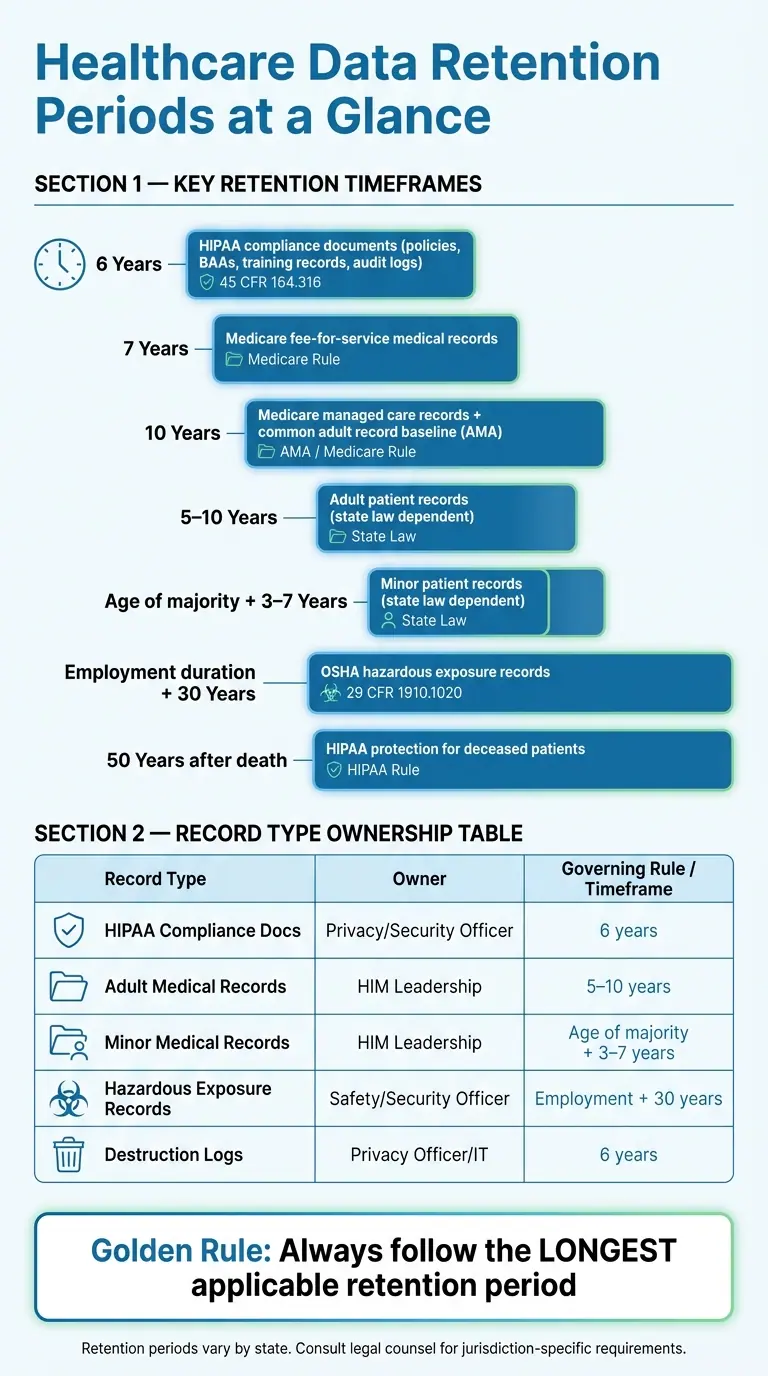
Healthcare Data Retention Periods: Key Timeframes at a Glance
Document Retention and Destruction
sbb-itb-5f36581
Regulatory foundations: HIPAA, state law, and policy ownership
There isn't one rule that sets healthcare retention periods. HIPAA, state law, and other rules can each set their own timelines, so the safest approach is to follow the longest period that applies. In practice, that means patient records and compliance records often run on different clocks.
PHI vs. HIPAA documentation
Clinical records like charts, diagnoses, and lab results follow state and other applicable retention rules. In many states, that window falls somewhere between 5 and 10 years, depending on the jurisdiction.
HIPAA handles a different category: compliance documentation. That includes written privacy and security policies, procedures, risk analyses, training records, Business Associate Agreements (BAAs), breach notification logs, patient authorizations, and audit logs. Under 45 CFR 164.316, those records must be kept for at least six years from the date they were created or the date they were last in effect, whichever is later.
So even though both sets of records may relate to the same patient or process, they usually don't move together. Clinical PHI and HIPAA administrative records often sit in different systems, belong to different teams, and follow different disposal controls and retention triggers. That's why storage, review, and destruction workflows often split as well.
Retention rules for adult, minor, and specialty records
For adult patients, state rules often fall between 5 and 10 years, and the American Medical Association points to 10 years as a baseline. Medicare fee-for-service providers must keep records for 7 years, while Medicare managed care providers must keep them for 10 years.
Minor records follow a different rule. They are usually kept until the patient reaches the age of majority, plus another 3 to 7 years, depending on the state. Specialty records, such as behavioral health, oncology, and research files, often come with longer timelines.
OSHA adds another layer for occupational health. Employee medical and hazardous-exposure records must be kept for the duration of employment plus 30 years.
These rules sound simple on paper, but they can get messy fast if no one knows who owns what.
Who owns the policy
Retention policy is shared across several teams. Privacy and Security handle compliance records. HIM handles clinical records. Legal handles holds. IT carries out secure disposal. Compliance lines the policy up with federal and state rules.
The table below maps each record type to its default owner and retention baseline.
| Record Type | Governing Rule | Minimum Retention | Policy Owner |
|---|---|---|---|
| HIPAA Compliance Docs (Policies, Procedures, BAAs, Training Records, Patient Authorizations, Audit Logs) | HIPAA (45 CFR 164.316) | 6 years from creation or last effective date | Privacy/Security Officer |
| Adult Medical Records (Clinical PHI) | State Law / CMS | 5–10 years (state-dependent); 7 years (Medicare fee-for-service); 10 years (Medicare managed care) | HIM Leadership / Records Custodian |
| Minor Medical Records | State Law | Age of majority + 3–7 years (varies by state) | HIM Leadership / Records Custodian |
| Hazardous Exposure Records | OSHA (29 CFR 1910.1020) | Duration of employment + 30 years | Safety/Security Officer |
| Destruction Logs | HIPAA / State Law | 6 years | Privacy Officer / IT |
Clear ownership helps keep retention and disposal consistent.
Medical record lifecycle and deletion workflows
Once retention periods are in place, the workflow follows a clear path: review, archive, then destroy. A medical record moves from active use to inactive status, then into archive, and only then to destruction. Each step needs intent and documentation.
Use the last encounter date to move records out of active use and into review. When a record hits its retention end date, send it to a review queue before anything is destroyed. That process starts with a scheduled review, not deletion.
How retention schedules trigger review and disposal
Before a record is cleared for disposal, check a few things in order:
- Verify the record type
- Confirm the right retention rule
- Confirm there is no legal hold
- Document the approval
A review queue tied to last encounter date + retention period makes this process much easier to manage.
Once destruction is approved, the record of that action should include the date, time, location, description of the records, quantity, method used, and signatures from both the operator and a witness. Keep those destruction logs with the compliance record set.
Soft delete, archive, and true destruction
Inactive status is not disposal. And inactive status is not deletion. A soft delete simply hides the record from the front-end view, but the data still sits in the database. That means it can still show up in legal proceedings or be exposed in a breach.
An access-controlled archive is the right middle step for records that are no longer active but still fall inside their legal retention window. It keeps retrieval and audit access in place while older systems are phased out. Irreversible destruction should happen only after the retention period ends and all holds are cleared.
| Method | Description | Recoverability | Compliance Risks | Recommended Use |
|---|---|---|---|---|
| Soft Delete | Marks a record inactive without removing the data. | High - data remains in the database. | High - PHI is still discoverable and vulnerable to breaches. | Temporary administrative changes only; not a disposal method. |
| Archive | Moves inactive records to controlled long-term storage. | Moderate - accessible to authorized users for audits, legal requests, or clinical reference. | Low - if the platform is HIPAA-compliant and access-controlled. | Records past active use but still within the legal retention period. |
| Irreversible Destruction | Irreversibly removes data so it cannot be reconstructed. | None - data cannot be reconstructed. | Moderate - risk if destruction occurs before retention ends or if documentation is missing. | Records that have exceeded all retention triggers and have no active legal holds. |
Special cases: minors, deceased patients, closed practices, and high-risk specialties
Standard retention schedules do not cover every case. Minor records need age-of-majority tracking. Retention runs until the patient reaches 18 or 21, depending on the state, before the standard retention period begins.
Some record types also carry longer timelines. Behavioral health and oncology records often have special hold rules that extend beyond the usual schedule. Deceased patients stay protected for 50 years after death, and closed practices, mergers, or EHR migrations need a designated custodian to keep chain of custody intact until retention ends.
The practical fix is simple: build these exceptions into the retention schedule and assign a custodian before any disposal step.
Secure disposal for paper files, devices, backups, and cloud systems
Once a record is cleared for destruction, the disposal method needs to fit the medium. PHI must be made unusable, unreadable, and indecipherable before disposal. NIST SP 800-88 puts sanitization into three groups: Clear, Purge, and Destroy.
Paper records and physical PHI
After legal review is done and a record is approved for disposal, paper records can be destroyed by cross-cut shredding, pulping, pulverizing, or incineration. Redaction is not destruction. For paper shredding, DIN 66399 P-4 or P-5 is a solid benchmark.
Before destruction, keep paper PHI in locked consoles or sealed containers, not open bins. If you work with an outside shredding vendor, you need a signed BAA in place. That agreement should require the vendor to protect PHI through final disposal and report security incidents or breaches. For each batch destroyed, keep a certificate of destruction.
Electronic records are different. Simply deleting a file does not mean it has been destroyed.
Electronic media, backup retention, and audit logs
For electronic media, use the NIST method that matches the device:
- Clear for reuse
- Purge when recovery must be infeasible
- Destroy when physical destruction makes sense
HDDs can be degaussed, shredded, or pulverized. If you degauss them, remove the platters first and use media shredders rated for the job. Mobile devices should be factory-reset first, then physically destroyed. USB drives and SD cards should be shredded or pulverized with equipment rated for flash media.
Immutable backups help block tampering. Restore testing shows whether data can actually be recovered before you depend on it. When backup media reaches end of life, dispose of it under the same NIST 800-88 rules. Your electronic destruction records should include the device make, model, and serial number, plus the sanitization method, verification steps, and the operator and witness signatures. Keep those records for six years with the rest of your disposal documentation.
Cloud-held PHI follows the same retention rules, but deletion should be logged and driven by policy.
Cloud forms, intake workflows, and BAAs
Cloud-based intake form templates and workflows are PHI repositories, so they need the same retention-based deletion controls as any other record set. Collect only what you need. Set automated retention triggers. Use role-based access controls and TLS to protect data in transit.
Cloud platforms should support defensible disposition, meaning the audited deletion of records after retention ends. Any platform that touches PHI should also have a signed BAA. Deletions should be logged in a tamper-evident audit trail so you have a record for litigation or audit review.
The table below sums up the recommended disposal methods and the documentation tied to the most common media types:
| Media Type | Recommended Method | Key Controls | Documentation Required |
|---|---|---|---|
| Paper Records | Cross-cut/Micro-cut shredding (DIN P-4/P-5), pulping, or incineration | Locked consoles; BAA with vendor; redaction does not count as destruction | Certificate of Destruction; destruction log with date, method, and quantity |
| Hard Disk Drives (HDD) | Degaussing, shredding, or pulverizing | Remove platters before degaussing; use rated media shredders | Device serial number; method used; operator and witness signatures |
| Mobile Devices | Factory reset (Clear) followed by physical shredding | Verify reset completion; secure chain of custody for transport | Device ID (IMEI/Serial); date and method of destruction |
| USB / SD Cards | Shredding or pulverization | Use industrial disintegrators rated for optical/flash media | Quantity/Weight; method; vendor BAA |
| Backup Media (Tapes/Drives) | Physical destruction or degaussing (NIST 800-88) | Immutable backup settings; restore testing | Backup rotation logs; destruction certificates for physical media |
| Cloud / Form Data | Secure deletion; defensible disposition | Role-based access; BAA; automated retention triggers; TLS encryption | Tamper-evident audit logs; disposition policy; BAA |
Building, auditing, and updating a healthcare retention and disposal policy
The disposal rules above only matter if they live in one written policy and are enforced in the systems that store PHI. A written policy turns retention and disposal into controls your team can follow the same way every time. It should tie each record class to the rule that governs it and the minimum time that record must be kept.
Core policy components and required documentation
At a minimum, your policy should include a full record inventory, a retention schedule mapped to the longest rule that applies, storage standards for paper and electronic records, litigation hold procedures, approved destruction methods by media type, and version-controlled revisions.
Every destruction event also needs documentation. Destruction logs should record the date, method, record description, quantity, and signatures from both the operator and a witness. If a vendor handles destruction, keep the certificate of destruction with those same records.
Connecting policy to systems and workflows
This is where a lot of teams slip up: policy language on its own doesn't do much. It has to be built into the tools staff use every day. That means EHR retention settings, document management platforms, backup configurations, and cloud intake workflows all need to follow the same destruction triggers set in your written policy: last encounter date plus the applicable retention period.
Legal holds are the big exception. If litigation is reasonably anticipated, both automated and manual destruction must stop at once for the records involved. That override needs to exist in every system that touches those records, not just in a printed procedure.
Cloud intake workflows should follow the same retention and access controls. And if vendors touch PHI, they need signed BAAs.
Audit readiness and policy review
Audit readiness takes routine review, not a once-a-year scramble. That includes checking destruction logs, verifying backup retention and purge activity, auditing access controls, and confirming that every vendor handling PHI has a current signed BAA with audit rights included.
You should review and update the policy at least once a year - or sooner if state laws change, you bring in new tech, or vendor relationships change.
The table below sums up the main policy parts and what each one must include:
| Policy Component | What It Must Include |
|---|---|
| Record Inventory | All record types, formats, and systems holding PHI |
| Retention Schedule | Longest applicable rule by record type and jurisdiction |
| Destruction Protocols | Approved method by media type and verification steps |
| Legal Hold Procedure | Triggers, responsible roles, and system-level suspension controls |
| Destruction Logs | Date, method, description, quantity, and operator/witness signatures |
| BAA Register | All vendors touching PHI, with a signed BAA and audit rights |
| Policy Version History | Dated revisions with approval signatures |
FAQs
How do I find the right retention period?
Start with state laws. HIPAA does not set a fixed retention period for patient charts.
That means your first job is to review your record types, match each one to the state rules that apply, and keep records for the longest period when rules don’t line up. It’s the safest way to avoid getting caught between competing deadlines.
State law is the main driver, but it’s not the only one. You should also look at:
- payer contracts
- accreditation standards
- malpractice risk
- records for minors
- documentation tied to chronic or specialized care
A chart isn’t just a chart. A pediatric record, a long-term care file, or documentation tied to a specialty practice may need to stay on hand longer than your default policy might suggest.
What stops a record from being destroyed?
A record can't be destroyed before it reaches the retention period required by state law. It also can't be erased or changed without proper authorization.
If it's still needed for care, accreditation, or legal compliance, it must be kept secure until a formal, policy-aligned destruction process is completed.
How should backups and cloud data be deleted?
Delete backups and cloud data with sanitization methods that make ePHI unreadable, indecipherable, and impossible to reconstruct.
Accepted methods include cryptographic erasure, degaussing, and physical destruction of storage media under NIST Special Publication 800-88.
For cloud data, deletion needs to be thorough and irreversible. That means you shouldn't stop at removing files from view. The data should be wiped in a way that prevents recovery.
For a compliant audit trail, document:
- Device identifiers
- The sanitization method used
- Verification steps
That record shows what was deleted, how it was handled, and how you confirmed the data couldn't be brought back.
Related Blog Posts
Get new content delivered straight to your inbox

The Response
Updates on the Reform platform, insights on optimizing conversion rates, and tips to craft forms that convert.




Drive real results with form optimizations
Tested across hundreds of experiments, our strategies deliver a 215% lift in qualified leads for B2B and SaaS companies.
