
.webp)
Email Data Sync: CRM Fields That Matter Most



If I had to cut this down to the core point, it’s this: consent, lifecycle stage, owner, and region should be synced first. Those fields decide who you can email, where a lead goes, who follows up, and which rules apply.
When those fields drift, email and sales start working from different data. That leads to bad routing, off-target sends, stale nurture paths, and compliance trouble. After that base is in place, I’d use lead source, product interest, and engagement/lead score to fine-tune targeting, timing, and prioritization.
Here’s the full set the article covers:
- Lifecycle stage: where the contact is in the funnel
- Lead source: how the contact entered the database
- Owner: who should act next
- Product interest: what the contact wants
- Region: where the contact is located
- Consent: whether email is allowed
- Engagement/lead score: how active the contact is now
The main rule is simple: CRM should stay the main record, and the email platform should follow it. The one major exception is unsubscribe and complaint data, which should sync back at once.
A few numbers from the article show why this matters:
- Interest-based segmentation drove 74.53% higher clicks
- It also led to 25.65% lower unsubscribes
- GDPR fines can reach €20 million or 4% of annual global revenue
- CASL fines can reach $10 million CAD
- CAN-SPAM penalties can reach up to $50,000 per email
Quick Comparison
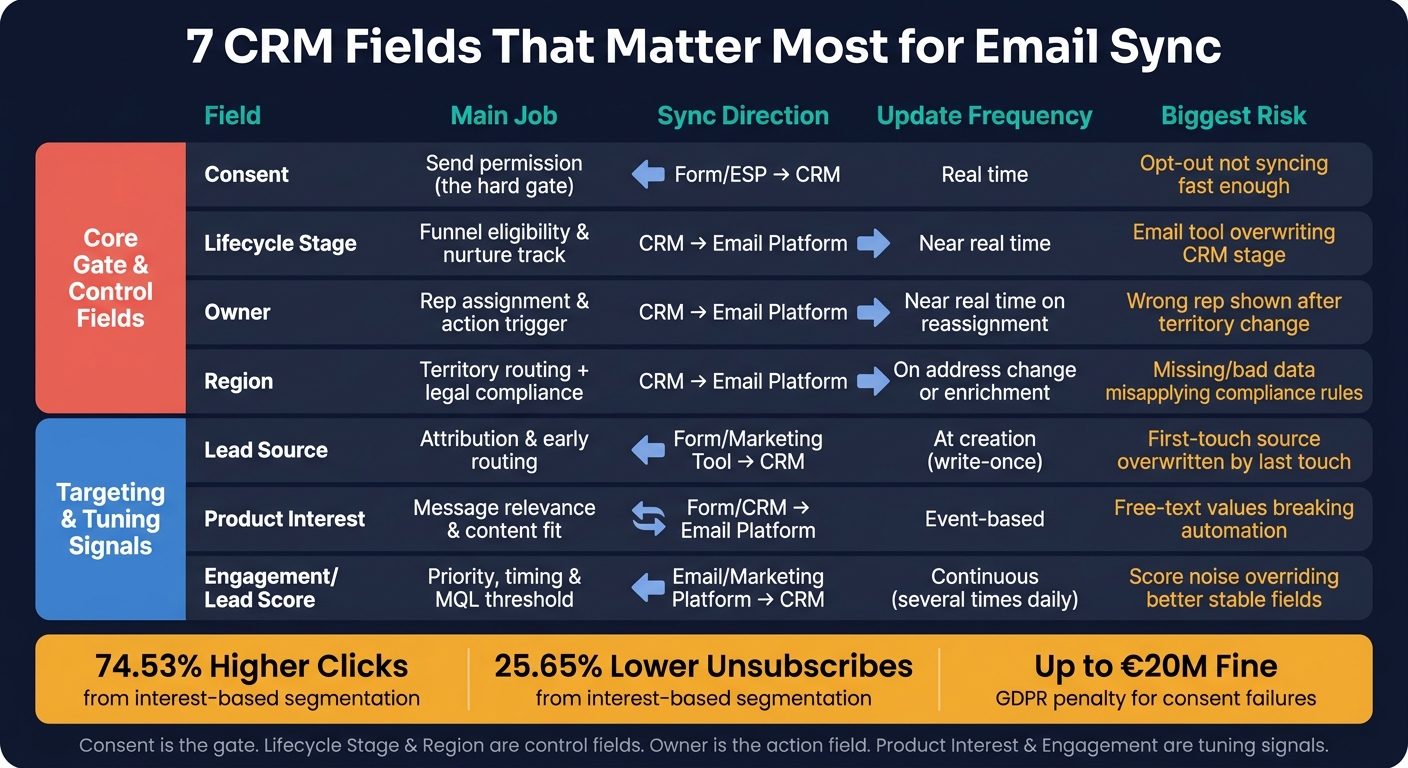
7 CRM Fields for Email Sync: Roles, Sync Direction & Risks
| Field | Main job | Best sync direction | Main risk |
|---|---|---|---|
| Consent | Send permission | Form/ESP → CRM | Opt-out not syncing fast enough |
| Lifecycle stage | Funnel eligibility | CRM → email platform | Email tool overwriting stage |
| Owner | Rep assignment | CRM → email platform | Wrong rep shown after reassignment |
| Region | Territory + legal rules | CRM → email platform | Bad or missing location data |
| Lead source | Attribution + early routing | Form/marketing tool → CRM | First-touch source getting overwritten |
| Product interest | Message fit | Form/CRM → email platform | Messy free-text values |
| Engagement/lead score | Priority and timing | Email/marketing platform → CRM | Score noise overriding better fields |
Bottom line: I’d treat consent as the gate, lifecycle stage and region as control fields, owner as the action field, and product interest plus engagement as tuning signals. That setup keeps routing cleaner, segmentation tighter, and compliance risk lower.
sbb-itb-5f36581
1. Lifecycle Stage
Lifecycle stage shows where a contact is in the buyer journey - subscriber, lead, MQL, SQL, opportunity, or customer. It answers a basic email marketing question: What should this person get right now?
Segmentation Impact
Lifecycle stage groups contacts by intent and relationship, not just demographics. That makes it the main segment filter.
A subscriber should get educational content. An MQL should get case studies and comparison guides. An SQL should get product-focused messages tied to an active sales conversation. A customer should get onboarding tips and renewal reminders.
Use lifecycle stage as the main filter first. It helps you avoid mismatched campaigns, like demo invites going to customers or upsell offers landing in front of cold leads.
Routing Value
When a lead reaches SQL, assign a rep, stop marketing nurture, and move that person into a sales-owned sequence.
If your team still depends on manual triage at this handoff, delays and dropped leads become much more likely. Routing rules tied straight to lifecycle stage changes help fix that gap.
That routing logic depends on the next two fields: source and owner.
System of Record
Marketing automation platforms often keep their own status fields. Even so, CRM should remain the main record.
Set one taxonomy in CRM - Subscriber, Lead, MQL, SQL, Opportunity, Customer. Then configure your marketing platform to read from that field and write back only when stage-change rules are met. If form submissions enter CRM through Reform, map lifecycle stage as the record comes in so the first email trigger starts in the right place.
Compliance Risk
Stage is not the same thing as consent.
If you assume an SQL or customer has agreed to all marketing emails, you can run into CAN-SPAM trouble. Filter by lifecycle stage AND explicit consent status at the same time. Also check for stale stages. Old MQL or customer records often create spam risk, and they can lead to complaints if they stay untouched for too long.
Next, lead source and owner narrow down where each record should go.
2. Lead Source
Lead source tells you where a contact came from - paid search, organic search, webinar, referral, partner, or an offline event. It answers something lifecycle stage can't: Why did this person enter your database in the first place? If lifecycle stage shows where someone is, lead source shows why they showed up.
Segmentation Impact
Lead source is a strong early segmentation signal because it shows intent before you have much behavior data. Someone who came in through a product demo request has a very different mindset from someone who downloaded a broad industry guide, even if both sit in the CRM as "Lead."
That’s why source should shape nurture paths early. Webinar registrants usually respond better to follow-up tied to the event topic. Paid search leads often need shorter, more direct sequences with clear CTAs. Referral contacts may move faster and often fit a more personal, sales-led path.
The point is simple: let source shape the message angle, not just the list.
That same signal also affects routing in the next step.
Routing Value
Source helps you decide two things fast: how soon to respond and who should take the lead. A pricing-page form fill or demo request should go straight to sales. A blog newsletter signup shouldn’t.
When routing rules connect straight to source values, teams spend less time sorting leads by hand and more time following up. That cuts response time. And when response time drops, high-intent leads are less likely to cool off.
If your forms collect source data through UTM parameters and hidden fields, that data can flow into the CRM ready to trigger routing logic. Reform supports hidden field mapping and CRM integrations, which helps keep source data intact at the point of entry.
System of Record
The biggest problem with lead source is overwrite risk. If a later action - like a second webinar signup - replaces the first source, first-touch attribution is gone.
A better way? Treat lead source as write-once. Set it on first touch, then lock it. If you want to track later influence, use a separate "Most Recent Source" field.
Keep the taxonomy tight too:
- Use 5 to 10 core values
- Make sure values don’t overlap
- Keep names matched across your CRM and marketing automation platform
Small label differences can cause big headaches later. "Paid Search", "Google Ads", and "SEM" may mean the same thing to a person, but systems don’t read between the lines. Over time, that kind of mismatch breaks segmentation and reporting.
Compliance Risk
Lead source can help confirm how consent was collected, but it does not replace consent status. A source like "Webinar Registration" does not mean the contact agreed to promotional email. And a source from a third-party list needs tighter opt-in checks before any send.
Use source to guide compliance checks, not skip them. Broad values like "Web" or "Other" create problems here because they hide how consent was actually collected.
Owner turns source into action by assigning the right rep.
3. Owner
Owner answers a different question: who acts next? It’s mostly an execution field, not a segmentation field. Once stage and source set priority, owner assigns responsibility for the record.
Segmentation Impact
Owner works best for internal segmentation. You can split records by salesperson, team, region, or account pod to track conversion rates and see who’s doing what.
For external email, owner is more useful as a personalization layer. Emails sent from a known rep often get better results.
Routing Value
Use owner for sales SLAs, territory assignment, account ownership, and escalation. For example, if a California prospect already has a West Coast owner, keep that assignment in place. But there’s a catch: this only works if the CRM updates ownership before the first follow-up goes out.
System of Record
The CRM should own the Owner field. No exceptions.
When owner changes in the CRM, alerts and send-on-behalf-of emails need to update right away. If that handoff lags, the wrong person can end up assigned, notified, or shown to the prospect.
Compliance Risk
Owner is low-risk as a field, but it can create issues when exposed outside internal systems. Syncing owner names into customer-facing emails or shared dashboards may reveal internal details that don’t need to be public.
Owner turns stage and source into action. Product interest narrows that action to the right offer.
4. Product Interest
Product interest shows what a contact wants - product, plan, or use case. It's one of the strongest fields for segmentation and routing. If stage tells you when to send and owner tells you who acts, product interest tells you what to send.
Segmentation Impact
Lifecycle stage tells you where someone sits in the funnel. Product interest tells you what message will land.
A mid-funnel lead in "consideration" might skip right past a generic nurture email. But if that email speaks to the product they asked about, it feels more relevant and more timely.
Interest-based segmentation tends to beat broad sends by a wide margin. Mailchimp's analysis of interest-group segmentation found clicks 74.53% higher and unsubscribes 25.65% lower than non-segmented campaigns.
Use lifecycle stage for cadence and urgency; use product interest for subject, proof points, and CTA. A prospect interested in "security and compliance" needs different content than someone focused on "team collaboration", even when both are at the same funnel stage.
That same level of detail helps with routing too.
Routing Value
Product interest matters a lot for routing in businesses with multiple products, plans, or specialist teams. A contact asking about an enterprise package should go to an enterprise account executive. Someone with questions about onboarding or a specific module should go to a product specialist.
That cuts down on misrouted leads and helps teams reply faster, because the first owner already has a decent sense of what the prospect wants.
Routing only works with structured values. Free-text entries like "Need the analytics thing" are hard to automate. Predefined options are much easier to work with.
If a contact can have more than one interest, the CRM should support:
- A multi-select field
- A primary-interest field with secondary tags
System of Record
Capture product interest first in the form, intake workflow, or preference center, then sync it into CRM for activation. This is where multi-step forms beat static ones when it comes to clean form design.
Using a tool like Reform to capture structured interest choices - through dropdowns, checkboxes, or conditional multi-step fields - keeps the data consistent from the start. Unstructured or manual interest data tends to drift over time, especially when deals change shape or contacts look at more than one product.
Compliance Risk
Product interest is usually low-risk on its own, but the way it's collected and used still matters. If interest data is tied to sensitive inferences or collected without clear context, it can create problems under privacy frameworks and state privacy laws.
Store consent separately from product-interest data, limit access, document purpose, and keep opt-out clear.
Next, region adds the geographic filter that can change routing and send rules.
5. Region
Region affects send time, routing, and compliance. It looks simple, but it does a lot more work than many teams expect. One field can shape segmentation, sales ownership, and legal handling all at once.
Segmentation Impact
The fastest win from region data is send-time alignment. If you send at 9:00 a.m. Eastern, contacts on the West Coast get that email at 6:00 a.m. That’s not ideal. When you segment by time zone and schedule by local hours, your message shows up when people are more likely to see it.
Region can also shape the message itself. It helps with local promotions, local proof points, and state-level rules. A Q4 year-end planning email may make sense for a U.S. audience, but it can feel off for contacts in places that follow a different fiscal calendar.
And in many teams, that same location data also decides who owns the lead.
Routing Value
For territory-based sales teams, region is often the first thing checked for routing. A lead from New York goes to the Northeast AE. A lead from California goes to the West territory rep. When region is missing, leads get sent to the wrong person or sit in limbo.
The fix is pretty simple:
- Keep a territory map that ties states and countries to owners
- Treat region as a routing field that must be filled at form submission
- Don’t wait and fill it in later
That setup falls apart if region comes in messy from the start.
System of Record
CRM should own region values. Capture region with country and state picklists, not free text. Enrichment tools can standardize values or fill gaps, but they should not silently overwrite a value that already exists in CRM.
A practical rule helps here: if a new form submission conflicts with an existing CRM region value, log the new value in a separate "Region Raw" field and flag it for review instead of auto-updating the territory.
Using a tool like Reform to capture region at intake can help keep this clean. For example, conditional logic can show a State field when someone selects "United States." That keeps values structured before they ever hit your CRM or email platform.
Compliance Risk
Region also decides which email rules apply. Sending to EU or Canadian contacts without the right consent rules can trigger severe penalties, including GDPR fines up to €20 million or 4% of global annual turnover, CASL fines up to $10 million CAD, and CAN-SPAM penalties up to $50,000 per email.
This is where bad data gets expensive. If region is incomplete, or guessed from IP addresses alone, the rules may not be applied correctly. And IP-based data is shaky anyway because VPNs and remote work can throw it off.
The safer path is direct collection through validated form fields, tied to consent records. That gives you suppression logic you can actually defend.
Next, consent controls whether any region-based send is permitted.
6. Consent
Consent is the permission field. Lifecycle stage, region, and lead source help you decide how to contact someone. Consent decides whether you can contact them at all.
That distinction matters. In this group of fields, consent is the only one that can block send eligibility outright, no matter where a contact sits in the funnel or how much interest they’ve shown.
Use consent fields tied to specific purposes, such as:
- Product updates
- Promotions
- Transactional-only messages
A contact might allow transactional-only messages like order confirmations and account notices, while refusing anything promotional. That’s a normal case, and your system needs to handle it cleanly.
Contacts who are still pending double opt-in should stay in a short confirmation sequence and remain out of other flows until they confirm. Permission-based sending cuts complaint rates, which is why consent should be the first filter checked before any routing or nurture rule runs.
Consent should act as a required filter before routing, not a soft tag added later. Check it first. If a lead has no email marketing consent, they should not enter an email drip, even when lifecycle stage and product interest look like a perfect match. In that case, phone outreach or a one-to-one conversation may be the better path.
If email consent is withdrawn but SMS consent is still active, suppress email and shift updates to SMS. But that only works when consent data stays current across systems.
Store consent in the CRM, and push unsubscribe events back from the ESP in real time. Keep sync one-way, except for immediate unsubscribe updates from the ESP. With scheduled syncs, there’s a gap where someone can opt out and still get email before the status changes.
Store these consent fields in CRM:
- Consent status
- Channel
- Purpose
- Source
- Timestamp
- Jurisdiction
Tools like Reform can capture these values at the point of form submission with explicit checkboxes and mapped fields, so the CRM gets clean consent data from the start.
GDPR-style rules require explicit, documented consent for marketing email sent to EU residents, along with clear proof of when and how that consent was collected. CAN-SPAM in the United States does not require prior opt-in for every commercial email, but it does require a clear opt-out method and prompt handling of unsubscribe requests. CCPA/CPRA adds transparency and opt-out rules around how email addresses are used and shared.
Regulators found that MoneySupermarket sent emails to 6,788,496 recipients without clear consent evidence. That’s the kind of mistake that turns a messy database into a legal problem fast. Accurate, auditable consent records stored in the CRM and tied to the source of collection are your best defense.
Next, engagement and lead score show how active a contact is, but they never override consent.
7. Engagement and Lead Score
Engagement and lead score show activity. They tell you more than who a contact is. They show how interested that person is right now.
That’s what makes them different from static fields like region or lead source. Those fields usually stay the same for a while. Engagement does not. It changes often, which makes it a strong fit for email sync.
Once consent and lifecycle stage set the limits, engagement helps you see who is moving now. And because it shifts all the time, it works best for real-time prioritization.
Segmentation Impact
Engagement score tracks actions you can measure, like email opens, link clicks, form submissions, downloads, page views, event attendance, replies, and negative signals such as unsubscribes or spam complaints. Lead score combines behavior with fit data like job title, company size, and industry to estimate how close someone is to being ready for sales.
Its biggest job is segmentation. Instead of sending the same email to your full list, you can split contacts into tiers like hot, warm, cold, and dormant. Then you match the message to where each group stands. Better scoring tends to improve conversion because it puts the right contacts first at the right moment.
Give more weight to intent than to passive activity. High-intent actions and recent activity should matter more than opens alone. That keeps scores current and stops old activity from having too much influence.
Use engagement to adjust timing and priority after static fields have already set the audience, ownership, and permission rules.
Routing Value
A score threshold can trigger MQL routing. When a contact passes that mark, the system can flag them as an MQL and hand them to a sales owner. If they stay below it, they remain in nurture.
This also helps sales teams sort their time. A CRM view ordered by lead score from highest to lowest, then filtered by last engagement date, gives reps a cleaner way to focus on contacts that are more likely to convert now. Alert workflows can also fire when a score jumps fast, like when someone clicks pricing content several times in a short period.
System of Record
Because these signals change so often, they need a different sync setup than static CRM fields.
Store raw events outside the CRM. Then sync only the score, tier, and last activity date back into the CRM. Keep naming consistent across systems so routing and reporting do not drift over time. If form tools like Reform send structured signals, such as multi-step form completions or high-intent submissions, send those events through the scoring system first so the CRM reflects one centralized score.
Compliance Risk
Engagement is not consent. Track behavior only where disclosure and permission rules allow it.
Engagement can help refine targeting, but it does not grant permission to send. Engagement tracking has its own privacy rules under GDPR and CCPA. If a contact opts out, behavioral tracking should stop. Unsubscribes and spam complaints are negative engagement signals, and those should sync back across both the CRM and email systems. If consent is revoked, that always overrides score.
Used this way, engagement helps sharpen routing without overruling the limits set by consent and lifecycle stage.
How Each Field Pair Compares for Segmentation, Routing, and Compliance
The fields above matter most when you pair them the right way. One field sets the rule. The other adds context.
Use these pairings to decide which field should drive the rule, which one should add detail, and which sync path helps keep the record safe.
Lifecycle stage vs. lead source controls eligibility and activation for email nurture. Stage sets the timing. Source keeps the context. One field changes over time; the other is static and should be write-protected so attribution stays intact. The main sync problem here is letting the email platform write back lifecycle stage and overwrite CRM truth.
Owner vs. region powers territory routing and localized targeting. Region decides where a lead belongs. Owner is the result of that rule. Old owner data turns into a mess when territories shift, and emails from the wrong rep can damage trust fast.
Product interest vs. engagement/lead score supports personalization and prioritization. Use product interest to shape content. Use lead score to decide when to escalate. The sync issue to watch is replacing a multi-interest profile because of one recent action. When that happens, you lose context that matters for personalization.
Consent vs. behavioral engagement is where governance and deliverability meet. Consent decides whether you may send. Engagement decides whether you should keep sending. Consent updates need to sync right away to avoid non-compliant sends.
The matrix below pulls those tradeoffs into one view.
| Field Pair | Best For | System of Record | Update Frequency | Main Email Use Case | Biggest Sync Risk |
|---|---|---|---|---|---|
| Lifecycle Stage vs. Lead Source | Funnel nurture & channel attribution | Lifecycle stage: CRM; Lead source: marketing/form system → CRM | Lifecycle stage: near real time; Lead source: at creation | Stage-based sequences tied to original channel | Email tool overwriting lifecycle stage; lead source getting replaced by last touch |
| Owner vs. Region | Territory routing & localized targeting | Both primarily CRM; region sometimes enriched externally | Owner: near real time on reassignment; Region: on address change or enrichment | Rep-personalized follow-up; region-specific event invites | Inconsistent region definitions across platforms; stale owner after territory changes |
| Product Interest vs. Engagement/Lead Score | Content personalization & sales prioritization | Product interest: form/marketing tool → CRM; Lead score: marketing/email platform | Product interest: event-based; Lead score: continuous | Feature-specific nurture matched to readiness tier | Overwriting multi-interest profiles; conflicting scoring models across systems |
| Consent vs. Behavioral Engagement | Legal compliance & deliverability | Consent: email/form system → CRM; Engagement: email/marketing platform | Consent: real time; Engagement: several times daily | Compliant send lists; sender reputation management | Opt-out not propagating across systems; bounces and spam complaints not syncing back |
With the pairwise tradeoffs mapped, the next step is weighing each field type on its own.
Pros and Cons of Each Field Type in Email Sync
Those tradeoffs lead to a simple rule: some fields anchor the record, while others help shape the next move.
In practice, these fields fall into two buckets. First, you have stable anchors that set routing rules. Then you have dynamic signals that fine-tune timing and priority. In email sync, consent is the hard gate. Lifecycle stage, region, and owner define the base path. Product interest and engagement help tailor the message.
Use stable fields to decide who can enter a program and which broad track they should follow. Use dynamic fields to decide what to send and when to send it. One rule should stay fixed: dynamic signals must never override consent.
The table below breaks down each field by strength, limitation, use case, and risk.
| Field | Strengths | Limitations | Best Use Cases | Caution Notes |
|---|---|---|---|---|
| Lifecycle Stage | Stable; lines up marketing and sales journeys; easy to map to standard nurture tracks | Can turn subjective or outdated if teams update it unevenly | Defining nurture tracks; funnel reporting | Make the CRM the system of record; don't let email tools write back and overwrite stage |
| Lead Source | Strong for attribution; set once; reliable for long-term ROI reporting | Often incomplete or inaccurate; shows initial acquisition, not current intent | Channel-specific campaigns; budget and ROI analysis | Lock original source as write-once; avoid basing eligibility only on source accuracy |
| Owner | Critical for rep-personalized emails; supports territory routing | Changes during re-orgs; may be blank for new leads | Rep-specific follow-ups; routing to AE vs. SDR sequences | Build fallbacks for unassigned leads; don't hard-code owner names into sync rules |
| Product Interest | Supports relevant, product-specific messaging; strong for upsell logic | Self-reported and can go stale; multiple interests can make sync rules messy | Feature-specific nurture; cross-sell campaigns; onboarding personalization | Avoid over-segmenting into tiny lists; refresh interest data from behavior on a regular basis |
| Region | Needed for compliance and localization; supports time-zone-based send windows | Can be missing or unclear | GDPR vs. non-GDPR flows; regional events; send-time optimization | Define which region value controls compliance; add quality checks to avoid misclassifying high-risk regions |
| Consent | Core compliance control; clear include/exclude logic; supports granular preferences | Needs strict governance; models vary across systems; hard to fix after the fact | Master allowlists and suppressions; preference centers; transactional vs. marketing splits | Treat as the primary sync gate; never let other fields override it; audit and log consent changes with care |
| Engagement and Lead Score | Highly actionable; supports behavioral triggers; helps prioritize high-intent leads | Volatile; prone to noise from bots and privacy tools like Apple Mail Privacy Protection | Re-engagement programs; high-intent alerts; pausing low-engagement contacts | Don't treat scores as ground truth; always combine with stable fields before escalating |
That hierarchy sets up the final takeaway.
Conclusion
Start with consent, lifecycle stage, owner, and region. Those four fields shape permission, routing, and data accuracy from the start. Once they’re in good shape, add the fields that help with targeting and attribution. The first four protect deliverability and routing. The last three help with targeting and prioritization. Together, they make messaging sharper, attribution cleaner, and handoff to sales easier.
What matters most is execution discipline. A field should have:
- clear ownership
- standardized values
- real-time updates
If it misses even one of those, it can add noise to routing and segmentation, no matter how useful it seems on paper.
If you’re collecting consent, region, or lead source through forms, Reform can capture structured, validated inputs at the point of capture so CRM data starts clean.
Your CRM is the system of record. Your email platform should reflect what the CRM says.
FAQs
How often should email sync run?
It comes down to two things: how fresh the data needs to be and how much load your systems can handle.
If your sales or support teams need updates right away, go with real-time sync. If they don't, scheduled batch updates every hour or once a day may be enough.
Either way, watch your timing. Event-triggered updates shouldn't create delays that cause missed follow-ups or old lead scores.
What should I sync first in a small CRM setup?
Start with the fields needed to create a valid lead or contact: first name, last name, email, company, and country.
Then add the fields that help with lead scoring, routing, and reporting, like company size, industry, product interest, region, and job details. Before launch, map each field to the matching CRM property, and use a shared data dictionary so naming stays consistent.
How do I prevent duplicate or conflicting field updates?
Assign one owner to each CRM field and set a clear source of truth. That way, two systems don’t keep overwriting each other and creating a mess. You should also decide if each field needs one-way sync or two-way sync.
Use consistent picklist values instead of free text wherever you can. It keeps data cleaner and cuts down on mismatch issues. For critical fields, lock them down after the first submission so later updates don’t change data that should stay fixed.
It also helps to check sync logs and rejected-record reports on a regular basis. Small errors can pile up fast, so catching them early saves time and cleanup later.
Related Blog Posts
Get new content delivered straight to your inbox

The Response
Updates on the Reform platform, insights on optimizing conversion rates, and tips to craft forms that convert.




Drive real results with form optimizations
Tested across hundreds of experiments, our strategies deliver a 215% lift in qualified leads for B2B and SaaS companies.
