
.webp)
GDPR Consent Record Template Guide


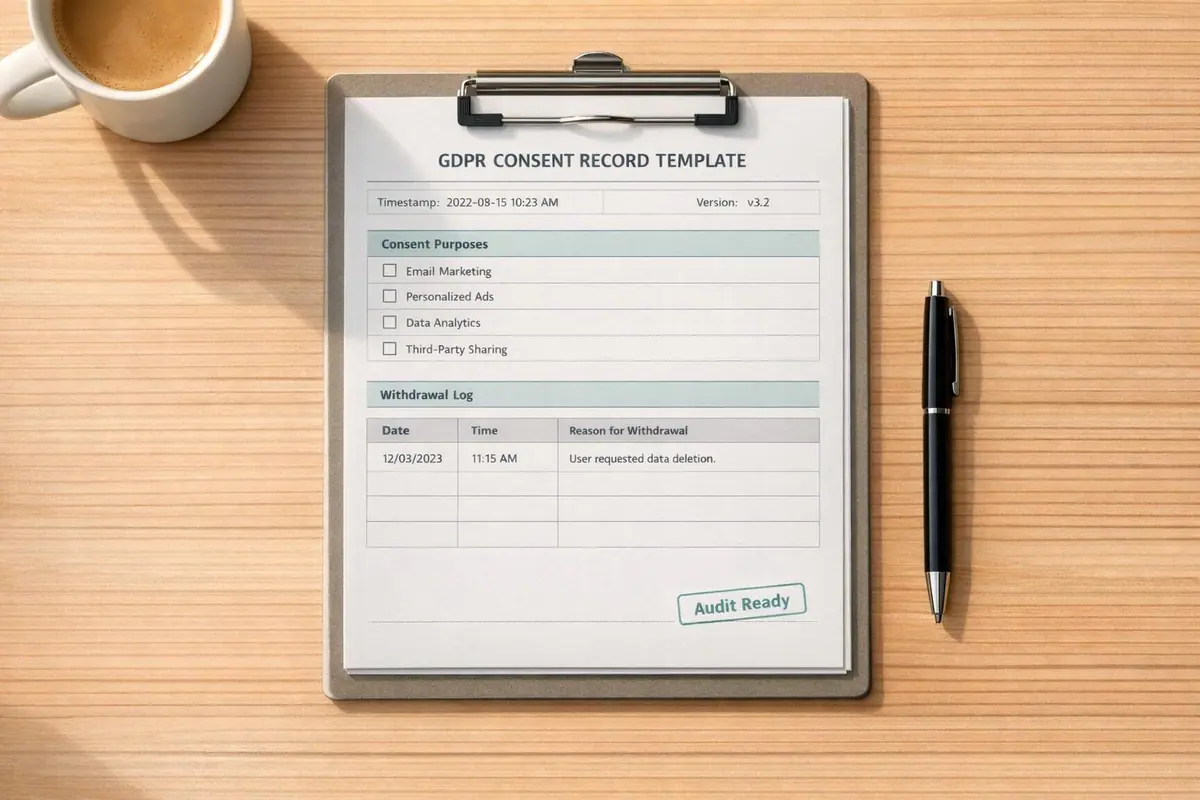
Here’s what you need to know about GDPR consent records:
- GDPR requires businesses to document who gave consent, what they agreed to, when, how, and what information they were shown.
- Without proper records, consent is invalid, which can lead to legal penalties.
- A complete consent record includes: user identity, timestamp, privacy notice version, consent purposes, and withdrawal status.
- Use standardized templates to ensure consistency and compliance. Missing details like timestamps or consent purposes can result in fines (e.g., Criteo was fined €40 million in 2023 for incomplete records).
- Consent must be specific and freely given. Avoid bundling multiple consents (e.g., marketing and terms of service) into one checkbox.
- Store records securely on servers, not cookies, and use version control to track changes in privacy notices.
Key takeaway: To comply with GDPR, you need detailed, secure, and accessible consent records. This ensures you can prove compliance during audits and avoid costly fines.
Getting started with GDPR compliance: Consent
sbb-itb-5f36581
Core Elements of a GDPR Consent Record
This section highlights the essential components and best practices for creating consent records that meet GDPR requirements. Proper documentation isn't just a legal necessity - it’s a safeguard against compliance risks.
Key Data Fields to Include
A consent record needs to go beyond a simple "consent = true" flag. It should provide detailed information about the consent event, covering the following fields:
| Field | Description |
|---|---|
| Data Subject Identifier | Links the consent to an individual using a unique ID, hashed email, or session ID. |
| Timestamp | Records the exact date and time of consent, down to the second. |
| Consent Version | Indicates the specific privacy notice or consent text shown at the time of consent. |
| Purposes | Lists the processing activities the user agreed to or declined. |
| Method | Specifies how consent was collected, such as via interactive forms, cookie banner, or verbal agreement. |
| Source | Identifies the URL or app screen where the consent event occurred. |
| Withdrawal Status | Notes whether the consent is active or withdrawn, along with the withdrawal date. |
Each purpose must be documented individually. Instead of a blanket "I agree to all" statement, the record should show detailed user preferences - such as consent for analytics, marketing emails, or third-party data sharing. For example, Spain's data protection authority (AEPD) fined Google €10 million in May 2021 (Decision PS/00094/2020) for bundling advertising personalization consent with account creation, which denied users the ability to give specific consent.
Formatting Guidelines for Consent Records
The way consent records are structured is just as critical as the data they contain. Following the four-part format recommended by ISO/IEC TS 27560:2023 ensures clarity and audit readiness. These sections include:
- Header: Metadata like record ID and timestamp.
- Processing: Details about the purposes and data types involved.
- Parties: Information on the data controller and any third-party processors.
- Events: Records of consent actions and any subsequent withdrawals.
It's crucial to store consent records server-side to maintain integrity. Relying on browser cookies for this purpose is risky - if a user clears their cache, the record is lost. A server-side database with an immutable audit trail ensures the records are preserved, regardless of user actions. As the ICO advises:
"Keep records to evidence consent – who consented, when, how, and what they were told."
Precision is key. A vague timestamp like "05/29/26" won’t hold up under scrutiny. Instead, use a detailed format like "2026-05-29T14:32:07Z." This level of accuracy demonstrates a deliberate and systematic approach to compliance.
Building a GDPR-Compliant Consent Record Template
Field-by-Field Template Guide
Creating a GDPR-compliant consent record template means ensuring each field serves a specific legal purpose. Missing even one field could leave gaps in your audit trail. Here's a breakdown of the key fields, how to label them, and what to capture:
| Field Name | Label to Use | What to Capture |
|---|---|---|
| Data Subject Identifier | user_id or hashed_email |
A hashed email or internal User ID - avoid raw PII unless absolutely necessary |
| Timestamp | consent_timestamp |
The exact date and time, down to the second, e.g., 2026-05-29T14:30:05Z |
| Consent Statement Version | policy_version |
The version of the privacy notice shown, e.g., v2.1 |
| Purposes | purposes_accepted / purposes_declined |
Specific flags for each purpose, e.g., newsletter: YES; third_party_ads: NO |
| Method of Collection | collection_method |
How consent was obtained, such as web form checkbox or mobile app toggle |
| Source/Location | consent_source |
The exact URL or app screen, e.g., https://example.com/signup |
| Affirmative Action | action_taken |
The specific user action, like clicking "Accept" or checking a consent box |
| Withdrawal Status | withdrawal_status / withdrawal_timestamp |
Whether consent is active or withdrawn, with the date of withdrawal if applicable |
Including the action_taken field is crucial to demonstrate affirmative consent. For instance, a pre-ticked checkbox won’t meet GDPR standards.
"A checkbox without a timestamp, user identifier, and version of the privacy notice presented is insufficient." - Legiscope
Using tools like Reform can simplify this process by automatically capturing submission metadata, making it easier to document consent properly.
Adding Version Control to Your Template
After defining your template fields, the next step is to ensure consent records remain traceable over time. This is where version control comes in. By linking each user's consent to the exact privacy notice they agreed to, you can meet GDPR audit requirements. As Recording Law explains:
"If the consent statement later changes, version histories must be kept so the organisation can prove exactly what each individual agreed to at the time."
To achieve this, implement a two-layer system:
- Record the
policy_versionwith each user's consent. - Maintain a Document Control Log that stores the full text of every privacy notice version.
Use an append-only model to preserve the entire history of a user's consent lifecycle. Instead of overwriting old records, create a new entry for updates, ensuring the history remains intact - from initial opt-in to any subsequent changes or withdrawals.
Additionally, set up a mechanism to prompt users for fresh consent whenever the policy version changes. This ensures compliance with retention guidelines and keeps records up to date. For example, the CNIL advises renewing cookie consent every 13 months, while the EDPB recommends reviewing other consent types every 24 months. As of 2026, many organizations retain versioned consent logs for up to 5 years, aligning with the statute of limitations for civil privacy claims.
Best Practices for Collecting Valid Consent
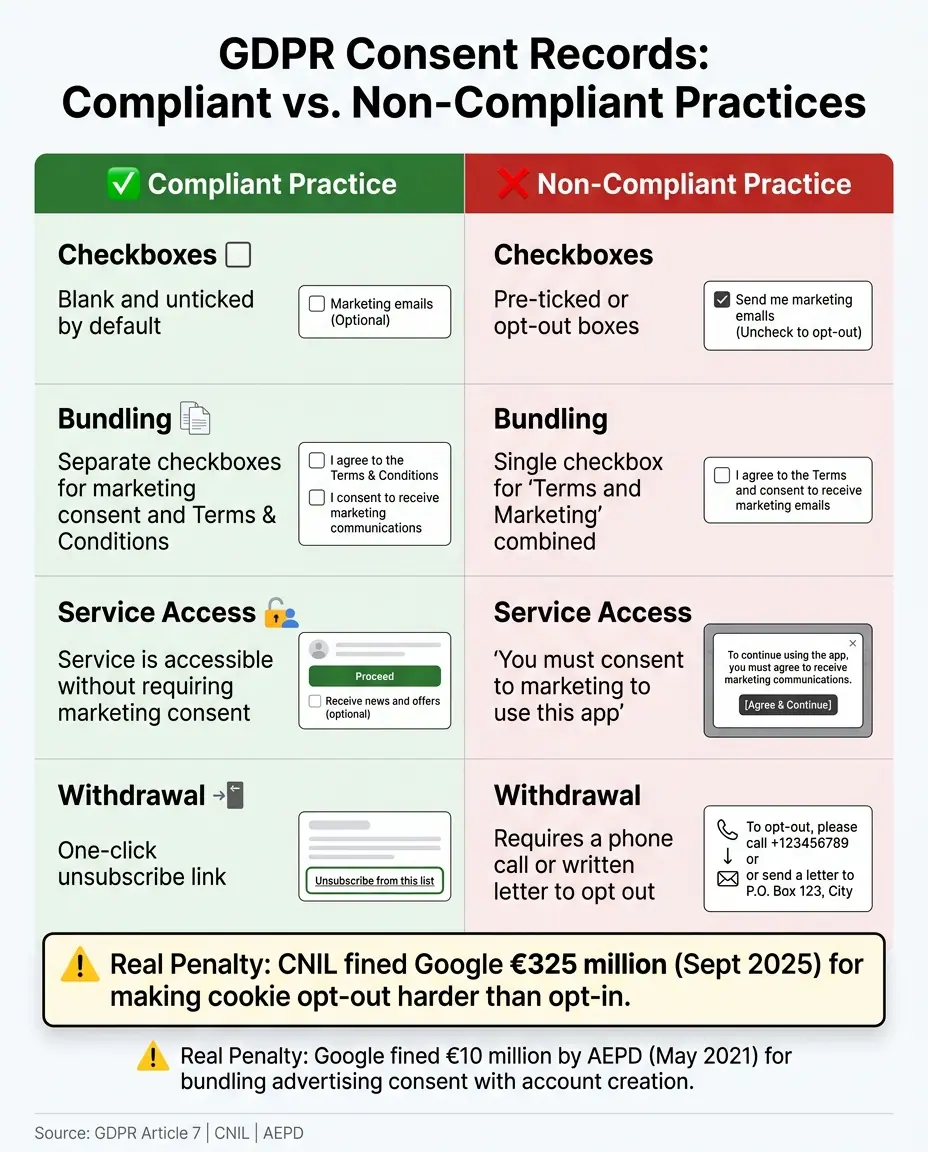
GDPR Consent Records: Compliant vs. Non-Compliant Practices
To meet GDPR standards, collecting valid consent requires user interfaces that are clear, unbundled, and easy to navigate.
Making Sure Consent Is Freely Given and Specific
Even with a strong template, how you collect consent is just as important as the information you document. GDPR mandates that consent must be freely given, specific, informed, and unambiguous. Many consent mechanisms fall short, often due to poor practices like using dark patterns or pre-selected options.
One frequent mistake is combining multiple consents into a single checkbox. For instance, asking users to accept terms of service while also opting them into marketing emails in the same checkbox is non-compliant. Each purpose for data processing must have its own opt-in. This way, someone can subscribe to a newsletter without being forced to agree to third-party data sharing.
"Consent should not be regarded as freely given if the data subject has no genuine or free choice or is unable to refuse or withdraw consent without detriment." - European Commission
Equally critical is ensuring withdrawal parity. GDPR Article 7 states that withdrawing consent should be just as easy as giving it. For example, if opting in requires a single click, opting out should also take just one click. A notable case involved the CNIL fining Google LLC and Google Ireland Limited €325 million in September 2025 because rejecting advertising cookies was significantly harder than accepting them. This highlights that making opt-outs difficult isn't just a poor user experience - it’s a direct compliance issue.
| Consent Element | Compliant Practice | Non-Compliant Practice |
|---|---|---|
| Checkboxes | Blank and unticked by default | Pre-ticked or opt-out boxes |
| Bundling | Separate boxes for marketing and T&Cs | One box for "Terms and Marketing" |
| Service Access | Service available without marketing consent | "Consent to marketing to use this app" |
| Withdrawal | One-click unsubscribe link | Requiring a phone call or written letter |
Clear consent practices naturally lead to the next step: using straightforward language in your forms.
Writing Clear and Simple Consent Language
Once you’ve set up a proper consent structure, the language you use in your forms must be precise and easy to understand. Consent language isn’t just a formality; it’s a legal record. Using vague or overly technical language can invalidate consent, even if the rest of your process is compliant. The ICO suggests writing consent forms at a reading level suitable for a 13-year-old. This ensures users fully understand what they’re agreeing to.
"The information on the processing of your personal data should be presented in a concise, transparent, intelligible way and drafted in clear and plain language." - European Commission
Avoid confusing phrases like double negatives. For instance, "I do not wish to not receive updates" is unnecessarily complicated and could lead to disputes. Instead, use clear, affirmative statements like "I’d like to receive weekly product tips from [Company Name] by email." Be specific: name the data controller, explain the purpose of the data collection, and outline how users can withdraw their consent. For example, "You can unsubscribe at any time by clicking the link in our emails."
A layered approach works well here. Present a brief summary of the consent terms upfront, with a link to the full privacy policy for those who want more details. Tools like Reform make it simple to design multi-step forms that display information in digestible chunks, ensuring users aren’t overwhelmed while still meeting GDPR’s informed consent standards.
Managing and Auditing Consent Records
Secure Storage and Retrieval
Collecting consent is just the first step. If you can't prove that consent was given when a regulator asks, it's as though it never existed.
To ensure compliance, store consent records in a secure server-side database with immutable audit trails. Avoid relying on client-side cookies, as users can clear them, erasing your evidence in the process. To further safeguard privacy, don't store raw IP addresses in your logs. Instead, use cryptographic hashing (e.g., SHA-256) to anonymize identifiers before they are saved in the database. Pair this with a Globally Unique Identifier (GUID) - a randomized token stored in a functional cookie - to link a user's browser session to their anonymized server-side record without handling personally identifiable information.
Being audit-ready means you must be able to produce consent records within 72 hours of a formal request. To prepare, consider running routine "fire drills" to test your system's ability to export a clean CSV or JSON file for a specific anonymized user ID within an hour. Experts recommend retaining active consent logs for 3 to 5 years - enough to meet the statute of limitations for most civil privacy claims.
Each consent record should include more than just a simple yes or no. Capture granular consent states (e.g., Marketing=True, Analytics=False), the exact UTC timestamp (down to the millisecond), the version of the privacy notice shown, the collection method (optimized conversion paths, chatbot, etc.), and the URL where consent was provided.
Timely and accurate logging of withdrawals and updates is just as critical as secure storage.
Logging Consent Withdrawals and Record Updates
Once consent records are stored securely, keeping them updated is essential, especially when users withdraw consent or make changes.
Every withdrawal should be logged as a timestamped event. These updates need to propagate immediately across all downstream systems, including your CRM, email platforms, advertising tools, and any third-party data processors. Neglecting this process can have costly consequences - Criteo's €40 million fine from the CNIL in June 2023 is a prime example.
"The checkbox is 5% of the compliance work. The other 95% is operational: building systems that handle consent, storage, and data rights automatically instead of requiring someone to manually track down a spreadsheet." - Camellia, Principal Product Marketing Strategist, Rework
When a user withdraws consent, delete their personal data but retain a suppression record (such as their email address) to prevent accidental re-addition to marketing lists. For email marketing, ensure withdrawals are reflected in your mailing lists within 10 business days. For cookie consent, renewals should occur every 6 to 12 months, while consent for other data processing purposes should be reviewed every 12 to 24 months.
If your privacy notice changes, your logs must show which version each user agreed to at the time. Additionally, users affected by the updated terms should receive a renewal prompt before any further processing continues. Maintaining version control in your consent records isn't just a good habit - it’s the evidence you need to prove your data processing was lawful at every point in time. These practices ensure your records are always audit-ready and compliant.
Reviewing and Maintaining Consent Templates Over Time
Consent record templates aren’t something you can set and forget. Regulations evolve, your business changes, and the reasons you collect data may shift. All of this can quickly make an existing template outdated or even noncompliant.
When and How to Update Your Templates
Updating consent templates is a must as regulations and business needs change. One clear signal that it’s time for an update is a change in processing activities. For instance, if you start working with a new third-party partner, begin collecting a new type of data, or branch out into a new marketing channel, your consent templates need to reflect those changes. When this happens, update the template and launch a re-consent campaign for any users impacted , often using prefilled forms to reduce friction.
Keeping an eye on regulatory updates is equally important. For example, the Digital Omnibus Package, proposed in November 2025, is pushing for browser-based preference signals and limiting the ability to make repeat consent requests. Specifically, it restricts re-asking for the same purpose within six months of a user’s refusal. These shifts mean you’ll need to adjust your templates and ensure your version control and consent renewal processes are ready to adapt.
It’s also a good idea to align your consent templates with your Record of Processing Activities (ROPA) on an annual basis. If your template’s stated purposes don’t match your ROPA, that’s a clear warning sign. To stay on top of things, conduct a yearly mock audit to ensure you can retrieve a specific consent record and its corresponding template version within 24 hours.
When it comes to refreshing consent, there are some general guidelines to follow. For marketing consent, aim for a renewal every 12–24 months. For sensitive data processing, the interval should be shorter - around 6–12 months. And if a user doesn’t re-confirm within 30 days of receiving a renewal prompt, it’s best to remove them from your active lists.
Archiving Historical Consent Records
Updating templates is only half the battle. Archiving previous versions is just as important to prove compliance over time. Each time you update a template, the old version should remain part of your audit trail. This way, you can show that data processing was lawful at the time, even if your practices have since changed.
To keep things organized, archive retired templates in a version log. This log should include the consent text, the dates it was active, and the schema version number tied to each consent event.
"Consent records must be retained for the duration of processing and for a reasonable period after, to satisfy the controller's burden of proof." - Legiscope
Supervisory authorities generally expect you to keep these records for at least 3 years after processing ends. For withdrawn marketing consent, a good rule of thumb is to retain the record for 24–36 months after the user opts out. A recent example of the risks of poor record-keeping is the €150 million fine issued to SHEIN in September 2025 by CNIL. The penalty was for placing advertising cookies before users interacted with the consent banner and continuing to read cookies even after users clicked "refuse all".
Conclusion
Key Points Recap
This guide has broken down the essential steps to create consent records that stand up to scrutiny. When it comes to GDPR compliance, unverified consent is no consent at all. Article 7 makes it clear: the responsibility to prove consent lies squarely with you, the data controller.
Every consent record must address four crucial questions: who gave consent, when they did so, how it was obtained, and what they specifically agreed to. To achieve this, you need to log a data subject identifier, an exact timestamp, the method of collection, detailed purposes, a version-linked privacy notice, and a withdrawal record. These elements, discussed earlier, are the foundation of a strong consent management system. Features like version control, detailed data fields, and regular updates ensure your records are always ready for an audit.
Granular consent is non-negotiable. Avoid combining different purposes into a single opt-in. Each processing purpose must have its own explicit consent.
"Where processing is based on consent, the controller shall be able to demonstrate that the data subject has consented to processing of his or her personal data." - GDPR Article 7
Consent isn't static - it evolves. Update your templates regularly, review your processes, and make withdrawal options straightforward. Keep your records clear, use version-controlled logs, and ensure compliance is always demonstrable. A well-maintained consent record isn't just a regulatory checkbox; it's proof that your data practices prioritize user trust above all else.
FAQs
Do I need consent for every type of data processing?
Consent isn't always necessary for processing personal data. Under GDPR, it's just one of six legal bases for handling data. If obtaining valid consent is challenging or doesn't offer a real choice, you can explore other options like legitimate interests or contractual necessity. Asking for consent when you'd process the data anyway can be misleading and unfair - it's better to rely on a more appropriate legal basis in such cases.
How can I prove which privacy notice a user saw when they consented?
To ensure you can verify which privacy notice a user encountered, maintain a secure, timestamped, and tamper-proof consent log. This log should capture key details, including:
- The text of the privacy notice
- The configuration version (like vendor and purpose lists)
- The precise timestamp of the consent
Store these records as immutable snapshots, so you can accurately recreate the legal and operational context at the time of the user’s decision. This includes elements like the banner design and the exact policy language presented when the consent was given.
What’s the safest way to store and retrieve consent records for audits?
To keep things secure and efficient, it's best to automate storage and retrieval using tools like secure databases, consent management platforms, or CRM systems. Each record should clearly connect a user to a timestamped event, outlining details such as what they agreed to, how their consent was obtained, and the specific version of the terms they saw. Make sure the data is stored securely to block any unauthorized access. Additionally, ensure the information can be easily exported in formats like CSV or Excel for audits when needed.
Related Blog Posts
Get new content delivered straight to your inbox

The Response
Updates on the Reform platform, insights on optimizing conversion rates, and tips to craft forms that convert.




Drive real results with form optimizations
Tested across hundreds of experiments, our strategies deliver a 215% lift in qualified leads for B2B and SaaS companies.
