
.webp)
How Klaviyo Form Design Impacts Conversions


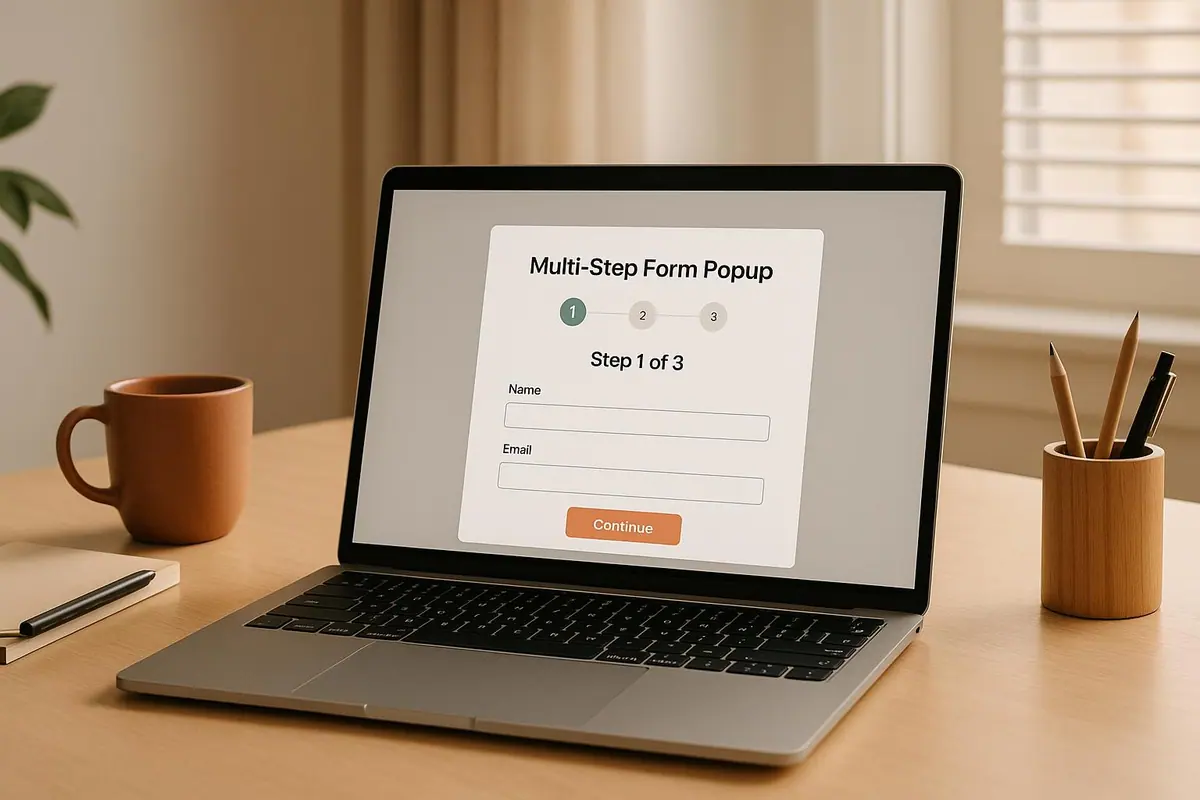
Klaviyo forms are a go-to option for businesses looking to grow email and SMS lists quickly. They’re easy to set up, integrate seamlessly with Klaviyo’s platform, and provide analytics to track submit rates and user behavior. But their design flexibility is limited, and poorly optimized forms can lead to lower conversions.
For businesses needing more advanced features, Reform offers a no-code form builder with better design control, multi-step flows, conditional routing, and tools for capturing higher-quality leads. It’s especially useful for B2B or complex workflows but requires more setup to integrate with other platforms.
Key Takeaways:
- Klaviyo forms excel at simplicity, speed, and integration into its ecosystem.
- Reform focuses on detailed data collection, advanced customization, and lead quality.
- Klaviyo is ideal for straightforward email/SMS sign-ups, while Reform suits businesses with more complex needs.
Quick Comparison:
| Feature | Klaviyo | Reform |
|---|---|---|
| Ease of Setup | Built-in and instant integration | Requires manual integration |
| Design Flexibility | Basic customization (colors, fonts, etc.) | Full customization, supports CSS/JavaScript |
| Advanced Features | Behavioral triggers, basic validation | Multi-step forms, conditional logic, lead enrichment |
| Lead Quality Focus | Basic validation only | Real-time validation, spam prevention |
| Best For | Quick list growth | Complex workflows, higher-quality leads |
If you’re already using Klaviyo for email and SMS, their forms are a practical choice for quick results. For more control and better-qualified leads, Reform is worth exploring.
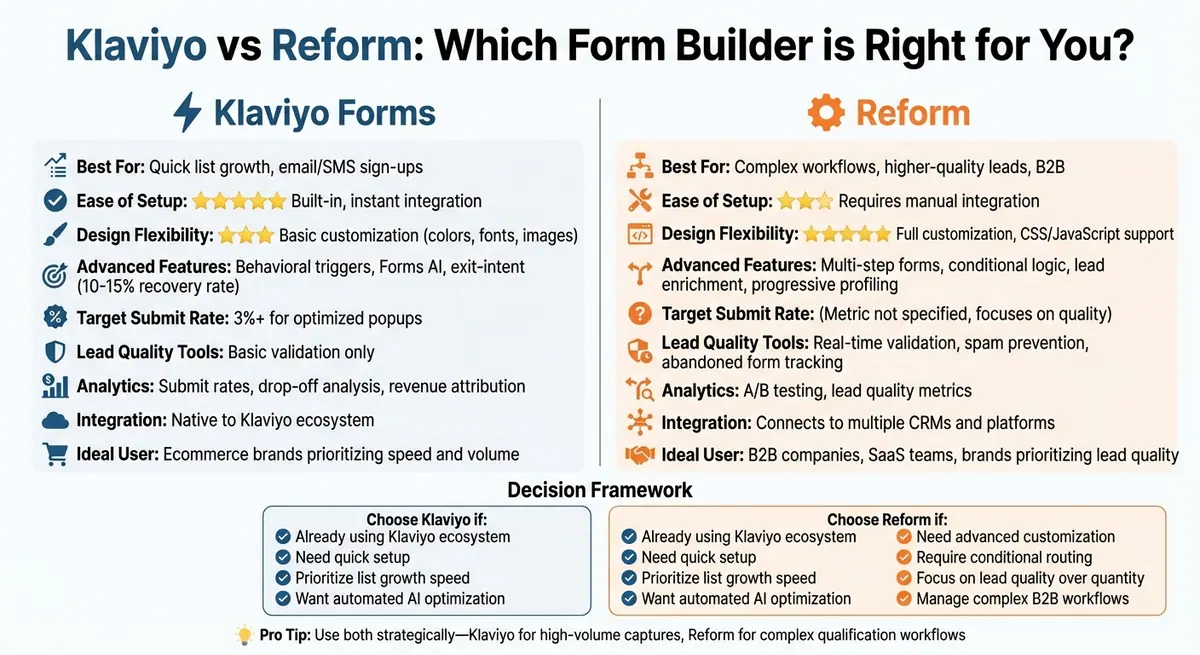
Klaviyo vs Reform Forms: Feature Comparison for Email List Growth
1. Klaviyo Forms
Form Types and Layouts
Klaviyo provides a variety of form options, including popups, flyouts (also called slide-ins), embedded forms, and full-page forms. All of these are created using a visual drag-and-drop editor, making customization straightforward. Popups and flyouts are particularly effective for growing email lists, with well-optimized popups often achieving a submit rate of over 3%. On the other hand, embedded forms are best placed in high-visibility areas like headers, footers, or blog pages. However, these forms typically see lower engagement unless visitors are actively seeking them out.
Choosing between popups and flyouts depends on your goals for visibility and user experience. Popups grab attention immediately but can feel intrusive if poorly timed. Flyouts, which slide in from the side, are less disruptive and offer a more subtle way to engage users.
Step Structure and Field Collection
Klaviyo's multi-step forms are designed to improve user flow and collect data efficiently. Built-in analytics help identify where users drop off. For instance, if 80% of users complete the first step but only 30% finish the second, it’s a sign to simplify the later steps. To maximize submissions, initial popups should stick to just one or two fields - such as email and, optionally, phone number. Adding more fields upfront tends to lower submission rates. Additional details, like birthdays or preferences, can be collected in later steps once the primary contact information is secured.
This approach not only improves completion rates but also sets the tone for a seamless user experience.
Design and Branding
A form's design plays a key role in its effectiveness. Klaviyo offers full customization for colors, fonts, images, and text, ensuring forms align perfectly with your brand on both desktop and mobile. This consistency helps build trust with users and reduces any friction they might feel when interacting with the form.
To boost performance further, focus on clear, benefit-driven headlines and concise, engaging copy. This reduces mental effort for users, making them more likely to take action.
Behavioral Triggers and Validation
Klaviyo takes engagement to the next level with behavioral triggers. These include options like exit-intent, time delays, scroll percentage, and visitor segmentation (e.g., first-time versus returning users). Exit-intent popups, when properly targeted, can recapture 10–15% of users who are about to leave your site. For even more precision, Klaviyo's Forms AI can automatically test and optimize trigger combinations once you’ve accumulated at least 400,000 profiles - eliminating the need for manual adjustments.
To maintain list quality, Klaviyo includes built-in validation tools that block spam submissions and ensure reliable data collection. Since even small issues like poorly timed triggers or slow load speeds can hurt performance, fast and dependable forms are essential for keeping submission rates high.
2. Reform

Form Types and Layouts
Reform stands apart from Klaviyo's popup-first approach by focusing on more in-depth, conversion-focused interactions. While Klaviyo shines at quick email captures with popups and flyouts, Reform is built for scenarios that demand more detail. It offers embedded forms, full-page layouts, and multi-column designs - perfect for B2B demo requests, consultation bookings, or comprehensive application forms where a simple popup just won't cut it.
With its no-code builder, creating forms that blend seamlessly with your site becomes effortless.
As Derrick Reimer, Founder of SavvyCal, puts it: "Reform is what Typeform should have been: clean, native-feeling forms that are quick and easy to spin up."
This emphasis on forms that align with your site's aesthetics builds trust naturally, which can often lead to higher submission rates.
The platform's design also extends to multi-step forms, enhancing user engagement with a refined, step-by-step experience.
Step Structure and Field Collection
Reform's multi-step forms take user interaction to the next level with progressive profiling and conditional logic. This means you can create dynamic forms that adjust based on user responses. For instance, you might start by collecting just an email address on the first step. Then, based on the user's engagement, you can display additional fields - like budget or company size - only to those showing higher intent.
To make things even smoother, Reform's lead enrichment feature automatically pulls in extra data, reducing the effort required from the user while still giving your sales team the information they need. Plus, Reform tracks abandoned submissions, capturing partial data from users who don't complete the form. This opens up opportunities to re-engage them later using Klaviyo's flows.
Design and Branding
When it comes to customization, Reform offers far more flexibility than Klaviyo's popup designs. Every element of a Reform form can be tailored to match your brand perfectly. You can adjust typography, button styles, spacing, and even toggle between dark and light themes - all without touching a single line of code. For teams that need even more control, custom CSS and JavaScript options are available.
This level of design consistency builds trust and credibility. For example, when a direct-to-consumer brand's product quiz matches the look and feel of its product pages - using the same fonts, buttons, and overall style - users are more likely to see it as trustworthy and complete the form.
David Hehenberger, Founder of Flamingo, shares: "Beautiful forms that are easy to brand with company colors and logo. Simple UI."
Behavioral Triggers and Validation
Reform doesn't just look good - it ensures the data you collect is accurate and actionable. While Klaviyo focuses on when to show a form based on triggers like scroll depth, time on page, or exit intent, Reform focuses on maintaining data quality. Real-time email validation catches typos and fake addresses before they reach your list, and spam filters help ensure you're only capturing high-quality leads.
The platform also features conditional routing, allowing you to segment leads based on their responses. This means different types of prospects can be automatically directed to specific Klaviyo lists or CRM workflows. For U.S.-based teams prioritizing revenue, this combination - Klaviyo handling timing and targeting, and Reform managing the form experience and data collection - creates a highly effective lead capture system that balances strong conversion rates with detailed qualification.
How To Optimise Klaviyo Pop-Up Forms
sbb-itb-5f36581
Pros and Cons
Both Klaviyo and Reform offer distinct strengths, but they cater to different needs and priorities. Klaviyo shines when it comes to quick setup and seamless integration. Its forms are managed within the same dashboard as email and SMS campaigns, allowing data to flow directly into lists and segments without extra configuration. Plus, Klaviyo's Forms AI optimizes targeting settings - like exit intent and scroll depth - to boost sign-up rates automatically. On top of that, its analytics provide insights into submit rates and pinpoint where users drop off during the process.
However, Klaviyo's form design has its limitations. While you can tweak colors, fonts, and images, creating more complex or highly branded forms often requires extra effort. Some users have also reported occasional technical issues, such as site speed problems, which have caused submit rates to drop from 5% to as low as 1.5% in certain scenarios.
Reform, on the other hand, focuses on delivering high-quality leads and a more personalized form experience. It offers full customization of design elements, along with advanced features like lead enrichment, real-time email validation, and spam prevention. These tools ensure you're capturing qualified leads rather than just maximizing numbers. Additionally, its conditional routing feature lets you segment leads based on their responses, automatically directing them into tailored workflows.
The downside to Reform is the added effort required for integration. Unlike Klaviyo's native forms, which sync data instantly, Reform demands extra setup to connect submissions to your email or CRM platforms. For businesses managing intricate B2B funnels or high-value e-commerce leads, this extra work can pay off. But for teams prioritizing rapid list growth with minimal hassle, Klaviyo's built-in forms may be the better option.
To summarize, here’s a quick comparison of the two platforms across key dimensions:
| Dimension | Klaviyo – Pros | Klaviyo – Cons | Reform – Pros | Reform – Cons |
|---|---|---|---|---|
| Form Design & Branding | Customizable colors, fonts, and images; optimized for mobile/desktop | Limited layout flexibility; lacks advanced branding options | Fully customizable, no-code design with support for custom CSS/JavaScript | Requires additional integration setup for email/CRM sync |
| Conversion Features | Forms AI targeting, exit-intent recovery, and multi-step analytics | Requires a large profile base; some risk of submit rate drops | Multi-step forms, conditional routing, and lead enrichment | Behavioral triggers need external integration |
| Analytics & Reporting | Submit rate benchmarks, drop-off analysis, and revenue attribution | Limited to Klaviyo’s ecosystem | Real-time analytics, A/B testing, and a focus on lead quality metrics | Needs integrations for revenue tracking |
| Lead Quality | Direct integration with lists and engagement tracking | Basic validation; enrichment may need third-party tools | Real-time validation, spam prevention, and built-in lead enrichment | Adds complexity with another platform to manage |
| Setup | Instant data availability; no setup required | Advanced UX flows may require workarounds | Easy no-code builder with connections to multiple tools | Extra setup time for field mapping and syncing |
Conclusion
Deciding between Klaviyo forms and Reform comes down to your business needs and priorities. For U.S.-based ecommerce brands already using Klaviyo for email and SMS, Klaviyo's built-in forms offer a fast and efficient way to get results. These forms provide seamless integration with Klaviyo's tools and deliver clear analytics, including submit-rate benchmarks (aim for 3% or higher) and step-by-step funnels that pinpoint where visitors drop off. If your goal is to grow your lists quickly with minimal effort, Klaviyo forms are a reliable choice.
On the other hand, Reform is ideal when user experience and lead quality are at the forefront. If you're managing multi-step workflows, complex conditional logic, or need to distribute leads across several CRMs and marketing platforms, Reform's no-code builder offers a level of flexibility that Klaviyo forms can't. This makes it a great fit for B2B companies, SaaS teams, or brands that prioritize a polished, on-brand experience. Features like lead enrichment, real-time validation, and spam prevention help ensure your sales team focuses on high-quality leads, enhancing your lead generation efforts.
For larger, data-centric teams, using both platforms strategically can be a smart move. Klaviyo forms excel at handling high-volume, straightforward tasks like newsletter sign-ups or SMS opt-ins, where tight integration and behavioral triggers are key. Meanwhile, Reform is better suited for more intricate workflows, such as product finders, quizzes, or multi-contact applications, where advanced logic and cross-platform data sharing are critical. By comparing the performance of each platform, you can identify which approach yields the highest revenue per lead over time.
To optimize your form performance, start by reviewing your Klaviyo analytics. Analyze submit rates, step funnels, and benchmarks from the past 30 days. If pop-up conversion rates are under 3%, experiment with triggers like exit intent, scroll depth, or time delays, and streamline your forms to just 1–2 fields. If you need more design flexibility or advanced routing options, Reform's no-code builder is worth exploring. Ultimately, the best platform is the one that aligns your design, analytics, and lead capture strategy with your specific conversion goals.
FAQs
What are the best ways to boost conversions with Klaviyo forms?
To increase conversions with Klaviyo forms, start by designing forms that are visually engaging and match your brand's identity. A consistent look not only reinforces your business image but also builds trust with your audience. Consider using tools like multi-step forms to make the process feel less overwhelming and conditional routing to create a more tailored experience for each user.
Don't overlook the importance of spam prevention and real-time email validation - these features help ensure you're gathering leads that are genuine and valuable.
Keep an eye on how your forms perform by leveraging real-time analytics, and experiment with A/B testing to fine-tune what works best for your audience. Make sure your forms are simple to use, accessible to everyone, and optimized for both desktop and mobile devices. These adjustments can make a noticeable difference in the quality of your leads and your overall conversion rates.
What are the advantages of using multi-step forms in Klaviyo?
Multi-step forms are a smart way to improve conversion rates by dividing the process into smaller, easier-to-handle steps. This approach minimizes the chances of users feeling overwhelmed and helps maintain their focus and engagement as they move through the form.
Another advantage is the ability to ask specific, step-by-step questions. This not only simplifies the process for users but also ensures you gather more precise information and qualify leads effectively. By offering a more seamless and user-friendly experience, multi-step forms can build trust and motivate users to complete the entire process.
How does form design influence user trust and conversions?
Form design is a powerful tool for earning user trust and increasing conversions. When a form feels intuitive and professional, it reassures users and encourages them to share their information confidently.
Key aspects like consistent branding, clean layouts, and accessible design make forms easier to navigate. Features such as multi-step forms and conditional logic can guide users smoothly through the process, cutting down on confusion and hesitation. By prioritizing a user-friendly approach, you create an experience that not only encourages completion but also helps drive higher conversion rates.
Related Blog Posts
Get new content delivered straight to your inbox

The Response
Updates on the Reform platform, insights on optimizing conversion rates, and tips to craft forms that convert.




Drive real results with form optimizations
Tested across hundreds of experiments, our strategies deliver a 215% lift in qualified leads for B2B and SaaS companies.
