
.webp)
How Public Forms Meet Data Security Rules



A public form is part of your data system the moment it collects sensitive details. If you ask for names, SSNs, health data, bank details, or files, you need to treat that form like a controlled system from the first field to final deletion.
Here’s the short version:
- I would classify each field by data type and ask if it is needed at all.
- I would secure uploads, routing, storage, and integrations as one chain, not as separate parts.
- I would limit access with role-based permissions, MFA, session timeouts, and audit logs.
- I would set retention and deletion rules before launch, not after data starts piling up.
- I would map the form to the right rules, such as HIPAA, GLBA, PCI DSS, state privacy laws, or NIST SP 800-53.
One data point stands out: Verizon’s 2024 DBIR says system intrusion, social engineering, and web app attacks made up more than 90% of breaches. The same report also notes a 180% year-over-year jump in breaches where vulnerability exploitation was the first step. That tells me a multi-step forms beat static ones every time, but a plain-looking intake form can be one of the easiest places to get security wrong.
If I had to boil the article down to one checklist, it would be this:
- Know what the form collects
- Track where the data goes
- Limit who can see it
- Set how long it stays
- Log access and deletion
Bottom line: if a public form collects regulated or sensitive data, I should be able to trace every field, file, handoff, viewer, and deletion step on paper before the form goes live.
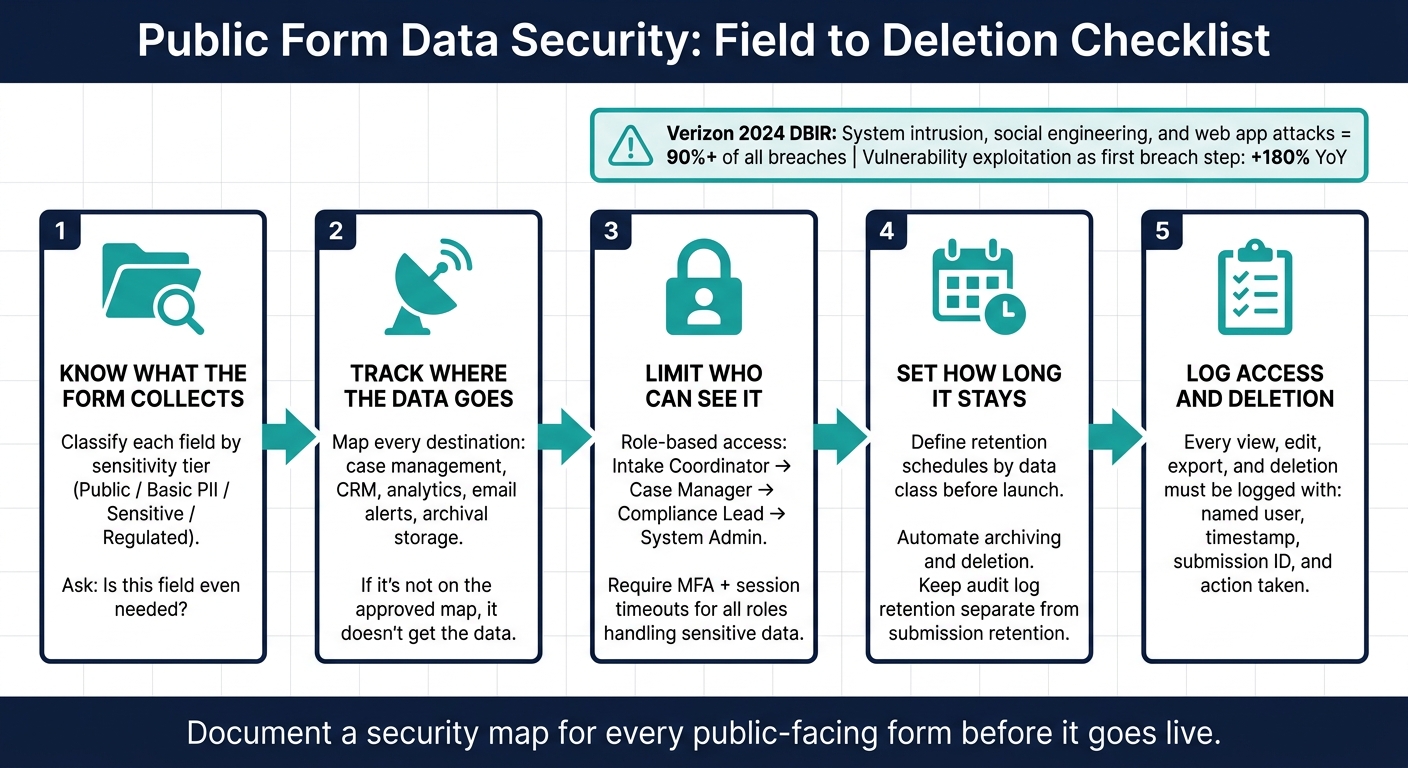
Public Form Data Security: Field to Deletion Checklist
Map each form field to data classification and required safeguards
Classify fields by sensitivity and purpose
To spot weak points, review the form one field at a time. Use a field inventory to track each field’s purpose, sensitivity, and whether it’s even needed. Start there, then use the same approach for uploads, routing, and storage.
A simple working model uses four tiers:
- Public fields
- Basic personal data
- Sensitive fields
- Regulated data
Context matters. A field that looks routine on its own can become far more sensitive when paired with other data. In a health setting, for example, identifiers can turn ordinary information into PHI.
For every required field, the team should be able to answer a plain question: What breaks if the user leaves this blank? If the answer is “not much,” that field should probably be optional.
Apply field-level protections and validation
The controls should match the sensitivity of the field. Server-side validation is non-negotiable for every field, no matter the risk tier. After that, higher-risk fields need tighter controls. Here’s a practical map for common field types:
| Field Type | Risk Level | Regulatory Context | Controls |
|---|---|---|---|
| Name, work email, city/state | Low–Medium | State privacy laws such as CCPA | TLS in transit, access controls, server-side validation |
| SSN, government ID, date of birth + name | High | HIPAA in a health context; state privacy laws | Field-level encryption, masking in the UI, tokenization, audit logging |
| Insurance card or ID file upload | High | HIPAA | Restricted file types, malware scanning, encrypted segregated storage, strict access and audit trail |
| Payment card data | High | PCI DSS | Tokenization, no storage in application logs, restricted access |
These controls only work if sensitive values stay out of logs and alerts. SSNs, health details, and financial data should never appear in plaintext in web server logs, application error traces, or analytics tools.
Use conditional logic to limit unnecessary data collection
Conditional logic is one of the most overlooked security tools in form design. If a sensitive question appears only when an earlier answer makes it necessary, fewer people submit that data. That cuts exposure right away.
For example, a public health intake form might ask whether the user is seeking medical advice and only show symptom history fields if the answer is yes. A financial services form might ask for a tax ID only when the user is applying for a product that legally requires identity verification. A complaint form might offer an anonymous path that hides name, phone, and address fields altogether.
Reform’s conditional routing and field logic let sensitive questions appear only when needed. Paired with built-in spam prevention and email validation, this helps keep data quality high while limiting how much sensitive data enters the workflow.
After field-level controls, use the same mapping for file uploads, routing, storage, and integrations.
sbb-itb-5f36581
Security, Access, and Trust in Government Information
Secure file uploads, routing, storage, and integrations as one data flow
Security has to cover the whole post-submit path: upload, routing, storage, and integrations. Every handoff can become a weak spot if controls stop halfway. So start at the upload, then follow the submission through every place it goes next.
Lock down file uploads before they enter the workflow
The moment a user adds a file, risk goes up. One upload can carry malware, PHI, or records that need tight control from the second they arrive.
Start with an allow list. Define the file types the program actually needs - for example, .pdf, .jpg, and .docx for a benefits application - and reject everything else. That means blocking executables, archives, scripts, and unknown MIME types.
File extension checks by themselves don't cut it. Server-side checks for file type, MIME, and magic bytes confirm the file matches what it says it is. Set a firm maximum file size too. That helps prevent denial-of-service abuse and keeps storage costs more predictable.
After validation, rename each file with a system-generated ID before it reaches storage. User-supplied filenames can hide path traversal or injection payloads. Files should live outside the web root, in an isolated object storage bucket with no execute permissions and no public access. Then serve them only through a download proxy that checks authorization on every request.
Files also need to be scanned before reviewers can open them. For Office documents, use CDR to strip active content.
Here's what secure and insecure upload setups look like side by side:
| Control | Secure Configuration | Insecure Configuration |
|---|---|---|
| File types | Allow list: PDF, JPEG, DOCX only; server-side MIME and magic byte checks | Accept any extension; trust client-side checks only |
| File size | Server-enforced maximum | No size limit |
| Filename handling | Renamed to system-generated ID on upload; special characters stripped | User-supplied filename kept as-is |
| Storage location | Isolated bucket; no public access; no execute permissions | Web-accessible directory |
| Malware scanning | Scanned before files reach reviewers; quarantine on detection | No scanning |
| File delivery | Download proxy with auth check; direct public URL blocked | Direct public URL |
| Transport | HTTPS with TLS 1.2 or higher enforced | HTTP allowed |
| Encryption at rest | AES-256; provider-managed KMS with key rotation | No encryption at rest |
After upload controls are in place, the next step is deciding who gets the submission and where it can go.
Route submissions only to approved people and systems
Once a submission clears validation, routing decides who can see it. The rule here is least privilege: each role gets only the access it needs.
An intake clerk may only need basic metadata to triage a case. A case reviewer may need the full submission for their assigned program. A supervisor may need visibility across their team, but not across other departments. Routing should match both the sensitivity of the data and the approved role in the destination system.
Conditional routing turns that idea into day-to-day practice. A U.S. city intake form, for example, can send housing assistance submissions, along with uploaded documents, only to the housing department’s case management system. Code enforcement complaints can go to a separate queue. Staff in one department never see files meant for another.
When submissions contain PHI or sensitive PII, routing rules should also confirm that the destination system meets the required security standard before data is sent. That includes encrypted storage, MFA, and audit logging.
Reform’s conditional routing lets teams set these rules right in the form builder. Submissions can be sent automatically based on answers such as program type, geographic location, or case category. Pair that with multi-step forms - where sensitive questions and file upload steps appear only after a first screen confirms eligibility - and fewer people and systems ever come into contact with the most sensitive data.
Document every storage destination and integration before data leaves the form
Before data leaves the form, document each destination, what data it receives, what controls protect it, and who owns it. That includes CRM platforms, case management tools, file storage, analytics tools, email alert systems, internal databases, and outside partner systems that receive data through APIs.
If a system is not on the approved map, it should not get the data. Simple as that.
A practical map looks like this:
| Destination | Data Types Received | Controls | Rule |
|---|---|---|---|
| Case management system | Full submission, uploaded files | Encryption at rest, RBAC, audit logging, MFA | Relevant for HIPAA-covered data |
| CRM | Name, email, program category | TLS in transit, access controls | State privacy laws |
| Analytics platform | Anonymized counts, categories, timestamps | No PII or raw attachments | Aggregated data only |
| Email alert system | Submission notification (masked fields) | TLS; no sensitive fields in plaintext | Avoid sending PII via unencrypted email |
| Archival storage | Encrypted records after case closure | AES-256, lifecycle policies, secure deletion | Retention schedule per program type |
API integrations need strong authentication, such as OAuth 2.0 or signed tokens. These should be scoped to specific endpoints and operations, then rotated on a regular schedule.
Each system should get only the fields it needs. An analytics platform might receive anonymized counts and categories, not raw attachments or full names. Reform’s webhook system includes a Signature header in every request, using a SHA-256 HMAC so receiving systems can verify that the payload has not been altered in transit.
Once each destination is mapped, review who can access it, how activity is logged, and when data is deleted. That map becomes the working rulebook for internal review, access logs, and retention.
Design internal review steps around access control, logging, and retention
Once submissions move into your internal process - intake, review, approval, export, and deletion - they need the same level of protection as the form itself. That’s where the destination map comes in. It helps you decide who can touch a submission after it arrives, and what they’re allowed to do with it.
Set role-based access for intake, review, and admin work
Everyone who handles a submission should have a defined role based on the data they can see. That role should also decide exactly what actions they can take. In public intake systems, broad staff access is one of the most common ways things go wrong.
For most public form workflows, four roles are enough:
| Role | Permitted Actions | Required Controls |
|---|---|---|
| Intake Coordinator | View queue, route submissions, add notes, update status | MFA, session timeout (15–30 min), no export/delete |
| Case Manager | View assigned cases, edit case data, export one record at a time | MFA, device compliance, field-change logging |
| Compliance Lead | View all submissions for audit, review access logs, approve deletions and other exceptions | Strong MFA, network restrictions, session timeouts |
| System Admin | Configure roles, manage integrations, set retention rules | Strong MFA, least-privilege admin model, regular access review |
The goal is simple: each role gets only the access needed to do the job. Tight boundaries help contain damage if an account is compromised. MFA should be required for every role that handles sensitive data. Short session timeouts help too. If your setup allows it, device compliance checks add another layer.
Log access and changes for every sensitive submission
Access controls tell the system who can do something. Audit logs show who did do it - and exactly what changed. That gap matters a lot when regulated data is involved.
Every sensitive action should create a log entry, including:
- A submission view
- A field edit
- An approval
- An export
- A deletion
Each log entry should include a named user account, a precise timestamp, the submission ID, and the action taken. If someone edits a field, the log should show both the old value and the new value.
Logs matter during audits, internal reviews, and incident checks. Store them in a central place, protect them from tampering, and limit access to a small authorized group.
Match retention and disposal schedules to the data collected
Sensitive data becomes a risk when it sits around longer than needed. Every submission type should have a set retention period, and that schedule should drive archiving and deletion automatically. Manual cleanup sounds fine on paper, but it often gets missed.
Set retention by data class, not just by system. That’s a big difference. The submission record, uploaded files, exported copies, backups, and audit logs can each have their own legal or operational rules. Keep log retention separate from submission retention. Investigations often need a longer lookback window than the underlying records, and governance records tied to health-data workflows are commonly kept for six years.
Deletion should run through an approval flow, not direct removal by one person acting alone. When a deletion goes through, make sure it also reaches uploaded files, backups, and connected systems. A soft delete that only hides the record usually does not meet disposal rules. And every deletion should be logged the same way access is logged: who requested it, who approved it, when it ran, and what was removed.
Apply the same retention rule across the intake queue, review system, export files, and logs.
Conclusion: Build a security map for every public form
Every public intake form creates a data flow. That flow includes handoffs, and each handoff needs a mapped control. If just one point is missing a clear safeguard, the whole chain gets weaker. The fix is simple: document a security map for every public-facing form before it goes live, and review it again after any major change.
That map should spell out how the form handles:
- fields
- uploads
- routing
- storage
- access
- retention
One practical way to make this stick is to use a pre-launch checklist that every form owner completes before publishing. Then run that same check again whenever a new field, integration, or reviewer role gets added. If a change brings in regulated data, it should trigger a full security review before launch.
Reform can help support that map with conditional logic, file upload limits, and team-based workflows that keep submissions on approved paths. In plain English, that means the form is easier to govern from intake through disposal.
The operating rule is simple: every public form should have a documented path from field to safeguard, from upload to storage, and from reviewer to retention rule.
FAQs
How do I classify each form field?
Classify each field by purpose and sensitivity so you know what it’s for, how careful you need to be with it, and whether you should keep it at all.
A simple way to do this is to group fields into buckets like contact, business, operational, and sensitive data.
- Primary PII like names, email addresses, and phone numbers usually fall under contact data. Sensitivity is often medium to high, depending on how the field is used and what it can be linked to.
- Unstructured data such as notes and free-text fields need extra care. These fields often look harmless, but people tend to type all sorts of personal details into them. In practice, that can push them into a sensitive category.
- Uploaded documents like tax forms or IDs should be treated as sensitive data from the start. These files often contain multiple personal data points in one place, which makes them high risk.
- Payment fields and operational data need to be split instead of lumped together. Payment-related fields may be sensitive or regulated, while items like IP addresses, session IDs, and UTM parameters usually fit under operational data. Even then, they can still be sensitive in context if they help identify or track a person.
Once each field is classified, assign three things to it: retention schedule, business purpose, and validation rules.
Your retention schedule should answer one plain question: how long do we need this, and why? For example, a support note may need a shorter retention period than a tax document tied to recordkeeping duties.
The business purpose should be narrow and concrete. Instead of writing “for business use,” say things like:
- account creation
- customer support
- fraud checks
- payment processing
- marketing attribution
- legal recordkeeping
Validation rules should define what good data looks like before it enters your system. That can include format checks, required fields, file type limits, length limits for notes, and rules that block people from submitting extra personal details where they don’t belong.
Here’s a simple example:
| Field type | Purpose group | Sensitivity | Business purpose | Retention schedule | Validation rules |
|---|---|---|---|---|---|
| Name, email, phone | Contact | Medium to high | Account setup, communication, support | Keep only as long as the account or support relationship requires | Required format checks, valid email structure, phone number pattern |
| Notes / free-text | Business or sensitive | Varies, often high | Case handling, support context | Shorter if possible due to spillover risk | Character limits, warning not to enter sensitive details, content review where needed |
| Tax forms, IDs | Sensitive data | High | Verification, compliance | Based on legal and recordkeeping needs | File type restrictions, upload size limits, access controls |
| IP address, session ID, UTM parameters | Operational | Low to medium, context matters | Security, analytics, attribution | Keep only for the period needed for analytics, fraud review, or logging | Pattern checks, timestamp linkage, allowed parameter formats |
This gives you a field-by-field map that’s much easier to use when you build forms, write policy, or review risk with legal and security teams.
What security rules apply to my public form?
Your public form should use server-side validation for every field, every step, and every integration boundary. Client-side checks help with usability, but they can be bypassed. That means the server has to verify everything before it accepts or passes along any data.
Data should also be encrypted both in transit and at rest. For data moving between the user and your site, use HTTPS with TLS 1.2+. For stored data, use encryption at rest so stored records aren’t left exposed.
Access should follow RBAC and the principle of least privilege. In plain terms, people should only get the access they need to do their job - nothing more. You also need audit logs for data access and changes, so there’s a clear record of who viewed or changed what.
At the point of collection, include a clear privacy notice. And if your forms handle sensitive data, admin accounts should be protected with MFA.
How should I secure file uploads and routing?
For file uploads, set strict limits on file count and file size. Validate every upload on the server, not just in the browser. Treat every file as untrusted, and protect data in transit with TLS 1.3 or 1.2.
For routing, stick to least privilege. Map paths that handle sensitive data, review conditional branches, and keep sensitive details out of email or Slack alerts. Use RBAC and maintain audit logs for accountability.
Related Blog Posts
Get new content delivered straight to your inbox

The Response
Updates on the Reform platform, insights on optimizing conversion rates, and tips to craft forms that convert.




Drive real results with form optimizations
Tested across hundreds of experiments, our strategies deliver a 215% lift in qualified leads for B2B and SaaS companies.
