
.webp)
Manual vs Automated Vendor Risk Reviews



I’d automate routine vendor review tasks and keep people in charge of risk decisions. Start by mapping what data each vendor can access, setting a risk tier, and assigning an owner.
The stakes are clear: Verizon’s 2025 Data Breach Investigations Report found that third-party involvement in breaches doubled from 15% to 30%. But less paperwork doesn’t mean less risk. <u>Collecting documents is not the same as checking them.</u>
Quick Comparison
| Criterion | Manual reviews | Automated reviews |
|---|---|---|
| Review time | Staff gather documents and chase replies | Tools reduce handling time; vendor delays remain |
| Error risk | Scoring can vary by reviewer | Bad inputs or rules can repeat mistakes |
| Follow-up | Staff track deadlines and send reminders | Rules route tasks and send alerts |
| Audit trails | Records may sit across inboxes and drives | Connected records stay in one place |
| Scale | Limited by reviewer time | Limited by integrations and unresolved issues |
| Exceptions | People assess unusual cases | Tools flag issues; people decide |
| Monitoring | Staff schedule or reopen reviews | Connected changes can trigger reviews |
My approach: use manual review for low-volume or unusual services, automation with human oversight for standard reviews, and a hybrid for mixed needs. In every model, verify documents, review contract terms, record approvals, and set reassessment triggers before sharing sensitive data.
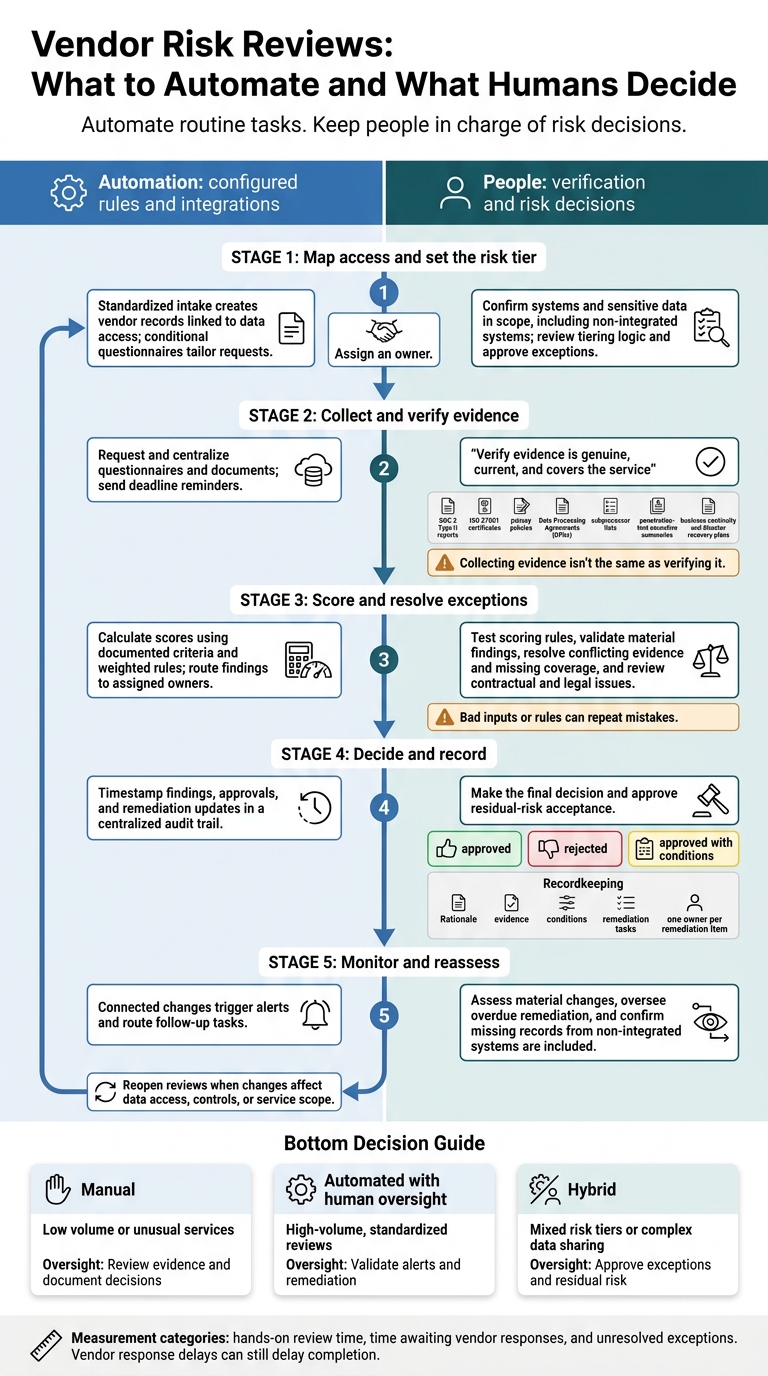
Vendor Risk Reviews: What to Automate and What Humans Decide
Transform Third-Party Risk Management (TPRM) with Smart Assessment Engine
sbb-itb-5f36581
Manual Vendor Risk Reviews: Steps and Limits
Before sharing data, confirm what the vendor can access, check its safeguards, and record the decision. Manual reviews often take 1–3 weeks from start to finish. Vendors may spend 8–15 hours completing a security questionnaire; that is not buyer review time. Track reviewer hours separately from time spent waiting for responses to see where delays happen.
Map Data Access, Review Evidence, and Record Decisions
Identify the vendor, the systems in scope - including non-integrated systems - and the sensitive lead data it can access. Assign a risk tier based on that exposure. Then match the questionnaire and evidence requests to the tier instead of sending every vendor the same long checklist.
Gather SOC 2 Type II reports, ISO 27001 certificates, privacy policies, Data Processing Agreements (DPAs), subprocessor lists, penetration-test executive summaries, and business continuity and disaster recovery plans. Check that these documents support the vendor’s answers and cover the service under review. Route contract issues to Legal and technical issues to Security.
| Workflow stage | Typical bottleneck | Control benefit | Recordkeeping risk |
|---|---|---|---|
| Intake & mapping | Missing or non-integrated systems | Matches review depth to exposure | Incomplete vendor inventory |
| Evidence collection | Waiting for vendor documents | Supports claims with evidence | Outdated reports or certificates |
| Validation & review | Resolving vague answers | Identifies inconsistencies | Uneven scoring or transcription errors |
| Decision & recording | Negotiating remediation | Sets conditions for approval | Decisions buried in email |
Record whether the vendor is approved, rejected, or approved with conditions. Keep the rationale, evidence, conditions, and remediation tasks in one audit trail. Give each remediation item one owner so the work doesn’t stall.
Weigh Human Judgment Against Administrative Work
Use manual review for vague answers and exceptions that need judgment. Interviews with vendor staff can reveal issues a questionnaire misses. But document searches, manual reminders, and recordkeeping all compete for reviewers’ time.
As volume grows, inconsistent scoring, transcription errors, and stale evidence make decisions harder to defend. Standardize evidence and scoring, assign owners to keep evidence current, and limit manual reviews to critical or complex vendors. Let automation handle intake and follow-up so reviewers can focus on exceptions and remediation.
Automated Vendor Risk Reviews: Tools and Controls
Automation handles repeatable steps that can slow manual reviews: intake, follow-up, and recordkeeping. It uses configured rules and integrations - not independent risk judgment - to manage questionnaires, collect evidence, calculate scores, route tasks, and track follow-up. Humans still make the final call.
Automate Intake, Evidence Requests, and Follow-Up
Standardized intake forms can create vendor records linked to the data each vendor can access, then trigger risk-based questionnaires. Conditional questions tailor requests to that access, while centralized collection keeps responses and evidence in one record. Configured workflows assign owners, send deadline reminders, and timestamp findings, approvals, and remediation updates.
| Automated capability | Prerequisites | Failure modes | Required human controls |
|---|---|---|---|
| Intake and conditional questionnaires | Standardized forms; risk tiers; branching rules | Incomplete inputs; incorrect classification | Review tiering logic; approve exceptions |
| Evidence collection | API integrations; Trust Center access where available | Broken integrations; stale documents; missing coverage | Verify evidence is genuine, current, and covers the service |
| Risk scoring | Documented criteria; weighted rules | Poor rules repeat errors across reviews | Test rules; validate material findings |
| Routing and reminders | Owners; deadlines; escalation paths | Inactive owners; unresolved follow-up | Reassign tasks; oversee overdue remediation |
| Continuous monitoring | Connected systems; baseline rules | False positives; alert fatigue | Assess material changes; oversee remediation |
| Audit trail logging | Configured workflows; system connectors | Missing data from non-integrated systems | Upload missing evidence; confirm approval history |
Use monitoring alerts to reopen reviews only when they affect data access, controls, or scope.
Check Data, Scoring Rules, and Exceptions
Automation doesn't remove the need to check the rules. Consistent rules reduce repetitive work and missed follow-ups, but bad inputs can spread the same mistake across many reviews. Maintain integrations, document scoring criteria, and periodically test thresholds against risk requirements. If AI drafts questionnaire responses, check them against approved evidence. Well-written text is not proof.
Collecting evidence isn't the same as verifying it. Receiving a SOC 2 report, for example, doesn't establish that it covers the service being purchased. Send conflicting evidence, missing coverage, and high-risk findings to a named reviewer. Humans must resolve exceptions, review contractual and legal issues, and approve residual-risk acceptance. The automated score should inform that decision, not replace it.
Manual vs Automated Reviews: Key Differences
Automation can cut staff handling time, but vendor response delays still determine when a review can finish. Measure staff time and vendor response time separately.
The differences matter most when sensitive data, missing evidence, and exception volume shape the workload.
| Criterion | Manual review focus | Automated review focus |
|---|---|---|
| Review time | Staff read documents, enter data, and chase responses. Vendor delays lengthen the review cycle. | Standardized intake cuts processing time, but missing vendor responses still delay completion. |
| Error risk | Reviewers may interpret evidence or apply scoring criteria differently. | Consistency relies on accurate inputs and sound scoring rules. |
| Follow-up steps | Staff send emails, track replies, and decide when to escalate. | Missing or expired evidence triggers routing and alerts to assigned owners. |
| Audit trails | Files and decisions can end up scattered across inboxes and drives. | Centralized logs keep review records together. |
| Scale limits | Reviewer availability and administrative work limit capacity. | Integration coverage and exception volume limit capacity. |
| Exception handling | Reviewers find and resolve exceptions case by case. | Reviewers handle exceptions, maintain rules, and make final decisions. |
| Monitoring | Scheduled reviews can miss changes unless someone reopens them. | Event triggers can reopen reviews when connected data changes. |
When comparing results, track hands-on review time, time awaiting vendor responses, and unresolved exceptions separately. Faster intake does little to help if the same evidence gaps stay open.
Assign routine steps to automation and exceptions to reviewers.
Conclusion: Choose and Set Up a Risk-Based Review Model
Choose a review model based on vendor volume, data sensitivity, and review complexity - not speed or automation alone. Use the table below to match review depth to vendor risk.
| Review model | When to use it | Main trade-off | Required oversight |
|---|---|---|---|
| Manual | Low volume or unusual services | Case-by-case flexibility limits repeatability | Review evidence and document decisions |
| Automated with human oversight | High-volume, standardized reviews | Coverage depends on configured rules | Validate alerts and remediation |
| Hybrid | Mixed risk tiers or complex data sharing | Requires clear handoffs | Approve exceptions and residual risk |
Once you’ve chosen a model, define risk tiers, assign owners, and set reassessment triggers.
Define Risk Tiers and Evidence Requirements
Base review depth on data exposure, access privileges, and regulatory risk. Require more evidence and human approval for higher-risk vendors. Check SOC 2 coverage, customer responsibilities, and the scope of ISO/IEC 27001 certification. Neither guarantees security.
Use Reform for Structured Vendor Intake
Use Reform to collect structured vendor intake through multi-step, conditional forms. Collect only the information you need, and assess Reform’s data handling before use. A submission is intake, not evidence - verify security claims independently.
Assign Owners and Set Reassessment Triggers
After tiering, assign owners for high-risk vendors, missing evidence, disputes, incidents, and exceptions. Set approval and escalation thresholds, remediation due dates, and triggers for reassessment when data access, controls, or service scope changes. Define record-retention requirements, and keep the methodology, evidence, findings, approvals, and remediation history together.
FAQs
When is vendor review automation worth the cost?
Vendor review automation is worth the cost when manual oversight can’t keep up with risk management needs. That’s often the case when data mapping and audit preparation take too long, data access requests come in frequently, or compliance rules require real-time audit trails.
Automate routine checks, but flag high-risk vendors for manual legal review. This approach helps teams keep compliance checks accurate without slowing down their work.
What if a vendor won’t provide security evidence?
Treat a vendor’s refusal to provide required security evidence as a serious red flag. This includes audit reports or a signed Data Processing Agreement. Escalate immediately through your formal procurement or legal process to document compliance gaps and the steps needed to resolve them.
Avoiding the vendor is the safest way to limit liability. Track their status in your vendor risk register, and keep sensitive data out of their unverified systems.
How can I test automated risk scores for accuracy?
Check automated risk scores against your documented lead flow and risk model. Map every tool that processes lead data, then assign risk tiers based on data sensitivity, downstream sharing, and your level of control.
Test integrations with synthetic leads and compare scores with observed behavior. Use simulation modes to test policies without affecting live operations. Regularly audit API usage, field mappings, and security controls. Investigate unexpected endpoints or sync failures.
Related Blog Posts
Get new content delivered straight to your inbox

The Response
Updates on the Reform platform, insights on optimizing conversion rates, and tips to craft forms that convert.



Drive real results with form optimizations
Tested across hundreds of experiments, our strategies deliver a 215% lift in qualified leads for B2B and SaaS companies.
