
.webp)
Multi-Factor Authentication for Payment Forms


If your payment form can lead to card data, password-only login is no longer enough. I’d treat MFA as the default for admin access, remote access, and any user path into the cardholder data environment.
Here’s the short version:
- PCI DSS v4.0 now requires MFA for many paths that can reach the CDE, with those rules in force after 03/31/2025
- Passwords fail often because of phishing, credential stuffing, and password reuse
- Not all MFA is equal: SMS and email codes are weak, while passkeys and security keys give much better phishing protection
- Use step-up MFA for high-risk actions like:
- viewing saved card details
- changing billing data
- updating payout settings
- rotating API keys
- Log everything: enrollment, login attempts, failures, removals, timestamps, and session details
- Keep checkout friction low by using risk-based challenges, such as EMV 3DS, instead of forcing extra steps on every buyer
One number stands out: the British Airways payment-page breach exposed about 380,000 card transactions. That’s the kind of damage a weak payment path can lead to.
In other words: use low-friction MFA where conversion matters, and stronger phishing-resistant MFA where staff can touch payment systems or card data.
Securing the CDE: Navigating Multi-Factor Authentication in PCI DSS 4.0 | SecurityMetrics Podcast 89
What MFA means for payment forms and payment teams
Multi-factor authentication means a user has to prove identity with two or more separate factors from different categories before access is allowed. Those categories are:
- Something you know: a password or PIN
- Something you have: a smartphone, hardware token, smart card, or security key
- Something you are: a fingerprint, facial recognition, or retina scan
The key detail is independence. One factor can't be used to unlock the other. So a password plus a security question doesn't count as MFA, because both come from the same "something you know" category. In payment flows, MFA usually looks like a password paired with a stronger second factor.
MFA factors used in payment workflows
In payment forms, some MFA methods are just stronger than others.
Authenticator apps that generate time-based one-time codes can help. But they can still be tricked by real-time phishing attacks. Hardware security keys offer more protection because they tie the login to the exact website being used. That makes stolen codes much less useful on a fake page.
Biometrics used with a device-bound passkey can meet MFA in one low-friction step.
For internal teams that work with payment data, phishing resistance should come first. SMS and email codes are weaker options because attackers can intercept them through SIM swapping or similar attacks.
Customer MFA versus internal PCI-scoped MFA
Customer MFA and internal MFA are solving different jobs.
Customer-facing MFA, like confirming a stored-card purchase, is meant to verify the buyer during a transaction while keeping conversion in mind. Internal MFA is different. It's a PCI DSS rule tied to access to the cardholder data environment. PCI DSS v4.0 requires MFA for all access into the CDE, and users must reauthenticate on every access attempt.
That shifts the bar upward for internal access. Payment teams should use stronger, phishing-resistant methods there, even if customer checkout needs a lighter touch.
How to add MFA to payment form flows without hurting conversion
Use step-up authentication only for high-risk actions.
MFA patterns for common payment form actions
Once you know which factors you need, the next move is simple: tie MFA to the actions that actually merit a challenge. Not every payment flow needs the same level of friction. If you ask for too much at the wrong time, people bail. If you ask for too little, you leave the door open.
| Action | Risk Level | Recommended MFA Method |
|---|---|---|
| Viewing saved card details | High | FIDO2 passkey or hardware security key |
| Changing billing details | Medium–High | Authenticator app (TOTP) or passkey |
| Sensitive admin actions (updating payout account, rotating API keys, accessing payment analytics) | High | Password + hardware security key or passkey |
| Standard checkout | Low | Frictionless 3DS authentication |
For standard checkout, EMV 3DS 2.3.1 can trigger a challenge only when risk goes up, using biometrics or one-time codes.
For internal admin actions, use phishing-resistant MFA on every step-up prompt. That means leaning on hardware security keys or passkeys instead of weaker options when someone is changing payout details, rotating API keys, or opening payment analytics.
Usability details that matter in U.S. payment forms
After you’ve picked the high-risk actions, the next job is making the prompt easy to finish. This part matters more than teams sometimes think. A clunky MFA prompt can tank completion rates even when the security plan is sound.
Failed MFA prompts should reveal only that authentication failed, not which factor was wrong.
That small detail helps limit extra clues for attackers. At the same time, clear prompts cut down on retries and form drop-off. People shouldn’t have to guess what to do next.
For U.S. users, formatting consistency helps build trust. Show amounts as $12,500.00, with a comma for thousands and a period before cents. Use MM/DD/YYYY timestamps in logs and customer notices to avoid confusion.
On mobile, MFA prompts should load without blocking the page. If a biometric prompt is available through a passkey or Secure Payment Confirmation, it should appear smoothly as part of the high-risk action flow. It should feel like one connected step, not like the user got kicked into a side quest.
Using Reform in secure payment form workflows
Reform can handle branded intake and update forms that feed secure payment workflows, while your PCI-scoped payment system handles authentication and card data.
In plain English: Reform manages the front-end form experience and the data handoff. Card processing and PCI controls still sit inside compliant payment systems. That split keeps the form layer separate from the PCI-scoped controls that enforce authentication.
sbb-itb-5f36581
Implementing MFA to support PCI DSS compliance
Where to enforce MFA in a payment form setup
After you pick the MFA method, the next job is simple: enforce it anywhere payment staff can touch the CDE.
PCI DSS requires MFA for all access to the CDE. That includes cloud apps, workstations, and the systems that support CDE operations.
In a payment form setup, MFA should be turned on across the places teams use every day, including admin panels, analytics dashboards, payment processor integrations, deployment and API tools, and remote support access. It also helps to pair MFA with least-privilege roles and regular access reviews.
Logs, enrollment, and policy controls auditors expect
Once MFA is live, auditors will want proof that it’s doing its job.
Just deploying MFA isn’t enough. Auditors need evidence that MFA is enforced, logged, and backed by policy.
Log every MFA attempt with the user, factor, result, timestamp, and session context. You should also log enrollment and deprovisioning events. On the policy side, document approved factors, required roles, and how exceptions are handled. Bypasses should not happen unless there is documented management approval.
Auditors also expect updated network diagrams, data flow diagrams, and a written inventory of authorized scripts with business justifications. For payment pages, continuous automated monitoring is expected. Manual review alone does not meet the bar.
| Audit Requirement | What Auditors Look For |
|---|---|
| MFA enrollment records | Proof that each CDE user completed enrollment with an approved factor |
| Authentication logs | Timestamped success/failure events with user, factor, and session context |
| Deprovisioning records | Evidence that access was removed when users left or changed roles |
| Exception documentation | Management-approved bypass records with business justification |
| Written access policy | Defined roles, approved MFA methods, and exception-handling procedures |
With enforcement and documentation in place, the last step is lining up MFA methods with each payment workflow.
Choosing the right MFA approach and next steps
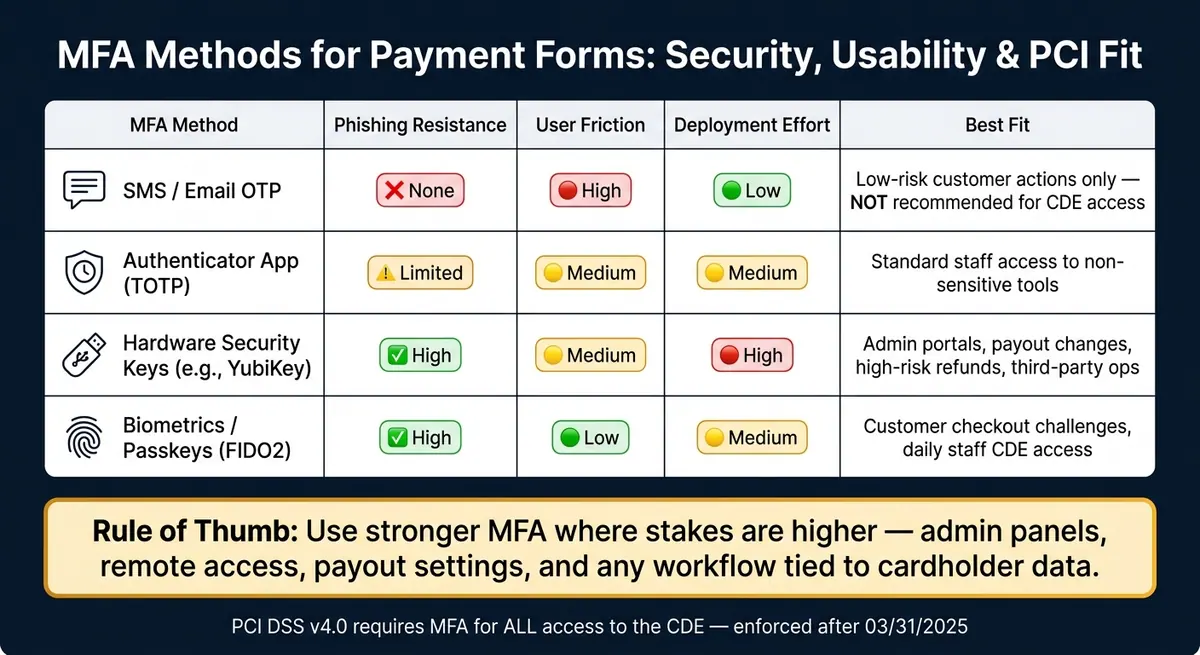
MFA Methods for Payment Forms: Security vs. Usability vs. PCI Fit
MFA methods compared: security, usability, and PCI fit
Once MFA is in place, the next step is simple: match the method to the user, the task, and the risk level.
Not every MFA method works the same way. Some are easy to roll out but weak against phishing. Others take more setup but give much better protection. For PCI-related access, that tradeoff matters.
| MFA Method | Phishing Resistance | User Friction | Deployment Effort | Best Fit |
|---|---|---|---|---|
| SMS / Email OTP | None | High | Low | Low-risk customer actions only; not recommended for CDE access |
| Authenticator App (TOTP) | Limited | Medium | Medium | Standard staff access to non-sensitive tools |
| Hardware Keys (e.g., YubiKey) | High | Medium | High | Admin portals, payout changes, high-risk refunds, third-party operations |
| Biometrics / Passkeys (FIDO2) | High | Low | Medium | Customer checkout challenges, daily staff CDE access |
A good rule of thumb: use stronger MFA where the stakes are higher. That means admin panels, remote access, refund tools, payout settings, and any workflow tied to cardholder data should get the best protection you can support.
Synced passkeys can meet PCI DSS Requirement 8.4.2 in some setups, but admin and remote access still need phishing-resistant controls that match your policy. MFA factors also need to come from different categories and stay independent.
Conclusion: reduce payment risk with stronger authentication
After you choose the method, apply it across every access point that touches the CDE.
Passwords by themselves don't do the job for payment systems. MFA adds another barrier, so an attacker has to beat two separate factors instead of just one.
The next move is straightforward:
- Map every access point that touches your CDE
- Enforce MFA by role, starting with admin and remote access
- Move toward phishing-resistant methods like FIDO2 as your baseline
Strong authentication cuts payment-form risk.
FAQs
Does every payment form need MFA?
No. Payment forms do not always need multi-factor authentication for the end customer.
PCI DSS MFA rules apply to people like administrators, contractors, or staff who can access the cardholder data environment. 3D Secure is a separate control, and it’s used to verify cardholders during online purchases.
What MFA method is best for PCI-scoped access?
For PCI-scoped access, the best MFA choice is a phishing-resistant method, such as FIDO2-compliant passkeys, smart cards, or hardware security keys.
These options provide stronger protection and may meet requirements even when used as a single factor, as long as they satisfy specific cryptographic binding criteria. In every case, factors must stay independent.
How can I add MFA without hurting checkout conversion?
Use a balanced, user-friendly approach that keeps routine purchases low-friction. Trigger MFA only for higher-risk actions, such as transactions over $100.00.
You can also require MFA for saved payment methods instead of the full checkout flow. When MFA is needed, prioritize phishing-resistant methods like passkeys for a faster, more secure experience.
Related Blog Posts
Get new content delivered straight to your inbox

The Response
Updates on the Reform platform, insights on optimizing conversion rates, and tips to craft forms that convert.




Drive real results with form optimizations
Tested across hundreds of experiments, our strategies deliver a 215% lift in qualified leads for B2B and SaaS companies.
