
.webp)
OAuth 2.0 Scopes and Permissions: Guide



If I get OAuth scopes wrong, one token can do far more than it should. The fix is simple: I keep scopes tied to clear actions, split user access from admin access, block broad scopes unless an admin approves them, and check scopes on every API request.
Here’s the article in plain English:
- Scopes ask for access. Permissions enforce rules.
- I should name scopes around business actions like
leads.readorwebhooks.manage, not around internal endpoints. - I should keep read, write, and admin-level control separate.
- I should use tighter scopes like
.selffor user-level actions and broader scopes like.allonly for admin-approved or app-only jobs. - High-risk actions like bulk export, PII access, and credential changes need their own scopes and stricter approval.
- I should avoid scope sprawl by keeping the list small, stable, and easy to review.
- If a scope changes, I should version it, such as
leads.read.v2, instead of changing old behavior in place. - At runtime, missing scope checks should return 403 Forbidden with
insufficient_scope. - Before launch, I should test both sides: what a token can do and what it must not do.
A few hard facts shape the whole approach:
- OAuth scope values are space-delimited and case-sensitive
- Every protected endpoint should check token scope before business logic runs
- A read-only token should get
200 OKfor read calls and403 Forbiddenfor write or export calls - Version sunset dates should be shown in U.S. date format, such as 08/22/2026
Bottom line: I should keep the model small, clear, and strict so people can approve access fast and APIs can block overreach just as fast.
OAuth 2 scope design for security
sbb-itb-5f36581
Design scopes around real lead capture actions
Build scopes around the things people actually do in a lead capture system: view submissions, create forms, set up webhooks, and export leads. Don’t base them on single endpoints or internal services. After you lock in those action names, group them by access level.
Map actions to resource-based scope names
A steady resource.level pattern - like leads.read, leads.write, forms.manage, analytics.read, and webhooks.manage - makes consent screens easier to scan and gives your API a clean, predictable way to enforce access.
A marketer can look at leads.read and analytics.read and know what they mean right away. In Reform, that kind of clarity can help a marketer approve a CRM sync fast. Keep scopes tied to stable business concepts - leads, forms, analytics, webhooks, integrations - not backend service names.
Separate read, write, and manage access levels
Not every action carries the same level of risk. Your scope model should show that. For most lead capture systems, a simple three-tier setup works well:
| Access Level | Example Scopes | Typical Use Case |
|---|---|---|
| Read | leads.read, forms.read, analytics.read |
BI tools, dashboards, analytics integrations |
| Write | leads.write, forms.write, submissions.write |
CRM syncs, form builders, server-side submissions |
| Manage | forms.manage, webhooks.manage, integrations.manage |
Webhook config, credential rotation, deleting submissions |
The line that matters most is the one between write and manage. Write scopes let an app create or update records. Manage scopes cover actions that would need clear admin confirmation in your UI - deleting all submissions, changing a webhook destination URL, rotating API credentials, or disconnecting a CRM integration.
If you bundle those actions with routine read scopes, an integration can end up with much more power than it needs, and that’s where problems start.
Split sensitive data into separate scopes only when justified
Some actions do need their own scope because the risk is different enough to treat them separately. Bulk exports (leads.export) create large, unmanaged copies of your lead database outside your system. Enrichment writes (enrichment.write) mean sharing lead data with third-party services, and that can change how the data is classified under privacy rules. Credential management (credentials.manage) can open long-term access paths if handled poorly. Those cases deserve their own lane.
At the same time, don’t chop low-risk actions into tiny scopes just because you can. If closely related actions are split too far, you add maintenance work without much security gain. It also nudges developers to ask for everything upfront just to avoid friction later. Split scopes only when the action changes who can view data, where that data goes, or how it’s secured.
Once those action scopes are set, map them to users, admins, and third-party apps.
Map users, admins, and third-party apps to the right permissions
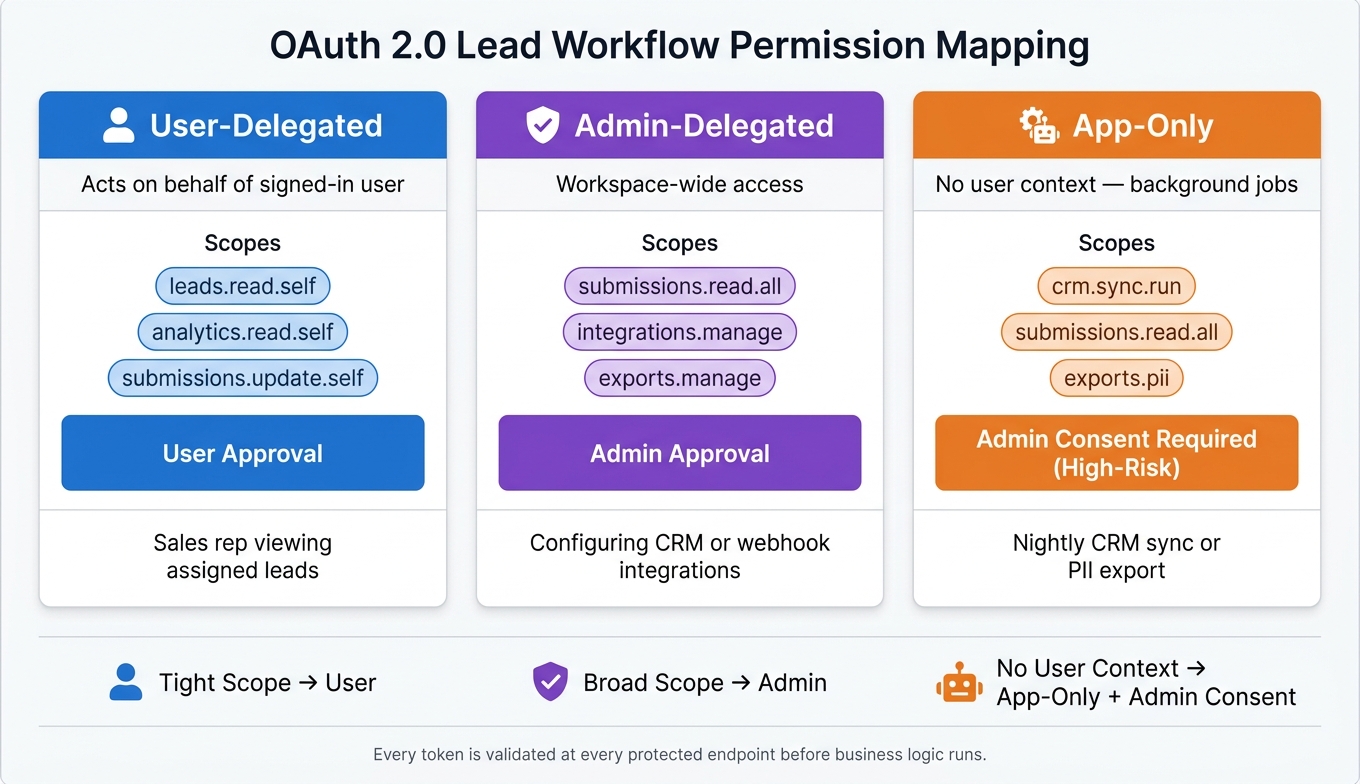
OAuth 2.0 Scope Permissions: User vs Admin vs App-Only Access
Once you define your scopes, the next job is to match them to the people and systems that use them. The simplest way to do that is to look at how much of the workspace each action can affect.
If an action only touches one person’s records, keep the scope tight. If it can touch the whole workspace, save it for admins or background jobs. That split keeps access easier to control and a lot less messy.
User actions vs. admin actions in form workflows
A standard user - like a sales rep working their assigned pipeline - should only be able to view and update the leads they own or are assigned to. Scopes such as leads.read.self, leads.update.self, and submissions.update.self keep that access narrow and predictable. The .self suffix limits access to the current user’s records, and the API applies that filter on the server side.
Admin actions are different. They affect the whole workspace, not just one user’s slice of it. Scopes like integrations.manage, submissions.read.all, and exports.manage should be kept for roles that need workspace-wide access.
Delegated access vs. app-only access
Delegated access means an app acts on behalf of a signed-in user. The token includes both the user’s identity and the granted scopes, so each request is evaluated through that user’s permissions. A personal analytics dashboard that a sales rep authorizes to view their own leads is a good example. It should get submissions.read.self - and nothing extra.
App-only access cuts the user out of the flow. A nightly CRM sync, a batch enrichment job, or an automated lead export runs without a human actively using it. It signs in with its own credentials and receives a token scoped for workspace-level actions like submissions.read.all or exports.run.
Since there’s no user context, the app needs clear admin approval before those scopes are granted. This is where governance matters most: background automations with broad data access can do a lot, so they need tighter control.
A practical lead workflow permission mapping example
The matrix below shows a simple way to split lead-workflow permissions.
| Action | Suggested Scope | Execution Context | Approval Level |
|---|---|---|---|
| View assigned leads | leads.read.self |
User-delegated | User |
| Access form analytics | analytics.read.self |
User-delegated | User |
| Export all workspace submissions | submissions.read.all |
Admin-delegated | Admin |
| Configure CRM or webhook integrations | integrations.manage |
Admin-delegated | Admin |
| Nightly CRM lead sync | crm.sync.run + submissions.read.all |
App-only | Admin consent required |
| Export submissions containing PII | exports.pii |
App-only | Admin consent (high-risk) |
Use the same split across workspace roles. Clear scope boundaries also make the next step - stopping scope sprawl - a lot easier.
Prevent scope sprawl in growing API integrations
After you map scopes to actions and roles, the next job is keeping the catalog from turning into a mess of overlap and broad catch-alls. Scope sprawl usually starts small: a few scopes end up covering the same basic lead action, and before long nobody is sure which one an app should request.
Keep the scope catalog small and tied to stable API domains
A simple way to keep things under control is to anchor each scope to a durable business domain, not to single endpoints or one-off feature requests. That means new features should map back to existing scopes like lead, form, analytics, or integration scopes instead of adding a new scope every time a product team ships something.
Catch-all scopes such as admin or full_access make this problem worse. They swell the catalog and get in the way of least privilege. If you do keep a catch-all scope, save it for rare internal tooling and review it on a regular basis.
This only works if high-risk scopes stay under tight control.
Use admin consent and client restrictions for high-risk scopes
Not every connected app should be allowed to request the same scopes. High-risk operations, like bulk lead exports, credential management, and other broad access, should sit in a separate class and require explicit admin approval. A standard user-authorized flow should not get leads.export or integrations.manage unless an administrator actively signs off.
Client restrictions add one more check. Keep a registry of apps with attributes such as trust level and allowed scopes, so only vetted clients can even ask for high-risk scopes. A third-party form builder or marketing tool might get forms.read and leads.write by default, but leads.export should remain off-limits unless it passes a formal review.
Consent logs should record:
- The admin's identity
- The scopes granted
- The date and time
That makes audits much easier later.
Once those request and approval rules are set, the next step is giving scope changes a clean path over time.
Version and deprecate scopes without breaking live integrations
When a scope needs to change - for example, if leads.read needs to expose a new enrichment data model - add a replacement such as leads.read.v2 instead of changing the current scope in place. Run both side by side during a transition window, and document three dates in your developer portal using U.S. date formatting: when the new scope launches, when the old scope stops accepting new app registrations, and when support ends.
Clear timelines help teams avoid last-minute scrambles. Admins should see upcoming sunsets right in the product's admin UI, not hidden away in a changelog. Migration guides with SDK code examples also make updates much smoother for CRM syncs, form apps, and enrichment services, so they can change configurations without disrupting live submissions.
Implement and enforce scope checks in production
Once you define scopes, you need to enforce them on every request.
Validate granted scopes at every protected endpoint
Scope validation is not a one-time login check. Every protected endpoint should verify the token signature, claims, and required scopes before any business logic runs.
If a token is missing a required scope - for example, a request hits POST /leads/export but only includes leads.read - the API must return HTTP 403 Forbidden. The response body should use the standard OAuth error shape: {"error": "insufficient_scope", "error_description": "Required scope: leads.export"}. Keep the error short, and log the endpoint, client ID, granted scopes, and required scopes internally.
The safest way to handle this is to centralize the check in shared middleware or an API gateway layer. That cuts down the chance that one service forgets to enforce it. In a microservices setup that handles forms, lead enrichment, and CRM sync, a shared authorization library helps the forms service, leads service, and webhooks service apply the same rules without copying the same code into each service.
Test least-privilege behavior before shipping integrations
Before any integration goes live, run direct tests to confirm that tokens can't do more than their scopes allow. Your test matrix should cover cases like these:
| Scenario | Token scopes | Expected result |
|---|---|---|
| Read lead list | leads.read |
200 OK on GET /leads |
| Create lead with read-only token | leads.read |
403 Forbidden on POST /leads |
| Bulk export with read-only token | leads.read |
403 Forbidden on POST /leads/export |
| Edit webhook configuration | webhooks.manage |
403 Forbidden on webhook update |
| Analytics query | analytics.read |
200 OK for aggregate metrics only |
Each test should check both sides of the rule: the allowed action works, and the stronger action gets blocked. Generate a fresh token for each test case with tightly controlled scopes. Hardcoded tokens can hide permission drift and make scope regressions easy to miss.
Conclusion: Keep your scope model simple, secure, and scalable
For lead capture workflows, enforcement matters just as much as scope design. Platforms like Reform - where forms capture leads, enrichment adds context, analytics tracks conversion, and CRM connectors close the loop - benefit from that kind of clarity. For lead capture APIs, keep scopes small, enforce them on every request, and reserve broad access for admins only.
FAQs
How do scopes differ from permissions?
In OAuth 2.0, scopes are the specific access rights an app asks for and gets in the access token for API actions. Permissions are the broader account- or role-level abilities inside the resource system.
With HubSpot, the app’s token reflects the scopes it requested. But installation doesn’t hinge on scopes alone. It also depends on the required scopes, the account’s tool access, and the role of the user who authorizes the app.
When should I use .self vs. .all scopes?
Use .self scopes when the integration should work only with the signed-in user’s own data or actions.
Use .all scopes only when the third-party app needs access across users or across the full dataset for its lead workflow.
In both cases, follow least privilege: ask only for the scopes you need, and stay away from broad scopes when you can. That helps limit the damage if a token is compromised.
How can I prevent scope sprawl as my API grows?
Use a strict one-scope-per-job approach. Each scope should map to a specific feature or action, not a broad set of permissions.
Avoid multipurpose scopes. Give each integration access only to the objects and fields it needs.
Keep an inventory of connected tools and their scopes, and review it on a regular basis. If requirements change, revoke old tokens and issue new credentials with tighter permissions.
Also document what each scope is for. That makes audits easier and helps with accountability.
Related Blog Posts
Get new content delivered straight to your inbox

The Response
Updates on the Reform platform, insights on optimizing conversion rates, and tips to craft forms that convert.




Drive real results with form optimizations
Tested across hundreds of experiments, our strategies deliver a 215% lift in qualified leads for B2B and SaaS companies.
