
.webp)
OAuth 2.0 Token Introspection Guide


If you use opaque OAuth tokens, your API cannot trust them on sight. I need to send the token to the authorization server, check active, then allow or block the request based on scope, expiration, subject, client, and token type.
Here’s the short version:
- I use token introspection when the token is opaque and can’t be checked locally.
- I send a server-to-server
POSTrequest to the introspection endpoint. - I use
application/x-www-form-urlencodedand include the requiredtokenparameter. - I may include
token_type_hintto say whether it’s anaccess_tokenorrefresh_token. - I authenticate the caller to the introspection endpoint with client credentials,
private_key_jwt, or mTLS. - I treat
HTTP 200 OKas “the server processed the request,” not “the token is valid.” - I check
"active": truefirst. If it’sfalse, I return401. - If the token is active but missing the right scope, I return
403. - I use HTTPS, rate limits, logging, and access controls because introspection exposes token state.
- I can stop access fast after revocation, logout, expiry, or disconnect events, which matters for APIs, gateways, CRM sync, and lead flows.
A few points trip teams up all the time: introspection responses can return 200 for both valid and invalid tokens, the request body must be form-encoded, and revocation checks only work if I ask the authorization server instead of relying on local checks.
In plain English: introspect at the gateway, enforce permissions in each service, and let the authorization server decide whether a token still works.
OAuth 2 Token Introspection
sbb-itb-5f36581
RFC 7662 basics: endpoint, request format, and required parameters
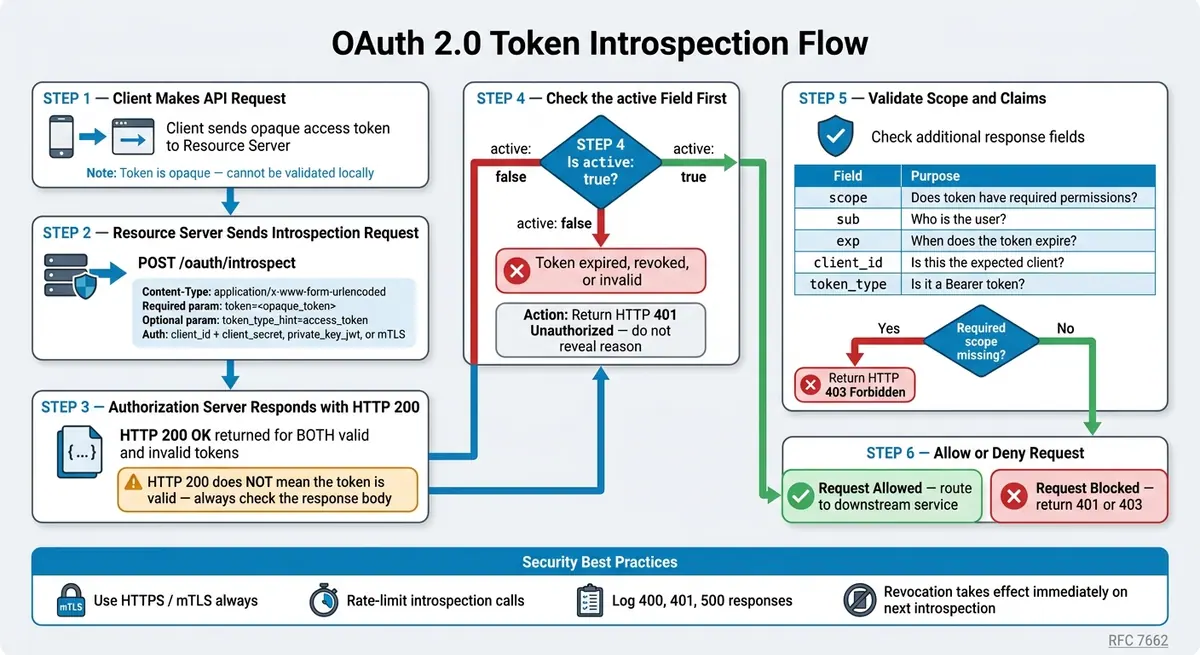
OAuth 2.0 Token Introspection Flow: Step-by-Step Validation Guide
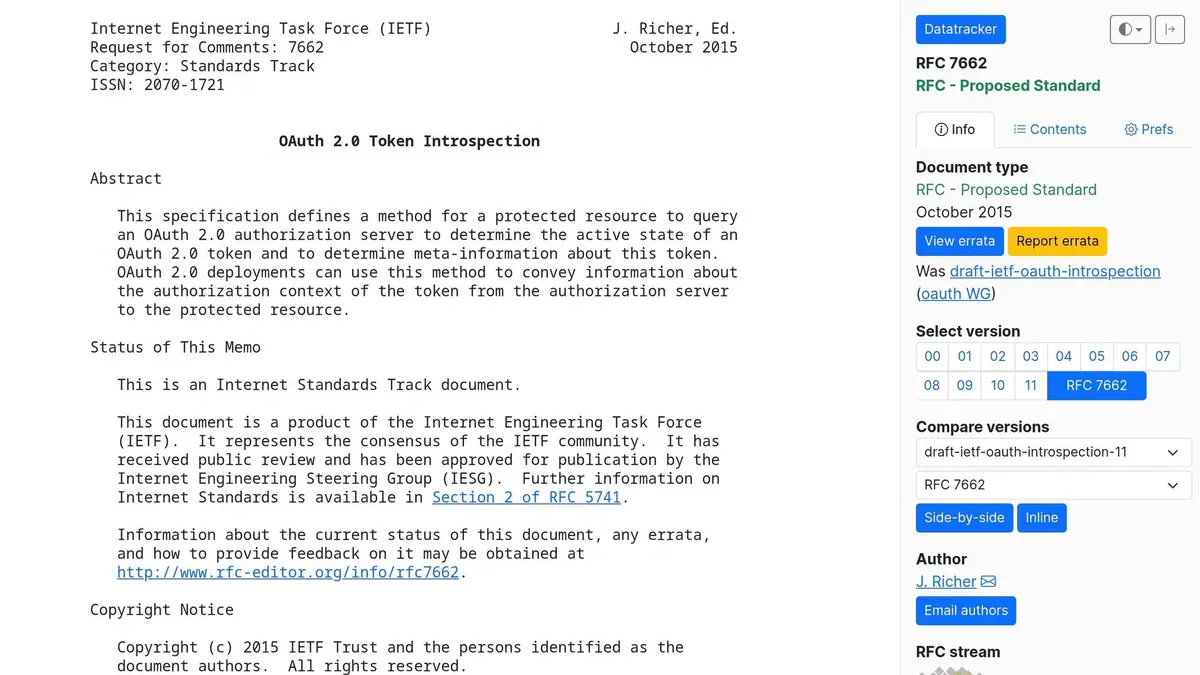
For opaque tokens, validation happens with a server-to-server POST request to the introspection endpoint. RFC 7662 keeps this pretty simple: a resource server sends an HTTP POST request to the authorization server’s introspection endpoint, and the authorization server sends back a JSON response with the token’s status and metadata.
One detail matters more than it may seem: the request body must use application/x-www-form-urlencoded. If you send the wrong content type, you can run into 400 Bad Request errors.
How to send an introspection request
The only required parameter is token. You can also send the optional token_type_hint parameter to tell the authorization server whether you’re introspecting an access_token or a refresh_token. It’s not required, but it may help the server speed up the lookup.
| Parameter | Requirement | Description |
|---|---|---|
token |
Required | The string value of the token to be checked. |
token_type_hint |
Optional | A hint about the token type: access_token or refresh_token. |
Authentication methods vary by authorization server.
How to find the introspection endpoint
The exact URL depends on the authorization server. Some providers list it directly in their developer docs. Others publish it in an authorization server metadata document, often available from a .well-known discovery URL.
When that metadata document is available, look for the introspection_endpoint property. It’s better to use discovery than hardcode the path, because introspection URLs differ from one provider to another. For example, OpenProject uses /oauth/introspect, while LoginRadius uses /service/oauth/introspect.
A simple introspection request example
Minimal introspection request:
POST /oauth/introspect HTTP/1.1
Host: server.example.com
Accept: application/json
Content-Type: application/x-www-form-urlencoded
Authorization: Basic czZCaGRSa3F0MzpnWDFmQmF0M2JW

token=mF_9.B5f-4.1JqM&token_type_hint=access_token
A successful request returns HTTP 200 OK whether the token is valid or not. That’s the part that trips people up. The real answer is in the response body, specifically the active boolean.
If the request is malformed, or authentication fails, the server returns 400 or 401. From there, read the response body and check the active flag to decide whether the token can be used.
Reading the introspection response and handling inactive tokens
After the authorization server handles your introspection request, it sends back a JSON object. Check active first. If it's true, you can use the other fields to decide whether the request should go through. If it's false, stop right there.
What active, scope, exp, sub, client_id, and token_type mean
| Field | Type | What It Means | How Your API Should Use It |
|---|---|---|---|
active |
Boolean | Indicates whether the token is currently valid | If false, stop authorization and return HTTP 401 |
scope |
String | Space-separated list of permissions | Check whether the required scope for the endpoint is present |
sub |
String | Subject identifier, usually a user ID | Use it for user-specific data or ownership checks |
exp |
Integer | Expiration timestamp, in seconds since the Unix epoch | Determine when the token stops being valid |
client_id |
String | ID of the client that requested the token | Confirm the token was issued to the expected client |
token_type |
String | How the token should be used, typically Bearer |
Reject unexpected token types |
Only look at these fields after active passes. They tell you about the authorization context. They do not decide whether the token is valid in the first place.
Use scope to enforce least privilege. A token with read can access read endpoints. If write is missing, write requests should be blocked. The split matters:
- Use
401for invalid tokens - Use
403for valid tokens that don't have the needed scope
What to do when the response is { "active": false }
If active is false, treat the token as invalid and stop the request.
An {"active": false} response can mean the token expired, was revoked, was deauthorized, the user changed their password, the user logged out, or the token was never valid in the first place. Your API doesn't need to know which one happened.
Return HTTP 401 Unauthorized and nothing more. Don't send back messages like "token expired" or "token revoked." That kind of detail gives attackers clues about token state and can help them test what exists in your system.
On the client side, a 401 should trigger graceful recovery - either try a token refresh with a refresh token, or send the user back through the authorization flow.
Securing the introspection endpoint: client authentication, transport security, and access controls
Introspection exposes token state, so it needs the same level of care as any privileged control plane endpoint. In practice, that means treating the introspection endpoint as a private part of the opaque-token validation flow. It returns token metadata, so access should be limited to trusted backend services and confidential clients.
Client authentication methods for introspection
Use client authentication for introspection requests, not the bearer token being checked. The caller should authenticate with client credentials such as client_id and client_secret, private_key_jwt, or mTLS, based on what the provider supports.
Those credentials may be sent in the request body or handled by the middleware making the call. If you want stronger client authentication, use private_key_jwt or mTLS.
Client authentication is only one part of the picture. You also need transport security and tight access controls around the request itself.
TLS, mTLS, rate limits, and monitoring
Require HTTPS in production. When stronger transport-level authentication is needed, use mTLS.
Rate-limit requests to slow probing. Return 401 Unauthorized when credentials are missing or invalid, and 400 Bad Request when the request is malformed. It also helps to log 400, 401, and 500 responses so teams can monitor misuse, bad integrations, and server-side issues.
These controls keep opaque-token validation private, traceable, and hard to abuse. That's a big deal when gateways, services, and sync jobs rely on introspection before they process lead or customer data.
Using token introspection in SaaS integrations and lead workflows
How SaaS teams apply introspection in APIs, gateways, and microservices
Once the endpoint is locked down, put introspection directly in the request path. In SaaS stacks, that usually means checking opaque tokens at the gateway before any request gets routed.
After that, downstream services should check scopes again for sensitive actions like bulk exports, billing changes, or PII access. Use scope to decide what the token can do, sub to identify the user, and client_id to apply integration-specific rules. This setup keeps broad access control at the gateway and more detailed checks inside each service.
There’s another big upside here: if a token gets revoked at the authorization server, the next introspection call shows that change right away. No code update needed.
How introspection supports secure lead capture and CRM sync
Take a platform like Reform. When a form submission kicks off a CRM sync, the backend gets an opaque access token and calls the introspection endpoint before it touches any lead record.
It checks that the token is active and that it includes both forms:read and leads:write. If leads:write is missing, the system blocks the write. Simple as that.
If a customer disconnects a CRM integration, or the system spots suspicious sync volume, revoking the token at the authorization server stops data flow at once across every connected form.
Conclusion: core rules for safe opaque token validation
A simple rule works well here: introspect at the gateway, enforce scope at the service, and depend on centralized revocation to push access changes across all integrations right away.
FAQs
When should I use token introspection instead of local token validation?
Use token introspection when you need to confirm whether a token has been revoked.
Local validation - like checking a JWT’s signature and expiration - is fast. But it has a blind spot: it can't tell you whether the authorization server revoked the token before its expiration time.
Token introspection solves that problem by checking with the authorization server directly. That gives you the token’s current status, not just what the token says about itself.
This matters when immediate revocation is required and you can't risk accepting a token that is no longer valid.
Should I cache introspection responses for performance?
Yes. A centralized cache for introspection responses can speed things up, cut latency, and take some load off your identity provider.
The main thing is simple: respect the authorization server’s expiration times so you don’t serve stale data. Done right, a centralized cache also makes it easier to handle token state across services while keeping clear visibility into authentication traffic.
What’s the difference between 401 and 403 after introspection?
401 Unauthorized points to an authentication issue. The token may be missing, expired, or invalid in some other way. It tells the client to sign in again or refresh its credentials.
403 Forbidden means the client is authenticated, but still doesn't have the right permissions or scopes for that resource.
Related Blog Posts
Get new content delivered straight to your inbox

The Response
Updates on the Reform platform, insights on optimizing conversion rates, and tips to craft forms that convert.




Drive real results with form optimizations
Tested across hundreds of experiments, our strategies deliver a 215% lift in qualified leads for B2B and SaaS companies.
