
.webp)
Real-Time Email Lead Routing Tips



Respond to leads within 5 minutes, and you're 400% more likely to qualify them. Wait 24 hours? Effectiveness drops 60x. Speed and precision in lead routing matter more than ever.
Here’s what you need to know:
- Geographic Routing: Assign leads based on location to connect them with reps familiar with local markets and regulations.
- Score-Based Assignment: Route high-priority leads to top reps using real-time scoring.
- Round-Robin Distribution: Ensure fair lead distribution while maintaining quick response times.
- Trigger-Based Routing: Automatically assign leads based on their email actions or behaviors.
- Real-Time Notifications: Alert reps instantly when a new lead comes in.
- SLAs with Escalation: Define response time goals and automate reassignment if deadlines aren’t met.
- Availability Checks: Ensure leads go to reps who are online and ready to act.
- Lead Enrichment: Automatically fill in details like company size or industry before assigning leads.
- Performance Tracking: Monitor response times, routing accuracy, and conversion rates to refine your process.
- Automated Reassignment: Ensure no lead is left idle by redistributing uncontacted leads.
These strategies, combined with tools like Reform, can transform lead management, improving response times and boosting conversions.
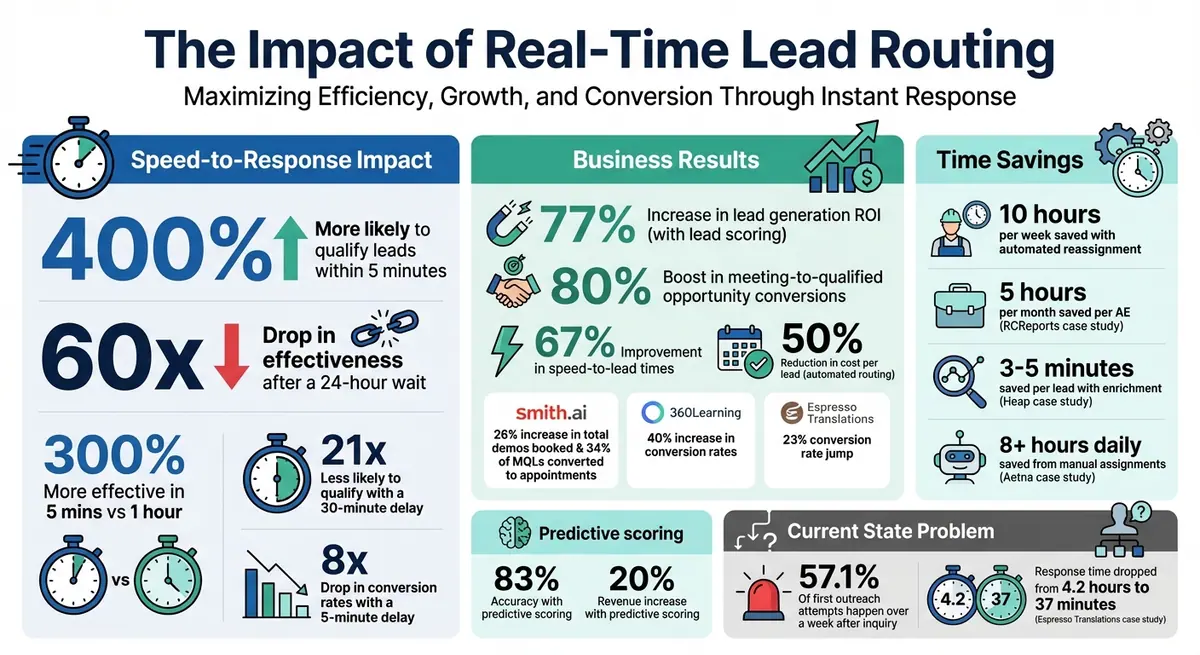
Real-Time Lead Response Statistics and ROI Impact
A Minute on API Factory: Performing Real-Time Lead Routing with a Salesforce Trigger
sbb-itb-5f36581
1. Set Up Geographic Routing for Email Leads
Geographic routing ensures that email leads are assigned based on location - like zip code, state, or country - right at the moment they submit a form. This process happens in milliseconds, directing leads to the right territory owner. The benefit? Prospects are connected with reps who understand the local market, speak the right language, and are familiar with regulations like GDPR for European leads. By integrating with your CRM, this data can also fine-tune your email campaign targeting.
Tealium offers a great example of this in action. They use reverse IP lookup combined with Salesforce to automate geographic routing. When a visitor from a specific area lands on their site, the system pinpoints their headquarters' location and sends an immediate Slack alert to the appropriate regional sales rep. This allows the rep to reach out while the prospect’s purchase intent is still high. The added bonus? Shorter forms and higher conversion rates.
Integration with Email Campaigns and CRM Tools
To ensure no leads are lost, centralize your territory definitions within your CRM. This avoids the problem of leads disappearing into "black holes" when fields are renamed or systems are updated.
Standardizing geographic fields, like Country and State, using ISO codes is another key step. It ensures your data is processed correctly. You can also use tools like Reform's no-code form builder to auto-fill missing fields, which helps you create shorter forms that are more likely to convert.
Lead Prioritization and Routing Logic
Time-zone-based routing is another smart strategy - it assigns leads to reps during their working hours. Alex, a RevOps Architect at Candybox, highlights the impact of this approach:
"Imagine that you have reps all over the world. Chili Piper can route immediately based on who was actually awake and online. That makes a huge difference."
Fallback rules are essential too. They ensure leads don’t get stuck if a rep is unavailable or overwhelmed with other tasks. This keeps the pipeline moving and prevents leads from sitting idle overnight.
Scalability for Different Team Sizes
As your team grows, maintaining geographic routing logic becomes even more important. A practical solution is to create territory-based round-robin groups within your CRM. When you hire a new rep, simply add their ID to the existing group. This setup makes it easy to scale as your team expands into new markets.
2. Use Score-Based Assignment Rules
Score-based routing helps rank leads based on factors like company size, industry, job title, and online behavior. By using real-time scoring, high-priority prospects can be routed to top-performing representatives without delay.
In 2023, Smith.ai combined score-based routing with Calendly and Salesforce, which led to impressive results: 34% of marketing-qualified leads converted into appointments, and total demo bookings increased by 26%. This approach builds on geographic routing by refining prioritization further, dynamically adjusting based on a lead's behavior and profile.
Lead Prioritization and Routing Logic
Not all leads are created equal, and their scores should dictate how they're handled. High-scoring leads - like those repeatedly visiting your pricing page or representing large enterprises - should go straight to senior Account Executives. Meanwhile, lower-scoring leads are better suited for nurturing workflows. Assigning low-intent leads to enterprise reps can slow down the process and reduce overall efficiency.
To ensure quality, assign negative scores to signals that indicate lower intent or relevance, such as personal email addresses, job applicant behaviors, or competitor associations. This helps weed out leads that aren't worth your sales team's time.
Integration with Email Campaigns and CRM Tools
Integrating score-based systems with your CRM and marketing tools is crucial for efficiency. Platforms like Salesforce and HubSpot can work alongside marketing tools such as Marketo or Pardot. Enrichment tools like Clearbit and ZoomInfo can fill in missing data - like company revenue or employee count - so you can score leads accurately, even with shorter forms optimized for conversion.
For example, RCReports integrated Calendly Routing with Salesforce in 2023, automating lead-to-account matching. Before this, Account Executives spent around five hours a month manually reassigning leads that were booked on the wrong calendars. Thanks to automation, this time-consuming task was eliminated entirely.
Scalability for Different Team Sizes
As your lead volume grows, having scalable scoring methods ensures consistent qualification. If you're just starting out - say, with fewer than 100 closed deals or less than six months of CRM history - rules-based scoring is a good place to begin. If you need help setting up these systems, you can optimize lead generation with expert form strategies. Assign points for key actions that reflect both engagement and how well a lead fits your ideal customer profile.
Once your data volume and quality improve, you can transition to predictive scoring powered by AI. These models analyze thousands of past leads to identify patterns linked to revenue. Predictive scoring has shown 83% accuracy and is tied to a 20% revenue increase. However, you'll need at least six months of solid CRM data to train the model effectively.
3. Enable Round-Robin Distribution
Round-robin distribution ensures leads are evenly rotated among team members, giving everyone a fair chance at new opportunities. This method eliminates the delays caused by managers manually reviewing and assigning leads - a process that can slow response times significantly [7,10].
Here's why speed matters: contacting a lead within 5 minutes is 300% more effective than waiting an hour, and a delay of 30 minutes can make qualification 21 times less likely. Automated round-robin routing kicks in immediately after a form submission, assigning the lead on the spot and notifying the representative without delay [10,19]. This system works seamlessly with geographic and score-based routing, ensuring both quick responses and balanced workloads.
Real-Time Automation Capabilities
Modern tools take automation a step further by updating the "Contact Owner" field in your CRM instantly and avoiding duplicate outreach [12,3]. Once a lead is assigned, it can automatically be added to email sequences, keeping the momentum going. To ensure reps are immediately aware of new assignments, integrate routing with tools like Slack, SMS, or mobile push notifications. Advanced systems even allow reps to set working hours or mark themselves as unavailable, so leads aren't assigned to someone who can't respond.
For added flexibility, you can use weighted round-robin to reward top performers by giving them a larger share of leads. For example, if Agent A has a weight of 2 and Agent B has a weight of 1, Agent A will receive twice as many leads [18,19]. Alternatively, capped round-robin sets a maximum number of leads per rep, preventing burnout and ensuring no one gets overloaded [10,19]. These features, combined with CRM integrations, make the process smooth and efficient.
Integration with Email Campaigns and CRM Tools
Round-robin distribution complements dynamic scoring and geographic assignment to ensure fair lead distribution. For instance, in 2023, Smith.ai used Calendly forms to qualify and route leads instantly through round-robin. Bryce Kropf, their Sales Enablement Manager, shared that 34% of marketing-qualified leads converted into scheduled appointments directly from their website, leading to a 26% increase in total demos booked.
"Our lead qualification processes are critical for getting the right customers in front of sales quickly."
– Sarah Jackson, Head of Revenue Operations, Calendly
A strong tech stack can make all the difference. Tools like HubSpot or Marketo can capture intent, Salesforce can serve as the system of record, and an orchestration layer can handle round-robin assignment and scheduling. To build trust in the system, enable Field History Tracking in your CRM so reps can see why a lead was assigned to them. And don’t forget to set up fallback rules, like a backup owner or catch-all queue, for leads that don’t meet specific criteria or in case routing logic fails [8,10].
Scalability for Different Team Sizes
Round-robin works well for teams of any size because it’s efficient, fair, and easy to manage. Even if you currently have only one rep for a specific segment, it’s a good idea to set up a round-robin group in your CRM. Adding a second rep later is as simple as including their user ID - no need to rebuild the entire workflow.
"In a previous role, even when we had just one rep for enterprise, I still created an enterprise round robin group in Salesforce. When we hired a second one, all I had to do was add their user ID instead of rebuilding the router."
– Alex, RevOps Architect, Candybox
As your team grows, you can transition from basic sequential rotation to a hybrid model that incorporates filters like territory or skills [8,10]. Use your CRM to segment leads by geography, industry, or company size, and let the routing system assign leads to the appropriate round-robin queue [8,3]. To maintain fast response times as lead volume increases, consider capacity-aware routing, which checks a rep’s current workload or availability before assigning new leads [10,3].
4. Use Trigger-Based Routing on Email Behaviors
Building on automated geographic and score-based routing, trigger-based routing takes things a step further by using email behaviors to speed up lead engagement.
This approach automatically assigns leads when they perform specific actions like clicking links, downloading content, or requesting demos. By cutting out manual processes, it connects high-intent prospects instantly. And speed matters - a lot. Studies show conversion rates drop 8× just five minutes after a lead makes an inquiry, and most first outreach attempts (57.1%) happen more than a week later. Automated routing can slash response times by up to 90% and boost lead conversion rates by as much as 100×.
Real-Time Automation Capabilities
Modern routing systems are designed to react immediately. For example, when a prospect clicks "Book a Demo", the system assigns the lead to an Account Executive right away, adds it to an outbound sequence, and sends an instant alert (like a Slack notification). These systems also prevent duplicate outreach by checking if the lead is tied to an existing account. If the assigned rep misses their response window, failover logic kicks in to ensure no lead falls through the cracks.
Lead Prioritization and Routing Logic
Not all email behaviors carry the same weight. Some, like demo requests or meeting bookings, should trigger immediate assignment to an Account Executive. Others, like downloading a whitepaper or signing up for a webinar, might simply add points to a lead score.
Here’s how it works:
- Assign numerical values (e.g., 100 points for a demo request).
- Automatically route leads that hit a certain score threshold.
- For stalled deals showing renewed interest - like a prospect revisiting your website - notify the account owner to re-engage.
"Use the right channel based on the lead temperature. Cold leads? Let marketing warm them up. Warm leads? Let an SDR pull them into a meeting. Hot leads? Get them in the hands of an AE now."
– Armand Farrokh, Founder, 30 Minutes to President's Club
A great example of this in action is Nicola Leiper, Director at Espresso Translations, who implemented automated lead routing based on email behaviors in October 2025. The result? Response times dropped from 4.2 hours to just 37 minutes, and conversion rates jumped by 23% in a single quarter. You can achieve similar results by using multi-step forms and using tools like Clearbit to enrich data in real time - this way, you can identify company size and industry without sacrificing speed.
Integration with Email Campaigns and CRM Tools
To make this strategy work seamlessly, integrate your marketing automation platform with your CRM. This ensures that a high-value action, like clicking a specific link, triggers the next step - such as offering a booking page. Use AI-driven BANT scoring to categorize leads:
- Route "hot" leads (score 75+) to senior reps.
- Send "warm" leads to mid-level team members.
- Assign "cold" leads to SDRs.
For leads that don’t meet any criteria, set up a catch-all queue. And for global teams, factor in time zones and online statuses to optimize assignments.
Platforms like Reform make these integrations simple, helping you implement trigger-based routing strategies with ease.
5. Set Up Real-Time Notifications and Alerts
Once you've implemented trigger-based routing, the next step is making sure your team gets notified about new leads instantly. Real-time notifications ensure there’s no lag between capturing a lead and taking action. This quick visibility translates into faster follow-ups, which can significantly boost conversion rates. The best real-time systems send alerts in under 30 seconds - sometimes even in under 10 - while older polling systems might take 15 minutes or more to detect new leads.
Real-Time Automation Capabilities
Webhooks are the backbone of real-time alerts, delivering notifications in milliseconds compared to batch systems that process updates intermittently. Speed is critical when dealing with leads. For instance, Porch developed a tool called "Pro Dial" using Twilio APIs. This system connects homeowners with contractors in under 60 seconds, leveraging a network of 3.8 million professionals.
Integration with Email Campaigns and CRM Tools
To maximize efficiency, your real-time notifications should integrate seamlessly with your CRM. This ensures lead records are updated instantly, and sales reps' actions are logged automatically. A great example comes from RCReports, which in 2023 used Calendly’s routing feature integrated with Salesforce. The project, led by Marketing Director Abbie Deaver, saved account executives five hours per month by automating the reassignment of misrouted leads.
"Qualified... alerts our sales executives when those accounts are on our website. Qualified tells them who they are and what they should be talking about based on the rich history we have in Salesforce." – Scott Holden, CMO, Qualified
Lead Prioritization and Routing Logic
Not every lead requires the same level of urgency. Create tiered notification systems based on lead priority. For example, send SMS alerts for high-priority leads, such as demo requests from enterprise clients, while using Slack or email for lower-priority inquiries. This prevents notification fatigue. Define service-level agreements (SLAs) to ensure timely responses: high-priority leads should be contacted within 10–15 minutes, with escalation protocols if no action is taken within 5 minutes. Additionally, if the primary rep doesn’t respond, the system should automatically reassign the lead to another team member or a manager.
Scalability for Different Team Sizes
Whether you're a small team or a large one, your notification strategy should adapt to your needs. Enrich notifications with relevant details like job title or company size, so smaller teams can handle leads as effectively as larger ones. Align your notification methods with your team’s workflows - for example, use Slack or Microsoft Teams for office-based teams, and SMS or mobile push notifications for field reps. Tools like Reform make it easy to integrate real-time notifications directly into your CRM and communication platforms, streamlining the entire process.
6. Define SLAs with Automated Escalation
To complement instant notifications, it's important to establish clear SLAs (Service Level Agreements) and automated escalation processes. These steps help ensure quick and consistent lead engagement.
SLAs set expectations for your team, holding them accountable for engaging leads promptly. Top-performing teams often set their time-to-first-response goal at under 1 hour during business hours. Be sure to define your coverage hours - like Monday through Friday, 9 a.m. to 5 p.m. EST - so it's clear when real-time routing is active.
Automated escalation workflows are your safety net when SLAs aren't met. For instance, if a sales rep doesn’t respond within the set timeframe, the system should automatically reassign the lead to another team member or manager. You can also use branching logic to handle scenarios like unassigned leads or those not yet ready for sales, avoiding unnecessary delays. This is particularly important since data shows that 57.1% of initial outreach happens over a week after an inquiry - a timeline that risks losing potential conversions.
To monitor SLA performance, rely on your CRM's built-in metrics. A solid benchmark is achieving an 85% or higher contact rate for leads addressed within your SLA window. By integrating your CRM, you can automatically log routing actions, making it easier to track performance without juggling external spreadsheets.
Here’s a summary of the key SLA components:
| SLA Component | Target Standard | Purpose |
|---|---|---|
| Time-to-First-Response | < 1 Hour | Ensures quick engagement with new leads |
| Contact Rate | 85%+ | Evaluates follow-up efficiency |
| Coverage Hours | Mon–Fri, 9 a.m.–5 p.m. EST | Defines active routing and accountability periods |
| Response Guarantee | Same Business Day | Prevents leads from cooling off overnight |
These SLA guidelines, combined with real-time routing systems, can significantly boost lead engagement. For example, Smith.ai reported that 34% of marketing-qualified leads turned into appointments after they implemented automated routing and instant escalation protocols in 2023.
7. Check Availability and Capacity Before Routing
Routing leads effectively isn't just about geography or scoring - it also requires ensuring reps are available and ready to take on new leads. Even the most well-thought-out routing rules can fail if they send leads to reps who are unavailable, busy with meetings, or overloaded with tasks. By incorporating real-time availability and capacity checks, you can ensure that leads are directed to reps who can respond promptly.
Real-Time Automation Capabilities
Modern systems are equipped to process live signals as leads come in. These systems check factors like online or offline status, synced PTO (paid time off) calendars, working hours, and shift schedules to ensure leads are routed only to reps who are active and available. If the primary rep is unavailable due to time zones, vacations, or response delays, automated failover rules redirect the lead to a backup pool.
Additionally, automation tools monitor workloads in real time. By tracking metrics such as active pipelines, scheduled meetings, and daily lead counts, these systems prevent top-performing reps from being overburdened while ensuring others remain productive. This approach not only balances workloads but also integrates seamlessly with CRMs, creating a practical link between automation and scheduling. For example, 360Learning reduced response times to under 10 minutes and increased conversion rates by 40% after automating their routing system to distribute leads more evenly. Before adopting automation, Aetna managers were spending over eight hours daily on manual assignments - time that could have been better spent on coaching or closing deals.
Integration with Email Campaigns and CRM Tools
To function efficiently, your routing system must bridge the gap between forms, CRM data, and rep calendars. Integrations with tools like Google or Outlook calendars allow the system to skip reps who are in meetings or on leave automatically. This ensures leads are assigned to reps who are available at that moment. Platforms like Reform make it simple to connect forms with CRM and calendar systems, maintaining real-time capacity checks effortlessly.
CRM integrations also allow for setting capacity limits, ensuring that reps aren’t overwhelmed with too many active leads. Features like "booking limits" help manage schedules and prevent chaos, ensuring a balanced workload for the team. Caspar Matthews, Director at Electcomm Group Electrical & Data, highlights the importance of structured allocation:
"A lead that comes in at midnight gets the same structured allocation as a lead that comes in midday."
Lead Prioritization and Routing Logic
Availability is just one piece of the puzzle. Smart routing systems also factor in rep expertise. Weighted distribution ensures leads are assigned based on criteria like seniority, quota, or ramp stage, creating a fair and effective system. High-value leads can be directed to top-performing reps who are ready to act, while newer reps receive a manageable workload.
Automation also ensures no lead is left unattended. If a lead isn’t worked within 15 minutes, the system can escalate the assignment to a fallback pool. This is particularly important when you consider that leads responded to within five minutes are eight times more likely to convert, and those addressed within the first hour are 60 times more likely to result in a conversion.
Scalability for Different Team Sizes
Whether you're managing a small team or a large sales force, availability and capacity checks can scale to fit your needs. Smaller teams benefit from simple calendar integrations and basic capacity limits to avoid overload. Larger teams can implement weighted round-robin systems, assigning more leads to senior reps while keeping workloads manageable for junior reps.
To further optimize routing, use CRM properties like HubSpot's "Contact unworked?" to trigger reminders or reassign leads if they aren’t addressed within your SLA. Standardizing geographic fields (e.g., using consistent state codes) ensures that territory-based routing rules operate without errors. These small but effective adjustments keep your routing system running smoothly, no matter your team size.
8. Enrich Leads Before Routing
Routing leads effectively is only part of the equation; giving sales reps all the context they need is just as important. Lead enrichment tools can automatically fill in key details - like company size, industry, and job title - before the data even enters your CRM. This reduces the need for manual research and frees up your sales team to focus on engaging leads. Often, this process happens instantly, sometimes even before a lead finishes completing a form.
Real-Time Automation Capabilities
Modern enrichment tools can instantly add more than 100 key attributes to lead profiles using providers such as Clearbit and ZoomInfo. Some tools use advanced "waterfall" enrichment, which queries multiple data sources in sequence. If one source doesn’t have the needed information, the system automatically checks another - like switching from Clearbit to Apollo.io - to ensure thorough coverage. These tools also support lead-to-account matching by cross-referencing incoming leads with existing CRM records. This makes sure leads are routed to the correct account owner, minimizing duplicate outreach efforts.
For example, in 2022, Heap used Clearbit to enrich leads with industry and company size data during the signup process. This allowed them to keep forms short while automatically categorizing leads into "startup", "mid-market", and "enterprise" groups. This automation saved each business development rep 3–5 minutes of research per lead - adding up to almost an hour a day for reps handling 10–12 leads. Similarly, Tealium used Clearbit Reveal to perform reverse IP lookups on anonymous visitors. This enabled them to route leads to the right geographic rep and trigger instant Slack notifications.
These capabilities integrate seamlessly with CRMs, ensuring smooth data flow and efficient lead handling.
Integration with Email Campaigns and CRM Tools
Lead enrichment works best when your form builder, CRM, and marketing automation tools are seamlessly connected. For instance, platforms like Reform come with built-in enrichment features that populate hidden fields automatically. This means you can keep forms short - skipping fields like "Company Size" or "Industry" - while still gathering the data needed for precise routing. Using webhooks to verify lead data against CRM records before assigning leads can also help avoid routing mistakes.
A clear division of roles further streamlines the process: marketing captures intent, the CRM enriches and scores the data, and an orchestration layer handles routing. For example, Smith.ai implemented automated lead routing with instant qualification, which resulted in a 26% increase in booked demos and a 34% conversion rate for marketing-qualified leads into appointments.
This integration also supports more accurate segmentation of leads based on their attributes.
Lead Prioritization and Routing Logic
Enriched data allows you to segment leads into different tiers based on your ideal customer profile (ICP). This means you can route "Startup", "Mid-Market", and "Enterprise" leads to sales reps with the right expertise. High-value leads can go to senior reps, while newer reps handle smaller accounts. Automated systems can improve speed-to-lead times by as much as 67% and double the number of qualified inbound demos.
Trigger-based workflows add even more efficiency. For example, when a lead visits your site or replies to an email, the system can automatically tag and route them to the next appropriate campaign. This eliminates delays in outreach - especially important when 57.1% of first call attempts made manually happen more than a week after the initial inquiry.
As Dan Ahmadi, former Director of Demand Generation at Outreach, explained:
"Automated lead routing and alerts help our sales development team understand where they may find low-hanging fruit."
9. Track and Measure Routing Performance
To make real-time email lead routing work effectively, you need to measure its performance. Why? Because without proper tracking, there’s no way to spot issues or improve. For instance, companies that respond to leads within five minutes are 400% more likely to qualify those leads compared to those that take longer. By monitoring the time between when a lead is submitted and when the first contact is made, you can pinpoint delays and fix bottlenecks in your process.
Real-Time Automation Capabilities
Modern routing systems take the guesswork out of tracking. They automatically log activities - emails, calls, meetings - into your CRM, giving you a detailed audit trail. This makes it easier to measure how quickly leads are contacted. Plus, automated dashboards let you monitor unworked leads in real time. If a lead sits idle beyond your set response time, the system can trigger an escalation or reassign the lead. For example, if your SLA (service-level agreement) requires a 15-minute response, the system ensures no lead slips through the cracks.
Integration with Email Campaigns and CRM Tools
Linking your email platform to your CRM gives you a clear view of the entire lead journey - from the first campaign click to the sales pipeline. Tools like Reform simplify this process by offering real-time analytics and seamless integrations. With Reform, every interaction is logged automatically, cutting down on manual work and keeping your routing data accurate and up to date.
You can also track conversion rates by routing rule to see which strategies result in the most lead-to-opportunity conversions. Measure SLA compliance by calculating the percentage of leads contacted within your defined timeframe. Keep an eye on routing accuracy by checking for issues like misrouted leads, duplicate entries, or unassigned leads. Additionally, tracking rep workloads ensures leads are distributed fairly, helping to avoid burnout.
Lead Prioritization and Routing Logic
Not all leads are created equal, so it’s important to analyze performance by lead type. For example, track how well your team closes high-value leads compared to general leads. This ensures your scoring models are sending the most important leads to the right reps. SLA compliance metrics can also highlight which team members might need extra training or support. As Mike from Resonate put it:
"If you can't measure routing performance, you can't improve it".
10. Automate Reassignment for Uncontacted Leads
Even with the most efficient routing systems, some leads inevitably slip through the cracks. A rep might be out sick, on vacation, or simply overwhelmed with their workload. When leads go uncontacted, the impact can be severe - conversion rates plummet by up to 8x just five minutes after a lead’s initial inquiry. The answer? Automate the reassignment process to ensure no lead is left waiting. This approach works alongside initial routing systems, targeting leads that haven’t been engaged yet and ensuring they’re promptly followed up on.
Real-Time Automation Capabilities
Implement fallback rules that automatically reassign leads when the original rep doesn’t act within the service-level agreement (SLA). For example, if a rep doesn’t engage with a lead within one hour, the system can reassign it to the next available team member.
Behavior-based triggers can also be incredibly effective. For instance, if a lead revisits your pricing page, the system can rescore the lead and prioritize it for an active rep. Dan Ahmadi, former Director of Demand Gen at Outreach, highlighted the importance of this approach:
"Reps hate when deals go silent, and having an instant alert that their prospect may be thinking about our platform again gives them an indication of the perfect time to follow up".
This real-time reassignment process integrates seamlessly with your CRM, ensuring every lead is accounted for and acted upon.
Integration with Email Campaigns and CRM Tools
For a smooth reassignment process, it’s essential to integrate your CRM with email sequencing tools. When a lead is reassigned, they should automatically be enrolled in the new rep’s email sequence.
A great example of this in action comes from RCReports. In 2023, they connected their lead routing system with Salesforce, enabling real-time reassignment. According to Abbie Deaver, Director of Marketing at RCReports, this automation saved each Account Executive five hours of manual lead reassignment work every month. Similarly, Smith.ai saw a 34% conversion rate for marketing-qualified leads to appointments and a 26% boost in demo bookings after automating their lead handoff process.
When these workflows are scaled across larger teams, the benefits become even more pronounced.
Scalability for Different Team Sizes
As your team grows, automating lead reassignment can save an average of 10 hours per week while improving speed-to-lead by 67%.
The key is setting up clear fallback routes for every scenario. For leads that don’t meet standard assignment criteria, route them into a general nurture sequence instead of leaving them unassigned. Additionally, use webhooks to notify sales teams in Slack or Microsoft Teams whenever an uncontacted lead shows renewed interest. Regularly update and monitor CRM data to ensure assignments align with territory and ownership rules.
Round-Robin vs. Score-Based Routing Comparison
Deciding between round-robin and score-based routing comes down to factors like your team's structure, the volume of leads you handle, and the complexity of your sales process. Each method has its own advantages, and the right choice will align with your specific goals.
Round-robin routing assigns leads in a sequential manner, ensuring an even distribution across your team. It’s straightforward to implement and prevents cherry-picking. However, it doesn’t account for lead quality. For instance, a high-intent prospect could end up with a junior rep who’s already overwhelmed. On the other hand, score-based routing uses numerical rankings based on factors like product fit, intent, and readiness to buy. This system ensures that your top-performing reps handle the most promising leads immediately, but it does require careful scoring and setup to work effectively.
This comparison highlights the importance of balancing speed with strategic lead assignment. As MarketBetter points out, "Round-robin serves as an initial approach, not a complete strategy". For teams managing a high volume of inbound leads with similar value, round-robin works well by emphasizing fairness and speed. However, for account-based marketing (ABM) campaigns or more intricate sales cycles, score-based routing ensures that your best prospects are matched with your most skilled reps.
Reform supports both approaches through its conditional routing and lead enrichment capabilities. With features like waterfall enrichment - where data is validated sequentially using providers like Clearbit or Apollo.io - you can calculate MQL scores before assigning leads. High-scoring leads can then be routed to senior reps, while general inquiries are distributed via round-robin. Reform’s no-code platform makes it easy to implement these strategies, combining speed with precision in lead management.
Many teams begin with round-robin for simplicity and speed, then introduce score-based rules as their lead volume and sales complexity increase. Companies that adopt automated routing have reported a 50% drop in cost per lead and an 80% boost in meeting-to-qualified opportunity conversions. By tailoring your routing strategy to the characteristics of your leads and the capabilities of your team, you can optimize lead management. Reform’s automation tools make it possible to integrate both methods seamlessly, ensuring efficient and effective routing.
Conclusion
Real-time email lead routing can completely change how your team handles inbound leads. Studies show that responding to leads within five minutes can increase lead qualification rates by 400%, while waiting just five extra minutes could reduce conversion rates by as much as eightfold.
The strategies outlined here work together as part of a unified system. Geographic routing ensures that prospects are matched with local representatives, score-based assignment prioritizes high-value leads for top-performing team members, and trigger-based routing uses behavioral signals of intent to act when interest is at its highest. Add in automated notifications, clear service level agreements, and lead enrichment, and you’ve got a streamlined process that combines data assignment and enrichment in one go.
"The BDR team already has to do enough research as is, so Clearbit cuts down their time if they don't have to think about whose lead it is. Multiply the 3-5 minutes it takes to research an open opportunity by the 10-12 leads they each get a day, and it adds up to a lot." - Charlie Liang, former Head of Demand Gen, Heap
Using Reform's no-code platform, you can tap into built-in lead enrichment, conditional routing, and seamless CRM integrations to build workflows that adapt to your team’s needs. Whether you’re starting simple with round-robin distribution or diving into complex score-based rules, Reform’s forms are optimized to capture high-quality leads from the beginning.
Begin with one or two strategies, evaluate the results, and expand from there. Companies that prioritize and route leads using lead scoring report a 77% increase in lead generation ROI. With these tools and techniques, your team can respond faster, work smarter, and significantly improve conversions.
FAQs
What routing rule should I set up first?
To get started, the first routing rule you should focus on is ensuring your CRM is fully integrated with real-time data synchronization. This step is crucial because it eliminates delays and avoids misrouting that can happen with manual processes or outdated information. Once your CRM integration is running smoothly, you can move on to setting up conditional routing. This allows you to assign leads based on specific criteria. However, remember that everything hinges on a solid CRM integration - make this your top priority.
How do I prevent misrouted or duplicate leads?
To prevent misrouted or duplicate leads, it's important to prioritize better data quality and a simplified routing process. Leverage tools that offer features like data validation, lead enrichment, and deduplication to maintain accurate and reliable information. Streamlining workflows with clearly defined decision points and conditional routing ensures leads are directed to the right place quickly and efficiently. Additionally, integrating your CRM in real time with proper field mapping reduces errors and delays, helping you route leads accurately every time.
What metrics prove my routing is working?
To gauge how well your routing process is working, focus on these key metrics:
- Response Times: How quickly your team responds to leads after they’re routed.
- Lead Assignment Accuracy: The percentage of leads correctly matched to the appropriate team members.
- Conversion Rates: The rate at which routed leads turn into paying customers or desired outcomes.
Tracking these metrics in real time gives you a clear picture of both the efficiency and effectiveness of your lead routing system. This ensures everything is running as it should.
Related Blog Posts
Get new content delivered straight to your inbox

The Response
Updates on the Reform platform, insights on optimizing conversion rates, and tips to craft forms that convert.



Drive real results with form optimizations
Tested across hundreds of experiments, our strategies deliver a 215% lift in qualified leads for B2B and SaaS companies.
