

SaaS Vendor Risk Review For Lead Forms



I wouldn’t launch a lead form until I know where its data goes - and can explain every transfer. That includes scripts that send text before submission, email checks, spam tools, enrichment services, and CRM connections.
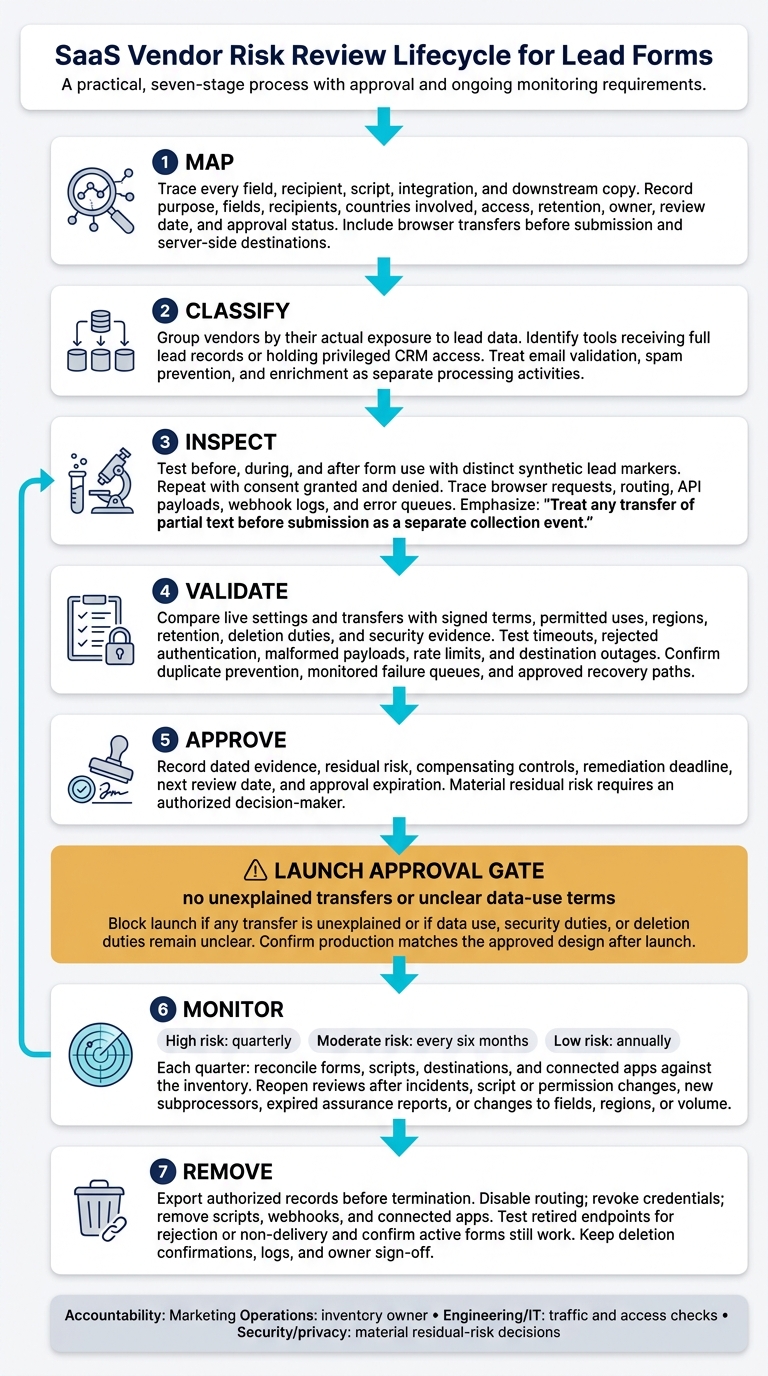
I use 7 steps to review the full path: map, classify, inspect, validate, approve, monitor, and remove. Here’s what I check:
- Data and access: Who receives each field, why they need it, and what they can change.
- Terms and security: Permitted uses, storage regions, retention, deletion, and security reports.
- Failure handling: Whether outages and retries cause lost leads, duplicates, or extra stored copies.
- Accountability: Who approves risks, checks changes, and confirms deletion when a vendor is removed.
My launch rule is simple: <u>no unexplained transfers or unclear data-use terms</u>. I check the live setup - including Reform settings - against contracts and test results, not just vendor promises.
Lead-Form Vendor Risk Review: 7 Steps
7 Step Vendor Risk Assessment Checklist
sbb-itb-5f36581
Inspect Scripts and Lead-Processing Tools
Use the vendor inventory to check what each browser script and processing tool sends, receives, or stores.
Check Browser Scripts for Hidden Transfers
On a production-like test page, inventory tags, pixels, SDKs, iframes, widgets, cookies, local storage, and network requests before, during, and after form use. Test with synthetic leads that contain a distinct marker. Watch browser network requests as you type, erase text, change fields, abandon steps, and submit the form. Repeat with consent granted and denied.
Search URLs, payloads, analytics events, and session recordings for the marker. Check cookies and device IDs separately. Treat any transfer of partial text before submission as a separate collection event. Either disable it or clearly disclose and justify it under data-minimization principles.
Trace each network destination to the script responsible. Require approved HTTPS endpoints, payload filtering, appropriate region settings, and disclosed subprocessors. Confirm that scripts not needed for submission can be disabled without breaking the form.
Before sharing network captures, remove tokens, cookies, and credentials. A Content Security Policy can restrict destinations. Subresource Integrity can help ensure that only an approved script version runs.
Once you understand the client-side transfers, review each downstream tool separately.
Assess Email Validation, Spam Prevention, and Enrichment
Treat each tool as a separate processing activity. For every vendor, document its processing role, applicable agreement, security evidence, subprocessors, and any required international-transfer safeguards.
Ask whether request data feeds model training or shared spam or reputation databases. A security report alone does not establish permitted use.
| Tool | Data received | Primary risks | Required evidence | Approval conditions | Exit requirements |
|---|---|---|---|---|---|
| Email validation | Full email address, domain, syntax, deliverability result, and possibly mailbox or reputation signals | Retention of identifiable addresses, secondary use, international transfers, and inaccurate or unexplained scoring | Data-flow diagram, privacy terms, retention/deletion policy, security documentation, subprocessors, processing-role description, and transfer safeguards | Send only the email field when needed; prohibit marketing use or resale; define retention and deletion; document permitted use | Disable the API, revoke credentials, delete lookup history and cached results, and confirm deletion in writing |
| Spam prevention | IP address, device/browser signals, cookies, interaction timing, challenge results, and risk scores | Fingerprinting, profiling, opaque decisions, excessive collection, and collection before consent | Signal inventory, decision logic or score explanation, cookie behavior, security evidence, regional controls, and false-positive handling | Use only the signals needed; avoid collecting form content before submission; provide an accessible fallback; limit retention and downstream use | Remove tags and SDKs, revoke keys, delete retained signals and scores, and verify that blocking rules no longer call the vendor |
| Enrichment | Name, email, company, domain, IP-derived location, firmographic data, inferred role, or linked public and brokered records | Incorrect or sensitive inferences, undisclosed data sources, profiling, prohibited use, and uncontrolled downstream sharing | Source provenance, accuracy methodology, permitted-use terms, correction process, opt-out mechanism, subprocessor list, security evidence, and retention/deletion commitments | Limit fields and attributes; record provenance and lawful purpose; block sensitive or unnecessary enrichment; label inferred data; restrict CRM visibility | Stop lookups, revoke credentials, delete returned attributes and cached matches, remove enrichment automations, and confirm downstream deletion or suppression |
Check Routing, API Access, and Stored Copies
Browser logs cannot show every server-side transfer. Inspect CRM field mappings, automation branches, spreadsheet appends, dashboards, notifications, API payloads, webhook logs, and error queues. Compare the actual payloads with approved fields.
Use separate credentials with narrowly scoped access, and keep secrets outside code. Verify HTTPS, webhook signatures, and replay protection where supported.
Treat returned scores and enrichment attributes as new data. Disable automatic field expansion. Check whether results trigger outreach, audience syncing, or other unapproved uses.
Test timeouts, rejected authentication, malformed payloads, rate limits, and destination outages using synthetic leads with distinct markers. Verify that stable event IDs or idempotency keys prevent duplicate processing - even when a CRM write succeeds but its response times out.
Confirm that failures reach a monitored queue. Record response codes, retry counts, and final stored record counts. Before approval, investigate every unexplained missing lead, duplicate, or unexpected stored copy.
Verify Contracts and Security Evidence
Use the live data-flow map to check that the contract covers what the high-converting lead forms actually send, stores, and routes.
Check Privacy Terms and Deletion Duties
Compare the signed agreement and DPA with the live setup, including fields, scripts, storage regions, and downstream copies. Get written terms for roles, permitted purposes, retention limits, deletion or return deadlines, incident notice, audit rights, subprocessor notices, and transfer safeguards.
Have privacy or legal counsel map applicable U.S. state notice, consent, opt-out, and consumer-request duties to each processing activity. Don’t assume a business lead is exempt from every obligation. Tracking identifiers, personal email addresses, precise location, recordings, or enrichment data may trigger separate privacy duties.
Ask vendors to explain their backup deletion schedules, legally required retention exceptions, and how they confirm deletion. A promise to close an account isn’t enough.
Test Security Controls and Form Reliability
Request the current SOC 2 Type II report or equivalent. Check the covered service, locations, reporting period, auditor opinion, exceptions, and customer-side controls. Not every SOC 2 report covers privacy, confidentiality, and processing integrity.
Review vendors more closely when they handle full lead records or have privileged CRM access. Request a penetration-test executive summary, remediation evidence, and proof of tenant separation, MFA, least privilege, encryption, audit logging, vulnerability management, incident response, and tested backup recovery.
Use the routing failure-test results to approve clear fallback rules. During a validation outage, the form might accept a submission with a review flag. A higher-risk automated action might need quarantine instead. Record timeout thresholds, alert ownership, manual-review steps, and queue-recovery procedures. Security evidence and uptime claims don’t prove that leads will survive a dependency outage.
Document Approval Conditions and Remaining Risks
Give each risk its own worksheet row, linked to dated evidence and the approved configuration. Record the accepted residual risk, compensating control, remediation deadline, next review date, and approval expiration. Conditional approval needs a named decision-maker, not just an unresolved ticket.
| Risk | Review focus | Evidence to record | Pass condition | Escalation trigger | Accountable owner | Reassessment date |
|---|---|---|---|---|---|---|
| Data use and deletion | Data use and deletion duties | Signed terms; retention schedule; deletion procedure | Approved uses and defined deadlines cover retained copies | Secondary use without permission or missing deletion commitment | Privacy/legal lead | Record date; reopen after terms change |
| Security assurance | Security evidence scope | Report period, scope, exceptions, and remediation status | Evidence supports relevant controls; material findings resolved or formally addressed | Excluded production service, excessive privileges, or material evidence gap | Security lead | Record date; reopen after material findings |
| Transfers and subprocessors | Approved recipients and regions | Subprocessor list; transfer terms; configuration record | Recipients and locations explained and approved | Unexplained transfer or undisclosed provider | Privacy/legal lead | Record date; reopen after provider or region changes |
| Availability | Fallback safety and recovery | Failure-test results; fallback procedure; alert record | Leads remain available or enter an approved recovery path | Silent loss, misrouting, or unrecoverable queue | Marketing Operations lead | Record date; reopen after dependency changes |
Use the approval record as the baseline for monitoring and removal checks.
Manage Vendor Risk From Setup To Removal
Follow seven stages: map, classify, inspect, validate, approve, monitor, remove. Marketing Operations owns the inventory. Engineering or IT checks traffic and access, while security or privacy teams decide whether material residual risks are acceptable.
Link every form and enabled integration to its fields, recipients, countries involved, retention, owner, review date, and approval status. An existing connection does not mean it’s approved.
Apply the Review Checklist to Reform
Use the inventory as your live checklist. Check each data path in Reform’s live configuration - not just the product name. Compare enabled features with contract terms and account settings, including:
- Partial-response storage for multi-step forms
- Destinations and fallbacks for conditional routing
- Provider details and lookup-record retention for email validation
For spam prevention, enrichment, analytics, and CRM syncing, check that enabled data sharing and deletion settings match the approval record.
For custom scripts and non-browser form flows, check consent timing where applicable, secrets exposure, endpoint authorization, replay protection, and server-side validation. A feature name alone doesn’t tell you where data goes.
Monitor Changes and Repeat Reviews
After approval, keep using the inventory as a live control list. Set a baseline review schedule: quarterly for high risk, every six months for moderate risk, and annually for low risk.
Reopen reviews after incidents, script or permission changes, new subprocessors, expired assurance reports, or changes to fields, regions, or volume. Each quarter, reconcile forms, scripts, destinations, and connected apps against the inventory. Track overdue reviews, unresolved high-risk findings, and unapproved destinations.
Remove Integrations and Confirm Deletion
When a vendor is no longer approved, move from monitoring to removal. Export authorized records before termination. Then disable routing, revoke credentials, and remove scripts, webhooks, and connected apps.
Test retired endpoints to confirm rejection or non-delivery. Check that remaining active forms still process without interruption. Keep deletion confirmations, logs, and owner sign-off as evidence of closure.
Conclusion: Set a Lead-Form Launch Gate
Before launch, document a go/no-go decision for live lead capture. Map every recipient, including hidden browser destinations. Group vendors by their actual exposure to lead data, and check that validation, spam prevention, and enrichment stay within contract limits.
For each transfer, record its purpose, fields, access controls, retention and deletion rules, owner, and monitoring plan. Check these commitments against test results, not just vendor assurances.
Block launch if any transfer is unexplained or if data use, security duties, or deletion duties remain unclear. Any remaining material risk needs formal acceptance from an authorized decision-maker, with a rationale, compensating controls, an owner, and an expiration date. Schedule a post-launch check to confirm that production matches the approved design.
FAQs
How do I prioritize lead-form vendors by risk?
List every tool that handles lead data, including form builders, spam filters, enrichment services, and CRM connectors. Assign each a High, Medium, or Low risk rating based on data sensitivity, downstream sharing, retention policies, and access controls.
As a general rule, treat vendors with full CRM write permissions - or those that enrich or redistribute data - as High risk. Put these vendors through more detailed legal and security reviews. For lower-risk tools, use shorter self-assessment questionnaires.
What if a vendor won’t disclose its data sources?
Refusal to disclose data sources or verify security controls is a serious red flag. Escalate immediately through your procurement or legal process, and document any compliance gaps. Avoiding these vendors is the safest way to limit liability.
Track each provider’s status in a vendor risk register. Never share sensitive data with unverified systems, and give priority to vendors that openly disclose their subprocessors and data processing practices.
How can I reduce spam without tracking visitors?
Use server-side checks that look at submission patterns, not visitor behavior. Honeypot fields catch bots, IP-based rate limiting curbs automated abuse, and completion-time checks flag suspicious submissions.
Keeping these controls in Reform lets you verify submissions without triggering third-party analytics scripts or session-recording tools that track or profile visitors.
Related Blog Posts
Get new content delivered straight to your inbox

The Response
Updates on the Reform platform, insights on optimizing conversion rates, and tips to craft forms that convert.



Drive real results with form optimizations
Tested across hundreds of experiments, our strategies deliver a 215% lift in qualified leads for B2B and SaaS companies.
