
.webp)
Third-Party Form Integrations: Privacy Risks and Fixes



Your form is not the main privacy problem. The data path after submission is. A secure form can still leak personal data through CRMs, webhooks, analytics tools, logs, and exports.
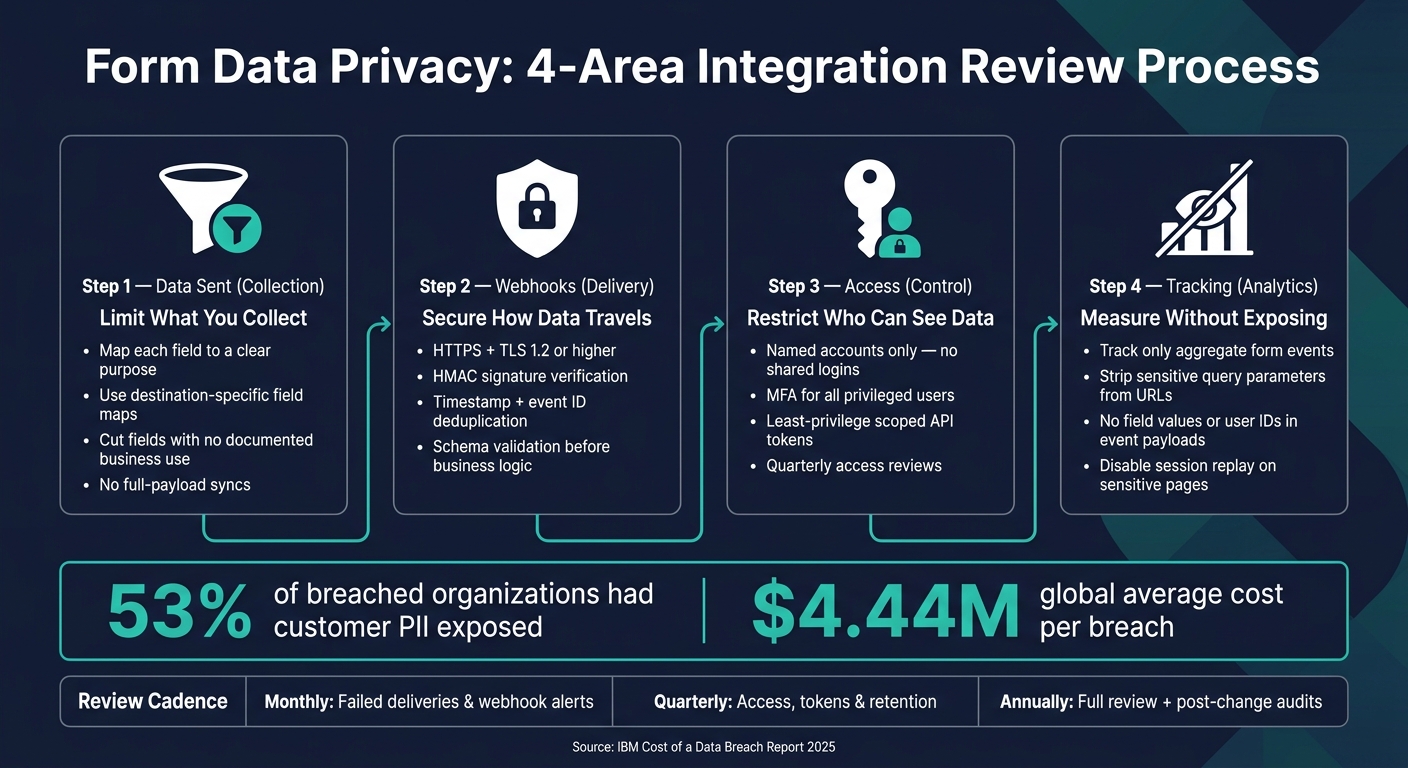
Here’s the short version: I’d review third-party form integrations in four areas:
- Data sent: only send the fields each tool needs
- Webhooks: use HTTPS, request checks, replay protection, and strict payload rules
- Access: limit who can view, export, or change form data
- Tracking: measure form performance without sending typed answers or IDs into analytics
That matters because the risk grows with every copy of the data. The article points to IBM’s 2025 breach report: 53% of breached groups said customer PII was exposed, and the global average breach cost was $4.44 million.
If I had to turn the whole article into one checklist, it would be this:
- Cut fields with no clear business use
- Stop full-payload syncs
- Lock down webhook endpoints
- Remove shared logins
- Use MFA and scoped tokens
- Keep URLs, referrers, and replay tools free of personal data
- Review retention, deletion, and access on a set schedule
A quick way to think about it: collection, delivery, access, and tracking. If any one of those is loose, form data can spread far beyond what you meant.
| Area | Main risk | What I’d do first |
|---|---|---|
| Data sharing | Too many fields sent to too many tools | Use field-level allowlists |
| Webhooks | Fake, replayed, or exposed requests | Require HTTPS, HMAC checks, and deduplication |
| Access | Too many people or tokens can view/export data | Use named accounts, MFA, and least-privilege scopes |
| Analytics | URLs, events, or replay tools expose personal data | Track only aggregate form events |
Below, I’d keep the focus on simple fixes you can check before launch and review over time.
Form Data Privacy: 4-Area Integration Review Process
Overcollection: Send Only the Data Each Integration Needs
Why Overcollection Creates Avoidable Exposure
Overcollection is about what gets sent, copied, and stored across every connected system. When you run a full-payload sync and push every field into your CRM, email platform, analytics tool, and Slack, you end up with copies everywhere. And each copy comes with its own logs, backups, exports, and access settings.
That’s where things get messy. Free-text fields, in particular, can pull in health details, financial information, or even credential data you never planned to collect. Then that data moves into tools that were never built to handle it.
IBM's 2025 Cost of a Data Breach report found that 53% of breached organizations reported compromised customer personally identifiable information, and the global average cost per breach was $4.44 million.
A bigger data footprint also makes retention and deletion much harder. It’s not just the main record you have to think about. It’s every copy sitting in connected systems too.
How to Reduce Data Collection
The fix is simple in theory: map each field to a clear purpose and a clear destination.
For each field, document:
| Column | What to Record |
|---|---|
| Field name | e.g., email address, phone number, free-text message |
| Purpose | The specific decision or workflow this field supports |
| Data type | Contact data, location, financial, health, or authentication |
| Destination | Which systems receive this field |
| Access role | Who can view, edit, export, or delete it |
| Retention period | How long each destination keeps it |
| Deletion path | How it gets removed from each system, including logs and backups |
If a field doesn’t have a documented purpose and a named recipient, cut it.
Instead of using default full-field mapping, switch to destination-specific mappings. Different systems need different things. Sending everything everywhere is like handing every employee the master key when most only need one door.
Your CRM may need a name, business email, and company. Your email platform may only need the email address and consent status. A sales alert may need just the name, company, and a qualification result - nothing more.
Pre-Publish Check: Audit the Data Flow
Before launch, check that the data flow lines up with your inventory:
- Every field has a documented business purpose and a named destination owner.
- No sensitive data appears in page URLs, query strings, email alerts, or Slack messages.
- Each integration uses an explicit field map, not a full-payload sync.
- Enrichment is off unless each added attribute has a defined purpose and retention rule.
- Retention and deletion rules cover submissions, drafts, exports, logs, and vendor copies.
If you use conditional routing - like Reform supports - you can send each submission type to a separate destination. A partnership inquiry can send business email and company details to your CRM, while a support request sends only issue category and contact info to your help desk.
The same rule applies to webhook payloads: send only what the receiving system needs.
sbb-itb-5f36581
Open Webhooks: Protect Submission Data in Transit and at the Endpoint
How Weak Webhook Setups Create Privacy and Integrity Risks
Once you've limited what each integration can receive, the next step is to lock down how that data gets delivered.
A webhook sends submission data the moment someone submits a form. That sounds simple enough. But the receiving endpoint has to verify every incoming request. If it doesn't, you're leaving the door open.
When an endpoint accepts incoming POST requests without checking who sent them, an attacker can forge submissions. That can fill your CRM with fake leads, scramble routing logic, and muddy your marketing data without touching the form at all. Replay attacks cause a different kind of mess. A valid request can be intercepted and sent again, which may create duplicate CRM records or fire the same automated step more than once.
And if the webhook uses HTTP instead of HTTPS, the risk gets worse fast. Every field in the payload - names, email addresses, phone numbers, lead notes, and more - moves in plaintext.
Logging can also create trouble in places teams don't expect. Many servers and monitoring tools log raw request bodies by default. That means form data may end up exposed far beyond the live system.
Fixes: HTTPS, Signatures, Schema Validation, and Smaller Payloads
HTTPS is the baseline, not the whole answer. It encrypts data in transit, but it doesn't prove the request came from a trusted sender.
To verify that, use an HMAC signature over the raw request body and include a timestamp so the receiver can check that the request is still fresh. Recalculate the HMAC from the raw body on your side, then reject mismatches with a constant-time comparison.
Use a signed timestamp plus event ID deduplication. Reject requests that fall outside a short window, often five minutes.
Schema validation should happen after authentication but before any business logic runs. Check the expected event type, Content-Type, required fields, field types, and maximum string lengths. Reject unknown fields when you can, and set a hard cap on request body size to cut down abuse. Just as important: send only the fields the receiver needs.
Secrets need the same level of care as passwords. OWASP recommends generating a random signing secret of at least 32 bytes per registered webhook. Store secrets in a secrets manager or a protected environment variable - never in source code, URLs, or logs. When rotating a secret, allow a short overlap so deliveries keep working, then revoke the old one after both sides have switched over.
Webhook Control Table and Checklist
Use the table below to spot common webhook failures fast.
| Risk | Weak Configuration | Recommended Control |
|---|---|---|
| Forged form submission | Endpoint accepts POST requests without authentication | HMAC signature over the raw body and timestamp; constant-time comparison |
| Replay attack | Valid request can be resent repeatedly | Signed timestamp with a short tolerance window, commonly about five minutes, plus event ID deduplication |
| Data exposure in transit | Webhook uses HTTP or outdated TLS | HTTPS only with TLS 1.2 or higher |
| Tampered payload | JSON is parsed and trusted before verification | Verify the raw body before parsing; validate schema and allowed values |
| Excessive data disclosure | Entire form submission is sent to every integration | Field-level allowlists and purpose-specific payloads |
| Duplicate CRM records | Retries trigger the workflow repeatedly | Store the event ID; make downstream actions idempotent |
| Secret compromise | Secret appears in source code, logs, or error messages | Use a secrets manager, redact logs, rotate secrets, and support overlapping keys during rotation |
Before you turn on any webhook integration, check these basics:
- Endpoint uses HTTPS with a valid certificate and modern TLS (1.2 or higher)
- Every request requires a valid HMAC signature verified against the raw body
- The signature covers a timestamp; requests outside the tolerance window are rejected
- Event or delivery IDs are stored and deduplicated
- Schema, event type, Content-Type, and body size are strictly validated
- Separate endpoints and secrets are used for materially different services or event types
- Secrets are stored outside source code and logs, with a documented rotation process
- Processing is idempotent - retries do not create duplicate records or repeated actions
- Logs exclude raw request bodies, secrets, authorization headers, and sensitive form fields
- Failed requests, signature failures, and unusual traffic patterns are actively monitored
Weak Access Rules: Limit Who Can Configure, View, and Export Form Data
Once delivery is locked down, the next problem is simple: who gets to see or export the data? After form data lands in a connected system, access rules control who can view it, export it, or change it.
Where Access Control Usually Breaks Down
Keep access separate across four areas: form editing, integration setup, raw submission access, and destination-system permissions. Giving one admin role full control over everything creates exposure you don't need.
The same three problems show up again and again. Shared admin logins make accountability almost impossible, and they turn into a mess when someone leaves. Over-scoped API tokens cause trouble too. A token meant only to push new contacts into a CRM can end up with read, update, and delete permissions, even when only create access was needed. Then there's stale access, which often sits in the background until something goes wrong. A December 2025 FTC complaint described credentials that stayed active long after an employee left, exposing 10.1 million student records.
API keys and webhook credentials can also leak in very ordinary ways: screenshots, shared docs, source code, and logs. If a secret is exposed, treat it as compromised and rotate it at once.
Once you've split roles, tighten control over accounts, tokens, and exports.
Fixes: Least Privilege, Role-Based Access, and Token Control
Use least privilege for both people and service accounts.
Require individual named accounts for every person. No shared logins. Add multifactor authentication (MFA) for anyone who can access integration settings or raw submission data. Then split roles clearly: form editors build landing page forms, integration managers set up connections, and reviewers only see the records they need.
For API tokens, create a separate credential for each integration and each environment. Production, staging, and development should never share keys. Give each token only the scopes it actually needs. For example, create contact is not the same as read all records, update any object, and delete data. Store API tokens outside source code and chat tools. Rotate credentials after any personnel change or suspected exposure. Revoke anything unused, duplicated, or unknown.
Use workspace roles to separate form building, response viewing, and integration management.
Run a Quarterly Access Review
Access drifts over time, so review it on a set schedule. Audit what each person or service can actually view, export, change, or delete across the full path from the form builder to the destination.
Use a structured table so ownership and decisions are easy to audit:
| Integration Name | Owner | Data Received | Permission Scope | Authorized Users | Authentication Method | Review Status | When People Leave |
|---|---|---|---|---|---|---|---|
| Website lead form → CRM | Marketing operations | Name, business email, company, consent status | Create and update leads; no delete or bulk export | Marketing ops and assigned sales users | SSO + MFA; scoped service token | Current quarter | Disable in identity provider; revoke token; confirm CRM access removal |
| Support request form → Help desk | Support operations | Contact details, issue description, attachments | Create tickets; no form configuration access | Support supervisors and agents | SSO + MFA | Current quarter | Remove from support group; revoke connected app; review open tickets |
| Application form → Internal review system | Recruiting owner | Applicant-provided personal information | View assigned records; restricted export | Designated reviewers only | SSO + MFA; separate production credential | Current quarter | Remove reviewer role; revoke exports and tokens; document completion |
During each review, confirm that former employees and contractors no longer have access, that privileged accounts use MFA, and that unused tokens and integrations have been revoked. Check logs for unusual exports, failed logins, and config changes. Credential abuse is still a major breach path.
Broad Analytics Tracking: Measure Form Performance Without Growing the Data Footprint
How Tracking Tools Can Capture More Data Than Intended
Even when delivery and access controls are tight, analytics tags can still make your data footprint bigger than you planned.
That happens because analytics tools often collect far more than simple form stats. Depending on the setup, they may pull page URLs, referrers, campaign parameters, device data, timestamps, interaction events, and persistent identifiers. A third-party script might log that someone clicked into a sensitive field, moved to the next step, or began typing in a free-text box - even if they never finished the form at all.
URLs and referrers are another easy place for data to slip out. A confirmation page like /thank-you?email=jane@example.com or a prefilled form link can expose personal data to analytics tools. Google notes that page and link fields can include query parameters that may need redaction. Session replay and heat-map tools add even more risk. If field masking is set up poorly - or just not tested with realistic sample data - keystrokes and partial entries can land in a vendor dashboard.
Persistent identifiers create a quieter problem. Ad click IDs or CRM IDs can connect form activity across systems, even when no field is ever submitted. For basic form measurement, that kind of link between systems just isn't needed.
Fixes: Track Aggregate Outcomes, Not Sensitive Inputs
Start with the smallest set of metrics you need. In most cases, that's views, starts, completion rate, abandonment rate, submission rate, and validation errors. That simple move helps stop the common pattern of collecting everything first and sorting it out later.
Then clean up the event payloads. Send anonymous step events like form_view, step_1_view, step_1_complete, and form_submit. Only include form ID, version, step number, and status. Do not send field values, file names, file contents, or user IDs. Step-by-step events are enough to show where people drop off. They don't need a person's identity or anything they typed.
You should also strip sensitive query parameters from URLs before those URLs reach any analytics destination. And instead of keeping the full referrer URL, keep only the referring domain. A full referrer can carry private paths or session data. If you use Reform's analytics and marketing integrations, review those payloads the same way you would for any other vendor. Convenience doesn't change the need to check what leaves the page.
It also helps to split operational analytics from ad tracking. Measuring form performance is not the same as building ad audiences. Those are two different jobs. Keep those data flows separate in your integration setup, and require a separate review before any form event is sent to an ad platform.
Use the table below as a simple line between safe performance tracking and data that should never leave the page.
| Analytics risk | How it happens | Safer approach |
|---|---|---|
| URL leakage | Email or ID appears in a query string or redirect URL | Use POST or server-side state; strip parameters before collection |
| Referrer leakage | Full referrer URL contains a private path or query string | Retain only the referring domain |
| Event-property leakage | Custom event includes a free-text answer or customer ID | Allowlist properties; send only form ID, version, and status |
| Replay capture | Session replay records keystrokes or validation messages | Disable on sensitive pages; test masking with realistic dummy data |
| Advertising data bleed | Form events forwarded to ad platforms without review | Separate streams; require explicit approval for ad destinations |
Conclusion: Build a Repeatable Integration Privacy Review Process
Overcollection, open webhooks, weak access, and broad tracking all have fixes. But those fixes only matter if you review them on a regular schedule.
At the root, these four problems come from the same thing: data travels farther than people expect. The privacy risk often begins after someone hits submit, once that data starts moving through connected tools.
The most practical way to handle this is to treat integration privacy as a short, recurring workflow, not a one-and-done project. Map each field from the form to its final destination. Then review collection, delivery, access, and tracking as one connected path.
Before launch, test with synthetic records: fake names, a test email, and dummy phone numbers. After launch, stick to a routine. Scan logs for unmasked values, check retention rules, and confirm that deletion reaches every connected system. It also helps to assign one named owner and one backup to each integration, so reviews don’t get lost when team members leave or shift roles.
A simple cadence keeps the process in motion:
- Monthly: Check failed deliveries and webhook alerts to catch issues early.
- Quarterly: Review access, tokens, and retention.
- Annually: Run a full review, plus an out-of-cycle review after any material change.
This summary turns the article into a review process you can run again and again.
| Privacy risk | Typical cause | Immediate fix | Review cadence |
|---|---|---|---|
| Overcollection | Extra fields copied everywhere | Remove unnecessary fields; use destination-specific payloads | Before launch; after form changes; annually |
| Open webhooks | Unsigned or unvalidated delivery | Require HTTPS and signatures; validate schema; rotate secrets | Before launch; after endpoint or vendor changes; monthly monitoring |
| Weak access rules | Shared access and stale tokens | Use least privilege; separate accounts; enable MFA; rotate tokens | Quarterly; after personnel or permission changes |
| Broad analytics tracking | Sensitive values in analytics | Track only aggregates; redact URLs; review vendor settings | Before launch; quarterly; after analytics changes |
| Uncontrolled retention or deletion | Copies in logs, queues, or vendor systems outside policy | Set purpose-based retention; automate deletion; document completion | Quarterly retention check; annual policy review |
Don’t aim for a perfect audit on day one. Privacy control is steady maintenance, not a one-time launch task.
FAQs
How do I know if a form integration is collecting too much data?
Map the full data path from the landing page to your CRM, then review every handoff along the way. The goal is simple: know exactly what gets collected, where it goes, and who touches it.
Go field by field in each form and cut anything that isn’t strictly needed for:
- payment
- legal obligations
- a documented user preference
Don’t stop at the visible form fields. Check hidden data points too, like URL parameters, UTM values, and embedded scripts. That’s often where extra data slips in without anyone noticing.
Runtime testing can help surface trackers or pixels that fire on the page. And your DPA should put clear limits on processing scope, while also blocking vendors from using lead data for their own purposes.
What’s the safest way to secure a webhook endpoint?
Use signed webhooks with a SHA-256 HMAC signature. That lets the receiving system check that the payload wasn't changed in transit. Add timestamp headers too, which helps block replay attacks.
You should also use TLS 1.2+ for data in transit, apply rate limiting to cut down on abuse, and follow least privilege by giving permissions only for the operations the system needs.
Which form analytics data should never be shared with third-party tools?
Never share sensitive PII - like financial details, health data, or other regulated information - with third-party tools unless those tools have been fully checked and are covered by the right legal agreements.
The same goes for free-text field data, internal IDs, exact location data, and raw form inputs. Don’t send that information to analytics or marketing platforms unless it has been blocked, hashed, or redacted first.
Related Blog Posts
Get new content delivered straight to your inbox

The Response
Updates on the Reform platform, insights on optimizing conversion rates, and tips to craft forms that convert.



Drive real results with form optimizations
Tested across hundreds of experiments, our strategies deliver a 215% lift in qualified leads for B2B and SaaS companies.
